Picocalc Customer ServiceMasayuki Akamatsu

Picocalc Customer Service

  1. Picocalc Customer Service
  2. Picocalc App Comments & Reviews (2026)
  3. Picocalc iPhone Images
  4. Picocalc iPad Images

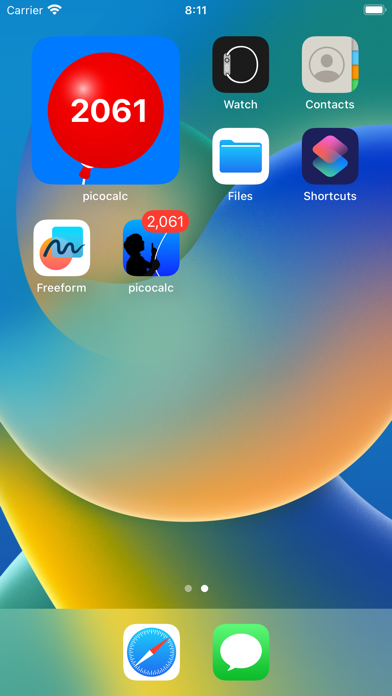
picocalc is a tiny number memo which can be set, added and subtracted. The number is show as an application badge in the home screen. Zero and a negative number won't be shown in the badge.

Picocalc App Comments & Reviews

Picocalc Positive Reviews

Simple, No Other Counter App with Badge Out ThereBeen using this app for 10 years. I may change phones but I always keep this app on my first or second screen. It’s simple: just set a number and then use the calculator to add or subtract from that starting number, and the result posts as a little red badge in the home screen app icon. I tend to use this as a quick budget calculator. I set it to my monthly budget for food and expenses, and it gives me a quick-glance preview of the number by just looking at the badge. I can quickly see how much of my budget I have left to spend on without even opening the app. One thing I wish this was capable of is sharing with another user, real-time. If my partner installed picocalc and it could update every time I added or subtracted, then we could both keep an eye on the same number separately. Likewise, it would be useful if the other person could subtract a number when they spend on lunch, and my picocalc showed an updated number. I’ve tried finding any other app that does something similar, but this is the only app that seems to exist of its type. Kudos to the developer! I hope you keep updating and maybe even scale it up just a little bit more :).Version: 2.1.0

Ok macuda?....First of all your I'm guessing using an iPhone or iTouch, therefore your using the same device as these kids... So obviously if there iPod is "junk" so is yours... And if you don't know that apps do sometimes crash the device your a complete idiot. And after saying and apple product is "junk" do you really think they are going to listen to a request from you? It's idiots like you who shouldn't be able to write reviews. Also the app makes complete sense and does what it shoul, it's just a simple way to remember a numder. Good job.Version: 0

Nice, but needs workThis is a clever idea, but the name is confusing. It should called number tracker or something like that. Basically, it is used as a tracker. For example, say you only wanted to consume 1600 calories per day. You might start with 1600, then every time you ate something, you could just subtract the number of calories. This way the program tracks how many calories you have remaining. The program icon on your home screen lists the current number (calories remaining in this case). You could do the same thing with your monthly entertainment budget or any other number you wanted to track. There are some problems. The main issue is that every change boots you out of the program. If you have just one change, that's great. Otherwise, you need to reopen the program for every change. This alone is enough for me not to use it. Another problem is that it cannot display 0's or negative numbers. The developers say this is an Apple limitation, but I wonder if there's a way around it (for example, changing the numbers to numerals (characters), then displaying them, or otherwise displaying negative numbers with a red background and positive numbers with a green background)..Version: 0

Not much, but great app.I know that this app doesn't really do much, but I have found it very useful as a quick budgiting tool. It's easy to put in how much spending money you have to spend and then just subtract it when you do. So you will always know how much money you have to spend!.Version: 0

There IS more to it!I was all ready to write a horrible review, but it actually isn't just an uber-basic calculator with text instead of symbols. The app's icon will display the result of your calculations (notice the figure in the icon up there is pointing at nothing) right on your home screen. As long as you aren't keeping track of anything too complicated, this might actually come in handy in various situations- especially if you don't have a pen and paper handy (and why should you? You have an iPhone!) More convenient than whipping out Notepad, I imagine. Meant to do one thing, and it does it well. Can't hate on it too much..Version: 0

Seems to have gone buggy with iOS 8.Such a shame. I have use this app daily for over five years, and have found no substitute. Sure, there are all sorts of checkbook and let your balancing apps out there, but none that allow me to get in, adjust my balance, and get out all in the seconds as I leave the cash register. Well I have virtually no features, it won the speed war. But now, with ios 8 it no longer seems to do it's math correctly..Version: 0

Great for keeping track of numbered projectsI work in video production and this app is great for keeping track of duplication. For instance, if I have 75 DVD's to run off and my duplicator can only run 8 at a time, it can be a pain to keep track of how many I have left to run (especially if I encounter a bad disk) but this app makes it simple. The only thing I wish it had is the ability to track multiple projects..Version: 0

Great for tracking bank balanceThis app is great for keeping track of your current balance & you can subtract your purchases with just a few quick taps. The current balance even shows up on the Home screen! No more overdraft fees!.Version: 0

HelpfulI find the way it keeps the number set helpful. And only having 3 function buttons is nice, too, since all I'm using it for is to add and subtract. I was looking for an app that I can keep track of income & expenses, one at a time, by just giving each item a name, value, and whether its a purchase or sale, that will keep a running tab, but this is the closest thing I've found so far.Version: 0

DecentI actually really like this program. For keeping track of your current expenses on a business trip or just your personal finances, this app makes it very easy. Couple taps to record an expense and you're done..Version: 0

Works perfectWorks great to track my monthly gas allowance from my job. I just enter the allottment on the 1st and subtract the amount each time I fill up. Would be better if you could track more than one category and decide which one is on your desktop though..Version: 0

A ClassicSo happy to see that this app is here! Picocalc is of the first apps I ever downloaded—way back on the 1st gen iPod Touch running system software 2. Right now things feel unexplored and exciting like 2008 again!.Version: 1.0

Cool app.I've been using this to keep track of my bank account. My only complait would be that it can't display tenths or hundreths for tracking change..Version: 0

Rules, owns, etcI was waiting for an update to make it compatible and now that it's here, blows my mind. It's crazy how lost you are when you lose such a simple app, but thank Buddha we got you back..Version: 2.0.0

InIt's not a calculator... It keeps track of numbers quite well.Version: 0

Simple, straighforwardDon't expect it to do as much as the calculator. It's great for keeping score (better than scribbling on paper) for games, tallying expenses, counting random assorted things, and the running total is displayed on the icon itself..Version: 0

Also..This app makes a really great countdown..Version: 0

So simple yet so usefulUsing it as a calorie counter. It's simple and so useful..Version: 0

Love it!Use it every day. Very fast. Nuff said..Version: 0

Free International Money Transfer 💸Enjoy high maximum transfers into more than 20 currencies while saving up to 90% over local banks! The cheap, fast way to send money abroad. Free transfer up to 500 USD!AdvertorialVersion: 3.1.0


What do you think Picocalc ios app? Can you share your thoughts and app experiences with other peoples?

Please wait! Facebook comments loading...

Picocalc iPhone Images
  • Picocalc iPhone image 1
  • Picocalc iPhone image 2
Picocalc iPad Images
  • Picocalc iPad image 1
  • Picocalc iPad image 2