Alexander Clauss
Kalkulilo (Calculator) Customer Service

- Kalkulilo (Calculator) Customer Service
- Kalkulilo (Calculator) App Comments & Reviews (2026)
- Kalkulilo (Calculator) iPhone Images
- Kalkulilo (Calculator) iPad Images
Kalkulilo is a comfortable calculator program and offers several different modes.
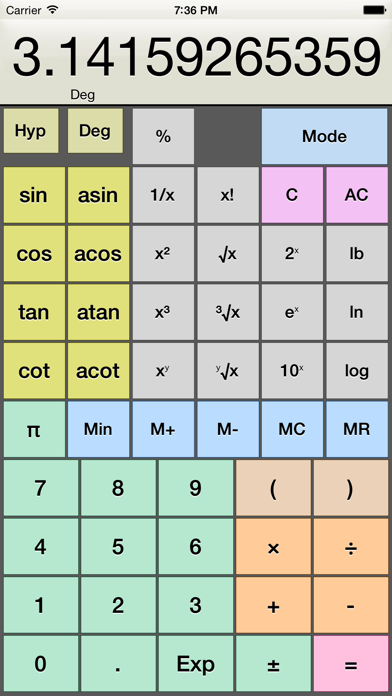
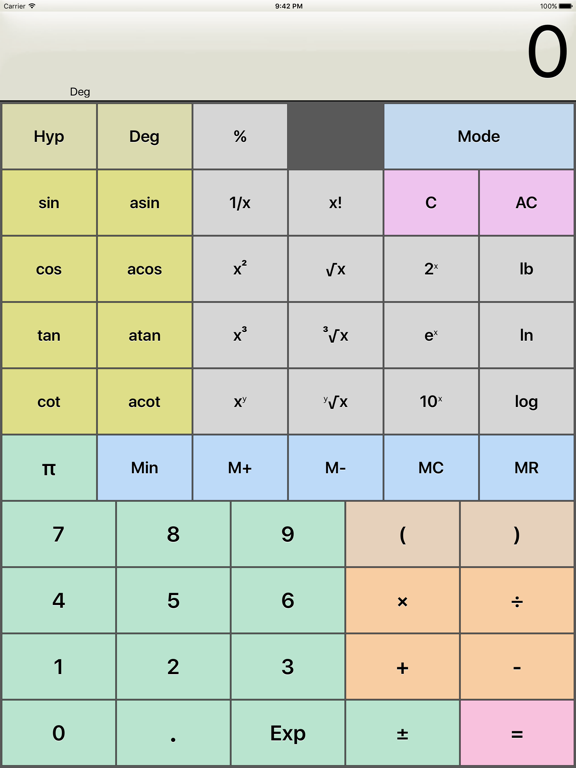
- The scientific mode offers all the usual functions and operations like the basic arithmetical operations, power, logarithm, roots, trigonometry etc.
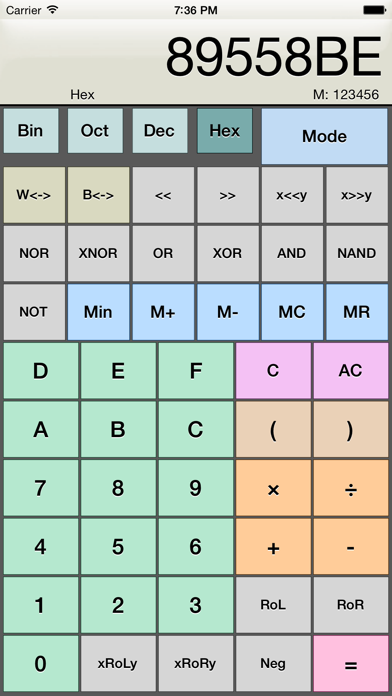
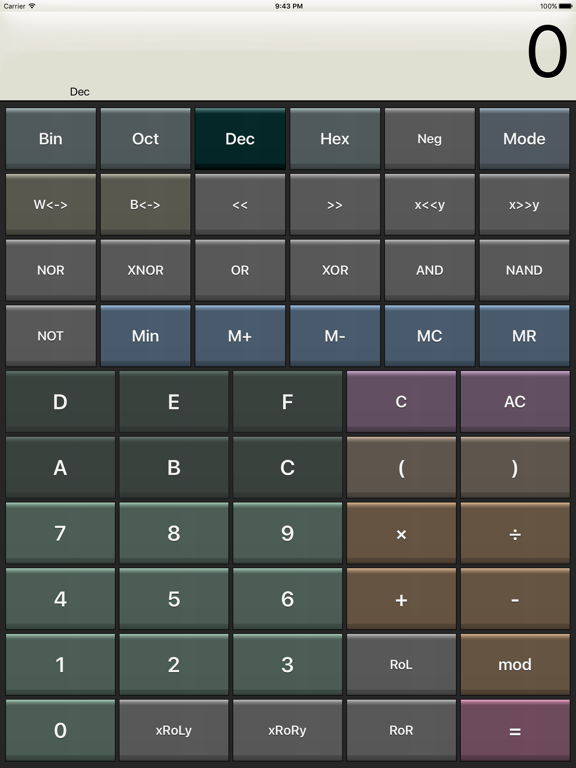
- The bit/integer mode offers logical operations (AND, OR, XOR, >>, etc.) on bit level. All values can be displayed as binary, octal, decimal or hexadecimal numbers. Calculations can be done in 8, 16 32 or 64 bits.
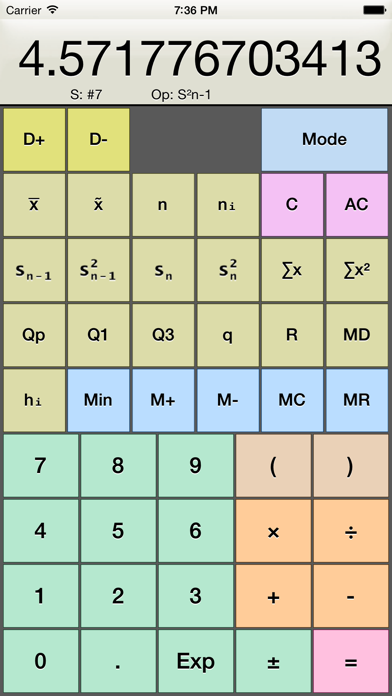
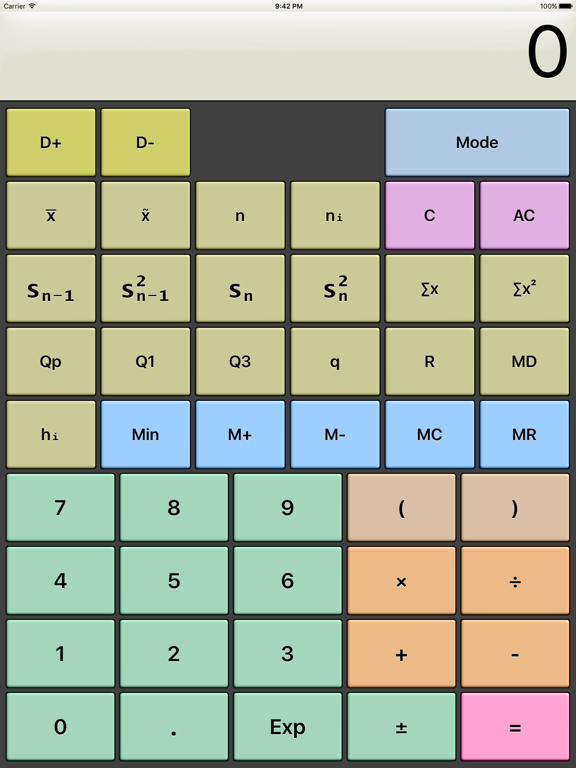
- In the statistics mode you can create a sample by adding several values and then calculate mean, median, quantil values, variance, standard deviation, range etc.
- Trigonometry mode provides lots of trigonometric functions
- The base/radix mode allows you to do calculations with numbers of base 2 to base 36
- The Time mode lets you directly work with time values (hours, minutes seconds)
- A simple calculator is also included, with just the basic operators and large buttons.
Colorized keys will help to distinguish between the different categories of the functions and operations. The user interface (design, colors) can be customized.
The App also includes a calculator widget for the notification center and a calculator App for the Apple Watch.
Note: This app uses ads to generate revenue to cover the costs for developement and support, and to be able to provide the App for free. But you can get rid of the ads permanently for a small fee via In-App purchase.
Kalkulilo (Calculator) App Comments & Reviews
Kalkulilo (Calculator) Positive Reviews
My favorite calculatorI love this calculator. The only problem I have with it is when you are working in scientific mode then switch to bit mode the number doesn’t transfer over correctly. Even when it’s an integer. Is it in floating point representation or something?.Version: 5.0
Excellent, stopped working on Apple Watch OS26I love this calculator for the ability to have some scientific calculation available on the Apple Watch. (Revised) It required a re-install after upgrade to watchOS 26 to have it work on my watch. I particularly like the variety of modes and the ability to do math in any number system, not just binary, decimal and hexadecimal. The size of the keys is also reasonably sized despite the functionality. I am basically using it as my primary calculator all the time.Version: 5.1.4
Extremely functionalYears after first finding it, this continues to be my default calculator on iOS. It’s easy to use, doesn’t push ads, and has any and every feature short of actual graphing that you might need to do some quick math..Version: 5.0
Excellent calculator!This is my go-to calculator for iPhone. It has everything you need for scientific, bit/integer, and statistics. I feel it was written for programmers. There are many cool options such as adjustable bit depth, etc. The negative reviews complaining about ads should pony up the money and buy the app!.Version: 4.6
Moving ForwardI loved this app, I truly did. Until... I updated it. This app has been extremely useful and totally user-friendly, but the new interface... I don't know why it had to be changed. This app has helped me through physics, biomechanics, chemistry and other functions that entailed a calculator. I want to thank this app for everything, for being the best and absolutely free. But now I think I am sticking with the Calculator+ app. For those who like editing and dislike ads, this is the app for you. Bye and thank you again. I thought updating should move the app forward, make it better and not regress..Version: 3.0
CalculatorYou should add a calculus calculator, linear algebra calculator, and probability. I love this calculator app.Version: 5.0
Just what I needed!I'm visually handicapped, and I've looked all over for a decent, well-designed calculator with the functions I need. The contrast on the button layout is helpful. In earlier versions, I was annoyed by some rather poor VoiceOver support. It seems to have improved greatly, and as a bonus the developer has now added support for the Apple Watch! What's pleasing is that the Apple Watch support is actually well thought out. It works far better than other calculators I've tried on it. It was immediately usable and I am highly appreciative of that. I've finally reached the point where I am deleting the other calculators I use. This app now does it all for me, and does it well..Version: 3.5
A Pleasure to UseStart with a full function calculator that has every mode you might want, including scientific, statistics, trig, binary, even a mode for time and circular angles such as latitude and longitude. Now add a customizable user interface that is not merely useful, but beautiful, and this wonderful app is what you get. I especially love being able to easily find different groups of functions by setting them to different colors, like pink for memory, green for trig, and greenish blue for roots and logarithms. The buttons and number display are very easy to read even on a small iphone. This is one of my 'must have' apps..Version: 3.5.1
Excellent general purpose calculatorBig thumbs up to Touchcalc! Apple's built-in calculator is nice, but it's missing power-of-10 and the "exp" function is implemented weird and I hate the sideways orientation--Touchcalc gets all these things right and is the only non-RPN calculator I've found that truly replaces my trusty old radio shack scientific calculator. I do wish the arithmetic symbols (+, x, -, ÷) were larger--it's hard to distinguish easily between the + and ÷ and ± symbols. If these were fixed, I'd give it five stars..Version: 0
Excellent apart from the keyboard clickThis is the kind of calculator that should have been included with the iPhone as standard (as an advanced mode within the Calculator application). The layout is good and while there's a lot of color, it's used to good effect to help group keys by function. My only real complaint is the very loud and sharp keyboard click sound. If there's a way of turning it off/down, I've not located it..Version: 0
Great app, some adviceOne thing I would like to do with the binary calculation feature is enter in some number in binary, then shift it by some integer like 3. Unfortunately if you are in binary mode then press the shift button, then want to switch to decimal mode to enter in the integer, it loses the shift operation and thinks that you are starting a new operation. There might be more little stuff like this. Otherwise, has fantastic features..Version: 0
Very nice calculatorI use the scientific mode and the hexidecimal mode and they are very nice. I found buttons to be a tiny bit too small for my big fingers, but not bad. There is a small issue with the engineering exponents when there is a negative exponent. It displays positive like this: 2.345E+6 but negative like this 2345E-9 This latter one should be 2.345E-6. Not a big deal but causes you to have to think about which way to change the exponent..Version: 0
Best Apple Watch calculator!!!This is the best calculator that I have found for the Apple Watch. First, the screen is well organized and uncluttered. Secondly, the app is native so button responses are fast. Lastly (and perhaps best) the calculator takes advantage of haptic feedback to confirm button pushes! Finally, a suitable replacement for my Casio CFX-200! It would be nice to have a 'back' button to erase mistaken entries, and perhaps a list of constants, but as it is it is a terrific piece of programming! Bravo!.Version: 4.0
Yes, you can delete the adsI love this calculator even with the ads, but for all of you that complained you weren't told that you could pay to delete the ads, you should learn to read. The description states you can pay to delete the ads and you can, because I did. I like all the different calculator options and the sections divided using colors. Great app for $0.99 without ads..Version: 3.0
Nice but incomplete; consider UI design...OK, this is very nice, it offers essentially 2 functional modes that aren't in the built-in calc: the Bit/Integer mode & the Statistics mode. This is significant - but odds are most people won't actually need these functions. The main drawback to TouchCalc is that it is pretty ugly. Sorry... the colors don't actually help usability. And it's getting an extra star for being free.... It is cool if you need these extra functions - otherwise, not sure why the average user would need this..Version: 0
ExcellentStill my favorite calculator after trying many others. This calculator actually works for scientific calculations, including proper handling of scientific notation. So many others seem oblivious to how scientists actually use calculators in this respect. They are more programming exercises than useful calculators. However, I do subtract one star for the glaring omission of the option to temporarily force results to display in scientific notation without changing modes..Version: 2.0
Better than all the other calculators out thereI've been using this calculator for programming at work for a long time now. It's definitely better than all the other ones out there. One thing I would suggest is adding a 'mod' function to one of the modes, as that is a very helpful function for programmers (unless it's there somewhere and I just can't find it?)..Version: 3.0
BlaghNo use at first it worked great, but now it can't even get it to do a simple addition problem. It starts out working beautifully, but then becomes less and less accurate, until it doesn't do anything. You can type the numbers and see them on the screen, but then it doesn't solve the equation. And this all happened within ten or twenty minutes after i downloaded it..Version: 0
Watch app not quite readyNoticed the app showed up on my watch after the last update. As a basic calculator on the app it seems to be good on the 42mm watch.. one problem that makes it unusable is that the number 9 button on the app is mapped to the number 8!! So when you push 9 the number 8 comes up (not a pudgy fingers problem)..Version: 3.5.1
Excellent free scientific calculatorIntuitive and easy to use. Has lots of functions, statistics, etc. Great for a free calculator--other free calculators are lite versions that make you pay extra to get these features. Have tried several other free calculators and deleted them after a few days. This one is a keeper!.Version: 0
Wonderful treatI love the scientific function, the ability to program multiple calculations. Very helpful to go shopping when you have to calculate all the discounts and the tax etc before you make your decision to buy. Thank you so much for the great work. Love the functionality and the look..Version: 0
Awesome!I know that the itouch's calc does all the same stuff, but since it was inconvinient for me to flip to landscape mode and keep it there while doing homework, I used this app instead to help me pass chemistry. I like the style and interface better. I would replace the original calc with this If I could..Version: 0
Powerful calculator, awful colorsThis is a very nice calculator and great that it's free. My only quibble is that the color scheme for the buttons is hard on the eyes because the colors do not match. Can you please change the colors to more neutral pastel tones? I'd give it 5 stars if you did that..Version: 0
Love it - needs iPhone 5 size updateI use this app all the time in my engineering job. Features are great! The only thing that's ever slightly bothered me is that all the keys are a little small. I understand why - it's needed to fit them all in. However, with the new larger screens on iPhone 5, stretching the keys vertically would be a welcome update..Version: 2.0
Can't believe it only costs...nothing?This has more features than any one of the paid apps I looked into buying. Works great for binary calculations and conversions too. Extremely east to use. Even greys out buttons not used, ex. Only 1 and 0 are usable in binary mode. Thanks a lot!.Version: 0
Great job! Could the memory be persistent?Great app. One annoyance, the memory contents are reset if you quit and come back to the application. Though the current value in the main display is preserved. It'd be nice to preserve the memory contents as well. A nitpick, the Min key is not very useful. MC followed by M+ achieve the same result. Many thanks..Version: 0
What a nicely done app!I've uninstalled the other scientific calculator apps I've tried and settled on this one. It cleverly merges several different calculators into one so you don't have to deal with second and third function keys. Setup and preferences is intuitive. Makes the iPhone a good workable calculator for a working engineer..Version: 3.0
AmazingI'm kinda mad that I really didn't look for a calc but really glad I found this and that to it is free the only problem was that the keys were a bit too small but other than that it is great for math analysis and physics which is what I use it for tnx sooooo much.Version: 0
Great for quick scientific calctns...!I use it when giving tech seminars or trainings and it's great, plus I don't feel like I need to be pulling my reading glasses every time I use it. Typing can be a bit tricky because all the "keys" are so tightly laid out, but it isn't so bad anyway... Great free app, Keep upgrading it!.Version: 0
Exactly what a calcuator should beHex! binary! plus loads of other stuff! it has everything a REAL calculator needs (not that lame thing that came with the iPod) just perfect. looks great, works great, easy to use and configure. and it's FREE. if you are looking for a calulator then this is the one you need..Version: 0
A+ certifiedI love this the org. calculater did not have the hex and binary option on it I'm in classes adding certificates to a comp sci degree this is one handy app if u need to do hex and binary conversions. I love it 5 stars. A back button would be a lil helpful when ur punching in well over 32 ones and zeros..Version: 0
Thanks for the binary/octal/hex calculator![Version 1.0 comment: Please add a mute button in Preferences (or better, if possible - check the phone's Keyclick sound setting to see if it's set to Off).] Version 1.2 added an option to turn off the keyclick, so I upped the review from 4 starts to 5..Version: 0
Elegant!Great layout. As a computer scientist I appreciated having all of the log functions and inverses laid out above and below each other. Thanks for the price, I can't imagine what gimmicks the pay to play alternatives offer..Version: 0
Nice, Easy Calculator AppI appreciate and need the three different calculator modes. This was exactly what I was looking for and am glad I found it after wading through many that didn't suit my needs..Version: 0
B+Wow! This cac. Has good featurs. I like how you can sqare numbers by one or two or three. There's only one problem that I don't like it when you press the plus botten more than once but it dosent work! Other wise it's good. Just change that issue to get an ''A''.Version: 0
AwesomeI've been waiting for a free calculator to do binary (hex really) math with. This works great. Super useful when I need to do some quick bitwise math while programming. The layout is solid and I like the mode selection button..Version: 0
Great Calc App!This is probably the best calculator app I've yet seen for the iPhone. I particularly like the bit/integer functions. It's too bad that there are spammers and other somewhat uninformed people submitting bad reviews to presumably keep its rating low..Version: 0
Great for HomeworkI downloaded this app for my homework on finding the circumference of circles. The calculator on my phone doesn't have buttons for pi or 2x so it was pretty difficult to do it. Once I downloaded this, I finished my homework easily..Version: 4.1
GreatI'm an 8th grader in precalc and this has made my life so much easier. I have only 2 complaints: the buttons are crammed and you also can't tell if the operation you're looking for is in 1st or 2nd. Other than that, I love it..Version: 0
Good to have itI think it's a good app. Because it does more than the iPhone itself has. I urge people to get it free than buy a scientific one in other store if they can use it in class..Version: 0
UmSure this is a very nice app...but I hope everyone knows they can make their iPod's calculator look like this, just by turning it on its side. Well, there's no point in giving this a BAD review, so five stars it is..Version: 0
Perfect!This calc program does more than I expected. The comp sci mode is especially useful, since it allows bin-hex-def conversions, with an ASCII and unicode translation, too! The vanilla sci and stat functions work well, too..Version: 0
TouchcalcNot having a binary mode on a calculator is a deal breaker for me. This is the only free calculator I've found that has it, in addition to all of the standard scientific and statistical functions..Version: 0
Ads or not to addTrue the developer put ads in the free app without warning. Bad plan. But I do prefer the new look, and the supported features better than the old app, and I am not bother by the ads. I use the app on an ipad and there is plenty of screen space. I will keep it for now..Version: 3.0
Simple and usefulMaybe an update for better compatibility with iOS 4?.Version: 2.0
Best calculator on the App StoreI saw that this calculator had only two reviews so I just felt compelled to write a review myself. I’ve had Kalkulilo for 5 years now and it helped me immensely through a computer science and math degree. If you care about math, you will appreciate the vast array of functions and different types of calculators, like one with selectable number base systems from 2-36. It can do everything but graph. And even if you don’t care about math, I find the time calculator that can do arithmetic on hours minutes and seconds often useful on a daily basis. I recommend this calculator to everyone, but especially people who do lots of math and need a diverse calculator..Version: 5.0
Now contains ads and poor colour scheme!Was a great app, now just ok - colours are bad for those of us with colour-blindness. Maybe an option to set the colour scheme should be considered..Version: 3.0
Most Complete YetThis is the most complete and most useful professional calculator yet. I keep trying others and coming back to it! One thing that I would love to see is a mode (signed decimal) where negative numbers are displayed with a minus sign..Version: 2.0
Pretty good, buttons are too smallThe overall is good, but the buttons are small, and when switching from degree, radient, and gradient, it is very hard to see which one I selected. Also, the colour is dull..Version: 2.0
Near PerfectThis is a near perfect calculator, espescially since it is free. Now if they could just implement the application to work in landscape mode it would have me rate it as *****..Version: 0
Mostly all you needI'm tutoring someone in Grade 11 math.. One problem I'm finding is that the calculators are WAY too complicated these days. And I'm thinking most students cannot use anything more than the basic math stuff, because they've lost the manual and there is absolutely no way to figure it out. This calculator would do so much of what a high school math student would do.. Now you can't do complex math and linear algebra.. you might need another calculator for that.. but this does virtually all the basics. I especially like the statistics section. Very easy.. Create a list with D+/D- and then use a function on it. So while some might think this is not powerful enough.. no 2-var stats, complex math, or linear algebra, for instance.. At least students will use the functions on it. I really like this app. I've bought 3 other apps.. and for some stuff, this is better..Version: 2.0
Needs backspaceThis app needs a backspace button to correct frequent typing errors on the iPhone..Version: 0
Very good calculatorIt's a scientific calculator. And it works. The inclusion of bit/integer and statistics modes makes it even more powerful than you'd expect at first glance. The interface is easy to use and the help glossary is nice. This is an excellent replacement for the default calculator for anyone looking for more functionality..Version: 0
Simply the best free scientific calc in app storeI use it all the time for hexadecimal calculations and conversions from hex to decimal (took a while to notice the configuration setting to change it from the default 16 to my needed 32 bits though). The C key clears the corrently entered number only so I can fix a typo without re-doing the whole calculation, and the option to use engineering notation makes working with large numbers much easier. My thanks to the author for putting so much functionality into a free app!.Version: 0
Great calculatorAbility to delete last number would be nice. Thanks for the great calculator..Version: 0
Just greatI think this is one of the best apps i have on my ipod touch, i even dont have a calc like that by myself and im gonna use this for a lot of things, best of all is, it is free!! You should really get that.....Version: 0
Very nice.I have other calculators are are about as good, but that doesn't detract fron the fact that this is a really nice application. We executed and has a rich feature set. The color scheme is not for me, but that's a very trivial detail..Version: 0
UsefullGood design. No missing buttons and no useless ones either Thx for this program.Version: 0
Nice app!This is certainly much more featureful than the Apple calculator. My only gripe is that hitting the 'mode' button to see the instructions wipes out the Stat data; it would be better if this wasn't wiped unless you change modes..Version: 0
It great!I use this is math.. it great!.Version: 0
Best Free (Maybe Even better than ones for sale)A free calculator which has all features of a scientific calc. many of the other apps which have lots features for a calc cost money and as some wit no money i cant afford 2 bucks :).Version: 0
Great app!This is an excellent app. Thanks for making it free..Version: 0
Excellent!Perfect replacement for the Apple app. Key sizes are just right..Version: 0
Free International Money Transfer 💸Enjoy high maximum transfers into more than 20 currencies while saving up to 90% over local banks! The cheap, fast way to send money abroad. Free transfer up to 500 USD!Version: 5.1.4