Andrew Smith
FFT Customer Service

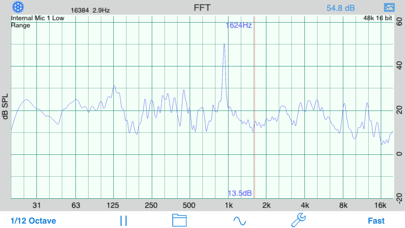
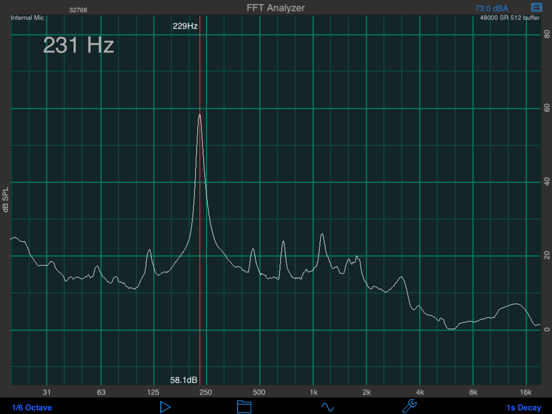
FFT is a high-resolution audio analysis tool for the iPhone and iPod touch. It uses the Fast Fourier Transform to analyze incoming audio, and displays a very detailed graph of amplitude vs. frequency.
Use this app with the built-in iOS device microphone, or upgrade to our iAudioInterface2 or iTestMic for a complete professional solution.
*** Designed for Acoustical Analysis
This application has been designed for acoustics work, and so the bins have been normalized to octaves, to get a display that will show a flat line for pink noise. You can control both the level of graph smoothing and decay time, to get as much or as little detail as you require.
You can also control the dB resolution of the graph, as well as the frequency range that is displayed.
*** Includes Signal Generator
Included in this app is the engine from our Generator app, which is a low-distortion, artifact-free signal generator. The signal generator appears as a heads-up display when you tap the icon, so you can see the graph while you adjust the generator. Generate sine waves, square waves (within limits), white noise, and pink noise, optionally in psuedo-balanced mode. All waveforms are generated in real time using high-precision algorithms.
*** Cursor Readout
Move your finger across the screen to get a cursor to read out exact dB levels and frequencies.
*** Touch-GUI Controls
Use a vertical pinch-open gesture to expand the dB scale.
Use a horizontal pinch-open gesture to expand the frequency scale.
*** Graph Smoothing
Smooth the graph by octave, 1/3, 1/6, 1/12, or 1/24 octave. Adjust the decay time from 0.5 seconds, for a very fast fluid display, to 8 seconds, or use Peak Hold or Average mode. Average mode is a true equal-weighted average, which can run continuously.
*** Peak Tracking
Turn on Peak Tracking to have FFT automatically find a label the frequency of the highest peak on your graph.
*** Tune the Parameters
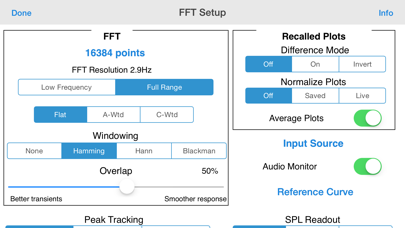
Set the FFT size from 4096 to 32k points (depending on iOS device) , or select Equal Points Per Octave mode, for high-resolution analysis, even at low frequencies.
*** Calibration
FFT comes calibrated for the typical iPad, iPod touch, or iPhone microphone, and you can adjust the calibration. Microphone compensation files tailored to each iOS device are automatically applied.
*** Save and Recall
When your analysis is complete, you can save the graph image to your photo roll to include in a report, or export the data in an XLS file.
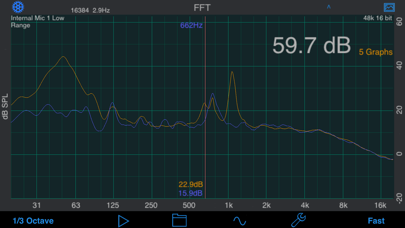
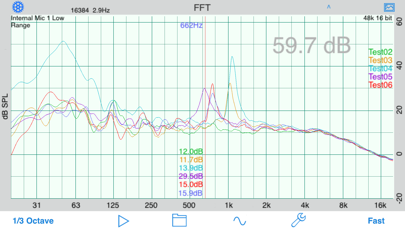
*** Display Multiple Graphs
Show a recalled graph on the screen in a different color.
*** Difference Mode
Use a stored graph as a baseline that is subtracted from the current graph in real time.
*** RTA or FFT?
If you are wondering if you should download this app or our FFT app, check out our website, we have a page devoted to this topic.
*** Other Audio Apps
Also, check out our other great audio and acoustics apps: AudioTools, our premier suite of audio and acoustics analysis apps, SPL, SPL Graph, for recording SPL over time, RTA, RT60, Generator, and Speaker Pop.
FFT App Comments & Reviews
FFT Positive Reviews
Nice app. Would like to see...Works as advertised. Nice online tutorial is available. Would really like to see two features added to make it less of a toy and more of a useful tool. 1) The ability to store the actual data and upload it to a PC. That is, not just a screen shot. 2) An A-weighted scale option..Version: 0
I put that s%#t on everythingAka: I use this app for all sorts of troubleshooting. Trying to find a slow leak in a tire or a vacuum leak on an engine. By showing the peaks in Hz you can visually "see" the sound in a way impossible to hear with your ears. Priceless tool for debugging anything that makes noise..Version: 6.9
Amazing app!I’ve been using this app for a looooong time. This is an amazing app that is definitely starting to show its age but remains extremely useful..Version: 7.0
Useful ToyFirst of all, if you use sound systems, buy this app. Even if you own top shelf gear like I do (2 TEF analyzers, SMARRT, B&K mics with calibrators etc) you will use this A LOT because it is in your pocket. I bought most of the Studio Six apps, and except for RT60 they are pretty handy. They do NOT take the place of real gear for a bunch or reasons like non pro connectors, poor dynamic range, lack of frequency extension, characteristics of the built-in iPhone mic etc., and the only archiving is saving a pic of the screen, and when you do that it doesn't show what settings you have selected for that measurement. I am hoping that the long promised external mic helps fix a couple of these items. Enough of the negatives...I use this app several times every day. If I had to give it back I would be bummed. Buy it..Version: 0
An excellent toolThis is an excellent, well designed tool. I have already used it twice to tune systems, and am quite impressed. If I could suggest a minor improvement, it would be great if the image could be flippable; the mic may be ostensibly omni, but I definitely noticed more accurate results when orienting it towards the speaker, which meant I would have to turn myself around on odd directions in order to get good results. While this isn't a replacement for full SIMM, Smaart or Spectra-Foo systems, it is certainly capable of analyzing the way speakers behave in a room, and helping a good pair of ears to tune it up..Version: 0
Great app for the pros who need quick analysisI am a professional freelance audio engineer and work in different locations every day with different consoles and different clients ranging from presidents to concerts. I have a pretty keen ear for pinpointing a specific frequency but when I am on the run this app is a great help. Usually I use a program called Smaart Live, a $700 RTA program created by EAW, but this app is a definite must for those who would need it, otherwise a fun toy -but a little expensive. The analysis is weighted for the iPhone mic, and it does pick up frequencies down to 30Hz. The decebel meter is fairly accurate..Version: 0
Great toolI was at a show mixing a bunch of live vocals and instruments when I recieved an email about the release of this app, so I downloded it and put it to work rightaway, from FOH measuring against my dbx rta using the HiQnet system architect on a rig of jbl vertec 88's and vertec 80 subs, this little app came incredibly close but for the limitation that the iPhones built in mic can't handle spl's higher then about 100db. As for the pink noise generator, works like a charm. I'm really looking forward to the external mic. Hoping it'll be able to handle higher spl's, I'll be one of the first ones to buy it. Thanks for a great app :-).Version: 0
Stop wondering and just BUY IT! Definitely worth it.Apps like this make an iphone worth owning. I am a pro sound engineer, I work a lot of different rooms. Believe the hype, this app is VERY accurate. The only place it needs improvement is in the sub frequencies (below about 150), but this is a limitation of the iphone internal mic-can't wait for the stereo mic these guys are making to release. BUY IT! You won't regret it..Version: 0
Fantastic FFT appLoaded quickly and ran as advertised. Very responsive, with plenty of options and settings. Signal generator nice feature. Worth more than $20. I debated about RTA vs FFT. Glad I went with FFT. With all the knobs, I get the info I need. Great resolution and range. May still buy RTA. Great tool set with all your apps studio six digital. Keep up the good work!.Version: 0
Very usefulI can't call frequencies. This app does it with great precision. Don' forget to turn auto tracking on..Version: 0
Great app!Great app which is easy to use and I use quite frequently but I would like to be able to output and email fft data in a text column format or excel... Can you please include this enhancement? Thanks!.Version: 2.6
FFTWorks exactly as described and a breeze to use. Anxious to see just how it performs with a "real" calibrated mic - the new iMM. A little costly by the Apps store standards but I feel for such great portable performance it is not a bad price..Version: 0
Great app!!Great app!!! Does the job of much higher end equipment for only $19!!! Check out their other audio apps as well. All are fantastic!!.Version: 0
BrilliantFar, far better than an RTA, and with a signal generator to boot. Super easy to use. I absolutely love this app!.Version: 0
AERCO mic preampsEXCELLENT! Very nice to have 16 K points, good user interface. Be nice to clear display from front panel- say double-tap?.Version: 0
Great appHelp me set up my hi Fi stereo with just my iPad. Lots of options and easy to use!.Version: 4.7
AwesomeLoved this app for a long time! Thanks for the 4" support!.Version: 3.4
Working awesomeGreat Job excellent app Buy it .Version: 0
Free International Money Transfer 💸Enjoy high maximum transfers into more than 20 currencies while saving up to 90% over local banks! The cheap, fast way to send money abroad. Free transfer up to 500 USD!Version: 7.8
What do you think FFT ios app? Can you share your thoughts and app experiences with other peoples?
Please wait! Facebook comments loading...