The Charles Schwab Corporation
Thinkorswim: Trade. Invest. Customer Service

- Thinkorswim: Trade. Invest. Customer Service
- Thinkorswim: Trade. Invest. App Comments & Reviews (2026)
- Thinkorswim: Trade. Invest. iPhone Images
- Thinkorswim: Trade. Invest. iPad Images
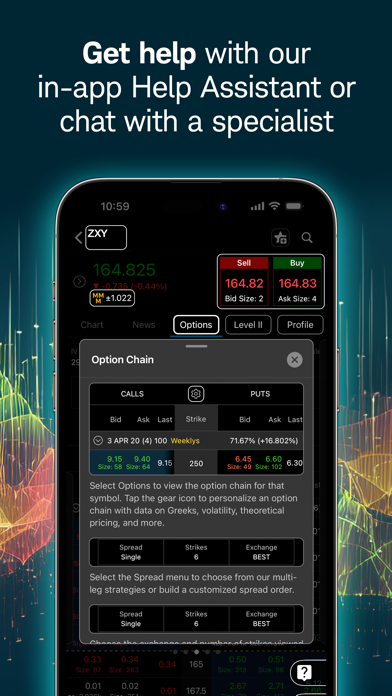
Put the power of thinkorswim® in your pocket with our trading app. Manage positions; find quotes, charts, and studies; get support; and place trades easily and securely — right from your phone or tablet. Access products like stocks, options, futures, and forex, or try out new strategies with our paper trading feature, paperMoney®.
• Create and modify advanced orders and add order conditions quickly and easily.
• Live chat with a trading specialist during support hours—even share your screen without ever leaving the app.
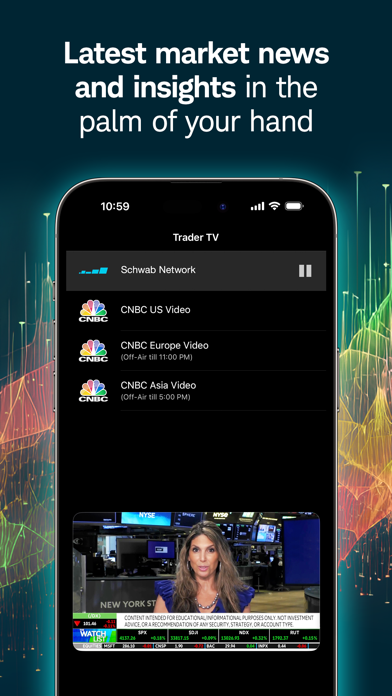
• Live stream programming from our media affiliate, Schwab NetworkTM, and CNBC (U.S., Asia, and Europe), and get company profiles from Trefis to uncover key insights.
• Practice trading strategies with real market data, using paperMoney—without risking a dime.
• Scan multi-touch charts with hundreds of studies. Chart drawings will sync within the thinkorswim suite of platforms. Glance at the past, take a look at the present, and consider potential outcomes when you overlay company and economic events.
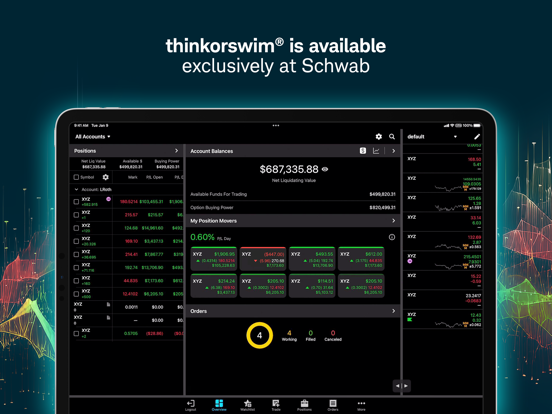
• Manage and analyze your positions and view your account balances on all your accounts.
• Track and modify watchlists, orders, and alerts, including saved orders.
• Check out our expanding library of educational videos.
Symbols and price and volume data shown here are for illustrative purposes only, and do not constitute a recommendation by Schwab to buy or sell a particular security.
thinkorswim mobile requires a wireless signal or mobile connection. System availability and response times are subject to market conditions and your mobile connection limitations. Functionality may vary by operating system and/or device.
Investing involves risk, including loss of principal, and for some products and strategies, loss of more than your initial investment.
The paperMoney® software application is provided for educational purposes only, and allows users to engage in simulated trading with hypothetical funds using live market data. Market activity, trade executions, transaction costs, and other elements presented in paperMoney are simulations only. Simulated performance does not ensure success in a live environment.
Schwab Network is brought to you by Charles Schwab Media Productions Company ("CSMPC"). CSMPC, Charles Schwab Futures and Forex LLC, and Charles Schwab & Co., Inc. are separate but affiliated subsidiaries of The Charles Schwab Corporation. CSMPC is not a financial advisor, registered investment advisor, broker-dealer, or futures commission merchant.
Trefis information provided by Insight Guru, a separate, unaffiliated firm. Stock prices are impacted by numerous factors, and estimates of prices in the future are not guaranteed.
Past performance is no guarantee of future results. Future returns and the achievement of stated goals are not guaranteed, and a loss of principle may occur.
Futures and futures options trading involves substantial risk and is not suitable for all investors. Please read the Risk Disclosure Statement for Futures and Options prior to trading futures products.
Futures and futures options trading services provided by Charles Schwab Futures and Forex LLC. Trading privileges subject to review and approval. Not all clients will qualify.
Charles Schwab & Co., Inc. ("Schwab"), Charles Schwab Futures and Forex LLC ("Schwab Futures and Forex"), and Charles Schwab Bank ("Schwab Bank”") are separate but affiliated companies and subsidiaries of The Charles Schwab Corporation. Securities brokerage products are offered by Charles Schwab & Co., Inc. (Member SIPC). Schwab Futures and Forex is a CFTC-registered Futures Commission Merchant and a NFA Forex Dealer Member and offers brokerage services for futures, commodities and forex interests. Deposit and lending products and services are offered by Schwab Bank, Member FDIC and an Equal Housing Lender.
©2025 Charles Schwab & Co., Inc. All rights reserved. (1225-M2X1) (0326-7FE5)
Thinkorswim: Trade. Invest. App Comments & Reviews
Thinkorswim: Trade. Invest. Positive Reviews
IssuesLove the platform and what it offers but am extremely frustrated with all the technical problems. There’s been countless instances where I’ve placed buy or sell orders that do not go thru. When you check it the color is lighter, it does not allow you to cancel it or make any changes, the order is not acknowledged resulting in enormous losses as you end up having to resubmit orders for a higher price or take a loss on the sales price. When the frozen order doesn’t allow you to cancel or change it, you have to submit a new order for a different price, suddenly the old order (which can sometimes take minutes at a time) suddenly activates and you end up with duplicate orders resulting at even further losses. Another costly problem is when you set trailing stops or stop limits and the stock breezes through it without selling. There’s been numerous other issues but those are the most predominant and costly issues. Of course It’s never Ameritrade the takes the loss, it is the user. If there weren’t so many technical problems I would really enjoy the program and frankly I’m shocked that there hasn’t been lawsuits from all the customers that have incurred monumental losses because of these problems..Version: 195.1
So much better than RobinhoodThere is so much more information and charts to analyze than Robinhood. You can change so many settings and dive into finding your own investment strategies. This app is very intimidating at first compared to Robinhood, but I strongly encourage you to dive in. Start simple by creating your watchlists. Then when want to purchase click on trade in upper right corner. It will already be set to 100 shares and instead of changing it with the +\- simply click directly on the number 100 to type the exact number of shares. Then either buy it at the market price which is if the lock icon is unlocked or lock the lock and click directly on the price and type the exact price you want to limit buy it at. Click send or confirm in upper right and your order is underway. If your order goes through then you can view your portfolio under positions tab at bottom next to watchlists. Next to that you can check on or cancel your orders under the orders tab. Hope this helps you get the confidence to give it a try. So far I love TD Ameritrade one week in..Version: 194.1.0
Not user friendly with key functionality faultsThis platform is not user friendly. If you are a regular investor whose regular job is not placing trades one after another then find something more user friendly option. Because to place a trade you will not remember the terms and their lingo. Counter to the ads run by TD Ameritrade with the geek broker trying to convince you can do everything on this platform. Well if you know the lingo and have years of experience with a brokerage firm, yes. Otherwise to place a trade you’ll be reading glossary rather than getting your desired price. Furthermore, the platform lacks functionality. It does not simply override your commands over a limit order. You have to first cancel a limit order then place your market order. By that time you do this the market price has moved. The support staff is pretty cocky. They expect you know this stuff and act as if you don’t know what you are saying. If you have worked in a brokerage and know what the terms are like OCA bracket then download this is for you. Otherwise do not waste your time. This is my honest advise..Version: 194
Long time Thinkorswim and TDA customer and I love itI've been with TDA for 12 years and using Thinkorswim for about 6 years. Back then, it was rough around the edges and people using it before me would double down on that statement. But the team behind this software is AMAZING. They've been constantly updating it for better experience and best of all, they get lot of the ideas and feedback from is loyal users. So they end up building what we all really need. For an advanced trader, who's not quite professional but still experienced, will find ToS platform capable of almost everything. It has so many features and now lot of those are available on tablets even down to your phone. I use my full desktop application and love it, but now I've switched to tablet app 60%, phone 20% and desktop the rest. These apps keep getting better with updates. I'd say improve on adding more features from full app, better over all performance of real-time order data. Great software overall!.Version: 190
Nice app but please remove the password thingEverything about the app is great except for two things- 1- it always asks for my password when placing a trade, and that really slows me down as an obstacle especially when trying to place limit orders during extended hours at times of volatility. By the time I type my password the price is different and then I have to keep doing the order again and retype my password each time. I know there is a way to use biometrics in place of a password, but I am not a fan of giving out my biometric data, so that feature is useless to me. I don’t see why we need to type our password for every trade. We should only have to do that once when we log in. Having to do it redundantly on each trade takes up valuable time which can (and often does) have a negative impact on those trades. 2- sometimes it shows the wrong prices for things I have bought, like the cost average I paid $7 per share may show up as a cost average of $15, profit shows up in the negative constantly even when I’m actually in the green. I don’t know if this is some kind of wash sale thing or a glitch but it’s kind of terrible.Version: 197.1
Maybe If you are a frequent traderThe concept is great and the execution is okay. Selection of settings and preferences to organize data and view it is poor and frequently confusing and not consistent from desktop to mobile versions. Display preferences are lacking especially in the desktop version, but in mobile versions too. Font size can not be controlled. Dark mode versus regular can not be adjusted in mobile versions. There are no accommodations for anyone with less than 20-20 vision who can’t utilize dark mode. I wanted to use it primarily because there are markets and data not available in TDAmeritrade’s regular app that I need to monitor so I was forced on to this app to access them. The settings and preferences issues basically made it unusable for me. They were not very helpful or logical in their responses. I received a nice response from the developers, but my primary issue with the font sizes remains. You cannot increase the font size which makes it very difficult to use. Every other financial or spreadsheet program I use enables you to zoom in or zoom out or increase the font size that is displayed. You cannot do that and think or swim and that makes it very difficult to use..Version: 192.1
Best App on my iPad but still needs improvementsI have dropped my rating from 5 star to 4 star. The TOS App is as intuitive, and as easy as one could make trading complex items. I do not have a desktop, and have not used the TOS Desktop for years. I do not miss it. The iPad layout is very well done, so that you can see many things at a glance. Keep up the good work. The TOS iPad app struggles to keep up with the changes that occur on the desktop version from what I understand, so numerous issues that I find, are not fully developed and tested before be distributed, so be wary of some of the data that you receive, especially for options calculations/expiration data and for advanced orders placement. I have put in numerous requests and bug issues, but I do not get any closure on if or when the anomaly gets corrected. It is too bad, but compared to any others out there, it seems the interface and it team at TOS IS BEST IN THE BUSINESS AND Think or Swim, intends to keep it that way..Version: 197.1
This app is why im with td ameritradeIve got 4 brokers, all with some thing i cant do without, but this app is a must for trading stock. I can get on at 1am and see a streaming chart of qqq which gives me an idea of what the markets doing. If some horrible news comes out at 11pm, i can get on here and buy psq 24hrs a day 5 days a wk. i can enter 17*qqq+250*sh in a quote window and get a real time chart of that combination of stocks and then buy and sell that combo like one thing. I have apps from ibkr, fidelity, schwab, and this that i use and this is in a whole other category by itself. If you were living out of a van and only had wifi at breakfast at mcdonalds, you could tell this app to buy a share of qqq every hour at market and go see the grand canyon. In my opinion, all this stuff is going full on mobile eventually and most of the other apps are kind of made to be used in a pinch. This is all you need ( with the exception of billpay).Version: 199.1
Decent App - Needs Keyboard/Trackpad Support on iPad/M1 MacThanks for developing this app. Thinkorswim is the power user's application, especially when compared with the regular TDAmeritrade app. As such, certain keyboard/trackpad functions are notably missing, especially given the proliferation of keyboards for iPads and the inclusion of the app for M1 Macs. If these features are added, I would rate the app 4.5-5 stars. 1. Keyboard integration for price input when placing trades. On my M1 Mac and iPad Pro, I have to click on the individual numbers as though I was using a finger. It would be a better experience if, when the iPad detects that a keyboard is connected, the user could use the numbers on the keyboard to input price into the order ticket. 2. Multi-touch/Mouse functions (e.g. “2 finger tap, right click, etc.”). When right-clicking, the crosshair view shows up and upon release presents the user with options to place trades similar to TOS Desktop. When a trackpad/mouse is detected, please enable the user to right click/2-finger tap to place trades at the selected price in chart view (similar to the ToS desktop app)..Version: 196
NEEDS SNAP OHLC ON MOBILEHonestly, this is truly an amazing app and the number of feature is second to none. I love 99% of everything about it. But the one frustrating thing about this app is that one of the most basic features that makes literally every other mobile charting easier is missing. Not sure how this was overlooked as they included it in the desktop application. You cannot turn on snap drawings in mobile. That means the lines just slide where you put them, whether or not it aligns with any significant point on the chart. And when it comes to trading, accuracy matters. Even a difference of $0.01 means your order may or may not be executed. What’s the point of the price level if it’s probably not even accurate?? I have to go back in a second time with the poke-and-hold to view the OHLC then validate every line I create is actually accurate by setting the values in the line settings. It’s incredibly tedious Phones are much smaller screens and that makes navigating lines and such a bit more difficult. Having to eyeball the open or close of a candle, or the body and wick or a candle when they’re close is frustrating. I love everything else about the app, but come on guys, just this ONE thing: snap drawings are a basic feature on every other reasonably standard mobile trading platform. It’s a weird thing to not have when everything else is so amazingly polished. Please think about adding it to mobile soon!.Version: 199.1
Worst app - by seasoned traderThis all use to be user friendly, but they have so many glitch now a days that it doesn’t show accurate stock and option quantity. For example, if I had purchased 100 stocks a night before then it will show some random number like 27 or 30 next day in your position page. But that doesn’t mean you actually lost them stocks, it just shows inaccurate quantity of stocks and options you own. I’m not sure how to fix those glitches, I have even downloaded all their updates in the App Store. DEVELOPER RESPONSE- they think I have partially filled orders but what actually happened is, for example if I have bought 100 TSLA today then in the AM next day, it will show some random number like 37 instead of 100 TSLA. I wish there was a way to attach a screen shot here in the comment section..Version: 198
TerribleThis new update that blocks your entire screen with the Order Entry pop up is garbage. You used to be able to draft an order, then flip over to your charts/watchlist/positions tab while leaving your order ready to submit with one click. Perfect for scalping. Now, you can’t. Edit: Response to the dev. Thanks for fixing the loop bug quickly and thanks for responding. But I still can’t understand why you want the Order Editor to block other Views/Pages when it doesn’t have to. The Editor should not be full screen over everything else. Example: selecting an option and clicking Next should take you to the Order Editor in Orders tab. From there, I SHOULD be able to leave my order Draft open and quickly switch back to the chart in WL tab. Instead, I have to CLOSE the full window draft to check the chart. Then go back to Orders and click “Draft” again to open the draft. It’s several extra steps that have been added, which don’t make sense to me..Version: 202.1
Better than the web on desktop, for options2020 October Update More stable this year, and very fast on iPhone SE (2020) The THEO theoretical price for option legs just disappeared on Oct 14, please add it back ! Legacy comments on old versions: 2017 October update: Customization of what columns to show and in what order to show them in is great, and is available for ticker symbol watchlist, portfolio positions, and entered (open or filled or cancelled) orders screens. It asks me for my password a lot more often, it should use touchID more often. 2017 July update: -1 star for nagging me to write a review and popping up reminders to write a review while the market is open. After demerits for review whoring, TD/ThinkOrSwim still earns a strong four star rating from me, a long term customer and option trader. ToS and TDAmeritrade understands what option traders do, and makes it easy to do. Recent editions have been weak about populating a market 'mark' price quote into lists of open orders. This missing the mark problem continues in 2017 June. Thoughtful improvements, but the additional information is optional and my screen does not become increasingly cluttered with additional columns I do not use, as I can sort or hide info I do not use. Flexible customizations. Sometimes unable to connect when the market is busy. The latest improvements to chat with support and share screens or images/screenshots is great..Version: 193
My primary TOS appI do 100% of my TD Ameritrade trading with this mobile app. I do use the desktop TOS for watching the market while at the house but when I make a move I grab my phone. I’ve never had issue with it, great for trading wherever. Charts are customizable and easy to read. Simple and advanced trades are possible. Options chains are easy to read and customizable. I wish the news feeds were better but that’s not a TOS issue. Calendar for events. And I’m sure much more. I’ve been using it for several years now. It’s complex enough you have to put effort into learning how to use it but works great once you get the hang of it. Well engineered imo. Oh, also you can paper trade to learn or tryout your next genius trading idea. I primarily trade option spreads and wheels with long stock positions. Daily. Wherever I am. Very pleased with it..Version: 200.1
Why I like TOSI have looked at and tried several trading platforms and charting programs. Most are bulky, esoteric, and limited. I am a devotee of Simpler Trading which has some of the best indicators in the industry today, which are available on the Think or Swim platform. The software is very complex in it’s functions but offers simplicity in it’s navigation. It just makes sense. The options chain has automated features that allow you to trade spreads, credit or debit quickly and easily by automatically formulating the trade and you just having to set the parameters. When you first open TOS you’ll think it difficult to learn but you’ll find T.D. Ameritrade videos that can bring you up to speed quickly. I do wish however they would display Market Profile like Trading View. Trade Well, Dave Taylor.Version: 204
Could be 5 stars.....but...Although there is an option to stop non trade broadcast messages.... TDA ads for their own video shows don’t get blocked.... so one has to stop whatever one is working on to see if a trade has executed or it’s just a TDA ad that is of zero interest. If one has broadcast messages disabled, it should disable ALL broadcast Ad messages, at least during ALL hours of Trading. I don’t think “they” get the issues of unnecessary interruptions. Some minor features could be better... alerts when setting have only one default relation, >. Seems a test could be done to choose an initial < or > depending on the value entered relative to the current price...who enters an alert that will trigger as soon as submitted? Would be nice if the app was a little better integrated with webpage access when in comes to alerts. The app does a reasonable job. Really could be a 5 Star... but it’s not..Version: 194
Tried SeveralI have tried multiple platforms and have found Thinkorswim superior to all of the others for many reasons: Charts, tools, ease of use, honesty, and most of all…..If I have a question about my account or really ANYTHING AT ALL, I can call and actually talk to a customer service representative for answers. Especially if you are new to trading the fact that they value their users enough to be available is a breath of fresh air! I had money in Robinhood for a long time because it was the first platform I started with. That made it difficult to change but I realized I had to start somewhere. Now that I am switched over I feel like I have the best tools available to me to be successful and in fact have done better. Happy to write this review Ronnie.Version: 197.1
Love the app and interface…Just wish that the iPhone version mirrored more of the capabilities of the iPad version. Most recent updates omitted the ability on the iPhone to see previous trades in the “All” tab within Orders. When you tap on an equity on the iPhone version, and select “Show details” you cannot select an option to see your portfolio for the equity (you can on the iPad… if a trade off for space needs to be made, maybe give us the option to remove Level II). Lastly, please make the Watch app more functional for us. I only see the alerts on mine… I’d prefer to be able to see real time data on positions. The standard stock app for the Watch is delayed by ~15 minutes which is near useless for active traders. Thank you in advance for the consideration of these suggestions and for the stellar product/service you guys provide. Cheers..Version: 202.1
Love the appApp is great, love the UI and how easy it is to do what I want. Issues I’ve been having as of late are that my position balances are not lining up correctly. My positions are showing a profit when they are currently at a loss, my positions are also showing that I am using margin. I called Schwab to confirm that my position is reflecting correctly with them that I am not at a massive gain but in fact at a loss and that I am in fact not utilizing any margin. The think or swim app is not reflecting correct totals. The only circumstances that changed with my account is that I deposited funds a week ago and also bought call contracts. My share count didn’t change but reflects a massive gain that isn’t correct. I would look into bank deposit relationships to positions..Version: 209
Strong trading platform out of all in the marketI have been using TD platform for long time and especially think or swim for number of years. I have seen ThinkOrSwim is high performance platform with real time trade and financial detail. It has always retail and institutional customers comes first mindset. I have used Robinhood and also WeBULL they are still not there yet compare to TD. Also I have seen conflict of interest on other platform like “Robinhood “which is not the case in here. And I am a high frequency trader where I can compare all the little detail for stock trade , option trade , required indicators and catalyst. Strong , robust , detail , real time and especially made for day trader and non-day trader with amazing experience . Great charting detail and financial clarity. Loved it . Strongly recommend for everyone over any other platform in the market ..Version: 195
I use this app a lot!I usually don't give app reviews, but I love this app so much, I'm making an exception! I use this app more than the TOS software on my computer. The app enables me to check my positions and make trades anywhere. I check it several times a day...more than I check Facebook. It has become my "go to" for checking the market, looking at my positions, and making trades. I make options trades while waiting in my car, and even while grocery shopping, etc. It is immediate, relevant, and allows me to keep track of my positions on the go. There are a few glitches that I've found (like OTM% on options changing to all zeros every once in a while), but the glitches are so minor compared to how glad I am that this app exists. It works very well as a whole, and I recommend it to anyone..Version: 182.2
The best for regular peopleI’ve tried all the trading platforms and none of them come close to what ToS offers regular traders in terms of tools, sleek interface, low prices and real time data. By contrast, I finally closed my futures account over at Tradestation after five years. Since that time, Tradestation never once updated its platform. Until a few months ago, basic data was free and there were no inactivity fees beyond small commission fees. Not so anymore, and it really shows how far ahead of the game ToS has been. Tradestation was charging me almost $60 a month for basic data and inactivity fees (less than 100 trades a month.) That’s not a winning trade I’m going to take. Moved the rest of my funds here at ToS and will be using them exclusively..Version: 208.2
Another fricken update?Seems to be a pretty good app that gives you access to the think or swim platform and it can be surprising how powerful it is. That said, check your calendar people, it 2018. We were suppose to have flying cars by now (in our driveways). Alas this app and its big brother on my Mac seem to need an update every time I launch them. So if you get a trade idea you want to move on when things get active, I hope you’re already logged in. Otherwise, the minutes are passing while the trade escapes you. Hey Developers: How about offering the update when we log out instead of killing the moment with yet another stoopid update. OR at least give us the choice to defer update till after completing initial objective. OR think of something even better. I can’t believe you’re still doing it this way. Check your calendar..Version: 182.9
Phenomenal trading appI have made great money using this app because of the setup of information available. It’s sad to Schwab bought out and trying to migrate to that Stone Age app. If they knew better they would just change the app name and maybe add the simulator return piece as competition. I already setup my E*trade account and TradingView. If they migrate to that horrible app I’m closing my account completely. Hopefully the old people realize thier old ancient ways gotta go and us young will be here to trade with great platforms like think or swim. It took my friend wire 3 days to hit her account at Schwab TOS takes 30 mins or an hour tops. News Flash Charlie TOS web developer is better. Remember Fat Cats & starving dogs. Which will you be with that horrible Schwab app??? Love you TOS 😍.Version: 208.2
Best brokerage app I’ve usedOut of all the brokerage apps I’ve tried this one is by far the most in depth, and has nearly everything I could want. You can easily trade stocks, indexes, options, futures, forex, etc.. While the desktop application is a bit more complex and capable, this app is perfect for anything I may need to do on the go. It was a little hard to get familiar with the layout and UI but after using it for over a year now I can say it is definitely worth getting used to. The app is much more capable than I initially thought, there’s almost nothing you can’t do, with some minor exceptions of course. I do wish they had a few more features though such as a chart to show your portfolio allocation and value over time, and maybe a better way to analyze a company’s financials in the app. They have a similar portfolio allocation chart on the website but it’s not as detailed as I would like. Overall it’s a great app that pretty much does everything I need it to. I don’t see myself leaving TD Ameritrade for the foreseeable future. I would recommend this to anyone who wants to invest and have more options than just buying indexes and stocks..Version: 201
Great App!This app was easy and fun to use as a trading self education tool. I used the Paper Money practice trading in this app for an immersive learning experience. It’s pretty much exactly like normal trading, but you use fake money to simulate what it’s like to trade before you actually invest your hard earned cash. Perfect for me! The graphs and studies and tools it gives you are very useful and convenient. One thing that is not convenient is that if you want to add something to a personal watchlist from the app’s lists, you have to switch over to your own personal watchlist first. Then you can search it up to add it. It would be much less annoying if there was an option that allowed me to add it to my personal watchlists while viewing other lists. Hope this helps it to improve!.Version: 192.1
The Ignorant ProI am an exceptionally, uneducated, 70 something that spent my adult life driving trucks across this great land of ours. After I retired, I decided to try my hand at a little day-trading. Did I say ignorant? Maybe ‘dumb’ better describes me. Anyway, after that colossal disaster, I downloaded THINKORSWIM ...that’s when things got worse. I couldn’t figure out what I was looking at or how to do anything. But, guess what, THINKORSWIM has many, many ways of learning the platform. And, I learned. Here’s my point; if I can learn this absolutely, terrifically designed, user friendly platform, and be profitable ...so can you. By the way, the support level is more than you’ll ever need to master it. Whether you trade stocks, options, futures, Forex, etc, this platform will do it all ...and quite well, may the add..Version: 185.3
Outstanding trading platform!I have used the desktop version of Think or Swim for many years. It is by far the most powerful trading platform I have ever found available. After years of use I still occasionally find functions I was not aware of. I have always used the mobile platform as well, but my schedule has forced me to use it most of the time now. It has evolved well beyond what it used to be. It is now also an extremely powerful and useful platform for complex trading, particularly in options. With both platforms when you do have a question the tech support is as good as you will find anywhere. It was this way under TD Ameritrade, and it has not changed under Schwabb..Version: 220
BeginnersI didn’t know a thing about stocks when I got this app but I wanted a hobby that I could get paid by doing it. It has everything you need in a nice streamlined app. I tried a few others and it didn’t compare in my opinion. Every day I learn a little more and I can practice with paper trades (without losing money) until I think I’m ready to play with the big boys. There’s a lot of information to be given so I try to stick one thing a day. It’s been a few weeks since I started and now I have a better understanding on how to use all the tools and terms. So if you’re just starting out in the stock market get this app and take it slow, you’ll get to were you want too be to start trading..Version: 185.4
Not a fanI don’t like the platform, it’s not intuitive to me for trading. I love it for research, and I like the drawing tools. That’s the only reason I gave it 3 stars. I tried to use it as a platform, and it is confusing to me. I was really hoping for it as an entry into forex, but after several hours, I couldn’t understand how to do basic things like make a limit order or create a stop on an already executed order. I probably should have spent more time in the paper trading function, which I appreciate they have, but at the end of the day, due to frustration, I made market orders that led to unprofitable trades. Maybe it’s a “me “ problem- if you can figure it out they have amazing charting software for no required investment, but for me , it’s usability and ability to price my trades. I’ll use ToS for charting and robinhood for execution any day. Can’t get my money out fast enough..Version: 194
Outstanding Analytics but...TOS is phenomenal when it comes to analytics and your ability to fully customize the interface to show exactly what you want to see. This is the whole reason to use it. The mobile app is really handy but the desktop application is top tier. However, the slippage and actual trading is atrocious. Like mind-blowingly bad. I’ve never had an order execute in less than five minutes. I placed a limit sell order a few days ago that danced around my target price (up and down and all around it) for 20 MINUTES with really high volume while I was only selling 8 shares. It never executed so eventually I canceled it and now I’m stuck holding the bags waiting for another exit point days later. Don’t use it to trade unless you want to bang your head against the wall..Version: 194.1.0
I love tos butCan you please let me edit my background color and my candle colors. These red and green candles are terrible and I hate both the white and black backgrounds. Also please can you add a feature so I can add space to the right of my chart. When I try to take a snapshot I cannot see any of my future plans bc it cuts the screen off. Also when you open up a spread trade it's really clunky to try and close and also i would like to have the option to close multiple orders at the same time. Please. Thankyou and other than these nitpicking little details TOS is an awesome platform and I truly love them. Oh another thing. I would love if you guys would add harmonic drawing tools on the desktop and mobile for different patterns, like bat and crab and all those. Please please pleas. Like trading view does. Oh and another thing. It would be really awesome if there was a feature that would alert me anytime the price of a stock moved a certain increment. Like say if o trade SPY I can set it to alert me every time the price moves $.50 up or down without me having to physically set the alert. It just does it automatically. This would be really cool. Thanks guys and gals and keep up the good work..Version: 182.5
Could use some workI’ve been using this app for years, and it’s generally a good app. But a couple of things make it difficult to work with. When I look at balances, some will show correct information, with respect to trade price and P/L since open. But several stocks show incorrect trade prices, and in some other cases, the “P/L Open” number is actually the entire value of the shares. This is annoying when I am trying to make decisions about individual stocks. I rely on the app to provide accurate information, but it simply does not, in many cases. The other improvement I’d like to see is more of a Robin Hood style home page, where you can get all the information you really need from that page. Again, not a terrible app, but the issue with incorrect P/L info needs to be fixed..Version: 197.1
Terrible service.The speed issues are so bad you wont be able to even load quotes sometimes or even your watchlists. If you contact them about it they'll just blame your phone, laptop, software and/or internet connection. Absolutely terrible because you know they make a killing off of your commissions but they'll just stick it to you when its imperative to get up to day real time quotes. Even in 4 bars of LTE their app will be slow. Contact customer support through chat and be sure to answer within 5 minutes or else they'll close the trouble ticket on you! Thanks for all the fees and subpar service TD. You really sold your customers out on these new updates recently..Version: 183.1
Excellent appAs a Canadian trading US options. The thinkorswim platform and app is second to none. Excellent!.Version: 181.2
Thinkorswim rocks!Other platforms don’t come close!.Version: 193
Great app to learn how to trade and do actual tradesOne of the beat trading app out there imo.Version: 203
Amazing.Amazing platform. Please build this for Canadian capital markets too..Version: 181.2
Ripped off in CanadaGreat program. Easy to use, pretty…. Fees in Canada (TD Waterhouse) are embarrassingly high. I’ll stick with Interactive Brokers, thank you..Version: 200.1
Need canadian stocksI love this platform. But we need the same for canadian stocks..Version: 181.1
It was great while it lastedTOS is the best platform on the market, but Canadians no longer have access. Very sad to see it go..Version: 209
Loosing ThinkorswimIt is a sad time for Canadians as we are loosing the rights to use ThinkorSwim in Canada..Version: 208.2
Please keeping TOS in Canada!!!TOS is wanted in Canada, please don’t let us switch over to another broker. We got a nice in the mail that TOS won’t be available to Canadian users starting next year January..Version: 207.8
BtzClick the top and scroll over it will unlock tos Canada.Version: 207.5
The Best PlatformIt cannot get any better! Awesome software for trading….Version: 204
Unable on iPad to switch platform to select Thinkorswim CanadaHello, I tried to use the application with an iPad Pro (11-inch) (4th generation) and from the logon screen I’m unable to switch platform to select and connect to Thinkorswim Canada. When clicking on the arrow a pop up appears saying “Select Platform” but nothing happens when clicking on it. I also tried to reinstall the application but same problem. On my iPhone 11 from the logon screen I can switch and connect to Thinkorswim Canada. Thank you.Version: 205
I like it bestEspecially its iPad version. It’s cute, lively, very flexible by any means. It’s efficient, by saving my time and space—using much less and giving much more. Thank the designers!! One thing I wish that a direct number of average volume could be added to all its versions. Love the forms, love you guys!!.Version: 204
Awesome!!!Thank God for TOS. I’ve been in this business with Reuters and ICE since 1981 and TOS beats them all… You guys have outshined yourselves. 5 Stars+.Version: 204
Pretty Good!Pretty good app for tracking real time market stocks.Version: 200.1
Easy to useAll I want are at my fingertips.Version: 203
Very good trading app for iPhone!It is easy to use, simple, but it can be more complicated if you want to use for more function. Excellent!.Version: 199.1
ExcellentVery convenient and user friendly.Version: 199.1
It’s pretty goodThe app is good, easy to use, lots of great features. One thing I would like to see is options analysis like on the desktop version..Version: 199.1
Love it!!!Love it!Love it!Love it!!!.Version: 198
EminiEmoji why Tos dosent have emojis?.Version: 199.1
TOSExcellent trading platform. Nothing more can a trader ask for. They should have same rates in Canada as in US.Version: 198
Get The Latest and GreatestGreat to hear and see the latest news while researching and trading. The video player rocks now with hidden features. Now only if I can share news to my notes more seamlessly. Can’t wait to see the updates..Version: 197.2
Just needs one key improvementFantastic app but please allow more strike prices on options. This is the one main issue I've had with the app, you can only view 5 strike prices out, and it's very limiting especially since the app let's you customize so much of the other components in the app. This is by far the most well polished app for pro investors but pro investors also need to view more than 5 strike prices on options..Version: 197.2
Greatest trading app of all timeThis app is absolutely incredible - level II access, real time charting, just excellent all around. Only bad thing is I heard ThinkOrSwim is discontinued so it wont be available going forward. Bad move, TD. This is the best thing you have to offer, you need to expand it not shut it down..Version: 197.2
Expensive but Great PlatformThe platform is an excellent one for researching companies as well as executing trades. It is especially strong at options trading of US markets. I wish it could handle Canadian markets as well. The biggest downfall would really just be it’s high cost of trading..Version: 197
Keeps crashingWhen I go to check the quote details (chart) for an options contract it keeps crashing. Sometimes it works, but most of the time it doesn’t..Version: 197.1
J’adore!J’adore cette application. Transactions faciles et informations justes et conviviales..Version: 196
TOS - TD DIRECT CANADAJust an absolutely fabulous platform that is user friendly, robust, and full of any technical studies you wish to employ. I sell mostly option derivatives, and the option trading platform is the best one out there for retail investors. Could not be happier! Thank you TD!.Version: 195.1
R.I.P to new traders in CanadaThey discontinued think or swim in Canada because TD cannot manage the massive risks anymore. Traders with existing accounts can continue with the platform and app but no more new traders for think or swim in Canada. Very unfortunate.Version: 195.1
Review revisitedDowngraded rating due to slow updates, many other new generarion trading apps update and bring new features almost every week. TOS is lagging behind competition. Still a pretty good app though. I wish developer would catch up!.Version: 195.1
Good investment toolGood program for education. The 15 min delay for quotes and trades is confusing and the TSX needs to be present..Version: 195.1
Watchlists need to be fixedWatchlists are getting fudged up all the time i reported it to support and they didnt have an answer.Version: 194.1.0
Good appLike the app, nice tool set, biggest problem, and it is a problem, is that the price axis is not scalable! Hello?.Version: 194.1.0
Free International Money Transfer 💸Enjoy high maximum transfers into more than 20 currencies while saving up to 90% over local banks! The cheap, fast way to send money abroad. Free transfer up to 500 USD!Version: 225.1
What do you think Thinkorswim: Trade. Invest. ios app? Can you share your thoughts and app experiences with other peoples?
Please wait! Facebook comments loading...