Arobas Music
Guitar Pro Customer Service

The Guitar Pro application allows all musicians to view and play sheet music and tablature created with the famous Guitar Pro tab-editing program for Windows and Mac.
This mobile version is the ideal companion for you to practice your favorite songs and share them any time, anywhere! Coming up with some arpeggio, a riff, a chord sequence? You can now note and save it all on the single-track tablature NotePad.
Powerful score player
• Supporting GP3/4/5/6/7/8 (.gp) and PowerTab (.ptb) file formats,
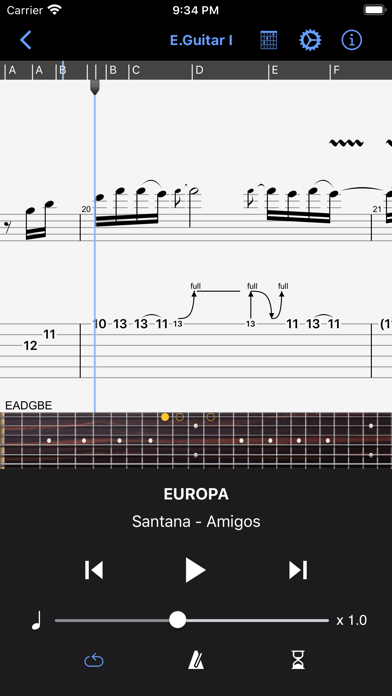
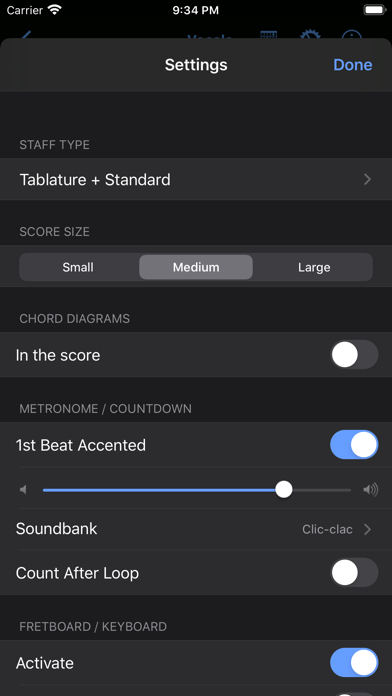
• Tab (with rhythmics), slash, and standard notations,
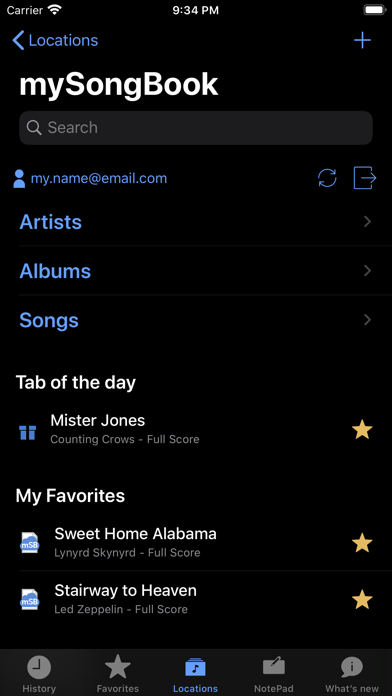
• Compatible with mySongBook portal to sheet music (monthly subscription and single buying),
• Switch between Dark and Light viewing modes,
• Load files via WiFi and web browser, iTunes, e-mail,
• Integrated sheet-music library with search, filters, and favorites,
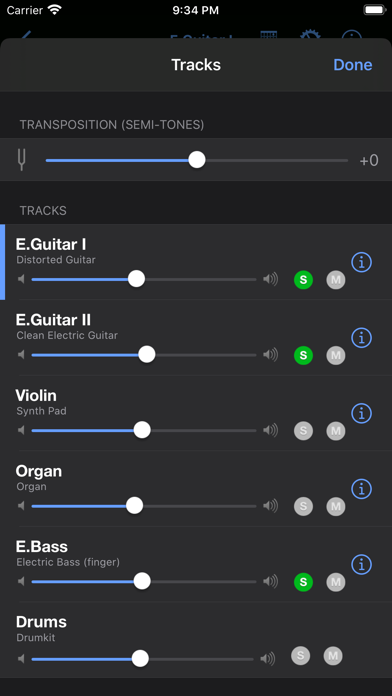
• Multitrack player with soundboard: volume / solo-mute / soundbanks,
• Metronome and visual countdown,
• 3 zooming levels,
• Guitar or bass fretboard (for right- and left-handers), and virtual keyboard,
• On-the-fly tempo changes,
• On-the-fly global transposing by half-tones,
• Playing any selection in loops,
• Simplified navigation between sections,
• E-mailing files directly from the application,
• Exporting files to PDF,
• Compatible with the Fretlight Wireless Guitar.
NotePad tool to create a tablature
• Use the NotePad to edit a single-track tablature for guitar, bass, banjo, ukulele, and mandolin,
• Tablature for 4- to 8-string instruments,
• 19 built-in sounds,
• Customizable tuning and tempo,
• Export your ideas into Guitar Pro 6 and 7 formats so as to later carry on with your composition on the Guitar Pro desktop version.
———————————————————————-
The app is updated frequently, so feel free to contact our team to ask any question or give your feedback.
For more info:
Need help: https://support.guitar-pro.com
Facebook: http://www.facebook.com/arobas.music
Twitter: http://www.twitter.com/arobasmusic
Instagram: https://www.instagram.com/guitarpro_official
FAQ:
Q: Can I create or edit sheet music with this app?
A: Unlike Guitar Pro for Windows and Mac, this app does not let you change the notation in an existing Guitar Pro file, or create sheet music in standard notation. It is however possible to edit a single-track tablature with the NotePad tool and export your work into .gpx and .gp formats to finish your composition in Guitar Pro 6 or 7. Editing a drum track is not available with the NotePad tool.
Guitar Pro App Comments & Reviews
Guitar Pro Positive Reviews
More like Guitar rank AmateurWhile I use Guitar Pro all the time I really with this app was an editor rather than just a reader. I would have paid triple for an editor. The only thing you can do with this software is change voices of instruments, track amplitude, and tempo. Musicians on the go don’t want to just practice away from the computer. There are times where we collaborate with others and even just being able to write out new parts a collaboration has done, or even just jotting down some quick ideas would have been helpful. Even if they would take away the instrument voices. Do we really need more than one instrument voice per instrument on a phone app where you cannot write music in it? That was a stupid decision by Arobos. Add in the editor module and take out half those instrument voices. Users can go home and fill out the piece they are working on their computers with all the bells and whistles the desktop version has. Seriously I’ll pay upwards of $30-35 more than I already have to be able to edit in this app. Yeah I know I can edit a partial track. If the app doesn’t decide to crash when saving it and only saves first few bars if you’re lucky. If you guys at Arobos back off the player angle and bring on full editing capabilities, you would corner the guitar tab app market. Especially if a one time purchase. It would crush that garbage wallet stealer pro guitar by ultimate guitar scam..Version: 1.9.11
Awesome Guitar Practice App, but Not Much Like the PC Version1/9/22 update: While this is a good and stable app, it pales in comparison to the Windows version. Sound quality is mediocre when a tab is slowed below 50%. There is no editing capability (you don't have that ability on purchased tabs in either version,however). Still, it's very worth it if you have a tablet. *** Great app that lets you playback Guitarpro tab files. There are thousands of them on the internet or you can buy them from Arobas, the makers of GuitarPro. This app is not a substitute for the full PC/MAC version which allows editing of files and more realistic sound. However, as a portable practice app, it is perfect. Has slow-down and loop features, guitar tab, standard note display and multiple tracks that can be muted or solo'd individually. Extremely stable. I practice my guitar with it using an Ipad/Amplitube/Irig setup. Has a virtual guitar fretboard/keyboard which will display the notes as it's playing. A must have..Version: 1.9.11
It doesn’t connect to my fretlight guitar.I bought this app. To learn how to play songs. I search on the internet to find out why it doesn’t connect to my fretlight it has the bottom I pres to connect and nothing happens for me to writing this is because I being trying for the past 2 days to make it work and nothing happens I try to email you and ask me for user Id ? I bought it here in App Stores what user name ? Sorry for the respond late. When you bought the app obviously you use your password to buy the app. And you downloaded you open the app ? And works right? If you respond is yes and that case you are ok. Now you say that you press the the guitar bottom and nothing happens? Now this could be a simple problem 1. Check the guitar if the battery is charge if blink it means it is 2 when you open the guitar pro. Go on the right corner where you see a little sign square for chords where you want to learn any scale or go where it says lessons when you are on either one ones you have open and you are ready to learn. You gonna see a Bluetooth sign is like dar gray color click that one. Is going to blink until you press the bottom on your guitar. And when both are connected that Bluetooth on the cellphone will turn on blue which means is connected but make sure your guitar blinks first before you connect because if the battery is dead it will not respond to your Bluetooth I hope this help you. 2.Version: 1.9.3
Wasted potential to be the best practice companion to guitar proI’m learning piano and guitar together with my daughter and guitar pro (desktop) has been an irreplaceable tool. I tab out pieces for her to practice and it’s super useful to have play along to get the rhythm right or sync with a teacher duet track. Guitar Pro beats MuseScore hands down on ease of use. I have an iPad Pro and we use this app to practice. It’s just so much nicer to put a tablet in front on the piano instead of a laptop, even more so when I have a strat strapped over my shoulder. Unlike other reviewers, I wish the app was more feature complete in the reader/practice use case. Some missing features that were felt: - multi track view, so we can play piano duets. It’s useful for guitar too to see what the other guitars are playing. - been able to select an exact tempo. I have a song at 100, 80 is comfortable while 90 is too fast. But I can’t select an 85 because the slider is at 0.1 increments. - nicer sounds? Doesn’t sound as good as the desktop version - bigger playback controls. This is already a read only app, make it nicer to use for this use case :) - pencil annotations, nice to have, but awesome for the teaching use case I’ve tried other apps like staffpad where it was promising, but writing on desktop GP was still faster than using the Apple Pencil. Why not make this a top notch GP reader to monetize the trove of pre-existing tabs?.Version: 1.10.3
Guitar Pro LiteThis is a great stripped/on-the-go version of Guitar Pro. Really handy for jotting down ideas-though it would be helpful to be able write using more than one track and to have the option to change time signatures or edit preexisting files. It will *read* all pre existing GP files but you can NOT edit them. To view multiple tracks on the pre made files, go into settings to view each one. You can download tabs from your browser and open directly in the app too which is helpful. I’ll rate 5 stars when/if more features are added to the note pad. Otherwise well worth the purchase.Version: 1.8.2
Pretty good, honestlyI’ve read a lot of bad reviews so I want to say something nice about this app. I can write a lot of stuff with the options in this app. At first I didn’t know there was a hidden menu for dotted notes. That made me really mad until I discovered this menu. Since I use a lot of dotted notes in my stuff this is greatly handy to me. Is the sound quality the best? No but you can at least show yourself and your friends your music with some idea of what it’s supposed to sound like. Also i don’t need multiple tracks if I can import into gp8 which I can and I do. Would I like to see more editing features? Sure. But for the small amount of money I paid for this app I am pleasantly satisfied. Also it’s great for the my song book subscription and learning new songs on an actual guitar too!.Version: 1.10.3
Needs better edit and notepad functionalityAs a practice tool, this app is well worth the money. However, I think the app name being the same as the monstrously powerful and useful tool for the desktop is grounds for false advertising. I bought this expecting to be able to edit my work on the go, and make changes to songs that people send me (often people have asked for suggestions or if I would be willing to collaborate) and you can make no edits to files unless they are created on the current device via the notepad. Even the ability to copy from a file and paste to the notepad would be a GIGANTIC improvement. I feel I’ve wasted my money on this app as it does very little of what I want out of guitar pro, and having bought every desktop version since 5 and seeing no further development of the mobile version, I am severely disappointed. I gave the app 3 stars because what it does is offer a nice practice tool for songs that do not exist on Ultimate Guitar. HOWEVER, if the song does exist on Ultimate Guitar, that practice platform far exceeds this one..Version: 1.10.3
COULD BE SO MUCH MORE! Where is an autoscroll??Seems like its a wasted potential this app. Instead of giving features you charge for a basic reader of GP8 files. When you can buy much better songbook type app/software and basically export the song into it. Even the fact that you can’t organize the files/songs as you want, makes this pretty lacking to say the least. —Group songs into sets or personalized groupings? Not possible —Update a song on the fly? Not possible —Add backing tracks or change the type of instrument used for the track? Also not possible. —Turn off instruments and just play metronome? Not possible —AUTOSCROLL?? Wow this is the strangest missing feature. The fact their software also doesn’t work with anyone’s pedal is really a bad decision! —Change the tab to a song or even revise an existing song you wrote or made up? Nope not possible, something that is a basic feature of GP8. For the price of this app, unfortunately it is seriously lacking in features that are available on pretty much every other app here..Version: 1.10.3
Seems pretty buggyI downloaded the app yesterday and put a couple of hours into fiddling with it. Although I love the idea of the app, it has proven to be frustrating. First, I signed into the associated music service (which itself was a buggy experience from my iPad). Once I finally got it all working, I spent a good hour going through the song list and adding to my favorites. Once I had a good fifty songs, or so, I was pretty happy and looking forward to learning some new tabs. My iPad went to sleep, as it does after a period of time. When I woke it up, all of my favorites were gone. Zap. No record of that hour I spent. What a PAIN! This evening I opened the app on my iPhone and somehow navigated to an offer for all of the top Guns’nRoses riffs. ‘That will be fun’, I thought. I clicked on the first tune and I was instantly transported to a completely separate page with everything in French! I kid you not. I still can’t find my way back to the GNR tabulature offer. Only one day in, and I am already frustrated. A good idea for an app that needs some intuitive help and maybe a bit more time on the oven..Version: 1.9.7
A Decent Companion for Guitar Pro 7, with just a couple issues.First of all, it runs fine. It could be a little better, but it works. For being 10% or the cost of the PC version, it’s worth the buy. But, I would not use this if you are intending to write or change music on it. It is great for reading tabs, not exactly making them. Yet, my biggest issue is it’s soundbank, which is not even comparable to the PC version. If there is a way to download a better soundbank, or even the PC soundbank, I would pay extra just to get that, because this is really lacking. Again, this is decent for reading tabs, but there are better alternatives out there..Version: 1.9.11
3.5 would be a little closer than 4 stars, but…It’s pretty good for $7. I have used the full mac version which has a LOT more features, so it leaves one just a bit cold to fall back to this bare-bones version. You can create a new score, but as far as I can tell, there’s no way to edit an existing one. While GP leaves a lot to be desired, that’s really only in comparison to itself. It’s better than any other iPad tab player that I’ve seen to date, and there are NO IN APP PURCHASES or sleazy subscription schemes. LET’S KEEP IT THAT WAY! Also, did I mention that it’s only $7?.Version: 1.10.3
Needs workIncredibly useful tool for learning difficult songs. But the interface is clunky as hell. Make a persistent play/pause button. I’m hitting it constantly and I have to tap the screen to bring it up. Why? Also the playback isn’t in sync with the marker as it moves across the staff. It’s off by like 1/4 note and really hurts the utility of that function. You can change the size of the staff, but that function isn’t very useful either since it does nothing to fit more notes on the screen. It just makes the staff tiny with a lot more white space. Still, it’s super useful to have all my tabs available all the time so I’d still recommend the app overall..Version: 1.8.2
Poor file handlingAs a tab viewer, this app needs to interact with other computers and storage locations such as iCloud. On this front app gets an F. The app needs to copy files into local storage on the iPad. A better way is to integrate directly with the iOS Files app and read the tabs directly from Files. It also never remembers the last location from which you loaded a tab, meaning it’s multiple clicks every time you want to load a new tab from iCloud. When you use the NotePad function to create a tab, the only way to get it back to your computer for further editing is to email it to yourself!!.Version: 1.10.3
Great app, a few minor things could be improvedOverall, the app does everything I need it to and I have no real complaints, definitely deserves 5 stars. A couple things that I think would be a better experience and make things easier though: 1. The default tab when you open the app. It goes to the locations tab. I don’t ever use the songbook, so it’d be cool to be able to set it to always go to “On my Phone” by default or have a setting where you can choose your default tab so that it opens to the place you want to be. 2. With the speed slider - some of the songs I write or learn are complex enough that being able to fine tune the speed to exact percentages would be awesome, because when I’m struggling with a song I like to do really small increments to work my way up, like 1-2% at a time. Overall I use the app regularly and it’s super useful!.Version: 1.10.3
Very useful but has problemsI’ve been using this app for around 3 years and it’s my main place to keep track of my riffs. The editing works well in this app but sometimes gets buggy if used for a while. The searching feature is bugged where if you search something once it will still search for that even if you clear what you searched. Also, I have hundreds of riffs and I’m starting to loose track of them, it would be nice if there was more ways to sort them- potentially by date created, bpm, time signature, instruments, etc. Maybe even adding folders for your riffs..Version: 1.10.1
Use it all the time. It’s great.No bugs for me. Great interface. I use GTP files for songs downloaded from Sheets Happening, which work great. UPDATE: After months of use, my only complaint is that I frequently tap the big gray bar across the top and suddenly find myself in a different place in the song when I was just trying to pause/play. I would say this is partly user error for missing the play button, but I would greatly appreciate some improvement here because I do this all the time and it’s really frustrating..Version: 1.9.9
Great companion to Guitar ProThis is a really helpful app. I’m a drummer and song writer and this app makes it easier to write a song and then practice the drum parts at various speeds to learn them. One complaint I have though - the app lets you write out music “notes” which looks really useful for capturing riffs etc. Why is there no drum capability here though? It would be great to be able to quickly jot down a drum beat in the phone when I’m at my drum kit. Otherwise this is a great app!.Version: 1.10.3
Good updates but needs finer tempo controlYou can only speed up or slow down the tempo by 10%. There is a big difference in BPM incremented by 10%. If you have a song that’s 180 BPM, and you slow down by 10%, you’re down to 162 BPM. There is currently no way to adjust between those tempos. That’s a huge jump when you’re trying to learn a difficult section. Also if you are practicing a section and have several tracks muted, if you minimize the app then open it later, all the muted tracks have been changed to solo tracks and you have to go back and re-mute them. Please fix these issues..Version: 1.9.8
Horrible UI but useful toolThe UI needs work. The bottom bar cannot be hidden and wastes too much space. On the iPhone version the tab can only be displayed on one horizontal line so given the limited screen space it is virtually unusable. Automatically flow the display into multiple lines shouldn’t be this hard, right? As it is now, it is an indispensable tool for me cause I need to handle those Guitar Pro files... but it is also one of the most frustrating apps that I’d like to avoid using as much as possible. Please! This app has the potential to become truly great, so please improve it ASAP!.Version: 1.8.1
Good app for viewing tabsGood for viewing tabs with nice options. The new version supports GP v7 files which is much needed. Only 3 stars because it is not possible to view “multitrack” on the iPad. With the iPad Pro and such, there is plenty of screen size to support this, at least 2 or 3 tracks at a time. This is a much needed feature for a lot of tabs out there tab “guitar 1” and “guitar 2” and so on. “guitar 1” will have rests while “guitar 2” plays. Or “guitar 1” solos while “guitar 2” has rhythm. So, being able to see both guitar tracks at once is much easier than flipping between tracks..Version: 1.8.0
It worksIt works for me on my iPhone, I like it, for sure. But considering I paid for this app, I wish under the settings there would be an option to change the entire guitar key flat or sharp for either self-tabulated or purchased pro tab files. Sometimes I only want to play songs with string tuning of Eb on my standard-tuned guitar or I decide to try playing back my tabs in a different key. And don’t tell me to learn my modes!! It’s not asking for much, pweeease.Version: 1.10.3
Good enough for practicingIt’s good enough for practicing to my songs me and my band mates write on gp5 on the pc then I import them to my phone for headphone practice. It’s also great for my cover band when people request songs I can download a gp file anywhere to learn the during our break. It’s however not best for composing and doesn’t sound as good as real instruments but that’s not why I bought it. It’s great for practicing and learning songs, highly recommended if you’re a serious musician..Version: 1.8.2
EhhThe truth is that I was very critical of this app…the reason? I thought that scores couldn't be created. I think that should be more intuitive; I don't consider myself someone bad or slow for digital things... on the contrary, but incredibly late in discovering that option... I'm still stunned. Anyway, good app, I would like a couple of more functions, but I'm sure that over time they will be implemented..Version: 1.9.12
Great tool for practice!This could best be described as Guitar Pro light because it has some of the features of the full desktop version, but not editing, composing, etc. It is a great GP file reader that is incredibly useful for practice and rehearsal. I don’t write original music or do a lot of transcribing, so this version is perfect for me. I use this app every time I am learning a new song to help with timing, accuracy, etc..Version: 1.9.11
I really want this to workI compose and arrange music using Guitar Pro on my desktop for my Ensemble. Excellent piece of software. I purchased numerous copies of this iPad version of Guitar Pro so my players could practice our pieces. The ability to loop sections, change tempo, and mute various parts make this an attractive practice solution. Mostly it works but the drum track is a disaster. The drums don’t play the same sounds as the desktop version. In fact many drum “notes” are silent on the iPad version. There also doesn’t seem to be any method of contacting the vendor for support..Version: 1.9.8
Solid app to create and open up GP/GPX filesI’ve been using the app daily to create tabs. I love it. It has almost all music composition and guitar techniques (triplet feel, harmonics, bends with fraction ratios). You can export your creations into a PDF, GO or GPX file. I just wish for a grace note function. I have one issue with the app. My progress is not saved sometimes. I’ve worked in a project multiple times and when I return none of my work was saved 😭😔.Version: 1.9.6
Efficient as a mobile versionThis app is great! People don't realize that this is only supposed to be a MOBILE version of guitar pro, so of course what you can do is limited! Also, it's very possible to adjust the tempo, you just don't have to be an idiot. Very happy that I can export my mobile files into scores and then email them to myself as well. Just wish they were a little quicker to send..Version: 1.7.3
Wish there was moreDon’t really care about lack of tones. Wish there was a way to make multiple tracks. Drums would be a nice feature too. It’s good for keeping track of some base ideas if you have the patience. Tabbing is kind of difficult on the app. Some note options aren’t there that make hard to tab what I want to. It’s not bad for what it is but it isn’t great. It would also be nice to be able to send compositions from the notepad to friends from my phone(this is the biggest issue for me)..Version: 1.8.2
Great app to view files created in the full version.This app is limited in its ability to create files. You should just consider it to be a viewer. I teach guitar and create the content for my students to view. For this purpose, this app is indispensable to me. However, it is only as good as the file it is viewing. Best to use it to view quality content as you would find on bis man jams..Version: 1.9.6
Fantastic appI bought this about a year ago and use it almost daily. It is a great tool for learning that I have yet to find. It is intuitive, simple to use and has all the features I could want. There are millions of songs available on the net for free and most of the paid sites offer their files in GP format. It is also ridiculously underpriced. Keep up the great work guys!.Version: 1.9.7
Needs multi track editing to be perfectI love this app. Have it on my computer and phone. I love sending myself projects to work on. I love that on my computer I can make multi track songs and send them to myself. The one thing this app NEEDS for a perfect rating is the ability to create and edit multi tracks on the mobile version..Version: 1.10.3
This is an essential tool for beginners.I love this program on all platforms; I wouldn’t be the musician I am without it because I’ve learned to use it to really push the boundaries on my writing styles. I’m sure most metal musicians can relate to what I’m saying here! This is something great for a beginner to get locked in on with learning and, as well, composing their own material..Version: 1.10.3
Someone to play withFinally I have easy access to a jam buddy that is always in time. Never misses a note. Now he sounds a little strange but I can handle the style. Slow down speed and loop tough parts makes me a better player. If I need an editor I pay for full version for laptop. Excellent! Thank you Dev Guys!.Version: 1.10.1
Been a user for yearsI’ve had a subscription to the main desktop version for 10+ years. The app version is good for downloading a tab and putting my iPad on a music stand. Of course you aren’t going to get the same functions as the $60 desktop program, but it does what I need. Good for spur on the moment stuff..Version: 1.8.2
Thanks for tryingGreat ap but it feels like a novelty version of GP6 it’s missing a few features the pc version had..Version: 1.9.8
Great app, but missing drum in the notepadGreat app no doubt! Just dream of being able to tab drums in the note tab!.Version: 1.10.3
Notation needs improvementNeeds to be a fully functional app. Like the desktop app. Also, If a tune is multiple parts, the stems directions become inverted..Version: 1.10.3
Good but room for improvementWorks well but would really love to see bluetooth/midi capabilities integrated in future updates for a hands free option for controlling playback and speed with a bluetooth footswitch..Version: 1.9.11
Great Portable SolutionI think if this product is viewed within the context of what I believe it was meant for - it does a great job! I use this as a practice tool and for that purpose I couldn’t be happier..Version: 1.10.3
MySongBookI use credits to buy tabs and he doesn’t appear in the list.Version: 1.10.3
Works for meI just want to use it to learn guitar music. It works fine for this, loops, slow down, speed up. I am new to apple system but figured out how to load .gp files from the cloud. Having said that they do need a help file for that process because it is not obvious for everyone. I am hoping they will upgrade it to accept GP files with embedded sound from version 8..Version: 1.10.3
4 Da proSuper 😎.Version: 1.10.1
Please change this! It'll make GP perfectPlease let me export from the tab back to note pad!! And even multi track in notepad too!! I know you guys can do it.Version: 1.10.1
Best Tab ReaderThis app is the best score reader. The best thing is that you can organize your songs by artists, albums and well… by songs !.Version: 1.10.1
Does the jobLove the simplicity of notepad to knock off a quick tab while playing. Could benefit from more in the way of user instructions. It was a little frustrating to find all the useful features..Version: 1.9.9
Improve SupportCustomer support must be improved through communication. You must show at least that you read customer’s messages. Interface should be more user friendly. 🎸Songs must be cheaper and more accessible. The rest is ok..Version: 1.9.8
Useful AppVery useful app, but could you please consider adding a regular iOS share menu to tab files? I would like to be able to Airdrop tab files between my devices (iCloud integration might be even better)..Version: 1.9.2
Good, but NotePad is unintuitive.I love the NotePad feature, but it is very clunky. I would love to see keyboard and mouse be taken advantage of for an experience similar to that of the desktop app. Furthermore, there is no way to add slide-ins, staccatos, grace notes, dynamics, or detailed bends in NotePad, all of which I use very frequently on the desktop app. Please add these..Version: 1.9.8
Poor experience, good features, thanks for FretlightLots of weirdness. Why are controls so tiny small and positioned on the top? Who needs all that useless white space. Search / filter is pain, options are super limited. Adding a star for keeping the Fretlight functionality that is only stable with this app as opposed to mac or pc..Version: 1.9.7
Needs a side scroll option.This app would have everything I need if only it had different scrolling options. Most of my students like following the side scroll. It wouldn’t be hard to add it in I’m sure. Just a suggestion..Version: 1.9.5
Great for teachers in lessonsGreat app for teachers to add depth to their lessons. Having said that, would be great if we can just download tabs from internet rather than file exchange from pc. The app lacks a lot of functions the software version has. Having said that, I knew this when I bought it. I do all my tabbing st home etc, then I export all files in one sitting to my iPad, and I teach effortlessly using it. Good job but can be better. Cheers..Version: 1.8.2
Love itIf you know how to play and read tabs this works wonders.Version: 1.8.2
Drums editorWould be awesome if we could tab a drum track.Version: 1.8.1
Multi-trackNeeds to be able to write multi-track tabs!.Version: 1.8.1
Works for meI mainly use this app for practicing guitar. I play the songs through my amp and can play along to get the timing right. Easy features like being able to repeat a section and slowdown the playback are great learning tools..Version: 1.7.3
AwesomeBetter then the ug app.Version: 1.8.1
Great app but..I have been using this for a long time and i really love it, however, i want to use it on my pc as well but I need to buy another version for the pc. So im sticking with this.Version: 1.8.0
ImprovementsYeah honestly I completely agree with the latest review comment. This app would be truly cutting edge with multi track, automatically measure bars and etc..Version: 1.7.4
Free International Money Transfer 💸Enjoy high maximum transfers into more than 20 currencies while saving up to 90% over local banks! The cheap, fast way to send money abroad. Free transfer up to 500 USD!Version: 1.11.4
What do you think Guitar Pro ios app? Can you share your thoughts and app experiences with other peoples?
Please wait! Facebook comments loading...