The Buddy System, LLC
Krafts Inventory Customer Service

- Krafts Inventory Customer Service
- Krafts Inventory App Comments & Reviews (2026)
- Krafts Inventory iPhone Images
Track Crafts Inventory and Projects
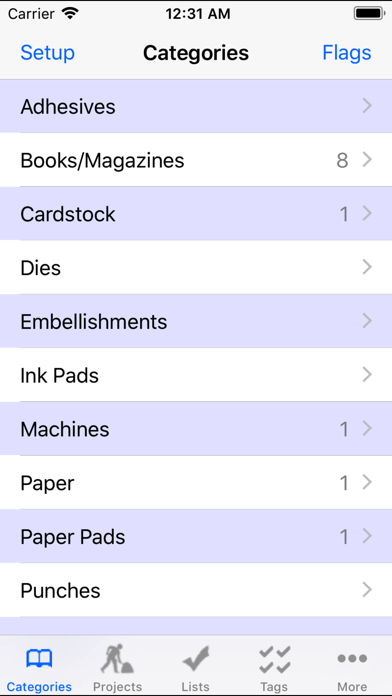
Custom-designed with the help of experienced crafters, Krafts is smart about helping you organize your materials and projects. You can add and edit categories to suit your needs.
The built-in UPC scanner uses your device’s camera to scan barcodes and automatically fetch product images (if available online). While shopping, you can scan barcodes in the store to easily check if you have those items in your inventory. You can also “flag” items that have special significance (e.g., need restocking).
Krafts is not affiliated with any supplier or retailer, so the app never tries to sell you stuff. The data in the app are YOUR data — no ads, promos, or company videos.
Krafts is more complicated than similar inventory apps, but that’s because it’s flexible and does so much more. Please read the extensive Help section in the app (and online at: http://mat.buddy.com/krafts).
Features:
• Maintain inventory of supplies and tools.
• Enter new project ideas and track projects through to completion. Add more details along the way.
• Designed for any craft.
• Create your own categories (e.g., “Card Stock,” “Tools,” “Books”).
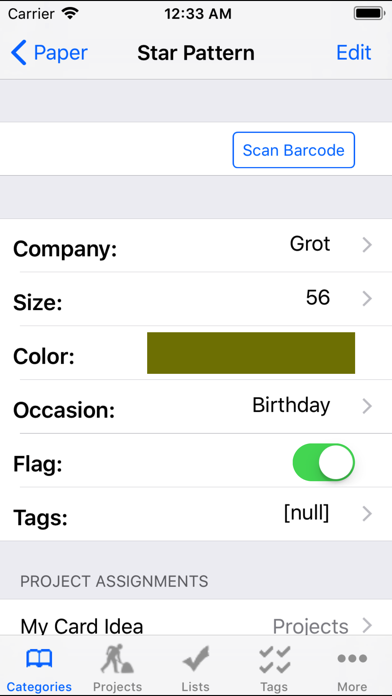
• Add customized fields to each category (e.g., “Name,” “Quantity,” “Company,” “Photo”).
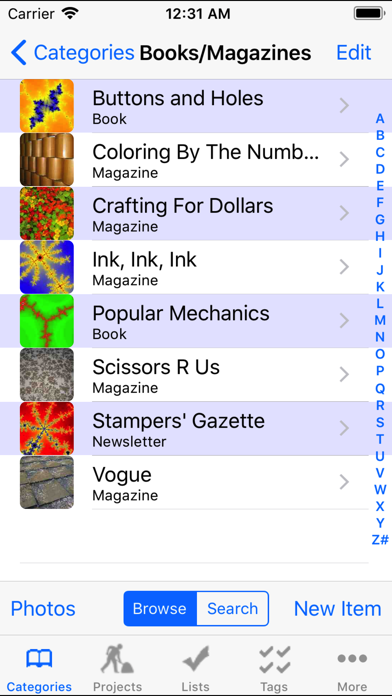
• Keeps photos of your items and completed projects.
• Scan UPC barcodes using the camera (only some codes have online data, see below).
• Scan store items while shopping to check for matches in your inventory.
• Add item photos using the camera or barcode scan.
• Help page assists with learning the app.
• Tutorial mode: help and tips for every screen.
• In-app Backup/Restore to/from your desktop PC.
• Email or print your entire database for safekeeping.
The scanner uses a public database to convert UPC codes to text. The database does not include all barcodes, and new ones are being added daily. However, even if a barcode is not in the database, Krafts will still save the number to allow match-ups when scanning the same barcode in your stash or a store.
Please contact me directly with questions or suggestions (hint: use the "Email Jeff..." button on all Help pages). Please do not put questions and suggestions in a review because I'll have no way to contact you.
Krafts Inventory App Comments & Reviews
Krafts Inventory Positive Reviews
Great for craftsI am very happy with this application, and use it regularly to inventory my craft items. the only thing I see that could be improved on at this moment… And hopefully very soon… Is the search feature. I like to take it with me on my phone when I go to the craft store to make sure that I do not duplicate an item. Rather than scrolling through the many many items that I already have, it would be helpful to be able to search for an item and have it show whether or not it is on my list..Version: 3.1.4
Awesome! Be prepared to learn.I downloaded this app in April of 2020 and have been using it for almost three years now. I had to read the Help sections and allow the in app tutorial to show me the ropes but once I caught on, it was so worth it. I think this app would be difficult for anyone who isn’t tech savvy, but not impossible. (I often compare it to a simple version of Microsoft Access.) Even three years later, I am still learning new ways to incorporate this app into my card making life. And I still haven’t gotten all my supplies and told loaded in…..I have way too much stuff! LOL I have recently been working on loading in all the photos of my finished cards and I LOVE that I can link the supplies and products I used to make the card to the finished project entry. The app lets me build the details to include in each category title those categories and details as I see fit. It really is a very flexible app once you learn how to set up your categories and details. Don’t be afraid! Use the tutorial and read the help section!.Version: 3.3.1
Awesome OrganizerBeen using this app for several years now and absolutely love it! It has a great tutorial to understand how the data structure is organized so you can utilize all the available fields to include lots of into on your item. I use it whenever I am looking to buy something new so I don’t duplicate. Love the ability to take up to 2 photos for an item as well as add an actual color block and name next to your items like ink pads, markers, etc. You can also customize what fields you want to show for each category. You can also search within the categories. When I updated my phone I had a minor blip in the color feature but I reached out to the developer and he was very quick to respond and helpful to give me a solution!.Version: 3.3.1
So far it's awesome!I've been on search for an inventory app for the longest time and spending way more than the 1.99 I initially got this app for. This has been the perfect app! You can create your own anything, really, and tailor it to your needs. I use this to also keep track of my resale online business as well as my craft and art supplies. Although it's a fabulous app there are a few updates I'd like to see: -More picture options than 2. Maybe like 5 -changing the flag item feature. Right now you can set a flag and the app just pulls everything that is flagged. It works if you have one flag but if you want to use multiple flags it isn't really helpful. It would be perfect if you can use multiple flags for an item and at the top of the flag page to be able to select the flag option(s) you want to instantly look up. (Also confused on the purpose on having both flag and switches. Seems redundant.) -Same with above on redundancy, what's the purpose of having one check box for the check box option? I just started using this so there might be some help option that answers these questions but I still really like this app. Definitely worth it!!!.Version: 3.1.4
Great app overallI just started using this yesterday and am really pleased with it! The only issues are that it's not working well with my camera (I have to tap on the camera "button" several times before it'll take a picture, and I have to tap on use photo several times for it to take it); it's also starting to crash when I put in new items, probably because I have so many now. I still really like it though..Version: 3.1.4
I love this app!I continue to be impressed when I use this app. I love that it's customizable so it fits MY crafting style vs the developers programming. I love that I can take pics and scan barcodes. It has stopped me from putting two entries in for the same product. I can note how many I have and adjust as I use things. I love it and would highly recommend this to any crafter that has way to much stuff to keep up with. 😊.Version: 3.1.4
Great app with no monthly service chargeI really like how customizable this app is. I have been using for a few years to slowly inventory all my craft supplies. One con, Because there isn’t an account to sign into I cannot view content on both my phone and tablet. Haven’t been able to figure out a way to sync them. If that is a possibility then would give it 5 stars.Version: 3.3.1
Could use 1-2 more features; 2 bug fixes neededI have a very large inventory of craft related items (mixed media, paper crafts, card making, miniatures, and general art supplies). This app is really great, in what it does. Bugs: 1. Most recent version has a tendency to just shut down while I am in the midst of entering items. 2. Most recent version no longer alphabetizes properly, nor will it allow me to manually set the order (and yes, I have selected the correct options in the Global presets). Scanner function works pretty well. But if you are not careful, it enters "copies" of items and you don't even realize it (Scan - Add Item - Choose Category and enter details - go to another or even same category again without first returning to scanner and it will make a Duplicate of the item. It should ask if that is what you want; or it should be a Global Preset). Scanner function would be EVEN BETTER if the StampinUp! Codes were in the catalog. Needed features: There is no option that I can find that allows me to search in the following ways (I have to search within a category.) But, for instance, if I want to know if I have Tim Holtz Distress Paint in a specific color ... did I put that into Inks, or Paints, or Mixed Media section? A way to search by product name, or company name (or any other attribute) globally would be great. 2. I would also like to be able to see the catalog on my PC. Because we often share across other people (example: I host at my house for a day of using all my punches, and others bring theirs; no need to bring duplicates) and having a way to share what I have with others quickly and visually is something that my old Excel system could easily do, that Krafts inventory cannot. I cannot even, say, print a list of all my punches to share/ show..Version: 3.1.1
Great inventory appI have been using this app for almost 10 years now, and it is still the best inventory app in my arsenal. I have to admit, it’s not very pretty, but when it comes to function, it has endless possibilities. You can create your own categories, tags, fields, etc, which makes it customizable for any way you want to use it. And you can add photos of your items. There is a backup function, but it is somewhat manual, so I admit I don’t backup as often as I should. Kind of wish the Dropbox backup was still available. If you’re looking for a workhorse to organize your stash, this will do the trick..Version: 3.3.1
Useful for Crafts & other collections!I don’t recall how long I have been using this app! Two years? I think perhaps more! I love how customizable it is and use it to track other collections besides crafts! It keeps me from buying duplicates! I love this and recommend it to other crafters!.Version: 3.3.1
Best Inventory AppI have been using this app for a few years. I still love it. I am allowed to move items from category to another as needed. I can search by topic, location type, and more. I love having this inventory app always with me..Version: 3.1.4
The best!!This is the best app for all of your craft supplies! It is user friendly. Customer support has ALWAYS gotten back with me! I have been using for several years and still very happy with the App..Version: 3.3.1
Helpful somewhatBut I don’t see anywhere to put notes. However, I do love that I can take photos of each item. Well I thought I could. I guess I could only for stamps? I find this app a little confusing and definitely not user friendly.Version: 3.3.1
Missing a search functionHaving a search function would be awesome..Version: 3.3.1
Disappointed.I was excited to use this app, based on the reviews. Unfortunately, it was not very easy to use because the scanner did not work as expected. When I scan an item it says "no matches found." I want to scan an item and then add it to a category. I have scanned a lot of barcodes and it does not seem to find any of the items I have scanned. I thought I would be able to scan the item, the fields would populate, and add it to the list. I thought this would save me a tremendous amount of time. This app was a great idea, but it does not work as expected. I will contact support and see if they can help. If they fix it, I will write again and give a new report. Same day: Received a reply from Jeff. He replied very quickly, which was great. I do not believe this app will work for someone who wants a fast inventory. If you have time and your inventory is not very large, this app will work for you..Version: 1.1
Not too bad, but...Needs improvement in the photo gallery. I just started playing with it. I would like to see my photos not only as thumbnails but in full screen and be able to swipe through all the items in a specific category/theme and when you double click the photo you can get access to the information. Other than that is a good app once you know what information will be helpful to you to keep track of your items. I can't wait for the update ;).Version: 2.2
Great Tool!I cannot be happier with this app. It helped me organize my stamps, ink, embellishments, and paper so I know exactly what I have. I have been more productive and creative, now that I know what is in my stash! I really like the scan barcode feature so I will not buy duplicates when I go to the scrapbook expo next week. I also like the photos feature, since I can see exactly what is in my stamp set. Most of my photos are pasted in from online stamp stores, which saved me a lot of time. Jeff, the developer, was so responsive to my email question about the program. In fact, he designed a fix that he released to everyone in response to my question. Now THAT'S service! If you want an organized craft room, this is the app for you..Version: 2.1
Very SatisfiedAfter trying some other free or almost free apps like this, I can absolutely say Krafts Inventory is the best value! It has incredibly customizable features once you understand the app. Even the way you have to setup the menus (which seems very awkward at first) makes sense after you’ve done it a time or two. I have been able to do everything I wanted to with this app. Not something I can say about any other Inventory style app. And the camera feature (the biggest flaw in most other apps) is great! There is a low res image in your main inventory page for quick reference. Click on your listing and you can get to your stored high res image to really see the detail of the item. High recommend!!.Version: 3.1.2
Love this!I'm a big scrapbooker and have (on more than one occasion) bought duplicates by accident so it's nice to have something like this to help me keep track of what I already have. Once you set each of the categories (paper, punches, embellishments, etc.) how you want (even adding your own or deleting), it's a pretty nifty app. You can scan the barcode of the products or manually add them (which you'll have to do for some if they're not recognized or obviously if you no longer have the packaging), add pictures, and even catalog your projects. Like I mentioned above, you can also set each category with things like size, color, notes, etc. $2.99 is a good price to pay to get organized.:).Version: 1.1
Easy to learn and fully customizableVery pleased with this app and intend to use it for all of my inventory, cataloging, and archiving needs. It's made with artists like me in mind, with a section for WIPs and completed projects. I have no fear of losing my data as there is an easy to use backup system, completely optional so I feel safe punching everything in. The tutorial to learn was easy to follow. The only suggestion for the development of this app would be to list it under organization, inventory, or other such tags, as it took quite a while to find this perfect app when looking under those topics..Version: 1.1
Amazing AppFor me, this is the most detailed & well thought-out inventory type app I've tried (tried most of the dedicated ones, and Bento, Filemaker, Access, etc.). Its sorting & browsing by either text or images is what I've been trying to create manually with other programs/apps - but this Dev has already done that through this app. It's use is easy, efficient & so well thought out! The browsing by images includes viewing by a grid/matrix, not just a linear list, or one-at-a-time item search. This is the first such app that I've seen designed for VISUALLY THINKING folks! I may not remember a Brand, or a named color, but if I could SEE it, I'd remember it. And that's exactly what this app does. Brilliance! AND I almost forgot about the TAGGING and FLAGGING. Those are two fields I always put in my own sad, little dbs. The tagging is obvious, but the Flagging is not often found in inventory apps. The flagging is easy and so convenient to use - even when you weren't actively seeking to use it. Here's what I mean: you've used the app looking for that one, obscure, such-and-such. Then you see that the cap split on the purple marker in the same box as the such-and-such and is all dried up. You quickly use the app to flag the purple marker for reorder or later assessment. I think this could be a real lifesaver to many folks. However, as with anything, there are ideas that I would like to see considered for MY personal quirks. Hopefully the Devs read these comments. Suggestions: continue making App updates to still include iPad-1s (iOS 5) and Universal; include Dropbox or Box sync ability (not interested in iCloud - Apple doesn't respect users with older devices, and these days iCloud & even iTunes are really unstable & crappy). And, the final suggestion: make a... blank version that can load & save different "libraries." As-in, I could (and would like to see) this same basic app adaptable to be able to separately load say your Books, Toys, AV Equipment, CDs, etc. But, in any case, Thanks for making such a thoughtful program in a sea of mediocrity!.Version: 3.0
Has potentialThe idea is great but I have too many items to inventory easily on my iPhone. There needs to be an online version or computer app that syncs to the iPhone/ipad for ease of use. At the rate I am going organizing my various items I may never get time to craft again! On the plus side - I am less likely to have as many unintentional duplicate purchases once I get everything in..Version: 2.2
Very cool app!I just got this and I am really liking it a lot! Yes, it takes time to enter your information but it will be worth it in the end. I did have to contact Jeff but only because I didn't scroll down far enough on the page to get to the field I needed. He responded almost immediately! Great customer support! If you truly want to keep track of your supplies, you won't be disappointed with this app. Just be prepared to spend some time with it..Version: 2.1
Must have for any crafter!This app is amazing... I'm guilty of buying the same supplies or stamps over and over and now I don't do that. Set up takes some time but it is SO worth it - you can have pictures of all your items on your phone to compare while shopping. Customer Service gets 5 stars too - I sent an email and within an hour I had a response from Jeffrey answering my question! You can't go wrong!.Version: 1.1
Freaking awesome!As a paper crafter for over 14 years, I can honestly say, this is the best craft supply organizer app I have ever seen. It's simple to use & the lists screen is invaluable. It allows for super detailed descriptions or just 1 line, it's your choice. It allows you to add as many categories as you need. You set the parameters for each category. Get this app to organize your stuff, you won't be disappointed..Version: 2.2
Great way to keep track of craft suppliesThis is a very versatile and comprehensive app. I love that I can scan items, see if I already have them and, if I don't, add them to my inventory. This app is well organized, customizable and easy to use once you get the feel for the general layout and operation of the app. The developer of the app was very responsive to questions. Great job!!.Version: 3.0
Thank you!I think I have downloaded every inventory app there is. They're all either too much or not enough, I have a business making soap and candles and I couldn't seem to find just the right app that would let me record what I needed to. All I wanted to do was be able to keep up with the inventory I didn't need anything else thank you so much for this app..Version: 2.1
Good app for keeping track.I am slowly going through my stamps and all of my other supplies. It will help me from keep from buying doubles. Only thing that I would like to see developed is the search function to search tags also..Version: 3.0
Love This App!I'm so glad I found this app. Helps me when I'm shopping and when planning a project. Trying to download data from my iPad to my iPod was a little tricky but I did get it to work. I would definitely recommend this app to any crafter who wants to keep an accurate inventory of their beloved supplies!.Version: 1.1
Hey, this isn't bad ...Once I figured out what to do, it got easier. The tutorial's very thorough. This is, actually a good app. It can help keep track of costs, too, if you're going into sales cuz it has a numerical field. I don't know why this app isn't more popular. Might be the name cuz when I searched under 'inventory' only business apps came up. This app is more what I need. It's the pre-app before a pro retail inventory app. I do jewelry and needed an app that understood the concept of a "project" - 'plan-work in progress-done'. All in all, nice going..Version: 1.1
Best App Ever!!!I am constantly trying to find a way to track my crafting/art inventory. I may have downloaded 20 apps in the past two years. This is by far the best app I have come across to keep track of my supplies. The error of ordering duplicates is now history!! I LOVE THIS APP!!!.Version: 1.1
Great for Tracking All My Craft/Art Supplies and ProjectsI use this app regularly. It has spared me from duplicate purchases. Because of the ease of us, I readily know what I have and what I need. I am pleased that I can include a photo of my supplies and work in process..Version: 2.1
Very useful and easy to customizeBeen playing around with this app and so far, it suits my needs. Very easy to use and it is extremely customizable. I highly recommend this to any crafter!.Version: 1.1
Fantastic appEvery scrapper, stamper, and crafter with an iPod, iPad, or iPhone should have this app. Great instructions, east input, no more duplicative shopping/buying. You can even plan a project on the go. This is the ONLY APP I have ever rated and I have quite a few. Wtg!.Version: 1.1
Love it! Except...I love this app, simple to use easy to add items too. I love that you can select the pic to make it full screen. Except, is there a way to make the pic in the list bigger? Then I could just scan to see what's there. Instead of selecting for detail. It gets hard to look at the screen after awhile when I'm squinting. PLEASE make the pics in the lists bigger. Thanks!.Version: 2.2.1
Great appLove this app. What a great way to keep track of art supplies. Backup worked very well between my iPad and iPhone. Thanks.Version: 3.1.4
Best Database For Crafts Inventory!This app has made it so easy to get a handle on my massive crafts inventory! Very easy to use with good tutorial based learning of the app. Excellent support for the app as well. If you've got crafts, you will want this app to avoid purchasing duplicates, keep track of locations of specific items and also keep track of the value of these items. Get this app—no regrets!.Version: 2.2
FantasticWorth the money, worth the time and worth recommending to serious crafters!.Version: 2.1
Free International Money Transfer 💸Enjoy high maximum transfers into more than 20 currencies while saving up to 90% over local banks! The cheap, fast way to send money abroad. Free transfer up to 500 USD!Version: 3.3.1