CATEATER, LLC
Camera For Stop Motion Studio Customer Service

- Camera for Stop Motion Studio Customer Service
- Camera for Stop Motion Studio App Comments & Reviews (2026)
- Camera for Stop Motion Studio iPhone Images
- Camera for Stop Motion Studio iPad Images
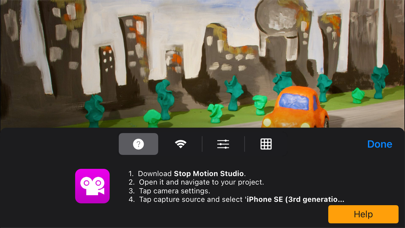
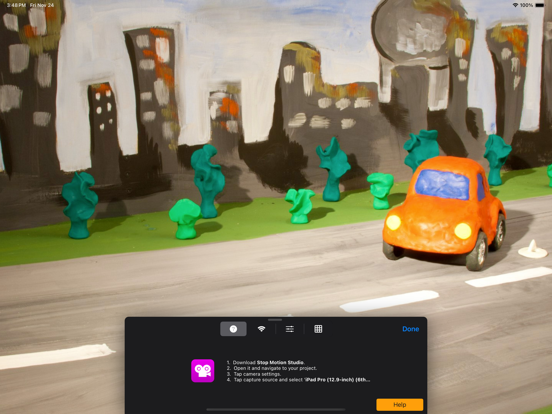
Turn your iPhone or iPad into a powerful remote camera for Stop Motion Studio.
With Camera for Stop Motion Studio, you can connect your devices and capture stunning stop-motion animations from unique angles, using one device as the camera and another as the controller. Perfect for creators who want precision, flexibility, and professional results.
Features
* Wireless Remote Camera – Use your iPhone, iPad, or iPod touch as a remote camera for Stop Motion Studio on another device.
* Live Preview – See exactly what your camera sees in real time for perfect framing and focus.
* Full Camera Control – Adjust exposure, focus, ISO, white balance, and shutter speed directly from Stop Motion Studio.
* Easy Connection – Seamlessly connect via Wi-Fi for fast, stable communication.
* Instant Sync – Every photo is automatically transferred to your Stop Motion Studio project, ready for animation.
Whether you’re shooting a claymation short, LEGO film, or product animation, Camera for Stop Motion Studio gives you the creative control you need to bring your ideas to life.
Note: This app works as a companion to Stop Motion Studio, available separately on the App Store. Both devices must be on the same Wi-Fi network.
Camera for Stop Motion Studio App Comments & Reviews
Camera for Stop Motion Studio Positive Reviews
Thought it was a remote appI thought it was going to be a remote for the app (so you could take pictures without touching and making your camera wobble), however it’s a remote camera which doesn’t really help (at least what I was hoping to do). I am taking pictures and using the studio on an iPad and would like to press a button on my iPhone to have it take the picture. As it stands now I would have to switch to editing on iPhone which would be more annoying or somehow transfer all the pictures from the iPhone to the iPad, or buy a tripod for the iPhone. It’s not the that it’s a bad app only not useful like this for my situation..Version: 4.1
Very usefulThis app is useful preferably for still life stop motion- if you are trying to shoot a moving object or person it takes up to a whole minute for the image to send from your remote camera. One click will come from the control device then 1-60 seconds later the remote camera will click. This happens inconsistently and can be frustrating when waiting for the second click because that’s when the actual picture is taken, taking double the time that stop motion itself already takes. When pairing devices, it kept disconnecting every once in a while and wouldn’t connect again until I restarted my device. Overall this app is very useful- I am happy that you can zoom and focus from the control device and it responds to actions in front of the camera quickly..Version: 4.2
There were issues but I figured them out.This is great. I set a phone in my project and trigger it from my iPad. The iPad allows me to see many things I’d miss on a phone screen. I did experience the slowing down. Each frame taking up to 3-5 mins and that was unworkable. But I figured out it was as my home internet got busy. Consoles, cameras, Netflix…….. so how did I fix it? I cut out relying on my homes Wi-Fi and everything on it. I connected my iPad direct to my phone via my phones hotspot. With no other devices on that “network” this works almost instantly..Version: 11.0.4
Look, it’s ok.I love the Stop Motion Studio app but this—this is not as good. It needs to be able to run with Bluetooth ‘cuz yeesh, it’s slow. I’ve read other reviews about the slowness but you can only use it via a strong wi-fi connection. Either way, it is still great for not having to touch my phone and move it every time I take a picture.Version: 24.9
Good idea, but...I would love it if it was a remote for the app but it’s actually just the camera and you edit from a different device. Also it’s really glitchy and since we’re working in a room with no WiFi, it’s almost impossible to get it to work. It’d be really nice if it could work without WiFi, but I guess that’s my problem.Version: 11.0.4
Works like a charm!I needed to be able to take pictures on stop motion studio pro from my computer and this is exactly what I need! I can do everything so much easier from my computer but using my phone camera!.Version: 11.0.4
Useful, though lacking key green screen featureThis app is useful if you want to avoid the risk of bumping your camera, or otherwise just want a bigger screen to compose things on. A major drawback though is that you cannot currently use this app alongside the green screen functionality. It’s one or the other..Version: 4.2
Worked very wellI did a little claymation project, and this app, in conjunction with “Stop Motion Studio”, and was a godsend. At first, I thought it sacrificed picture quality, but that was only the real time WiFi monitored image on my iPad. The picture it takes is actually very sharp..Version: 4.3
Misleading and disappointingAs a stopmotion animator, I try to eliminate wobble when taking photos. I figured the “remote camera” would allow me to take photos on a different device without touching my phone and causing it to shake. Instead, it just essentially takes the photos on a different app..Version: 10.3.2
Read this! #trustworthyreveiwThe reason people don’t like this is because they don’t know how to use this! This is really easy to use and it is a very reliable remote app. Just follow the instructions.Version: 10.4
I am mad (i’m not really mad. I’m just irritated)Right when I downloaded it and I went into stop motion studio stop motion studio vertical of the camera so I don’t know how I can fix it so please if this is just a bug from this or something that I did that I can’t fix. Please fix it..Version: 25.10
Useful, but very slowI like the concept, but the connection with the app does not make it very fun to use. It takes around 3 seconds to take a picture. If you could decrease delay, then I would probably use it..Version: 11.0.4
Pretty okIt is very useful and has made my stop motion a lot stronger and steadier but it’s a little bit slow.Version: 12.2
I love this app but needs one little speck for 5⭐️It’s very good I use it all the time but there is one small problem I cannot use green screen on it and it annoys me so then I have to use iPad if so I might edit for 5 stars.Version: 4.1
Great for stop motion must buyYou have to buy the in app purchase ($1) to use this or the whole pack (for $6 which is much more worth it).Version: 4.0
Perfect connection appThis is a perfect remote connection so I can use my phone camera. With stop motion on my MacBook and this app connecting to it remotely.. perfect!.Version: 3.1
Don’t know how to useI don’t understand how to use this app I have stop motion studio and I paid for all features free.Version: 10.4
Confusing, but usable.I had to read the other reviews to realize that this is exactly what it says it is, the remote "camera", not a remote for the app. If you wanted to take pictures from your iPhone, and control the process from your iPad, you'd install this on the iPhone, and run the Stop Motion Studio app on the iPad, and change the image source to "Remote Camera," (after you've made the IAP, of course). The whole process is broken, but this utility app seems to work ok..Version: 1.0
It looks cool😎How do you use the app it looks cool so I will give it 5 stars⭐️⭐️⭐️⭐️⭐️.Version: 4.1
Great feature, you just need to know how to use itAll you numbskulls out there, you need to make an in app purchase of $.99 to use the remote camera feature, the purchase must be made on the camera device, and the purchase must be restored on the remote device. Make the purchase by clicking on the pink tab in the stop motion studio application. Then swipe until you get to the remote camera icon, buy it. Or you could purchase the 5 pack for $3.99.Version: 1.0
Buy the Full VersionPut simply, I love this app and bought the full version about a year ago. I'm only an amateur filmmaker, but Stop Motion Studio has been in near constant use since I purchased it. You can complain all you want about having to pay ninety nine cents for it, but you can make infinite stop motions for the cost a candy bar or some other affordable, consumable good. I love what you are doing, Cateater..Version: 2.0
Great, except...When this works, it is amazing. However there are some issues getting it to sync with the actual Stop Motion App. Often I have to kill the SM App and restart it for it to find the remote camera. Additionally it would be REALLY USEFUL to be able to zoom either on the remote camera or via the device doing the recording with the full App..Version: 2.1
This App Works GREAT - Don't listen to the others who cannot read.To be clear, this app is a REMOTE for Stop Motion Studio…And for that purpose, it works perfectly. This NOT Stop Motion studio itself, which has caused poor reviews from many who need to read. A perfect companion app!.Version: 1.0
OMG!!This app is for the full version and not a Stop Motion App!! You have to buy a 0.99 App to make this work! You use this app to take pic's from I-pod, I-pad, I-Phone. Again Read the Title! "Remote Camera" for the "Stop Motion App.".Version: 2.0
EhIt’s good but it keeps having errors taking pics.Version: 11.0.4
IncredibleDo you people even understand what the app is for? STOP MOTION!!!!!!!.Version: 12.0
Trigger camera in remote app!I really like the app, I want to use a good camera that can take the pictures but don't edit on the good camera I just take the picture on the good camera and all the pictures come on my iPad. Very Convenient but I can't trigger the camera on the remote app so It really doesn't make sense please allow a feature to trigger the camera on the remote app please but very good app though.Version: 2.1
Finally being able to shoot remotely? Yay!Teaching myself Stop Motion since late April, today was the first time for doing it remotely with i-Phone taking the pics, viewable on the i-Pad! What a huge improvent alnost everywhere! Only minor complaint, is the seeming random amount of time, befire the phone receives the ‘take photo’ command. Otherwise, thank you!.Version: 10.3.2
Good but okayIt is good but I feel like you could do better cause with this you can’t even take A picture and if your like me and using a pc it is frustrating to have to keep going back and forth to take the photo unless your doing your stop motion right beside.Version: 4.3
Great appThe app is great just is confusing for some people. The reason you can’t take pictures with the app is because you need the stop motion studio app or stop motion studio pro app. This app is just a camera and the other apps are the control centres. The normal app is free and the pro is 6.99. Both are great. When you first get the app it take a long time to take the photo, but overtime it gets better. I hope this has helped you understand how the app works..Version: 4.2
Good but...How do i take pictures? I can’t find out how?.Version: 4.2
This actually worksA lot of negative reviews for very old versions... nevertheless my son is enjoying the host app Stop Motion Studio Pro which I bought him for 6.99. The iPad is a bit unwieldy though and so today we downloaded this companion remote camera app (to my iPhone) and it connects beautifully. All manual controls worked and he’s now able to put my iPhone in the scene and get some cool low shots... I don’t tend to leave reviews for any apps but I saw so many bad reviews I thought this app deserved a break. Getting kids to do creative stuff on their device instead of games and movies? That’s worth every cent..Version: 3.1
CrappyTo tell u the truth I've never actually used it... But oh well :/ yolo live life with no regrets peace out.Version: 2.0
.I tried to go on the app but it will just do nothing but say "waiting for a connection" so in other words DON'T GET THE APP!.Version: 1.0
Free International Money Transfer 💸Enjoy high maximum transfers into more than 20 currencies while saving up to 90% over local banks! The cheap, fast way to send money abroad. Free transfer up to 500 USD!Version: 25.10