Video Crop & Zoom - HD Customer ServiceFrancis Bonnin

Video Crop & Zoom - HD Customer Service

  1. Video Crop & Zoom - HD Customer Service
  2. Video Crop & Zoom - HD App Comments & Reviews (2026)
  3. Video Crop & Zoom - HD iPhone Images

Video Crop & Zoom - HD allows you to crop your videos in an easy and precise way.
Why would you do that?

• You want to remove a person or an object from a video. Crop your video to make this part invisible.
• You need to straighten a video in order to fix the horizon.
• You have recorded a video with a portrait orientation and you would like to change it to a landscape orientation.
• You want to add small effects to your video, like a zoom-in to someone's face, shortly followed by a zoom-out to a larger general view.
• You want to keep the best of your video only, cropping the main part of it, and removing the superfluous.
• You want to crop your video with a specific constrain (square, 4x3, 16x9 , ...) or some precise dimension (580p, 1080p, ...) before sending it to your TV or your favourite social service.


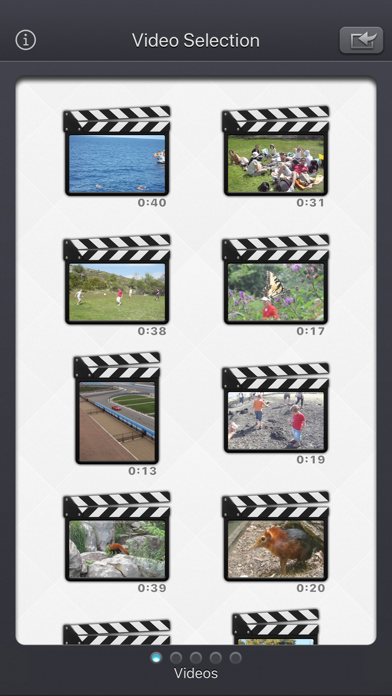
The Input video can be imported from your device in several ways.
The modified version (if there is one) or the original version of the video are both available.
The camera can be used directly to record a video if needed.
You can also connect your device to your computer in order to drag and drop specific videos (Files feature).

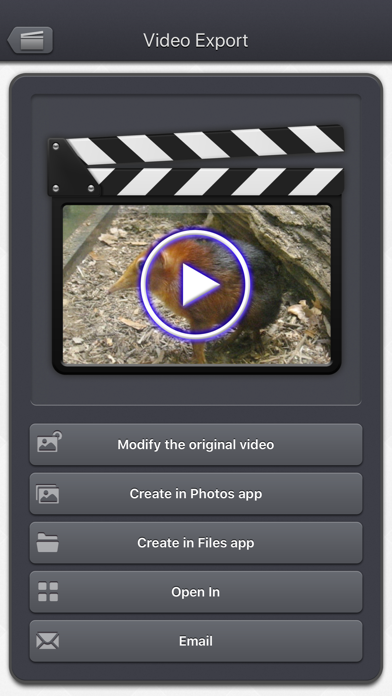
The output video can be exported in several ways.
Create a new video in the Photo app or in the Files app.
Directly modify the input video by adding an edited version.
Share the video to another application.


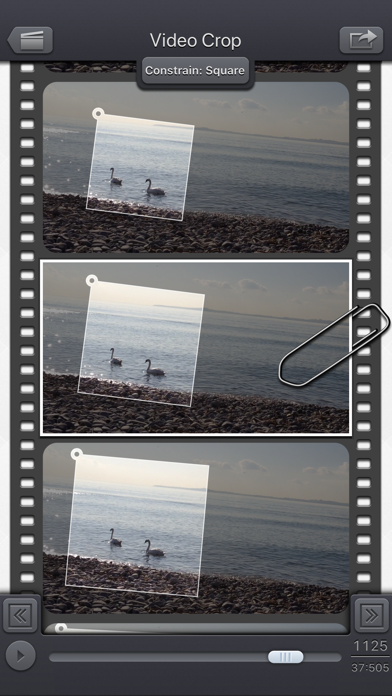
An animated and original user interface allows you to crop (and zoom and rotate), if necessary, every frame of the video independently.
An interpolation will be done automatically between each of your modifications, in order to scale and move progressively the crop area.

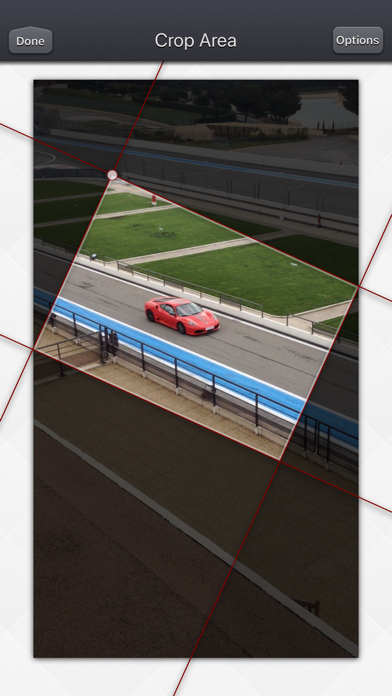
Those cropped areas can be defined by using some simple gestures, but in case some high precision is needed, you can directly change the values (in pixels for the size and position, in degrees for the angle).
Some optional visual guides, like configurable grids, and contextual information, can be displayed to help you track your target.


This application can run, on your iPhone and your iPad, as a standalone application, a Photo Extension, or as an Action Extension (from the compatible applications like the Photo app).
Portrait and Landscape orientations are supported in all screens.
Dark mode of iOS13 is supported.

You will find the original and intuitive user interface, common to all our videos applications.
These applications have been featured many times by Apple and various websites.

Video Crop & Zoom - HD App Comments & Reviews

Video Crop & Zoom - HD Positive Reviews

High quality effective focused app for cheepThis app is under priced. It is easy to use. Fast (in exporting and processing) even large videos. If you are looking for dynamic cropping even just to do it for a few videos it works so good and is so much easier to do than using video editing software and trying to key each frame. Highly recommend. It is single focused use case but if it’s your use case it works perfectly.Version: 5.6

Genius Video AppI use this app frequently. The results are flawless, so many creative options to reframe and zoom into my already filmed videos Brilliant design and execution. I use all of the video apps designed by this top-notch developer. Request: I would like to use this app on still photos also. I reluctantly use another app to convert my image into a video and then upload it into this app. I prefer to skip that extra step..Version: 5.4.1

Super-handy, easy & effective!This does a simple (and often needed) task just the way it should with zero fuss. If you need a video cropper, I'd highly recommend this. Note: For some reason I had a helluva time finding an app that met that, plus several other important criteria (that one this does!): • MUST crop to any dimension(s) I want (so many apps force you into standard aspect ratios--boo). • small footprint (for constantly full 16GB phone) • stable, and able to handle the files I give it (some apps get stupid finicky about formats, screen grabs, etc). • be from a qualified dev (not some ad-lovin clone maker). ...and now Robert is your father's brother. Nick Hey, dev: I just upgraded to the whole suite. There was a super deal, and your rep for this app sold me. Kudos all around..Version: 5.2.3

Works well for previewing Instagram cropsI have used this to crop personal videos where I had the rotation wrong (portrait instead of landscape). But it’s really great for cropping if your subject moves around in the shot. We use it for work to view how our landscape videos will be cropped when we upload them to Instagram (square)..Version: 3.0.1

Love this appThis app is very useful. Great purchase and really reliable. It posed a bit of a challenge at first as I wasn’t as keen in this area of expertise, but with a little bit of practice everything became easier. Since 2022, I have used this app for all of my edits and have been happy with it ever since. Thank you devs!.Version: 5.6

WorksCrooked horizon? -no prob. Shot too wide? - all good. This even let’s you set different reference points throughout the video to straighten. I edit video on pro software like adobe premier, after effects.. so would mostly use this for things I’ve shot with my phone and just got it a few days ago but so far, so good..Version: 3.0.1

Indispensable!Best app in the store for re-framing video. Many apps allow cropping, but this one allows you to manipulate that crop on a frame by frame basis, to correct for sudden camera movement, or to gradually move and correct the frame over the entire length of a clip. Easily my most valued iOS video post production tool..Version: 5.1

Super!!!Ive had this for a long time now and it has saved from my sloppy camera work me on more then one occasion. It’s worth haveing on your phone. It is intuitive and easy to use. And pretty fast considering it’s working on an instrument that is really a telephone.Version: 5.2.3

It’s so goodWant a creepy but honest review? If you set a tripod up and make a video of yourself, you can edit the video (with this app) to make it look as if someone is holding the camera and you weren’t just by yourself....making a video of yourself. 😂😭.Version: 5.2.3

Am liking this Crop & Zoom app!Works well with videos from other editing apps (e.g. Slow Fast) for cropping and zooming my SLO-MO videos of golf swings, and re-rendering them to create my "finished" training - and bragging - videos. Fun to use, and a worthy app/tool. Yes, I recommend its companion apps too. ;-).Version: 2.3

Zoom Zoom!!You wanna zoom a specific part in a video of yours that's already on your phone prior to getting this app? Then this is the app. It's worth the meesley $1.99 that is being charged. Totally recommended!!.Version: 3.0.1

Perfect TrackingFinally!! Countless searches left me empty handed - if only there was a way to dynamically adjust the crop along a video timeline. No more worry about missing the action or focusing the viewers attention. This app works wonders, is easy to use, and hasn't crashed yet. Only suggestion is the ability to zoom in on the media / content while editing to make sure the zoom/crop is adjusted properly around objects in the distance. Cheers to a very useful no frills video app! Thank you Paco Labs!.Version: 2.3

Performs as promisedThis app has been amazing. There are features I don't even use yet - I just do basic cropping and exporting for now. But this app does it so well, this alone was worth it for me..Version: 5.2.3

This is the best crop app.You can go standalone, you can also run from inside the photo app, it is way better than what is included with iPhone.Version: 5.4.1

Great appThis app does every thing it was made for with amazing tracking and super easy to use 10/10.Version: 5.4.1

Not fancy but it works really wellWant to zoom or crop a video? This does it. After using it for two years, I've come to appreciate the simple interface and speed/efficiency of it..Version: 2.3

Beginning and End Crops DifficultThis tool restrains the size of the video well, but cropping off start, stop , or middle pieces is not intuitive nor user friendly..Version: 5.4.1

Very useful toolThis is now a very used tool in my video editing apps folder. Great for after the fact dynamically following subjects in a video!.Version: 2.3

Simple beautyFrom the simple and efficient tutorial to the final product, it is perfect. You’ve got to give it a try..Version: 5.2

A tad buggyThis worked perfectly to fix a video I had filmed crooked. I was able to rotate the crop exactly how I wanted. Only bad part is sometimes the export doesn't work the first time..Version: 2.3

Broken! Used to work perfectlyEver since last update, can no longer simply save to camera roll and wherever you try to save it, it’s just the original video, unstraightened. :(.Version: 5.2

Great AppI shoot 4k on my phone and often want to zoom in on my animal subjects in post processing. This app allows me to do just that. Lots of options..Version: 5.2.3

Great appThis app lets me save videos to my camera roll that my phone only lets me save to my cloud. Great app, very functional.Version: 2.3

📢 Very Good App 🏆📢 This app works very well on my iPhone 6 & 6 Plus, iPad 2 on iOS 9. And this is the opinion of a long-term use of many years. I rate this app. 🏆🏆🏆🏆🏆.Version: 2.3

Does the JobThe UI is very basic and rudimentary but it does exactly what the app says it does, Crop & Zoom so I give it 5 stars!!.Version: 5.0.2

Great app!I use it often to crop videos. Easy to use, flexible, and works very well..Version: 5.2.3

Great fast appWonderful app and their suite of other apps are great too. So easy to use. Fast..Version: 5.6

Yessir, yessir!Not the most user friendly UI, but g dang does it do everything I need it too. Great app y’all. Keep up the good work!.Version: 3.0.1

Thanks for the update.With this update, it works perfectly on my iPhone6s..Version: 2.3

Zoom with zestGreat app for quick clear video crops on iPad and iPhone. Thank you..Version: 2.3

PerfectionGreat crop/zoom app. Simple to use and fast conversions..Version: 5.6

Loved itOne of the only useful editing apps.Version: 2.3

Great appIt is a very good video edit app which is worth for purchase..Version: 5.0

GreatTake a little time to get a hang of and you should good.Version: 2.3

PerfectWould recommend works great for cool fingerboard and scooter clips to post on Instagram..Version: 5.4.1

Really usefulUse it all the time..Version: 5.2.1

UsefulContinues to do what its supposed to without fuss👍.Version: 5.4.1

Crop and zoomHave enjoyed the best app ever.Version: 5.4

A must have!You can zoom in and out segments of your video.. a feature no other video editor possesses...Version: 2.3

Nice and fastKeep up.Version: 5.0

Great AppGreat app, easy to use, excellent output.Version: 5.5

Works almost all the timeIt works pretty good but sometimes on bad wifi it just doesn’t.Version: 5.6

Great!!!!Very useful! Very friendly..Version: 5.0

UsefulGood but I think it damage quality of video.Version: 3.0.1

Figured it outTrial and a lot of error.Version: 5.5

FascinatingPowerful. Lots of flexibility to re-edit your videos. Reframe continuously as if you're holding the camera..Version: 5.5

Intuitive interfaceEasy to use. Effective cropping..Version: 5.4.1

Amazing!Love it.Version: 5.2.3

Fun and helpfulThis gets even better after the last update. It helped you to put your video films with your choices of sizes and/or just the parts you wanted..Version: 5.0

Awesome AppWorks exactly as stated and every time. Worth every penny. Crop transitions are fluid and smooth. Single fixed video can have the look of professional videography. Great app!!! 5 Stars.Version: 4.0.1

Very impressedNot only is the app really high quality and useful, I had a question so I sent a question to the the support email Address that was provided and I was answered with a solution to my problem in a matter of minutes..Version: 2.3

AwesomeThis is exactly what you need to edit you videos. A must have..Version: 1.1

Crop and ZoomI can only import 12 videos out of a total of 400 I have in my camera roll. Will delete if not fixed. Please fix..Version: 1.3

FantasticI use this app to accomplish a very controllable zoom on my video clips. I then import the clips into a video editor that is very good but does not have zoom capability. There is a lack of apps that have full editing capability without costing what is a lot of money for an app. This app fills the gap as far as zoom is concerned..Version: 1.1

This is exactly the app I've been looking for!Works great, allows you to follow your subject frame by frame, easy to use, and final product looks polished. Thanks for making this app!.Version: 1.1

This app is brilliantCropping your videos can make them so cinematic looking. This app allows you to add custom crop factors. I cropped my video with a 3:1 ratio and it looked so good. I'm impressed!.Version: 1.1

Free International Money Transfer 💸Enjoy high maximum transfers into more than 20 currencies while saving up to 90% over local banks! The cheap, fast way to send money abroad. Free transfer up to 500 USD!AdvertorialVersion: 5.6


What do you think Video Crop & Zoom - HD ios app? Can you share your thoughts and app experiences with other peoples?

Please wait! Facebook comments loading...

Video Crop & Zoom - HD iPhone Images
  • Video Crop & Zoom - HD iPhone image 1
  • Video Crop & Zoom - HD iPhone image 2
  • Video Crop & Zoom - HD iPhone image 3
  • Video Crop & Zoom - HD iPhone image 4