Photo Widget Customer ServiceFrancis Bonnin

Photo Widget Customer Service

  1. Photo Widget Customer Service
  2. Photo Widget App Comments & Reviews (2026)
  3. Photo Widget iPhone Images

Those Widgets are compatible with the new iOS 14 Home Screen Widgets.

Thanks to this application (and the other Widget apps from PacoLabs), you can now customize the Today view of your device, by adding custom widgets for some specific purposes.
From anywhere in your device, with a simple top to bottom swipe, you'll have access to your own information and actions.

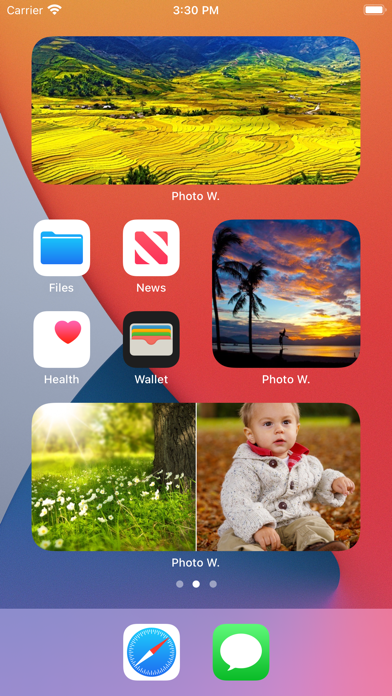
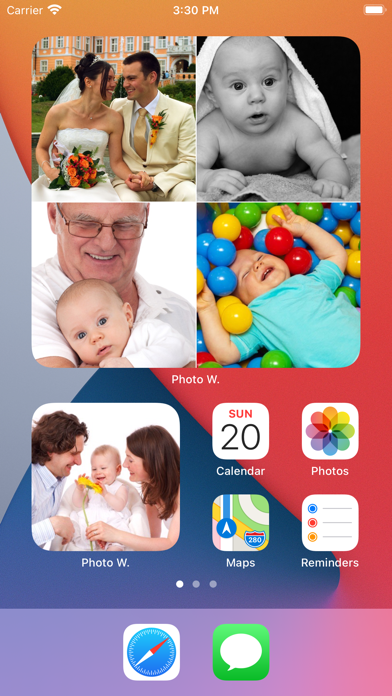
Each Photo widget allows to view one or more photos from the photo library of your device.
This is the quickest access to the favorite photos of your beloved family and friends.
Add from 1 to 6 photos in each widget, in order to maximize the available space.
Those photos can be viewed in fullscreen by touching them.

The application is really easy to use and is adapted to the fresh look of your device.
Dark mode of iOS13 is supported.
You can add as many widgets as you want and they will be displayed in up to 3 different lists. Those same lists will be available in the Today view and in the application (although it is possible, if you want, to hide some widgets in the Today view).
To avoid overloading the Today view, when too many widgets are displayed, an intuitive control will allow you to navigate from one widget to another.
Even if the main purpose of the app is to view the widgets in the Today view, it can also be very handy to view them directly in the application (a long press on a widget in the Today view will open it directly in the main application).

Photo Widget App Comments & Reviews

Photo Widget Positive Reviews

For a paid app, not quite 5 stars.Great app, works well, but, feels more complicated than it is, or, its is more complicated and a tutorial needs to be accessible. Also, if the “PW” logo was superimposed in the corner of the image instead of saying “photo w.” under neath, that would look a lot more pleasing esthetically..Version: 5.0.5

Pretty much perfectThis app is exactly what I was looking for and is totally worth the price. I’m even more impressed that you can do photo grids and they always come out perfectly. Having pictures on my Home Screen just gives my phone that true custom feel. My only wish though is that I could name each photo array in the app so when I’m looking for the correct one in the widget editing section I can just quickly look for the name I chose and then apply it instead of seeing Photo 1 (List 1) etc. Other than that there is nothing else I could ask for. This is definitely one of my favorite iOS 14 compatible apps..Version: 5.0.1

Display your own content quickly and easilyAs one who almost NEVER makes reviews of things I couldn’t avoid telling you how great this app is! If you like to have single screen visuals of many things you want to be fast to pull up on your device this is the app for you! Also this app works well with widgets to display any selected content on your Home Screen! It’s a must have!.Version: 5.3

Like it. Hoping for new features.I love the quick access to fav photos. Please add ability to share the pick once I tap on it. I would also like ability to swipe through photos in the related set and see other sets of photos. Thanks!!.Version: 4.2.2

Nice app, but missing one key feature.I like the widget. It has a lot of flexibility. Pictures fit nicely into home screen. Only missing feature is a slideshow option. With slideshow I'd give it a 5 star rating..Version: 1.0

It’s okayI like that you are able to put your photo on display in your phone, however I would like it if my pictures would go on the Home Screen instead of just today’s view..Version: 4.2.2

It’s great but...I like that I can have different widgets with different images on my Home Screen however I wish they could shuffle through the pictures I have in each of the lists.Version: 5.0

I meanIt could be better, the pictures are not that high quality like I would like them to be.Version: 5.0

HelpGood concept but how do u add the extension manually? I’ve done the plus thing but the app doesn’t show up when I scroll for it..Version: 4.2.2

Love itI love it works great for what I wanted!.Version: 5.3

Photo widgetIts awesome all I have to say.Version: 5.0

How do I go to today’s view?I don’t know how to use it.Version: 4.2.2

TravelDru.Version: 5.0.2

Defections aren’t clear.How do i add my second widget it only allows me to add one photo.Version: 5.0.1

🙏wowGood.Version: 4.2.2

LU Km I.Version: 4.0.2

Absolutely absolutely love it 😃😃❤️❤️😃😃I have been waiting for so long to finally be able to display my photos in the notification Center, as a widgets. This is one of the best widgets and apps I've ever bought. MI recommend it to everybody it's truly amazing!!!😃😃❤️❤️😃😃 I would like to add and ask for developers if you could put in a slideshow capability that would make this app even better thank you. 😃😃😃😃😃❤️❤️❤️❤️❤️😃😃😃😃😃.Version: 2.0

5 StarsApp does exactly what it says it does. Consistent updates and interacts perfect with stock Calendar app. Great consistent work mate!.Version: 2.0

Love it!Great job! Works well, great options. App is very well done. Love it! Thank you for this app..Version: 3.0

So grateful.Thank you. Inexplicably insurmountable unwavering grace..Version: 3.0

Awesome but....A pin lock for the app would make this 5 Star in my humble opinion. Viewing the pictures as "gifs" would shoot this beyond a 5 Star rating. ;-).Version: 3.0

Option NEEDED!The ability to resize image.Version: 5.2

Lanalugirl13Idk how to work the app?.Version: 4.2.2

Free International Money Transfer 💸Enjoy high maximum transfers into more than 20 currencies while saving up to 90% over local banks! The cheap, fast way to send money abroad. Free transfer up to 500 USD!AdvertorialVersion: 6.2


What do you think Photo Widget ios app? Can you share your thoughts and app experiences with other peoples?

Please wait! Facebook comments loading...

Photo Widget iPhone Images
  • Photo Widget iPhone image 1
  • Photo Widget iPhone image 2
  • Photo Widget iPhone image 3
  • Photo Widget iPhone image 4