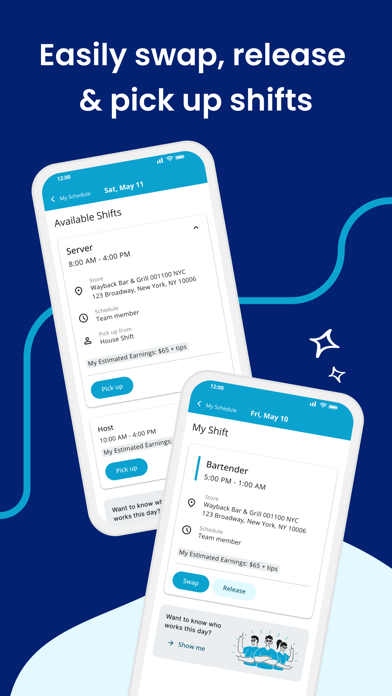
Check schedules and send text or email alerts to notify staff about the schedule or other important messages. Team members can swap, pick-up or release shifts with one click. Schedules and the roster automatically update with any manager-approved changes.
NOTE: The HS Team application REQUIRES a valid HS Team user account through your employer.
HS Team App App Comments & Reviews
POSITIVE REVIEWS
NEGATIVE REVIEWS
HS Team App Positive Reviews
Super helpful app with one issueI work at Chick-fil-a and we use this app for scheduling and it’s super great and fairly easy to use! But the one issue I have with this app, idk if others have this issue, but I have gotten a new number since I started working at cfa, and the app won’t update my new number. I’m tried it in both my phone and my laptop, and I’ve tried deleting the app then re-downloading it, but my number still won’t update..LJoyRiceVersion: 4.243.0
Good- butI’ve been using this app ever since I started working, which isn’t to long ago. I work at chick fil a and it’s been the best experience so far! This app is what I use to check my schedule and ask of time etc. this app has some problems but I didn’t think to much of it because I could easily restart the page. I’ve been trying to restart the page since idk when this morning because I need to see my schedule for this week and the next week because I might have plans. It’s honestly so annoying when it takes forever to load and I’m just waiting for something to happen. I know what time I work today tmmr and the next.
I don’t now if it’s my phone or the app being slow but I’ve tried restarting my phone, turning my cellar data on n off and I’m gonna try to use wifi to see if it will work..Mags4596Version: 4.194.0
Bug/Problem SpottedI’ve been using this app for work and for the most part it’s been really good and reliable but today I’ve been trying to log in for 5 hours and it’s acting like it’s loading and then timing out and now it’s loading in straight to some kind of settings home page and won’t let me get out of it. When I tap on any of the options it will either load and say my account has no name/number/email, etc for profile and everything else acts like it’s loading for a minute and then tells me I don’t have a connection..Hale774Version: 4.202.0
Great app, but one issue.It’s awesome and easy to use and all that great stuff, never had an issue till now. Ever since Apple updated the phones to “Light” and “Dark” modes, the dark mode steering was changed and then this app was updated to accommodate that. However, in doing so, the dark mode on this app makes it nearly impossible to see the “My Schedule” page and the shifts that show up on there, because of the color scheme. Please fix this so I can actually see my shifts, thank you. 👍.The Tophat ManVersion: 4.118.0
Small textThe app is fine for what it does but the font size used is very small. It doesn’t resize according to system font settings and appears to have no app setting either.
The app updates my calendar but adds to my main calendar. It appears to have no way to use a different calendar. Maybe it could publish a subscription calendar which would let me record shifts in a separate calendar and even share that subscription with family and friends so they could see my schedule..Joe EgoVersion: 5.0.0
Great app but one issueI am TRYING to change my availability and it keeps saying bad request 400. i told my manager countless of times how it never lets me change my availability and she’s not responding to me in time. i have to get this done tonight otherwise i’m going to have to be available all day, which i’m not. i only work 4:30-10:30 pm. can you please do something to fix this bug? it’s been bothering me so much. i cant do anything to fix it. i even try it online and it still won’t help. like what is going on.?.JJForLife11Version: 4.219.0
Goooood for jobI worked at Arby’s for a couple months and I love this app. I’ve worked at multiple jobs over the years and by far the best scheduling app of their the only thing I would say to critique it is a dark mode instead of every time you open it in the morning let’s see if they get up at 6 AM well and you open the freaking bright as a freaking sun!!!! but overall great app.6754emcVersion: 4.237.0
It works alrightI used this app when I worked for Whataburger for 2 years. It’s how we got our schedules, obviously. But you couldn’t use the time off requests option because it didn’t go through to the managers. Often it would log us out. If you don’t have an internet connection, then you don’t get to see your schedule. At least it has a dark mode so it don’t burn your eyes when your bosses update your schedule at 2am and you need to see how they modified your schedule (again)..SunnyforpredidentyesletsgoVersion: 4.198.1
Layout and LoadingThe layout is really nice and easy to navigate. Recently, however, the app won’t load sometimes. This is incredibly inconvenient because I will try to check my schedule and it won’t load. This is the only way I can look at my schedule. So, if the app won’t load I won’t have a clue when I work and there is no accessibility for me. It used to work really well, but with the updates the issue has been getting WORSE. Please update the app to have it load quickly again, thank you..Drakert468Version: 4.106.1
Could use a theme update for iPhone.The app seems pretty decent and well put together. Recently theres been an iPhone update to enable dark mode and this is the only app that seems to not work well with the new iPhone update. It’s extremely hard to see the text when in the app. I have to go into my phone settings and change my entire display to be able to read the text in the app. Hope an update can be made to support the new iPhone display settings. Otherwise a good app overall..JayAcapellaVersion: 4.118.0
Bug SpottedI have an iPhone….maybe that’s the issue but for the past year, whenever I open the app while it’s synced to my calendar it will I’ll double up on what’s already been synced to my calendar and I get twice as many notifications an hour ahead of time. It’s really annoying. I hope the next update will fix this.HeyAla92Version: 4.221.0
Breaks on OccasionNot perfect but is great when it works. I’ve been using this app for over 2 years now and hasn’t given me a single problem until now. Sometimes I can get past the loading screen and have to hard reset for it to load. Pretty good app overall and it’s nice that my multiple employers all use it..S.P. 1984Version: 4.191.0
Good app for workEver since the latest update, it takes forever to load my schedule. Takes forever to load the “How would you rate your shift?” Then finally after that it takes even longer to load schedule, If at all. Wifi not the issue.You owe me $2Version: 4.219.0
App needs fixedI’ve been using this app for the last 3 months. This month I’ve been having a lot of issues logging in. It continues to say my device is not compatible and to update to version that is compatible but when I try it won’t give me the option to download new version. I’ve been having to use the website instead of app which is frustrating to me..... BellaVersion: 4.203.0
App updateV5.0 has been out for one day and i already dislike it. i can not even see who is working on days i’m not scheduled without going to the roster and waiting forever for it to load. i used to be able to see a full week and a half most of the time but now i can only see like three-fourths of a week. i don’t hate the design but just make it the same size it used to be and reinstate the previous functionality or add an option to revert to the previous design and i will change my opinion.
edit: apparently the change has been reverted or something so for now the above is invalid.EpicSwordFight101Version: 5.0.0
Very useful to keep track of my scheduleThe app is very useful to keep track of my schedule, but I also love that I am able to see who else is working that day. The one thing I wish you would add is a total for the hours scheduled and also a total for the week to see house many I am scheduled for.WoodP88Version: 4.65.0
Almost thereI’ve been using HotSchedules for a while. It’s worked for previous jobs and now it’s not. I use the same log in I use on the website and it’s behind.I mean it’s an error message. Plus there should be an outlook calendar addition to this. That way my schedule is not all over the place..Tyrell McCalmonVersion: 4.240.0
Not able to use my appI had this app for a previous job an my new job uses the same app so I created my account for my new job upon being hiring an it’s telling me my credentials are not eligible… I have to use the browser to get my schedule every week… someone help me.UrmomanamehereVersion: 4.200.0
No longer loadingThe app has been great but recently nothing seems to be loading. Other people on my team with iPhones have been having the same problem so I’m sure it’s not a network issue. Beyond that this has worked great in the past..R@nd0m_UserVersion: 4.221.0
Dark Mode Not Working!!While I appreciate HotSchedules making adjustments to have dark mode available, this app isn’t ready for it, yet. The text stays black and doesn’t shift to white, so you have to manually change the display to light mode in your iPhone. I’m hoping a fix comes soon.
Also, the load time has been slow for quite some time, and I would love to see that get resolved, as well, in the future..Relient eggsVersion: 4.118.0
Great AppThis is a fantastic scheduling app, it totally gets the job done! Two things I would love to see implemented. Schedule notifications (when a new schedule is posted, or what my hours are for the upcoming day) and the ability to see all my hours totaled at the top of the week. Awesome work on all fronts. Thanks!.LegoKivaVersion: 4.81.0
Please fix the calendar sync!!!One of the most useful things is the calendar sync so everyone in my family knows when i work. I allowed hs to have full access to my calendar, however it keeps telling me i need to give it permission and will not turn on..Pheonixfire260Version: 4.230.0
One problemThis app is user-friendly and very helpful, but I’ve had a couple times where I am trying to pick up a shift, but because I’ve asked for time off it won’t even let me see the shifts and even if the time off isn’t scheduled for that day it won’t let me see any released shifts at all..Faulty07Version: 4.151.0
Invalid certificateI am googling to figure out why I am not able to look at my schedule after I just looked at it 30 minutes ago. It says my certificate is invalid when I have already reset my phone along with restarting the app multiple times. Any solutions cause the date and time are correct on my phone.SauceMagnetVersion: 5.5.0
Calendar issueI have been using this app for a year now and all of a sudden it doesn’t want to sync up with my calendar for my family. They have been planning stuff around the times I work because ever since the recent update on this app, it doesn’t show up on either of our calendars..Yuh masterVersion: 4.231.0
Good but one quick questionI find HS to be an effective system of schedule dispersion. However, I’ve noticed lately that people let go of shifts and I KNOW they let go of it but it doesn’t appear on my app. Is my app specifically broken? Or is it a widespread issue? Can you guys maybe investigate this and fix it in the next patch?.SFM6Geo$Version: 4.110.0
Good app but unreliableHalf of the time when I try to get on the app it takes forever load and just doesn’t show me anything. The app works fine and makes it easy to add/drop shifts, change availability, etc, however when I want to look at the app it’s always down and it’s not just me..Bellablue403Version: 4.219.0
Free International Money Transfer 💸Enjoy high maximum transfers into more than 20 currencies while saving up to 90% over local banks! The cheap, fast way to send money abroad. Free transfer up to 500 USD!AdvertorialVersion: 5.25.0
HS Team App Negative Reviews
Its great... when it worksThis app is great in the number of features it offers and the simple design. I work at Chick-fil-A and it is the scheduling app we use to manage everything. However, there are problems with its performance. Its loading times can be very long, to the point where it will time out you have to restart the app. Sometimes, even when you restart the app it won’t work and you have to wait 20-30 minutes until it comes back. Second, the messaging system is unclear whether a message is sent. I will write a message out and hit send, and the send button will go dark and it will just sit there. No confirmation, just a static page. If you wait 30 seconds, it goes away. However, it is unclear whether the message sends if you don’t wait until it vanishes automatically. Lastly, the shift pickup system is buggy. A few weeks ago, I was trying to pick up a shift for a Saturday (and it was a Monday) and it told me there was an error. I kept trying to pick it up throughout the week and it never let me pick it up. I tried to pick another one up that week too, and again, I was never able to. This app would be awesome if it were more reliable..Llama_Man32Version: 4.160.0
Not a good layoutThe app is just not easy to navigate. I believe this app could be so much more organized. I find it unnecessary to have to first click on the calendar icon on top, and then each day of the week over and over just to set up your availability. I think having a pop-up or a drop-down box after simply clicking on each day of the week, with the time frame you are able to work, would be much easier and faster to set up.
Even on the website, the availability calendar is set up almost like an excel sheet when it could just be a one-click drop-down box of the hours you’d want to work.
The message feature on the app doesn’t give me notifications of a new message so I often read them late (doesn’t go through push-notification), and new messages should be in bold print to differentiate between old/new messages. Simple features make a huge difference..Mar3736373Version: 4.94.0
Dark Mode UpdateI use this app every day for my job and it’s been such a huge help in my life.
That being said, the new dark mode update has turned a useful tool into the most inconvenient app on my phone. I understand that most apps are switching to dark mode to comply with the new IOS update, but the execution of dark mode in the latest update of this app is horrible. You can’t see messages, times, or days, which makes seeing my schedule and communicating with my coworkers more difficult than necessary. Please, either edit the dark mode compatibility to make the app usable again, or ditch it completely and go back to the old format. There is absolutely no reason why I should have to adjust my phone’s entire display to see an app.
I love this app and all the help it provides, so I am extremely disappointed at this update and the problems it’s caused..Egghead365Version: 4.118.0
UNDO THE UPDATE!!I’ve loved hot schedules for years now. it’s been extremely convenient to see schedules and who i’m working with. this new lay out over the whole app is terrible. makes the app way less quick and easy. if i’m clicking on my shift i don’t want to click more buttons to she who i’m working with, it should already be visible. but no, you added basically a random buffer to seeing that. which is extremely pointless and frustrating. the old lay out while it was oddly compact it had better flow and was much more enticing to use. not happy with new changes in the slightest..Veil_03Version: 5.5.2
Poor PerformanceAnything from signing in to opening into the main schedule, and even looking at messages takes minutes at a time to go through. Tapping on notifications while outside the app always takes an extra minute or two. This is has to be due to a poor backend structure as this shouldn’t be happening for a simple scheduling/networking app.
Disclaimer: I’m using the newest iPhone (14 Pro Max) and have tried several fast/stable internet connections. All relevant troubleshooting steps still lead to waiting 30 seconds minimum for even basic app interactions..Austin AlacrityVersion: 4.219.0
TerribleApp loads schedules properly maybe twice a day. The rest of the time the screen times out and tells you to try again. Then the screen times out and tells you to try again. Then the screen times out and tells you to try again. I could go on but I think you get my point. How this app has 4.5 stars is beyond me. If you’re making schedules and using an app use literally anything else because this thing is just an exercise is frustration. Now if you’ll excuse me I have to call my manager and see what time I work because this thing sure isn’t going to tell me..8BitIsauroVersion: 4.219.0
Incompatible with Dark ModeWith the new IPhone update a lot of apps are either staying the exact same or moving along and adapting to dark mode, however this app is unreadable when dark mode is on. I don’t know if it’s an apple thing or if you guys can do something to fix it, but the color of the text stays the exact same and parts of the background turn black, making the app useless unless you go to settings and switch off dark mode. It’s more of a PITA than anything else, but it would be cool if you guys could fix it. Definitely would get a 5 star review for that.Chrisnicholson96Version: 4.118.0
Will not work periodIt works perfectly fine on any browser even on the same device and even worked once on the app but besides that it says my login information ‘does not meet the credentials for this application’ which is ridiculous since it obviously does work 😭 even my manager looked at me funny because of how ridiculous the error was when they’ve been using the program for YEARS.. I’ve seen others complaining about recent updates and it’s such a letdown because it looks like a super useful tool and it’s mandatory for my work.. oh well :/.RedHeadGamerGirlVersion: 4.209.0
I liked Shift Agent betterOn HS you are unable to see the whole team you are working with. If you are scheduled front of house, you can't always see who is back of house or in leadership. You also only have the options of being available or unavailable. On Shift Agent you were able to say when you preferred to work or preferred not to work even if you were available.
Also, the interface just isn't pretty. It's shallow but as a consumer, it matters.
It still gets the job done and works. But these are ways it could be better..Mir_CFAuserVersion: 4.66.0
Login issuesJust found out you have to click the mypass login and then the labor login links in order to ACTUALLY log in otherwise it says your credentials are not correct, but when i login it just gives me a screen that says “//walk me stuff,” whatever the hell that means. and i’ve got one question; you guys didn’t hire anyone with any experience at all in app development when y’all were making this app, didn’t you? my mother could do better than this. this app is counterintuitive and you’re better off just adding a shortcut from the home screen to the website..Annoyed working manVersion: 4.122.1
Hate everything hot schedule relatedMuch to my dismay my boss uses hot schedules for work. I hate having to open Google and search hot schedule every time I want to see when I work. I thought this app would help make it easier (it doesn't).no I do not want to pay for the $2.99 version just want to look at my schedule. I shouldn't have to pay for it. hot schedules could make this very easy for employees but it doesn't it's trash. the company is trying to make money but take it from my employer it's not the employees I'm just trying to work my dude..JKunicornsVersion: 4.205.0
Will not loadI had to get this app for my job but I cannot stand it. Hotschedules is the only place where I get my work schedule but it will not load! I have had consistent issues with long load times and I just spent 10 minutes trying to get the app to load but not once did it. Heck, it just gives up loading and leaves me on a blank screen. I’m only giving two stars because it’s doing its job right, I just can’t even get to that part!.GrumpyDumplingVersion: 4.219.0
This needs to be fixedEvery time the app updates it logs me out and then when I try to log in it, it says my info is wrong and it won’t let me but I know I’m entering the correct info because I’m logging into my job website fine. I’ve changed my password and tried logging in again and it’s still not letting me and now I have no clue what my work schedule is… the app shouldn’t log users out after an update, this is very inconvenient..Auriyana#1Version: 4.178.0
Calendar Syncing IssueHonestly, this app is not very great, but it works for me. There’s only one very annoying issue that I have with it (as of now lol): So I synced my work schedule with my Apple Calendar, however, there’s like multiple listings of the same shift on my Apple Calendar. So like it’s there, it’s syncing, but it’s putting it there multiple times, which is pretty annoying. I don’t know exactly what’s causing this, maybe every time I open the app it re-syncs? That’s my biggest issue at this moment..HQutie😜Version: 4.134.0
App installation update by developerI have an iPhone 5 and have had this app for six months and it has worked amazing. I love the app! But about a month ago the app stopped updating and I could not update in the App Store but it still allowed me to access the app. But a week ago it refused to let me into the app and said I had an authentication failure so I uninstalled it and tried to reinstall it and now it won’t let me install the app back on my phone. So I was hoping to get an answer or find a way to fix it. Thank you for any help. I hope this can be resolved..Cathy in ARVersion: 4.85.1
New lookI get the idea behind making the look of the app interface more modern, but the simplicity of seeing everything laid out is now ruined. And as a leader who has to see the entire roster of people working and house shifts in a day, it is difficult now to see who’s working, not working, what available shifts there are, and what house shifts are available without going to 3 different pages on the app. Not a fan.AnonymousWalkerVersion: 5.4.0
This app has the predictability and temperament of a printer.It worked fine whenever you don’t need it, but the absolute second you need to know what your schedule is as fast as possible, it takes forever to load and won’t let you see anything for hours.
I am convinced this app can sense urgency and takes every step to ensure the worst time possible in that situation..MgenchlsVersion: 4.219.0
Doesn’t work half the timeThis app will not load half the time , hoping my job changes to a different app if it doesn’t get fixed
Having to screenshot my schedule or log onto the website just to see what days I work when it decides it’s not going to load
Technology is supposed to make things easier, this app seems to make things harder.TruthfulTrudyVersion: 4.220.0
An App that barely functionsMore often than not, when one tries to open the app, it will stay stuck on the loading screen (a rotating circular object will appear). When one is finally able to access the app, the load times are really slow and the app, as a whole, is really buggy. The developers should really take a look at this issue because the app is practically unusable most of the time..FixYourAppHSTeamsVersion: 4.217.0
Bugs. Laggy. Wont let me in the app.This app genuinely annoys me. I try to log in everyday for work and it just doesn't freaking load anymore. I checked for an update.. NO UPDATE!! I am not even being a Karen I am just so freaking annoyed. I love my job, but when I want to make sure i go in at the right time and i’m too early then i'm in the way waiting to clock in, or I am late. You know how annoying it is to be late? V E R Y..Annajo2745Version: 4.219.0
Suspended for no reasonI’ve been suspended for over a week now. My managers and directors have no idea why this has happened and has emailed hotschedules and all they got was to reset my password. It wouldn’t work so I tried reinstalling the app. Nothing. I can’t see my schedule in the app, cant request off through the app, can’t pickup or drop shifts or do anything associated with the app. This makes it very hard for my team leaders to keep track of what’s going on and this needs to be fixed..ChickfilAemployeeVersion: 4.105.1
Duplicate shifts on google calendarI have the app synced to my google calendar, however every time I open this app it re-adds all my shifts to my google calendar, even though non of my shifts have been changed since they were published. Since I have opened my app like 5 time this week I now have 5 shifts today all for the same exact time on my Google calendar..SG3335Version: 4.204.0
Fix itThe app worked fine at first. I could see my schedule and it let me know when a new schedule was posted or if I had a message.
The new update now I have to log in like it’s a computer and than it said I’m not in the system. I’ve been using it for like 3 weeks. What’s going on? I uninstalled and installed again said the same thing. I looked at the other app where you had to pay. It’s doing the same thing.
Fix it. This is getting really annoying..Angelinababy232123Version: 4.101.2
Payoneer 💰Payoneer is an online payment platform that lets you transfer money from any corner of the world! A best and must have payment service for every blogger, traveler, freelancer, affiliate marketer, consultant, virtual assistant, business person, online sellers, and receivers. Earn $25 for free by joining Payoneer. Sign Up Now!AdvertorialVersion: 5.25.0
What do you think HS Team App ios app? Can you share your thoughts and app experiences with other peoples?
 HotSchedules