DJI Virtual Flight Customer ServiceDJI

DJI Virtual Flight Customer Service

  1. DJI Virtual Flight Customer Service
  2. DJI Virtual Flight App Comments & Reviews (2026)
  3. DJI Virtual Flight iPhone Images
  4. DJI Virtual Flight iPad Images

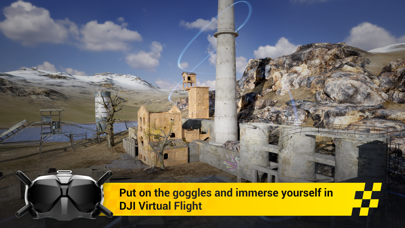
Take off and feel the blood pumping through your veins. Introducing DJI Virtual Flight, a mobile app designed by the DJI flight simulator team for practising FPV flying techniques. With DJI Virtual Flight, you can double the fun by learning through practice. Put on the goggles, grab your remote controller, and launch DJI Virtual Flight to learn flashy FPV freestyle tricks. Experience flying in the comfort of your own home.

Product Highlights
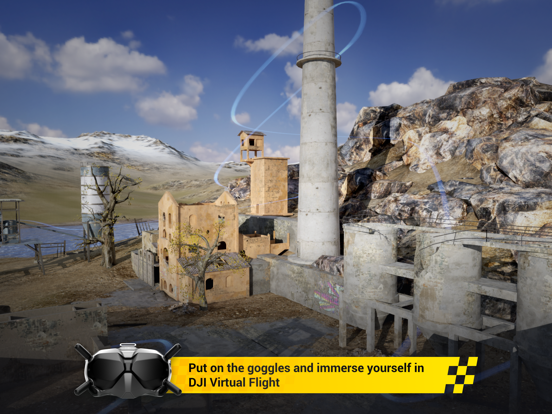
- Put on the goggles and immerse yourself in DJI Virtual Flight
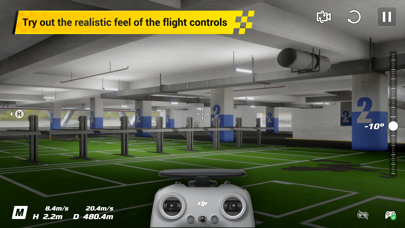
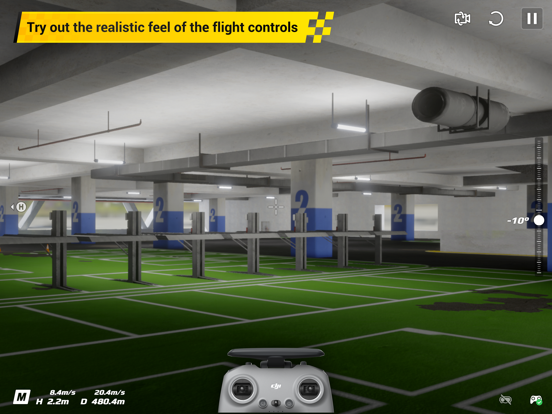
- Try out the realistic feel of the flight controls
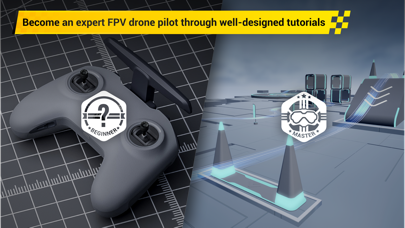
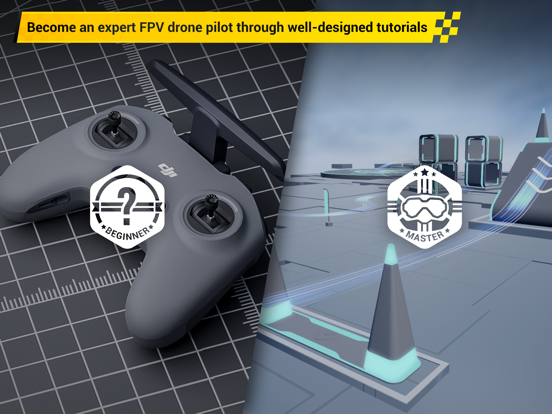
- Become an expert FPV drone pilot through well-designed tutorials
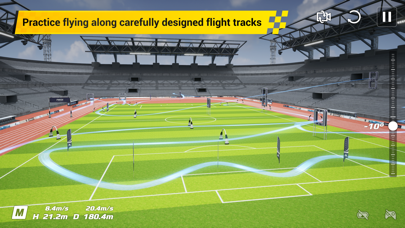
- Practice flying along carefully designed flight tracks
- Multiple lifelike locations with vivid details

Compatible DJI Devices: DJI FPV Goggles V2, DJI FPV Remote Controller 2, DJI FPV Motion Controller
Recommended Systems: iOS 12.0 or later versions
Recommanded Devices:
iPhone:
iPhone 8, iPhone 8 Plus, iPhone X, iPhone XR, iPhone XS, iPhone XS Max, iPhone SE 2, iPhone 11, iPhone 11 Pro, iPhone 11 Pro Max, iPhone 12, iPhone 12 mini, iPhone 12 Pro, iPhone 12 Pro Max
iPad:
iPad 7th Generation, iPad 8th Generation, iPad Air 3, iPad Air 4, iPad pro 2ed, iPad pro 3rd, iPad pro 4th, iPad pro 1st 10.5'', iPad pro 1st 11'', iPad Pro 2ed 11''

DJI Virtual Flight App Comments & Reviews

DJI Virtual Flight Positive Reviews

Not bad for the priceOverall this app is great for its intended purpose, but it’s still a simulation so it may not be exactly what the real life experience is like. With that this is a great tool to get your muscle memory started, learning how to do coordinated turns and such. As for the cons, this version every once and a while will just stop. Not the whole program, just the drone. It’s like it hits something mid-air, but there is nothing nearby. The drone feels a little “floaty” sometimes. Also it seems to fly slow. In real life I fly with ~20 degree camera angle, but in the simulator I run ~35 to get the same speed. Overall I highly recommend this for anyone starting to fly their DJI FPV before going in manual in real life..Version: 1.2.0

Good start for fpv but…….I’ve had DJI GPS based drones for a few years. Although fun and allowed me to take my eyes to the sky much cheaper compared to fixed wing, I’ve always felt a rush watching FPV videos. I’ve really wanted to dive into FPV for years but didn’t know where to start. The DJI FPV kit has helped me get the goggles strapped on. The app itself has potential but I feel the feedback of the controls are probably laggy compared to flying the fpv in real life. I also find the goggles freezing every 5-10mins and have to turn them off and back on and restart the app. The app is still running on my iPhone 12 Pro Max, but froze on the goggles. I’m trying to use this as a tool to hone in on some experience before I even think about acro in real life, but the constant goggle crash is leaving me to consider alternate simulator options. I own 5 drones and every drone is DJI. It’s the only drone brand I’ve bought. I feel I’ve showed my commitment to DJI so please show your commitment to your supporters/purchasers and fix the app..Version: 1.3.1

DJI simWould be a great sim but is simply unusable. I’m so glad i did not use this to learn flying or I would have learned the wrong way. The “mode 2” controls are almost right but the left stick is not supposed control the pitch of the aircraft. You would think that DJI would know what mode 2 is. It’s ridiculous to me. Had me flying like I had never flown a day in my life. I’m sure I could learn to fly this way but then my muscle memory would be wayyyy out of wack. DJI the left stick in Mode 2 is supposed to control throttle and the direction the quad is facing. Not throttle and the direction the quad is leaning which is still backwards anyways. Left leans right and right leans left. This makes the app unusable for me and that is a shame. Well there you have it folks. Dji can’t say I didn’t tell them. Keep in mind I am using only my iPad..Version: 1.2.0

Mode Button doesn’t work for Motion controllerI just got the Avata drone and was happy to see this simulator so that I could practice before taking my drone out. Unfortunately, the simulator doesn’t register the Mode button presses so I can’t finish the controller overview and I can’t get a time better than 22 seconds on the factory time trial because I can’t switch to sport mode. Also the time trials suggest switching to manual mode which the motion controller doesn’t even support so the base speed for the stadium time trial isn’t even possible. Also this together means that I can’t fully make use of the simulator since many of the tracks are still locked and impossible to unlock since the mode button doesn’t work. I’m hoping they will release a software update soon..Version: 1.4.1

Controller not workingRE: UPDATING worked! I wish the Virtual Flight app told me that though. 4/5 until they add a update controller pop up to the VR Flight app. I can’t get through basic Training because my joysticks won’t do anything. It shows both my googles and controller are connected, but when it’s showing me how to fly up nothing happens. I have tried every Controller configuration (1,2&3) still no luck. I just bought this drone yesterday and I wanted to put a couple hours on the VR before my first real flight please help! Actually the joysticks don’t work in any menu but the other buttons do! Why?!?.Version: 1.1.0

Amazing and useful simulationThis is more difficult than flying the actual drone. For example, if you let go of a drone’s controls it immediately stops and holds its position. The virtual drone continues sliding in the direction of the last input for a brief moment. As a commercial pilot, I recognize this anomaly from spending hours inside aircraft simulators. This difference is actually very beneficial because, if you can master the simulator, the actual aircraft seems easy. This is an extraordinary training device if you actually use a drone and a lot of fun if you’re considering getting one..Version: 1.4.3

Stars?I really enjoy the app. And flying virtually in the app. But it seems a bit weird to fly the first 2 pre-unlocked time trial maps when you first get the app. The you gain what I can assume are propellers as you master them, but then need Stars to unlock other time trials?! Where are the stars? I have enough propellers to unlock more time trials but I need Stars not Props. Is this just broken? Or am I missing something? Thanks for your time! -Dan.Version: 1.1.0

MUST HAVE FPV GOGGLESThis app is only for FPV drone users and is not compatible with the mavic pro. I hoped that it would help me become more comfortable using the remote control in a virtual setting instead of learning by flying the actual aircraft. Due to regulations, FPV isn’t an option for me flying alone- I have to keep it in line of sight or have a spotter while I fly, so I did not buy the FPV goggles for my drone. Unfortunately, this app requires the use of goggles to get past a certain point so I was never actually able to use the app. This is a good idea though- I wish that it would accommodate older remotes and drones and that I didn’t have to buy new equipment to practice flying virtually..Version: 1.1.0

JimmyI love playing this game on drives on any time it’s a great experience if you’re a beginner or professional flyer it has two different drone options the dji avata and dji fpv there is two or three modes depending on which map you choose timed arcade and free flight they are all great and there are three modes for the drone s m and n but I don’t know what they stand for most of the bad reviews are because they bought a drone and thought this would fly there real life drone you just fly one on your phone and that’s all I have to say.⭐️⭐️⭐️⭐️⭐️.Version: 1.4.2

It’s not badI have been seeing reviews on the app that talk about freezing and input lag. I have personally never experienced any of this except for once, and it was because I was not using the lighting cable. The app runs fine on a IPhone 13 Pro Max with or without the goggles. It is also a good app for some quick fun because I can use it anywhere on the touch screen and have the same controls as the headset. Great app and software even if you don’t own a DJI FPV you should still try it out!.Version: 1.4.1

YOLOI was hesitant to take the plunge on the DJI FPV system because of cost and durability concerns but I’ve fallen in love with this beast for its overall versatility and power. I have a number of other quads I can bando bash all day. I won’t be doing that with this qwad. Turns out this thing is just fun easy and a pleasure to fly. The range is a whole new dimension for me and I’m still blown away by the clarity and quality of the v2 goggles. That combined with a high end DJI camera drone that happens to do ACRO? Yeah I’m glad I pulled the trigger. Haven’t crashed yet. So far am having a ball!.Version: 1.2.0

Decent FPV TrainerIt’s great for training. It definitely helps to get you ready for full manual mode and it feels somewhat realistic. It is glitchy and has freezes between goggle and phone. There are difficulties toggling between time trial and free flight. The landing is not as realistic as it could be in m mode. One thing to definitely change aside from the above glitches would be an ability to not have to do a basic transmitter tutorial every time you want to practice. A great start to opening the FPV world to more people. I hope DJI continue to perfect this simulator!.Version: 1.3.2

Goggles bugI have been using this to learn to fly for a long time now. But now every time i put the goggles on it bugs out for some reason. It shows a bunch of green lines and sometimes you can see good. Tried using a different cable but it still doesn’t work. I would love to see a class where it shows you to do small little tricks and 360 spins in the air too.Version: 1.2.0

Good for Learning But…I have the goggles 2 which work flawlessly with this app. I have had no issues so far. The only thing I can say as a negative is that flying in the simulator is not quite a 1:1 for flying in real life. It’s good. But even if you’re doing pretty well in the simulator, you may still end up crashing several times in real life..Version: 1.4.2

Great idea but issues with iOS 15.4Just bought a DJI FPV drone and thought I’d practice before going out to fly. Unfortunately as others have mentioned there seems to be a connectivity issue with the latest release of iOS 15.4 that results in a scrambled DJI goggle display and repeated disconnects. So you’re left to either use the touchscreen joysticks 🙁 or attempt to fly the drone without any prior practice and hope for the best 😐. Hope DJI can provide an update soon 🤞.Version: 1.2.0

Broken after iOS 16.4.1This was working great, but when all of my devices auto upgraded to iOS 16.4.1, now the app is grainy and blocky in the Goggles v2, when attempting to fly. The iPad and iPhone screens look fine, it is just the interface to goggles. It looks like it went full on compression mode like I’m playing a game from 1995. Please update DJI Virtual Flight to be compatible with Apple products again. No, I do not have another “not upgraded” apple device..Version: 1.4.2

Awesome way to get a handle on manual flightThis works extremely well and I have loved using it. I let my 5 year old practice flying with the motion controller and she had a great time. I practiced enough manual flight that I am able to fly in real life because of this app. I loved being able to practice without destroying my drone. Highly recommended!.Version: 1.1.0

Great appI find that it seems to have a few glitches or maybe it’s just me and the Motion Controller. Can’t find the buttons with the googles on and I tend to hit the wrong buttons. The sound stops in the googles but it’s still recording on the screen recording. Lots of different places to fly. It will be great experience in the FPV hobby.Version: 1.4.1

PID’s and Track builderThis is an awesome app with quite a few features but the only two thing I miss is PID tuning for super fine tuning and a track builder for practising basic moves and custom practices. I hope DJI sees this and possible starts working on it then I will even start recommending this to my friends.Version: 1.1.0

Appreciate the effort!Thank you for updating this app, I really appreciate the team that is trying to fix the problems. While this most recent update did fix many bugs and issues, I still continue to have problems with iPad Pro 2021. App runs fine on iPad but FPV googles freeze mid level. Pressing “main menu” resets and makes the googles work again. Thank you again!.Version: 1.3.1

Great simI love this sim on my phone I wish I could use my tango 2 remote but it’s a great pocket flyer and even better if you have the actual fpv system so you can use the goggles. Great way to learn what manual mode is really all about . Good job on this one and it’s freeeeeee!.Version: 1.4.2

4 stars I just said five so would be at the frontI don’t know why, but I just love this Sim but I do hate that this is the only good one and I also wish they add a new maps or just made the maps look high quality.Version: 1.4.3

Goggles glitch & controller disconnectsI have no idea what is going on. But I recently tried to go in the app and continue practicing and now I can barely see from the goggles because of the glitched screen & the controller keeps disconnecting. It hasn’t happened at all before but two days ago it has. I connect to my iPhone 11 Pro. Help, thank you. -Aren.Version: 1.2.0

Good but missing some featuresIt would be nice if we could use it with our controller WITHOUT goggles. For Mavic practise scenarios..Version: 1.2.0

Yeah butIt would be nice is we can use goggles like quest 2 or quest 3.Version: 1.4.3

TWould be nice if they was more map.Version: 1.4.2

Amazing!!This app is absolutely great to learn how to fly. Increased confidence and now only comfortable looking at my screen rather than the drone..Version: 1.4.2

Needs a bit more workThis simulator is good, but to be truly amazing it needs to work with the other controllers, not just the top end gadgets.Version: 1.4.2

Rc motion 2Upcoming update that support RC motion 2 any soon ?.Version: 1.4.2

W appThis app is a w.Version: 1.4.2

Works pretty good!Add some more drones to the options please! I’m never going to buy the FPV, but it’s good practice for other drones, be even better if you could use a Mavic/Mini2/Air/Inspire..Version: 1.2.0

HiGreat product. Would love to see sport plus mode for dji fpv - allowing max speeds while still fully in control of drone. Normal Sport Sport Plus Manual Thank You.Version: 1.4.2

Thank so so much for great free simulator.I have been using this APP for 1year. It was awesome and great. I don’t get that these uncomfortable reviews. Please Never mind. You guys doing well..Version: 1.4.1

DJI Goggles 2 Freeze upGot the new goggles and after about 5 minutes of flying they completely freeze up. The app still works on the phone and everything is fine like that but goggles are non responsive. Have to reset the whole app just to get the goggles working again. App would be amazing if I could fly for more than 5 minutes at a time.Version: 1.4.1

Love the new updateThank for this update I love the fact that I dont respawn after each crash.Version: 1.3.1

Confidence in manual modeGreat app for practicing with my Dji FPV goggles and controller in manual mode before going out to the real world. Hope you can add more levels/areas in the future. Maybe a steep mountain cliff and ocean, waterfall with some forest etc..Version: 1.1.0

Choppy frame rateI couldn’t get this app to load on my iPhone so I used my 2018 iPad Pro. The frame rate for the first level is so bad it gives me a headache. The field level is fine. Second, the tutorials are confusing. Suggested direction arrows make me crash instantly when I follow the suggestions. I wish there was a better lesson or tutorial for manual mode. They don’t really talk about the logic of how the drone moves..Version: 1.2.0

Email address field too shortI am unable to login with my email address because the email field is limited to fewer characters than my email address. Looking forward to trying it out when I can type in my full email and login..Version: 1.0.0

Yes to iPad Support but Still Glitches!I have increased my rating from 1 to 3 because there is iPad support right now. There are still 2 issues left that exist on the iPad: 1. Frame rate is not 120fps but 60 2. There are odd visual artifacts when using goggles. There is image duplication and odd lag of non traditional nature. This is forcing me to fly using the iPad screen and goggles are just sitting on my desk. Please fix these 2 issues so I can fly in the sim when the weather is bad outside for the real flying..Version: 1.1.0

Amazing appSharp graphics, looks amazing screen mirrored on an Apple TV. Would be great if this would work with the DJI Mini 2 controller..Version: 1.0.0

Hard to fly on smartphone (update)If you don’t have the controller then this app is a pain to fly with touch screen. Just goes all over the place. PS4 controller works but only the joysticks. You would need to use touchscreen for other functions. If this app could be optimised for iPad to make use of better screen that be good. You can use AirPlay but it sometimes lags..Version: 1.0.0

So funThis application is so nice an fun even if we don’t have the fpv drone!!.Version: 1.0.0

Power !!Omg ! Esto es perfecto !!!😍😍.Version: 1.0.0

Free International Money Transfer 💸Enjoy high maximum transfers into more than 20 currencies while saving up to 90% over local banks! The cheap, fast way to send money abroad. Free transfer up to 500 USD!AdvertorialVersion: 1.4.3


What do you think DJI Virtual Flight ios app? Can you share your thoughts and app experiences with other peoples?

Please wait! Facebook comments loading...

DJI Virtual Flight iPhone Images
  • DJI Virtual Flight iPhone image 1
  • DJI Virtual Flight iPhone image 2
  • DJI Virtual Flight iPhone image 3
  • DJI Virtual Flight iPhone image 4
DJI Virtual Flight iPad Images
  • DJI Virtual Flight iPad image 1
  • DJI Virtual Flight iPad image 2
  • DJI Virtual Flight iPad image 3
  • DJI Virtual Flight iPad image 4