Blackmagic Design Inc
DaVinci Resolve For IPad Customer Service

- DaVinci Resolve for iPad Customer Service
- DaVinci Resolve for iPad App Comments & Reviews (2026)
- DaVinci Resolve for iPad iPad Images
DaVinci Resolve for iPad
DaVinci Resolve for iPad is the world’s only solution that combines editing and color correction in one software tool! Its elegant, modern interface is fast to learn and easy for new users, yet powerful for professionals. DaVinci Resolve lets you work faster and at a higher quality because you don’t have to learn multiple apps or switch software for different tasks. That means you can work with camera original quality images throughout the entire process. It’s like having your own post production studio in a single app! Best of all, by learning DaVinci Resolve, you’re learning how to use the exact same tools used by Hollywood professionals in high end post production studios!
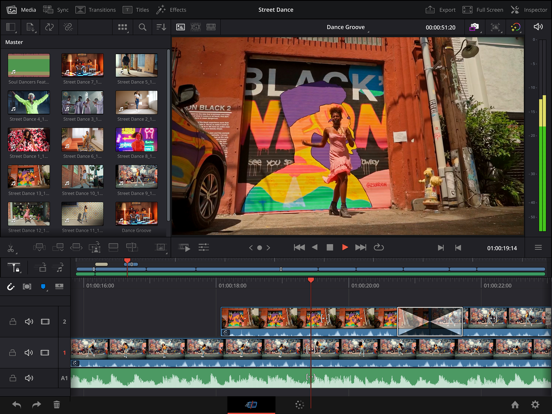
Turn work around fast using cut page editing!
The cut page is perfect for projects with tight deadlines that you have to turn around quickly. It’s also great for documentary work. The cut page has a streamlined interface that’s fast to learn and designed for speed. Features such as source tape for visual media browsing, fast review, and smart editing tools help you work faster than ever. The sync bin and source overwrite tools are the fastest way to edit multi-cam programs, with easy to create perfectly synchronized cut aways! With DaVinci Resolve you’ll spend more time editing and less time hunting for shots.
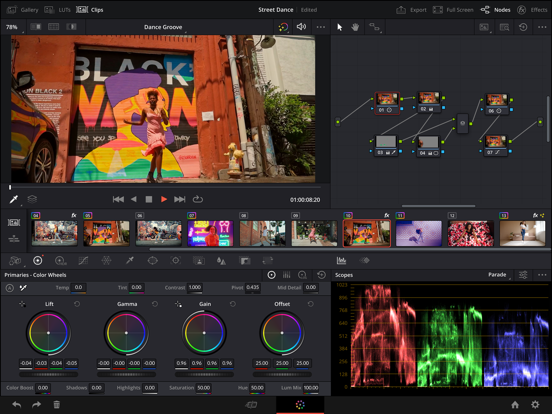
Hollywood’s favorite color corrector!
The DaVinci Resolve for iPad color page is Hollywood’s most advanced color corrector and has been used to color and finish more high end feature films and television shows than any other system! It’s also approachable with features designed to make it easier for new users to get great results while they continue to learn the advanced tools. For example, primary control sliders will be familiar to anyone who’s used image editing software, making it easy to adjust contrast, temperature, mid-tone detail, saturation and more. The color page has an incredible range of primary and secondary color grading features including PowerWindows™, qualifiers, 3D trackers, advanced HDR grading tools and more!
Blackmagic Cloud Collaboration
DaVinci Resolve for iPad supports the revolutionary Blackmagic Cloud, a whole new way of collaborating using cloud based workflows. Simply create a Blackmagic Cloud ID and set up a project library for your project. You can assign any number of collaborators to a project, using Blackmagic Cloud to share projects. Multiple people can work on the same timeline! When changes are made, you can see and accept them, changes are only applied when you accept updates. A single click can relink files, update timelines, or view changes. Built in timeline compare tools let you merge changes into a master timeline so others can continue with edits.
AI Tools for Creativity with Studio In-App-Purchase
DaVinci Resolve features cutting edge AI processing powered by the DaVinci AI Neural Engine. Tools such as magic mask need only a single stroke to locate and track people, features and objects in a shot. You can make characters stand out in an under lit shot, or invert the mask and stylize the background. Smart reframe repurposes footage to dramatically different aspect ratios by recognizing the action in a scene and panning within it so you can quickly create square or vertical versions for posting to social media. Voice isolation lets you easily remove loud, undesirable sounds from interviews and dialogue recordings from noisy locations. AI tools create quick, accurate results saving you hours of time!
Compatibility
Recommended for use with Apple iPad Pro M1 or newer models with a minimum of 8GB of RAM. Earlier iPad models may be restricted to HD, and memory limitations may limit some features. DaVinci Resolve projects (drp) and project archives (dra) are fully compatible with DaVinci Resolve 20 on desktop. Supported file formats include H.264, H.265, Apple ProRes and Blackmagic RAW. Supports the Magic Keyboard, Apple Pencil as well as Studio and PRO XDR Displays.
DaVinci Resolve for iPad App Comments & Reviews
DaVinci Resolve for iPad Positive Reviews
Absolutely great (READ IF IT CRASHES ON STARTUP)Industry standard video editor on an ipad! and to all the people saying it crashes, im on an ipad mini 5, it works fine, what more can you ask for? if it's crashing on startup, delete it and reinstall it. This app is free and has more features than other "pls subscribe and give me money" video editors. Every other editor is permanently out of the question. Davinci Resolve includes amazing editing tools for free, with even more amazing tools with Davinci Resolve Studio, for $95, which is actually a pretty good pricepoint for professional software such as this. I’ve seen softwares that have only one focus, and cost $200, while this is a full-featured, Hollywood professional movie studio quality editor, which of course is more than suited for my needs, simply making memes and editing my videos, and while some people may be immediately turned off by the fact that it simply looks quite complex, keep in mind, almost no professional software (Blender, Affinity Photo, Davinci Resolve, etc.), does not look complex, as it’s possible to fit advanced features without hiding them away in 350 different bundles of menus. Overall, 11/10, absolutely outstanding piece of software. The one and only request I have is the addition of more tabs. (Fusion, fairlight, etc.).Version: 18.1.2
HEIC Photos not workingIve enjoyed using the app, although it does have a pretty steep learning curve. There are certain things I hope the ipad version gets down the road, like being able to record audio from the fairlight? Tab, but the main issue I’m having right now is that all my HEIC photos are green, and messed up in a project that I've been working on for months. They were fine until recently, and when looking for answers I saw other people saying they are having the same issue on Mac as well, so not just an ipad issue. I have the studio version, but am pretty disappointed that one of the “features” that I paid to be able to use (HEIC photos I think are only in the studio version) isn't working, and with how much work it would take to convert all the photos, and re add them to the project makes this a pretty frustrating bug. I also saw someone mention on the resolve forums that this issue isnt a problem in the beta of V19, but I dont know when the update will be out of beta, let alone when that version might come to ipad. Other than the no audio recording, and this bug, I do think that resolve is the best app to edit videos on Ipad as of now. There are so many things you can do in resolve that no other app can do, just hope they continue to update, and refine the ipad version of resolve since its already great, but has so much potential to be the go to professional video editor on ipad..Version: 18.6.6
Makes your iPad feel like a video editing machine. (Read if frustrated with not all pages)I’m not gonna lie there are some very specific workspaces this app can fit. If you have an iPad that slows down with normal tasks like checking the web I definitely would not recommend this app for you. I have and iPad Pro with a Magic Keyboard and that is the only way this app works for me. However if you have something like that you feel would work I would recommend this. Now I will talk about an issue that I had but I resolved through a creative method, you do need some sort of keyboard you can connect to your iPad. I came from DaVinci Resolve for my Mac and was soon frustrated by the lack of pages, that is only the Cut and Color page. However if you press alt or option+command or control+k it will pull up a page that I’m not sure were supposed to be able to access. However, if you scroll all the way down you will find a drop down menu that says show page. From here you can create keyboard shortcuts for each page you want to show..Version: 18.5.1
From a guy never used DaVinci Resolve before and only using LumafusionI first heard about this editing software when it came to ipados, never knew that it existed on computer. I heard lot of professional editor like using this software. I never tried any editing software on the computer maybe because it’s performance very bad and cost too much money. So i try it out after 5 years using Lumafusion to editing for my videos. At first it’s very hard to use. can’t pinch in or out the clip line, comlicated zoom and out effects, theres some cool effects that I liked. After tried to learn it and final straw that broke the back is that, audio very buggy when i played the video (on 2021 iPad mini). So I decided to head back to Lumafusion because it’s kinda simple, enough for my video cutting, easy to zoom and out of an video, enough effects. It does all the stuff for me like Color Space based on clip I put in the project so I don’t need to worry about. Maybe i’m just an idiot trying to learn this “professional” app. If it’s the good editing software for you then use it and purchase the Studio mode for it. I just find it very hard to use and it’s sort of anti new user. If you find this review stupid then yea, i’m stupid..Version: 18.1.2.1
Valiant attempt but key pieces missingThis attempt to bring DaVinci to the iPad is amazingly well done. It is possible to construct and color grade a video timeline almost as good as you would on the full version. Almost but not quite. There are some shortcomings to the functionality especially in the audio features. Annoyingly there’s no easy way to fade in and fade out an audio track - - the little white handle that you can drag in the edit module of the full version is non existent on the iPad. For that matter, the edit module is not there at all, neither is the Fairlight module. Paying the $ 99 upgrade to the iPad studio version doesn’t open up these features either, although it opens up many additional transitions and fusion features. Don’t get me wrong, I have created several pro looking videos on my iPad with this app and I am amazed that it actually brings a fairly good version of DaVinci to a mobile device, it’s just missing some audio control features, which I am hoping will be added in future updates. I.Version: 18.1.3
Desktop style video editing On-The-Go!I have been using DaVinci Resolve on PC for years. It’s always been an intuitive yet powerful video editing tool, able to be as simple or advanced as the user would like. When I heard it was coming to iPad, I was skeptical. I have the iPad Air 5 and wasn’t convinced it would operate effectively. However, upon downloading and working with it, I realized how badly I judged the shift to mobile. The videos I edited were only around 5 minutes at most, however it seems the application delivers quality results regardless of the needs. It’s definitely worth the free download for anyone who would like to get into amateur video editing on entry-level devices. Fantastic job..Version: 18.1.2.1
Exciting Potential Amidst Current ChallengesI’m a big fan of the app and its robust editing capabilities, but I’ve encountered some frustrating hurdles. For instance, despite having the latest iPad Pro with an M2 processor and ample storage space, I struggle with handling large files like those in ProRes format. Attempting to work with a 45GB file in my project often leads to crashes whenever I try to open or navigate through it in the timeline preview. Additionally, while Davinci Resolve offers a plethora of editing tools, the UI presents some challenges. Certain tabs, like the mixer tab in Fairlight, don’t fully open into view, and there’s no option to adjust their size. I also wish there was an option to enlarge the scopes window for better visibility during editing. Moreover, the subject tracking feature could use some refinement as it fails to save key frames for refining the automatic point and cloud tracking. It would be fantastic to see face tracking capabilities utilizing machine learning, similar to what’s offered in Final Cut Pro. Lastly, it would streamline my workflow if I could import media directly from my FTP file sharing server within the app..Version: 18.6.6
Enhancing Global Usability: Arabic Subtitle Auto-Detection Feature RequestDear DaVinci Resolve Development Team, I trust this message reaches you well. I am immensely grateful for your ceaseless endeavors in evolving DaVinci Resolve into a premier choice for video editing professionals, myself included. The software has significantly streamlined our video editing and production processes. Nonetheless, I’ve identified a potential enhancement: the inclusion of an Arabic subtitle auto-detection feature. This function is pivotal in catering to a global audience, especially amidst the growing necessity for multi-lingual content creation. Intriguingly, smaller-scale applications already embody this feature, highlighting its feasibility and importance. Incorporating this feature could broaden DaVinci Resolve’s user base and reinforce its standing as a comprehensive, user-centric software. I am hopeful that an Arabic subtitle auto-detection feature could be a valuable addition, fulfilling the diverse needs of the DaVinci Resolve community. I eagerly await any updates regarding this feature request and extend my gratitude for your consideration and continuous innovation. Warmest regards, Dr Ahmed Nazar.Version: 19.1
DaVinci Resolve CrashI’ve used DaVinci Resolve since I found out it came out on the iPad. It works great for the most part, but there are some things that do need to be addressed. 1, whenever I start adding multiple video layers, it starts to slow down. It takes time for the layers to load, which doesn’t really help when I’m trying to work and get things done. 2, when scrubbing through my timeline while having multiple layers, the app will freeze when it gets to a part that has multiple layers. 3, there is a horrible lag whenever I try to add transitions. 4, when I add pictures or small videos to my timeline, the app will crash. Now, I don’t do many heavy things on this app. I use it to mainly for putting pictures together. I have an M1 iPad Pro so I know that these issues aren’t caused by hardware. I really do love using DaVinci Resolve. I just hope that these problems get fixed because I do not want to have to switch to another video editing software..Version: 18.6.6
A nice tool for low budget DIT but needs more updateI am a digital colorist, also 2nd camera assistant on set. Used the app on a set with wireless video receiver and UVC capture card. I captured incoming video as H.264 and made a grade roughly for DoP. It took only 3 minutes, He knew actor’s hair needs more light if we want to change hair color more vibrant and subtle cyan feeling in the post. We resolved the issue within another 5 minutes and everything worked flawlessly, both director and DoP was happy. It was not a livegrade but anyway works. Even recorded footage from C70 played butterly smooth. However one thing was disappointed: It does not support Canon Cinema RAW Light unlike desktop version, nor ProRes RAW, although my 12.9 6th gen iPad Pro have a decoder engine for that. Hope to see more format support in the near future and hopefully livegrade support..Version: 18.1.3
Good but needs workThis is a great app, and you get a lot of stuff for free (I paid for the Studio and honestly I probably shouldn’t have), but they seriously need to make some simple changes to the UI. Specifically - stop snapping the window to pre-defined ratios and just allow me to resize it like a normal person! It’s very annoying to have an external monitor 16:9 attached to my IPad, open it on that monitor — and Davinci inexplicably locks itself to a 4:3 ratio. If you try to drag the window around or resize, you can see the UI elements rescaling — only to ‘snap’ back into place once you let go of the mouse/window. Extremely annoying. Also, switching the pages at the bottom often interferes with the iPads taskbar appearance activation - so if you tap/click to go to the Cut page, for example, it’ll show the task bar. You have to click the very top of the icon to avoid this..Version: 20.3.2
Keyboard Shortcut Issues and Timeline Navigation Problems on iPadI’m using DaVinci Resolve on an iPad Pro M4 with a Bluetooth keyboard, and I’m experiencing issues with keyboard shortcuts. Most keyboard shortcuts, including both default and custom-assigned ones, do not work at all. I have spent time trying to troubleshoot the issue, but it does not seem to be resolved. This does not appear to be a keyboard issue, as the keyboard works correctly in iPadOS and other apps. It seems to be either a serious bug or a limitation of the iPad version of DaVinci Resolve. At the moment, this makes the basic editing workflow very difficult due to unreliable shortcut functionality. Additionally, I would like to ask how to zoom in and zoom out on the timeline on iPad. I am also experiencing a usability issue with the timeline navigation area. The timeline movement section feels extremely narrow, and multiple functions (dragging clips, moving the playhead, and navigating the entire timeline) are all compressed into the same small area. Because of this, it is very difficult to make precise adjustments. Even small movements often result in large unintended jumps, causing the timeline to move far away from the intended position. This makes it necessary to repeatedly search for the correct position, which significantly interrupts the editing workflow. I cannot find any option to adjust or expand this control area, and it is unclear how this interface is intended to be used efficiently in practice. Is there any setting or workaround to improve timeline navigation precision on iPad, or is this a known limitation of the current interface? I would appreciate it if these usability issues could be reviewed and improved in future updates. Thank you..Version: 20.3.2
Software Optimization for Older iPadsOne of the best editor available on iPad. It feels like nearly identical with the one I am used to on MacBooks, but allows mobility with this iPad version. There is only one issue, which is when I use it on some of the oldest compatible devices, such as my iPad Air 3rd generation. It will crash because of out of memory, even if on 1080p, when scrubbing timelines or rendering. The highest i can make to work is 720p. I mean 3GB of RAM on this iPad Air 3 is a hardware limit, and I can’t really blame on you guys too much, but some more software optimization on older devices would be appreciated!.Version: 21.0.0.1
Pretty great, except for software bugI’m pleasantly surprised that Resolve runs smoothly on my 4th Gen iPad Air (although I am disappointed that I can’t export in 4k without upgrading to an iPad Pro). That aside, I stumbled across a possible software bug when editing vertical content: it is shrunken down and surrounded by a large black border that I can’t get rid of. I have already tried adjusting my project settings to 1080x1920, cropping the clips (doing so only zooms in to the clips without enlarging them), and adjusting the Retime/Scaling settings. Note that, regarding the black border, I’m not referring to the empty space that would otherwise be filled if the clips were horizontal. This problem, however, doesn’t occur when editing horizontal video. I figured that I was missing something or doing something wrong, so I imported vertical content into the desktop version of Resolve to see if the issue persisted. I used the same project settings I used on my iPad, but the desktop app displayed the vertical clips correctly. With that being said, I would appreciate having this software bug fixed so I can utilize the app fully. I’ve tried reinstalling the app, to no avail. I’m curious if other users have also experienced this problem..Version: 18.1.2
Can’t wait to see where it goesI love that this is a full version. What I mean is that you can have someone on an iPad while someone is on a PC at the same time with cloud collaboration. I think the Cut Page and Color Grading pages are great for the iPad. It just needs to get the Fairlight & Edit page next. If you’re looking to get this, definitely try it first. If you’re already used to Resolve, then you’ll have 90% of the learning curve down. Definitely expect some learning curves. The workflow and other things will be a bit different and you will be slower than normal at first..Version: 18.5
In 20+ years this is my first app review.In the 20 plus years and many thousands of dollars spent in the App Store, no program warrants such praise as BM DR. The fact that you can run the full program on an IPad was enough for me to make the jump at a time when money was questionable, going so far as to buy a maxed out iPad Pro. Liberating myself from the office desktop allowed me to see my 19 year film career in a different, less stressful light. The functionality of BM DR has truly allowed me to fall in love with this wild journey we call production yet again. Seriously, thank you..Version: 18.6.6
Love app still needs some fine tuningI love using DaVinci Resolve on my Mac and the fact that I can now go back and forth from my iPad to my laptop or desktop is amazing, my only pain point is the fact that not all pages are on the app yet specifically the edit page which is what i mainly use on desktop and that the touch Interface can use some work to flow smoother at least being able to zoom in and out of the timeline or some sort of wheel to scroll through the timeline like Final Cut brought to their IPad version. Overall I really do love that DaVinci is here and look forward to how they will improve..Version: 19.0.3
Very basic and missing fundamentalsWell I was hoping that BMD would at least assure that their own software would work with their own cameras but as of now at least Resolve for iPad only supports BRAW but not the CDNG format many of their previous generation cameras shoot into. It sees files shot in CDNG as just stills and won’t import them properly as a clip for any of their older cameras. Also missing is the ability to add any custom 3D LUT’s at all, you are stuck with the basic LUT’s Resolve comes with, there’s no option at all to add any third party LUT files whatsoever. Hopefully they address both of these major issues, even if it requires me buying the Studio version, which I totally would if it supported both these features..Version: 18.1.2
Keep it up, great start!So far, the app works great with the current features, although there are not feasible ways of doing very simple things, such as audio fades, but also the ability to use ultra key, like in Adobe Premiere Pro. Hopefully something like this can be added soon. Also the ability to scale the timeline would be great too, as it’s currently stuck in one viewing mode, or bringing edit mode to the iPad would fix this. Thank you guys, great job so far and keep going!! This app has the potential to even rival after effects in the industry at some point, but please keep fixing bugs and crashes as well!.Version: 18.5.0.1
Bring all the pages and features of the computer version to the iPad!Please continue to allow us access to all 7 pages and please continue to further develop the pages so that we can have all the same features that the computer (Mac/PC) version has. If that means I have to pay the $295 to have that, then so be it! Bring the full DaVinci Resolve experience to the iPad! Especially when no one else is giving us a powerful full fledged editor, aka Apple. This app is so powerful with all of its pages and features, without them it’s just another basic iPad editing app like iMovie, CapCut, etc..Version: 18.1.2.1
Edit PageI bought an iPad Pro specifically because of DaVinci Resolve, so I could edit more conveniently. Yet after two years, you still haven’t added the Edit page. Since I don’t have a physical keyboard, I’m forced to use the virtual keyboard or connect an external one to access that page. Every time I exit the app or it crashes, the page resets, and I often don’t have access to a keyboard to bring it back, causing a major inconvenience. Everyone is aware of Apple’s restrictive policies, but at least add the Edit page alongside the other two to make the experience complete..Version: 19.1.1
2 audio files can’t play at once!Music and other audio can’t play at once. It does crash a lot too. I woul like it to be easier to add transitions. Also, having a dedicated menu screen would improve the layout. It is hard to learn, but I’m sure there are plenty of videos on it. I can’t watch them so, if you could maybe add a help section showing some of these, that would be great! I am considering upgrading to pro, but it won’t show me the price, it just asks for password. Please fix! Five star app, just a few problems..Version: 18.5.0.3
Love Resolve but problem with 18.5 updateI’ve noticed since the update to 18.5 audio is about 20 frames off - audio is 20 frames early! I have had to adjust audio to sync with the video - in all pages. I have tried several files and they all have the same issue. Other than this, Resolve is fantastic. BTW, audio on Resolve on my iMac is fine - this is just an iPad Pro Issue (latest iPad Pro). Even with this issue, I still give Resolve 5 stars as it is an excellent app. I just have to adjust the audio track to match the video..Version: 18.5.0.1
Nothing Short of Astounding..best tablet NLE in a big wayI have tried Final Cut on the iPad. I have tried Premiere’s version. They are total garbage in comparison to DaVinci. With DaVinci on iPad, you can actually WORK OFF AN EXTERNAL DRIVE! A must when iPads have very little onboard storage. Aside from that you can ACTUALLY FULLY EDIT AND COLOR GRADE—and that’s with the free version. Blackmagic has somehow found a way to successfully shrink down a fully useable version of their flagship software to work on a tablet interface. I’m shooketh. And no subscription fees?! Long live Blackmagic!!.Version: 19.1.3
Adding mobile to a workflowI’ve used this app to help with my video editing for most of a year, I stopped for a little bit while saving for a new iPad that I can edit in my preferred resolution with. I setup a cloud and folders for working between my desktops and iPad while on the road or otherwise not at home. The issue I have is temporary but annoying, I upgraded to 19 on my PC and Mac, for some of the features I use, however you can’t open 19 projects on the current iPad version, so until 19 is out of beta I can’t use my mobile workflow.Version: 18.6.6
Just don’t…I’m tired of crashing. It is not reliable. For a while, I’ve been looking for ways, googling up for better solution. Maybe close different apps and sign out from Blackmagic Cloud. But… to… no… avail… I think it is at its infancy, but I’m at my point where I’m not recommending anyone to fork over $95 for the Studio version. You are better off buying Macbook Air and be provided the full version of Davinci Resolve. Even more, the apps is limited to Edit and Color and there are some limitations on how to edit. Not to mention, if Apple is releasing Logic Pro apps, where is Fairlight?.Version: 18.5.0.1
GREAT FOR WHATS INTENDEDThis editor really is the most complete version of video edition that I’ve seen on a mobile device and FREE for a quick simple edit or just to get some work done on the go but I’d say you can edit any video in here, ofc the desktop version (free) is more complete and has more tools but for what it is capable and for social media editing really makes life easier than carrying a laptop or going to the desktop to edit a simpler video , Really works great and runs smoothly on the iPAD Air 5 with the M1 Chip..Version: 18.5.1
Very good with a keyboardI am a YouTuber making videos… this was a big game changer my pc could not handle the power of DaVinci now my m1 iPad is rocking this without any difficulty. I know it’s still not fully released with all pages so using the other pages is ok but not smooth it crashes. But it should be fixed when the other pages are officially released. This is A great editing app for pro and casual user. Better than all the other “free” editing apps.Version: 18.1.3
Imo, as of Oct 2023 - Final Cut has the edge. So much potential tho.You swap from Lightroom to DaVinciResolve with a flick of your hand - the CX impossible on most machines that run this software. But not on the iPad - this is the reality we are fortunate enough to live in today. Here it is - the Resolve interface you know and love. You notice only two tabs on the bottom immediately - editing and color grading. FairLight is nowhere in sight (and fair enough), but nor is the file manager there, or the simplified clip view. Odd choice, but understandable - better have a stable build now, than later. Then, you try to fade in audio and realize - that is not a feature (yet, (hopefully)). Cropping on the M1 iPad Pro is comically laggy for 1920x1080p footage, and the overall CX of the NLE is just… off. Ex: You are guaranteed to try to move a clip, only to enter the ‘scroll selected portion of the source’ mode inside the clip. Verdict: Final Cut is clunky and I dont like it, but — it has more features of the desktop NLEs..Version: 18.6.2
AMAZING! But, PLEASE STOP THE CRASHES!Editing on the couch with an Apple Pencil faster than my editors in a suite? Yes, please and thank you—- until —-WOOPS—— CRASH, CRASH, CRASH! Just counted eight times in a row in 15mins. This has to stop in order to be effective. Reluctantly deleting and reinstalling app, scared that all of my files will be gone because of this CRASH, CRASH, CRASH! So, the Final Cut and professional, fancy editing colleagues actually win because they can complete a project longer than :45. Fix whatever bug is crashing the 18.5 on the latest iPad. Thx! From all the couch-and-go miscellaneous editors..Version: 18.5.0.1
Good editing-crashes A LOT on my ipadThere are a lot of features so there is definitely a learning curve to this which is great. I like the software but it crashes a lot when I am using on my ipad. If I am using it for two hours, it may crash about 10 times, luckily it automatically saves my work so I don’t have to redo anything, just re-opening the app and choosing my work many many times. I don’t know how to report it. I googled it and that looks like a time consuming process too, I just want to edit videos. I hope it gets fixed soon. Really like the software..Version: 18.6.6
Doubly miraculousThere are literally two miracles occurring here: First, that software like Davinci Resolve is available in nearly complete form on the iPad. Second, that it’s completely free for just about anything most people need to do with it. Yes, it’s complicated and it takes time to learn how to use correctly. Good. I wish more iPad software would allow itself this level of complexity, because often that’s the only way to get to necessary capability..Version: 19.0
Absolutely love it, but not the updateI absolutely love using DaVinci Resolve. I use it waaay more than any other editing software, but the most recent update has moved all kinds of things, and I am having many many problems that I didn’t before. I can’t even finish exporting any videos, it fails right at the end every time… please help and I’ll go back to 5 stars. Otherwise I’ll have to quit using it… no point if I can’t export..Version: 18.5.0.1
Difficult UIDavinci on iPad was an afterthought as it is very close to the desktop version. The interface is absolutely overflowing, and frustrating. Productivity and fun are both low. For DaVinci Resolve on iPad you need an Apple Pencil, Speed Editor, Keyboard, a 20w + power supply that’s continuously connected, and reading glasses. Headphones are nice to have as well. And even with all that stuff the desktop version is where you long to be, and that’s where I finish every project started on iPad. I’m going to try FCPX on my trip to Mexico this week. They say that one is fun and productive..Version: 19.1.3
Great appI love using this app to make content and I like using the legacy warp effects. On the fusion page, there should be an animate toggle for the drip effect. You should add another effect like wave that has 6 sliders, 3 sliders for vertical and horizontal waves and an animate toggle and slider and maybe 2 sets for both vertical and horizontal. It should act similar to drip but with waves instead of ripples, like a clone of Vegas pro waves. I'm not forcing you to create these effects but it's a suggestion..Version: 20.3.1
Wish I could do 5This is a great option for iPad and I’m happy it’s free. I’m on a 10th Gen so some of the advanced features are not available. Still it’s very powerful. Only issue is it crashes sometimes 3x in a row and usually at least every few minutes like 2-3 luckily it seems to save the last state of the editor. Can’t complain really but I have to give 3 not 5 maybe they’ll figure it out. I don’t want to delete and reinstall and lose projects so I’ll live with it. Great program if you have an iPad Pro you should be sailing….Version: 19.1.3
Just ONE thing….As a Resolve Studio user on PC, I love this. Performance on my M2 iPad Pro is fantastic. Only one thing, you cannot bring up the edit panel unless you have a physical keyboard connected to the iPad and you assign a shortcut to it. After all this time, I cannot believe this is STILL the case. Unreal. So, if I want to edit on my iPad, I must always remember to being a physical keyboard with me to open the edit panel. As unreal as that seems, that’s the case. Until it’s changed. And soon, I hope. Very soon..Version: 18.6.6
Edited and Published my first video using this app, was awesome!I am very happy with this app. I am suspecting more features are on the way but this was a great start. I created my first video using 4K footage from my Sony A7IV and multi-cam with some GoPro’s and I had no issues. Although I don’t normally use the cut tab, this forced me to try it and it turns out I really like using it. Very happy with this and for free, it’s amazing. I’ll be picking up Studio though. Very happy, thank you!.Version: 18.1.2
Efficiency and performanceI haven’t used it to its full extent but I wanted to write a quick review to make an issue known. During export, when you switch to a different app, the export progress bar disappears, without any indication whether it’s still exporting or not. After awhile it fails. While the progress bar disappears and you try to export again, it won’t let you; nothing happens. You would have to quit the app and try again. Developers need to fix this issue..Version: 18.5.1
Game ChangingThis app is game changing! This is not a dumbed down version of resolve, it’s fully featured cut and color pages, and with cloud collaboration I can work on projects on desktop and iPad interchangeably. Can’t wait to see what BMD does with this app next! The deliver tab, and fusion tab would make this app nearly perfect. And maybe fairlight? And for free this app is a no brainer. Also I’m on a 2018 iPad pro, and have not run into any issues. So happy this is out!.Version: 18.1.2
IPad Pro M1I see a lot of lack lustre reviews. This is an extremely powerful piece of editing software that just recently would have been unthinkable to operate on a mobile device. I have done some very complex edits on this, in line with what I would achieve on my M1Max desktop. Smart masking, noise reduction, voice isolation, speed warping. It is quite astounding. I would not recommend running this on anything below the M1 and if you are rating a FREE version of software that is THIS capable you should just move on and zip it and download something more simplistic. I can professionally edit and color grade Video anywhere?? Bonkers..Version: 18.1.2.1
Instructional toolAs an instructor to young students, I promote DaVinci Resolve as an essential app. It’s easy and free to learn, and as a tool used by professionals, it is effective in helping the students achieve their chosen career plans..Version: 20.0
Fix for crashing while starting appIf you have trouble with this app crashing while starting. First, delete the app. reboot your iPad, then reinstall the app. This should fix everything and it will start right away..Version: 18.1.2
UNBELIEVABLE!!!Cannot belive this is FREE!?! And how much you can do on an iPad now?! Honestly… mind BLOWN 🤯.Version: 18.6.6
Professional level edititingI’ve used both Premiere pro, and rush, but I always come back to DaVinci resolve. I still can believe it’s free.Version: 18.5.1
Works well Runs GreatI was surprised it runs well on my slightly older iPad but it opens and runs really well overall a great app to have I really appreciate it and having it more accessible on the go is a truly amazing experience and a true blessing to have thanks.Version: 18.1.2
Probably works better on a newer iPadIt crashes a lot on my 8th gen ipad, but I don’t really blame the app, it’s most likely the age of my iPad. I’m sure it’s works better on a m1 ipad..Version: 18.1.3
5-Star AppThis app is a 5-Star app. It works brilliantly on an M1 iPad Pro..Version: 18.1.2
Works flawlesslyWorked without a glitch in my iPad Air 4 on first attempt! Those one-star reviews must be trying to bring down the rating, can’t believe they’re innocent!.Version: 18.1.2
This App is the only reason I bought an iPadThis is the best, most feature rich, and useful app in the app store as far as I am concerned. I don;t just mean editing. The only issues I have, are with Apples useless UI, but hopefully the next version of the OS will allow me to continue to render if I accidentally press the Expose button or I allow the screen to turn off. I honestly bought the ipad for this app primarily. I needed something super compact and portable, and I wanted to be able to animate drawings which is why. I skipped the Macbooks.Version: 20.0.1
ADD all pages bottom IPad (Request)I love it but I wish you to add more tools like in the laptop because it is missing in iPad. Please update it. I hope you saw this and consider it. I’m having hard time to zoom in and zoom out timeline. Especially long video. I don’t want to use keyboard to pop out the all pages.Version: 20.3.2
No voice over still?Still impossible to record voice over in the app on iPad. Will stay on CapCut for now unfortunately.Version: 20.3.2
Good, but not good enoughI’m grateful for Black Magic to offer this IPad version, and it really made working with iPad possible. However, I don’t understand why blocking some of the function, considering it was basically just Mac version with a different UI. I really need an update of Support for R3D raw files, which is already supported in other versions. It would be great if it supports those files..Version: 20.3.1
Love HateLove using DaVinci on iPad. However the bottom icon tray for the various windows isn’t programmed well and the iPads feature of going to Home Screen (when swiping bottom of screen) overrides it. These icons should be raised up a little bit in order to avoid this nuisance..Version: 20.2.3
Mixer doesn’t work,……WHY?Mixer doesn’t work…..WHY? When will you fix it?.Version: 20.1.1
Feature requestCould you please optimize the app to take full advantage of external displays because right now it does not support full screen mode on external displays and when you stretch out the tab as big as you can, it just magnifies everything instead of proper using the space on the screen this would be awesome.Version: 20.0.1
5 star but…When you install the app for the first time. It’s very confusing and you have to lsearch on youtube on how to upload videos, trim, edit, add text etc. I think it would be nice if there were a quick and easy guide on how to use davinnci resolves.Version: 19.1.3
Outstanding exceptTimelines can get big fast. There is no bar, like on the desktop, to shrink or expand the timeline. Or perhaps there is and I’ve missed it. I just see the scrubbing buttons. Other than that, it’s great..Version: 19.1.2
Profesional work done on iPadIt’s amazing how this kind of apps been around for years and for the past few years there’s been an amazing development on the OS and platforms so we can have access to this kind of software in an iPad. Even if sometimes it lacks of smoothness or video rendering problems at least on my iPad Pro M2. It is still an amazing feature to have on a device like this.Version: 19.1.2
5 stars butIt need stage manager support..Version: 19.0.1
Amazing appI use it for simple edits but am totally impressed with the capabilities.Version: 18.6.2
Runs FineI bought a new iPad Pro 11 inch (4th Gen) with M2 so I could use this. Looking forward to learning it. I could use a tutorial for all the features even though I am familiar with the Studio version on my computer. I think the warning about whether it will work on non-M1/M2 devices is worth heeding. Don’t be disappointed by something that you’ve been told would have troubles on a less than capable(for this app) device..Version: 18.5.0.1
Almost perfectJust needs more stability on the rest of the pages (edit, fusion, etc….) and I would love to be able to zoom to pinch the timeline, but other than that it’s perfect. P.S. I’m a paid user for it and use it professionally on desktop, but this is perfect for my iPad and on the go work. If you’re a new user, this is the industry standard to learn on and the free version will take you where you need to go..Version: 18.5.1
Not totally happy.This is supposed to run on my ipad (8th gen) with limitations and I understand that. I didn’t think a limitation would be adding a cross disolve to a single jpeg and a short video. Continuously crashes without being able to save my work. Reinstalled and the same thing keeps happening. Another disappointment is the UI change in the studio version which I decided to buy on the ipad due to lower price. On the mac version, to get the subtitle feature, I think you right-click on the file and choose to get the text. On the ipad, rather than a long press which brings up options, all of a sudden, I need a keyboard and a keyboard shortcut. I don’t normally travel with a keyboard, so I can’t use the feature. Can you change it?.Version: 18.5.0.3
Really good appSo okay, initially there were many bugs, but what app doesn’t have those when coming out. I would tell you to use this app with an M1 or M2 chip since it will utilize its video encoding sections which help a LOT with fluidity. I’ve been using DaVinci Resolve for 10 years just for fun and I’m so happy that black magic are still working hard to offer the best they possibility can and offer this wonderful editing software on the IPadOS ecosystem. If you’re unsure, take a look at latest 18.5 update (newest at the time of writing this). They work hard for us. Let’s all use this app and produce wonderful content or just have fun with it. Peace..Version: 18.5
Check compatibilityApp opens and works flawlessly on 2022 iPad Pro M2. I see some of the people giving negative ratings are trying to use it on unsupported devices. Do your homework. So happy to finally have desktop video editing power on a tablet! Bravo Blackmagic. Now step up and bring us the same for audio Apple! Logic Pro please!! 😉.Version: 18.1.2
The Davinci Resolve on iPad is what I was ALMOST looking for.Let’s just be honest here… We want this app to editing, color correcting, and all of this stuff… it is great to work outside of my main station: my PC. But when I say “almost”, there were some numbers of things that are still missing and hoping on one thing: the “edit” section. That one thing that I need the most. To move clips, adding music or sound effect, motion caption, etc! And other thing… I already bought a studio version from my PC, and you guys just told us to my another licence for this device? Like come on! Give us an update so we can spend one activation code on this device. If you’re like me, and just want to edit video with your heavy 4K raw footages while offline from your trip, this is it! Sure, you’ll experience crashes (forgot to mention one. Fix it.), but it is for what you get to edit and such (for now)..Version: 18.1.3
Amazing Free Video EditorI am finally able to edit my vacation videos on my iPad! Very easy to import from an external SSD and export without ever taking up my precious internal storage. Thanks Black Magic!.Version: 18.1.2.2
The pro app the iPad needed!!!Very happy to see Davinci Resolve on the iPad. Can’t wait to color a project with my Apple Pencil! The only inconvenient I have so far is the path mapping not working. I have to relink manually all my files when working on a network project. But the fact that my network project works on day 1 is crazy! Thank you for that. Love the undo, redo and delete buttons in the left corner. Would love to see some more buttons there or customise it..Version: 18.1.2
If its good enough to do broadcasting assignments with its good enough for your YouTubeWhy are you even looking at reviews this studio production quality software is free to tinker with just install it free yourself from the clutches of adobe.Version: 21.0.0.1
Free International Money Transfer 💸Enjoy high maximum transfers into more than 20 currencies while saving up to 90% over local banks! The cheap, fast way to send money abroad. Free transfer up to 500 USD!Version: 21.0.0.1