Blackmagic Design Inc
Blackmagic Camera Customer Service

- Blackmagic Camera Customer Service
- Blackmagic Camera App Comments & Reviews (2026)
- Blackmagic Camera iPhone Images
- Blackmagic Camera iPad Images
Introducing Digital Film for iPhone and iPad!
Blackmagic Camera unlocks the power of your iPhone and iPad by adding digital film camera controls and operating systems! Now you can create the same cinematic ‘look’ as Hollywood feature films. You get the same intuitive and user friendly interface as Blackmagic Design’s award winning cameras. So it’s just like using a professional digital film camera! This means you can adjust settings such as frame rate, shutter angle, white balance and ISO all in a single tap. Or record directly to Blackmagic Cloud in industry standard 10-bit Apple ProRes files up to 4K! Recording to Blackmagic Cloud Storage lets you collaborate on DaVinci Resolve projects with editors anywhere in the world, all at the same time!
Get the "Hollywood Look" with Digital Film!
Blackmagic Camera puts the professional features you need for feature film, television and documentaries in your pocket. Now you can create YouTube and TikTok content with a cinematic look, and broadcast quality ENG! Imagine having a run and gun camera on hand to capture breaking news whenever it happens! Or use Blackmagic Camera as a B Cam to capture angles that are difficult to reach with traditional cameras, while still retaining control of important settings. Best of all, recording to Blackmagic Cloud allows you to get your footage to the newsroom or post production studio in minutes.
Interactive Controls for Fast Setup
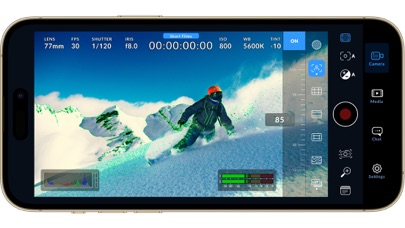
Blackmagic Camera has all the controls you need to quickly setup and start shooting! Everything is interactive, so you can tap any item and instantly change settings without searching through confusing menus! The HUD shows status and record parameters, histogram, focus peaking indicators, levels, frame guides and more. Show or hide the HUD by swiping up or down. You can auto focus by tapping the screen in the area you want to focus. You can shoot in 16:9 or vertical aspect ratios, plus you can shoot 16:9 while holding your phone vertically if you want to shoot unobtrusively.
On Screen Heads Up Display
The heads up display, or HUD, controls have the most important camera controls such as lens selection, frame rate, shutter angle, timecode, ISO, white balance, gain and audio levels. You can adjust settings such as exposure by touching the ISO indicator, or you can change the audio levels simply by touching the audio meters. Everything is interactive, so if you tap any item you can instantaneously change its settings without having to search through complex menus!
Camera Setup Menus
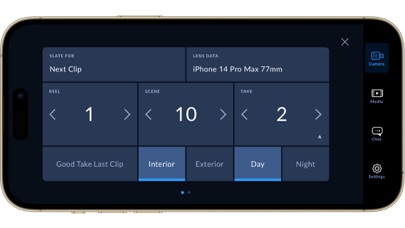
The settings tab unlocks the full power of your phone’s camera, with quick access to advanced settings such as monitoring, audio, camera setup, recording and more! The record tab gives you total control over video resolution and recording format including industry standard Apple ProRes or space efficient H.264 and H.265. Plus, you can set anamorphic de-squeeze and lens correction settings. Professional audio options include AAC and PCM format and VU or PPM audio metering. You can even add external microphones! Or add 3D LUTs to recreate film looks!
Media
The Blackmagic Camera media tab has all the controls you need to browse or scrub clips for quick review, search and sort and view the upload status of your media. Access your media from Blackmagic Camera’s all clips folder by choosing the Media button to see the thumbnails for each clip you have stored. Plus, you can save to the files folder on the phone, send it to Blackmagic Cloud Storage via Blackmagic Cloud or manually choose which clips to upload to a project library. You can even sync media from Blackmagic Camera directly into the DaVinci Resolve project so you’re ready to edit!
Live Sync to Blackmagic Cloud Storage
When shooting with Blackmagic Camera, the video you capture can be instantly uploaded as a proxy file, followed by the camera originals, and saved to Blackmagic Cloud Storage. This means you can start editing quickly using your proxies, speeding up your workflow.
Blackmagic Camera App Comments & Reviews
Blackmagic Camera Positive Reviews
Almost perfect, full auto needs to be betterThis app is so close to being perfect but for me I’d like a better auto mode as there are several issues with it currently. The shutter speed likes to stay around 1/30th in relatively dark environments, while the ISO moves around, when the shutter is close to 360 degrees there is a MASSIVE dynamic range hit, so forcing it to never go below a 180 degree equivalent would be perfect. In general I would love it if tap to focus/expose could be decoupled so it’s only tap to focus, I can’t tell you the amount of times I’ve had my manual setting dialed in and accidentally tapped somewhere that’s not a control. There should be better built in LUT options, as the Apple 709 one is terrible. Though I have it set up with an Apple Log to HLG LUT that I made so I can actually monitor in HDR, which is essential for seeing what your doing outside, and crucial for me since I target an HDR delivery with these files, so what I see is what I get..Version: 1.5
Great software but..It's really good software, i used it in my vlogs, unboxing videos, and other stuff. Having so much settings that unavailable in default iphone camera is helps so much. But today i had some issues with it, i can't record for really long, or i just can't record timelapse videos. I don't know why, but for some reason after 3-4 hours of recording, i found that app just closed for no reason. The videos itself seems normal and all okay, but why it keeps doing that? My phone is iPhone 11, i have more than 50gb of free memory, my settings is pretty normal, 4K 30 fps, H265, Timelapse is set to 1 frame every 30 seconds, and i have right now 2 records that about 13-14 seconds long, by calculations is about (14 seconds * 30 fps * 30 seconds / 60 seconds / 60 minutes) 3.5 hours, and after this i find my phone chilling on home screen, no errors, it looks like somebody just closed app. I wanted to record timelapse that is 168 hours long, but seems like default camera just don't have any settings to change speed or intervals between frames, and blackmagic keeps closing for no reason, it's not overheating, i checked it, it's not frame drops, record button not flashed with exclamation mark, it's not memory (even with my settings 168 hours long record is about 11 minutes long footage with 30 seconds interval between frames), so, why is it happening?.Version: 3.1.2
First version feels polishedFor a first iteration of an app, this seems incredibly stable, robust with features, and easy to use. Having built in luts day one is awesome, so many exposure tools, great codec options, good color, and the list goes on. Amazing work Blackmagic team! I only have 4 criticisms (or more like recommendations). My first criticism is I wish there was a way to tap to focus without also turning on auto exposure. Its terrible when you have everything locked in, then you tap to focus and now your exposure is messed up. Second criticism is that it uses a histogram for exposure. I wish I could change that to a wave form. Wave form is more useful as a quick reference when exposing the whole frame and find myself relying less and less on histograms. My last request is I hope we get a 10bit log codec for older iPhones (the 14 can handle a 10bit log file proven by other apps). Would be nice to push the colors a bit more and see if we could squeeze a bit more dynamic range out of the iPhone sensor. Overall, amazing app so far and I’m excited to see updates pushed out in the future. I cannot imagine filmic pro being happy about this app not only being free, but being better in many ways. Considering the filmic app is a subscription (an expensive one at that), many users will be jumping to this immediately..Version: 1.0.1
So far so goodThe ability to adjust ISO and white balance is what convinced me I needed to try this app. I make mostly small videos with me in the shot talking as well as do a video podcast with a few friends. My white balance would shift between warm and cool at times with the native iPhone app. In iOS 17 they now have the ability to lock white balance. But I was noticing the images were sometimes a little grainy when I would shoot in my “home studio”. The ISO was always too high trying to shoot the low light stuff. Between my background lights, key lights and full light the native iPhone camera wasn’t producing the best results. Now lowering ISO and adjusting my lighting afterwards made a huge improvement. The other thing that almost had me deleting this app was the audio seemed extremely low when I was using my USB microphone. I was turning up the gain on my microphone way higher than I had needed to do before. Just figured out tonight that if you tap on the audio meter, gain control pops up inside the app to make adjustments. It starts off at the lowest level and you can raise it from there. Pretty sure when using the native iPhone app it just comes through at full gain preset..Version: 1.0.1
Literally the perfect app for filmmakers; just missing one thing I hope to see soon…Everything about this app has given me the control to create perfect cinematic video, there are no limits and I fully believe with an app like this and proper skills, you can make your iPhone footage look like any cinema camera/DSLR. One thing I’m basically begging you guys to incorporate is the cinematic mode that can now be used in 3rd party apps with the IOS 26 update. If that depth of field can be incorporated with high bit rate recording (not sure if that’s how it works exactly I may be wrong), then hands down this would be the most innovative and professional tool for any filmmaker. That’s literally my only slight problem needing to switch to the actual camera app for shots I deem necessary to have a shallow depth. I can’t wait to drop a cinematic reel sharing this all with everyone, many have already been surprised by the clips I’ve shown thinking I was shooting on an Alexa; but it’s just good cinematography with a very incredible app!.Version: 3.2
Used extensively every day for 3 weeks and it’s ALMOST perfect!I’ve been backpacking Australia for 3 weeks and have even using this app every single day, all day, while traveling. I absolutely LOVE this app. It’s well beyond any of the settings that Apple allows in their default app. I just have a few things I kept running into that would make this a full 5/5 for me if these updates could happen. Comments for improvement - •Progress bar for file transfers from internal to SSD •Bubble level tool •Remote viewing from Apple Watch •When replugging back in an SSD, remember a default SSD and selected folder location. Even better, have a “favorites location” that populates faster than having to dig through folder structure each time you plug in a drive. •Ability to flip the interface to the left instead of defaulting the record button to the right when shooting horizontal. Sometimes I had to one hand hold the phone and the record and settings always on the right side of the made it hard to operate with one hand at times. •Custom saved settings. I don’t want my 24mm lens to use the same ISO I’m using for the 120mm if the aperture is faster on the 24mm. I keep having to change multiple settings to switch lenses which slows me down. I’d like to have custom settings to tap and get into faster, or remember the settings I used with the previous lens automatically. •Option to swipe to hide “camera, media, chat, settings.” I don’t need these viewable at all times, they often they just take up space..Version: 1.2.1
My new favorite camera app!For years I used FiLMiC Pro because it got me much better results than the default camera app. These days the default camera app does a great job and so I couldn’t justify the annual sub for FiLMiC as I don’t really use the advanced features. Then a friend told me about this app. Being free, there's absolutely no reason not to use it. Advanced features if you want them and it just feels good. Pretty intuitive. So far there’s only 2 minor things I miss from FiLMiC, both from the Media page. The ability to hold down the “Select” button to quickly select all, and the horizontal list view that showed a thumbnail on the left and video info on the right, as opposed to the grid view of this app. I have already used DaVinci Resolve as my editor for years so no surprise that this is a great app. I also wish there a full manual somewhere but I haven’t found one..Version: 1.1
Still missing some things.To be fair I think this app deserves 5 stars, but I’m putting 3 because it’s lacking some key features. Whenever I plug in an external mic it only picks up mono and never gives me a stereo recording. I’ve tried rode video mic pro, and rode wireless go. Both only seem to pick up mono and no stereo even though it’s clearly putting out a stereo signal from the wireless go. Also, BLACKMAGIC, if you’re reading this, please allow it to capture and output to 2 audio devices. For example: I would love to be able to have a mic input and an output device. Right now you can only select one, so if you want to monitor your audio while recording you need to have a mic that has a headphone output built in, or you need to unplug the mic each time your done recording something and go into your media and playback your recording to hear the audio. I’m no app developer, so this might be harder than it seems, but I imagine with an update you could connect a DJI mic 2 via Bluetooth to your phone as the input, and then connect AirPods via Bluetooth for the output. Then you’d have wire free recording & monitoring which would also leave the usbc port open for recording to an SSD. Right now u need some giant bulky hub in order to record via external SSD and have a mic input. Plus these hubs usually require power, so now you have to have a hub, an external battery, a mic, an external SSD, and a way to hold all that in your hands. It goes from a small compact video camera to something bulkier than your average mirrorless camera. All of this is fixable in a software update with an audio input & audio output option. Otherwise…. This app is amazing, and BLACKMAGIC is still top tier in my opinion for indie filmmakers. That goes for their mirrorless cameras and their editing software too. I hope BLACKMAGIC reads this! A potentially simple fix would solve a lot of problems. I would pay $ for this update..Version: 1.2.1
ProRes & control problemsOn M1/M2 iPad Pro, should be able to capture ProRes to external TB4/USB4 NVMe storage with over 1GB/sec sustained write capacity, but that’s only stable for ProRes Proxy. Same storage used with Blackmagic Video Assistant for ProRes capture. The app needs better capture buffering. If recording to local NVMe storage is marginal, how can recording to cloud be stable? The frame drop alert is also obnoxious. It should be configurable. Consumer cameras deliver far better data rates to far inferior storage without dropping frames, and the storage I’m using has high sustained data rate capabilities when copying large ProRes video files averaging 400GB, so this app ought to be able to use those USB4/TB4 storage for ProRes capture. Remote camera control never worked on 4 different iPadPros and two iPhoneProMax phones all on the same dedicated WiFi or Ethernet network. No device ever discovered any other. Setup is too difficult because auto discovery should be as simple as finding printers or remote Macs. Other camera control apps are easier to use..Version: 2.0
This app is FANTASTIC!!!!I own my own digital network, Black Star Network, and host my own show #RolandMartinUnfiltered. I own five C300s; two Canon XF-405s; three Canon XA-25s; a Canon XA-45; a Mark IV 5D; and a Canon C70. We do lots of high quality one-on-ones. But there are numerous times when I am solo and on the go. I’ve shot a lot of stuff with the native video on the iPhone 15 ProMax, but it does NOT compare to this app. What I am most impressed by is the natural colors. Too often with the iPhone, the algorithm changes the colors of what I’m shooting. I see this all the time with concerts. The color on the camera is totally different than what I’m seeing with my eyes. Yet with this app, I’m getting true colors. The video is vibrant, sharp and amazing. I was totally blown away the first time I used it and that has been the case ever since. This is truly an amazing app and I now shoot all of my video in it!.Version: 1.4.1
Great App! Just Needs Apple Watch Remote AppGreat iPhone app. Needs a dedicated apple watch camera remote app like the standard iPhone camera has so that you monitor and remotely stsrt/stop recording of the camera from an apple watch when your iphone is on a boom/jib arm or you are self recording. Currently I have to switch back to the default camera just to use apple watch as a camera remote. It's also cumbersome to turn on/off false color. Ideally you could select a preferred exposure tool and have it be one press to toggle it on/off. Right now it takes 3 taps to turn false color (for example on/off which is too slow for real world use. This last one is more of a wish list item but it would be great in settings to be able to set a base iso and then adjust exposure based on stops instead of micro adjustments of iso for a faster exposure setting workflow. I will adjust rating to 5 stars once there is a functional apple watch companion remote app and it's easier to turn false color on/off..Version: 1.1
I was looking for something like this for a whileAlthough the app is quiet amazing, and there are a lot of options and controls there is a slight problem with the newest version. Or maybe the previous ones as well, but I am facing this problem more as I updated the application, the problem that I’m facing with is whenever you are trying to connect a microphone to your phone, usually the setting with the LUT get a bit problematic and it messed up with the ISO and shutter angle or shutter speed depends on which one you’re using and it makes it really hard to find a sweet spot for brightness. I’m not sure if I’m doing something wrong or there is a problem with the app but whenever I try to choose a different LUT these settings that I mentioned do not work properly, but beside this problem, everything else is awesome..Version: 3.1.1
Add a ton of more optionsCan you please add a ton of more options for example add more customization options I want to personalize the app even farther for example I want options to change the record time style and change the HUD style and button layouts and record photo button position and transparent buttons and transparent controls options and disable camera control option and camera select button option and screen refresh rate and display brightness options and rotation Lock Screen settings change the and add double tap to zoom in and out and double tap to flip the camera and turn the flashlight on when you record a video and I want options to use the front and back camera at the same time and change the app icon.Version: 2.3
Great app, needs to improve autofocusI am a great fan of Black Magic for giving us the DaVinci Resolve. Now giving us this free iPhone app which overtime will be on par with Filmic Pro and Cinema P3 pro camera. I downloaded and tested it. In addition to other suggestions in other reviews, I noticed that when I changed from 24 fps to 60 fps that there is a delay in autofocus while you move the camera around. Autofocus is not continuous. I’m sure that will change soon. Great app nevertheless. Update: kudos to Black Magic for continuous updates of this app. It is my go to app now and on par with their competition and exceeding. I like the Apple log profile for HEVC which saves storage and addition of Apple log to rec709 option. Keep the updates coming and you will be dominating iPhone video recording.Version: 1.2
A fully featured cinema camera app.This app will change your phone to a reliable cinema camera, except of sensor size. It will give you full control of shutter and iso. It also unlocks full codec & resolution & gamma & color space combination, gives you perfect recording spec suitable for your next project. And it supports 1.33 and 1.55x anamorphic desqueeze and also DOF adapter, which is critical for professionals. Also its internal and external monitoring capability is great. It supports 65 point 3d lut and also supports bake lut to video output, clean video signal output via usb-c so you can use any monitor to see apple log or hdr footage within rec709 profile. However, few features are missing. it does not support to display waveform and vectorscope. So you need to rely only on false color to check your exposure correctly..Version: 1.2.1
The best iPhone app ever designedFirst off, I would’ve think black magic for making this iPhone app because basically it taught me how to use a manual camera by learning this app and it showed me everything that I would want to know in order to use as a lateral transfer all of the black magic products that they have for professional videography. This is a groundbreaking application due to the fact that it’s free and it’s instructional it’s fun useful and groundbreaking in regards to the picture quality and usability so thank you so much For putting this out and especially making it free because you’re gonna get a lot of repeat customers in return customers just for doing so.Version: 2.3
Nicely integrated, but potentially flawedInitially playback of clips recorded under a display LUT worked, but now it crashes the app. I have done the full reset, rebooted, moved the LUT into the correct folder manually instead of importing, changed the codec and resolution. The clips play from the photo library, albeit without the display LUT, and not using a display LUT when recording doesn’t crash the app when those clips are opened in the Media page. Looks like it’s something in the loading of the display LUT for playback of clips recorded under it causing the crash. So technically, since it looks like the LUT isn’t being burned into the file anyway, I can still output clips recorded under a display LUT as normal and just remember to not touch the Media page and reapply the LUT in Resolve. Otherwise, the app is great and I’m excited to follow further development!.Version: 1.0.1
Promising!Considering it’s a new app, I won’t hold it to the same standard as an aged application. This app definitely shows a lot of promise, hitting some of the features I have desired control over. I mostly wanted to throw in the features I would find valuable to add! Control over the camera light would be phenomenal. One of the big issues I encounter with Apple’s native camera app is the inability to take photos with the light on, I need to be able to see the object with the lighting before taking the photo. I take macro photography of bugs, so a sudden flash is much more likely to scare them off. My only option has been recording snippets to take photos, but I have to sacrifice a lot of quality. The light would be world changing! Would also like to access the alt macro camera (not the .5), that would be awesome..Version: 1.2
Could be my go to app but….Having invested in the majority of Moment’s M series lenses I decided to purchase their app and discovered they provide corrections for their various lenses. And now that I’m replacing my M series lenses with their new T series lenses which I’m hoping will show a marked improvement in IQ. The caveat I have and why I don’t give the Blackmagic camera app a 5 star rating is there is no way to utilize the Apple Watch to control shooting HQ rear facing lens vlogging content. It appears the now defunct Filmic Pro and native camera apps support this feature. A shame as the Blackmagic camera app has the potential to be a massive game changer for mobile content creators like myself when used in conjunction with add on lenses from Moment, Sandmarc, etc. If Filmic Pro could make this work, why hasn’t Blackmagic done the same thing?.Version: 1.2
Prefect AppHello and greetings I can say with confidence that this app has made me come and leave a comment for the first time after many years of having an iPhone, and that too with such a long comment... Before I got to know this app, I was using the default app on my phone, but now I have put that app in a folder on my home screen, and it can really be said that this app takes filming with a phone to several levels and has wonderful features. I really thank the developers of this magical app. I wanted to say that you are really professional in your work. Don't hesitate to download this app because you will love working and filming with your mobile phone..Version: 2.2.1
New FavoriteFor almost 2 years, a work colleague put me onto Filmic Pro and luma fusion. I enjoyed the combo with my former iPhone 13 Pro Max. Now that I have the 15 pro max, I was going to resubscribe to filmic but couldn’t justify the $40 annual subscription. I do use the Shiftcam system and figured would just use the native camera app until I saw black magic advertised on some tech channels. Especially since it’s free, how can you go wrong. You can’t!! Just started using it today and briefly played with some setting. CONS: I personally would like the option to only record to the the photos app not in files and and photos. Also, wish their was an option for Apple Watch to control and view video like the filmic pro app. But, it free, so can’t complain.Version: 1.2
Great app but…Everything I’ve been looking for, however…be careful with the Timelapse recording setting. There is zero indication in the viewfinder when that setting has been toggled. Shot a Timelapse sequence and then an hour later shot some more clips in a location I can’t return to…and they were all in Timelapse mode, so useless. I love everything this app can do but not having an indication in the viewfinder when you are recording a Timelapse is a major overlook that I’m hoping will be a quick fix. How your listening Blackmagic and thanks for the effort on this app so far. (Also, every once in awhile the top menu seems to be unresponsive in the media tab..Version: 1.1
I love itI absolutely love everything about the Blackmagic Camera App! I’ve even switched my Action button to launch this app—it’s now my go-to for every video shoot. One of my favorite features is the ability to shoot horizontal videos even while holding the camera vertically. Although it crops the image slightly, I still find it incredibly useful. One feature I would love to see added is the ability to create custom presets. I often find myself adjusting the exposure triangle settings in different environments, and having custom presets would save a lot of time. I really hope this feature is included in a future release!.Version: 2.0
True multi-phone camera filmingThis app really takes it above and beyond what Final Cut Camera does. While it does have some of their hardware products’ UI look and feel, it’s true power comes with using the remote camera feature wireless to sync and record. With the iPad support, you can turn it into both camera and controller. Setup was easy with connectivity being fast and shows near realtime display from the other cameras. The settings really allow you to capture video and audio in the way you want. With the option to have a clean HDMI output, you practically have a film crew that’s truly mobile with this app..Version: 2.3.1
RIP FilmicI never review apps, but what Blackmagic has done here is nothing short of breathtaking. All the features I loved in Filmic at an incredible price ($0), with far superior UI and way faster startup times. The market leader in iOS filmmaking camera apps, Filmic Pro, is a total gouge using a subscription monetization model with an old, janky UI and I will never be going back. The only thing I miss is the drag/lock UI for the focus and exposure which I found intuitive, but the traditional tap here works fine. I'm also a recent convert to Davinci Resolve and just love it. Thank you Blackmagic for everything you do! Love your products lots and they've enabled me to do so much..Version: 1.2
Get serious…If your serious about video and TIRED of Adob charging month fees for very little or maintenance updates, welcome to BlackMagic! DaVinci is a serious contender for you to consider, along with FinalCut Pro! I have NOT fully used this app but have used DaVinci and even the free version can help you to get to pro level editing for free! The fact that this app is free, shows that BlackMagic is serious about you and your needs, as they want you to become a Pro and later, AFTER you making money to invest in their Pro level services/products! Give this camera app a try and see how amazing the folks at BlackMagic are!! Not a paid review but a FREE DiVinci user!!.Version: 1.0.1
This is phenomenalI was looking to find a way to remotely trigger a second iPhone. This app popped up in Google. Downloaded it on both phone. Created a hot spot, and 2 minutes after I downloaded my tripod phone was remotely triggered by my other phone 30 feet away. And it is free. I can’t get over the fact that it is free. I was trying to find the catch. There isn’t one. Black magic will make money from folks that buy their hardware and pro desktop software. I would pay if they asked. It is that good. And I am an amateur at best. I just wanted to sit in the back to record a concert and not block anyone’s view..Version: 3.2
This is it… (+ feature requests!)Well, after a few more updates, this WILL BE ‘THE’ only pro video recording app you need. Maybe even completely replacing the ‘camera’ app on iPhone. So here me out, Black Magic…. The addition of LUT monitoring is great, but WHAT IF we could bake in a LUT to the recording? Now why would we want to do that? Doesn’t that defeat the purpose of shooting an Apple log? Actually no, here’s why. 1. Digital sharpening, and 2. Creative looks (‘what you see is what you get’ shooting) I’m finding myself recording things more than ever now on my phone because of the quality and lack of ‘over sharpening’ that Apple log finally gives us. Shooting with custom LUTs is also a very fun and inspiring, instead of just looking at a boring rec709 image. It’s the same reason I shoot photos with my Fuji with Film simulation, instead of my iPhone. It just brings me joy. So for the everyday moments, Family memories, nostalgic trips, and other point-and-shoot scenarios, I wondered what if I could shoot with some of my favorite LUTs baked in and have BEAUTIFUL video clips right on my phone, no post editing required. My all-time fave LUTs are the Arri Alexa emulation LUTs from Phantom LUTs, and I know he’s already working on a set for apple log. So imagine, being able to whip out the Blackmagic Camera app, start recording the moment, and it’s instantly saved with beautiful filmic colors and no over processed sharpening. That’s incredible, and I think we’re just a firmware update away from this! Ideally it would be baked in without any steps, but a potential workaround would be to at least be able to APPLY LUTs after the fact to one or multiple clips. Hope Blackmagic sees this, as I think a LOT of people will enjoy shooting their everyday moments this way. Love this company and everything they do, and that they made this app FREE!! (Though I’d happily spend a one time fee for the LUT bake in support!).Version: 1.1
Needs better false color for Apple LogThis app is absolutely phenomenal! I was very impressed at how many features are on this app that I can manipulate to my needs like shutter speed and measurement, iso, zebras and focus assist, even LUTs that I can import myself! For this, it’s an easy 4.5 stars. However, I’m rather disappointed at the false color feature when using the Apple Log color space. The false color feature seems confused at the profile, and believes the darker parts of the frame are at 18% middle grey. Basically, it’s not accurate. However it appears to work fine under every other color space in the app. Overall, great app! False color still needs some tweaking..Version: 2.2.1
Blackmagic continues to deliverBlackmagic’s smart business practice to provide to all customers high level products without searching for opportunities to greedily rip you off is what has made me gravitate to this company and its products, recommending it left and right. This app is proof of that. It is professional and very well done, and provides all that is needed to grow professionally without the gotchas all other companies do, providing pieces and to grab you in a subscription or something, which at the end causes me to distrust them. This is why I use Davinci Resolve, their AV switchers and now looking to invest more. Blackmagic… Thank you!!.Version: 1.0.1
Interface is messyI’m sorry I know this app is probably the most capable camera app ever made but at the same time the interface is so messy and it makes it not fun or fast to use. It’s hard to tap the iso, shutter, wb etc. switching cameras takes forever. And for the life of me I can’t understand what the point is of having presets if they aren’t accessible on the screen. By the time I get into the settings and to the preset tab it completely defeats the purpose of being quick. Please give this app a redesign. All cameras should be right on the screen to switch fast. Presets should be where the metadata tab that nobody uses is. Sorry it’s just frustrating because I know how capable this app is but it’s not enjoyable to use.Version: 2.1.1
I love this app BUTI really love this app and I love the direction blackmagic is going with it. But for my personal use, I really wish when you’re in the cloud dashboard and you delete media from the cloud, I wish you could choose where it deletes from. Right now it deletes on my computer and on the cloud, but not on the camera I recorded it from. I wish it was backwards where it deleted it from the camera, and the cloud kept it on the computer that I’m editing on, it’d be nice if you had the option to choose which locations media deleted from when you delete media. But other than that I’m really loving this app and I’m excited to see where it goes..Version: 1.0.1
Watch out this is better than Filmic Pro- The controls on filmic pro are tiny and annoying to adjust. This one does it correctly, it is easy to adjust settings. - It allows you to record to external media unlike filmic pro. And it allows this with any format not just ProRes like the default camera app. - It lets you record wide screen video without having to turn your phone sideways. - BTW they’ve unknowingly allowed you to record ProRes on iPad mini 6. You’re not supposed to be able to do this on non-pro models, Apple uses ProRes to segment their products but this app lets you do it anyways..Version: 1.0.1
Great camera app - with one important omissionThis is a fantastic (and free!) alternative to Filmic Pro after I could no longer justify using that app. It has basically all the same controls, in perhaps an even more intuitive interface. However, there is one important feature that Blackmagic is missing. The ability to control and monitor the camera from a separate iOS device like an iPad. This functionality is imperative when self-filming. There is also no support for the app available on the website. So the only way I can request this feature is here in a review. I hope Blackmagic is listening and implements this asap!.Version: 1.2
A must have app for mobile filmmakingWhether you are familiar or not with blackmagic menu systems, this is really simple to use and a lot of features packed into a free app. It’s too good! I’ve always wanted a reliable app whenever I’d want to film something with my phone. You can load luts. Nice! First thing I noticed was that when you zoom you don’t get that exposure and weird jitters when jumping from ultrawide lens, then to wide and medium as you do in the regular camera app. I can’t wait to explore the message system in the app. Everything is just so clean as usual with BM products. Thank you, Blackmagic Design!.Version: 1.0.1
So far, OKAY…I downloaded the app 4 days ago and it worked audio and visually at first, but after my third video, my audio just ceased. I create a profile with Black Magic Design, deleted the app and redownloaded it to “reactivate” the audio and I thought my previous videos would’ve been stored in the cloud, they were not! I am still learning the app, but that was annoying. Also, it has been said that it does not use your storage on your device, however… I don’t think that’s true. I’ll do an update when I get more acquainted with the app..Version: 1.4.1
Best There IsComing from being robbed by Filmic Pro after having bought all add-ons for it to be sold to Bending Spoons for them to take it to a subscription model which is the only way to receive updates and support I am relieved BlackMagic Design have provided a full feature app. Everything is just there and works better than all the broken promises and stolen money of Filmic Pro. As someone that also uses Davinci Resolve Studio I could not be happier with this app and would gladly pay $20 for this app if needed for a one time purchase..Version: 2.2
Great app, few updates neededGreat app, although I wish there were settings for each camera style to match. I use this app as a backup and center camera angle for my podcast with two Sony Zve10 cameras and so struggle matching the settings and color profile between them even though on paper all the settings match up correctly. I also pair my phone with a rear screen monitor from small rig and lately I noticed it records with a delay so I have to fix the audio in davinci so if they could provide a fix for this that would be awesome as well… but overall great experience!.Version: 3.2
God Mode EnabledHow did Apple hide literally everything good about the video system from us? Blackmagic unlocked the potential and made me realize the camera in my new 1000 dollar iPad was not in fact capable of only potato vision. Everything about this app is amazing except that it loses connection without the other iphones too easy. It’s not hard to get them back, but for a free app I won’t complain too much. Yes it will kill your battery and storage but with this software you can control everything. NOICE..Version: 2.2.1
Perfect for iPhone 15 ProI attached an SD card reader, and one of my faster, SD cards to the phone and used this app to record 4k ProRes 422 with Apple log, and a display LUT I loaded in, without a single problem. It was glorious. The image is extremely good looking and on wide shots or ECU could easily cut in with cinema cameras. I’m blown away. While Apple does allow pro as recording in their native app, it is only progress 422HQ, which takes up tons of space. Blackmagic lets you set that lower to be more reasonable. You can even record 4k/60 ProRes 422 to an SD card. And the app is free. Wow..Version: 1.0.1
Great app- a buggy in iOS 26 using h265 logLove this apps power and flexibility over the iPhone camera app… you can force it to use whatever lens you want…. However lately it’s gotten more buggy. With iOS 26.0.1 on an iPhone 15 pro max, if you start recording on the 13mm fixed lens, (recording in H265 with log color space), it won’t start recording (and the timecode display won’t show it’s recording) for about 8-10 seconds after you hit the rec button. Starts instantly on all the other lens sizes just not the 13mm… so if you’re using it to capture documentary footage or anything g else you need “instant on” be careful! Otherwise, great app!.Version: 3.1.2
Issues with H.265 files shot in Apple LogGreat app in general. Being able to shoot in Apple Log with smaller file sizes is great. The app is easy to use once you learn the layout. Only issue I’ve come across is shooting in 4k Apple Log H.265. The files aren’t recognized by my PC and resolve only sees it as an audio file. The proxy version in 1080p H.265 works fine. Just can’t open the 4k files. I’ve tried reinstalling my HEVC codecs to no avail. Other H.265 4k videos I’ve downloaded online work fine on my PC so I believe it has something to do with the videos coming out of the app. Hope it gets resolved soon..Version: 1.1
An amazing app thank you BlackMagic!Even Apple used BlackMagic for their iPhone 15 Pro announcement and that’s validation enough for anyone that wants to try this amazing app out. HUGE PROPS FOR IT BEING FREE. 😊😊🙏📸🎥.Version: 1.3
Really great video appThe only flaw while using the DJI Mic Mini in Bluetooth mode, your audio output has to be same as audio input setting. Hence you can record with the Mini Mic but to listen to your playback on iPhone speaker is tricky. Not sure why it has to be the same. A work around is record with Mic Mini and for playback, take iPods out of case to listen to your playback. Store iPods back in case when you want to record again..Version: 2.1
Magic…Great app, just wonderful and incredibly convenient..Version: 3.3.1
Add Teleprompter SupportThis app has been fantastic! I recommend that you include teleprompter support for front-facing camera on the app close to the camera or enable third-party app to make it possible..Version: 3.2
Does phone videos justice they deserveSo awesome. i mean, ofc it is. qualms: wish were less pressing of icons to adjust iso/shutter/etc. and more clever design of finger swipes to do so (think: how snapseed does it). precisely adjusting and scrubbing to specific values ie., iso 30 vs. 100, etc., is rly finicky. wish: THIS BUT FOR PICTURES. RIGHT NOW. IT CANT BE THAT HARD. PLS RELEASE IT. I CAN’T WAIT!!! 🙂🙂🙂.Version: 3.3.1
Anamorphic Lens Not Working on iPhone 17 Pro MaxI really like using Blackmagic Camera, but the anamorphic lens option doesn’t work on my iPhone 17 Pro Max. This is an important feature for me, so it’s disappointing that it’s not functioning properly. Please fix this issue in an update. Once it’s resolved, this app would easily be 5 stars..Version: 3.2
Great control optionsCan set variables during the shoot..Version: 3.2
Best Camera AppExcellent! ;-).Version: 3.2
BMD CameraThe best camera ever ! And it’s compatible with my 7 reels BMD CAMERA Studio Pro G2 and Pocket 4K. I’m a fan !.Version: 3.2
Two critical Issues1. Resolution: When recording Open Gate + Apple Log 2, the app stealthily drops resolution to 1920x1440 with zero notification. 2. No LUT during RAW Playback: There is no way to toggle LUTs during playback for ProRes RAW. Even with Proxies recorded, the app forced-plays the flat, gray RAW file with no option to switch. You can't review what you shot..Version: 3.2
Best free camera app!It’s essentially an actual camera and there’s so many settings you can use! Install it, you won’t be disappointed!.Version: 3.2
Good but not reliableUI is great and a much needed improvement over the Apple app. However, airdropping images from the media section fails more often than it succeeds and attempting to save files to the photo album results in only a random half of them being saved. unreliable..Version: 3.2
Can Blackmagic Camera® can you please add Photo Mode I have been wishing for that since the last updI really like this app which changes your phone into a camera but can you please add Photo mode thank you very much.Version: 3.2
Using black magic to create my clone!Came recommended to me by Anik Singal of UgenticAI & his team.Version: 3.2
Expect nothing less!After all this is Blackmagic’s creation. An app that covers basically everything when it comes to videography. My personal favourite is the timelapse settings you can do!.Version: 3.2
New version broke the appI love this app, but unfortunately the new version makes it impossible to remote control with an iPad. I used this setup for home content creation, but since updating the iPad cannot enable Bluetooth for the app for remote control pairing Hopefully they’ll fix soon!.Version: 3.2
BEST FREE CAMERA APPI hope they don’t charge people. like other camera apps or editing apps like capcut..Version: 3.2
Not for beginnersIt’s all icons friend, best you know them well before you endeavour here. Deleted the app so I can find an app that has icons with descriptions! It’s free however.. so give it a try if you have the time..Version: 3.2
Excellent!Must have app for video shooting.Version: 3.2
Good lutPerfect.Version: 3.2
So cool🔥🔥So cool🔥🔥.Version: 3.2
Best vidéo camera appI love this app…although, si ce update, I can not activate stabilisation on any combination I do. Need a fix for that please..Version: 3.1.2
Incredible appLove this app.Version: 3.1.2
Nice one, please support HDRI hope can record Dolby version 4K60 on iPad mini 7, 4K30 could, but not 60, please add it. I believe this cpu is strong enough for that..Version: 3.1.2
A True Cinematic Experience on iPhoneThe Blackmagic Camera app on iPhone is an absolute masterpiece — it turns your phone into a true filmmaking tool. It gives you complete control over ISO, shutter speed (from 1/60 to 1/8000), white balance (like 5900K), and even tint adjustments, all right on screen. The interface is beautifully designed — clean, responsive, and packed with pro-level information like histograms, audio meters, and focus peaking without ever feeling cluttered. What really makes it stand out is its LUT support, ProRes recording, and seamless DaVinci Resolve integration, letting you take your footage straight into professional color grading and editing workflows. It’s not just a camera app — it’s a full cinematic experience built into your iPhone..Version: 3.1.1
Don’t mess aroundDownload this immediately.Version: 3.1
Still the best.No in app purchases, no annoying controls, genuinely the best app for shooting video on Iphone..Version: 3.0
It’s bananasNot really…..but it’s pretty darn good.Version: 2.3
StabIt’s would be better with stabilisation..Version: 2.3
Best App I’ve used for videoThank you Blackmagic.Version: 2.2
So much for freeThis is an incredible app for videographers using their iPhone for all their videos. I can’t believe how much controls they have added into the app and that there is no subscription nor a single advertisement. I’ve used this for many projects and I’m 100% satisfied with the results of the video before exporting it to my computer for final editing.Version: 2.2
So goodA must for anyone looking to get the most out of Film making on iPhone. Blackmagic is the pro film app..Version: 2.2
Thank youThank you for FREE such a good and professional application..Version: 2.1.1
Free International Money Transfer 💸Enjoy high maximum transfers into more than 20 currencies while saving up to 90% over local banks! The cheap, fast way to send money abroad. Free transfer up to 500 USD!Version: 3.3.1