Generally Helpful Software
Signal GH Customer Service

- Signal GH Customer Service
- Signal GH App Comments & Reviews (2026)
- Signal GH iPhone Images
- Signal GH iPad Images
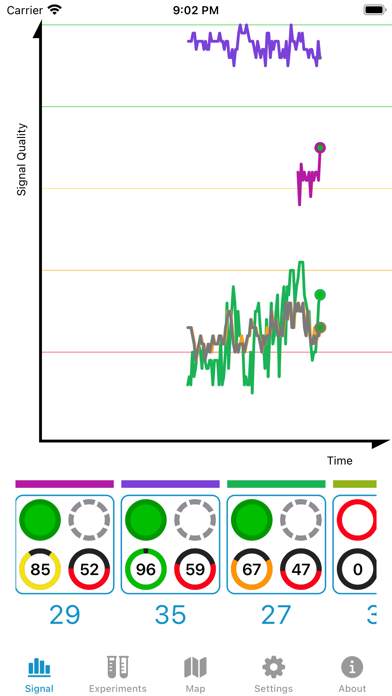
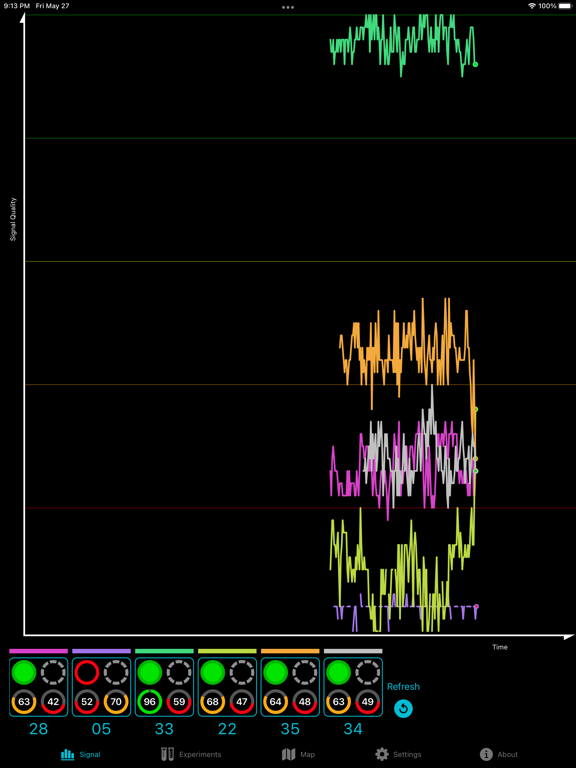
Signal GH is a tool for users of the HDHomerun networked digital TV tuner who want to monitor and improve their Over The Air (OTA) reception quality. It graphs signal quality from multiple channels simultaneously, allowing a user to more rapidly adjust and upgrade OTA receiving hardware, i.e., cables, connections, splitters, pre-amps, and antennas.
Snapshot the state of your system using the Experiments tab to keep track of what worked and what didn't work.
United States users also have the benefit of a map of digital television broadcasting towers. Depends on the accuracy of your device's compass.
If you don't have an HDHomerun, you don't need this product. If you do have an HDHomerun, and use it for over the air reception, you will likely find it useful.
If the automatic scan does not find a station you expect, tap on the station's real digital channel in the unused channel column under Settings.
Signal GH does not support QAM (digital cable) Please make sure your HDHomerun is set to use a broadcasting channel set and not a cable channel set.
You cannot use this software to watch video on your iOS device. This is a diagnostic tool.
Signal GH App Comments & Reviews
Signal GH Positive Reviews
Awesome App!I used this app, an HDHonerun quad tuner I already had and another great piece of software from this developer (TV Towers U.S.A.) to install an antenna at my dad’s house, and it turned what used to be a long game of “point and guess” into a quick, simple and painless task. (More than that, it actually made it kind of fun!) The Towers app made it easy to know where to point the antenna, while the SignalGH app let me see the strength of the signals I was receiving in real time on my phone without having to run up and down the ladder. Because my HDHomerun device had four tuners, I could dial into four different stations at the same time and see how moving towards one station affected the signal I received from the others. Once we completed things and did a Channel scan, we picked up everything we were expecting and a few more. I didn’t have to re-climb the ladder and adjust the antenna once. If you have an HDHomerun, using these two apps together will greatly simplify your antenna installation process, especially if you’re doing it by yourself. I highly recommend them both. Thanks for making these great apps. Job well done!.Version: 2.3
This app saved me a couple hundred $$$I've been pulling my hair out trying to fix a couple if signal quality issues with my OTA antenna. I thought I had tried everything. Moved antenna incrementally only to resolve one problem and create another. I decided to try this App out before ordering a new Channel Master Pro plus the preamp. To my surprise, I set up the app to monitor my problem channels and went outside at the antenna. Watching the channel signal quality and signal strength on my iPhone, I slowly moved my antenna. Wow! Just turning it 1.5"-2" on the mast fixed everything. Hard to believe such a small change affected the reception so much. Thanks to this app I could easily see what was happening. Amazing helpful app. Thanks so much..Version: 3.0.5
Extremely UsefulI’m honestly surprised in the number of bad reviews from people who can’t read and don’t understand that this is an app for the HDHomerun line of equipment. That said, if you know what this app is and what it is for, it is an invaluable tool for anyone setting up an OTA system with at least one HDHomerun device. Having live feedback of antenna positioning including all the transmitter data, compass directions, etc will ensure you get the best signal your equipment can handle. I especially love the ability to compare multiple tuners and channels on the fly to see how a position may improve one channel but degrade another..Version: 2.3.2
A MUST for proper antenna placementThe fact that this app samples many channels at one time is a wonderful advantage when placing an antenna because you can see the signal of all of the stations at one time. If you have trees, as most know, one station may work well at a specific height or location, and another may not. With this app, you can move the antenna around until you have ALL channels at 100% and your DONE! Takes the guess work out of finding the optimum signal location for your antenna. Very good!.Version: 3.0.3
Helpful app, few suggestions1. Add an option to leave the screen on when on the signal page. When pointing my antenna, it was annoying to constantly wake the iPad screen. Additionally, it would be nice if the app would still poll when the screen was 2. Tweak the UI so it’s clearer which circle is signal strength and which is signal quality. It was pretty confusing and I constantly mixed up the two. 3. Increase the signal polling frequency and store a longer history. I’d like to be able to review a longer dataset to ensure the channel is stable. 4. Plot signal quality levels on the signal chart by the reference lines. Also some indication to indicate loss of symbol lock on the chart would be real nice too. Other than that, this app was extremely helpful in helping me find the perfect position for a high gain antenna in a cramped attic. Watching the signal graph made it easy to try different positions. The experiment page made it easy to determine which antenna/filter/preamp works best. Nice work!.Version: 3.0.2
Invaluable for cord cuttersI’ve been troubleshooting issues for months with my HDHomeRun Duo and Plex Live TV. Plex would disconnect and complain about a weak signal, but I had no indication of the actual signal strength at the HDHomeRun box. I purchased Signal GH, and immediately determined my signal strength was lousy. I used it to systematically troubleshoot my antenna installation, and discovered the transformer on my external antenna had a broken lead. Replaced the transformer, and Signal GH confirmed my signal strength was excellent, and the antenna was pointed correctly. I use Signal GH anytime Plex hiccups so I can rule out signal strength. Invaluable app!.Version: 2.2
Worth every pennyThis app is amazing. In less than five minutes, I was able to make very small adjustments to my attic antenna to get 100 percent signal, symbol and quality on ALL of my over the air channels using HD home run. There is no way I could have done it without this app. In fact, I assumed some channels simply would not come in. Wrong. This app gave me feedback on tiny antenna adjustments so that I could get all stations. Really cool..Version: 3.0.4
Version 3 is a superb updateNew GUI MUCH more useful! I had this a few years and think the new interface will be much easier for new users. Scans are much faster and more complete. Everything is better. I use it with HDhomerun 4 tuner and find it invaluable. I always recommended it but now consider it a must have. Thank you!.Version: 3.0
Version 2.3 killed this app for meI used to use this app almost every day to adjust my antenna so I could pick up hard to reach channels. It worked perfectly up until version 2.3 came out. Now its broken. Channel scans do not work and it gets the real and virtual channels all wrong. Tried reinstalling it and it was even worse. This is a serious setback for me..Version: 2.3
Fantastically helpful - get it!We have been using this app for the past few years to optimize our Mohu antenna for our HD home run. The app was indispensable for helping us figure out the best antenna location and continues to help with fine tuning and maximizing signal. I highly recommend the app - its fantastic!.Version: 3.0.1
Lost without itI have a less than ideal antenna location with lots of trees and neighbors. I was totally guessing before I added this app with a HDHomeRun. Because of location challenges, I have to tweak the alignment once in a while. This app gives me the signal and quality readings for my best alignment. A must have. Many thanks to the developer..Version: 2.1.8
Great AppI am Recording OTA using two HDHomeRun Quattro, I am getting glitches where sound and picture go off for a while and it irritating. Watching the channels normally is no glitches at all. This app tells me that my antenna is not the problem which is a great investment... I am getting 100% Quality and Strength on the channels I notice the issue..Version: 2.3
Feature requestThe app works very well for checking the signal coming from the antenna for processing. It would be great if you could change the refresh rate when doing this though. That would eliminate the slight lag in seeing the effect of the antenna position change..Version: 2.2.2
Exactly What I Was Looking ForIf you have an HDHomerun tuner, you need this app. I’ve been chasing down some minor pixelation on a couple of my channels for YEARS. One day using this app and I was able to figure out what was going on and fix it. Thanks for a great app that does exactly what the label says!.Version: 2.3.6
So usefulI was having problems figuring out which way to point my antenna. Using this I easily figured out the best spot to put my antenna. A change of 30 degrees made al the difference and I now have clear, uninterrupted signal. Saved me so much time and frustration..Version: 2.1.6
GREAT!This app makes troubleshooting and optimization a breeze! From problematic tuners to problematic cable connections, to Splitters, preamps and antennas, getting complete data from the actual point of usage, after passing through the Entire system, makes diagnosing and resolution a quick matter. THANK YOU!.Version: 3.0.4
Very easy to useGreat app! Easy to use but I’m having trouble it’s shows I’ve got 100% signal or close to it on a few but 0 quality. I do have it amplified by double Mohu amplifier. It’s the Mohu skyhd 60 antenna and most stations are 60 to 80 miles out. Does this mean I need a stronger antenna? Thanks.Version: 2.1.8
Makes Antenna Aiming EasyUsing this app with my HDHomeRun really made it easy to re-aim my antenna and get instant feedback on signal quality without having to go up and down the ladder to check the signal on the TV..Version: 3.0.1
New version works perfectly!Purchased old version for iOS a few weeks ago. Crashed repeatedly on iOS 14. New version released 1/21 is excellent! Must have if you own an HDHomerun or two. More than “generally useful.” Keep up the good work!.Version: 2.3.4
Works for meOne of the most useful apps, productive apps I've used. Even though I may never use it again, it is well worth 3 Bucks. Took about 2 minutes to adjust my new attic antenna. Takes me longer to climb up and down the attic stairs..Version: 2.1.8
Thank you so muchThis app helped me fix my antenna issue so quickly. I don't even want to think about how long it would have taken me to figure out the antenna angle on my own. The angle I needed was between two towers and it was not intuitive..Version: 2.1.8
Should have been included by SiliconDustWorks very well and is really useful if you have a SiliconDust tuner, because that company did not include any tools for finding setup weaknesses. I just wish some info about how Quality and Strength are defined..Version: 2.2
Good dev response(See below for response) I can no longer switch channel that I’m monitoring because the list of channels drop-down refreshes on every tick, so I can scroll it before it refreshes - scrolling me back - every time. This is on an iPhone 12 Pro (not max)..Version: 3.0.1
Perfect for HDHomeRun usersIf you’re trying to fine tune your antenna for use with your HDHomeRun, this app is the one for you. Generalize your area with the included tower locator and then switch to the signal/quality strength indicator and fine tune for the best reception. Perfect!!.Version: 2.2.3
App works great !I was having signal quality issues on my vhf channels, using this app I was able to quickly make adjustments from my attic and get my signal near perfect..Version: 2.2.1
Perfect for my needsThis app did exactly what I needed it to do, help me tune my antenna while on my roof. Well worth the purchase. A dedicated tool would have been much more expensive..Version: 2.2.1
Positioning for dummiesThis made aligning my antenna so easy. I was able to see exactly what was happening on both tuners (picking up from 2 different towers) in real time. Well done..Version: 2.1.7
Very cool appAwesome app. Verifies the accuracy of your Kentucky windage. Or use it during antenna installation to get it accurately pointed the first time. Wish I had the app the first time I went up the ladder! Awesome support as well..Version: 2.1.8
Took some time to figure it outI had to play with it to see how it worked, a single page on how to use it would have been nice. After I figured it out, it works great..Version: 2.1.8
Ok but does not pick up all channelsThe app does what it says and works well. Autoscan for channels did not pick up all the channels I receive which is why I only gave it 3 stars. At startup there is a manual scan option but can’t find how to manually add channels once the autoscan finished..Version: 2.1.8
Wow. Did this make it easy.The maps are fantastic. Took about 10 seconds to find out my antenna was about 20 degrees off. More channels, better signals. Awesome..Version: 2.2
Excellent appLove this app and use it to set my antenna’s direction. However the new update has introduced a bug. The graph y-axis says Signal Quality but is plotting signal strength. Please fix..Version: 3.0
Works great and helped improve signalMoved in a home with existing attic antenna pointed in the wrong direction over 90 degrees. This app really helped to get it pointed properly..Version: 2.2
It’s repack time...I’ve lost WCVE (Richmond, VA). Seems they have moved from real channel 42 to repack channel 22 (virtual 23). A scan still displays real channel 42. Is your app working off a database (maybe outdated) or is WCVE broadcasting the wrong channel information in their signal? My next email goes to WCVE asking the same question. I had a feeling repack would be interesting.... Thanks.Version: 2.3.2
Great for OTA cord cuttersI got this just to check the signal quality on my HDHomeRun since cutting the cord. The direction finder using the phones compass was a bonus to help aim the antenna..Version: 2.2.3
Antenna SetupThis is a great app for adjusting my Antenna array. Connected to a HDHomerun I am able to see real time differences in channel strength as I adjust my antenna components..Version: 2.1.6
WowSuper helpful. I went searching for a way to help me position my antenna. This was exactly what I needed..Version: 2.1.7
Needful appThis helped me set my antenna to get the best signal for my house. A bargain at twice the price!.Version: 2.2.3
Update for iOS 13New update for iOS 13 restores usability.Version: 2.3.2
Awesome!This App is awesome in every way. Operationally very valuable for system setups and great graphics..Version: 2.1.8
Exactly as describedGreat simple utility to help position your antenna. Thanks for your effort..Version: 2.2.3
Highly recommended if you have an HDHoneRun and need data to best choose and position your antennaI don’t normally leave reviews but this app is great. It does exactly what it says, which was what I needed to help me troubleshoot choosing and positioning my antenna. I’m in the Toronto area, so can confirm this works for Canadians as well..Version: 3.0.4
Amazing for Canadians, too!Despite the ‘USA’ branding throughout the app, this is fantastically useful for us the Great White North, too. This makes it so easy to get multiple channels lined up at the best possible signal. I’m a stone’s throw from the CN Tower in Toronto but can also pick up a number of stations from Buffalo, NY and this app has made my life so much easier compared to the basic HDHomeRun web config..Version: 2.3.5
Great App!Love the app! Works flawlessly with my HDHomeRun. The map is a great feature..Version: 2.3.4
👍Great app for OTA antennas.Version: 2.3.3
This is invaluable for positioning my antennasThere are a few weak signals I’m trying to get, and having this app open as I play with the antenna wires and position really helps. In the before times, I would need to have a TV tuned in and do it by trial and error..Version: 2.2.3
FormidableSi vous avez un HDHOMERUN avec une antenne, cette application permet de voir en temps réel le signal sur 2 postes de votre choix. Ça permet de tester tous les angles possible de l'antenne, le câblage et les splitters. L'application permet aussi de pointer l'antenne dans la bonne direction avec une carte des tours (ça marche à Montréal, à l'exception de Télé Québec)..Version: 2.1.7
Awesome :-)Let's you position your antenna to get all the local OTA channels. Because of this app I was able to make my own tiny antenna and still receive all the channels. Thanks you very much developers :-).Version: 2.1.2
Exactly what it saysPerfect for aiming antenna between multiple towers - worth the money in time saved!.Version: 2.1.2
Perfect!Getting real time signal quality feedback in my hand as I positioned and rotated my antenna allowed me to reliably receive 2 more channels than I previously though possible. I was able to rotate the antenna such that the new channels were being received reliably, while ensuring that the changes I made did not degrade the reception of other channels below an acceptable threshold. This app is worth the price many times over. Great job. Thank you!.Version: 1.2.5
Works as advertised, great timesaverThis little app delivered exactly what I was looking for. I have two SiliconDust HDHomerun tuners on my network, a 2nd generation and 3rd generation. This app detected the tuners immediately, let me tune in to four stations simultaneously, and report back on signal strength and signal quality. I took my iPad up into the attic with me to point the antenna, picking the best spot for the four most common channels that I use. An unexpected feature was a map of the signal towers nearby, and an arrow pointing which direction you need to point the antenna. This uses the iPad's built-in compass and while I didn't personally need it because I know where the towers are, it would have been a great help when I was first starting out. Note that this only works for US towers, not Canadian..Version: 1.2
The best!!!I have been looking for this for a long time. Now I can adjust antenna on roof and immediately see results. You ROCK!!!.Version: 0
Free International Money Transfer 💸Enjoy high maximum transfers into more than 20 currencies while saving up to 90% over local banks! The cheap, fast way to send money abroad. Free transfer up to 500 USD!Version: 3.0.8
What do you think Signal GH ios app? Can you share your thoughts and app experiences with other peoples?
Please wait! Facebook comments loading...