Hindenburg Systems ApS
Hindenburg Field Recorder Customer Service

- Hindenburg Field Recorder Customer Service
- Hindenburg Field Recorder App Comments & Reviews (2026)
- Hindenburg Field Recorder iPhone Images
Hindenburg Field Recorder is made with radio production in mind. It will work equally well for anyone conducting interviews for podcasts or research.
It’s all about the story.....
Create your interview in three simple steps:
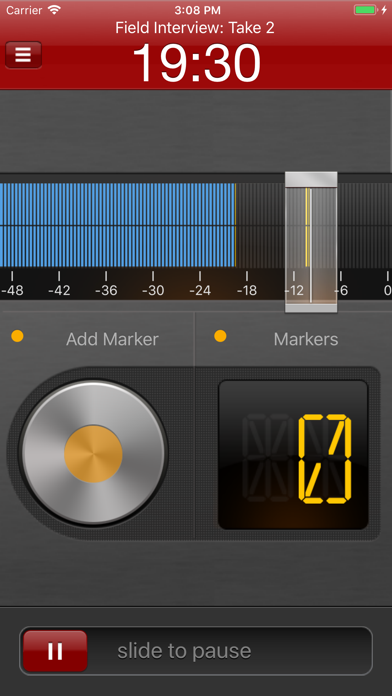
Step 1: Record interview and set markers at points of interest
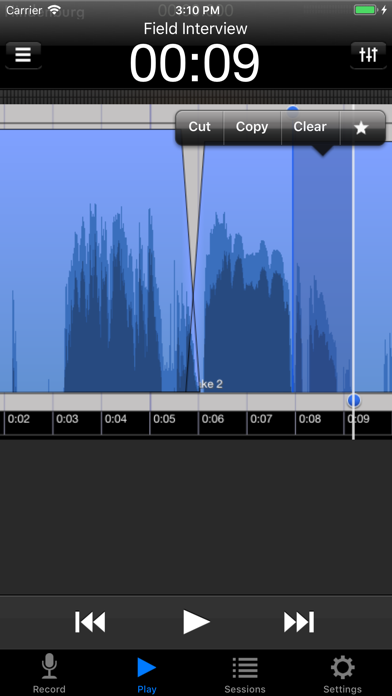
Step 2: Edit recording with cut, copy, paste and more...
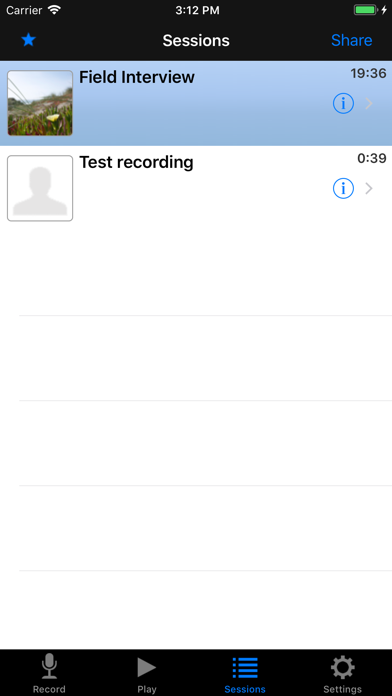
Step 3: Share your interview with attached picture and location
Recording
Simply begin recording whenever a story occurs.
Set markers at points of interest in the interview. Markers make it easier to navigate large interviews. Finding those good soundbites can otherwise be a tedious job.
Add additional recordings to your session. This could be speaks or background sounds and more.
Editing
Hindenburg Field Recorder has all the editing features needed for creating a radio interview.
The interface is kept simple and uncluttered. But there is more to it than meets the eye.
* Non-destructive editing with full undo/redo.
* Cut, copy, paste, insert, break, clear, move, trim and change volume of regions
* Adjust playback position with audible scrub
* Rehearse edit or play selection
* Add fade in and fade out or create cross-fades between regions
* Create, delete and rename markers, jump between markers
* Copy and paste audio between sessions
* Add jingles or sound bites from the favorites clipboard.
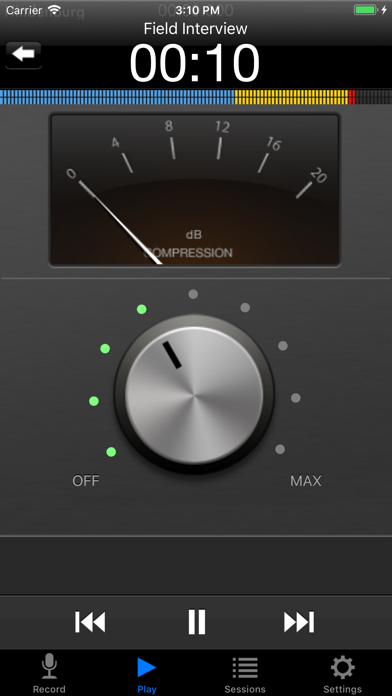
* Use the built in compressor/limiter to increase overall volume.
To find out more check the support URL where you will find a download link to the the PDF guide.
Share
There are five ways of getting your interviews out of the device.
1. Send to your computer (With Hindenburg Pro)
2. Send as e-mail
3. Upload to FTP server
4. Share to iTunes
5. Use "Open in..." to share to other apps
Specifications:
Records audio as 16 or 24-bit / 44.1 or 48kHz PCM.
Stereo recording supported with suitable accessories.
Option to monitor with headphones while recording.
Share audio as WAV, AAC, MP2 or ALAC with adjustable compression parameters.
Hindenburg Radio Tools are developed and tested in a collaborations with radio professionals.
Hindenburg Field Recorder App Comments & Reviews
Hindenburg Field Recorder Positive Reviews
Nice but no mp3It’s everything you would want except a lot of audio is required to be mp3. I’m surprised that it’s not available. Other than that it’s great..Version: 1.76
Wonderful App - but…Being a professional sound tech, I searched for a long time for no-frills professional recording app. Hindenburg does the job. A no-nonsense interface fills the screen the moment the app opens up. Setting levels is a snap and the volume level indicators make it obvious immediately whether you’re recording in mono or stereo. Sharing files is also just what you’d expect from a well-designed app. Hindenburg has just what I need - and even more importantly - I don’t have to wade through a bunch of cartoon-like garbage to make a recording. One MAJOR omission, though (which is forcing me to use another app) is its lack of ability to recognize and use a Bluetooth mic. If you fix this one fault, I’ll come back home to Hindenburg… thx.Version: 1.80
This is an ideal field recorderThis is an ideal field recorder. Foolproof recording, and surprisingly robust editing functionality. Direct integration with the desktop app make this a no-brainer. I wish all apps had this great functional design and power..Version: 1.70
Good but needs to be updatedPlease update this app. It needs mp3 functionality at the very least. Thank you..Version: 1.80
Wonderful AppThis field recorder is an amazing app. I wish we had an updated iOS7 version (why 4 stars and not 5). I hope the developers are considering updating this great app..Version: 1.45
OH, THE HUMANITY!!!(Come on, someone had to say it.) Hindenburg Field Recorder is what I would consider a perfect app---IF you need what's known in the industry as a "field recorder." See? It's right there in the title of the app: Hindenburg FIELD RECORDER. If you don't know what that is, or if you're trying to edit your latest dubstep download from Pirate Bay (or wherever these young whippersnappers are downloading their sick beats from), then . . . move along. Nothing to see here. But if you're in need of a kick-a** way to record flawless audio in a streamlined manner with an awesome U/I, and the ability to edit the audio ex post facto (that means "after the fact," by the way), and you have the need for crossfades and all sorts of nifty cool stuff like compression and limiting, then you will not find a better app. Ever heard the expression: You get what yo pay for? Some say the expression is merely a cliché, but it's a cliché because it's frickin' true in 90%+ cases. Hindenburg Field Recorder costs $30 because no other audio recording app can touch what it does. Don't believe me? Download the free version first and check it out. Originally, I downloaded the free version, and within 5 minutes of using it I shelled out $30 for the paid version; I was *that* impressed with it. That's just my opinion, but I'm sticking to it. Now buy the app before the zeppelin explodes!.Version: 1.63
The best by far.This is by all measures a stunning piece of software and by far the best recording application in the App Store. It has a clean interface, remarkably easy to use and yet it allows complex and perfectly accurate audio editing. As a radio journalist, it gives me everything I need, from AAC audio compression to WAV perfection, from FTP uploading to audio file attachment emailing, from location tracking to real time monitoring, from sound bite selection to audio scrubbing. Most importantly, I’ve been using it for weeks on the field and it has never crashed on me. If you are serious about recording, get a good external microphone and buy this application. There is no going back to a portable recorder. My Sony PCM-M10 has been in the drawer for weeks now..Version: 0
Awesome app!Hindenburg Mobile is an awesome app! It's like having an editing deck in your phone. I've been a recording engineer / Producer since the 70s and this is one of the coolest things I've used to create audio product. Combine that with the fact that the developer is super responsive to customer questions makes this an incredible app for those who depend and getting the audio right for a living! From communicating with the Dev. I get the feeling that there not just stopping with v1 and that the desktop app is also evolving. I have over 250 apps stored in my itunes folder and this is the first one I was so impressed with I decided to give this review..Version: 0
Oh SNAP!!! Finally!!!I can't believe it's taken this long for there to be an audio app that gives you this much control. I first downloaded the free beta desktop companion app and it was very intuitive and stable. Decided to give the iphone app a whirl and am thrilled to finally have this level of audio recording control and editing in my pocket! I was looking for something to use for editing interviews for audio blogging while on the road, and I think I've finally found it. Thanks!.Version: 0
Great App, excellent supportI have to say this is a terrific app. I am very happy now because the developer addressed the few issues I had and they were very good in following up with me. I love the superb recording quality, the easy compression setting and the intuitive editing. If you are thinking of buying, just go ahead. You will be glad you did. Thanks Hindenburg!.Version: 1.45
Tremendous!I am enjoying Hindenburg on the iPhone 6 Plus with iOS 9. Flawless operation. The editing functions require reading the manual, but once you get the hang of it, no other app that I have encountered can compare with the flexibility of non destructive edits..Version: 1.64
Flawless recordingThe recording quality is as good as good as many high res single function field recorders. The auto record volume works better than all I've tested - even in the wind or noisy environments..Version: 1.32
Excellent audio recorderI have used this Hindenberg iOS app for many years. It is excellent and works very well for audio recording and editing. I highly recommend it..Version: 1.45
Beautiful Update!This is my favorite iphone app..Version: 0
AwesomeIt's worth the price!.Version: 0
Brilliant!I use Hindenburg on my computer to record my podcast and now I have this field recorder which works awesomely. Thanks for all your good work. Watch the YouTube video tutorials to learn how to use it. It’ll take you less than 10 minutes and you’ll be good to go..Version: 1.76
Brilliant.The way an app should be done. Suggestions: 1. 'undo' or 'previous marker' without leaving the recorder (erase or to record over last) -saves time. 2. line in level adjustability..Version: 1.32
Parfait pour le journalisme !J'utilise l'application pour enregistrer des entrevues et des déclarations qui seront plus tard utilisées dans la rédaction d'articles de presse. Les marqueurs sont très utiles pour retrouver rapidement les déclarations les plus importantes. L'interface est très intuitive. L'application n'est cependant pas faite pour éditer lourdement les fichiers audio. Il est préférable pour ce faire de transférer le fichier sur un ordinateur. Les modes de transferts sont polyvalents et flexibles, contrairement à d'autres applications aux possibilités limitées. L'enregistrement peut se faire directement du microphone du téléphone, que l'on porte à plus d'une dizaine de centimètres des lèvres. J'utilise avec le iPhone 5 un adaptateur iRig Pre, un microphone AT897 et un casque d'écoute Sony MD 7506..Version: 1.45
ElegantAn attractive program with a simple and elegant interface. Its best feature is the way it quickly and seamlessly transfers files to the Desktop version of Hindenberg Journalist, along with any markers. (This capability was broken in a previous version of the iOS app, but is now fixed and works well). Add a good mic to your iPhone, and, as the app name suggests, you have a pretty good field recorder..Version: 1.72
CNN iReporter (Rare Diseases)J’utilise ce logiciel depuis plus d’une semaine, et je réalise que c’est le logiciel qui me convient parfaitement, fonctionne parfaitement avec mes périphériques, (iPad et iRig Pre), je l’utilise avec la version gratuite desktop Hindenburg Journalist. Ces deux logiciels combinés sont très faciles à utiliser. Je suis certains que les prochaines versions de ce logiciel seront de plus en plus performantes. Cette application est dispendieuse à comparé à beaucoup d’autres applications, mais vaut son prix. Excellent travail Hindenburg!.Version: 1.45
Free International Money Transfer 💸Enjoy high maximum transfers into more than 20 currencies while saving up to 90% over local banks! The cheap, fast way to send money abroad. Free transfer up to 500 USD!Version: 1.82