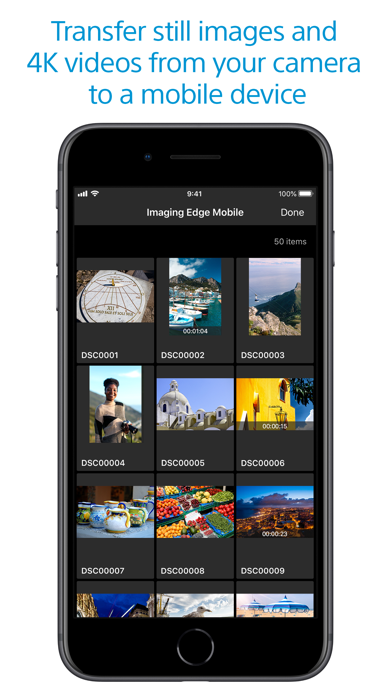
Imaging Edge Mobile allows images/videos to be transferred to a smartphone/tablet, enables remote shooting, and provides location information to images captured by a camera.
■ Transfer images from a camera to a smartphone
- You can transfer images/videos.
- The selection and transfer of images after shooting are no longer needed as the automatic background transfer function allows images to be transferred to a smartphone as they are captured. *1
- High bit rate video files including 4K can be transferred. *2
- You can view and transfer images in your camera from your smartphone even when the camera is turned off. *2
- After transferring, you can immediately share your high quality images on social networks or through email.
*1 See here for supported cameras. Files are imported in 2MP size when using this function.
https://www.sony.net/dics/iem12/
*2 See here for supported cameras. Availability of video transfer and playback varies depending on smartphone in use.
https://www.sony.net/dics/iem12/
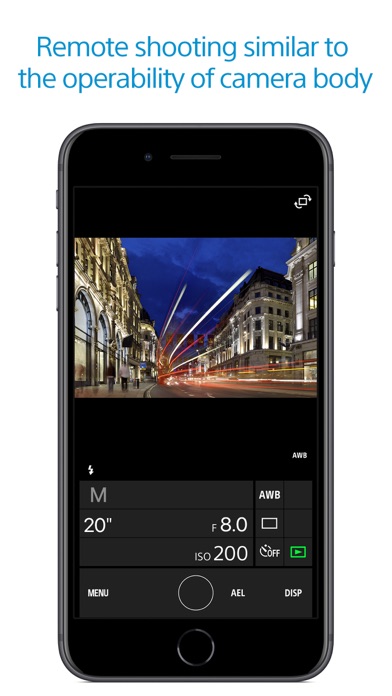
■ Remote shooting of a camera using a smartphone
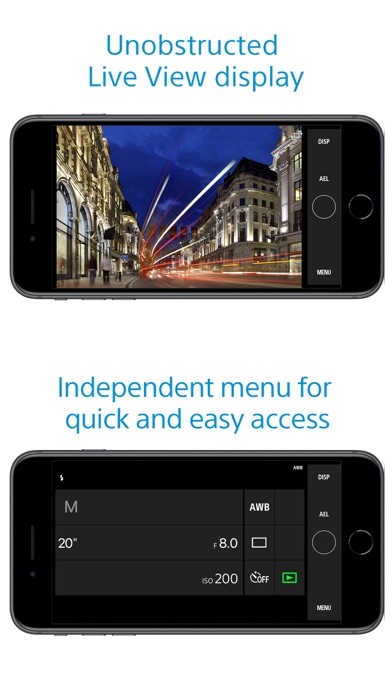
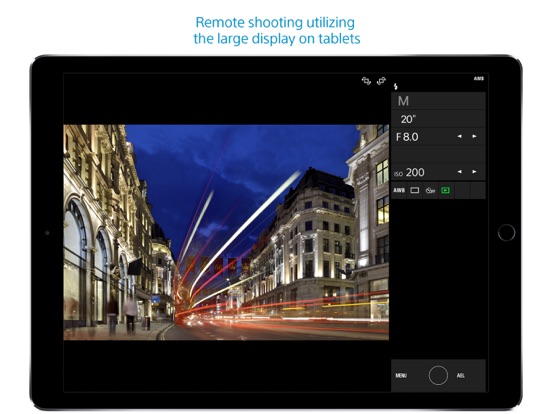
- You can capture photos/videos remotely while checking the live view of a camera on a smartphone. *3
This is convenient for capturing night views or water flowing scenes which need long-exposure, or macro shooting in which you need to avoid to directly touch the camera.
*3 Models that support PlayMemories Camera Apps can use this feature by installing "Smart Remote Control" (in-camera app) on your camera in advance.
http://www.sony.net/pmca/
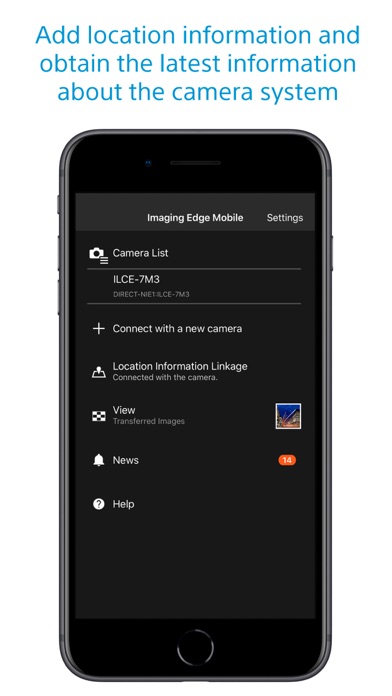
■ Record location information
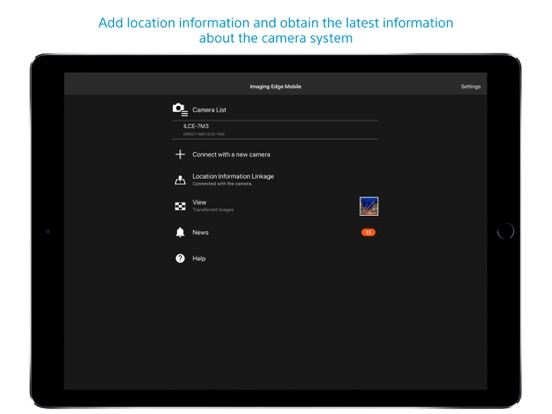
- With cameras that have a location information linkage function, the location information acquired by the smartphone can be added to the captured image in your camera.
For supported models and detailed operation methods, see the support page below.
https://www.sony.net/dics/iem12/
- Even with cameras that do not have a location information linkage function, it is possible to add location information acquired by your smartphone to the photos saved on your smartphone during remote shooting.
■Save and Apply Settings
- You can save up to 20 camera settings in Imaging Edge Mobile.
You can also apply a saved setting to a camera. *4
*4 See here for supported cameras. Save and Apply Settings are supported only for cameras with the same model name.
https://www.sony.net/dics/iem12/
■ Notes
- Supported operating systems: iOS17.7-26.2
- This app is not guaranteed to work with all smartphones/tablets.
- Features/Functions available for this app vary depending on the camera you are using.
- For supported models and information on features/functions, see the support page below.
https://sony.net/iem/
Sony | Imaging Edge Mobile Positive Reviews
OK for what does, but limitedThe biggest drawback with PlayMemories is the hodgepodge of separate apps - remote, photo transfer, HDR, etc - launched separately from camera rather than a single comprehensive program. Coming from Nikon, CamRanger blows it out the water but doesn't support Sony. About the only function I use is remote trigger which transfers those jpg, but not the photo transfer app with traditionally shot photos as I says will transfer individual but only does ALL! HDR, variate filter etc, use real software in post where have more control. One thing to be aware of, the app starts with last settings and adjusts the camera to it rather than reading the current camera settings and adjusting from there. If you last shoot was night/Astro and currently daylight/beach, you suddenly start with ISO 6400 despite the camera being set at ISO 100!
Now to the reviewers upset because doesn't transfer RAW. Seriously? ARE YOU NUTTS! Save your RAW to SD card and use real software later. Jpg and minor app adjustments if necessary is certainly sufficient for viewing/chimping and social media upload. With Nikon did RAW+jpg to separates SD cards and loaded the selected jpg to iPad directly via SD toggle from that specific card? With Sony's single SD card, RAW+jpg on same card and both transferred. With 43mgB RAW files, it totally blew out my memory in the iPad. Worse, with the duplicates - RAW and jpg - IOS doesn't show file name extensions or file size to know which one yo delete..Lawrenceg51Version: 5.9.0
Works amazingly wellWhen I first bought my Sony RX100 V1 I could not for the life of me get this app and my camera to synchronize. After watching every video I finally complied a quality list of exactly the steps to get things working. The KEY to the whole procedure is to get the camera and the app to communicate with each other. Once you open your settings on your iPhone and click on WiFi you will see your regular home etc. WiFi Settings. Make sure your camera is on. It might take awhile but your camera WiFi setting will be entered into your list. Click on it and make sure once it takes over for your home WiFi it has to have a check on it. Immediately go to your app and make sure it’s opened. You will see what’s on your camera screen. You can then use your iPhone as a great remote. The procedure to get photos from your camera to your iPhone or iPod is different but the key is to make sure both are paired via WiFi. IT WORKS SEAMLESSLY except for videos. That’s another whole story. You must change specific settings in your camera menu and purchase a unit that can attach via usb to your camera’s charging cord and then into this new usb cord and that cord into your iPad via lightning connector..Lagrive333Version: 7.2.2
The app works, but not clear on setupI see that a lot of people were having trouble connecting to the camera. I finally got it to work after a few tries. Follow these steps below: 1)Turn off your Wi-Fi to your Apple device so it doesn’t automatically connect to your camera when you turn on your camera’s Wi-Fi. 2) Click the Wi-Fi icon on your Sony camera device to show the name of the camera and password. 3) Open the app on your Apple device and click on your camera’s model or “Connect to new camera” option. 4) Click on the enter SSID option. 5) Enter the name of your camera’s name. On the app, it only says “DIRECT-“. You have to fill in the rest of the camera name. 6) Enter the password that is on your Sony device, but do not click “Connect” yet. 7) Turn the Wi-Fi back on to your Apple device. 8) Go back to your app and click connect. 9)Double check that your Apple device is connected to the Sony device’s Wi-Fi.
This should fix the issue. I was able to get it to work on both IPad Pro 11 and the IPhone XS. Hopefully this works for you since I had the same frustration of not being able to connect. Entering the rest of your Sony camera’s Wi-Fi name should fix the issue! Good Luck!.Ishoy2000Version: 7.3.0
This is Sony’s weakest link. UpdatedI’m a professional photographer who switched over to Sony after shooting with another brand for 16 years. I love all the features of my Sony mirrorless cameras, but sometimes I need to be in the photos. My old camera brand had a great iPhone app where I could set the ISO, F-stop, shutter speed and focus point manually on any camera in the family. Imagine my surprise that when paring my top of the line 42MP camera to play memories mobile, I found it to be next to useless. No adjustment of anything except for being able to put it in the timer mode. You can’t change any other manual function and if you leave your camera in auto focus, it might even grab the wrong spot. Sony gets an F on this one at least with the iPhone.
Update. After looking at another app that prompted me to upgrade the app in my camera, everything magically started to work as it should. I wish my phone app would have alerted me to this miss match. New grade B+.DanA206Version: 6.2.1
Try reinstalling the app!The location link feature broke after I updated to the latest version. I saw one review saying to reinstall, but I brushed it off because I thought the location settings would always show in settings > privacy > location. It turns out I was wrong and a reinstall was necessary.
Once you’ve reinstalled you’ll need to re-pair with Bluetooth. Also, when it firsts asks for access to your location it will only request “while using the app”. The app later complains it’s not “always” and will request you change that in the settings. After that you should be set.
For those of you struggling to get the NFC to scan, the reader is on the very top (not on the back) of the iPhone 8. With that said, once it scans there’s a 90% chance it’ll fail to connect 👎 (or at least that was my experience with the old version).GrahamWalters_Version: 7.1.0
FocusNot sure what the point of this app is, it would be great if the live view function to control camera included some ability to adjustment the focus on AF lenses. The app doesn't even allow for pinch to zoom. This could be a great tool for wireless use, studio or field use, with your mobile device as a field monitor if only Sony built out more functionality. The app is so tedious to use for review of images on camera's memory card as well. This would be another useful function, the ability to quickly review shots and even download to phone. The app has this but you must go through several steps. With the app one has to reconnect to camera either as a monitor for shooting or as an image review tool. Come on Sony, you have the app, put a little more user friendliness into it, otherwise what's the point?.DeartheoVersion: 7.5.1
Works fine for geotaggingA lot of reviews are focusing on the image transfer aspect, which could definitely use some refinement in the WiFi pairing process — the real problem there is that the iPhone almost instant wants to disconnect from the camera and connect to your home router since the camera has no internet.
The Bluetooth side of things, for adding GPS data to photos/videos has been working great for me however. It connects quickly when the camera is turned on and immediately starts getting GPS data without having to open the app manually, even if it’s been a while since it was last used.
Tested with an iPhone 13 Pro on iOS 15.1.1 with an A7 III running firmware 4.01.Mihir3535Version: 7.7.0
Forget the playmemories appI have a Sony a5100 and I spent hours trying to sync my photos from my camera to the playmemories app (which is the app that even the instructions that came with the camera told me to use) and researching online and it was just useless. Then I stumbled upon this app and it transferred my picture in seconds!! Also unlike the playmemories app, this one gives you simple steps to sync your camera to the app and even has alternative methods if one doesn’t work. I was amazed.. don’t know why anyone would suggest that other app because this one is the best, and in my case, was the only one that worked! Thank you!!!.AriaWashburnVersion: 7.3.3
Just What I Needed for the Solar Eclipse!I used this software in connection with my purchase of a Sony DSC-QX100 camera, which I directly attached to an old Televue Pronto 480mm telescope along with a Barlow that doubled the focal length to 960mm.
I was able to connect to the camera’s wifi radio using my iPad Pro and could take pictures and see the images on the iPad before taking the picture as well as downloading the picture immediately to my iPad.
Given all the quick decisions needed to take good amateur quality eclipse photos, I didn’t miss the lack of manual settings on the DSC-QX100. The pictures turned out very well and I was able to share the view through the telescope with other viewers - all without disturbing the telescope setup.
While I realize that my use of the software is rather unusual, for me, the application fit my needs and was “Just What I needed for the Solar Eclipse”. While the 2024 eclipse is still quite a way into the future, I’ll be using the setup for other solar observing opportunities using neutral density and hydrogen alpha filters..ErrtrfvddggvVersion: 6.1.1
Make sure firmware is up to dateIt is frustrating how little help Sony is with this app, plus they recently changed the name of the app I guess because all the you tube videos were calling it play memories or something, which is a completely different app for sharing photos. I had to find out from another reviewer that the firmware needs to be updated for the phone to connect properly to the camera. The updating process wasn’t all that easy either so give yourself about 40 min to troubleshoot that as well.
Once installed and connected, the app works as expected and functionally you can change what you need to from the phone.
It was a frustrating process all in, so that’s why the middle of the road review.Ross878787Version: 7.2.0
Better than ReviewsI just got my first professional camera (Sony a6100) and I am very new to photography. After seeing the reviews for this app, I wasn’t looking forward to using it, but I have to say I was pleasantly surprised.
Im not sure if the developers improved the app since these negative reviews, but I’ve had zero issues. It took a couple minutes to figure out the instructions, but it was smooth sailing from there. I’ve had no problem transferring photos from my camera to my phone, zero issue with bugs, and the transferring process is pretty quick.TneosjdtneosnfVersion: 7.5.2
Fix connection issues please!I want to love my new camera, but the fact that the app that is meant to work with it so that I can shoot remotely never connects to my iPhone right, is a bummer. I used to shoot canon & the mobile app always connected instantly, & now this IEM app causes a lot of frustration because it connects initially, then kicks me off & I struggle to eventually get it to reconnect… but I do not think it should be this difficult. I’d love to be able to easily shoot remotely & upload photos directly to my phone, so please fix this since I shoot remotely & transfer to my phone a lot, & it’s really slowed down my process & I’d love for that to not be an issue anymore. Thank youuuu!.Surrr_uhhVersion: 7.7.5
Great with a6600!Does not work with my a6000 anymore but I also have not updated the software on that camera. Wonderful improvements to this app for new cameras like a6600. Love the location data automatically connects to my phone every time I turn on the camera. I don’t have to do anything to get the location data. I will see if I can update my a6000 to work with this app again but I know that the a6000 will not work with some of the improvements like location data. I will be happy if I can upload photos to my phone from the a6000 again..Broncogirl81Version: 7.6.0
Sony is pro 🤙Using a professional sony camera is not made for the faint hearted. With a slew of features which could easily take months to master, a sony camera is a beast and can be vet technical. But one of the easiest and funnest feature is sony play memories. This feature is so powerful and fun to use. Especially if you need tight turnarounds. Easily upload images to your phone and process through Lightroom mobile or your favorite editing app. You also have the ability to control your cameras settings remotely. How powerful is that? If you have a sony camera you should have this app! Period..SinsinaVersion: 6.1.1
Almost perfectI’m actually quite impressed with the application, I haven’t really come across any glaring issues and am quite glad they still support my camera (a6000). There are two points I wish they’d work on. 1, adherence to iOS design language, unfortunately its base design language isn’t very good and could use with a polish. 2, permissions, it shouldn’t need FULL permission to just write to my phone’s library. No other app that writes to my photos needs that level of permissions it’s an invasion of privacy. Besides that it works well, makes it convenient to export quick shots for social sites..TheInsipidJonyIveVersion: 7.8.3
Hostile to Video RecordingThis app is optimized for photography, not videography. No control modes are available for video modes. If you attempt to engage remote record, all exposure settings are disregarded in the actual recording, despite displaying the desired outcome on the app. I was rudely awakened to this when I found that all of my footage had glare it didn’t show on the app. There is also no way to control focus in video mode, even if your camera is fully capable of remote focusing. The quality and speed of streaming from camera to phone is decent, but the lack of functional controls in the app, and the automatic disregard of displayed exposure settings, hampers the actual usefulness of this app in video mode..Vak'tezrajVersion: 6.3.0
Can’t connect to camera since updating to iPadOSWorked fine for connecting to my Sony a6000 until updating my iPad to the new iPadOS..MusicLover in CanadaVersion: 7.2.1
Read ThisYou people that gave one star are all wrong. You are using the wrong app. This app is for older Sony cameras, and it works fine (yes, the password is complicated, but you put it only once). If you have a newer camera use Sony Creator’s App.Ms- homeVersion: 7.8.2
This app works as intendedEveryone giving 1 star is tripping it took me 2 mins to figure it out and it worked no problem..William9907Version: 7.8.1
Pretty goodOnce I learned how to connect to the wifi in the app and not in the settings app it was very straightforward and easy to use.Mattiasnord_Version: 7.8.1
Free International Money Transfer 💸Enjoy high maximum transfers into more than 20 currencies while saving up to 90% over local banks! The cheap, fast way to send money abroad. Free transfer up to 500 USD!AdvertorialVersion: 7.8.3
Sony | Imaging Edge Mobile Negative Reviews
UselessWhen I was trying to use this app with my Sony A6000 I found It functionally useless. However, I recently purchased a Sony RX10M4 and now find it quite useful. I can operate my Camera remotely while seeing through the viewfinder on my phone. I can trigger HFR shooting, and high speed drive multiple stills. Sure there are lots of things you cannot do but those are two important ones to me. Connecting is much better with the RX10 than the A6000. One significant irritation is that the WIFI link disconnects if you goto the camera and press the playback button to see a recording. On the iPhone, if you go to another app or even the main display, you have to restart your Imaging Edge session. It does not keep it active in the background. The session is still active but you have to push start for your camera. The disconnect when press camera playback is a significant irritation. Do not understand this limitation. Remote control of a camera is extremely valuable, I hope Sony will continue to expand hardware and software options in this area.
Well, just found out that you cannot start a recording with this app. It does support single and multiple shot drive, and you can trigger HFR sooting but only offers the shoot trigger otherwise. How can this be? How can Sony build such great Cameras and develop such crappy remote control apps. Thus has been going on for years. Had to buy a non Sony remote system to do things I cannot do wit Sony apps and remotes. How silly is this?.DcssteveVersion: 7.3.3
Barely works and works badlyNetwork connectivity of Sony cameras is terrible and this app is a great example. Wi-Fi connection to my phone from my camera involves minimum 6 button pushes every time and drops as soon as the files transfer if not before. 70% of the time the network connection fails without transferring a picture. When it does work it usually takes multiple minutes to transfer a single picture. No way to transfer files to the cloud storage I use. It’s absurd how bad this app is and it’s been bad for years with no improvement.
I should be able to transfer my photos from an A9 to my phone with max 1 button push or automatically. Should automatically connect and Wi-Fi should be painless. Not the ridiculous process this app uses. I should be able to connect my camera to a network and have the files go to the cloud automatically. Like my iPhone has done for a decade. Ridiculous that in 2023 this isn’t working and Sony seemingly doesn’t care..SJBEHRSVersion: 7.7.4
Imaging Edge killed my iPhone displayHorrible app! Looks like it was designed by some high school kids and never went through beta-testing. Even basic functions don’t work. The app is a shame for one of the biggest consumer electronics companies in the world. If this were a free app for a $50 point and shoot, I wouldn’t complain. What’s shocking, though, is that Sony recommends this app to be used with their professional grade camera systems, costing thousands of dollars. Worse still, the app can DAMAGE your equipment. When I used the app to transfer a 30 min 4K video to my iPhone from a Sony a6600, the display of the iPhone got fried and needed to be replaced by Apple for $217. (iPhone XR with current iOS). When I contacted Sony Customer Support about it, Sony simply stated the app had been amply tested, this must have been “isolated issue” and refused to cover for the damage. I offered to submit detailed information from Apple, but no interest whatsoever!! (Yes, why would you want to learn about problems with your super buggy app, silly me!) Not a cool customer service response for a $2,500 camera system... Use at your own risk...
Update: Tried again two years later. The app won’t even connect to the camera. It’s total garbage!! How can a well known consumer electronics company like Sony expect its customers to use such a garbage app?! It’s unbelievable!.Highly doubtfulVersion: 7.7.5
This app is a jokeThis thing is terrible. It's clunky, bug-ridden, and lacks basic functionality like the ability to transfer RAW files. Even some of the things it's supposed to be able to do don't work—I can't even transfer a full-res JPEG with this, although there's a setting to do that. This is why smartphones are eating the traditional camera industry's lunch—the workflow on a smartphone is so much smoother and more polished, compared to this barely-even-an-afterthought garbage that we get with "real" cameras. Seriously, this kind of trash software wouldn't even pass as a sophomore CS student's term project.
Sony, you can do better. You make incredible cameras that push the boundaries of what technology can do. You lead the camera industry in multiple areas, from sensor design to machine learning. You even make some pretty decent smartphones. Please devote just a tiny, tiny fraction of your immense resources to making this app what it should be. If you can create a seamless interface between your cameras and your customers' phones and tablets, your cameras will gain much greater appeal to a generation of photographers who are currently turning their backs on the traditional camera industry en masse. This app could be the bridge that brings an effortless mobile workflow to photography enthusiasts and professionals, which would be immensely powerful and advantageous. You can do it!.AOANLAVersion: 7.3.1
Good camera with a heavy app features baggage.I’ve been shooting with the a7riii since its released after upgrading from the a7rii. After learning that the remote function is barely usable with its connectivity issues, along with the fact that the tap to focus not being supported on the a7riii, I stopped using this app. Which is perplexing because the a7rii worked fine with it even when the app was called PlayMemories or something to that effect.
It’s 2021 and I thought I’d try it again. The a7riii is at its latest firmware and lo and behold, it’s still just as I remembered. I guess it’s fine as an external monitor for a quick reference (if you can get a good connection) but without the tap to focus, there’s hardly a reason for me to have this app. This really sounds like I’m ranting about the a7riii rather than this app but I’d argue that the features of the app is part of the package and it’s severely lacking.
Imagine all the money invested on this camera system only to be burdened by a feature that cameras costing fractions of its asking price does perfectly. And I heard that all of this also applies to the a7riv. Embarrassing..Chaeb1iVersion: 7.5.2
This app gets worse as time goes onUsed it on a professional shoot today. Just so frustrating.
Trying to use remote camera trigger via the Sony app is so close to useless. You can’t really change settings without minutes of lag and having to close app restart reconnect fiddle with camera which is 15 feet in the air. Pull it down, up down, up down, up down on busy city streets in 30 degree windy weather. What should take 5 minutes, take 1/2 hour. When it does trigger it won’t stop taking photos. Then because it took 100 it takes forever to process in camera. Wouldn’t stop when in mid burst, which is new. Switched to low burst still no effective control over shutter. Then needed different exposure. Because of this zero way to bracket. Even though I paid for bracket app, it’s not integrated into remote Sony app. Crazy that after years it’s not available. Always hate using Sony, much prefer Nikon shooting blindly, but needed wider Rokinon 10mm (35mm equivalent to 14ish) lens. Awful. Don’t get your app teams act together. Geez! Worked better 2 years ago. Put bracketing in app if people paid for it, I’d pay more, JUST FIX IT!.CommonwealthVersion: 7.3.2
Unstable App Connection to Sony AX53 ?I can fully connect and maintain High broadcast level WiFi from iPhone to Sony AX53. However this Application looses it? Takes many attempt to even connect to camera. When it finally connects you can use it for only 15 sec after executing a command then spinner starts and Then it times out and looses connection. However at the same time the WiFi connection at high level and is up and stable so I can only deduce that this application is unstable? This situation has happened consistently for dozens of times. Literally have spent hours trying everything with marginal results! I have read all the FAQ and reset my network connection on my phone. Results are exactly the same -marginal connection by App?
I have a iPhone 7Plus running 13.2.3 (latest IOS)
At this point I give up as there is no way to work with anyone directly to solve this continuous problem. I hope someone at the App recognizes this problems and gets it stabilized soon ?!?.Skr815Version: 7.2.3
Barely functionally-passableHey Sony, love you guys, but this app should do a few things consistently and quickly and it does a lot of nothing quite inconsistently and slowly.
I do want to write a more comprehensive review soon, because I genuinely want to stay with Sony and see this camera-to-mobile ecosystem succeed, but right now I don’t have a ton of time and have been putting off saying anything already.
For me, a main goal on a daily basis is to quickly offload some travel photos to my iPhone for sharing. I’m shooting on the A7C.
Some issues: connection to/from smartphone to camera are always finicky and slow. In terms of UI, just add the major goal tasks in big buttons at the top. Something like “Connect to Camera” or something. Maybe make these buttons customizable so we can choose what tasks we want to do quickly. Also, connection to the camera from my smartphone isn’t always stable and fairly often I find myself having to re-establish the connection process. Also, the 2mb image size limit is very low! Can we somehow get a 4mb, 8mb, or something higher?
In general, the UI of this app would benefit hugely from an overhaul. Work on the information hierarchy and make sure the main tasks for the users stand out visually. Give us some buttons and a settings screen— simplify and make sure visual treatment matches the intended use of each feature! Buttons should look like buttons, list items should look like normal text, for example.
Overall, I’ll keep using this app because I need to, but I would feel much better taken care of by Sony if this app lived up to its potential to connect cameras to the mobile ecosystem (quickly and consistently!!!).YomommmaobamaVersion: 7.8.1
Creates HUNDREDS of empty albums in your photos appFirst off, as a remote for my Sony DSLR and a photo transfer method, this app is pretty fast. That said, there should be more controls (like mode, focus, etc). Also, when you’re connected to the camera, there’s no way to switch between taking a photo and looking at the photos on your camera. It’s not user friendly at all.
The worst part, however, is that the app will automatically create BLANK, EMPTY albums in your photos app. It looks to me like it creates one album for every photo you download, but it’s just an empty album. Scrolling through my photos app, I have hundreds of blank albums labeled “Imagine Edge Mobile” with no way to delete them outside of one at a time. Horrible design. Those albums will be stuck in my photos app unless I decide to spend an hour or two scrolling through to delete them one-by-one, and will continue to build up every time I take a photo.
Developers, if you care about your customers, please find a way to fix this..Bewar3Version: 7.2.1
Barely worksThe NFC function is comical...you are basically waving your phone around the camera NFC point like weirdo hoping something happens (spoiler, nothing does). How long do you keep looking silly before you give up? (Yes, this is on an iPhone X with NFC support and the right OS).
Then when you switch to QR, it only transfers a low res version, not the original raw (I think).
The location linkage...well, this used to be nearly as comical, disconnecting a ton and requiring re-pairing several times in a shooting session. However something happened in the past few months so it actually seems to be working more reliably now. I can actually just start shooting and it links up and tags the photos. Not sure if it’s a fluke or if something got updated or what...but I’m basically afraid to launch the app or try anything for fear of losing this magic..Rob_from_caVersion: 6.3.0
Why so bad, for so long?The app department down at Sony cameras needs to be completely rebooted. As all the other commenters describe, it has been terrible since the beginning. Instead of fixing all these bugs, Sony wastes time repeatedly rebranding the app.
Just now, I actually managed to register my camera with a new phone for remote control. But the moment I switched from the app to my photos to see the photo I had taken and went back to the app, the connection was lost, it had no memory of my camera, and now I am struggling to re-register it. Insane. Five minutes of testing or even trying to use this terrible app should be enough for Sony to realize what's wrong. And the app has the audacity to ask for collecting feedback. As if we haven't already given enough feedback... for years.
I'm not trying to be mean, but clearly they created a software department full of people who don't know how to write or ship quality consumer software..Unhappyuser567Version: 7.7.2
Sony Camera doesn’t connect to appI’ve been having troubles transferring my photos and videos on my a5000 to my phone through the app. I tried back in June but I thought it was just a bug in the app. So I tried again several weeks after, still no go. I have to use my laptop if I want to save the videos onto my phone. Saving to my laptop isn’t the problem. I just like the convenience that I can do it through my phone and uploading them right away to any social media platform. Back to my iPhone, I tried to transfer a pic today. Connecting my phone with the camera through the WiFi settings works like a breeze. It shows I’m connected. It also shows “connecting” on my camera but as soon as I go onto the app, it will not connect. Therefore can’t transfer any picture to save to my camera roll. Are y’all ever going to fix this or?? It’s just been very frustrating because I don’t carry my laptop wherever I go. Please fix this!!!.DaaanngVersion: 7.2.1
This app hamstrings Sony/iPhone connectionEver since this app updated to calling itself ‘Imaging Edge’ it has become a source of frustration and annoyance.
Since late 2019, every time I try to connect my iPhone 8 to my sony a5000 there seems to be a different problem. If I knew it was going to be this much of a pain I might have not chosen a Sony camera in the first place.
iPhones don't support NFC so wifi is the only way to go – and for the first few years I owned the Sony a5000 (when the app was called 'Sony Play Memories' [I think?]) it worked just fine. I had to enter the complex password just once and then each subsequent connection went smoothly.
But since late 2019, Sony changed the name of the app, and the ease of connection with my iPhone has been replaced with frustration and wasted time. Now, every time I try to connect to transfer photos off the camera and onto my phone it asks me to re enter the long, complicated password – and even then it works less than half the time. If I reset my network connections (erasing ALL my wifi passwords) and restart the phone it works most of the time – but then the next connection an hour or a day later means jumping through all those hoops again. I am very tired of dealing with this and if you own an iPhone I would recommend avoiding Sony cameras until they straighten this out..B1jonesVersion: 7.3.0
Location service doesn’t workI made sure to turn on the location service on both the camera and turn on all the required settings in this app. The Bluetooth pair and location service worked for the first time. But when I turned on the camera the next day, the location service didn’t work anymore. I checked the app, it always said “Searching for the camera”. And I checked my iPhone Bluetooth connection. The camera was not connected by Bluetooth automatically. I also tried to manually connect the Bluetooth in the setting, the location service didn’t work either! Location service is extremely important to me. If there isn’t a way to get it work, I will have to return the camera and switch to other brand. Come on, Sony! You are a company that made so many amazing products! You should do better than this!.BigballjieVersion: 7.5.2
Not working with new updateI’ve been using this app for 2 or 3 years and never had a issue till now. Every since I updated my iPhone to iOS 13 this app will not work. I’ve tried everything the app told me to do to get it to work again. I’ve reset my phone, I’ve reset my network, I’ve turned my phone off and back on, I’ve even deleted the app and re-downloaded the app. I’ve turned on my Bluetooth, I’ve literally done everything and nothing is working. I’ve been working on this for hours. If I knew this mess was going to happen then I would have never updated my phone. I use this camera all the time now I cannot even transfer the images to my phone. This is sad, especially when I can’t call or email anymore connected to Sony or this App to tell them what is wrong and how everyone I talk to is having the same issue. I hope they can fix this issue soon..Lizzygirl90sVersion: 7.3.0
Rarely worksWhen I first got this app I was excited to skip the steps of uploading images to the computer then transferring them too my phone. Except for the past month (I use this almost daily) I have had to delete, re-download and most of all, forget my networks just so I can get this app to work. It’s ridiculous that with the number of bad reviews this still has yet to be fixed. Literally in my news section of the app it continually tells me how to “fix” the issue. In my opinion, you as the developer need to fix it and show more interest in how your app runs.
I gave this app two stars because RARELY it works and it’s amazing when it does- takes me just moments to choose pictures and transfer them. But it’s so inconsistent in how often it decides to work.
I honestly don’t recommend this app..Katie052011Version: 7.2.3
Just an endless disasterI do not understand how a company with as much money and brain power as Sony can allow this dumpster fire of concentrated uselessness to continue to be shipped in its name. I’ve had camera in the a7 family for 7 years and in that time each iteration of this app has been just as unforgivably useless as the last. It does not work, it has never worked, and it will never work. It’s as if Microsoft sent a team of consultants over and promised to put the ol Microsoft magic into an app for Sony - terrible interface, cumbersome & ineffectual process, just the endless stench of smug mediocrity and lack of self-awareness. I’m the year 2023, while Apple wizardry exists for all to study and learn from, Sony is proudly and firmly entrenched in “if it ain’t working, why fix it?” mentality that has definite Imaging Edge for the better part of a decade. Shame on all of you clowns..CandidHams4000Version: 7.7.2
Where is Sony??The app itself is pretty decent but sometimes it wont open the first time or two times you have to completely close the app. Another issue I have seen is the bottom share button wont work, you press it and there is no action at all. I wish the app had at least some more editing tools and also make it possible to transfer high resolution pictures. Make it also that you are able to share more pictures at one single time. I loved Sony in the 80s for their quality stereos, headphones, walkmans etc but they need to catch up in software as even the menus on their SUPERB cameras are kind of clunky. SONY, you have excellent cameras that get amazing reviews by magazines and camera websites, step up and make your software just as good as your cameras. This app could be amazing too..YoungheartedSoulVersion: 7.1.0
Hilariously, after seeing all the 1-star reviews....... Sony changes the logo. Fixes nothing else. Typical! Do the nimrods who wrote this garbage app truly believe that, now I've finally mastered its little quirks and gotten it more or less working, I'm going to tamper with it to change the ICON?! What is wrong with these people? UPDATE You blithering idiots actually interrupted my shooting session TO FORCE ME TO SIGN YOUR PRIVACY POLICY!!!! You've already got enough ways to make me miss shots -- WiFi that doesn't connect, or drops the connection, waiting for your slow download before I can take the next shot, etc. -- but you had to invent a new way? What is wrong with you people???
Oh, and of *course* the "Later" button didn't work. I can't figure out whether the Imaging Edge coders are buffoons, sadists, or the boss's brothers-in-law. Could be all three, of course..Basic functionalityVersion: 7.7.5
Useless Garbage. Sony Idea of Update? New IconSony’s newest update, as of May 2023? I redesigned icon. That’s it. No improved functionality. No added functionality. No improvement in app stability, or in the ability to connect to a camera. No real improvement at all. Not even a new bell or whistle. Just a new icon. That sums up Sony’s attitude to customers. It also sums up why you should avoid Sony. I have used 3 professional Sony cameras, including the a1. Gray images. Terrible everything else. And no useful upgrades ever. None. The worst customer service of any company I have ever dealt with (and that includes mobile phone providers, cable/ihternet access providers, and health insurers). And Sony Imaging Edge is the absolute worst of the whole lot. Unstable, unable to connect reliably, if at all. Poor features even if you are able to connect..Dr HuwVersion: 7.7.2
Tons of issuesI just switched to Sony from Canon and Canon’s version of this app works flawlessly. So handy. Sony has a LOT of work to do. If you just want to send a shot from the camera to your phone it seems to work. But you can’t go into the app and see all the photos on your camera and choose which ones you want to send. You have to go through one at a time on your camera and check mark the ones you want.
As for remotely controlling the camera, good luck getting it to work reliably. One in ten times I can actually get it to find a stable WiFi connection between phone and camera. When it does finally connect, you have very basic camera controls that work fine but if you have back button focus turned on the app will no longer auto focus.
I really want this app to work, sure hope they update this thing soon..Brantman1Version: 6.2.1
Doesn’t Connect!Merry Christmas! Sony released an update today that now renders this app useless. Before it would take 10 minutes attempting to connect, dealing with it disconnecting numerous times, and not being able to look at individual pictures on my phone; only having the ability to upload. Now I can’t even connect. I’ve spent 20 minutes or so resetting the network settings, reinstalling the app, looking through tutorials, and nothing! Of course Sony has no customer service I can contact. How I miss the days where I could transfer my pictures to my phone and have them on social media within minutes! - I work in the entertainment field so time is crucial. When the event ends, the pictures need to be up!! Sony use to be a huge assist, but now I might have to look into other camera companies that offer WiFi that works!.NevadaLambVersion: 7.3.0
Security vulnerabilityConsidering how there are a greater number of serious exploits registered with the official CVE-ID registry used by every govt, company etc, for iOS now than for Android....the fact that this app requires the use of an unsigned certificate to operate is very telling of Sony's toward your privacy and security. Wonder how that last incident slipped by these geniuses??
This shouldn't be the case especially since the requirement for a developer certificate is that you sign up free of charge or prerequisites for a developer account that in my experience isn't vetted or verified for authenticity and since apps are not checked for embedded malware who knows is Kim is poisoning your wifi network remotely with a $35 raspberry pi and watching you in Sony's stunning 4K UHD.
I tried calling Sony about these issues and the non-technical tech support had no clue what I was talking about. He had no clue what a "checksum" was or why I would want it and just kept repeating something not useful that he did know, which was kind of odd.
The reason I am suspicious of all this is because one time I saw my camcorder lens pop open while it was just sitting on a table. Even though the camera being off while the fold out screen and pullout eye viewer both closed for several hours which automatically turn camera off. The lens then began to move as it normally does when shooting due to the active image stabilization feature that reduces the shaking effect on a video shot with a handheld camera.
That said it works on my iPhone so that's good...guess we should just get used to people watching us on our cameras and listening on our microphones. I'd like to spook them one day and do a I Love Lucy in twin in the mirror thing using Sony's mirrored flip view feature!.D5cad5caVersion: 6.1.0
No real RAW option..Not being able to transfer RAW files in my phone is not worth using this app at all.. It cant even save to photos app which Canon does it better.. Such a waste of space. The app itself is lacking so much in button thats its not even user friendly. Only used it twice and never again to use it its trash
Update: 3-3-20
Ive tried the video capabilities of this a couple weeks ago and it seems fine and working without lag. But after the update which is the 7.3.2 I am beginning to have a lot of unwanted freeze from the phone. Although it didn’t affect the video itself when i did my preview but the latency of which when you are recording was worse than when i previously started. There should be an update for this and i hope it’ll come in soon..RalphhhyVersion: 7.3.2
My Lamborghini is dependent on this PintoSeriously, my $4500 Sony A9 camera is dependent on this horrid app to put location information onto the pictures it takes. I’d say 90% of the time, and that’s being generous, I have to re-pair the app and my camera for it to work. Even with the app having run in the background permission, that NEVER works; I can’t just get my camera out and start shooting, I have to open phone, start app, start camera, wait for the inevitable failure to pair, fix, shoot. Or, just apply generic location in post. I’ll bump my stars up if Sony ever cares to fix this; for every 20% more reliability I’ll give another star, so Sony, all you have to do is shoot for 81% and you’re golden.
Honestly at this point if Sony sold a small GPS receiver that could feed the camera location data I’d buy it in an instant just to be done with this app..Colo AdminVersion: 6.2.1
This app is awfulI don’t understand how a tech company like Sony is seemingly incapable of developing a working app for their cameras. The camera to phone live feed works at like 3fps and has at least a second of lag. It’s a terribly difficult experience to use for any sort of composition, especially if you’re trying to do a self-portrait. Oh and trying to change the camera settings on the phone would make you wanna bash your head into a wall due to the lag. On top of that, the connection is broken constantly if you ever directly touch any settings on your physical camera. Please Sony, for God’s sake, do whatever you need to, please, please, PLEASE make a competent and useable camera app. Your inadequacy in this area is honestly making me miss Canon, and their camera app was pretty bad too. Yours is just 100 times worse. That’s saying something....BQCaoVersion: 7.3.1
Cannot ConnectUpdate 6: App seems to be working. Not holding my breath on how long this will continue. Shame on Sony for taking this long.
Update 5: As of December 25th update, Sony is still lying to customers and issuing false updates that do not fix the image transfer problem. Has not worked since iOS 13 and that remains true to this day.
Update 4: Emailed support and they acknowledged the app doesn’t work with iOS 13. They did not say whether or not they were working on a fix...
Update 3: after weeks of waiting... 7.2.3. did not fix the issue as promised... this is truly embarrassing for Sony
Update 2: This shouldn’t be taking this long to fix...
Update 1: 7.2.2. still not Working with iOS13.
I would attach screenshots but I’m not able to. The camera thinks I’m connected. The iPhone does not think it’s connected. Have never had trouble with this before. Must need updated to be compatible with ios13. So I’m stuck in limbo with no progress. Also I don’t know if my camera doesn’t have NFC or my iPhoneX doesn’t (it does...) have NFC but that doesn’t work either. Will adjust score when fixed. 0/5 right now as app is useless.I just want to watch a movieVersion: 7.3.1
Almost unusableI love Sony. I love their TVs. I love their cameras. I’ve owned many of the years. But this app is almost unusable. I spent a lot of money on a decent Sony RX100 VII (an older but excellent travel camera). All I want to do is send photos from the camera to my iPhone; took 15 minutes to get synced and working and then takes almost 60 seconds per photo. Then I figured I’d just hook it up to the iPhone for GPS location services on the photos. Again, almost 15 minutes of turning settings on and off, both in the app, on the phone, and in the camera. It appears to work as GPS now, but you can’t close the app. Please Sony, either make the app user-friendly or update the 2019 cameras OS so I can just Bluetooth the photos to the iPhone and get the location from the iPhone!.DrivingHappyVersion: 7.8.1
Inconsistent conversion and limited functionThis app frequently fails to connect to my Sony a6000 using the nfc or qrcode method. It very occasionally connects over WiFi, but does not always transfer all photos and regularly shuts down mid session.
I have found that transferring photos is almost all this app is good for and even that if often fails. The remote shoot feature is neat, but seems to compete with the photo transfer ability such that if you link a camera for remote shoot it does not want to pair for photo transferring. The remote shoot features themselves are limited and do not build on the functionality of the camera (by adding time lapse or extra long expose for example).
This app is a disappointment - the camera is phenomenal but this interface falls far short and really reflects negatively on the product..MijaanVersion: 7.3.3
Update 7.3.0 Major ProblemThe recent update has made pairing with a Sony camera product impossible. Photographs taken on the camera can no longer be sent to the phone via this application, due to update 7.3.0. I highly suggest that the developer revert the version until a fix is released. Many other users of this application are counting for an update and fix to resolve this issue and allow for the continued exportation of their creative photographs.
When a fix is issued, I shall modify my current review. However, as it stands, update 7.3.0 has proved to myself and other users of this application (as apparent in the recent mass amount of negative reviews) to be a major inconvenience. This application was working fine until the recent update. I hope the developer(s) hear us and work quickly to resolve this issue..Arun5814Version: 7.3.0
Major features missing, hard to useSony claims that still images can be batch transferred in their original size. But all that is actually transferred is a low resolution JPEG, not the original RAW, or even a full sized JPEG! App and A7Riii do not remember connection settings when either app or camera sleep. App can not control camera focus, and can only change fairly basic settings. No control over eye autofocus or focus at all means no selfies. Images saved to internal app folder, not to smartphone pictures folder. No remote control over the intervalometer. On the plus side, you can use the app to remotely take photos, and see the camera’s live view, even from another room, using the camera’s internal WiFi. Live time sync and geotagging is a useful addition..WinterCeiliVersion: 7.1.0
Terrible on an iPadIt's hard to believe Sony would neglect the iPad so badly on this version of the app. The image on the screen (while recording video) is about 1/3 of the screen. The settings, record, zoom buttons take up about 1/3 and the remaining 1/3 is left blank. I don't get it???
My Sony 4k camcorder doesn't display 4k to an external monitor (also stupid lack of functionality) so I must use this app to record in 4k. Except this app was so poorly conceived that it's next to impossible to use. The zoom buttons are so small and the feature is so slow, it's difficult to use. I tried using a remote to zoom, but the multi use port is disabled when using the wifi feature to this app. Nothing is working well together on this one. Please update either the camcorder firmware, this app or something to make it easier to use..Sly Bri the fry guyVersion: 5.9.0
Pretty Bad…for Sony I expect better!Sony makes a lot of good products, but this app is NOT one of them. Pretty lame that you can buy a Sony A7IV for $4,000+ and a nice Sony lens for $2,000+ and all they give you is this useless app to use for remote shooting.
Even better, they just updated the app icon in March 2023 and didn’t bother to try and improve the app itself!!! Main problems for me are: Fails to establish wifi connection with camera (A7IV) for remote shooting about 6/10 times, even with the latest software update. Randomly disconnects. Has trouble connecting to camera when my iphone is connected to a different wifi source. At the same time…I haven’t found a better solution for remote shooting with this camera so I’m stuck with it. C’mon, Sony. Put in the work!!.LivesOnaHillVersion: 7.7.2
Horribly buggy and unstableI have had my a 73 for three years now and love the camera. But one of the selling points was that I could use my phone to provide GPS coordinates on my images. It took me hours on the phone with Sony to initially get it working. And after a while it stopped and it took me hours on the phone with coming in to get it working. It has gone on and off working over the years and now has stopped again. And Sony tells me that the camera is out of warranty so they can no longer help me. I wish I could give those a -5 stars but a single star is the lowest rating possible. It appears there are some other apps out there now that are beginning to offer this functionality. If I find one that works well I will post it..AlKworezmiVersion: 7.6.0
Not easy to connect to cameraVery hard to connect to camera . Almost I have to scan QR code to every single time. The wifi app just fail every time..if you don,t want frustration.. stay away.FC777Version: 5.9.0
IOS 13The app is no lounger working with the iOS 13 updated. I hope this is fixed soon!.Cait8386Version: 7.2.1
App not working with ios 13App is not compatible to the updated version IOS 13 , deleted and downloaded the app many times, but still won't work. Just won't connect at all, very frustrating. Tried on my other phone which has the old version of the IOS and it worked, so it really is the App not working..NelleoghancaoimheVersion: 7.2.1
Horrible. Unfriendly. Needlessly complex sign in.Pathetic app. Password creation rules are needlessly complex and inflexible. Creating connection to camera is buggy and unresponsive. Whoever created this is just giving Sony a bad name. Older Sony apps were much more intuitive. This is a step back to the dark ages..Frstrted2016Version: 7.3.1
WILL NOT CONNECTI have an iPhone 11 Pro with iOS 14.2 and just spent $3000 on my new Sony a6600 camera and lens. Imagine my frustration after failing to connect to this app repeatedly. I followed the instructions to enable location, all transfer of all images in my settings. I’m dissatisfied as this wifi feature was one of the selling points for me. I’m hoping to see this app completely revised ASAP..NsachsVersion: 7.4.0
Frustrating to use!Extremely frustrating to try and connect camera. Only manually entering SSID worked. Tap and Wi-Fi could not find camera.
To be determined if camera connects automatically!!! Documentation that came with brand new camera referred to apps that are no longer offered (PlayMemories). This app came up when PlayMemories QR code scanned!.Vader429Version: 7.7.2
Even worse than the original!I thought Play Memories was terrible so I was really happy that Sony finally updated it. Now I can’t connect to my a6500 at all, no wireless transfer options to get photos onto my phone now. This app is completely useless. I register my camera over and over with the QR code and the SSID direct process and it fails every time and then forget the device. This is not a useable piece of software. Come on Sony!.PoolShark777Version: 7.7.2
Garbage appIt is compressing my image work to 200kb. Actual size should be around 40mb.Hasrat's mumVersion: 7.7.2
It sucksIs not working for ISO13.NadamassoyjuanVersion: 7.7.2
GarbageVery bad app ! Don’t bother downloading Just garbage.RomanschVersion: 7.7.2
Returned the camera b/c of AppHooooorrrrriiiiible app. Returned the camera, running back to Cannon..Mandypatinkenfanclub101Version: 7.7.1
Absolute nonsense fail appI thought that shame was a big deal for Japanese folks and firms?
These apps have had absolutely terrible reviews for years, and Sony has done nothing about them.
Too, there is no earthly reason that anyone needs an internet connection and location services enabled to control a camera a few metres away, wherever they may be in the world.
Sony, listen up: stop thinking about the data you want to gather, and think ONLY of what users need.
Stop the privacy-invading nonsense.
Your terrible apps are indelibly tarnishing the would-have-been sterling reputation of your cameras.
Please fix this now, urgently, NOT some time in the next year or two if you find it convenient, and NOT with the same development team that seems to have zero understanding of creating delightful, positive user experiences..UX GalVersion: 7.4.0
HelpDoes not connect to my a5100 on my iPhone XS Max running on iOS 13.Faith coVersion: 7.2.3
Really sony?!Still can’t touch focus with my a7riii guys. What’s the point of remote shooting from my phone if I can’t focus on what I need it to..Wolverhampton123481831Version: 7.1.0
Very limitedFor the price of this camera I would expect a much better app. Functionality is unnecessarily limiting. I hope they make something better soon. This is my first Sony camera and I'm not impressed with the connectivity..OopsmarkVersion: 5.9.0
Guys c’monI say guys because no woman, could, or would screw it up this bad.
I’ll admit the app finally works again for ios13...
hOwEvEr,
The user interface is still clunkier than it originally was! It has more ‘taps’ than it did before the app was rebranded the orange&white colours. I’m not sure why, although it must have been an order by some overpaid fellow who doesn’t understand we don’t care about the latest news of an image transferring app. We just want to share images in as few steps as possible. Like what has gotten into people.
Sony has a way better camera os but can’t figure out the most important part; sharing media instantly. Give your head a shake.Fugees_69Version: 7.4.0
ZV-E10 WON't CONNECTWhat a horrible app. First the login was not seemless at all. It prompted me to connect with safepass but it failed to recognize it forcing me to login via email which still "failed" but when I exit the screen on the app it suddenly proceeds as usual. Okay I thought maybe a small glitch in the system I can overlook now that I'm logged in. I tried connecting my ZV-E10 via QR Code. Everything lined up. My iphone 13 promax shows connected to the camera's wifi but I wait, and waited, and wait even longer and for nearly 1 hour I still see "failed to connect". I went through their help website, followed all the FAQ recommendations, made sure my camera is compatible which it is and nothing. I see only 1-star reviews on this app and I can see why. What's most upsetting is that it seems Sony abandoned this app and potential users..HydroLifterVersion: 7.8.3
Stay away!This wasted too much of my time. My ipad is iOs 13 updated and it does not work at all. My wifi is completely fine but nothing seems to connect. Use another app instead.BobettjakoalwuVersion: 7.8.3
Why does Sony need full access to my phone photos?The app is just okay. My issue is I refuse to give Sony access to my phone photo library. Why can’t the developers change minimum app permissions to Save only???.MofomomoVersion: 7.8.2
Terrible appConnection is terrible every time because it doesn’t connect. Don’t buy a camera by trusting the smartphone connect.Hakotako3Version: 7.8.2
Will not connectNew camera, new iPad, latest version of IEM, will not connect, throws up an uninformative error code. Checked, double checked settings, same result. This is not a me problem Sony, this is a you problem. Forced to go third party to achieve this functionality..Levi ActionslaxVersion: 7.8.2
How old is the this app’s “developer”?A five years old kid can program better than this app’s developer.
The app found my camera, wifi is connected but all doesnt work. What a joke..HaifbebaVersion: 7.8.2
App stopped working on iOS 26I am on latest version of Imaging Edge Mobile, the app worked fine until I updated my phone to iOS 26. The app shows a complete black screen, doesn’t work at all..Keith🏷️Version: 7.8.1
Wifi won’t connectIs this how little Sony cares for its customers? Last update 1 year ago! There are known programming errors and Sony does nothing about it. The app connected to my camera last night. Today, using the exact same sequence of buttons and taps, it won’t connect. Great camera, terrible support..The Anti-AppleVersion: 7.8.1
It just sucks.I’m never buying a Sony camera again. I’m a professional photographer and need a reliable app connection. This thing is awful.Bluewhale95Version: 7.8.1
Rubbish AppTrying to create an account for the first time is ridiculously overcomplicated. Between the endless verifications, countless policy agreements, and invasive permission requests, it feels excessive and intrusive. It shouldn’t take this many steps just to get started. Honestly, it’s disappointing, shame on you..SsssephirothVersion: 7.8.1
Connection is terribleConnecting to the camera used to be trouble but with some recent updates now it’s darn frustrating. This pretty much defeats the wifi transfer all together. Just as well to go through the effort of taking out a device and transferring from the card..Matt6794Version: 7.8.1
The worst app$5000 spent and this app hasn’t worked in 5 years. Doesn’t connect, disconnects, doesn’t download, stops download. Full of bugs. The people writing the code should be fired..FreeeeeespeeeeechVersion: 7.8.1
Terrible!!If i could do zero stars i would. It is very very useless and disappointing.Disappointed7572959Version: 7.8.1
Thumbs downThe worst possible way to import pictures/videos. Never works, never connects, always shows “could not perform” pop-up. No matter how many times I disconnect and reconnect..T$chmoneyVersion: 7.8.1
Awful appSuper hard to connect the camera and super slow.Súper horrendaVersion: 7.8.1
Tellement de bugLorsque j’arrive à connecter l’application ( 1 fois sur 10) celle-ci bug et fonctionne très mal. Délais constant et déconnection constante avec l’appareil. pratiquement aucune fonction utile, aucun Touch to focus en 2025. Canon a cette fonctionnalité depuis 2016 au moins…
Je peux pas croire que Sony propose une application aussi désuète pour ses produits...Etienne.SgnVersion: 7.8.1
Still needs workImages fail to transfer.BU chemistVersion: 7.8.1
Unnecessarily complicatedTerrible app, so difficult to connect to camera. Gave up trying..Lee AlexanderVersion: 7.8.1
Worst. 最悪Disconnects camera after selecting hundreds pictures. Always.
使えなさすぎる。 ソニーから乗り換えるきっかけになった.Norziou1205Version: 7.8.1
Stupid appCan't connect with my ZVE10. Super hard to connect! Can't send the pictures to my phone and can not use my phone as a smart control to take pictures or videos. Garbage app!.Don't usethis appVersion: 7.8.1
Photo accessI don’t know why they need you to approve access to your entire phone photo library in order to import new photos to your phone. It seems very invasive. This is why I cannot use..JanuaryaneVersion: 7.8.1
PatheticThis app is a joke.Swimmy_shikiVersion: 7.8.1
Really bad appI dont know what develop gone through while making this app. Each time I wanted connect this app with my camera it will not connect. Can’t even recognise my zve10. OMG canon is better than this. Really really bad app and camera functionality. :(.Deep sathwaraVersion: 7.8.1
You IEM SUCKSWhat I paid for the Sony A7R4 and I can’t connect to my iPhone. It’s terrible. You should give me a full refund..LucianophotographyVersion: 7.8.1
Worst piece of software. Really, Sony?Embarrassing for Sony how terrible and incredibly frustrating this app is. Wifi jpg transfer function is completely unacceptable and unreliable. It will have you tearing your hair out.
The only thing that works reliably is the Bluetooth sending location coordinates to the camera for geotags.
Do better Sony. Your cameras are expensive and this app is junk.
Sony A7C with latest firmware. IOS 17.11 on iPhone 12 Pro Max..~MMM~Version: 7.8.1
TerribleCan’t connect to phone to import photos and if you manage to get lucky it takes 5 minutes for one image..Patt3131Version: 7.8.1
Absolute GarbageThis is nothing but a ploy for Sony to collect your personal information (you apparently need to use your birthday in case of lost password, among other things). Impossible to sign in but even as a guest, you can’t get in without giving them your shoe size..PsyclerCVersion: 7.8.1
Version a7r4 are not supported by appI have iPhone 13 and just got a Sony a7R4. I can’t connect it. NFC one-touch is not working too..Максим татаевVersion: 7.8.1
Perfect example of bad app designThis app is the perfect example of an app that was supposed to be engineered to acheive a simple goal, but it works in the most non-instinctive way possible.
It might work the first time, but then sometime random, it won't work anymore. You will have to read a load of documentation and even if you think you do it properly, you can't connect to the camera.
It's very poorly designed. Please Sony, do something about this..WonderShot182Version: 7.8.0
Bad AppConnection is awful, laggy and downright useless. So frustrating. I guess I’ll have to spend my life savings on an actual monitor. Somebody put some effort into this app please..Johnjaackson97Version: 7.8.0
Payoneer 💰Payoneer is an online payment platform that lets you transfer money from any corner of the world! A best and must have payment service for every blogger, traveler, freelancer, affiliate marketer, consultant, virtual assistant, business person, online sellers, and receivers. Earn $25 for free by joining Payoneer. Sign Up Now!AdvertorialVersion: 7.8.3
 Sony Corporation