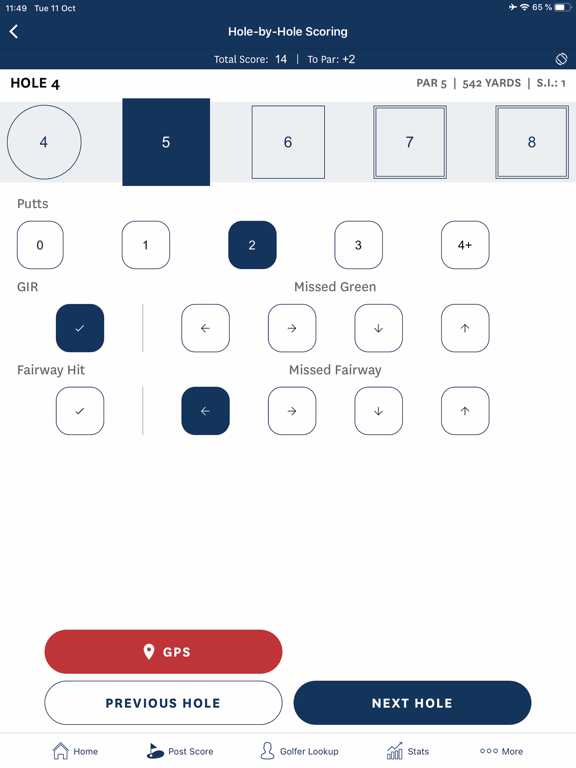
This is the official mobile app of the Golf Handicap Information Network (GHIN), a service offered by the USGA to golf associations worldwide.
Key features include:
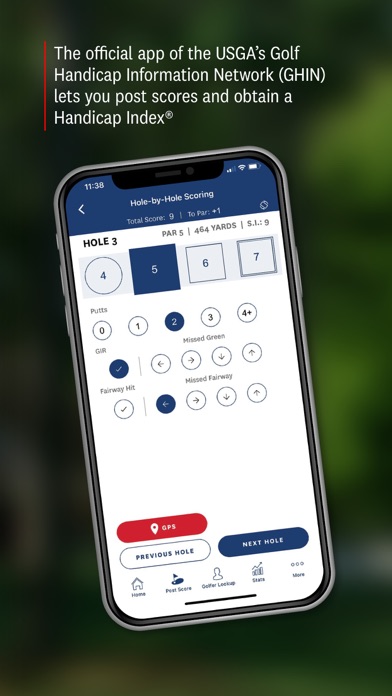
• Score Posting (Total Score, Hole-by-Hole Score and Hole-by-Hole Score with Stats)
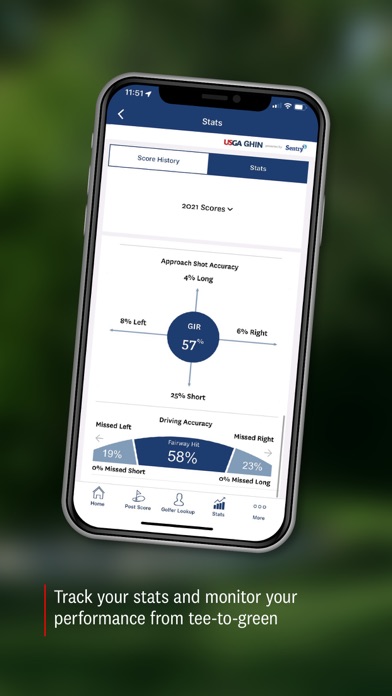
• Stat Tracking (Number of Putts, Approach Shot Accuracy and Driving Accuracy)
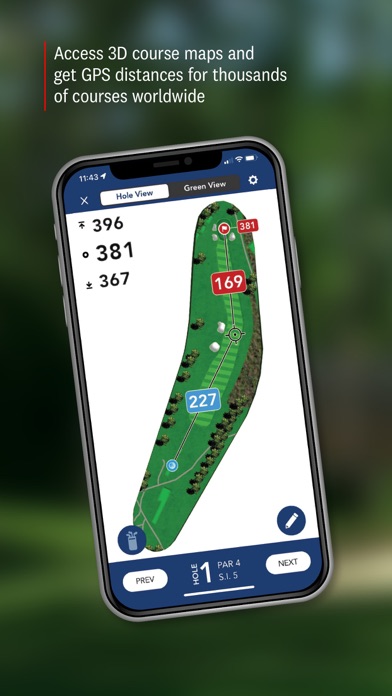
• Course Maps & GPS
• Enhanced GPS Features (Putt Break Map, Approach Shot Heat Map, Shot Tracking)
• Games & Group Score Keeping
• Apple Watch integration
• Golfer Lookup
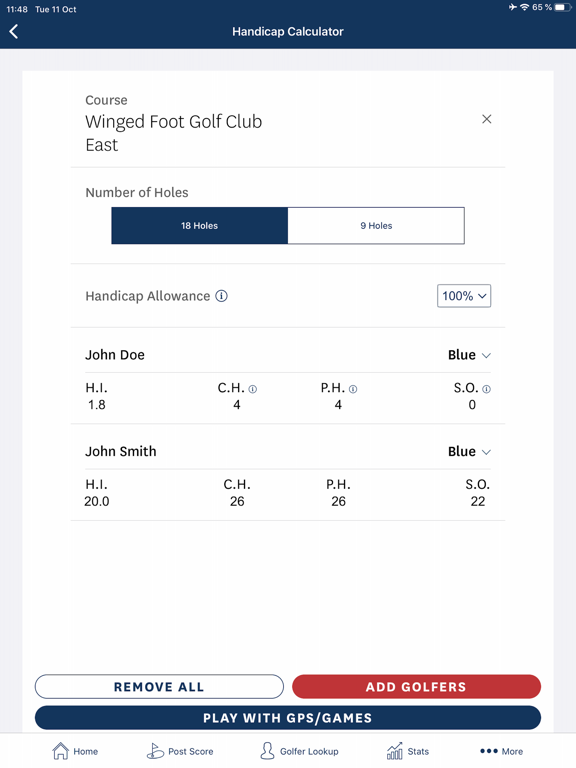
• Handicap Calculator
Terms of Service - https://www.apple.com/legal/internet-services/itunes/dev/stdeula/
Privacy Policy - https://www.usga.org/content/usga/home-page/Handicap-ghin/ghin-privacy-policy.html
GHIN Positive Reviews
Better systemI have a soft cap on my handicap. I believe it is a result of one great round I played at my home course in August. That dropped my index way down. It’s a little disappointing that my index is being constricted because of that. You know it is possible to have one good day on the links in an entire year. Especially if you were a very good golfer at one point in your life. It’s still in there. I just can’t get it to come out nearly as often as I would like. Quite honestly, it’s embarrassing ring the index I am. But it’s what I am. I’m getting older. Can’t hit it as far or as straight. My body doesn’t always cooperate. Can’t practice as much as I would like because of my back. Wish the system could take everything into consideration..NinvfvbkibvgVersion: 4.5.4
Phone App Great - Watch, not so muchThe app for the phone is amazing. I love that it keeps handicap, has enhanced GPS, has heat and putt maps, stat tracking, handicap calculator, etc…. One major flaw is that with the Apple Watch, the GPS still uses yardage from your phone. So, sorry for you if it’s cart path only. Sorry if your partner drops you and takes the cart. The watch app is also constantly closing on your wrist, so, reopening and having to allow it to calibrate again is annoying. GHIN needs to take a note from Hole19 and GolfShot and allow the watch app to utilize the watch GPS on GPS mode only, this way, your watch shows accurate yardage. I find that the biggest difference is the other apps allow Apple Watch with GPS to use the watches GPS and stay open for the full round (phone or not) by utilizing the health app. I use the phone for approaches and around the greens (mainly when we are driving to an approach shot and/or parking to walk to putt and wanting to see the green slopes), then I leave my phone in the cart and I use GolfShot for my watch GPS..KuhrhfhurdhiVersion: 5.3.0
Great Potential. Support is non existentI have been using the app for several years. I use it essentially as an electronic scorecard with the added bonus of automatically submitting for my handicap. It is helpful for match situations with built-in net scoring and even has flexible percentages of net strokes. It is also decent at keeping track of statistics, though there are other apps which are more powerful and offer more granularity, like club and putt distances. The thing that is annoying is that my course, which is a top course in the state, does not have the green heat maps. I know they exist because other apps offer them. I have emailed the developer on several occasions and only get the message "you have already submitted this request," with no path forward. Additionally, the app occasionally has a bug which does not allow proper score input, and reverts to the keyboard instead of the numerical pad input which gives an error in advancing to the next hole. Lastly, the Apple Watch integration has promise, but crashes too many times to be useful..RCPanekVersion: 5.3.3
App stopped working again after IOS updateUpdate: since updating to the latest app version the iWatch and iPhone now work well together as intended. The team addressed the issues and fix the problem in a very timely fashion. One cannot ask for more than that. Thank You!!
The app has been working well up until yesterday when I updated my iPhone IOS to 18.2 and the watch app to 11.2. Now the app on the iPhone works well but when trying to connect the iwatch it just says searching and to start round on iPhone. A problem we had in the past. The app probably needs an update to sync with the iPhone and watch app using the latest IOS updates.StshbeVersion: 5.6.3
Better TrackingI use this app every time I golf to track my round. If I am playing in a league or outing I am likely using golf genius. I cannot “post my score” in GHIN because it will create a 2nd round as Genius is being used. I wish it had a way to just track my stats, and skip submitting that round score, so that I can watch/follow my stats over time but not submit my score 2 times for 1 round. One time through GHIN and again through Genius. ALSO, I would love a way to track penalty strokes per round. I’m working on getting less penalties, and would love to see how they impacted my game overall. If there was just a check box for penalties or something that showed you how many you had with stats/chart over time that would be great. Thank you.Wendell 1107Version: 5.6.21
Gah!I loved this app the last two summers. It worked so well with my watch. This year, I’m lucky to even get it to connect to my watch. When I actually do get them connected, it will disconnect almost every hole and if it’s still connected, it will not show distance from the hole, only the score input screen for that hole will show up on my watch. I want my money back!! I will not renew next year if this does not get fixed. Other than that really big problem, I love the app. It’s easy to use and a nice looking app. Please fix this!!
Edited: with the update it works for me better than ever! I hope it sticks! Thank you!!.AshleyruthVersion: 5.5.3
Great golf app could be betterHigh Hcp trying to lower it. I track stats, count putts, look for areas to improve, and the app is good for all of that. Also love using my watch on the course. Distances are reliable. Greens on the phone are great. My main beef is this: it will not let me keep score on courses outside their posting windows. I used a free app that let me keep scores that it did not include in my handicap. What gives? I shot my second best score in December this year; my best on New Years Day a few back. I’d like to have the data even if it doesn’t figure in. And when I use it those times without score the app will NOT close on my phone because there is no round to end. Please fix those and I will be your biggest fan!!!.Gronny2Version: 5.6.2
UI FeedbackApp works great and I use it every week. I do have feedback on the interface though. On the enter score/scorecard screen there are two buttons below the scorecard and above the keypad. They are GPS and Post Score. You post your score one time a round, but you potentially switch back to GPS from scorecard on every hole. There is no need for the buttons to be the same size and there is every reason the gps button needs to be bigger. If you’re riding in the cart towards your ball and you’re trying to tap the gps button as you approach, it can be difficult to tap the small gps button just right to get it to switch over. Give me a big old gps button to mash please..Recip99Version: 5.5.0
BugAfter hitting “play” and selecting the course then hole by hole with stats when you try and pick the tees the wheel does not go away to move forward to keeping your score. Hope that makes sense. Thanks
Edit: the “done” button after selecting tees is white on a grey background. It works but extremely hard to see. Please fix. Thanks.
Edit 2. Looks like there was an update today that changed the visuals and the done buttons is clear. Thanks for the update..Kerrpk69Version: 5.6.23
Simple fix?Enjoy the app, though only use for keeping score and then post-round posting. Agree with other comments that it’s a nuisance having to re-click “GHIN” to have it reappear on the face after lowering hand. Biggest gripe, though, is that the user should be able to change face element colors—such as to white background with dark lettering. That, or make the hole being played white lettering (or some other higher contrast color, such as bright yellow). Right now “Hole” appears as gray on a black background in a smaller font size. In bright daylight, this is VERY difficult to clearly see—particularly if one is older and needs “readers” (that I don’t wear while playing golf)..FeO2y1957Version: 4.9.2
“Scorecard” display is annoyingThe scorecard display is cut off. If you landscape it, you can’t see the bottom stats unless you scroll up a bit, and then you lose the top line which is the yardage of each hole.
Why can’t you set it up so that one page shows the front 9, as a whole, with all the stats, and then when you flip sideways you get the back 9?
That way you can capture the image of the scorecard with stats and even PRINT those pages as a whole card.
You could also integrate some kind of progress chart, an average chart, like in other Apps, where you can see what you’ve been doing over the last 20 scores to show areas of the game that need work etc.
This App could be so much more.He ain't THAT goodVersion: 5.6.15
Occasional IssuesI’m happy with the yardages as it is always within a yard or two of other golfer’s range finders. Took a little while to get familiar with how to work through scoring a round. My main problem is that it often returns me to the home page and I have to start again, telling it to finish my round so it goes back to the course I’m playing. Today, it kept reverting back to hole #2 even though I was on the back nine. When I manually moved to the hole I was playing, every time I tried to enter my score, it closed the app. I tried restarting my phone, but that didn’t work. I wish it was more reliable in this regard, especially after paying $50 for the upgrade. Needs work!.TmcomplaintVersion: 5.4.3
Apple Watch app needs work UPDATEDUPDATE: Both issues were fixed in the latest update! I changed my rating from 3 to 5 stars.
Please allow for disabling turning the grown to switch holes. My glove turns the crown, so I’m always on the wrong hole. Also, the app keeps closing, even if I set Return to Clock to 1 hour. I need to reopen the app on the phone and hope it syncs with the phone app, which is still tracking a round. Find out how the other golf GPS apps make it work..WiresMcGeeVersion: 5.5.3
App keeps crashingUpdate: the update has helped and it works like its supposed to again although it is draining my battery more than in the past. Since the update last week the app keeps crashing. I get logged in and then it closes and I have to keep reloading. Deleted and reinstalled and still keeps happening. Worked fine until Friday after the newest update. I contacted USGA and they are working on it. Hopefully will be a quick fix. I use this app all the time and usually works great..KdhasaVersion: 5.6.8
Golf Lookup featureSearch for a golfer on the aystem is horribly flawed. Many times registered players don’t show up. I hope they read this and fix it. Still doesn’t work all the time. Seems like once you create a favorite list of someone like Smith you can never add another person with the same last name ! It won’t search the data base. FIX IT !.MachKingVersion: 4.9.0
Needs Apple Watch FeatureThe stats and GPS functions of the app are great and comparable to other GPS and shot tracking apps like 18 birdies however, the thing that 18 birdies and other apps have that this one doesn’t is compatibility with Apple Watch to tell you front, middle, back yardages and keep stats without using your phone or entering it after the round. Would be nice to see this all inclusive app have the Apple Watch pairing function so you could keep score and stats live as well as receive GPS yardages using your Apple Watch for those who play with the watch on..E_lambertVersion: 5.6.17
Phone app fine, but watch crashesI've used this app for about a year now. On my iPhone XS Max the app works fine, but the app on the watch (v 5) tends to start and immediately crash rendering it useless. I don't understand why the app needs to load my home course every time I play. Can't it just be updated periodically? And I also wish that I could set up a default for my tee setting and number of holes for my home course. Overall, the intereface is a little clunky. I'd like to be able to just have a "play" button for default settings and get rolling..BACareyVersion: 5.3.0
Good app, getting betterThe app continues to improve and I use the stats function often. I would like to see the following changes, upgrades. 1) change the colors for the stats. It doesn’t have to be a some kind of shade of green. Try a different color. 2) that doesn’t seem to be a way to select a penalty stroke. 3. When reviewing stats after a round, the data in the screen needs to be recalibrated so that you can clearly see the stats for fairway accuracy..JGCOOPVersion: 5.5.5
Okay app; needs improvementsA couple of things. I love daily GHIN updates, when playing a lot of rounds it’s great. Also love you’re bringing in some of the stuff from GolfLogix. It’s great. I want to use the app for distances - but practice rounds alone aren’t scoreable, and I don’t have the ability you use the app without scoring / marking it as an alone round.
Additionally the app just won’t load sometimes. Many devices - all the same. The change was recent and it’s like it’s locking up and timing out during authentication..ThatsOneSweetPieceofAppVersion: 4.9.1
RECOMMENDED UPDATEPlease update the GHIN App “My Courses” option of the Profile section to allow the user to designate one of the courses as default “HOME”. I recognize that it can be done when starting a round but that option does not standout and I (and many of my golf buddies) fail to select it. I also understand that if I joined through my home club it would be the default. However, it is a lot more convenient for me to renew my membership on-line..KickinbirdieVersion: 5.3.0
Loved the app when it worked correctlyI used to be able to post my scores hole by hole, which was awesome. Since 3 days ago the app closes when I try to use that feature. I’ll choose post hole by hole, select the tees and date, then hit post and the app closes/ shuts down. I am able to post total score from and back but that doesn’t keep hole by hole stats, which i like. I sent an email via the help button on the app but got no feedback. Problem continues to this day..ShagginwagonVersion: 5.5.1
Need a comparison chart for statsWith all the stats, I enter, it would be nice to have the ghin app compare my average stats to other golfers of my same handicap for example, greens in regulation percentage, fairways hit percentage, putts per round number…Etc. that would give me a target to see what I need to work on a little bit better. That would be easy to do I would think with all the data that the gin app is collecting from all golfers..Elmo307Version: 5.3.1
Great yardage but keep crashingThe app is great for yardage. I use it now instead of my garmin gps since the GHIN app is updated for our course renovations (new bunkers and widened fairways and greens) and garmin is not. Also wonderful at tracking stats and playing match play (gross or net) with friends. Only 3 stars because the app keeps crashing when I review my scoring history by course and the mobile app does not work well (yardages not accurate, app crashes, could not post scores). Otherwise 5 stars!.JenHenry:)Version: 5.4.3
Disappointing Handicap scoringOne good round over a year ago dropped my index by 5 strokes. Since then I’ve played my normal, struggling way which is never breaking 90 for the past 15 rounds. I’ve entered my scores under other apps and my index is correct. Using this app, my index has never changed. This app is not updated properly, your rounds scores vs your index will not be accurate, and only leads to people abandoning the app, and the handicap process altogether. Get it together start managing this app like it deserves..PstyledVersion: 4.8.1
Finding other players.I have difficulty finding fellow golfers on the app...Lynn de CambraVersion: 5.0.2
Great but....I can get my course handicap on my iPad with this app, but when I use the app on my phone, I can’t select the tees. This is annoying when you are out on the course, and you can’t figure out what your max is on a hole, now that we have the new rules. This app would be really useful if you could fix this..XxxdewVersion: 3.0
Free International Money Transfer 💸Enjoy high maximum transfers into more than 20 currencies while saving up to 90% over local banks! The cheap, fast way to send money abroad. Free transfer up to 500 USD!AdvertorialVersion: 5.6.23
GHIN Negative Reviews
Poorly designed, poorly supported, such a great start, but badOk
I love the app for the ease of scoring and the GPS function, when it works. So much to possibly like, but…..
There is no way to use the score/scorecard function without using GPS….
But why wouldn’t you want that??
Because, the GPS is so poorly designed my fully charged phone usually doesn’t make it through 18 holes without running the battery down (iPhone 12 pro with battery effiecency of 88%)
AND….
My local private club, a Pete dye course, has the wrong gps course attached, so the GPS is worthless. I have submitted two feedback forms to the app, with no response and no change. Nothing like being on the 4th hole (par 5) of a championship course and it saying you are 2357 yards away from the 5th hole of the non rated executive course.
But, they have the scorecard correct. Just asleep at the wheel…
Then, my son and I started to play 18 on Sunday evening but decided to stop at 9 holes instead. Well, when scoring for multiple people there is no way to end the round early and post only the 9 holes…. Again, do the developers or employees not use the app??
Every time you boot the app and try and play it tries to get you to pay $40 a year for more features, but the basics don’t even work.
Don’t get me wrong, I really like some aspects, but I assumed with the USGA name in this that the basics would work and they would have some basic supports..TeufelHunden91Version: 5.2.0
Mediocre at bestThere is no feature to configure what stats should be tracked. Other apps offer a means to select which stats are important to you. Like bunkers (green side and fairway), penalties and others. Simply recording how you missed the fairway or the green doesn’t always tell the whole story. Also, if you start a round from a hole other than 1, it doesn’t let you proceed past 18. You have to arrow backwards to find hole 1. This is cumbersome on the golf course.
GHIN should partner with other better apps so scores can be input from them. GolfLogix is my personal favorite. This way you could choose the app that serves you best. They, of course, could even require part of the app fee be shared with them for maintaining usga handicaps. Golflogix is not perfect, but much better than the ghin app. Unfortunately I’m stuck with the ghin app to maintain my handicap..Gobosox01Version: 4.9.1
Apple Watch bug issuesI enjoy the concept of the app and not having to manually enter hole by hole scores after each round or carry a rangefinder. However there are bugs which hinder the functionality of the app.
1. After each hole or shot in need to reopen the app on the watch to enter scores or get a distance. Last year I used GolfLogix and this was not an issue. GolfLogix stayed open and active on my watch the entire round.
2. Yardage distance does not always update on the watch this issue appeared occur off and on. Often after reopening the app on my watch (see #1) the distance on my watch would read as if I’m standing on tee, but I’m only 100 yards away from green. I would go to the phone app which would confirm I’m 100 yards from the green. The value of the watch app is not having to mess with my phone during the round.
3. Not all scores entered on the watch transfer to to the phone app scorecard. After the round I review the scorecard before posting my score. 3-4 holes did not have recorded scores entered though the watch. I needed to manually enter the score for those holes on the phone scorecard in the app before posting the scorecard.
The app has great potential but these issues need corrected for the app to remain viable..Rani blueVersion: 4.9.0
LOTS of Issues With AppWhen the app works it’s very, very good. Awesome app for tracking your handicap and looking up others. The concept of the GPS app is very solid, would be amazing if it worked. Sadly, it does not in many ways called out by others in reviews. You tee off to play and the app is signed out, won’t sign back in, had to change my password while trying to play the other day. That was enjoyable, forget the Apple Watch interface, changes holes throughout your round.
I paid for the upgrade options, in doing so I did have a basic expectation that the app would work. It does not, feel ripped off and not willing to go through what I am sure will be a massive hassle to get a refund. USGA should be ashamed of yourself, looks like from many reviews they think all is good. A real shame, could be a really good product..DWRameyVersion: 5.2.0
Do not buy if you use a watch!I purchased this because I thought it would simplify posting my scores after a round. However, I like to only use my Apple Watch when playing. This app is a disaster for a watch user.
First, the watch features are nowhere near where other apps are. You cannot input your score on the watch nor can you track shot distances.
Second, the watch app is glitchy. It wanted to continue to play different holes and I had to continually manually tell it what hole we were on. Very frustrating.
Third, the app crashed multiple times. This required me to go back to the phone and restart. It kept the score correctly when I restarted, but it was frustrating to continually have to pull out my phone to restart the app.
In summary, when I’m golfing, I don’t want to be interacting with my phone. It’s distracting and unpleasant. The watch is a great solution that GHIN has barely attempted to make viable. I asked for a refund the day after I purchase and after deciding 9 holes in to return to Hole 19 for the remainder of the round but I’ve been denied. So do yourself a favor and don’t flush $50 down the toilette with this junk app if you want to use a watch while you golf..FalconInTheMountainsVersion: 5.3.1
When it works, works great but….I paid for a year subscription, because the first few times I unused it it worked well. Loved the heat map and the gps, the watch, not so much. Nowadays it’s unusable and way behind other apps that are free. The phone app is great when it works but it keeps closing itself and you have to go through the whole process of starting it from the beginning, which takes a couple of minutes, not something you want to be doing 5-6 times a round. Also the heat map green is supposed to orientate itself based on where you are on the green, it does not do a good job of that. Unless this app, get a lot better on the next month (which is when my subscription ends) I will not be renewing..BobbysanVersion: 5.5.0
Not worth the moneyThe basic app is great for inputing scores for handicap calculations and golfer lookup , etc. since this part is basically supported by the yearly fee for the GHIN , it’s worth that portion of it. However, the $39 for the annual upgrade is a waste. The functionality of the gps and scoring functions are crude when compared to less expensive and much more robust apps like Golfshot +, etc. Considering the amount of data that the USGA has on each golf course, one would think the app would reflect it. The bug when using the Apple Watch feature has been well documented by others in this forum but it’s is amazing that this hasn’t even been fixed in the well over a year since the gps portion of the app came out. I will not be renewing next month when it comes due..Nested 12736Version: 5.3.0
USGA doesn’t care about quality!I have consistently had problems with the GHIN app shutting down during my rounds. Sometimes I can restart at the point it shutdown, but sometimes I have to restart from the beginning. I have written multiple times to the USGA providing screenshots showing the sequence of events and they just reply sorry we can’t replicate which I can understand, but other times I get an instant reply which indicates they haven’t even bothered to review what I have provided. They seem to be more interested in making enhancements than fixing problems. I have other friends having the same issues but don’t bother sharing but just complain. As a paid subscriber it bothers me they don’t care about customer support! If you want people to use it get it fixed!.Ragtag2Version: 5.2.0
Apple Watch App Doesn’t WorkI was excited to see that they finally made the app available on the Apple Watch, but like others that have posted it works poorly or if at all. It worked one time for me and it kept closing between shots and I had to reopen the app on the watch every time. This is poorly designed - it should remain open and active on the watch until the user closes it. Since the one time it “worked” I have not been able to get the app to actually launch on my watch. There is plenty of available storage, so that is not the issue. I have totally abandoned trying to get it to work. The app is useless until the developers fix these issues..Kurt in PghVersion: 4.9.1
Hopeful this would be the solution I was seekingI have upgraded to use the enhanced features of the app and I am still encountering issues when using the watch. The most annoying issue is that the watch will periodically disconnect from the phone app during a round and it is difficult to get the phone and watch re-synced. I like the options available to track shots during a round, but I don’t like losing the shot data for half a round because the app needs to be restarted on its own terms. It’s a little too buggy for me. I wish the support was better as well. I won’t be renewing the subscription features unless they can get the app debugged before my subscription renewal..CS2167Version: 5.2.0
Posting hole by hole is broken.For the last 2 seasons I used the app as a scorecard, posting hole by hole while playing… enter hole scores 3 at a time then save, then hit post & finish round, enter the next 3 holes & repeat this process until finished. For the last couple months when I try to do this the app frequently loses the saved hole by hole scores. I have also had a number of cases where I set up an 18 hole round, complete the first 9 holes, hit post & finish round to enter back 9 holes only to have the app re-open the round as a 9 hole round with no ability to enter back 9 hole by hole. Something broke! I like the app but these 2 problems have greatly diminished its utility..Fast7edVersion: 5.5.5
There are better pay apps out there.The pay features on this app are lacking. I paid for the app just to get club distances. First of all, the clubs you’re using are not customizable in the app. For instance, I cannot take out a gap wedge and replace it with a 60*. Second, there is nowhere that I can find to review the club distances anywhere in the app. What is the point in tracking them if you can’t review them and formulate averages for each club? I’ve reached out to customer support and have yet to receive a response. Really, the only thing the app is good for is the free features which is yardage and tracking your handicap. So don’t waste $60 per year..Jeeper_98_TJVersion: 5.4.3
Almost works…Had the app for a couple of years and it mostly worked fine. The app would occasionally shut down during use but upon restart you could pick up where you left off and the scores for holes you played would be retained.
In the past 6 months something has changed. When the app restarts all your scores are gone and it only shows the first 9 holes. So basically you have to record on a paper card while using the app. Kind of defeats the purpose of electronic scoring.
When I tried to get help via their email I get no response. So I can’t recommend paying for this app which is kind of a shame because when it works it has some nice features..GoHawks98059Version: 5.5.5
App crashes and loses scores when keeping score for a groupBug in current version would not let me save around of scores with a group gave me an error. Something to the effect of something must be greater than one tried finishing the round half dozen times every time it crashed deleted the round tried to score another round with a group and partway into the round, the app crashed lost everyone else’s scores except mine and when I continued to try to keep my score, it indicated that I needed to enter in everyone else’s scores to the whole last crashed and then it crashed one more time so I had to stop keeping score for the group and keep my own score only..Network novusVersion: 5.4.3
Worthless AppI got this app when it finally was available on Apple Watch and I paid for a one year subscription. I have tried using it several times but have never got it to work for more than one hole. It’s clunky, it will stop if you get notifications such as Ring or messaging and you have to restart. When you do it has no idea of which hole you’re, so it’s impossible to know far it is to the green. If I could get my money back I would. The other issue is that you have to download the course information every time you start a new round (or try to get back to the one the was messed up with notifications)..SparphVersion: 4.9.2
App constantly restartsThis app often restarts and asks to either Finish the round or Delete the round. Hitting finish will resume where you left off. This happens to quite a number of golfers at my club. No issues with cellular service either. Another issue is that after nine holes and making the turn, sometimes the app will not allow me to enter scores for the back nine. It only displays the nine holes played, even though I selected 18 holes when I started the round. I really like this app and want to use it, but it is really frustrating that this has been happening for a long time..The-FazmanVersion: 5.5.1
Dreadful AppBeing forced to move from NCGA app to GHIN. This app is really badly written. Logging in a totally random. Have to create a profile. Reset password. Then login fails again and again. No way to copy and paste your password from a password manager. No faceID login. Screens don’t align properly on the iPhone so you can see the right info. If, and that might you take some time, you get into the app, it has all your regional data but the presentation is weak. I couldn’t be less excited about this App. Will go back to logging my results on the local course computer, assuming they will still exist. Amateur hour. Why not copy the NCGA app and rebrand it. It works fine..RCGVersion: 4.9.1
QuirkyI like the app as it is very functional and provides the info necessary. I use in conjunction with my Apple Watch, don’t like carrying my phone all over the course bound to lose it. Like that you can score and then end of round post immediately. One quirky thing is in the Apple Watch function. During many many rounds, in the middle of the round the Apple Watch portion becomes disconnected from the phone some how and stars giving wacky yardages. Have to grab phone to get correct yardages. Once this happens you cannot get the watch to read the same as the phone. Very problematic..ZuZu2012hgytVersion: 4.9.2
IWatch App locks upTried the watch app during 3-4 rounds. Locked up every time. Had to restart on phone to get the watch app to start working after lockup. Send email to USGA support. Response: We have not received reports of the Watch app freezing as long as there is an active cellular service or wifi connection established. The GPS uses the geolocation of your phone so as long as you have a connection and your Cellular Data/Location Services options are turned on, the GPS should function as expected. If there is a loss in service, there will be a delay in the yardage updates..Marker1072Version: 4.9.0
Cellular FailureThe app seems to rely on the cellular network for something, which results in frequent crashes on golf courses with zero to two bars.
Unless you have entered a score for at least one hole, the app then needs to download the course data again, which is not possible with poor cellular coverage.
If you have entered a score, then you have to go through a multi-step process to restart the round, which means delaying everyone.
Good luck maintaining your focus on the game when you are wrestling with the app.
The Apple Watch integration seems to create more instability..Ref laxVersion: 5.4.3
FrustratingDistances and hole layouts seem good. GPS wouldn’t work one time and had to use another app. Watch pairing stinks, constantly have to relaunch on watch even after I made the setting changes noted in the FAQs. Also, the phone app has crashed each round I have used it (5 times), relaunch brought back to round in progress. This is with an iPhone 13 and Watch 7. I’ve asked for my money back but doubt that will happen. Will delete from my watch and just use on phone. Probably rely more on the Grint since I never had a problem w that on watch..KingDog88Version: 4.9.2
Constantly crashesI really enjoyed this app early on and was even paying for the extra features then an update a few months back caused it to start crashing periodically mid-round. I can usually get back to where I was in the round and will still have my score but it takes a minute which is absolutely not what you want when your standing over your ball ready to get a distance. Until the bugs are fixed, I’ll be searching for something else. Really worked well for me when it actually worked..TR1PTIKVersion: 5.1.0
Lots of bugsI purchased the annual $39 upgrade and am disappointed. The connection with Apple watch (was the main selling point for me) drops every round. I need to restart the ghin round on the iPhone to reload it. The app on the watch drops frequently requiring me to reload. I’ve done all the ‘fixes’ including adjusting the phone and watch settings.
So - my annual subscription is now useless - -
I’ve gone back to my ‘Golf Buddy’ device which never fails and which has just had a $20 battery replacement (DIY).
My golf partners are also happy that I’m no longer putzing with my phone/watch instead of playing the game..JohnandorVersion: 4.9.1
Paid Membership FeeFrequently locks up on my Apple Watch, further doesn’t show current score on your watch. On the phone app, very difficult to view your scorecard without losing the round. No share function with friends. This app needs a lot of work and was released premature. Cannot put in tournament scores. Forces you to post scores when tournament organizers for mens leagues enter your scores which causes duplication. Difficult to review past rounds. I would use golf logix or the V1 app as I find myself fighting this app instead of focusing on my game. Good luck all. I had positive expectations but left disappointed..Rick Utah GolferVersion: 4.9.0
Enhanced, NOTThe basic version is fine for keeping your handicap, looking up other players, and keeping a basic score.
Do not get the enhanced version! So not worth the money. Full of bugs. Does not use GPS satellites, but instead mobile towers so yardage is often wrong.
App continuously shuts off so you have to restart and all the effort that goes into keeping track of clubs and shots is wasted.
Hate to say, but futzing around with the app actually makes the round slower and less helpful.
There are many more apps that are free, or about the same amount of money that are much much better..THiPadVersion: 5.3.1
GPS Doesn't Work ProperlyIt loses track of the course constantly during rounds and I have to re-enter the course that I'm on, wait for it to "download" again, and then find the hole that I'm on every time I want to look at yardage or enter my score. So, it's just not good and very annoying to try to use the GPS. If that were fixed it would be a great app, but it simply doesn't work as a GPS app. Look elsewhere for that. It gets 2 stars for being able to enter scores to GHIN. But that's pretty generous still for such a simple task..JbjbjbjbjjbjbVersion: 5.3.1
Glitchy with iOS 16Crashes continually on the latest iOS version.Ronnie999-12Version: 4.9.2
Fix this!Useless App! You can’t choose Tees! Doesn’t t work on iPad or iPhone 8..McMacMoVersion: 3.0
GHIN mobileApp on my phone just stopped opening. There are many reviews stating same issues. Please fix..West vancouver54321Version: 4.4.0
Program Does not remember meOn my IPAD I have re-enter my GHIN number each time ! Very frustrating..Woody 1952Version: 3.0.3
Garbage!Doesn't work. Can't login. Useless..IncisiveOneVersion: 2.1.34
Payoneer 💰Payoneer is an online payment platform that lets you transfer money from any corner of the world! A best and must have payment service for every blogger, traveler, freelancer, affiliate marketer, consultant, virtual assistant, business person, online sellers, and receivers. Earn $25 for free by joining Payoneer. Sign Up Now!AdvertorialVersion: 5.6.23
 United States Golf Association