Bugfoot Studios LLC
Cut Calculator Customer Service

- Cut Calculator Customer Service
- Cut Calculator App Comments & Reviews (2026)
- Cut Calculator iPad Images
*** Winner of This Old House's Top 100: Best New Home Products ***
"Enter the lengths of lumber, sheet goods, crown molding, pipe, and other materials for a project and this app produces a cutting plan that gets the most out of your stock, minimizing waste. Invaluable. " - This Old House Magazine
Ever get to the end of a project and you don't have a piece big enough to finish the job? Guess what, you didn't plan the cut combinations and now you're heading back to the home improvement store to buy more material. Not any more with Cut Calculator!
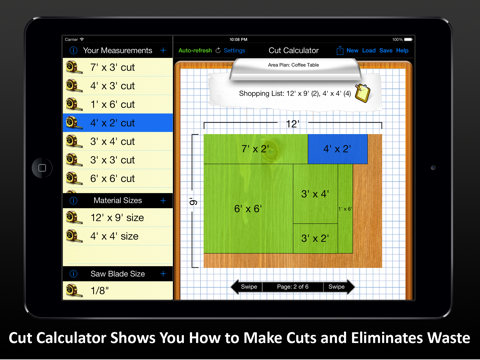
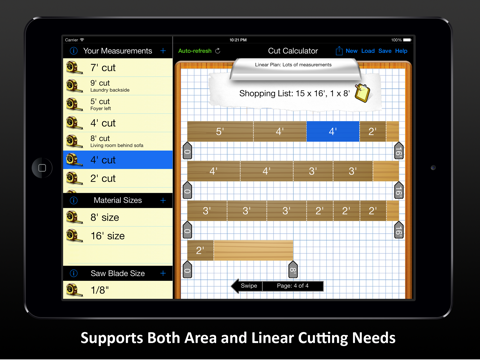
Don't get caught with wrong material estimates again. Cut Calculator will help minimize the amount of material you need to buy, accommodating all of your cut sizes. Perfect for linear cuts such as baseboard molding, crown molding, pipe, lumber AND area cuts such as plywood or drywall. Cut Calculator will plan your cuts to save you money!
Cut Calculator is a contractor's, a carpenter's and do-it-yourself'ers must have!!
FEATURES:
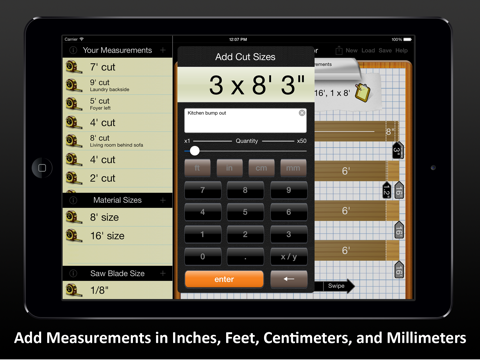
* Add all of your cuts in feet, inches, centimeters, and millimeters. You can use fractions or decimal. Even mix between imperial and metric
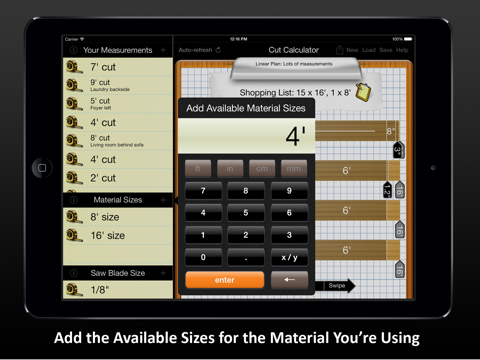
* Add multiple available material sizes. Cut Calculator is going to figure out how to minimize waste with any combination
* Add your saw blade width (kerf) and Cut Calculator is smart enough to know that a 3 ft. cut and a 7 ft. cut will no longer work on the same 10 ft. board
* For sheet goods, Cut Calculator allows you to factor in wood grain or ignore it, all while optimizing your cut plan
* Save your Plans for later, load up old Plans is fast and easy
* View and print a PDF of your plan design
* Export your shopping list to email, iMessage, or copy into any App
Avoid one mishap using this App, and Cut Calculator has paid for itself, and then some!! Don't just take our word for it:
"Some people have a hard time visualizing the best way to utilize materials, and Cut Calculator creates a picture illustration of your materials and your cuts to help you best utilize what you have" - MacNewsWorld, June 2013
Featured by Apple as a New and Noteworthy App - Utilities
Cut Calculator App Comments & Reviews
Cut Calculator Positive Reviews
Great for deck planningBuilding a small deck, and this is the first cut list app that has actually exceeded my expectations. I’m able to enter the cut lengths I need, then quickly experiment with board lengths for purchase to see how to reduce waste. In general, waste is more costly than incremental cost per lineal foot for longer boards (but not always). App crashed once when switching grain direction from horizontal to vertical, which didn’t inspire confidence out the gate. Output to PDF for printing is fantastic! Haven’t tried panel layout, as I don’t need that yet. Would be nice to be able to input pricing and/or availability for different material lengths and have that as an optimization input (for example, say 10’ boards are unusually expensive compared to 8’, or perhaps I need materials now, and there are only 2 10’ boards in stock, but plenty of 8’s). Worth the asking price - I’d buy the developer a cuppa coffee!.Version: 3.11.1
Nifty AppHelped me figure out the size of lumber to buy based on my project needs, really simple and easy to use. Printing ability was great as well, so I can take sheets with me to store. Also was able to go back to a saved "project", make changes, and recalculate. Had a little learning curve at first, but realized you want to calculate lengths on one dimension at a time, (for ex. Put in all cuts on 2x4s only, and available stock to come up with lengths to buy), or cuts and available stock on a "area" (for ex. Plywood sheets of certain size to but for all cuts from plywood needed). I thought ability to have pricing might be helpful, but generally longer stock lengths and efficient cuts translate to lower costs. Couldn't find this tool in more expensive apps..Version: 3.11.1
Good appI make signs for a living and find this app useful for its intended use. It saves time when doing several different size cuts to minimize waste. One review said 5th grade math would do the trick. You can do the same calculations on a sheet of paper with the same results however, why waste the paper? It’s not a perfect CAD design program but that’s not what I is intended to be. It’s a simple to use calculator that saves time and resources. I’ve used it from its beginning and through any and all upgrades it is still useful unlike other calculators I’ve used. Keep up the good work..Version: 3.11.1
Ok...but could be way better.I’ve used different and more expensive software before. For wood working, I typically use multiple sizes of wood to complete a project. There is no way to enter in multiple material sizes under 1 plan. Only cut lengths. If you plan on using different size lumber 2x4, 1x3, 4x4 for example you need to create a different plan for each, which seems counterintuitive to me. I have no problem spending time setting up the available materials and designating under the cuts what material is needed. It is a simple add to the software that will take it further. Since it only really does 1 size at a time, I can work that out on paper like other reviewers have stated..Version: 3.11.1
Regular guyTook we a while to get used to how to add, modify or delete cuts and materials, but once I got familiar with that, this app has been perfect for me. So far, this app has done a spectacular job of optimizing materials. Has saved me a lot of time I would otherwise spend doing it with a calculator and/or graph paper. Have used it for both linear goods (such as 2x4s) and sheet goods. Also has saved me money by eliminating waste. I'm sure I've already saved the few $ this app costs. Much better overall than I would have expected..Version: 3.11.1
Super helpful - needs a few tweaksI have used this for several years now. This app does all of the math and space planning in seconds that would take me at least an hour on paper. Minor frustrations- sometimes just by changing the description of the cut or the material (long dimension vs short dimension first) I find that the plan creates more or less waste. I have to delete and change the descriptions to find a better, less wasteful plan. Related frustration - descriptions can’t be edited; cuts have to be deleted and re-entered. Cuts also cannot be batch deleted but deleted separately. It’s annoying but not a deal breaker. I love how easy printing the plans is. I just put the cut plans printout on my clipboard, and we’re off!.Version: 3.11.1
Awesome!With wood prices up this app is essential for reducing waste. Love everything about it. One small issue for me is the area isn’t as smart as it could be. For example swapping dimensions to make a piece fit instead of going to a new board. Not a big deal just something to look out for.Version: 3.11.1
Fantastic App! Not as $$ greedy as the newer onesI’ve been using this app since 2016 and I’m so happy that it’s still runs on my devices. I’ve used it on many projects and continue to do so the are amazing and it’s so easy to use compared to some of the other products out there which requires subscription..Version: 3.11.1
Need to know the most efficient way to cut your woodThis is the app that big box stores should be using to help customers not waste their wood. Where you are charged after 6 cuts what if you don’t really need it? I like knowing how many projects are potentially in this purchase.Version: 3.11.1
Great startCut Calculator is a great tool that could be better. It may be my fault but I would like to be able to have multiple material options in a single plan instead of having a separate plan for each material used..Version: 3.11.1
Saves me time and moneyI have been building kitchen drawers, a large pantry and drawer dividers and this app has made all of my cut lists a perfect as possible. This has saved me the time of trying to figure it out and the money of not buying extra wood. Completely awesome..Version: 3.11.1
Handy for making foam board traysWith the kerf set to zero (razor knife thickness) this app helped with making divided storage trays for Christmas ornaments from foam core board. Of course it’s been used in the wood shop too! My only wish would be that parts could be parametric, allowing me to enter a part’s dimensions, and then changing the part’s quantity later. Or, entering a “project” as a list of parts, and then changing the project quantity later... Until then I can live with making a BOM first and then entering things. It’s still a five star app in my book!.Version: 3.11.1
Nice but could be easier to useThe input interface is not very intuitive. A more positive enter or save button for each step would help (For example if you do not enter the unit like inches, you can hit done and nothing happens). A training video or real instruction would help. Overall a good value but with just a few tweaks it could be a killer..Version: 3.11.1
Great way to plan materialI’ve been using this app a lot lately to help plan sheet goods for a large cabinet job, I love it. It is pretty intuitive and the results work, you might be able to get even higher yields but as a starting point, it s great..Version: 3.11.1
Great appThis app has been very helpful the past couple of years. One improvement I'd like to see is the ability to optimize based on multiple quantities of the same length stock I have on hand..Version: 3.11.1
Great for Beginner WoodworkersLet’s me maximize my materials by planning out most efficient cuts. Have used on several projects and let’s me know when I am short with only having to worry about the measurements of my final piece..Version: 3.11.1
Time & Material Saving App!I just don't understand what all the complaints are about? It's only$4.99 not $499! C'mon. I've yet to actually cut a sheet of 4x8 ply on my TS using the app but I've studied the way its handles layouts taking into account blade thickness and it seems to be right for kitchen cabinets..Version: 3.11.1
Great .. Time and money savingGives the best layout for length and area cuts, simple to use and accurate .. Saves money on materials and your time .. This is worth five stars and an app purchase fee .. Will be a favorite after first us.Version: 3.11.1
It’s Fair, cannot read all the numbers on the layoutIt is pretty straight forward but one you have your layout plan it is very difficult to read the dimensions. And if you print it out it is a very small printout that you can barely read. And it cuts off numbers. I’m trying a different app.Version: 3.11.1
Nice and easy to useVery nice and easy - would like more edit options. Have to delete and re-add, but so easy not much of a hit. Also would like to manually assign some cuts to certain woods. Spot on product.Version: 3.11.1
Nice but glitchyThis app is fairly basic, would be nice if it were able to create cuts for different wood thicknesses without having to create a new list for every size. But it’s something and the price is right..Version: 3.11.1
Love this app! Could use some updates though!It's been 4 years! Would love to see some modernization and updating. But still functions and is the best available.Version: 3.11.1
Super usefulUI is janky and takes some getting used to. But once you’re used to it, it is straight forward and works extremely well..Version: 3.11.1
Easy, fast and intuitiveI was using his within 2 minutes . Please , please make an iPhone version.Version: 3.11.1
Looks goodHaven’t used this yet, but it looks very useful. Could be better if it would set table saw cut lines ,because you can’t cut corners in the middle of sheet goods with a table saw..Version: 3.11.1
Super helpful!!I can finally figure out how to best cut wood for my projects. I make several of one item, and this app is so helpful..Version: 3.11.1
Works great!Saved me tons of time on several large projects. Worth the price and very easy to use..Version: 3.11.1
Easy to determine cut listStraightforward app to determine cuts. Does not let you enter cost per board foot. Would also like to enter existing lumber inventory..Version: 3.11.1
Love it!Just what I need to figure out how much wood to buy and how to optimize its yield. It has no useless bells and whistles. For 5 bucks, you can't beat it!.Version: 3.11.1
Awesome with one exceptionYou should be able to enlarge the drawings otherwise it's a helpful tool for small projects.Version: 3.11.1
Great money saverWorks great when you have plywood to cut. Especially at today's lumber prices..Version: 3.11.1
It works!Simple instructions... Easy to use. Saves time. Saves money..Version: 3.11.1
Great appThis app is very useful for me when I'm making my cut list for my projects..Version: 3.11.1
Cool!Used three times already saved two sheets of plywood! Very easy to use!.Version: 3.11.1
Does what I needEasy to use with efficient display. Gives me optimized initial cut layout for sheet goods and a good estimate of the number of sheets required..Version: 3.11.1
GreatWell worth it, would be great to have Mac/OS and iPhone version. Knocks more expensive PC software out of water..Version: 3.11.1
Generates accurate cut listCalculator app exceeded expectations. It is a simple to use tool. It provided an accurate cut list..Version: 3.11.1
Great help to save materialsCalculate materials needed for complicated projects. This app will make it easy to optimize and organize your cut sheet..Version: 3.11.1
Very Handy AppGreat app for the DIY'er. Saves money and time by providing a shopping list and the plan for each piece of stock..Version: 3.11.1
Basic CalculatorDoes a decent job of fitting pieces into a sheet of plywood but doesn’t fit them in for optimal ripping on a table saw. Pieces are placed in the sheet as long as they fit without regard to straight line cutting..Version: 3.11.1
Great toolGreat tool, simplifies design process, gives accurate cut lists..Version: 3.11.1
Buy it!Bought it for the plywood calculator. Very useful and helpful..Version: 3.11.1
Life just became easier.Saves me tons of time designing kitchen cabinet cuts. Love it..Version: 3.11.1
Great for me the noviceThis really helps me minimize board waste.Version: 3.11.1
Free International Money Transfer 💸Enjoy high maximum transfers into more than 20 currencies while saving up to 90% over local banks! The cheap, fast way to send money abroad. Free transfer up to 500 USD!Version: 3.11.1
What do you think Cut Calculator ios app? Can you share your thoughts and app experiences with other peoples?
Please wait! Facebook comments loading...