SVT Software
Accounts 2 Checkbook Customer Service

- Accounts 2 Checkbook Customer Service
- Accounts 2 Checkbook App Comments & Reviews (2026)
- Accounts 2 Checkbook iPhone Images
- Accounts 2 Checkbook iPad Images
*** For the latest features and enhancements, please check out our NEW Accounts 3 Checkbook app, now available for download from the App Store! ***
Featured by Apple in "What's Hot" List
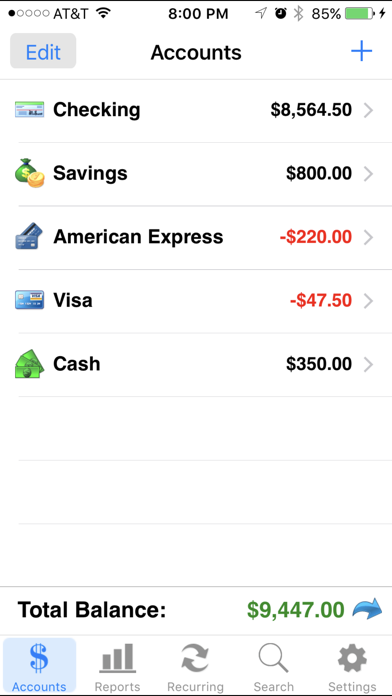
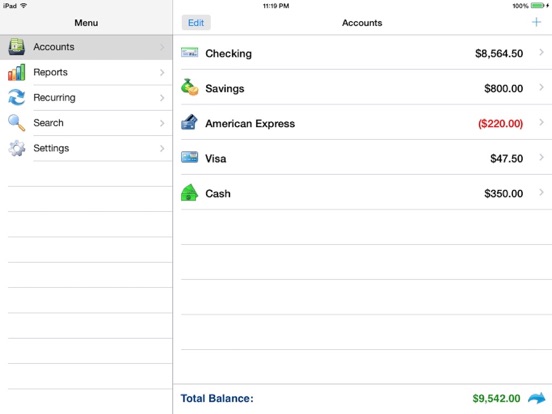
Accounts 2 is an easy to use application to replace your paper checkbook. With the Accounts 2 application, you will have a quicker and more convenient way to track your daily finances. You can schedule transactions, transfer funds, capture photo receipts, reconcile, view reports, export data, print, and much more. All features of the Accounts 2 app are designed to be quick, clean, intuitive, and easy to use.
FEATURES
* Touch and Face ID Support
Use Touch or Face ID to authenticate and launch the app quicker and more conveniently.
* Sync Data via iCloud
Sync your data across iPhone, iPad, and iPod Touch devices
* Universal Binary
Designed for iPhone, iPad, and iPod Touch devices. No need to buy separate apps for each device.
* Graphs and Reports
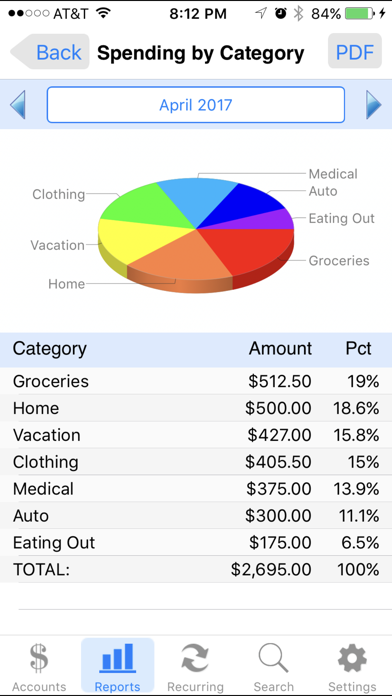
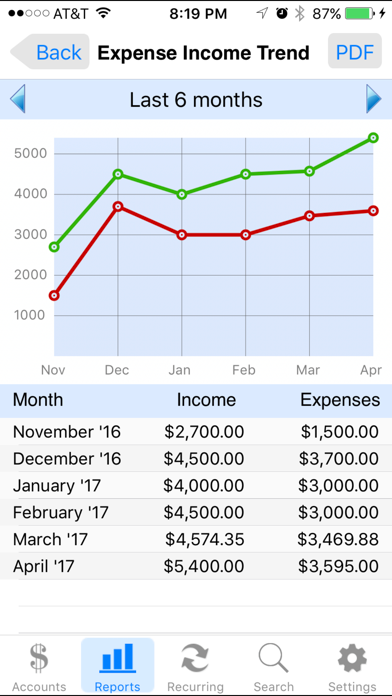
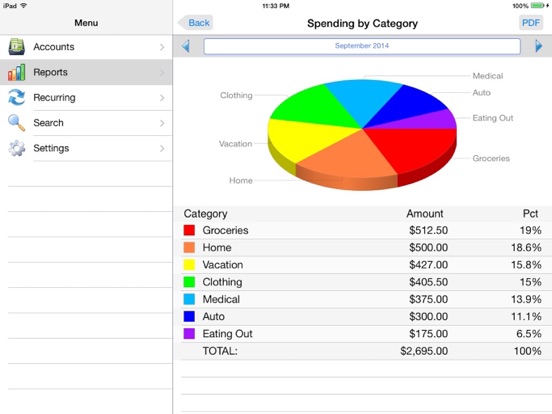
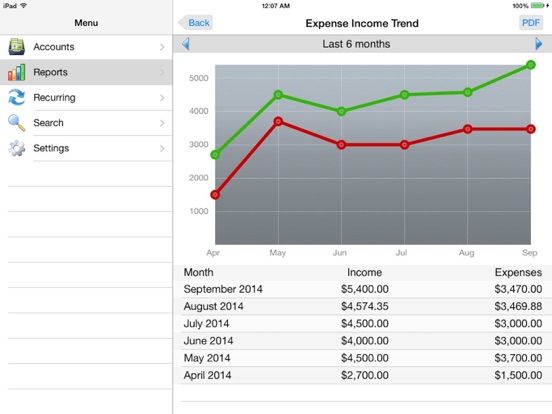
Review your monthly income vs. expense, spending by category, or income by category summaries with beautiful graphs and reports.
* Photo Receipts
Capture and store photo receipt as part of a transaction.
* AirPrint Support
Print reports directly from your iPhone or iPad to any AirPrint-enabled printer.
* Recurring Transactions
Schedule transactions to repeat weekly, biweekly, monthly, semimonthly, quarterly, biannually, or yearly on a start date that you choose.
* Split Transactions
Split a transaction among several categories for more precise tracking.
* Search
Quickly search for transactions and edit them from the same screen.
* Reconcile Transactions
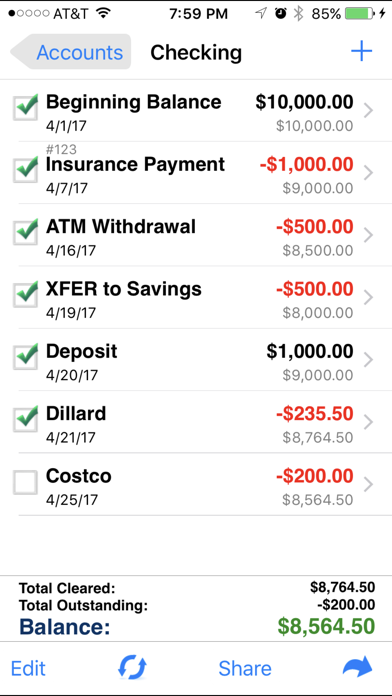
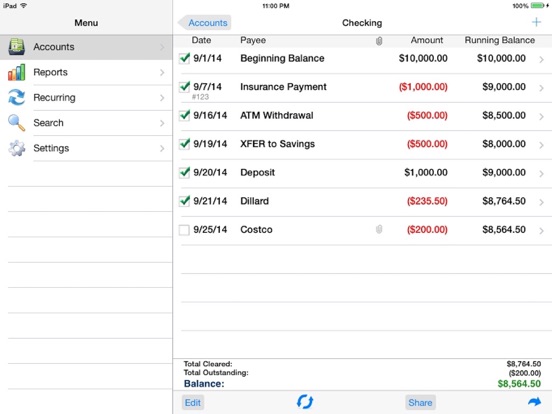
Reconcile by checking off cleared transactions and comparing the actual and outstanding balances against a bank statement.
* Smart Autocomplete
As you type, a list will show you your previously entered descriptions and corresponding category. Selecting an entry from the list will fill both fields of the transaction.
* Auto-increment Check # Field
Accounts 2 will suggest the next check number for you based on the previously entered number. If you replace your checkbook, just enter the new starting number and Accounts 2 will auto-increment from there.
* Transfers
Make a one-time transfer between accounts or set up recurring transfers to automatically repeat.
* Export in CSV, QIF & HTML Formats
Export transactions via email attachments for used with desktop applications such Numbers, Excel, or MS Money.
* Customization Settings & Themes
Configurable settings and themes to customize the Accounts 2 application based on your preferences.
* Transaction Sorting/Hiding
Sort transactions by date in either ascending or descending order. You can also hide reconciled transactions to keep your current list from being cluttered.
* Accounts Reordering
Reorder your accounts from the account list in any order you choose.
* Accounts Delete Lock
Prevents accidental deletion of all the transactions under an account.
* Backup / Restore
Backup your data for safekeeping via email, Dropbox, or iTunes file sharing interface. Then restore it to your device whenever you need to.
* Passcode Security
Keep your accounts information private.
* FREE Accounts 2 Lite version
Please download the Accounts 2 Lite version to try before you buy.
Accounts 2 Checkbook App Comments & Reviews
Accounts 2 Checkbook Positive Reviews
Best of several I testedI tried several of the other similar apps and eventually settled on the original “Accounts”. I had compared it with the others and found it to be the most useful. Then switched to “Accounts 2” when it became available. It’s easy to list several active “accounts”. You can track bank accounts as well as ongoing expenses for such things as auto, home, donations, loans etc. Also track income and expenses with convenient reports generated graphically for any or all accounts. It is easy to track both categories month to month. A “recurring” feature allows you to easily enter and track income and expenses. You set each according to your needs: monthly, 3 months, 6 months, yearly etc. You simply choose the income or expense, the dollar amount and finally the date of entry. The app automatically enters it in the correct account. You can set up “recurring” to help you keep track of when a bill is due. You enter your monthly bills under “monthly” and for each one you can identify a payment amount and due date. Each bill automatically appears in the correct account, in my case it’s one of my checking “accounts”. You can use a date prior to the due date. Then when that bill appears under the “account” you know it’s time to pay it. Simply allow sufficient time for it to be received “on time”..Version: 6.4
SAVED OUR BACON!With two of us using debit cards on our joint account, as well as having all our bills automatically paid electronically, and online shopping, it was becoming a harrowing experience (not to mention how much time it took) for us on checkbook-balancing day. But with conscientious use of this app, religious collection of receipts deposited in only one location immediately upon returning home, and only a few minutes to compare the app with a printout of our bank’s recorded transactions twice a week, we no longer have to worry about having “enough left in the account” to pay a forgotten annual bill! This app allows us to monitor transactions in a savings account, our joint checking account, and a bill-paying account. All I have to do is make sure I manually record every transaction in the app, just like I would a paper checkbook register, but I DON’T HAVE TO DO THE MATH!!!🥰 I can add & subtract alright, but don’t expect me to even say 2 + 2 = 4 if I’m trying to find the source of a discrepancy! I am so pleased with this app! Did I mention how affordable it is? FREE! So, THANK YOU to the developers! Please,.Version: 6.8
Helps me keep track of my bank balanceWith everything being done electronically these days, I needed a way to keep track of my bank account. I’ve used other “check book” registers but after awhile they all go away. So I took a chance on this one and purchased it. It does everything I need it to do and more. I’m not worried about doing a budget on here but I like the way it shows you how much you spend in each category (as long as you enter that info). I also love the ease of quickly entering the data. Once you enter a name and a category, it remembers that info for next time. As soon as you start to enter a name, it shows you the list of names beginning with that letter, tap the one you want and it adds the category in for you. All you have to do is enter the amount. Great for when you are on the road and need to enter a purchase quickly. There are a couple of features I would like to see. 1) a way to be able to sort, either by amount, date or by name. 2) a search feature. Overall it more than meets my needs..Version: 6.3
Great ApplicationI have been using Quicken for years on a a Windows system. Recently I decided to simplify things by moving all my tracking to my IPad. Although Quicken can do a few more sophisticated things my needs had evolved to tracking bank and savings transactions and getting a synopsis of income and expenses as needed. This application is simple and very easy to use but does everything I need. You can even do a split entry for type of expense which I use for my credit card payments. The reports are simple and fast and very visual with pie charts. It is super easy to add accounts and delete or change as necessary. I was pleasantly surprised that recurring entries could be set up as automated entries. I have not had any issues so far and am quite impressed with this application and the extraordinarily reasonable pricing. I’ve been using applications over many years for financial tracking and analysis. Sometimes you need something that does the basics plus a bit more and nothing further. This is it..Version: 6.8
Loving this check register replacement!I finally gave up the old paper check register and ventured into modern banking. I wanted an app that would do basically the same thing as my register only better, faster, and easier! I think I have found it with Accounts 2. It’s easy to enter transactions on the spot and easy to reconcile with my bank every few days or whenever I get a minute. I like that the “memo” line shows in the account view so that I can easily recall what a transaction was about. What would I like in addition to make it 5 stars? 1. The ability to have a “note” about each account where I can “write down” how I have the account set up to work with the app. This would be very helpful as I have several savings accounts to keep track of. 2. The ability to “nest” accounts...such as multiple users within one checking account. My husband and I keep our personal money this way (in our joint account) rather than actually having separate accounts. It would be helpful to see the balance of the joint account separate from our personal accounts..Version: 6.7
Customizable and FlexibleI’ve been using this app for several years and absolutely love it! It gives me the ability to track everything - including checking and savings, loans, credit cards and retirement accounts. When I originally searched for an app, almost every other one on the market tries to simplify and do so much for you, which unfortunately takes power away from the user. I wanted a way to simply keep a checkbook style ‘file’ of every dollar spent and earned without too much else getting in the way. This app does exactly that! One future improvement I’d love to see: allow us to add ‘pending transactions’ that don’t affect the total balance on an account. For example, if I know a paycheck is coming on Tuesday, I want to be able to enter it into my checking account without adding to the total balance. Maybe a toggle to add/remove the amount in a similar way the accounts level works where you toggle an entire account to apply to your balance or not..Version: 6.8
OG userI’ve been using this app since 2013. It helps me stay aware of all my transactions and with the manual data entering needed it keeps me fully aware of my financial position. Makes it easier to use credit cards that earn cash back rewards without spending more than the cash I have. Helps me plan and know if I can make big purchases. I love being able to look at my pie charts to see how my spending has been to see if I’ve gone overboard in any categories. Developer ?: Im considering upgrading to the next app Accounts 3 but want to know if there is a certain feature added before I download it. Is there an option to hide old closed accounts from the main page? Cause I want to keep my data and all the information since there’s transfers to and from still active accounts but no new activity can happen on the closed account. Is this a feature on Accounts 3 or any others of your apps?.Version: 8.2
My best pick of several similar apps I have triedI have been using Accounts 2 for many years now. I tried a few other apps and liked this one the best. I really like being able to have numerous accounts, the ability to transfer from one account to another, and seeing reports and how much I’ve spent by category. There’s a bug that’s been in the app for years - check numbers. When you tap the check number box it automatically populates (what should be) the next number, however, I noticed that it populated with the next check number of whichever account you last wrote a check from and NOT the correct account that you are actually making an entry for. Who writes checks anymore though? I actually do because many service people (yard, house cleaners, pool guy, etc) are old school and only take checks still!! I would REALLY love to see the ability to duplicate an entry!! Often times I have multiple entries of the same type of expense. It’s would extremely helpful to have a duplicate function..Version: 7.0
Keeps me saneI have been using this since February, 2013 (I just searched through my transactions to the first one!). I have a TERRIBLE habit of not logging transactions immediately, so I never knew what my balance was when I used a paper ledger. I tried several apps but they weren't what I needed. This is perfect for me. I have reminders set up with my bank to text me for transactions over .01 (yep, that's ALL of them). Every couple of days, I pull up those texts and enter them into my log. I probably could do without the app and just rely on the bank alerts, but I'm not ready to cut the cord yet. Besides, unlike my bank, this app shows me exactly where my money goes and how I'm doing with my (non-existent) budgeting. I categorize entries as I make them. I would have to go to my bank website and amend all of the transactions once they're posted. This is much easier, quicker and accessible without needing an internet connection..Version: 7.2
Keeps Me HonestI love this app! I’ve been using it for a couple years now and it’s helped me to keep on top of my finances and budget with the different in-app features that are available. One of my favorite features is the Recurring Transactions feature. Every one of my bills are set-up on auto debit. With just a one-time set-up in the Recurring Transactions tool I’m able to automatically record every bill and my monthly income to show on the 1st of each month. Once the transactions are recorded on the ledger, I know exactly how much surplus money I have left for the rest of the month without having to do the math myself. Then as the recurring debits and credits hit my checking account, all I have to do is check off each transaction in the app. This app keeps me honest with my budget and keeps me organized as it’s less for me to do with keeping track each month..Version: 7.5
Wonky Sync Issues with iOS 13Hope the Developers are reading this. My iOS is 13.2.3. Recently I’ve been receiving non-stop pop up notifications that say: ”Failed to upload document to iCloud will try in a few seconds.” My iCloud account is fully functional and I can manually sync. But then this message appears when opening app and doesn’t stop appearing no matter what you press, making the app unusable. I have to disable iCloud when this happens. Please fix - love the app otherwise! Only other feature that would be awesome would be the ability to change account within any given individual transaction- as sometimes you inadvertently put a charge in the wrong category. Please fix sync issues - you need to stay compatible with iOS updates otherwise people will bail. Sync stability is key - as users spend years entering in bank data and backup is critical. I lost all my data with another app. Got your app which I love. But now sync is wonky. Please fix!.Version: 6.8
Definitely worth the priceI am very grateful for the Accounts2 app. It’s simple and does what you would expect from an electronic checkbook. My favorite part of this app, and the saver for me, is recurring transactions. I set my bills up and I know exactly what I have coming due. The app automatically adds those bills to the ledger on the due date. That allows me to stay on top of my bills, eliminate unnecessary bills, and allows me to see if I’ll have enough money in the bank. The income and expense charts have been very handy to see where my spending goes. I use this app literally everyday, and I use separate heavy-duty software on my computer for Accounting purposes. This app does a great job of managing my bills and watching my cash flow. If you are looking for an electronic checkbook, you can’t beat the price on this app..Version: 7.4
Great app to replace another checkbook register app that stopped workingI had been using a different checkbook register app from 2015 until around June 2020 when the app stopped syncing between devices and the developer wasn’t providing support anymore. This app is even better and usually syncs between my iPad and iPhone, but sometimes I have to back it up and upload the backup from one device to iCloud and download the backup on my other device and then it starts syncing again. Like I’m going to have to do now…but it’s been a nice replacement and keeps me from inadvertently overdrawing my checking account, which was the reason I decided to start using a checkbook register app back in 2015. Haven’t had that issue since I started using this app, so I’m happy with it..Version: 7.4
Best so farThis is the 3rd checkbook app I have tried. It is also the best (so far)and the most user friendly one I have tried. I had no trouble setting up the account and entering all the information, however, there are 2 issues I have with it, one of which may be a deal breaker for me. One being that you cannot split a recurring transaction. I have the same deposit every month and I split them into all the categories I need. It would be nice to set this up and not have to enter it all every month. I could live with this though. The other is not being able to see a report of what the balance is in each category. One that will carry over each month. A cash flow report. You can see the income as well as the spending each month but it does not carry over. This may well be a deal breaker as I do refer to this often to know what I have available in each category on any given day. I would recommend this app..Version: 6.5
Finally found a decent one!I used iReconcile for several years, but they stopped updating and it quit working consistently. I searched and paid for several apps looking for a replacement, I found Accounts2 and was thrilled with it until I had trouble with syncing between my iPhone and iPad. Well! It's syncing fine now! But I still use my email to keep a back up....I set up the sync this time by using my iPhone as the primary instead of the iPad, I uploaded everything as it suggested, but it kept downloading a past setup to my iPad, so....I uploaded to the cloud again and did it three times in a row hoping to erase anything from the past, it crashed....then I downloaded from the cloud to my iPad and it was exactly the same as the phone....it's been working for about three weeks now....I'm thrilled! I'm grateful for this app being taken care of with current upgrades..Version: 6.2
Keeps me on trackHave been using Accounts2 for about a 1 year now and it has been awesome! This has helped me have a better handle on my budget! The only thing I would like to see when doing monthly reports is to have the option to shows reconciled for the month instead of all transactions. I put bills in recurring 2 weeks ahead to remind me when it’s due & what to expect. To put the option of reconciled and all transactions as options in the reports would help me budget even better! Other than that I highly recommend this app! * In settings it has that option but it’s not showing all the reconciled. For example I want to see how much I spent in groceries mid-month and it’s not showing up. Instead I see a little reconciled with a little non-reconciled. Could use some help on this one..Version: 6.8
This app is a life changerThis app has helped me keep track of and actually budget all of my household’s expenses. I love that it doesn’t require you to connect your accounts to track expenses. I rely on this app to manage all of our checking, savings, credit cards, and cash. This app also keeps track of my recurring expenses, therefore I never forget a payment. All around a wonderful app. I have recommended it to 3 of my close friends already. Update after years of using this app: Accounts 2 is a big reason I was able to buy a house. Meticulously keeping track of all of my expenses by using this app allowed me to develop a budget and cut out all unnecessary spending. This app allowed me to track and manage a large financial goal with such ease. Thank you developers..Version: 7.4
Almost perfectFor a free financial register, this is a very good application that is easy to use with a good number of features. I would give it a 4.5/5.0. 1. Please add the ability to post a recurring transaction. As an example, let’s say I have a number of automatic payments scheduled over the next two weeks. I want to show them as pending in the register as a reminder. Can you add a feature to post an entry from the recurring list so that it is written to the associated account, and updates to the next scheduled date in the recurring list? 2. Add the ability to obligate a transaction. In a similar vein, I may want to make an entry that I know I will do next week, so I enter it into the register as an obligation. But, it would be helpful to be able to distinguish that transaction from an obligation to a commitment. In other words, enter it ahead of time as a reminder (and to reserve the funds). When the day comes I then do whatever and make that transaction. Then, once I’ve done it, I can switch from obligated (a mere reminder to do something) to committed (I’ve actually done the thing). 3. Give me the ability to hide accounts that are no longer active, without losing the transaction history associated with them..Version: 6.8
Great Checkbook App - Works With IOS 13This is the best ledger (checkbook) app. that I have tried. I like that you can make your entries and assign them categories, mark them as cleared or uncleared. I really love the reoccurring transaction feature which works great. The ability to sync to ICloud is awesome too. This is very useful if you have multiple devices, but also serves as a backup. I like having the choice of sorting the transactions either by new transactions first or last, which is controlled via a button in the settings. Also contained in the options, is the ability to hide reconciled transactions. This can clean up the look of your register some, especially if you have a lot of uncleared transactions scattered about. There’s a transfer function, so you only have to put in the information once and it will update both account ledgers. This function is available in both the reoccurring and on-the-fly transactions. This is a time saver. I played around with the charting a little bit, which can help people learn where there’s money is going, so perhaps they can make better financial choices. I haven’t found any negative things about this app. yet, but will update my review if I do..Version: 6.8
My apologies,This app is one I’ve been using for years. It’s replaced our normal ledger sometime ago and slowly is getting better. At times the developer is slow to update however it’s hard to fault as there’s only so much you can do to a checkbook ledger. The DropBox backup and the ability to photograph receipts are nice features however the iCloud sync could use some touch ups. It seems to work perfect when it wants to, but then isn’t even close at other times. A pain when you’re trying to see just how little money you may have. A suggestion to the developer since I cannot find a contact page would be to build a widget for the App. It would be very handy to swipe down to enter a transaction without ever opening the app. You could also include a total dollar amount in each account the user could quickly glance at..Version: 6.3
Really like this app....just one small suggestion to make it even better!!I really like this app. I’ve used it for years and it does a great job of making managing my various accounts easy. The only thing keeping me from rating it a 5 is the limitation on sharing real-time account activity with another user not sharing my same Apple ID account. My spouse and I have different Apple ID accounts for various reasons. Syncing with iCloud requires using the same account based on what I see. There is an email option...but that seems clunky if there are a lot of updates. It would be great if I could specify an Apple iCloud account / password within the app that i want to sync with, even if it is different from the one my phone is defaulting to. If I’m missing an easy option...please let me know!! I really want to stay with this app!!.Version: 6.8
Forgot passwordI have thoroughly loved this app. Encountered a few glitches over the years but nothing too serious until today. I use the Touch ID on my iPad and apparently locked myself out. For an hour, a complete hour, I fretted and searched for a way to retrieve or reset my password. There is absolutely NO TECHNICAL SUPPORT available for this app! Nowhere!! Very frustrating!!! Luckily, after an hour passed I tried yet again to open this app and it had reset to the original Touch ID log in page again. Thank goodness because I would have been furious to lose all my data again. So FYI because you won’t find your answer or support anywhere, save your password somewhere safe!!!!! I can’t turn off the Touch ID because I honestly cannot figure out what my password is. It is not the password I have written down. Go figure!.Version: 6.8
So far, exactly what I wantedI downloaded a different app first, and did not realize it is one of the many these days, requiring a monthly subscription!! So it was immediately deleted. I did a web search and this app was suggested, for a one time purchase, so I bought it. And I am happy I did!! This is EXACTLY what I was looking for. Quick and easy set up, great for quick on-the-go needs. If you are lookin for a digital replacement for a “checkbook register” type of finance app, this is it! There are even budgeting tools, but not complicated and over done. We all know our debit accounts don’t post transactions in the order they are actually made. So, this is my way of keeping actual track of my real balance. So far, this app is perfect. Thank you Accounts2!!.Version: 6.8
Looking forward to enhancements!I love this app. I have been using the paid version since the original paid app released. I think everything in this app is amazing and works well. 98% of the time, it is smooth sailing. I only have issues with the app syncing between my iPhone and iPad. If this wasn’t an issue, it would get 5 stars. My family and friends also use this app from my recommendation. I look forward to future enhancements take advantage of all that Apple offer in their latest iOS updates. I would love to see a better iCloud sync experience as well as widgets and Siri Shortcuts to name a few. I would gladly pay for an Accounts 3 app with new feature, functions, etc. Keep up the great work! Let me know if you do decide to make a new version and need beta testers!.Version: 7.4
Lost Everything!Update: I was able to restore the old data so for that, I am thankful. Unfortunately after this scare it made me look a little closer and the lack of the ability to contact the developer is frustrating. The only way I was able to get help was by posting a negative review. The instructions at the link are somewhat outdated but I was able to figure it out. All-in-all a good basic accounts app but lacking on support if something goes wrong. Been using Accounts for years and relied heavily on it to review previous transactions. Updated my device to iOS 11 and I can no longer access any of my transactions. They are gone. There is no way to contact the company for support the links just lead you to FAQs and an outdated Facebook support page. Be cautious if you are going to rely on this app. No warning that I would lose everything by updating my device..Version: 6.3
Best way to manage financesI first used this app many years ago when the 1.0 version was released. With that version I was able to get control of my finances and slowly pay off all debt by entering a payment amount into Accounts before I actually made the payment to see if I would have enough cash to last me until my next payday if I made a payment (or not make the payment if the account would go negative). Eventually all debt was paid while keeping all utilities current. Now that I’ve purchased a house and have all the debt incurred with that purchase, I have come back to Accounts 2.0 to help me tackle it all once again. Accounts 2.0 is my weapon against debt giving me clarity and focus on debt elimination. Thank you Accounts 2.0 Gods!.Version: 6.8
Great App, 3 SuggestionsI’ve been using Accounts 2 and it’s prior version almost as long as I’ve had an iPhone… about 12 years. It’s been a great tool and replacement for old school checkbooks and excel spreadsheets. I like how it doesn’t link to your bank and you have control on entries. I’d like to see 3 changes: 1) ability to “hide” old accounts with history without deleting them and 2) to be able to move a transaction you entered in one account to another if you accidentally added it to the wrong one, right now you have to delete and add again. 3) Ability to “re-sync” on the fly to iCloud without having to disable iCloud sync, upload to iCloud and then re-enable..Version: 7.5
Best So FarI tried a couple of other checkbook apps and like this one the best. If the developers are watching you could improve the app by projecting the recurring payments one month into the future as an outstanding payment rather than waiting until the day of to show it. I don’t wait until the mortgage payment is due to write it in my checkbook. I write it in after the last one paid. If you project the income as well for a month in advance you would be providing the best cash flow analysis possible. Still the best one out there but not yet five stars. Update. As I learned more about this app you can post recurring items any day you wish. Upgrade to 5 stars. Stopped using my paper register completely..Version: 7.1
Great App but Bug in Search - XFERs excludedGreat App, as it really helps me to manage a complexity of personal finance. One irritating bug tho. The Search function will not find any keyword or amount in any of the Account Transfers. It will list all XFER items if I put XFER in the search window, but if I search separately for a name (Ie “XFER to Mom” or just “Mom” or check number “102” or the amount of “$75”) then it finds nothing, even though the transaction is there. (I don’t use quotes in the search btw.) A related bug is when I check an XFER as paid in the general checking account register it does not carry over to the XFER account and Vice versa. I have to check it paid in both places. So it appears there is a Boolean disconnect between the search engine and the XFER between accounts function. Otherwise a fantastic App!.Version: 6.7
Streamlined! Best AppI have probably tried over 2 dozen different types f checkbook apps, unfortunately they all disappoint. This app is super simple. Have had it for almost 7 years now. It is honestly “Old Reliable”. It might now have all the shiny bells and whistles that other promise but this app is extremely simple to use and I rely on this more than any other app I have on my phone. I run a household with all sorts of accounts, credit cards, and it keeps track of everything. You can look up a purchase from 2013 if you wanted to know when, where & how much you paid for something. No animations or glitz but definitely reliable and simple to use. I highly recommend this..Version: 7.0
Replacing QuickenMy bank and Quicken are changing how they download transactions until the middle of August so I wanted to find something I could use until then. I tried this and I’m liking it so much I may not go back to Quicken. It doesn’t download the transactions from my bank but with having it on my phone I don’t need it to download. I had savings goals set up and I’m able to do that with this too by creating ‘envelopes’ and using the transfer option. My only request is that I can choose a recurring option of every third Wednesday, every fourth Wednesday for our social security deposits and the last day of the month for my pension. I’m hoping the developers consider this. The sync needs a lot of work.......it’s very slow! Would also like to get this on Iwatch..Version: 6.8
Previously used ireconcileWhen I was forced to stop using ireconcile with iOS updates I tried tons of different checkbook registers. This is the one I ended up using long term. Here are my thoughts... Pros: -can hide reconciled -Has net worth -Has running total -Allows for rearrangement of accounts on account overview page -If transfer amount/date/memo is edited it carries over to both locations -Does not reconcile transfers in both accounts. -Can set up automatic transfers Cons: -Does not have memorized transactions. You can schedule tho. -Does not show the credit card limit/availability -Does not show total of account category -Wish it showed day of week in transaction date choice. -Can not choose transfer in a transaction. Must hit transfer before starting the transaction. -does not have a budget feature. Have to buy a separate app. I have used this app for sometime now. It’s still not everything I want in a checkbook app but depend on it. I enter every single transaction to multiple accounts. I really wish there was a way to have budgets in this app or send transactions from this app to the corresponding ace budget. That would be amazing..Version: 6.8
Great - with one big flawI’ve been using this app to manage finances for years now. Love it. It has a good balance of being able to set up recurring or “quick fill” fields, while also letting me manage categories (unlike apps like Mint which auto assign categories often incorrectly.) I keep hoping that they will fix the one big “problem” I have - you cannot move an entry from one account to another. So if you accidentally put an entry into one account, you have to delete and completely recreate it in the correct account. PLEASE update so we can quickly move an entry from one account to another! Then, this app get 5 stars. This has been great to see EXACTLY where my money is going..Version: 7.5
ExcellentI’ve tried a few other similar apps, but none are designed as well as this one. I appreciate the ease of use and the variety of tools including reconciliation and seeing the outstanding amount vs the cleared amount. My only feedback would be that I would like to edit the businesses. When I started using the app I didn’t use the category feature. I’m now using that feature, so the same business is showing up multiple times - one time without a category and another with a category. I’d love to merge these together to eliminate the duplicates. In reality, this is such a minor issue - all the pros significantly outweigh this tiny annoyance of mine..Version: 6.8
Finally ! Instantly syncs between iPad and iPhoneI wasted most of my day downloading and testing a bunch of Checkbook Register Apps. This one is exactly what I was looking for. Easy entry with memory from previous entires of the same name. So when I type “Sunoco” and setup a category “Auto-Gas”, it remembers. As soon as I type another entry starting with the letter “S”, Sunoco comes up to select. And when I select it, the Category it auto filled. And the most important feature is the iCloud sync between my iPhone and iPad. I have both devices sitting side by side. Within seconds of a new entry on either device they sync up. Wonderful. Great design and well worth the $2.99 price..Version: 7.4
Almost perfection!Still using the app on a daily basis for years now, I guess the developers don't read the reviews because the feature that I would like to see has not been implemented yet, but at least they still update it. If you do read this see what you can do about a sort feature, thanks. The only thing I can ask to be added is that you give us loyal users the ability to rearrange the transactions when the edit function is selected. That way I can make them align with my bank statement. Thanks for the great app, hope to see this feature soon. A few years later and still no sort feature. Good work.Version: 6.2
Almost perfect but missing one thingI absolutely love this app, Very clean and easy to use, love that transactions can be split and that categories are easy to create as well as the report options. The only thing this lacks, which I really need, is the ability to do a deposit where you can split it not only with other incomes but also with expense lines. Example I have 1200 in income but 200 was spent on some expense so my deposit is actually 1000 going in bank. There is no way to do that right now where I could show 1200 income and 200 going out to say office supplies and then my deposit equal 1000 which would match the bank and that is an important feature I would like to see added. Pretty please!!!.Version: 6.7
Stable & ThoroughFor over 4 years, I’ve been using this checkbook app several times a day, to keep track of checking and savings accounts and several credit cards & loans. It’s very stable and easy to use (and I transfer funds from checking to pay credit cards, so it subtracts from checking and adds to the credit card in the same action. Very smooth and easy, and Stable. Even when my iPhone died (hardware failure), I had to do some tweaking from my last backup, but the app is simple and intuitive and the recheck of account balances took about 20 minutes. Very Good Job!.Version: 7.5
Review and questionI love using the app for check registering and reviewing my monthly spending. I have used it for the past couple of years and it has been very helpful to have at my fingertips to add transactions. After reviewing I realize that I need to budget! Can something be added to set budget amounts and report your balance in each budget line? Also, when I return an item at the store it goes into the salary or earned money transactions. Can we have it so that the item I return, such as clothing, subtracts from my total clothing expenditures so that I have an accurate look at my spending?.Version: 7.4
Best Little Check Book AppI used to use Pocket Money DB until they ruined it with useless features and in-app purchases and annoying pop up ads unless you wanted to pay an annual fee.... but I digress. Accounts 2 is awesome. It does what it should do....allows you to track you home finances without a great deal of fluff. It is easy to master and has good instructions. I especially like that you can use the iCloud to instantly (yes instantly!) back up your data AND share / sync your home accounts between devices such as the iPhone and iPad. So convenient. Note To Developer: I’ve only been using this app for a little over a month. Hopefully, this is a one time occurrence. I was prompted to remove temp files after iCloud syncing. I replied “yes”. The Accounts II application froze. I had to exit the app, restart and then all was good. ***I still have trouble syncing from my primary to secondary device using iCloud. I’ve reset a few times, began to work for a bit and then reliability failed again. Uninstalled on secondary device. ***.Version: 6.8
Great Basic Checkbook AppI got this to use while my desktop computer was being fixed. My wife decided that she will no longer need to use the program we have on the computer as this does everything she needs. I am in agreement with that also. If all you need to do is to keep track of your deposits and debits then this will be a good app for you. As noted in other reviews, there is a very limited report section. Personally, the search function would work well for me as the only report I need sometimes is to see how much I paid to an individual payee. So, I can recommend this app to manage your checkbook with minimal effort..Version: 6.2
Love this app! Great spending tracker and reconciliation toolI have been using this app for over 10 years and love it. You’re able to track your spending to see where your money is going by category. It is also a great way to reconcile my accounts. Like reoccurring payments also. There are 2 things that would be great additions: 1. Ability to set a specific number of reoccurring payments. 2. Ability to change an account for expense or deposit after entered. I sometimes pick Wrong account and have to delete entire transaction and redo with the desired account..Version: 7.5
PerfectThe best. I would recommend to everyone. Thank you.Version: 6.7
Add: Total Cleared in Accounts ScreenHi Developer, I hope you can provide a response to my enquiry below. I have used this app for many years it works well. Great job. I am thinking of upgrading to Accounts 3 In the Accounts screen, it shows the Total Balance only. It would be excellent if it could also show the Total Cleared from all accounts in the Accounts screen like it does in the individual accounts screen. I used to use another financial app that had this feature and it was great and helpful and gave the true cleared balance of combined bank accounts so you can actually know your combined net balances at any time period. I hope this could be added in the next upgrade. If it is added, then the app is a 5 and I will order the Accounts 3. Regards..Version: 9.5
Bill TrackerDo you have an app for keeping track of bills ie recording bills, upcoming bills alerts, due dates etc. History of paid bills. Thanks.Version: 9.5
Accounts2 vs Accounts 3I haven’t really gone too deep into the app but the first thing that strikes me is the lack of colour. The icons in Accounts2 are graphically more pleasing colours to distinguish between accounts. Everything seems more black and white .. even the app icon. The functionally seems quite the same but will update my review after I’ve had a chance to test it..Version: 9.3
Excellent Program - Highly RecommendedI have tried numerous banking programs. Most start out being fine, then an update and crash! I've been using this app for almost 2 years without a crash and/or malfunction.. The time I spent putting my info back together with some of the "recommended" software was extremely time consuming. If you are looking for a good day-to-day banking program, this is it! Trust me, I have tried many and so far, this is the best. Keep up the good programming!.Version: 7.2
Excellent AppBeen using this App since the last few years and it’s easy to use and allows me to keep track of accounts very systematically. Thanks 🙏🏻 Steven.Version: 6.8
I love this appIt works so well. I highly recommend it..Version: 6.8
Happy With AppBut how do you turn off the clicking noise when typing. Drives me nuts..Version: 6.8
Simple yet fabulous!!Great App that is easy to use yet does the job. I easily manage multiple accounts. Have been using for 2 years. No problems..Version: 6.7
Lv2jmCould you please fix this little glitch. If you enter two or more purchases The Save at the top right corner of the screen disappears altho if you touch where it’s supposed to be it works. When deleting a transfer in checking it also deletes it in savings account screwing up the bottom line One usually wants to keep several months of records in saving while updating checking account more often. My only option is to manually enter transfers in both accounts now. The transfer function between accounts has just become useless.Version: 6.5
The BestEven my husband uses it on his tablet. So easy and great detail.Version: 6.2
Close but not perfect..1st, developer website provides no contact address except facebook.. i do not, will not, and refuse to use, facebook.. 2nd, app does not (that i can find) provide an in-app calculator which would be very helpful as well as.. 3, an in-app alarm to notify of bill(s) coming due would be a major plus But ya.. STILL LUV THE APP 😋.Version: 6.2
Finally The All In One!!This app is everything I have been looking for! Check book, bill tracker, spending analysis all wrapped up in one. Thank you.Version: 6.2
Money well spentThis is probably the most useful app I have ever purchased. I've been using it for years through many devices and updates and never encountered a problem. It's simple and effective. Just not having to do the math is a treat but other features such as recurring transactions just make life simpler.Version: 6.2
Perfect Chequebook RegisterI keep track of 5 accounts with this software and find it extremely easy to use. I highly recommend it. PS - I wrote this review four years ago and still LOVE this app and use it daily!.Version: 6.2
BiweeklyLove it, purchased both versions one and two, just noticed in the reoccurring payment schedule there is no option for biweekly, which my car payment is, would like to see this added please. Thanks..Version: 3.3
BankingGreat app. Would love to be able to change order of transactions in account view. I like to keep ahead of a minimum balance and if not in the right order I end up with negative balances. I enter my transactions a couple of months ahead to do this. Just started using app and otherwise like it. Have a great program on my PC but haven't been able to find comparable one for iPad..Version: 3.3
Très bonne applicationJe l'utilise depuis plusieurs années et j'en suis entièrement satisfait. La synchronisation entre le iPhone et le iPad s'effectue parfaitement. Je ne peux pas demander mieux..Version: 5.5
ArtI have been using this app for years..others have come and gone. There was a short period with the downloading of IOS 8 where the syncing just did not work. With the latest update it is again fully functional. Sync is fast. Would recommend it to all. I would like to see a 3 and 6 month Forecast added...Version: 5.5
Almost perfect!Love it!.Version: 5.5
Quality AppThis app is far better that the last one I was using. It does all described in it's description. Very pleased with it's performance and recommend it to anyone..Version: 5.5
Checking programsHow do you import a bank statement, are you considering this for the Mac ?it would be nice on all my apple products.Version: 5.5
Very helpfulWorks very well on iPhone and iPad to keep a record of banking especially for my situation of joint accounts.Version: 5.5
Great appThis app is simple to use & works well. I'd buy it again. The company also makes a budgeting, mortgage and debt consolidation app and they aren't bad but could add some functionality such as bi-weekly income. I prefer these apps over Mint and other budgeting apps I've tried..Version: 5.5
Very useful appI'm using accounts app for my guesthouse business. The app is very efficient and very helpful. Expecially the monthly up to yearly report is great and shows easily what happend and where the money went ......Version: 5.5
ExcellentI use this app every day and have never had a serious problem. I like the printing addition and ability to split bills amongst spending categories. I'm using iCloud sync for backups a I it works okay but it activates a message which must be acknowledged every time you reconcile a recurring transaction. The warning talks about a shared account but it doesn't apply to me. There needs to be a way to disable this message as it makes reconciliation of accounts more tedious than necessary. I have answered the same message way too many times - more than 20 times every month! Two things still on my wish list...to be able to backup to DropBox & to schedule repeating transactions (like service charges) to occur on the last day of the month. Overall I'm happy but my rating dropped for this version as none of my wish list has been addressed and reconciliation is more tedious than it should be..Version: 4.6
Great app, but ...Everything about this app is awesome, except for the one feature missing. You can't tie it to your CC, PayPal, or bank so that those transactions are added automatically. If it had that, it would have everything..Version: 3.6
Got rid of itGot rid of this in favour of Pocket Money - an app that is full of bugs and no longer in development. This app works great but lacks so many tools and options like auto-clear, or a way to scroll between balance views (totAl, projected, etc) It's also not smooth for quick entry. I have to enter the account and then choose to enter a transaction. No simple button from the start screen. Transfers are treated as separate options. Editing a transfer is awful because it only affects one side of the transfer, not both. The buttons are in inconvenient locations. Selecting a category involved scrolling a list instead of an auto complete box like the "to:" text field. For someone using this occasionally it's great. If you enter every single purchase you make, like I do, it will drive you nuts. If you're like me and want to quickly see what your income was this month last year, it won't be easy..Version: 3.6
Great app. Needs a better sync functionSimple to use. Wish it could auto sync with secondary devices easier than it does through iCloud.Version: 3.3
Best one I have triedI downloaded several different checkbook apps and decided on this one to purchase as the sync function was available to use and it actually works well. It can be a little tricky to set up between our three devices but once I got it figured out with help of support on website it works really well. Other apps either didn't offer it or it did not work properly. Would like to see future dated transactions appear in different color so it is easier to see what current balance is in account as we need to keep a minimum balance to have $0 fee account but we often post date transactions on online banking so like to enter when we do that. Also would like to be able to back date transfers between accounts. Otherwise it does not have the fancy interface that some others have but it is more functional and does what I need it to do..Version: 3.3
The best choice so far!!!!!!!I have downloaded and purchased almost a dozen of these softwares and found the best for by needs. I'm proud and would definitely recommend others to try it out. Outstanding work to the developers.....Version: 3.3
Presque....Presque parfait. Il manque la possibilité d'avoir des sous-catégories et je constate un problème de synchro. J'utilise l'application sur ipad et iphone, j'ai créé 2 comptes, des catégories, tout va bien, je retrouve tout sur les 2 appareils. Mais j'ajoute une transaction sur le iphone et la synchro ne se fait pas. Si je dois inscrire chaque transaction surmon iphone et répéter sur le ipad, c'est pas pratique. Sinon, l'interface est simple, la version française est correcte (quelques erreurs de traduction mais ça passe)..Version: 3.3
ExcellentHelps me stay on top of the finances..Version: 3.3
Nicely doneThere's quite a few checkbook apps out there - some for significantly more money - but this app offers a clean and professional presentation and the bonus of iCloud backup / sync. I recently moved from PC to Mac and with that, I 'lost' my checkbook program, but this app - on both my iPad and iPhone (and using the sync) - far surpasses what I lost. If I have a niggle, it is I'd like a more flexible/expandable Category section. One can edit the names of the existing ones, but the ability to personalize further would be welcome..Version: 3.1
Needs notes on transfersGreat app easy to use but could use a place for notes on transfers that would appear in both accounts..Version: 3.3
EXCELLENTPerfect just what I needed....Version: 3.0
Accounts 2 (V 1.0)This is the best app that I have ever purchased. It has functionality of apps costing 20 times as much. I would make two suggestions for improvements. Some integration with the author's own loan calculation program so that a loan or a mortgage can be displayed as one of the accounts. Also one of the reports that would be nice to have is a cash flow projection utilizing the recurring transaction function applied to any account. Otherwise this app is the best for managing your household finances..Version: 1.0
Accounts 2This is a great and inexpensive accounting system. Worth the .99 cents. Needs internationalization of dollars and the ability to handle multi currencies - most people deal with two currencies especially in Canada. Needs a more direct access to transaction categories via settings same as currencies. Great application..Version: 1.0
Free International Money Transfer 💸Enjoy high maximum transfers into more than 20 currencies while saving up to 90% over local banks! The cheap, fast way to send money abroad. Free transfer up to 500 USD!Version: 9.9
What do you think Accounts 2 Checkbook ios app? Can you share your thoughts and app experiences with other peoples?
Please wait! Facebook comments loading...