Luis Rivas
Vector Q By Imaengine Customer Service

- Vector Q by Imaengine Customer Service
- Vector Q by Imaengine App Comments & Reviews (2026)
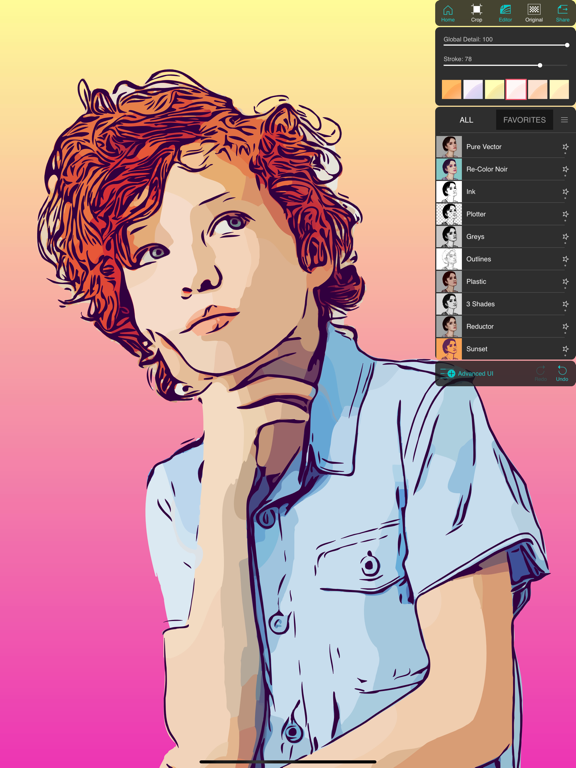
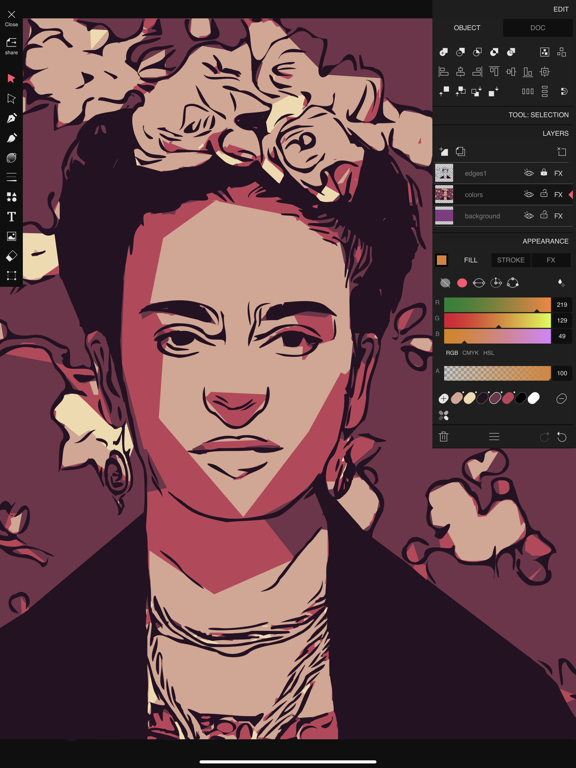
- Vector Q by Imaengine iPhone Images
- Vector Q by Imaengine iPad Images
Vector Q, (before known as Imaengine) is a fast and powerfull Raster to Vector translator and a complete Vector Editor. The definitive VECTOR TOOL!
Turn your pixel-format pictures into fully editable vector drawings. With custom filters you can get from a standard vectorization with unlimited colors, crispy grayscale images, two-tone stencils, original Pop-Art drawings and amazing polygonal shapes.
New redesigned EDITOR, probably the most powerfull vector editor for iPhone and iPad with exclusive and unique features:
- COLOR CURVES, a new tool to apply color to paths and shapes.
- Variable WEIGHT and COLOR strokes.
- Nested masks, everything can be a mask, a group can be a mask, even a mask can be mask!
- Perspective tool with two modes, apply perspective to paths, shapes, groups, pictures..
and more
- Text , text on path, colored text on path
Projects are fully compatible between iOS and MacOS, There is a Vector Q version for Mac!
Record video with rotoscoping-like effect.
* PDF and SVG files are vectorial graphics and you can enlarge as much as necessary and edit in Inkscape, Adobe Illustrator and others.
APP CRASH? please send me email with device model and iOS version to : [email protected]
Vector Q by Imaengine App Comments & Reviews
Vector Q by Imaengine Positive Reviews
Problems since last updateI had been enjoying this app immensely. However, since I installed the most recent update, every time I try to save an image, it pops up a window telling me I can’t save in the trial version. Although it also gives me the option to “restore” if I had already purchased the app, I have clicked on this and it fails to work. It brings up the same error the next time I try to save. I have uninstalled and reinstalled the app, but it is still not working. I hope this issue is resolved soon, because previously I would have given a 4 star review. Update: Thanks for the fast fix..Version: 6.0.5
UPDATE: YEARS of amazing work!This app is something that truly, truly showcases what you can do with an iPhone. I downloaded it so long ago, I had an iPhone 7, and even then it was outstanding- I was even a bit intimidated by it because of the quality. It was really made for art and design on a professional level. Fast forward a few iOS versions and iPhones, and it’s turned into a total powerhouse. You just can’t bust out work like this so easily- especially video media- in this style. If you didn’t have this app, you would be doing A LOT of work for this output. This is true multimedia art. ORIGINAL REVIEW (from like 5 years ago when it was a different name): This app has been not only educational in the way that I am learning about vectorization, but it has given me hours of true artistic freedom. I carefully edit my shots, optimizing them for vector output, then import them into the app. I've made some really nice stuff. The app has always been a bit crashy and slightly buggy, but there is some major rendering going on! Highly recommend this app for digital artistic exploration. I've been using it for well over a year 👍🏻 thanks devs 🙏🏻😊.Version: 7.3.1
Valuable functionsI had this app as a free version for a long time but finally paid for the full version and it was worth it for me. I love that it handles both images and video. Couple of notes or ideas: 1) could the dev add a better way to hide modals. Especially the kind that pop up over the working area with property value sliders on certain style modes. Like maybe a long press on the title could make it draggable or a swipe right makes it slide off the screen (hidden), or just a classic close /hide button. 2) could there maybe be a global undo/redo button to jump between previous or subsequent effect changes. Like if I have the first mode selected, then scroll way to the last mode and select it, but then want to see the first mode again it goes back to the first one after pressing undo. 3) the editor, particularly layers. it would be great if the mode buttons only operated on user-selected layers. For example, if i wanted to add the outline effect on the original image, i could add a new layer (from the original image) and select that layer, then select the outline mode, then when i go back to the layer it only updated that particular layer, keeping any other layers as they were before i selected outline for that layer. Like it only updates that selected layer. 4) support for different algorithms. This is just an example. The remove background function already works amazingly, but it only uses one default algorithm. Maybe there could be other object identifier algorithms or background removal algorithms to select from on these sorts of functions so the user can select the one best for them. Additionally, maybe the user can add an “anchor” pinpoint to the image and the function then attempts to find the object containing that point, then it removes everything but that object. But that idea is a little more extreme because i personally haven’t seen any background removal apps that do that. 5) better and more transparent rendering process. It hasn’t worked for me yet to export a video..Version: 7.3.5
Definitely confusing * UPDATED REVIEW**April 2024- They have improved their version of the ‘auto-trace’ or ‘auto-vectorizing’ whatever it goes by.. it was always pretty good and unique but it has improved to be even better so if that’s one of your main reasons for wanting a vector app then I say hands down get this one because the price is perfect..a one time payment. Lots of different options to make unique SVG files from more complex images or photos and then turn them into vectors. Being able to customize settings like lines, thickness, colors, etc. in a simplified and more intuitive interface is worth the price alone. I will say this though- If you are planning on making a lot of art with different brushes & effects, wanting to go all in on an iPad app then I’d recommend something like Affinity Designer 2 bc it’s way more robust but also more complicated with a steeper learning curve & it doesn’t have an auto-trace function. But back to Vector-Q.. Once you have vectorized your image, you can then go into the ‘editor’ and start editing and play around with the nodes, add text, etc. or you can skip the auto-vector part and just go straight into the ‘editor’ and draw or paint from scratch to make your own art in the program. All in all I definitely recommend. *Updated Review: May 2022* Love it! ❤️👍🏼 - I have had this app for a couple months now and l’d say that I only use it on average about 15 times a month but it's not all that scary like it was in the beginning when I first got it, being new to the whole vector and digital art/graphic design scene in general but I have come to think its an awesome piece of vector/editing software. It’s more straightforward and less glitchy than others I’ve tried and I’ve tried a lot these past few months. I have been designing my own SVG’s for my Cricut projects. When converting images to vectors and drawing with the brush tool it doesn’t add so many nodes like other converting apps do. I would def try it out, it’s free to use so you can try it and then if you like what you’ve done and want to export then you pay like $5 or something small like that. Worth it..Version: 7.3.5
Needs update for iOS 13+ and Creative CloudThis is one of the best tracing apps I’ve seen, but the current version adds steps to my workflow because it is not up to date. 1) For import from Creative Cloud, Imaengine only allows Creative Cloud Files, but needs to support Lightroom cloud photos, Adobe Cloud Documents (used by Photoshop on iPad), and maybe CC Libraries. 2) Imaengine does not appear on a Share Sheet, so I could not send a photo directly from Lightroom to Imaengine, I have to export to Photos then import. 3) Imaengine does not support import from/export to iOS Files, only the Photos app, but I now move many images through the Files app without ever adding them to the Photos app. It is clear that Imaengine supported the services available when it was released, but times have changed, and Imaengine has not kept up with the times. Photos is no longer the sole repository of images on iOS since Files is now so great, and Creative Cloud Files is not the primary storage for Adobe photo apps..Version: 6.2.0
Amazingly powerful tool!I first started using this app when it was iemagine, but I could never spell the name. ;-) It is an amazingly powerful tool, and I have yet to find its equal. (Note: I even have access to full Photoshop and full Illustrator and unless I am missing something, this blows PS’s “image trace” out of the water in terms of flexibility.) I know the editor and the advanced options can be a bit overwhelming for some, and I count myself initially among the “just use the presets” crowd. But two things… First, this tool helps you SEE. It really does. I initially started using it to help me simplify shapes for my watercolors. It is amazing tool for that — think “squinting on steriods” or “way better than a red square” for seeing shapes and values. Second, now that I have spent some time in Illustrator and understand the different selection modes there, I suddenly grokked a bunch of the tools in the editor mode of this tool, and I am so in awe that this tool exists that I had to come write a review. (e.g. Not only can you get the closed objects created for you, but you can tweak them directly from this app.) I really love this app, and I don’t say that often. It is critical to my brainstorming and creative process. Thank you for making it..Version: 7.0.24
Amazing Tracing Effects with Real Editing ToolsVector Q is unique among the vector trace and effects apps that I've seen in that not only does it feature some beautiful tracing capabilities and effects, but it's one of the very fiew that has some actually useful built-in editing tools. You can accomplish quite a bit within the app itself before exporting your file to your favorite vector graphic application. On top of that feature, the app is wonderfuly designed, simple to use, and fast in applying its effects and edits. File management is simple as well. Recommended for those of us Affinity Designer users who are looking for a vector tracing app to use. And Vector Q's effects and features will probably remain superior to whatever is offered built into Designer eventually. That's certainly true of the same features in Adobe Illustrator. Vector Q is well worth the purchase to keep this wonderful tracing tool and effects in your graphic design toolkit. Although not stated in the App Store listing, in-app purchasing gives you full file exporting abilities. And of course, supports the development of the app..Version: 7.1.9
Love this appI use the app for fun projects including a Warhol-like print I made for my niece of an image from her wedding where she was smiling with her husband, repeated across the print in 60’s colors - just chose one vector design and kept easily recoloring - so cool. I also design sewing patterns, and use this app to easily convert photos of my pattern pieces to vector to illustrate my instructions pages. I am terrible at drawing, and rendering photos of my pieces took way too my time in Adobe Illustrator as I had to review so much to make all the pieces the look consistent. Now, I use two of the vectorizing designs to help creating my instructions in a consistent and efficient way. Love this app, worth the low price <3 !.Version: 8.0
Best!!I am a Cricut owner, and started using this app, after searching and trying tons of websites and apps, to make SVGs. I was a bit intimidated at first, to attempt it, but even though I’m still in the “learning phase”, I’ve found it to be incredibly simple. I expected so much more complicated than what it actually is. I truly look forward to learning more within this app. I had to reach out to app support, as I’d accidently deleted one of my presets while dealing with the baby. Almost immediately, he responded with questions and has restored the preset I needed. I couldn’t ask for better support, or anything more within the app. Truly amazing! ... And definitely worth the $2 for the upgrade!.Version: 6.0.9
Fun and surprisingly powerful.I'm not a professional illustrator, so I don't have--or really need--the sort of high-powered desktop apps that cost hundreds of dollars. I'm a silk-screen hobbyist, and I wanted to find a way to create vector images for printing. This is an intuitive and fun way to play with graphic images on the go. I take my iPad to the library and snap pictures from dictionaries and field guides, manipulate them with imaengine, and take them home for my screen burner. Even the free version allows you to save and share what you make, but you'll want to spend a few bucks to upgrade to Expert..Version: 5.3.0
Wow! Simply Amaaaaaaaaaaaazing!I am so happy to have found this app. I’ve been wanting to be able to turn regular photos into different types of images such as poster like images, comic book style, and Andy Warhol like images, grunge style, line art, low poly, rasters, etc and this ONE APP does it all! As an added plus, I can save my work as a pdf, jpeg, svg, and png and save to my camera roll or share on social media! How cool is that! The image can also be saved as big as 8000px X 8000px. How many apps can boast to say that. The developer says that this app may run slow on older models of iPad. I have an old iPad mini 3 and it works just great. If you’ve struggled to learn vector graphics using Adobe Illustrator, give this app a try. I don’t mean to sound like a commercial but it’s that good. Now I can work anywhere without the need for my MacBook. Thank you, thank you, thank you to the developer for creating this incredible app. Virtual hugs and kisses to you!😘🤗.Version: 6.0.3
Fantastic app however developer response lackingWonderful and powerful app. My favourite for quick and beautiful vectors! I have noticed some flaws in the iPad version however. When a photo is added, to an open project, there is seemingly no way to vectorize within the editor. Also, copy, cut and paste would be helpful to separate items across layers. Keep on developing this wonderful product (and please answer emails) 😊.Version: 7.0.24
Wonderful, but sometimes it just ‘goes away’I do love this app. I don’t know how I even found it, but I make vectors from my watercolors and absolutely love the results. Occasionally, the app just conks out and there’s no retrieving it, so I have to delete it, and then go and reinstall it. Meanwhile, I’ve lost all my prior information/settings. But when it’s working, I am a very happy camper. Thank you so much for this app. By the way, is this a true vector app? Can I use this for creating images for seamless pattern making if I save it as an SVG file?.Version: 6.2.0
Get Mr Rivas’ three awesome appsIf you do mono-printing (gelli, vinyl, screen) or fabrication (3d printing, cnc, cricut) for $20 you get a specialized workflow that will save hours of trying to control illustrator, affinity, etc.). Just input image, vectorize with a long list of presets, tune the settings (very simple), do minor edits and export to SVG. You probably have seen these in other very heavy apps, but doing everything in a minute is what this is for. I just wish it also exported to DFX or DWG, but hey, not even I am perfect :). Excellent apps, productive workflow, even as toys they are great.Version: 7.7
Incredible app that integrates well with a few othersWhen combined with other vector-based apps, which there are very few of, this one really shines as both a pre and post production tool to bring standard images into the low resolution requirements of the non-rasterized vector-based image world. There’s also a lot to be said about giving us the ability to exploit and modify the everyday basic images we capture on our cameras in extreme ways. I suggest using this in combination with Pixite’s Assembly and Adobe’s Illustrator (for desktop OSs)..Version: 6.1.1
The latest update lost essential controlsThe October 2023 update lost the essential controls for the SimpleVector preset: global 100, lines 79, weight 15 I need to match the preset for a client project, and IT CAN’T BE DONE. And where is the undo tool? The online documentation doesn’t contain the word undo. And my photo opens with background removed automatically without my asking for it. It took time to find the little button in the bottom left that turns off that useful (but unwelcome) feature. And the big buttons on the right are clownish. Big Failure happened to a formerly Great App. …. My previous review from a few years ago: I have used raster to vector converters for 20 years. This is mind-blowingly fast and elegant and beautiful. The interface is hard to read, the color of the text above the sliders is green and almost illegible, and the way the interface works is very quirky, but the results are astounding. The output options are amazing. Try it and buy it..Version: 7.3.0
Superb AppYears ago there was an app back in the 90s that converted photos to painting styles. Can’t remember what it was. Finding Imaengine has been great. I love the effects and control options. It can be overwhelming but be patient and start over often. Excellent value. Buy it! If you work in free mode. You can save with screen capture and cropping. Just play around you’ll figure it out. As with any project make notes to duplicate your favorite methods and modes. This is where most folks fail. At 60+ and with many concussions I learned to write it down. Creating my own world of FAQs sort of like mental breadcrumbs..Version: 6.2.0
Hands down the bestThis is the first app I’ve ever felt motivated to review. I’m very familiar with a few different expensive photo editing programs but I’ve never been able to get them what this app does so fast and easily. Being able to turn a picture into a line drawing opens up a lot more opportunities for me. (I’d just fix the rating button inside your app to make it easier for more people to rate it ;-) I had to come to the App Store and search for it first. ). Love it!! Thanks so much!!.Version: 6.2.0
Perfect for cricut users!Ive been searching for a SIMPLE vectorizer for my cut projects. Everything app was either subscription based and/or so complicated. If you are a crafter, tshirt designer, looking to bring a tatoo in for a tat artist, and youre not a drawer OR even if u are a drawer, this app was so worth the $7. I am not a 2d artist or an adobe illustrator or photoshop user, procreate was so hard for me to use. I was using this for 5 minutes and was able to upload into cricut. Thanks Luis!!.Version: 7.3.2
Very user friendly and easy to useThis app has definitely assisted me in production of my art for commercial use. It is a valuable tool that I have been able to learn in a short amount of time especially during this pandemic. I do believe you need a certain skill set to manage the tools. It is great for anyone with an imagination, skill, and patience. I hope this review will help someone who is hands on and driven as it has helped me..Version: 6.2.0
Wonky UI/UX, but awesome features!I like the direction the dev is taking the app, feature wise. I'll probably even buy the full version soon. Once I accepted that this app just isn't gonna look like the better designed apps out there, I started playing with the features and I'm kind of blown away! I want to get into some textured, offset, color block illustration styles, using unsplash photos as a starting point. Having fun already..Version: 6.0
ChangesIt’s OK I’ve been working with the app . I still like the old app better but the improvements or great . I’m sorry for the first message but it was a shock to see a massive update to change the complete app into something unrecognizable . So yes a lot of the features are better than the old one . So yes I apologize this is still a great app it’s just if you’re going to change the whole thing forewarn somebody first ..Version: 7.0.21
Bring back the color hatching filterI got the app like 2 years ago and it was my favorite. I used the color hatching filter all the time. A while back they changed a lot of the filters and took out my favorite and added some new ones. The new ones are okay but I wished they would’ve kept the color hatching filter instead of the black and white hatching filter. Please bring it back 😭😭.Version: 7.0.24
VERY Slow; Still has rotation bugsThis is my third review update. My old review comments are completely irrelevant now. I added a star for general improvements to the app (I've pretty much ignored it for a year and it has improved since then). However: As noted by the developer, the new engine is incredibly slow. I don't think the quality of the images is different (or improved), so I'm not sure why this tradeoff was considered to be acceptable. There are still some rotation bugs (seemingly still associated with landscape mode). When i exited and re-entered the camera mode, i had only one quarter of the camera area visible. Rotating the iPad from landscape to portrait, and then back to landscape, solved it for then. Overall, this is still a neat app, but it still lacks much control over the resulting vector image. The biggest problem is the slowness, though..Version: 6.0.2
Love it!I love this app!! Soo awesome! The ability to export in so many ways 😍 My only issue is in the color edit mode... when choosing pallet, there are so many colors to choose from to change that it makes it difficult for me to find the color I’m looking for. Is it possible to be able to click on an object then choose pallet and only see those 2-3 colors to choose from??.Version: 6.0.7
Had this app for yearsI absolutely love this unique & powerful app, the vectorized vids and images are pro level power tools. The reason I wasn’t be able to review it full-heartedly was the App calls for a powerful phone or overheating device will occur while converting videos (significant frame drops). That has intimidated me from exploring its potentiality. Thank you for the amazing app!.Version: 7.3.3
Love it but has BUGs Can’t rename Projects for exampleReally really love this app but appears its not updated very often to fix bugs. I bought it cause its great. Saw some bugs but figured I’m sure its known about and will be fixed. Looking right now it says last update was 6 months ago. Wow not being able to rename something for 6 months is kind of bad. But besides that it is a great app. But hope bugs get fixed soon and sooner in future..Version: 7.1.9
Insanely good!I downloaded this app a few days ago and have only use the vectorization feature of this app, but I’ll love it! You can feed it the worst low-res image and produce incredible renderings. I’ll play around with the vector editor in the coming weeks. So now a question. I want to buy this for my Mac as well. I have both a MBP and a Mac mini. Do I have to pay twice to run them on both computers?.Version: 7.0.24
Very good appI find this app to. Be very high quality and. Very comprehensive. It’s more than a one touch effects app. You can instantly vectorize your work and customize your vector too. Going further it offers layers and brush and other vector editing capability’s. Limitless possibilities, great results, value and its a best kept secret app for artists. They should consult me for beta testing, I use it all the time..Version: 6.0.7
Favorite “artistic” app everI got this for my iPad and it’s a real gas. Took some pictures of my dogs to play around with and spent quite a bit of time having a lot of fun. So much fun that I went online, had the pictures printed online for a Valentines Day gift. If you have the heart of an artist, but can’t draw anything recognizable, you will love this app..Version: 6.0.9
Absolute Best Vector App. 😎👍This app produces amazing vector images and videos too! Don’t mind the old reviews that talk about old issues the had. This app has come along way in the years it’s been around. The producers of this app are true artists who empower others to create art of their own. Thank you for producing this amazing app! 👍.Version: 7.0.21
One of my mainstay graphics apps.I love this app so much. It is easy to use, and capable of some amazing image transformations. I love the fact you can export SVG out of it too, I use the format in other apps on my iPad. Imaengine is an important part of my workflow. Luis the developer is on the case too, he is responsive to problems/feedback. Excellent stuff..Version: 5.3.2
PromisingI bought the app and am very happy with the results it has in turning rastor images into vector images. It does a great job, and has some fun artistic filters as well. I would however like to see an option to make transparent backgrounds for images that have white or solid color backgrounds. Things that I draw in other rastor images apps for example. Thank you, and I look forward to future versions..Version: 6.0.6
Best Vectorizing AppThis is the best vectorizing app I have used. It’s even great for making simple vector art and for beginners. This saves me so much time, now I can spend my time on other details I would not have done. It’s easy to use and not super complicated..Version: 7.3.7
Absolutely great.This app is by far the easiest to use for a mere 2.99... I’ve spent hours trying to figure out other apps, and this HANDS DOWN BLOWS them all out of the water.. just pic your pic and let it happen, results in seconds!.. thank you so much to the developer/developers.. sbmc.Version: 6.2.0
Wow!This app is worth much more than the seller asks for to unlock the few features locked up as iap!. What a powerful tool this is with so many applications.. I use it to quickly vectorize photos or images so that I can import them to my CNC software for Vcarving..Version: 6.0.7
Mixed FeelingsI like the apps ability to constrain the output colour to a user selectable number. I find it difficult to selectively smooth jagged lines showing in my input images..Version: 7.1.9
Use it all the timeThis app is pretty sick, especially for being pretty much free as far as my use cases have been concerned. I wish there was a straight up vector trace that was not stylized. If there is, I would love to know about it give five stars anyway because for a free app I would give the same for much less anyway. Thanks for your hard work L!.Version: 7.7
What a great app!I can’t afford subscription based. This one is full of talent and style. Greatly appreciated..Version: 7.3.7
HelpNew to this. Is there a way to get tutorials with thus app. I was getting to know the old version. Is there a way to revert to it.i am putting.Version: 7.0.0
Simply amazingIt didn’t take long for me to be impressed by the results you get from this app’s covert-to-vector feature. You can turn a ho hum photo into a beautiful vector drawing. The options you can tweak are expansive. Spending the money to buy the full version was a no brainer..Version: 7.1.4
Love this appI’ve been using this app for a few years to give my artwork for videos a specific look. Love the update to the app as it is now offering a lot more ways to be creative. Just need to fool around with it a bit to understand it. Would love some randomization features. Otherwise top notch..Version: 7.0.24
Just getting startedLook very comprehensive, but I cannot figure out how to simply crop my image... Documentation does nor match the ipad version i just downloaded....Version: 7.0.24
I paid for Imaengine. Do I really have to pay again?UPDATE: problem solved. Was able to restore the app and didn’t have to pay again. The developer also sent me an email today to let me know of the same. I still like the original look better, but I’m happy I can at least continue relearning the app. ORIGINAL REVIEW:I paid for this app on Jan of this year (2021). Now, if I want to use QVector, it’s asking me to pay again. Really?. Seems like a rip off to me. Also, why change the whole look of this app?. I feel like I have to relearn the whole thing again and it’s just not user friendly. Please bring back Imaengine or at least honour the upgrade I already paid for..Version: 7.0.24
New update is great!Works fine on iphoneX and old iPad mini (2nd gen). New filters are great. Editor is complicated. Finicky on small screens, but can do a lot. A ‘go to’ app for me..Version: 7.0.21
This is a great appI use vector graphics everyday and there are times that I need to convert a drawing or pic to vector format - this app - that only costs around $6 - does this job better and easier than my Adobe illustrator - by far. I rarely write reviews and, rarer still, write reviews unsolicited. This app has so much value that I had to take the time to look it up and give the review. Great job with the app - it paid for itself many times over on my first use..Version: 7.0.21
Update namechange changed more than just the nameA real step back. All the filters are too similar now. Can't control the crosshatch density anymore, for example..Version: 7.0.0
Updates and lost filters!Please please offer the older version again. There is a functionality I was using and with this loss I am unable to press some images. Please help!.Version: 6.1.1
Love itWould love to have more new filters.Version: 6.2.0
Have not received upgrade that was paid for2 members of the same household paid the $3.99 for the upgrade of this app, and neither of us have gotten it. I like this app, but I'm very annoyed by this.Version: 6.2.0
Fun as...Great, refreshing app! Love it.Version: 4.1.2
AwesomeFkn amazing.Version: 6.0.9
Apps de guerreC’est FOOOOORMIDABLE!!!!.Version: 6.0.9
Real time Human Cartoons!This is a pretty amazing accomplishment as far as I can see so far. Does a beautiful job converting to some very silky conversion of you shots. Wow!.Version: 6.0.9
Great App. Easy to use and lots of filtersThis is a great app. Very easy to use. Great for doing quick edits on images. Lots of filters.Version: 5.3.1
VeryDope.Version: 4.1.2
Nice appLove it.Version: 4.1.2
Fun!This app is very fun..Version: 4.1.2
Lots of customization!Great app! You can see what the image will look like in real time as you adjust the many settings for each style. Great to add a little something extra to your images!.Version: 4.1.2
NiceHard to find a good app as this.Version: 4.1.2
FunYup... Fun.Version: 4.1.2
Good apLots of variations.Version: 4.1.2
AwesomeGreat App!!.Version: 4.1.2
AppLooks good.Version: 4.1.2
Good appJust trying :).Version: 4.1.2
Awesome!Love it..Version: 4.1.2
Fun, artistic and easy to use!.The app works great, it is really easy to use and the filters are really artistic and easy to use!.Version: 4.1.2
Fantastic AppHas the ability to make any pic something very special!.Version: 4.1.2
Thumbs up!Glad I found this app!.Version: 4.1.2
MehI'd like to see more filters. Other than that, it's ok..Version: 4.1.2
WivkedReally enjoy the effects.Version: 4.1.2
Easily 5 starsWaited years for this. Could you horizontal video recording please please please?.Version: 4.1.2
SmoothIt's fast. It has many options. Saving and exporting is smooth..Version: 4.1.2
Free International Money Transfer 💸Enjoy high maximum transfers into more than 20 currencies while saving up to 90% over local banks! The cheap, fast way to send money abroad. Free transfer up to 500 USD!Version: 8.0