Krueger Systems, Inc.
Calca Customer Service

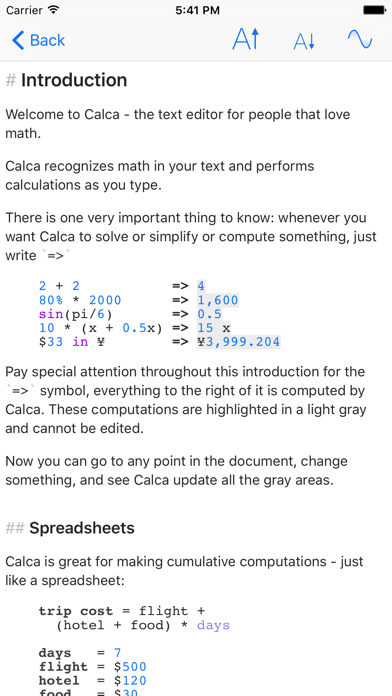
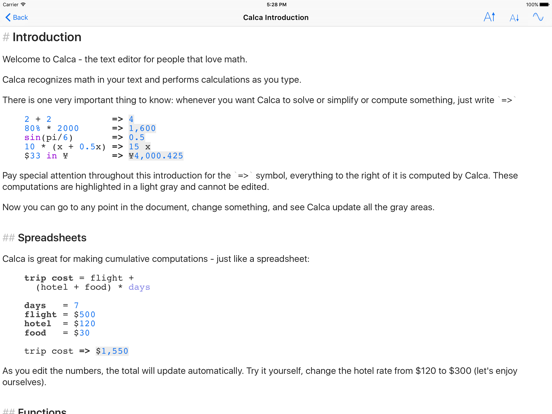
Calca is a powerful symbolic calculator that gives you instant answers as you type. It solves equations and simplifies complex expressions - it's a computer algebra system in your pocket! It's also a rich Markdown text editor so that you can explain your ideas alongside your calculations.
Calca is perfect for professionals and students - anyone who works with numbers and equations. Variables and functions can be created with only a few keystrokes and can be manipulated with a rich library of operators and functions.
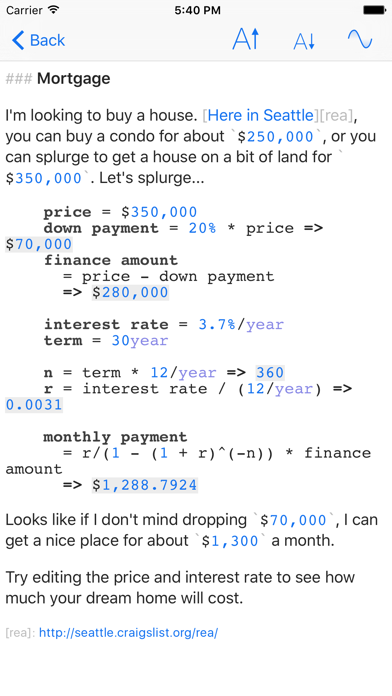
Calca updates as you type - just like a spreadsheet. You can declare variables, edit their values and watch everything update before your eyes. Since everything is calculated on the device - no network needed - you get answers instantaneously.
All calculations are stored as plain text so you can easily share them with other editors and move them from device to device. Calca has been designed to work with iCloud documents so all your devices can access your calculations - you'll always have the latest files ready for viewing and editing.
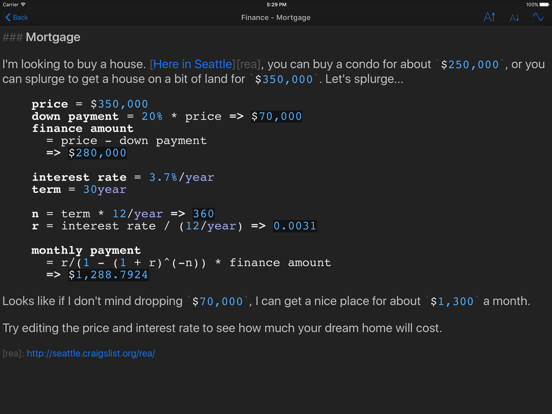
Calca comes with a suite of examples to help you get started covering topics from home mortgages to kinetics. All these examples are fully explained within Calca itself.
Are you still using a desktop calculator? Are you using the calculator with the giant buttons that came with your OS? Computers are much more capable than doing simple one-line arithmetic - put your machine to work with Calca!
Calculation Features:
• Variables `x = 42`
• Functions `f(c) = 9/5*c + 32` and even recursive functions
• Units `42 mph in kmph` and currency `¥599 in $`
• Solves equations (`x + 2x + 4x = 42`, what is x?)
• Matrices with inverses so you can solve linear equations
• Sum, prod, map, and reduce operations on lists, matrices, and ranges
• Trigonometry and complex numbers
• Derivatives of functions
• Logic operations and if statements
• Binary math (& and |) and support for binary and hex number (`0xA9` and `0b1010`)
• Keeps track of units (m, s, m/s, m/s^2, etc.) so you can verify your equations as you compute
Please visit http://calca.io to see lots of examples. Thank you for looking!
Calca App Comments & Reviews
Calca Positive Reviews
Breaking bug on iPad Pro 12.9 with keyboardCalca is one of my favorite apps. I use it regularly on my phone, laptop, etc. I desperately wish I could use it on the iPad Pro with Magic Keyboard folio. Unfortunately, in that context, I'm usually trying to total line items under a 'total +=' line. For every line item, when I start typing digits, the app highlights the entry as though I'm cutting / pasting and does not permit me to enter amount normally. I can work around it -- to a degree -- by separating each digit with a non-numeric character, but I usually just give up and go to a different machine. Hoping the developer will see this and determine what causes / resolves the problem. Huge fan, otherwise, and leaving 5 star review because it works on every other device perfectly..Version: 1.5.1
My go-to app for calculations now.Calca is my favorite Math program. The developer's responsiveness on Twitter is amazing. It has quickly replaced Pacific Tech's Graphing Calculator as my go-to back-of-envelope estimation tool. Soulver never lived long on my Mac or iPhone as the "running total" quickly got on my nerves as being often highly out of context, even for their example support files. I love how straight-forward Calca is in it's definition of functions and output. I love how well it handles and resolves physical units (so long as unit definitions are declared early). In a few cases when I got a spinning-beach-ball after mistakenly entering a very large calculation, I just force-quit, and when relaunched, I was only a minute change from recreating my working file again, even though I'd never manually saved the new "untitled" file. I really appreciate it using built-in OS X document features like auto-saving and iCloud. In hindsight Calca feels more valuable than the price in the Mac and iOS App Stores. If the developer ever releases a paid-upgrade, I will happily be one of his first repeat customers..Version: 1.4
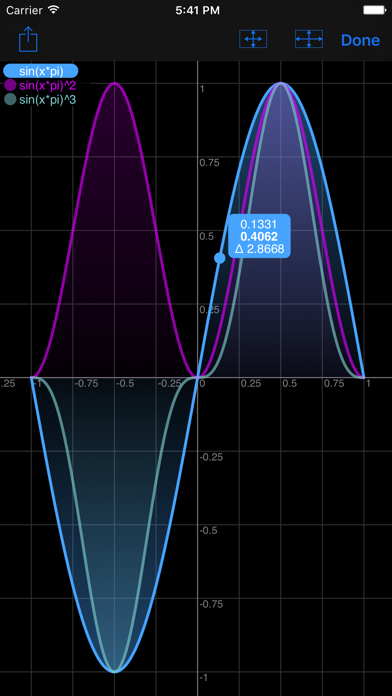
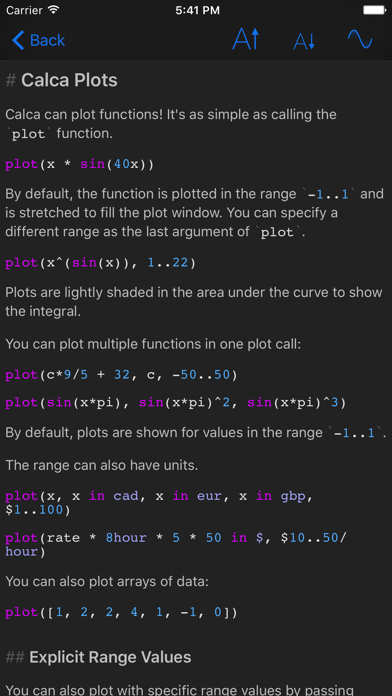
What an app!Great calculator mixed with a Markdown text editor?!? Can life get any better? Honestly though, I've been using this app since it came out for the Mac and iOS, and it's just fabulous. I happily paid for both, but I completely understand the developer's need to make money and try this new approach. I'm just glad that it's still in active development. Now having graphs on the iPhone is great, and I LOVE the dark mode! The holy grail would be a way to handle tabular data in a multi markdown table!.Version: 1.4
Love this app, just wish there were more frequent updatesI really dig the approach this app takes to text + free-form calculations. I use Markdown all the time, so that's a bonus, but the app really shines in the way it interprets text and functions in-place. It has far more power under the hood than I could ever use so I only have a few surface-level nitpicks: * Document management on iOS/iPadOs is clunky. * I still hit occasional crasher bugs. * I wish the iOS/iPadOS versions were updated more frequently. I don't think it needs to roll in all the latest platform features, but some bug fixes and polish would be nice..Version: 1.5.1
Wanted to love it, but implementation disappointsI love the idea and design of this app. Combining Markdown and Mathematica/Wolfram Alpha presses all the right buttons for me. As soon as I read the app description, I needed it in my life. I was ready to donate before even downloading it. However, once I downloaded the app, I found it... lacking. The idea is great, but the app is buggy/"quirky". I find myself fighting with the interface, tapping on something over and over to get it to register the right action. The Markdown syntax extensions for doing calculations sounds great, but the app makes it hard to enter the correct equations, and get the desired result. Even the built-in example notebooks, which should showcase the app's features, don't completely work (one notebook, for instance, uses an undefined variable, causing it to fail to run). Overall, the quirks and bugs make the app more frustrating to use than not. For now, I'm sticking with Tydlig for interactive, explanatory calculations, and will copy+paste results into my Markdown editor if I need to write up text..Version: 1.4
Best calculator app for math people.If you are used to using a text editor, with the tab key and a monospace font, to keep track of things, this app is right up your alley. Stripped down and very powerful, this is exactly what I've been waiting for. I'm sure to tell my friends about it, and I don't mind the pop-ups at all. I wish all app developers would use a donate model. They could actually make a sustainable living that way. Cheers to the developer! I salute you..Version: 1.4
A welcome (and useful) update!Great update, lots of added utility! I respect the presence of a polite request for support of development and I actually didn't notice the request in the document list until I actually looked for it. I've seen a couple apps go the route of the optional support and I think it's a good idea. If I may be so bold, however, I would offer some sort of "perk" for supporters. I defer to the developer's good judgement to decide what that might be. Great work!.Version: 1.4
Excellent AppThis app is unique and there is nothing else quite like it. I use it in place of Excel when multiple calculations are required along with extensive text. That said, it’s been several years since it’s been updated so I’m concerned the developer may have abandoned the project. Calca is among my core apps so I’d be open to a subscription offering to compensate the developer and ensure it remains sustainable..Version: 1.5.1
PerfectionI used Tydlig as my go-to for many years, but wanted something a little bit more text based and “functional”. This app is easy to learn and use. One suggestion: my first “problem” was with a function which I tried to evaluate, but forgot to give it an argument. A tooltip or squiggle suggesting I add an argument might be helpful for novices like me..Version: 1.5.1
SurprisingI went looking for a good RPN graphing calculator in the App Store. After trying several that I didn't really like I found a review in the web for Calca. It sounded interesting even though it wasn't what I was initially looking for. After using it for a few weeks I continue to be impressed with the visual format and features. It's my new favorite app..Version: 1.4
One of my favorite appsI've been using Calca for a very long time and I just love it. It's one of those very simple to use apps that fill a very real need. To be honest, my usage on the iPhone tends to be a little less involved than on the Mac but I still use it very frequently. On the Mac, I use it so much that people at work sometimes joke about it..Version: 1.4
Fantastic app, with one modern caveatI’ve used Calca for years on iOS and Mac, and I love it for all sorts of computation. I did run into one issue: I recently got an iPad Pro with a Magic Keyboard, and it seems to have troubles with the focus system, making numeric entry very, very cumbersome with the Magic Keyboard..Version: 1.5.1
Welcome back!Glad to see this is being updated again. I had lost hopes since the last update 2 years ago. While I have forgotten a lot of how to use this app, I can’t wait to get back into it. Thanks for updating and please keep up the great work!.Version: 1.5
In app purchases?!?I just updated hoping it would fixed the crashing and cursor bugs, but am slightly annoyed with the “optional” in app purchases (which don’t add any features) in the form of multiple ads on the file list. I have paid for the app and never really used it yet due to bugs, and they now want me to pay extra for no reason? I really have high hopes for this app and might be inclined to make that donation if the bugs are gone and the request is less obtrusive. Fine, show it in the settings and/or maybe ask for it once in a blue moon. Don’t put it as both an icon in the file list as well as a banner that makes the file list smaller..Version: 1.4
Great for the toughest problemsThis is a mathematical sketch pad that tackles the toughest problems with aplomb. If you like bc on your computer this is much more fun and powerful. Like a spreadsheet it recalculates dynamically. Unlike a spreadsheet calculations are clearly visible, especially when they are complex..Version: 1.5.1
Calca DeliversI have used this app for over a year. Calca performs as represented. It is capable of very sophisticated math applications. The seamless interaction with text makes it excellent for documenting the logic of you calculations. The learning curve for this application is very short. You will find it useful quickly..Version: 1.4
Wonderful ApplicationThis is a powerful tool. It helps me replace most of the reasons why I use spreadsheets. The recent updates are awesome. I love how it allows you to set variables. You never realize how valuable it is to use variables when doing calculations until using Calca. I really wish that the developer adds a charting feature or a way to use a value from a variable in one calculation to another. Also a charting feature and financial functions. Regardless the app is totally worth it!.Version: 1.4
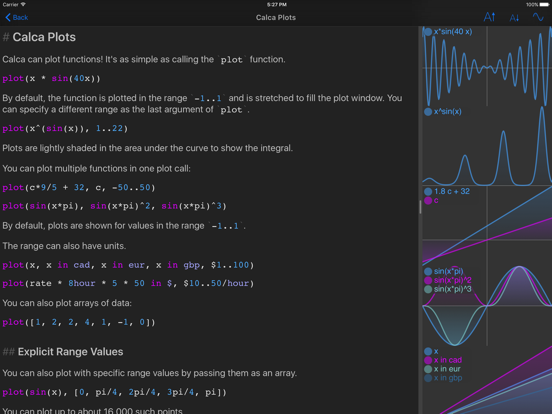
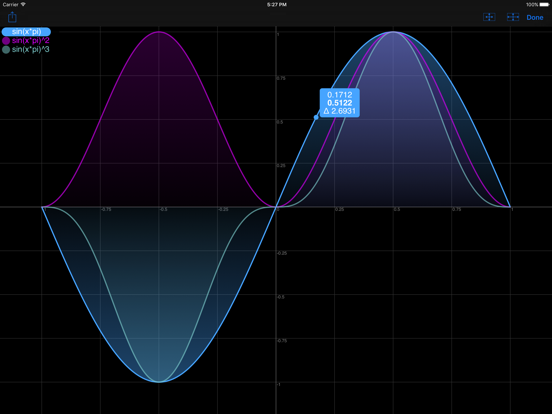
Easy to useThis has unique combination of having ability to type free text as well as writing and solving math equations. If that is not enough, one can plot them too. A must have..Version: 1.5
Great featuresThis calculator has the most features out of all that I've looked into. It may look unappealing for someone because it looks like coding, but the documentation explains the syntax very well..Version: 1.4
Really a fun calculator, spreadsheet and document in oneThis is such a useful app, with text documents coming alive as computational documents. Like a spreadsheet in a way, but in a different medium. Truly wonderful.Version: 1.5.1
BrilliantCalca is a beautifully crafted and extremely powerful application. Easy to learn and incredibly versatile. I have it as a swipe over app and use it regularly across many apps. Bravo!.Version: 1.5
Edit: BEST CALCULATOR APPI left a 1-star review a few years ago because I couldn’t create new sheets (“calculations”) in it. But now it’s the only calculator app I use. Functions. Graphs. Units and unit conversions. Markdown for comments. And all with a pretty intuitive syntax that’s easy to get used to. Now that my kids are doing high-school level math, it’s invaluable for checking their work..Version: 1.5.1
GreatVery powerful. Helps you communicate concepts to others with natural language assignment of variables. Great support too. Developer responded and stated he would make changes I suggested,.Version: 1.5.1
The best math/ calculator appThis is the app I have been looking for. So good, easy to use and intuitive!!!!.Version: 1.4
Does not work with iPad keyboard - 12 months waitingHas not worked with the iPad magic keyboard for more than 12 months..Version: 1.5.1
Very nice app!I moved it to my home screen as I am using it more and more..Version: 1.4
One of the best apps despite maybe being abandonedI first got Calca when it originally came out (and way before I did for real 🥲), over 10 years ago. I was in college and I had an iPhone 4s, I think. It had apps, most of them not very useful. Calca was *something else*. Calca could do math, and Calca made it convenient to do math that involved more than just punching in two numbers to get a single result. No longer did I need to break out a spreadsheet (which are still awkward on a phone, even in 2024, even on our now massive smartphone screens). I could calculate the rent split for my college roommates. I could calculate the total cost of a trip for me and my friends, with a bunch of flight tickets, accommodations, and whatever else, with the total cost split between all of us. I could estimate fuel costs given the fuel efficiency of a car. I could calculate means, standard deviations, and other arbitrary statistics on some data I was thinking about (don't you hate not having an app on your phone for figuring out stats for some random piece of data?). I could plot things. And I could annotate it all with Markdown, which I had then only just discovered. All on my phone. It was probably the first app I ever got on my phone that made it very real that this thing I always have on me is actually a legit computer, and having a computer that is always on me is actually useful. (Except for when it's the opposite of useful, but that's not Calca's fault). Calca is not perfect. Over the years, I have encountered a fair amount of weird behavior, and anything really-really complex can still be awkward and error-prone. Calca's unit-aware calculations, while really cool, have also sometimes caused bizarre results. But when it has worked — and most of the time, it has — it has been magical. I only have weird behavior to complain about because I still come back to it and use it, a decade and who knows how many smartphone generations later. I wont deny that I'd appreciate it if the developer came back to this app to give it some love. But also... I get it. 11 years is a *long* time, and I only paid for Calca once (that was nice, by the way, to be able to pay for an app just once, and have it keep working for over a decade). Even if it's flawed, even if it's maybe abandoned, even if I now have a full-blown Python interpreter on my phone, with a whole host of numerical computation and data analysis libraries (imagine that, college me from 11 years ago), I still keep coming back to Calca. If I could give Calca 6 stars, or 11, or a usize::MAX, I would. If I could pay for it again, (and then maybe a third time), just to say "thank you," I would. It doesn't have to be perfect to be one of the best..Version: 1.5.1
Pretty goodGreat concept. A few bugs but it mostly works well..Version: 1.4
Not loadingThe app Is not working with IOS12. Please fix it.Version: 1.4
AmazingThis is the best calculator app ever. That's it..Version: 1.4
Really wanna like this appSeems like google doesn’t know the answer to a lot of questions i’m no good at maths thought this might help.Version: 1.4
A work of mad geniusIt is the love child of soulver and markdown with Google as a the proud godfather. Create reusable functions, lookup values in google (including stock quotes and who knows what else. Feeling Lucky?) and format with markdown. Build a tool on your Mac and iCloud syncs it to your iPhone and iPad. Thanks Frank for fixing it in one day after breaking iCloud with the 1.1 IOS update. The output is useable forever since it is a plain test file. Calca takes a text file and interprets all the potential calculations. The => symbol means therefore and calca responds by taking its best shot at interpreting the preceding calculation. Make a change and everything gets reinterpreted. If your problem doesn't involve structured rows and columns, this may well be a choice than a spreadsheet app. A breathtaking array of mathematical possibilities makes me wish I had paid more attention in my various math classes. This app deserves a community of user created downloadable tools..Version: 1.1.1
Replaces several other apps with Magic!This app is fantastic. Can use it as a calculator, for unit conversion, to write basic Markdown text, and then to build really powerful computational tools to carry around in your pocket. Often times at work I need to whip out a spreadsheet just to figure something out, like how to split the bill for a car rental with a client when I took a couple vacation days on the end of a business trip. This tool is way better for problems like that because, unlike a spreadsheet you see the math working in real time and everything is clearly labelled. Of course you can do this with a spreadsheet but it's so much easier with this app. Wish it had some graphing like tydlig, for me what this app does is way more valuable, just think that would be a nice touch... Also would be nice if it could format math like mathml... Again, not needed, just nice to have....Version: 1.2.2
Literate calculations for the rest of usWhen you are writing something with calculated numbers you owe it to yourself to make sure that they are accurate and include the final constants, variable values and other assumptions that you are depending on. You also owe it to your readers to be able to reproduce your results. Calca does both in a Markdown text editor with straightforward and forgiving math syntax with more computational sophistication than most of us will ever need. If you've ever suffered from type type switch highlight copy switch paste whoops, then think of this as a text editor with automatic global search and replace for numeric results. Change your formula? Presto Chango, all of the earlier results are updated. Wanna make it look presentable? It renders Markdown, which allows 90% of day to day text layout and formatting with a simple syntax. Stop reading and download..Version: 1.1.1
Amazing toolI absolutely love this app. I have been using notes and attempting manual calculations for far too long. The app is beautifully designed and works great. I do have some constructive criticism: 1. It is a little bit difficult to type on an iphone. There is no landscape mode (yet, I presume) but I would still highly recommend using this app 2. If I delete a "=>" (therefore) the last result remains and I have to move the cursor to delete the result ( I can see where in some situations this is desirable, but it's bugged me a few times) 3. Lastly, a calculation can not be computed unless it is after all of the variables. I guess that makes sense, but if it could reference variables from anywhere on the page, it would be easier for me to see my budget at a glance, without having to scroll down the page. All in all, great app, I'm sure the iPad version negates my issue with typing. Highly recommended and can't wait for new features..Version: 1.1.1
My favorite iPad productivity appWow! This is exactly the calculator I needed. It gives me 95% of what I need and not much that I don't. Intuitive but surprisingly powerful syntax. iCloud syncing between Mac and iOS devices is extremely useful. In an earlier review, I said that Calca gave me 90% of what I wanted in a math notebook. Now that vectors and matrices are supported, it's 95%. Some basic plotting support would make it 100%..Version: 1.2
Fantastic app being ruined by poor maintenanceEasily one of my favorite and most useful apps. Unfortunately I have been relegated to mostly using this on my mac these days because it doesn't work in landscape with the on screen or bluetooth keyboards. PLEASE Fix this so I can go back to recommending this and making it a 4-5 star app again. For those that like it, seems it works in portrait mode now... doesn't help if you have a case/keyboard that has you using landscape most of the time... but at least it works..Version: 1.3.1
Latest version is impossible to useThis WAS a 5-star app. But in latest version document jumps up and down all the time while editing. So it is impossible to use and also incredibly frustrating that a single editor bug renders such a great app useless..Version: 1.3
Best "Non-Traditional" CalculatorAmazing app for performing complicated calculations and analysis. There are a few apps out there that do similar things but this one has them all beat. Simple concept without a weird, obscure and hard-to-remember interface. Just does what you need it to do. Well worth the price..Version: 1.2.2
The back of the envelope comes aliveWhen you need to think some sort of calculation through this is an amazing app. It is like having a live back of the envelope. Really a new way of helping one think. If had landscape mode and was easier to insert text in a line and to add line breaks (maybe some arrow keys?) this world be a 5 star app..Version: 1.3.1
Best thing ever for formulas, conversions, and math notesI use this to: - figure out US Gasoline Pump prices (I’m Canadian) - splits the cost of goods from a foreign country with a friend - figure out what to charge someone after importing a replacement part and installing it - convert recipes to weight measures - figure out angles for woodworking projects (built a trapezoidal box) This thing is amazing! And the file format is plain text, so you can make a workbook that anyone can see and verify..Version: 1.4
AwesomeThis app is great. A slightly different take than Soulver... it's better for more text-heavy documents with calculations intermingled. Love it. Well worth the low price..Version: 1.0.1
My favourite calculatorI replaced using my calculator with this app. Being able to save equations as a document is awesome ;p.Version: 1.4
Great concept, but...Lots of bugs, and no iOS8/iPhone 6 update. Needs developer's attention badly - seems like it has been abandoned..Version: 1.2.2
Best idea everI just got it and love it. I can't believe it does calculus. No bugs found yet, though I'm trying to find its limits. Keep this bad boy developing because this has quickly become one of my favourite apps..Version: 1.2.2
Love this appIt's changing my life! If you're curious about this app just get it. I'd love Dropbox support, a better typing experience on the iPad, and generally better design (imagine Vesper mixed with Calca)..Version: 1.1.1
Perfect for the iPhoneThis is a great way to work with numbers on the iPhone, better than anything else I've found..Version: 1.1.1
Pretty goodAmazing functionality, a little slow on accepting input (do you really need global recalc between keystrokes?) and your icon looks like there's dirt on it..Version: 1.1.1
PhenomenalI love this, especially with iCloud integration to the Mac..Version: 1.0.1
Free International Money Transfer 💸Enjoy high maximum transfers into more than 20 currencies while saving up to 90% over local banks! The cheap, fast way to send money abroad. Free transfer up to 500 USD!Version: 1.7.2
What do you think Calca ios app? Can you share your thoughts and app experiences with other peoples?
Please wait! Facebook comments loading...