Microsoft Corporation
Link To Windows Customer Service

- Link to Windows Customer Service
- Link to Windows App Comments & Reviews (2026)
- Link to Windows iPhone Images
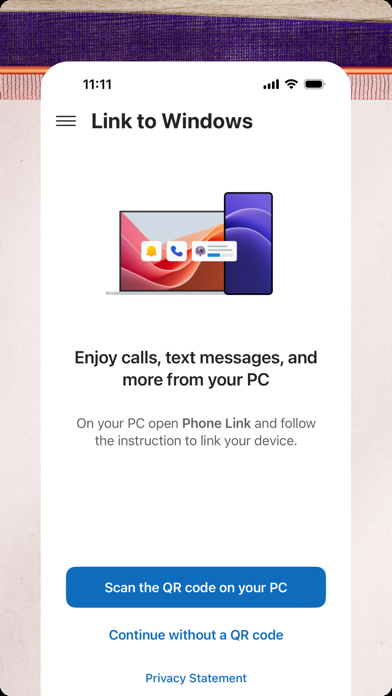
You love your phone. So does your PC. Get instant access to everything you love on your phone, right from your PC. To get started, connect your iPhone with the Phone Link Feature on your Windows PC.
Enjoy these Phone Link features on your PC:
• Make and receive calls
• Manage your phone's notifications
• Read and reply to text messages
• View your phone contacts
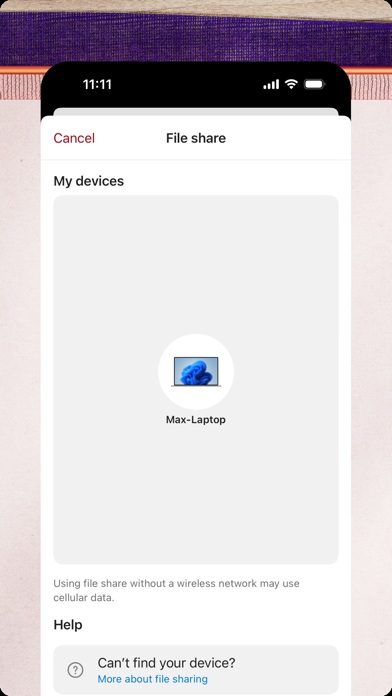
• Share files between your phone and PC
Phone Link for iOS requires iPhone running iOS 16 or higher, and a PC with Bluetooth Low Energy (BLE) support running Windows 10 (with the May 2019 Update or later) or Windows 11. Not available for iPad (iPadOS) or MacOS.
By installing this app, you agree to the Microsoft Terms of Use https://go.microsoft.com/fwlink/?LinkID=246338 and Privacy Statement https://go.microsoft.com/fwlink/?LinkID=248686
Link to Windows App Comments & Reviews
Link to Windows Positive Reviews
Useful but Limited - iPhonePhone Link is worth having for iPhone, even if it doesn’t do everything you want. You can stop reading reviews and just download it, it’s useful for what it does and it’s not a big decision, anyway. What it does: Let you read texts you received recently. Read 7 recent conversations, but only messages you received or sent from your computer, not that you sent from iPhone. Text anyone from your computer. You can read only the last 7 convos, but you can start one regardless. Helps because you can paste directly instead of scanning text/typing manually on your phone. Text yourself stuff instead of typing it in manually. A pseudo-universal clipboard, if you will. Send files seamlessly, instead of relying on email, which has file size limits. Notifications pop up on your computer too, not just your iPhone. Transfer calls to and from your computer. Can be finicky. What it doesn’t do: Let you read texts you sent on your iPhone. Actually let you copy on computer and paste straight on iPhone like you can on a Mac. Screen mirror your iPhone. Pretty much anything else I didn’t list. Other: It shows up on the Windows start menu as well as on the app, for easy access. Recommendation: Download it and use it. It simplified a lot of things even if it can’t do everything (which is probably not the dev’s fault. Apple is specific about their ecosystem).Version: 1.25092.6
Finally Makes Texting on Windows Feel NaturalI absolutely love the Phone Link app. Being able to reply to text messages directly from my Windows PC has been incredibly valuable for me. Before this, I never really had a seamless way to handle texts while working on my computer. What makes the biggest difference is how little it interrupts my workflow. Instead of physically picking up my phone, unlocking it, and typing on a small keyboard, I can just switch to the Phone Link app, quickly type a response on my full-sized keyboard, and get right back to what I was doing. Even short replies are faster and much less disruptive. I primarily use the texting features, and they work extremely well for my needs. I did try using it for a phone call once, but I had audio issues where the other person couldn’t hear me well. That may have been a setup issue on my end, though, because the messaging experience has been excellent. For anyone who spends a lot of time on a Windows PC, especially during work, this app is a huge quality-of-life improvement..Version: 1.26042.10
⭐️⭐️⭐️⭐️⭐️⭐️⭐️⭐️⭐️⭐️⭐️⭐️⭐️⭐️⭐️⭐️⭐️⭐️⭐️⭐️⭐️⭐️⭐️⭐️⭐️I'm not somone who has the delusional blockage that most have always chasing the idea of "Perfect" in this world it's non existent and always will be.. 2nd I'm not a troll that goes around doing my best to downgrade everything or everyone.. i noticed this app only had a 3 star rating which is definitely not even close to the stars it should have.. Everything has always worked on this app as it should and the app is user friendly as they come. If you want to link your device that's exactly what it does without fits and all the other chaos and hording of information behind our backs. The app maintenance is kept up and the apps security is very good. I'm not one for long speeches so keep up the good work and don't let the trolls bother you.. Especially the ones that think there is "Perfect" in this world in life you will fail and you will fail often because no matter how well you do someone will say it's not good enough.. if perfect did exist this is one that would be in the classification"Perfect".Version: 1.24112.78
Great tool but needs more integration.Apple’s Link to Windows feature offers a convenient way to receive calls and messages on your PC while working, but it still has room for improvement. While it effectively syncs notifications and allows users to manage basic messaging and calls, the lack of deeper integration limits its full potential. One major missing feature is the ability to see images within text messages. Without proper media handling, users are forced to check their phones separately, disrupting workflow. Additionally, full screen mirroring—allowing users to interact with their iPhone’s screen directly on their PC—would be a game-changer for productivity, similar to Samsung’s integration with Windows. Overall, Apple Link to Windows is a useful tool, but it could be much more. Enhanced media sharing and seamless screen mirroring would push it toward the perfect companion for users who want complete phone access on their PC. Hopefully, future updates will bring these much-needed improvements..Version: 1.25032.22
It works well enoughPhone Link appears to leverage the iPhone’s notification and hand-free functions to allow a user to send and receive messages on a Windows computer. It’s clever and it works for most of my 1-1 use cases. It doesn’t work with group messages (but you’ll be notified that you got a group message) and sending/receiving photos. It also cannot sync messages that you directly send with the phone. Example: You get a message from Bob and see it on the Phone Link app on the PC then decide to use your phone to reply instead of using the PC. You will not see your reply on the Phone Link app. You would have seen it if you used Phone Link app to make the reply. I get the limitations that Microsoft is working with when trying to interface with an iPhone, so I don’t see any of this as being problematic. I usually do not run into any issues because most of my messages are 1-1 anyway..Version: 1.24042.3
Having this on my desktop is huge!I’m giving it four stars for one reason and one reason only because it still can’t do everything that I can do from my mobile device on my desktop. But once I can do that, I’m gonna give it a five star. You can’t always attach things or read attachments or things of that nature that you can do on your mobile phone. I’m sure they’re working on it, and I’m sure it’s gonna be here shortly. But for right now, it’s a fantastic tool. Just having it here makes life easier, especially when you’re juggling 15 different things and running your own business and you just need to have something that you can do quickly, like being able to copy and paste from your desktop into text message. Or answer a text while you’re in the middle of an important task. Golden..Version: 1.25062.16
Very Nice but a Few SuggestionsIt paired with my pc perfectly and intuitively. I really love its design. It even works if your pc is running Windows 11 without all of the minimum requirements to run the OS. I have a few suggestions though; 1. Please allow the music to play from the computer and more controls. 2. Group Chat text support. I am pretty sure a lot of you guys are like me and have a group chat that has your friends or family in it. I would feel that this app would have some of its true potential unlocked if you can text your group chats from your computer. 3. Having support for every SMS, MMS, and RCS feature, such as photos, stickers, audio messages, music sending, all the good stuff. The app will be a lot better if the features are implemented. 4. Allowing more phone control, like a mirror phone screen to Windows option, or to play games on pc from a game on your phone. I am someone who loves playing games and I love using what I have to it’s full potential, I use a keyboard and mouse on an Xbox or using controllers on Vr, so we could add more support for controlling the phone from the pc. I love the app even though I have recently downloaded it, I just think with the suggestions I said put in place in this app and the pc Phone Link app, then I think the app would have its full potential unlocked and a lot more people would use it..Version: 1.24042.3
HopefulI think this is a good start and it got me pretty excited since before I couldn’t sync anything from my phone to my microsoft laptop! I like how it shows my notifications from other apps. I also enjoy the mimic of imessage where it allows gifs, emojis and even emoticons. As people have mentioned, the conversation will not sync if you switch to text on your phone. There are also delays with messages coming in from imessage and to start a conversation I have to type in the designated phone number instead of the contact name which is inconvenient. However, the app does warn you it can’t sync message history and any messages from your phone. This the best app that’s worked so far for getting notifications on my laptop from my phone and at least I can text a little! I hope they will add a feature where we can change the theme of the chat and make kt more colorful! I hope it will continue to be worked on and improved : ).Version: 1.24021.1
Beat option out there but still lacking some featuresOverall this is definitely the best option for linking your iPhone with your PC to send messages, but there are definitely some caveats that you’ll have to deal with until further support or app development. Group chats don’t work because messages from each group member show up as individual chats. Any messages that you send from your phone don’t show up in the app, and you can only see the other party’s responses, so you either go all in and chat with the app or just use your phone. It’s been convenient for me to use at work to respond here and there throughout my day when I don’t have time to pull out my phone and text. Overall 3.8/5 but I rounded up to give it a 4 since it’s the best I’ve seen so far in terms of usability and security..Version: 1.24042.3
Love itPhone Link has been an excellent tool for connecting my phone to my computer. The setup was simple, and once everything was paired, it worked smoothly right away. Being able to see notifications, send and receive text messages, and access photos directly from my PC saves a lot of time and keeps everything in one place. The interface is straightforward and reliable, and it makes multitasking much easier during the day. Instead of constantly picking up my phone, I can handle messages and quick tasks right from the computer. Overall, Phone Link is a very useful and convenient app that does exactly what it’s supposed to do. Highly recommended for anyone who wants a seamless connection between their phone and PC..Version: 1.26012.3
So far so goodTo be able to text from my desktop and so far in the last few days this is done what I needed. There are a few improvements I’d like to see. 1) Allowing carriage return when composing a message. Right now if you hit enter, hoping to start a new line it actually sends the text instead. 2) All incoming text messages don’t show up on my computer. It’s a hit and miss when people reply to a text on whether or not their reply will appear on my computer. It will appear on my phone but not on the computer, which is annoying. I have not tried the function for making calls since it’s not something I really need. So far no connectivity issues between my phone and computer so far loving it but hoping to see more improvements in the future..Version: 1.23081.3
Great feature - just needs improvementI love this feature and really want to give it 5 stars, but I just can’t. My overall input seems to be in alignment with other reviews, but these are my pain points from what I also enjoy. The biggest thing I enjoy is simply getting notifications and being able to text people, and send files from my phone as it helps me be more efficient and not requiring extra time to move back and forth from phone to computer. 1. Feature overall is great but the setup took several attempts to complete. Even then, the Bluetooth wasn’t always connecting and still has problems now where it isn’t synced 100% of the time. This became frustrating and is really the biggest reason for 3 stars. 2. I do not like how the messages sent from my phone do not show up in the computer. It nearly defeats the purpose of having the computer option because if I switch to my computer from my phone after being out for an hour or any extended period of time, my conversations would require me to almost go back into my phone and see what I said last to continue a discussion. Not the end of the world but this needs a fix. 3. Messaging is great, but I don’t like how group chats don’t feed through at all and they are all singled out with the person sending the text. This needs to be a fix in the future because this really puts me in an odd spot where I have to pickup my phone compared to using this functionality. I know it’s not a phone but ideally, I would assume most people would like this feature to act like their phone on nearly the same level. 4. The music doesn’t seem to work or maybe it’s just my setup. Either way I don’t use it a lot so nothing is really lost for me here but it seems others have issues as well..Version: 1.24112.78
A useful appI am using this app with PhoneLink on my Windows laptop. It is useful in a limited way. I like being able to type texts on my computer. That is the main benefit I have used. With my iPhone, other benefits are not available. I can’t add a picture from my computer, for example, or send or receive text to more than one person. Also, it is very different from using Google Voice, which I used to do for years before deciding to get away from Google. With Google Voice, all texts are accessible online because it works through the same servers for both computer and phone with your Google Voice number. With this app, it is simply connecting your computer to your phone whenever they are both connected via Bluetooth. So you do not have a record of communications that happened at other times..Version: 1.25121.10
Good progress compared to nothingThe app works well for receiving and sending messages as long as there is a Bluetooth connection between computer and phone. It basically acts as a remote reader and input device to the phone. However, pictures, emoticons or videos are not transmitted and the computer will not have a remote edit function, meaning you cannot edit, delete or otherwise change messages once sent or received by the phone. Message history while disconnected from Bluetooth is not transmitted either. I would not want to miss this app, but it does not compare to the full integration between Apple devices be they phone, tablet or computer. It remains to be seen if MS and Apple can or want to ever work out that level of integration..Version: 1.24042.3
So helpful!I find this app so helpful and have it set up across all my user accounts on all my Windows devices. Copying and pasting 2FA codes when I’m working on my PC becomes mega easy. Transferring files to my phone is a huge feature for me when I’m completing certain tasks on my phone that I begin on my PC (not needing to email myself files etc). I imagine this feature is in the works but I would like to see images in my text messages some time in the future as it’s currently the only time I need to pick up and look at my phone while working on my desktop. Oh and I should mention how convenient it is to type on a keyboard when replying to texts. People often ask how I can reply so quickly..Version: 1.26012.3
IPhone sends texts but may not receiveThe process to connect my iPhone with PC was simple and I can easily send texts. I wasn’t receiving texts though. After troubleshooting, I found a solution. 1) Turn off Bluetooth on iPhone and computer and close the Phone Link app on computer. 2) On iPhone, go to Settings > Notifications > Messages > set “Show Previews” to “Always”. I had mine previously set to “Never”. 3) Turn Bluetooth back on for iPhone and computer and open the Phone Link app on computer. Now I was able to send and receive texts. Although the above helped for a time, later on I was no longer receiving texts again and had to remove my device from my PC and go through the connection process again. It’s great when it works!.Version: 1.23032.10
Seems to have improved!The Phone Link app and/or Link to Windows app on the phone, seem to be working much better than the first time I tried using it. No more connection issues. No more text thread syncing issues. Everything is working as expected, which makes texting using my PC very convenient. I am not good at typing on my iPhone. I use to be much better at it, say 5 years ago and before, but my eyesight has gotten a little worse and my fingers are big and more calloused now, so it take me forever to get a text out. Using a full keyboard is a different story. I can “text” 3x as fast using an actual keyboard. Worth giving a try if you wish your PC could use Messages like on a Mac. This is a great solution at this point..Version: 1.24101.18
Not bad, just not functionalHere's how this app works for me on an iPhone 16. First you start connecting to a Windows 11 (Pro) laptop. The Bluetooth works, the Windows app picks up my phone, and when I grant permissions, it shows messages and allows me to make phone calls and reply to messages on my desktop. This iPhone app doesn't recognize the connection. The connection over Bluetooth works. The Windows app does what it's supposed to do. This iPhone app doesn't recognize anything. It's just uselessly not attached to my Microsoft account and uselessly unaware that the Windows side is working just fine. You only need this app to connect to a Windows machine. You don't need it on your phone. I'm removing this app again (now this review is done), and the Bluetooth connection to my laptop will continue to work just fine..Version: 1.25032.22
Getting thereThis review is for iPhone support in Windows using this app. It’s almost getting to the point of being a good match to native MacOS support of iPhone on Mac’s. It is missing support for group messages as well as emoji reactions overlay on the message. Like, if you love a message with a heart emoji, it is listed as another message instead of putting a heart over the correct message. File transfer works well. I would love to see copy / paste support added as well. Right now, I can’t copy on iPhone and paste on the connected Windows device which is automatically happening between iPhone and Mac. Overall, I’m happy with the direction and progress of this app. Looking forward to further improvements in features and everyday usability..Version: 1.25121.10
It’s enjoyable and gets the job doneThere can be some improvements made to the interface in terms of how it appears on the computer side but for what it is it definitely gets the job done. I’m able to call, text, check notifications, check battery level, and check call logs from my computer. The only downside is that if I respond to a group message I do not respond to the group but the individual person. Not only this but I cannot see the messages that I send the person from my phone so it shows up as an incomplete conversation on the computers end. Other than those minor downfalls I do enjoy using the app and it has been a good addition to my life..Version: 1.24042.3
Ok - some good some improvements neededIn fairness I’ve only been using this two days. My first recommendation to Microsoft is not to spam us to review until you allow the user to actually use the software a bit. Messages -I hate texting for business, it’s so much better being able to respond on my laptop to texts. If I could easily copy and paste multiple texts in a thread to email or notes that would be a nice improvement. If we can see group texts that would be great but I think I can see the difficulties that would give. The one thing that I really don’t like is I can be replying to a text, when another text comes in it automatically switches to the new incoming message. It would be much more convenient to finish the message then look to see the new text. Calls - it’s been a little buggy - I select phone on my phone and it just switches back automatically to the computer shortly after. Overall I might still like this I think I need to get used to it. Over all I like it. I do have some concerns it might be distracting. I was on a Teams meeting and an incoming call started ringing on the computer as I was speaking on mic. My solution was to put my phone on airplane mode..Version: 1.24042.3
Problem with teamsMostly it works but some issues. I like being able to send texts from my windows computer; that is nice. However, when I am on a teams meeting on my phone, if I try to add my Linked laptop to the same meeting (for example so I can view a shared screen) it automatically puts the call on hold in my phone. If I add device that means the new device is not using audio or video, I don’t want to switch which device I’m am using to speak or listen. Not long ago, it would not allow me to have both my phone and the laptop it was connected to in the same meeting, if I took one off hold the other went on hold, back and forth. Most recently, I only needed to take my phone off hold after adding the laptop, no further issues..Version: 1.26012.3
So happy to finally have some integration of iPhone —> WindowsI have an iPhone but Windows computer and have always felt like I was severely missing out on Airdrop with the Apple-only ecosystem. Link to Windows brings a lot of that functionality to Windows included seamlessly sharing files and sending texts which I love. With how much we text these days, I love using a keyboard to text quickly while I’m already sitting at my computer instead of picking up my phone and using two thumbs. Of course there some missing features still like group chats that would be nice but this is still a fantastic and seamless integration that I will be using a lot!.Version: 1.25052.18
Limitations of the software are due to Apple, and not MicrosoftMicrosoft has given us the best functionality possible given the restrictions in place by Apple. I appreciate especially the options available to customize my use of the app. Specifically the ability to disable call functionality through the app. I don't want my pc taking control of those and would rather separately answer on my phone. Without the ability to turn that off I'd honestly not even use the app. Thanks for doing what you can here and delivering this product even though it can't be as perfect as we'd like thanks to lack of access on the ios side..Version: 1.23081.3
Fist Go at iMessage on Windows 11I’ve been in the Apple ecosystem for nearly 10 years with only working on windows for work. With recently I had to retire my Mac laptop and instead of buying a new one I decided to make a gaming PC with that same budget. The only reason I didn’t retire my laptop sooner was because I love having the ability to use iMessage on the laptop. Now with this app it’s definitely the first go at this, but I can at least message people on my desktop instead of opening up my phone. Main issue is group chats don’t pop up and then some text messages don’t show up. But that’s probably due to iOS not using the same messaging protocol..Version: 1.25011.28
Pretty Exciting FutureThe fact that this is possible at all is incredible. We have been waiting for a feature like this for years. That being said, there are a ton of bugs and limitations. The biggest problem is that it is not a true link; your conversations don’t sync exactly from your phone to your pc like a Mac does, which is ultimately the desire of the end user. Not being able to send multimedia over the link is a huge limitation. Calling does switch over just like a headset, which is a very nice feature, especially since I use my phone and computer for work. It’s easy to leave my phone alone and field calls and messages on my computer since I’m doing relevant work on screen..Version: 1.23081.3
Dream Come TrueI can’t believe I’m able to send and receive messages/calls from my Windows 11 laptop! I joined Windows Insider to access that one feature alone, and after patiently waiting, I finally received my invite to join the preview group. My only desire is that I wish you could access your entire message history from your PC, instead of just messages you sent and received from your PC. I’ll take what I can get, though. Regardless, Phone Link is finally software I no longer have to find a way to uninstall. It works wonderfully for iPhone users now, and I’m so grateful! Thank you, Microsoft!.Version: 1.23032.10
Game changer for seamless connectivityThe Windows Link to iPhone app is exactly what I’ve been waiting for. Setting it up was incredibly easy, and within minutes, my iPhone was connected to my Windows PC. Notifications, messages, and even photos sync effortlessly, saving me tons of time switching between devices. The interface is clean, intuitive, and runs smoothly without noticeable lag. I especially love being able to respond to texts right from my computer. This app truly bridges the gap between iPhone and Windows users — highly recommend it for anyone who wants a seamless cross-device experience!.Version: 1.25032.20
Work in progress!Spring hasn’t sprung yet here in New England so I decided to invite the Easter Bunny to slip his snowshoes on for search for a new electronic Easter Egg! Found one from Lenovo with lots more bells and whistles than my archaic Dell. So many new features, applications, and cloud integration that is both overwhelming and exciting. The Phone Link is just one app that’s becoming a convenient necessity! For me, it does work better with a headset on than strictly using only the laptop speakers and microphone. That said, it could be due to my desktop equipment arrangement, my individual Yoga laptop speaker and microphone location, or other devices settings that need to be tweaked. The more I use, the more I will learn!.Version: 1.24021.1
Needed a quick solution.As a personal preference, I'm not overly fond of downloading random applications to my iPhone, especially if I still need to vet or review the application. However, today, I needed a quick solution to the "it's on my PC DeskTop how do I send via iMessage" conundrum. I needed a quick solution (not a quick fix): Copy from a website on my PC desktop. Paste the information. Send the information via iMessage on my iPhone. Using the PhoneLink application, linking my phone to my PC, and then beginning to use it was less than five minutes. I'm enjoying the application (using it for 30 minutes), this new application on my phone, and this new experience. The PhoneLink application may have been around for a while, but I am enjoying it now. I don't review items with five stars. I notice some bugs and glitches, but for the most part, PhoneLink is exceptionally user-friendly and practical for people who live in the iPhone environment and want to quickly send information or share information from working on their PC desktops. Great work..Version: 1.24021.1
Good app but could use some improvementsThis is a great application for PC users with an iPhone. I like it because I spend most of my time on the computer and I like being able to answer calls and texts right from my PCs keyboard. The only improvements I would like to see is to be able to see ALL of my previous text conversations in the text message tab. Right now you can only see messages that are sent and received via the phone link app. Other than that this is a great feature. Apple and Microsoft need to work together on this as most people (especially business people) have iPhones but work off of a PC..Version: 1.24042.3
Seamless connectivity between Phone and PCThis app is a game-changer for anyone who wants a smoother connection between their smartphone and PC. It allows me to access texts and calls directly from my computer - no need to constantly switch between devices. The interface is clean and easy to navigate. I especially love the ability to reply to messages and view notifications in real time. For someone who spends a lot of time at their desk, it really boosts productivity and reduces distractions. Overall, this app is a must have tool for anyone looking to start connected and efficient across devices..Version: 1.25011.28
PhoneLink ReviewI love that I am able to connect my phone to my laptop now. I have an iPhone , but I prefer HP or windows computer systems. It really makes everything more convenient to have access to everything in one place. A few things that I do not like about PhoneLink include the lack of ability to reply to group message from my computer , but still receiving the notifications for group messages. I also think (not sure) if someone sends messages containing images, images do not show up on the computer either. I’ve also experienced a few issues with connectivity and the app glitching to where it has trouble starting upon turning my computer on, and connecting to my phone..Version: 1.23081.3
3 starsI have received latest iPhone update since then it don’t pay with my laptop on my Windows. Calls randomly switch between laptop to my iPhone without tapping anything it just does it itself in the middle of the court the connection goes to my phone in the other room and it’s the same thing with my phone when I receive calls from my phone, the voice of the person I talk to disappear and it goes to computer when I tap it to get the call back on my phone it does it, but after 10 seconds it again goes to computer so there are some options and downs with the application and love the most matter is not connecting with my phone it’s not pairing.Version: 1.25121.10
Limited text messagingOne of the primary benefits of this app is being able to use text messaging on my PC. For instance, if I want to send a Zoom link, I can cut and paste the link into the messaging app. The limitation is that I can send to only one person at a time. There is no group texting. the other major limitation is that only text messages that I received during the Bluetooth session appear, so I have to go to another device to see other messages. The phone call link is somewhat useful, but I can always go to my phone on speaker to get the same fact it’s the ability to type messages from my PC that would be the greatest benefit. Of this app, if all features were enabled..Version: 1.24101.18
Convenient app for using iPhone on WindowsWhen it works it works well. There are times however where notifications will go to my laptop but then when I attempt to respond it says that the device isn’t connected even though it shows that it is. Usually a system restart will resolve this issue. But can be frustrating to do when I’m in the middle of doing other things on my computer and just want to quickly respond to my messages. Definitely have seen an improvement from recent updates so that’s a plus. But if that one issue could be resolved somehow I’d give it 5 stars..Version: 1.25121.10
Ehh…Intel Unison is a little better (mainly because you can transfer data even on an iPhone). This app is bad, but it is better than having to pick up your phone. It truly is so limited, and I REALLY HOPE the team can improve it whereas group messages will work, you can receive messages instead of having to send out a message first, being able to click on a phone number on the internet or a link in Salesforce (in particular) and have it upload to phone link (if there are any letters or numbers after the actual number, the phone number doesn’t work well). Anyways, this is a great tool for sales if they can spend some time to think through the use case..Version: 1.23081.3
Good but kinda annoyingWhen I got my new computer I was really excited for phone link. While it’s great to see my messages when I don’t have access to my phone during the day, it’s really annoying that messages I send do not show up on my computer. Also, as a person who primarily uses WhatsApp (who’s app is amazing on of btw) it’s really frustrating that they can’t figure it out like WhatsApp did. I love that I can call though. Also any links sent to you it can’t rly open. The photo connect is good but it’s a hassle to rename photos and then you don’t know which is which. I was under the impression that there would be like apps and one would be photos so I was very much mislead.Version: 1.25032.22
Love it!So great to text from my PC. Finally! Disconnects from Bluetooth frequently, but all in all, very happy!.Version: 1.24112.78
Connect with pcIn general, everything works fine, not counting the newly added function, namely dropping images, I took all the steps, searched for information on the Internet, reinstalled applications, but the maximum I achieved is that my iPhone swears that I have an old version on my PC, although this is not so.Version: 1.24112.78
Great item and looking for moreSo far I am really just observing how this service operates on my computer. I did try to transfer the phone over to the computer but I lost the voice. My caller could not hear me. So I haven’t done that again but I need to experiment to find out why it didn’t work. I am a little reluctant to just go and use it outright right now as most of my phone calls are fairly important and I don’t want to lose them. I wish that I had access to my online photos along with the service. It would make it much more useful since the photos and the iPhone are such a significant part of my life.for example I am writing letters to people or or instruction manuals and screenshots or pictures on my iPhone would be immediately accessible if I could just drag them over into the text that I’m writing on the computer. Thank you for creating this wonderful service.Version: 1.24042.3
Good start on Phone Link but much work to be doneMicrosoft has done a good job on providing partial functionality when texting from the desktop. There are many limitations that prevent this from being an overall adequate solution but I can appreciate that much of this is caused by the Apple “walled garden”. Some functionality is better than nothing but I hope more progress can be made quickly to attain feature parity across platforms..Version: 1.23081.3
I really needed this appNot perfect, but really good. There is some of the typical clunkiness in connecting, notifications, and additional steps. Power users may still wrinkle at some of its inefficiency limitations, but for most of you users, it’s going to be great to finally have this interoperability between phone and computer..Version: 1.26051.14
Love itI didn’t think this would be such a useful item.. But I was wrong.Version: 1.26051.14
FrustratingI get frustrated when i am using my phone physically and the computer takes over. I dropped a call because i joined a meeting online and my computer paused my phone call and i could not get it unpaused..Version: 1.26051.14
Getting error messagesWorks - somewhat.Version: 1.26051.14
OkRequiers la prise en charge des écouteurs via PC, pour le reste ça fonctionne bien! Le jours où les écouteurs seront. Pris en charge ce sera 5*.Version: 1.26051.14
GreatReally makes a difference..Version: 1.26042.10
GreatWorks well and much easier than having to look at a small phone all the time..Version: 1.26042.10
Good and badFirst a did it on my computer and it got locked and I bought a new one and it did not work and I tried it so many time then it worked.Version: 1.26042.10
Decent app needs a feature.The app seems to work well. It’s nice not to have to pick up the phone and type text messages on the crammed phone keyboard. It would be nice if the app worked with images and video in today’s multimedia rich environment..Version: 1.26041.21
Would like:For messages sent from iPhone to show in conversation on link, as well as pin certain conversations.Version: 1.26042.10
BonFonctionne bien dans l’ensemble. Je n’arrive pas à résoudre un problème de son où les gens ne m’entendent pas quand je place un appel, mais je les entends très bien. Peut-être quelque chose à améliorer :).Version: 1.26042.10
Poor performanceThis app works about 50% of the time..Version: 1.26041.21
Not great but it’s a good tool if it works perfectlySo So.Version: 1.26032.13
Application pratiqueJ’aime pouvoir envoyer des textos à l’aide d’un vrai clavier d’ordinateur. Cela me sauve du temps. Cependant, j’aimerais pouvoir effacer les textos qui ne sont plus nécessaires. Une meilleure synchronisation permettrait d’effacer les textos dans les deux sens. Aussi, il serait bien que la totalité d’un texto se copie dans l’ordi et le cell..Version: 1.26041.21
Mobile ConnectéJ’adore.Version: 1.26032.13
One problemSo the problem I’m having is that when I send stuff from my PC it will send perfectly fine to my phone but as soon as I try to open it on my phone, nothing shows up and only the sound plays.Version: 1.26041.21
Very usefulGreat for texting from my desktop..Version: 1.26031.21
Très bienPetit bugs ici et la, mais généralement bien.Version: 1.26032.13
GoodGood.Version: 1.26032.13
MonsieurBonne expérience. Merci..Version: 1.26032.13
Works greatDefinitely has come a long ways since the first version. I rarely run into any issue. Very convenient to have it on the desktop and be able to use my keyboard to type messages..Version: 1.26031.21
Souvent déconnectéFonctionne bien quand il arrive à rester connecté. Je dois souvent fermer et rouvrir Bluetooth sur le iPhone..Version: 1.26031.21
Link to WindowsOnly thing i don’t like is you have to leave it open or it doesn’t read and update the messages properly .. Inless this is something on my end...Version: 1.26031.21
Photos sent to PC are hard to find.Using the Link to Windows app to send photos works fairly well but finding the photos you send to PC is difficult. There should be a separate spot for files on the PC app..Version: 1.26031.21
Good appI see all my incoming cell phone stuff being mirrored in a side window panel over my laptop which gives me my authentication codes with an easy copy/paste feature, very convenient..Version: 1.26031.21
Free International Money Transfer 💸Enjoy high maximum transfers into more than 20 currencies while saving up to 90% over local banks! The cheap, fast way to send money abroad. Free transfer up to 500 USD!Version: 1.26052.6