US Customs And Border Protection
Global Entry Mobile Customer Service

- Global Entry Mobile Customer Service
- Global Entry Mobile App Comments & Reviews (2026)
- Global Entry Mobile iPhone Images
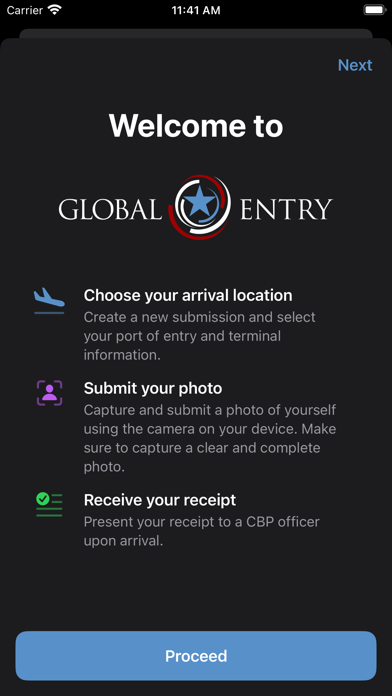
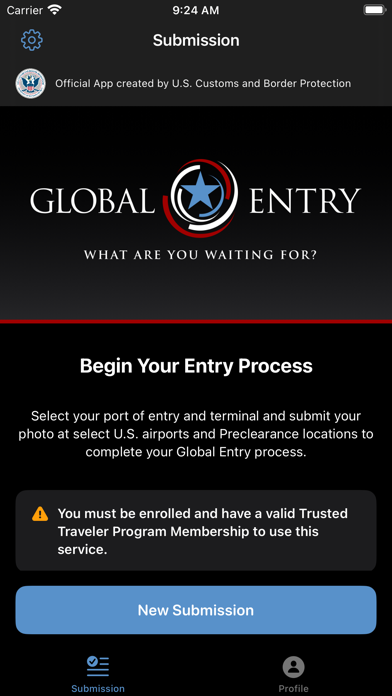
The Global Entry mobile application enables active Global Entry members to report their arrival at any supported airport in the place of a stationary Global Entry portal. You must be an active member in the Global Entry program to use this app.
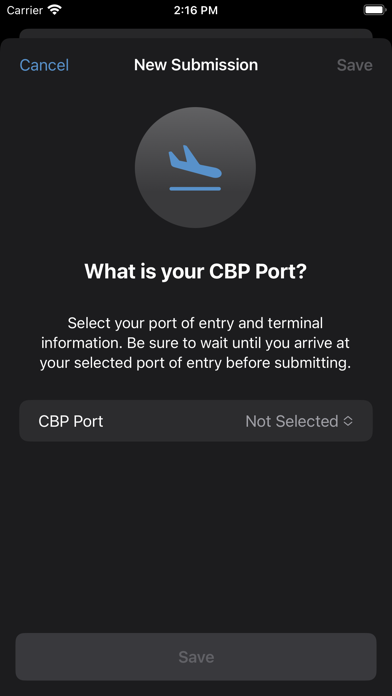
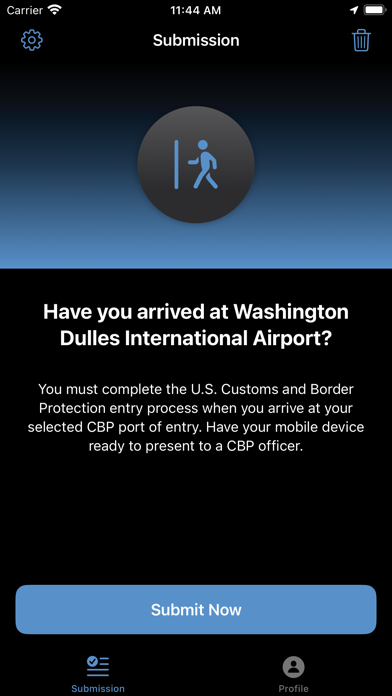
Simply choose your arrival airport from list of supported airports and submit a photo of yourself to CBP for verification. Be sure to complete this process while you are physically located within your arrival terminal. Once you’ve successfully submitted, you will receive a receipt of your submission that you must present to a Global Entry officer upon arrival. Be prepared to offer further travel documentation upon request. If you are unable to obtain a receipt using the mobile app, you can proceed to an existing Global Entry Portal and proceed with the normal process
The Global Entry mobile application also allows existing Global Entry members to store their CBP Pass ID and (if applicable) select their preferred Class of Admission that will be used by all Global Entry services.
Note: If you are not enrolled in the Global Entry program, you are not eligible to use this mobile application. This app does not enable enrollment for the Global Entry program. You must either proceed with the normal entry process or use the free CBP Mobile Passport Control app.
Global Entry Mobile App Comments & Reviews
Global Entry Mobile Positive Reviews
App works fine, these reviews are absurdAlmost every single ‘review’ so far (Sep 2023) is from someone who has no clue as to how the app works. This app of course doesn’t have a place to enter personal info, such as KTN, because it doesn’t use any of that, so most of these reviews demonstrate ignorance. So far, only 7 airports Seattle Tacoma International Airport, Los Angeles International Airport, Miami International Airport, Orlando International Airport, Washington Dulles International Airport, Pittsburgh International Airport, and George Bush Intercontinental Airport, are available for using the app as of late September 2023. It only works by opening the app once you have landed at your arrival airport which is participating in this early roll out, connecting to the Internet (either cellular or by airport WiFi), and capturing a selfie picture. The app uses your arrival information and the facial scan to match you in the GE database. Once that is verified, you can skip the kiosk and go right to the CBP counter via the GE line..Version: 1.0.1
Speeds up a relatively fast process even moreFull disclosure, I’ve only used this once so far but it was coming off of a 380 into an old terminal (so a setup to overwhelm the capacity). I was able to use this for myself and one other traveler. It allowed us to skip the line in essence. You still have to stop and have your picture taken, and had a brief verbal conversation, but we were not asked to do anything else once we were in passport control (ie, no kiosk needed). The one thing I would add has nothing to do with the app but rather signage at the airport. We had to ask people what to do since we had already used the app. We received verbal instructions to bypass the passengers who would not use the app, but still had Global Entry..Version: 1.5.0
I spent less than a minute!I had used the app before through Tom Bradley LAX and I still had to physically present my card and passport to the border official which defeats the purpose of the app. However, on this occasion, passing through Dulles IAD (which is my favourite airport, by the way) was a breeze! I had used the app to take the foto and got a number. I looked for where the GE line was, the lady was asking me to go to the machine to take a foto. But, as soon as I told her I had used the app, she directed me to the border official. He asked me to show him the foto from the app and he waved me through. No inspection of any document. It was so surreal. Everything took less than a minute. This app made all the difference..Version: 1.5.0
5, for now..I just downloaded the app and went through the process of setting up my profile. So, I didn’t actually use the app for its intended purpose yet. But I WAS impressed by how straight forward and easy the setup process was. With all due respect to my fellow workers of the IRS, it would be wonderful if filing your taxes were this easy. It was literally 1- Enter first name. 2- Enter last name. 3- Enter known traveler number. (Plus some minor optional questions such as “participate in optional survey”, “voluntarily use a face picture”, etc.) Next time I travel internationally and have a chance to actually use the app, I’ll revisit. For now, great job developers!.Version: 1.3.0
This AP rocks for SeaTacSister was all bragging on having this App. I am a new Global Entry participant and was unaware of it. She said, no . No kiosk. Just snap pic and go straight through passport control. We both snapped a selfie on her phone and App. Collected baggage, was helpfully directed through line - some marked global entry lines were closed, but awesome staff at SeaTac pointed the way- The friendly officer looked at pics asked for anything to declare (just a bit of alcohol) and waived as through. Amazing. I love this App. Traveling in a month again and so happy I know of it….and I am flying through SeaTac.Version: 1.3.0
Simple to use but needs one enhancementThe submission cannot be made until landing back in the U.S. what I found was that most of the entries can be made ahead of time but the picture needs to be taken back on U.S. soil. The problem with this is if it’s dark out, it is harder to take the picture on the plane before deplaning or wait and try to snap it while walking to customs. Or stop and take the picture which defeats the purpose of simplifying the declaration process. The app needs to have a way to allow the picture to be saved within something like a 12-24 hour window. Then when landing merely submit the receipt..Version: 1.4.2
Time allowed when entering countryThe app today is set for 1 hour then it times out. We landed in CLT yesterday and took our pictures and the clock started to count down from 60 minutes. Then we were advised that customs does not open for another 35 minutes. So we were stuck in the plane. Once we got off the plane , our pictures timed out and had to provide another picture. Since the app wants the entering port, shouldn’t the server know it is not opened yet? They app should have added time to the 60 minutes from the time the server started counting..Version: 2.0.0
Just Awesome!On a recent international arrival at Seattle, I had a very short connection to a domestic flight to PDX. In Seattle, one had to pick up bags first before proceeding to passport control. While waiting for our bags to arrive, I snapped a picture of myself, wife and son and submitted it. Almost immediately I got three cards with a photo, name, class of admission and a green check mark. I showed them on my way through the GE aisle to the CBP staff and just walked out. Hardly took seconds..Version: 1.4.5
Makes Global Entry even fasterWith this app, you don’t even have to stop at a Global Entry kiosk on your way in. I take my picture just before getting off the plane and since it’s good for one hour that always gives me plenty of time to get through passport control. Some airports even have specific separate lines for people using this app and Global Entry when they’re long global entry lines. Definitely worth using..Version: 2.1.1
Still New to Some CBP PersonnelUsed the app for the first time departing from Ottawa, Canada back to the US. Used the app after landing in Ottawa. Snapped a selfie of my wife and I, submitted and got a confirmation back in a few seconds. Used the GE line but when I presented the application receipt to the CBP officer, he had no idea what it was. Said he had never seen it before. We had to present our passports and he asked if we had our GE ID cards, which we did. Not sure the app did us much good. Will try again at a different port of entry..Version: 1.4.2
Surprisingly GoodWould have never expected to rate a government app five stars but here we are! I prefer the app over the new kiosks because I can check my declarations right in the app and then there’s no way to forget vs the kiosk where you have to remember to tell the first CBP person you see between kiosk and exit. Declarations in app are a good failsafe for the jet lagged..Version: 2.0.2
Highly appreciate this program! So convenient for what our standard life needs now in digital era ?It is so Great. Thanks so much . My passport processing now is on hold due to citizenship status verification . In fact I paid $160 for data search as DOS guided. But finally, I go not know what they are doing when meaning “ processing consistently with integrity data?.Version: 2.0.4
Global EntryI have used this APP for US entry a couple of times and it is simply phenomenal! Don’t have to stop at the portal, you do everything when you land and are taxiing to gate. Head straight to the GE area and go right to the officer processing GE and simply show the app response and they may ask you if you have anything to declare or just say have a nice day..Version: 1.3.0
Not for families w younger childrenYou can only have one profile per mobile device. So if you are traveling with children who do t have their own cell phone or mobile device they can access this….it won’t work for you. I have not used the app and probably won’t because I typically travel with my child who does not have those.Version: 1.5.2
Quick and easy to set upAs suggested by the officials, I completed the process to use the mobile app while waiting in a longer than usual Global Entry line. Which allowed me to switch to the shorter/quicker mobile app line. This is a great tool that helps cut down on your wait time..Version: 2.0.4
Wake up peopleThere is no info to input. Global entry has been using facial rec for years now. It submits your picture in the background and you get a receipt if approved. If not approved, use a kiosk. If You people would actually use the app before reviewing we would have better information to base a decision on..Version: 1.0.1
Excellent - including for non-US citizen GE membersThis app was a pleasant surprise; easy to set up and register and the arrival/entry process using the app was very smooth - I felt it worked even better than the sometimes finicky kiosks. The user interface is clean and easy to use and the selfie/face scan worked smoothly. Great job, CBP!.Version: 1.3.0
Works 👌🏻Downloaded in Manila and used upon approaching the gate at O’Hare. You pre-fill your name and # and wait til you’re at your destination. Open the app, select your entry point, take a selfie and voila! You receive a confirmation with a countdown. Flash your app confirmation to the customs agent and move along. Your checkin expires in 60 mins..Version: 1.2.0
App is great, some agents do not know about itAs I was taxiing at airport, I easily filled out and received my global entry clearance. Make sure location services are on. The only problem was at sfo, a few of the agents were unfamiliar with it. Once I found the right agent, it was a breeze. I assume with time, that will change..Version: 1.2.1
No option for multiple users (family)Haven’t used it yet however initial setup appears to imply there is no option to add multiple travelers (family members with GE) in same app. Guess everyone needs to have phone (child?) or delete profile and created new after submission of prior one? (Not sure of that would work since first submission might be required to be shown?).Version: 1.1.2
1st time (almost) excellent !Used GEM for the 1st time in Houston. App worked very smoothly. There was a line at Global Entry and this caused some confusion in where to go if you are using the Mobile app. Only suggestion is to make this clearer and that the Mobile customers are not trying to “cut in line”..Version: 1.5.2
Snap a photo and goWhile heading towards immigration, I selected my port of entry and snapped a photo of myself through the app, submitted it, and then literally walked through immigration. I just showed my phone with the submission screen as I walked past the officer at the exit. Doesn't get any simpler than that..Version: 1.0.2
Couldn’t be easier!We arrived in Miami, walked to the passport control, had our photos taken, and finished in under 3 minutes. The longest part of the experience was the walk from the gate to passport control. Everyone was very friendly and helpful..Version: 1.4.6
Really speeds up the processFirst time using the app - I’ve had Global Entry for a while. It really speeds up entry, especially if the airport has a mobile app line. GE is pretty quick already, but with this app, I breezed straight through. Set it up while on my way to the terminal..Version: 2.0.0
Needs WiFiI tried to use this app at SFO July 2024. But I forgot to turn off airplane mode so was not able to connect. No problem. Went through the stationary version easily. Love the idea of this app and will definitely remember how to use it next time..Version: 1.3.0
JDMWas made aware of the Global Entry mobile app last week while traveling internationally, downloaded the app immediately used it when I arrived at the airport for my departure flight. It was quick, it was easy, and I would highly recommend..Version: 1.4.6
Wonderful AppThis app is a total time saver. If you are on a tight deadline to get catch a connecting flight this app will save your bacon. You will sail through customs like nobody’s business. Take the time to download it and complete the registration process. You will not regret it..Version: 2.0.4
Bye bye kiosk!This app further streamlines an already streamlined process of expedited entry from international trips. No need for a passport! Just take a selfie when you land and queue up to get your exit card from the Global Entry agent. This last step should also be automated and bypass an agent - let’s go!.Version: 1.3.0
Straightforward and easy to use!This is my first time using it and I was impressed at how simple and easy it was to use. I also noted that the pictures will always be the most recent to your current appearance..Version: 1.3.0
ImpressiveI’ve used this twice now in Seattle. Global Entry, itself, has always made customs easier, but this has had me barely breaking stride. Just show the digital receipt to the agent and through you go. Really, really well done..Version: 1.2.0
Makes the process extremely quickI love how much easier and quickly I am able to go through customs with this app. It works flawlessly. Keep up the great work..Version: 2.1.1
Love this app… butThis app is great to get a jump start on the Global Entry process while waiting to deplane. However, it would be great if there was a way to cancel and resubmit the submission if the it is not confirmed for some reason (e.g., poor quality photo). Hopefully a future upgrade will offer such a feature..Version: 1.3.0
Bug at the location verificationToday the app asked for an update, post the update I could submit my submission even though I was at the airport. Actually even after I cleared security it did not work, the error message was the location is not at the airport. The bug appears due to the recent update.Version: 1.4.4
Great enrollment processGreat enrollment experience, start to finish. Fully completed in less than a week! The person who did my interview at Dulles at 7 pm on a Sunday night couldn’t have been more helpful and kind..Version: 1.5.0
Legit Game ChangingWas expecting this to be a poorly designed gov app, but this was legit insane. I did not have to sign in, or upload random details, everything just worked and it knew my flights!.Version: 2.0.4
ReviewI love having Global Entry! Having the app let me catch a connecting flight after returning from overseas. The Global Entry line was well marked in Chicago and I was able to process the entry after landing, so breezed through customs. Thank you..Version: 1.5.2
Was great until latest update.I use this app multiple times a week as flight crew working international trips. Ever since the app update, I’ve tried everything and it never approves my location for submission. Yes I’ve done all the suggested resets/logging in and out etc etc. Its useless at this point.Version: 1.4.4
This is Excellent!I downloaded this app while I was in line for Global Entry at EWR last Monday. I was able to enter my info, create an new submission, and skip the line altogether in less than 5 minutes! What a great experience..Version: 1.3.0
Excellent appThis app makes crossing the border an absolute breeze. Once you are set up, you just take a selfie when arriving at a participating airport. You get sent to a special line and just get waved in, no papers necessary..Version: 2.0.0
Works great, if you’re at the right airportStill only available for a few airports, but if you’re using one of them be sure to grab this free app. Even faster than just GE..Version: 1.3.0
Update failedI’m a pilot I fly international all the time and I have global entry. The app was working but now it tells me I’m to far from the airport when ok literally in the terminal waiting to clear customs. Whatever update you all did to the app for iOS failed and needs to be fix immediately.Version: 1.4.6
Free International Money Transfer 💸Enjoy high maximum transfers into more than 20 currencies while saving up to 90% over local banks! The cheap, fast way to send money abroad. Free transfer up to 500 USD!Version: 2.1.2