Kino - Pro Video Camera Customer ServiceLux Optics Incorporated

Kino - Pro Video Camera Customer Service

  1. Kino - Pro Video Camera Customer Service
  2. Kino - Pro Video Camera App Comments & Reviews (2026)
  3. Kino - Pro Video Camera iPhone Images

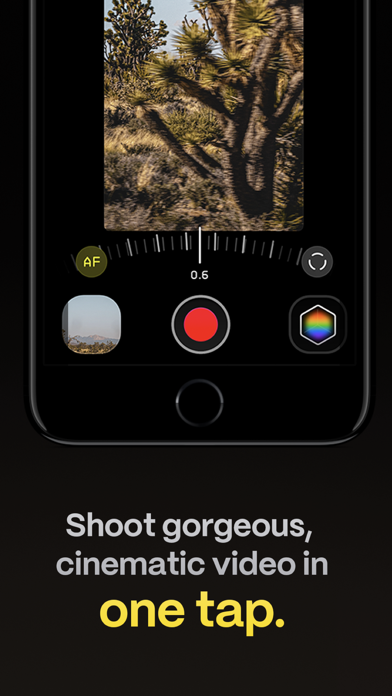
Make great video easy! Kino lets you just press record and create cinematic video with color presets created by expert filmmakers—no edit required. Plus, with “AutoMotion,” the app automatically creates that smooth "film look" you see at the movies. Shoot great video with no film school required.

Are you an experienced filmmaker? Kino includes all the features you need to shoot like a Pro, such as a full manual mode, focus peaking, color waveform, audio meters, and more. If you’re experienced in color, you can import LUTs quickly and use the same powerful Instant Grade feature to output video with baked in LUTs.

Regardless of your skill level, Kino adapts to your needs. Pick your experience level when setting up the app to dial things in your way or go with recommended, simple settings. The beautiful, simple interface shows only essential things, while keeping powerful features under thumb’s reach.

INSTANT GRADE

Kino comes packed with pro color presets by experts like Stu Maschwitz, Sandwich Video, Evan Schneider, Tyler Stalman and Kevin Ong. With one tap, you can shoot video with cinematic, film-like color by selecting a Grade preset. With Instant Grade, you don’t have to apply it later or do any editing steps: Kino just saves the processed video for you, ready to share.

LEARN ALONG

Getting started with video? The Kino team has a free series of lessons prepared you can dive into right away to learn filmmaking with the app. Start out with our simple recommended settings and enroll in a lesson plan to get lessons emailed to you that are easy to follow and let you unlock every feature of the app to use for making better videos.

PRO TOOLS

Kino’s simple interface does not mean it lacks in powerful pro tools. Start out with automatic exposure with EV adjustment and AE and WB lock, or drop into full manual mode with shutter speed, angle and ISO adjustment. Compose a shot with the grid with built in level, check exposure with the RGB waveform, and pull focus with focus peaking. Kino can store your recordings in Files instead of Photos for better and easy shot management, and even features a screen lock to prevent inadvertent taps messing up your shot. Set custom recording settings (like 4K 60FPS Apple Log ProRes422HQ on iPhone 15 Pro) or get started with presets for flexibiltiy.

BEAUTIFUL INTERFACE

Thoughtful touches are abound in Kino: from a screen-wide telltale ring to show you are recording, to beautiful custom typography throughout with our own bespoke fonts, Kino balances beauty and simplicity with flexibility and control for users of any skill level.

AUTOMOTION

Get cinematic motion like in feature films. Introducing: AutoMotion. Kino biases exposure towards a 180° shutter speed by default. If you land in this sweet spot, and available light supports it, the ‘Auto’ label turns green — showing you are in the sweet spot for great cinematic motion. Bright day out? Pop an ND filter on your iPhone and don’t worry about adjusting manual settings: Kino will take care of prioritizing shutter angle so you can just shoot and get great results.

LUT FRIENDLY

One of the powerful aspects of Kino is being able to download new looks from your favorite creators or your own making. Author .cube LUT files in Pixelmator Pro, Davinci Resolve, or other apps (up to 33x33) and open them in Kino with a tap.

TRULY PRIVATE

None of our apps gather or collect data, or analyze your videos and photos. We believe the most important thing a camera can be is private.

CREATOR SPECIAL

Are you a creator or filmmaker and want to get started with or love using Kino? Get in touch with us to get our ‘Creator Kit’: see the Kino website for more details. When sharing your work, tag it #shotwithkino so we can feature it online.

Thanks for making it this far! Kino is made by friends — Ben Sandofsky and Sebastiaan de With, with the help of Katie-Rose Summerfield and Doug Broussard. We made this app with love and care and we hope you love it.

Kino - Pro Video Camera App Comments & Reviews

Kino - Pro Video Camera Positive Reviews

The lack of geotags !I’m a big fan of this app. I appreciate how the developers have designed it to be user-friendly, with an interface that isn’t cluttered with unnecessary features. The quality of the footage is also impressive. It’s much better than the native footage from the iPhone camera and has a DSLR-like quality. I plan to use this app while traveling, and I’m particularly interested in the Geo-tagging feature. It would be great to be able to see my videos on a map later, which would be very helpful. Additionally, I would appreciate it if you could add the ability to assign the app to the new iPhone camera button. I’ve seen other apps that already have this feature, and it would be a great addition to this app as well..Version: 1.1.2

Great app, a little bit laggy.Kino is an amazing app with support for every single this I need except for TWO things. Number 1, I want to be able to change the shutter speed to something that isn’t one of the built in presets. There is only and option for 1/30, 1/60, 1/120, and 1/240. I think that if a slider was implemented rather than presets (or just alongside the presets) the app’s functionality could be much improved. The other thing, not too big of a deal but still something worth mentioning: anamorphic de-squeeze. I would really like to see a feature that allows me to de-squeeze my 1.33x lens and for other users, their 1.55x lens. I understand that you can always do this in post production, but it would be much quicker if it could be implemented directly into the app. One last thing that I think they should work on is fixing the bug where the ISO slider doesn’t work at all. This happened to me and I can’t seem to change the exposure unless I use an ND filter. Other than that, it is an amazing app with a stunning design and it has so much potential. I look forward to the future updates. Both to Kino and Halide. Especially the ones that include the camera control button.😉.Version: 1.1.2

After seeing Apple’s FCP camera app I’m adding a starI love the fundamental concept behind Kino and I applaud how hard the team is working to put the finishing touches on this great app. The provided LUTs are interesting but I’d like to see a curated library of LUTS users can individually download. I’ve gotta say that after using Apple’s new FCP camera app - I was more than happy to go back to Kino. One last comment - as I said - I applaud the fresh take on controlling the camera’s essential features while allowing the camera person to keep their concentration on the story they are telling. This is one great app!.Version: 1.0.6

Has potential but still needs work.Pros: The interface is very intuitive, clean, and simple. The automotion and the instant grade features really differentiate this app from the competition and simplify the shooting process. Cons: More than half the grades are only available for log footage so if you don't have an iPhone 15 you won't have access to them. It's a shame they couldn't produce equivalent grades for standard rec709 as well but maybe they will in the future? I also tried to import multiple LUTs from my davinci resolve folder but could not get any to import successfully despite the LUTs working fine in Davinci. The .cube files were within the 33x33 size limit as well so not sure what the issue was there. Also external microphones do not seem to be supported. I tested with the Hollyland Lark m2 Bluetooth microphones and was unable to get it to work. This is a shame given that this is supposed to be a pro app and audio quality from the onboatlrd iphone microphone leaves much to be desired. Hopefully this can be added in the near future. Finally, there is no tap to focus or tap to adjust exposure like there is in the default iphone camera app. This may have been a deliberate design decision but it would be nice to have the option to enable/disable these features for those who want them..Version: 1.0.1

A must have and an incredible priceThis app is a must have for anyone wanting to take their video to the next level. For non-professionals, it gives you both the benefits of Log without having to mess with it, but also works well as a way of introducing you into the format. For professionals, there are a variety of benefits to this app. If nothing else, it’s a great way to quickly set up a shot and see how the post processing Lut is actually going to render..Version: 1.0.1

Only 7 Grades for iPhone 14 Pro?… come on.First off this is an incredible app; functionality, design, and user interface are top notch. However, as an iPhone 14 Pro Max user I am very disappointed all of the grades are not available. I would understand on a technical level how the processing power of an older iPhone would be limited, but between an iPhone 14 and 15 it’s pretty negligible. I suppose we’re 3 months away from the new iPhone, but still. Apps like this are only purchased for the ability to use filters, or in this case Grades. Hopefully more will be allowed for the iPhone 14 Pro and Max..Version: 1.0.2

Needs custom presetsLove the app but I was really hoping to be able to customize the preset shooting modes to be able to switch framerates with one click. For example there are 3 preset shooting options, 4k 30 HDR, 4k 30 P3, 4k 24 Log and customize. I don’t shoot 4k 30 at all and especially not in hdr. And 4k 24 in log is ok but I prefer ProRes LT so either way I have to go in and customize every time I want to change my frame rate. Seems like it should be a no brainer to make that entire section fully customizable. Would love to see this in an update please. Will change to 5 stars.Version: 1.1.2

They listen!!!As a Vlogger this app hits it out of the park! Ive asked for the volume shutter to work and the added that.. now my vlogging set up is complete!!! this is better than the Final cut camera app from apple.. plz keep this simple to use and i love i can record non pro res video on an external SD card! apple default camera only lets you record pro res on external SD cards or ssd that are fast enough! thanks team!.Version: 1.0.6

Hits the sweet spot!Thanks for this terrific app. Excellent functionality and interface design. Makes shooting on my iPhone a real treat. Hits the sweet spot for video camera apps- useful automation with enough user control to make the iPhone able to produce high quality work. Perfect app for what you would use an iPhone, as opposed to a cinema camera, to shoot..Version: 1.0.2

Impressive start…So far I’m liking what I see. Nice layout and easy to use controls. A couple things I’d like to see improved in the next version: an option for a larger histogram window and manual white balance controls. Hoping this will eventually become my main video camera app but it still has some catching up to do. That said, it’s a great v1 release and I look forward to seeing where it goes..Version: 1.0.1

Wonderfully thought-through, delightfully designed video app for iPhoneI’m amazed what the folks at Lux were able to pull off in a few short months. Kino is an absolute joy to use, being both simple but with powerful control when you need it..Version: 1.0.1

Another excellent appIt was a quick download and I was already shooting better looking videos thanks to the Grades. I don't consider myself a pro in video recording, yet it was so easy to get started. I will definitely explore what else could be done..Version: 1.0.1

I love Kino!Great creator apps make the complex easier, even fun. Sebastian and the entire Kino team always find a way to enrich the creator’s toolkit with experiences that improve what matters and abstracts away that which doesn’t. They hit another homerun with this app and I’m a happy customer and proud supporter..Version: 1.0.1

Please support zooming!I am always zooming and swapping lenses and it bothers me that I can’t do either while recording in this app. I want to use Kino for general video, as a full on replacement to the camera app. Mainly so my footage looks better with LOG and LUTs, but as far as usability, it’s really lacking. I’m also surprised I’m getting lag when navigating the app on a 16 Pro. Looking forward to improvements!.Version: 1.1.2

Do you want the best?If you want the best quality video your iPhone can record, look no further than this app. It’s incredible how much more cinematic this footage looks than the stock iOS camera app..Version: 1.0.6

Great app, one thing missingLove the app, but having to scroll around to pick my favorite luts is no fun. Kino, please make the LUTs able to be arranged. That would be dope and make the app more seamless to use. Much appreciated if you do!.Version: 1.1.2

Awesome idea and simplicity BUT…I’ve had the camera for a few weeks and it’s awesome! I’m a huge fan of the instant grading/lut profiles but for some reason the app closes every time I open it immediately. It’s frustrating given that I paid for it..Version: 1.1.0

Perfect app only one complaintThis app is amazing off the bat. Only one thing that would make it 5 stars, please allow an option to record at 30 fps. Instagram doesn't play well with 24 fps making videos choppy.Version: 1.1.2

A stunning contribution to software designThis is what app design is all about Taking something you thought was done And showing that we have not even begun.Version: 1.0.1

Audio issuesGreat app, wonderful controls, day 1 buyer. There are some audio issues when using a 15 pro max and selecting to shoot in 4k 60fps pro res. Audio goes out of sync or completely cuts out. At least it did for a good amount of my videos which sucked but it happens. Also unable to use the 5x camera when shooting in the same format. There should be a dialog box that says it doesn’t support that format rather than black screen and the app crashing..Version: 1.0.5

Great out of the gate. Needs Apple Watch RemoteAll I need is an Apple Watch Remote app to control this so I can do self-tape auditions. I’d love gimbal support for my Zhiyun gimbal (Filmic Pro had gimbal support), but the Watch app would be so great to have..Version: 1.0.4

Simply the best.Kino is stunningly designed, attractive, intuitive and fun. It’s easy to use and produces incredibly high quality video. My new go to! I use it daily, a great deal & worth every penny..Version: 1.0

Starting off greatThis is a great point and shoot app while using Luts to color grade instead of having to do it in post but there’s a lot of clipping when recording outside in the sun. I’m sure this will be fixed soon..Version: 1.0.1

Add file name, camera and location please!!Love the app and how nice it is to use. Can you please add file name, camera info and location for the video?? Please 😊.Version: 1.0.5

OptimismI do not professionally record cinematic films on my phone but I happily paid ten dollars for an app that makes me feel like I could if I wanted to..Version: 1.0.2

Outstanding. Best Video Camera app!This team -wow. This is exactly what I’ve been waiting for since the iPhone 15 Pro came out..Version: 1.0

PLEASE ADD TO APPPlease add to app the ability to pinch zoom in and out and Pause and resume for easy editing please in the next update thanks.Version: 1.0.4

For the “right now” momentLove this.. so easy. So simple.Version: 1.0.4

No audio in playbackWhen I try to watch the video in the Kino app, there’s no audible sound. I made sure the volume is all the way up and I am speaking while recording..Version: 1.0.1

Latest update crashes every time I open the app…..Love the idea but the latest update caused the app to crash every time I tried to open the app..Version: 1.1.1

Constantly switching back to HVECThe app will constantly switch back to hvec instead of apple ProRes 422. I really like the in camera colorgrading..Version: 1.0

Record with volume buttons?Why can’t I record with the volume buttons?.Version: 1.0.2

Amazing teamSo happy this group of amazing people worked together to create something this good to us. It all comes down to Log and LUT choice on device. But they went the extra mile with added functionalities and very clean sleek design. Loved it. Must have for all serious iPhone film makers out there that don’t want to spend too much energy on post edit..Version: 1.0.4

Ok, but needs some basic “pro” featuresThe app has some good things going for it - ease of use, preset grades - but it’s missing a few basic “pro” features, custom white balance, focus peaking, and timecode..Version: 1.0.1

Cool colour grading presets but the zoom feature can be improvedI enjoy using the app, especially the color grading presets, which add a lot to my shots. However, the limited zoom options (only 1x, 2x, and 5x) make it challenging to use in varied shooting scenarios. A more flexible zoom range would greatly enhance the app’s usability and creative potential. Expanding the zoom functionality would make this app far more versatile.Version: 1.1.3

No hdr if auto gradingThe custom settings says that HDR rec2020 is enabled with 4K and the hevc as a codec, but actually, what is being recorded is SDR. so the only option to have HDR in the app is to use the Apple style, which is basically the same workflow as using the Apple camera app. If you have anything, but the very latest iPhone 15 pro, instant grade is not usable in an hdr workflow. But that is very much Apple fault, not the devs..Version: 1.0.1

Free International Money Transfer 💸Enjoy high maximum transfers into more than 20 currencies while saving up to 90% over local banks! The cheap, fast way to send money abroad. Free transfer up to 500 USD!AdvertorialVersion: 1.4.3


What do you think Kino - Pro Video Camera ios app? Can you share your thoughts and app experiences with other peoples?

Please wait! Facebook comments loading...

Kino - Pro Video Camera iPhone Images
  • Kino - Pro Video Camera iPhone image 1
  • Kino - Pro Video Camera iPhone image 2
  • Kino - Pro Video Camera iPhone image 3
  • Kino - Pro Video Camera iPhone image 4