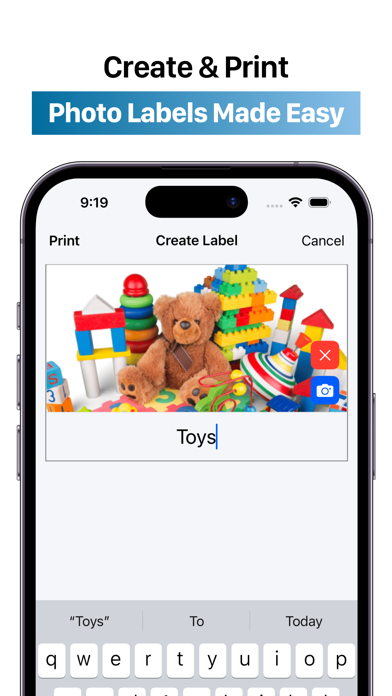
Use your device’s camera to snap photos for your labels, and easily print them from your printer.
This intuitive, all-in-one picture-labeling tool makes it so easy, that you'll label everything in sight.
++ HIGHLIGHTS ++
- Clean and modern design
- Performant app without Ads
- Super Easy and Intuitive Navigation
- Add titles to your photos with ease
- Capture images with your device’s camera or choose from your photo library
- Print just one or as many labels as possible on one piece of paper
++ BENEFITS OF THIS APP ++
- Organize office supplies or craft materials
- Design picture labels for early childhood settings
- Create personalized photo name tags
- Make pocket chart items
- Develop picture flashcards for words or sounds
- Label classrooms efficiently
- Quickly update or change labels in your spaces
- Establish permanent records for inventory and insurance purposes
- Label boxes for moving or storage
- Make tidying up toys fun with name and picture labels
- Create schedules, chore charts, and behavior charts with visual cues
- Develop classroom visual aids
- Provide clear, consistent instructions
++ DON'T BE A STRANGER ++
We have some exciting features coming soon, but you can always email suggestions or write a review for the app.
Don't forget to share this app with a friend, because your support will make this app incredible.
Contact us:
[email protected]
++ WE CARE ABOUT YOUR PRIVACY ++
Privacy Policy:
https://apps4world.com/privacy-policy-apps.html
Terms & Conditions:
https://apps4world.com/terms-and-conditions-apps.html
Label Pics+ Positive Reviews
Love it but could be moreI got this app because a coworker said it was the best thing. She said her version was the older one with more features but I was hoping that when I did download the app there would be. She even said that she was unsure of what was being offered because she heard it was different. I like the preset pictures. The pictures we take need to be better stored. I don’t care for my pictures running along the top of the page. There should be a folder they can go into. Definitely font styles and sizes would be a nice feature, just a few options. I like that we can choose our picture size. It get the job done, just offer a little more please..Anna GoehleVersion: 1.4
Label Pics+I have enjoyed this app; it is very helpful to add text to pictures when creating labels, and I enjoy that the picture size is so easy to edit. However, the lack of editing options is frustrating. If I forget to add text to a picture when adding it to a page of other labels, I must start over, adding the labels to the page for printing freshly. I wish there was a way to crop or rotate photos within the app..Jax590Version: 1.4
Teacher in-putI loved the original Label Pics and am working on learning this new version. It is fun to have the option of different sized labels.
It is great to be able to print direct from phone .. however… we are not able to connect to the printers with our phone in all our centers. The ability to email it to a computer and then save the file for later use was a key positive to the original version!!
Update: I have found the arrow that allows you to email the page of labels to a computer to save and then later print!!! Changing my review to 5 stars.WergoofeyVersion: 1.4
Getting used to new versionI use this to create labels for our childcare center. I had the previous version but had to download this new version. The previous app was more user friendly and easy to navigate. I really had to explore this new app to find the functions it offers. Seems to work just fine now. Might I suggest a tutorial for first time users. I do like how there are some preset labels available..B34UM4M4Version: 1.4
Edit/Delete??How do you edit and/or delete labels?
A tutorial would be helpful.
I made the labels, and they’re beautiful, but can’t edit them or delete them once they’re created. Or, am I missing some feature?.Anita EggVersion: 1.4
Label PicsI had the original Label Pics app and think it was easier to navigate than this one. I was excited to see an updated version but am disappointed that there are no directions on how to navigate the app, change the font or to rotate the pictures..75USCVersion: 1.4
Frustrating & Time consuming!!Frustrating to use. Old Label pics app was easier and user friendly. Hard to make adjustments to pics. Every time I make a change this “rating” pop-up comes up and slows the whole process. For a teacher with limited free time, I do not like this version and will look for another app option..Miss Frustrated TeacherVersion: 1.4
Adjusting Photo-EditI still have the previous version so thankfully I will not need this one, my issue is that you can't adjust the picture like you can with the original version! I hope that gets an upgrade, overall still a good buy at $1.99 and I appreciate it but as long as the original works I will not be using this version!.IbeewillieVersion: 1.4
Can’t Edit PicsI had the original app. Loved being able to use it in my class room and made my life easier. The biggest flaw with this is you cannot edit the picture to fit within the photo insert as you wish. Would give it 5 stars other than that but I also haven’t printed from the app yet. So we shall see..@Sandman123456Version: 1.4
Back in actionI’m a preschool teacher thank you for bringing this app back. Please allow the app to make a whole bunch of labels a plethora instead of just one page and if I’m mistaken, thanks anyway.Josh ATLANTAVersion: 1.4
Decent AppWhat would make this App 5 stars, is if you can change the color of the font, and add a second line for us to type the label in both English and Spanish or another language.DykilamoreVersion: 1.4
Not badI liked the other version better. This one you can’t adjust the pictures when adding them in. But still a great app for preschool labeling..H StuckiVersion: 1.4
It’s okWish the app gave the option to adjust a photo once it’s on the label so the picture fits better in the square. Also wish you could just click on multiple labels to add to print instead of having to press “add label” on each one..Apinkham2025Version: 1.4
Helpful but could be betterI would love the be able to have label title on two lines. Also, there does not seem to be a way to delete old labels I no longer need..Ashbok10Version: 1.4
OkWish you could create all and print all at once like multiple pages.Need multi page optionsVersion: 1.4
Pic editingIts not letting me edit the size of the picture so it always chops half of it off..TludoviciVersion: 1.4
EhhNot as user friendly as the old version. Lots to click and flip through Vs it all being right there and flying through making classroom labels..SydneyffVersion: 1.4
Great app ideaI love the idea of this app. It makes label making really simple! I just wish I could select multiple labels at once and not have to continuously click “add more labels “.KakdjurhejVersion: 1.4
It gets the job doneGood app but being able to manipulate photos is a pain and you can’t rotate pictures to fit better.Z clanVersion: 1.4
So far so goodStill figuring out features but pretty simple so far!.Bb345bbVersion: 1.4
Time saverThis app is easy to use and saves you lots of valuable time !.P.TisdaleVersion: 1.4
Needs some helpThis app is great for making labels. I would love to be able
To add as many labels to a page without having to do it individually. I use this app all the time. Make it more user friendly please..Teacher in KVersion: 1.4
Free International Money Transfer 💸Enjoy high maximum transfers into more than 20 currencies while saving up to 90% over local banks! The cheap, fast way to send money abroad. Free transfer up to 500 USD!AdvertorialVersion: 1.5
Label Pics+ Negative Reviews
A MAJOR downgrade - review from a preschool teacherThe original Label Pics app was so simple to use. It didn’t offer a lot of features but it didn’t need them. Making labels used to be quick and easy. That’s no longer the case with Label Pics+. Labels can only be edited from the printing menu rather than when first creating them - WHAT?? Labels have to be added to my document to print individually, which takes tons of time. When I export a PDF to print from my computer, it creates a document with no margins. If I want to print more labels than will fit on a single page, I have to create and export each page as a separate document. When I am viewing my labels, I can only see two at a time because the “Label Suggestions” area takes up most of the home screen and cannot be removed. There doesn’t seem to be any way to delete old labels I no longer need. It’s a time consuming, clunky headache. I can’t believe I had to pay for a product that’s worse than the free version!!.RaychleadeleVersion: 1.4
DisappointedI love the old app and used it for many, many years. It was perfect! This newer version is just not the same. Honestly, I’m really disappointed- the old app no longer worked so I had to repurchase for the updated app and then came to find out that it does have all the features of the old app. Is there a way to change the font? If there is, I haven’t been able to find it. This is important because I need to be able to use a font that includes a single story lowercase letter a (it is written as a circle with a vertical line down). I teache pre-k and want the print to match the way they are learning to write. Please consider adding back the option to select from various fonts..Becky.727Version: 1.4
Unhappy with the updateI used Label Pics for all of my classroom storage labels and loved it! Recently when I went to create more labels the app had been discontinued and replaced with Label Pics +. Unfortunately it is not as usual friendly. I do not like how you can’t go back and re-print a page, how you can’t print multiple pages (you can add them to print but then it only prints page 1), and you can’t remove a label after adding it to the print page. There are several features that I miss from the old version and I was hoping for more options since it is now a paid app..Unhappy_teacherVersion: 1.4
FrustratingWhile this app has potential, it is frustrating because every single time I try to add a picture to print and ask me to review it. And it wants me to give it a five star review and honestly, I am not giving it a five star review because it’s aggravating me that I have to keep reading it. It also does not let you save edits to names or photos without deleting the entire thing and starting over again. And then it still doesn’t actually delete the item. Again it has great potential, but there are definitely some kinks that need to be worked out..Frustrated134Version: 1.4
Not as good as the old version.I’ve been using an older free version of this app for a few years. It started closing out every time I pressed print, so I started downloading and then printing. I realized there was a new paid version available and thought it would be better. It is clumsier with more steps, and you can’t center the picture once you’ve uploaded it. On the old version, you can see all the labels in one place before printing without having to move them. This one, you have to add each one by one to a printing page. The labels are also much smaller..YouandmeandthedogmakesthreeVersion: 1.4
Was amazing now terribleThis app used to be amazing where you could easily take a bunch of pictures them and print them off or save them as a pdf. As a preschool teacher it was a game changer. Now with the update you have less ability to move photos around to center them so you have do a lot of trial and error to center them so you photos. When printing you have to individually select the photos you want and even then you are limited in how many you can select whereas before you had more freedom.KatherinecitaVersion: 1.4
Missed the old versionI used the older version of this app for the last 6 years. I went to open it this week and it was gone. I went to the App Store and found the updated version for $1.99. This update is terrible. There are no directions, the sizes are too small, I can’t change the size and direction of the photos, and printing is much more complicated. Very much miss the old version..Lisa Fellner SmithVersion: 1.4
Preferred older versionI preferred the older version. I would love to be able to adjust the size of the picture in the app. Also, it was easier to take multiple pictures (12+) and print them all at one time. Right now I can only print one page of labels at a time. Maybe it’s user error, but the older version was user friendly..76TAEVersion: 1.4
New “Update”This update, that I had to pay for, is not user friendly, does not give any information on how to use, and overall is a major downgrade. I can’t adjust my pictures (the photo example in the App Store isn’t correct). I don’t know how to adjust the font size, and can’t find any help on that. I feel like I just wasted my time and my money on something that doesn’t work anymore..Mia2868Version: 1.4
It’s okFor the most part this app works. I do not like you can’t edit the photo once you take the picture by moving it around in the frame. I also find it frustrating that to print labels you have to go and individually add each one. Why can’t you just pick the size you want and create them all on one page?.Aaprl83Version: 1.4
Unfortunate changeThe new app is very hard to use. I took several pictures in my classroom. Two days later I went to print them and they were gone. I couldn’t find them. My suggestion would be to print them immediately after taking them because they may not be there later..Pre-k teacher 123Version: 1.4
Not like the old appI have used the old app in my classroom year after year and absolutely loved it. It was so user friendly and easy to use. I liked that you could adjust the picture within the label and choose from different fonts. This doesn’t seem to be an option anymore and it’s a bummer..Caliiii478Version: 1.4
Not easyCan’t zoom pictures or move to crop. Just not enough options to make this work well unfortunately. If the preview of options was just a page where you could plug in your pics and zoom/move photos inside the box and print out the whole sheet it’d be easier..Nelsonmali9696Version: 1.4
Not the sameThis is not the same as the old app. You can edit the photo to make the picture fit the photo box. Also, when you go to print it is missing some labels, and only prints one page at a time. So when you make labels make sure you are not making more than one page at a time , or you are wasting your time.Nick098766Version: 1.4
What’s with this version??1. Why only one label printed at a time?
2. No help or support offered
3. I can’t adjust the photo for zooming in, zooming out, or centering it. I’m pretty tech savvy and nothing I tried worked.
4. Bring back the old version because I legit have used it every year before school starts for years..Newjess1Version: 1.4
Preschool Teacher ReviewI loved the original label pics; this updated version isn’t as user friendly. I miss being able to add a second line of wording and change the color. That is a requirement for my classroom labels and now I don’t have that option on this new version..Bellci07Version: 1.4
Updated version 👎Very disappointed in the new label pics app. The old version was more user friendly. I love using this app for my classroom but it is so difficult to use that it slows me down making me want to try other options. Hoping there are some updates to fix some things!.J....21Version: 1.4
No option to change fontI never leave reviews, but this is the worst app I’ve ever seen. There’s no way to change the font. There’s no way to add a second line for more text. There’s no way to add more photos without closing out of the app and hit cancel. Do not use this app. It needs a whole load of help..AmandaSue13Version: 1.4
Bring back the original labelpicsI would pay more money just to get the original label pics back. I want to easily upload many labels on one page without the hassle that the new app puts you through. Takes you through to many steps just to make labels..RenreviewsVersion: 1.4
PotentialThis app has potential but it needs some serious changes just to make it more user friendly. First it would be great if I could do more than one page of labels at a time. The old label pic app was able to do multiple pages.
Second I would like to resize or adjust the pictures within the label.
Third to really upgrade things it would be nice to change the font, add borders, and save files.
I’ll gladly change my rating once these updates happen..Applepen00Version: 1.4
I miss the original versionI loved the original Labelpics - why did it go away? 🙁 I wish I could change the font, edit the photo and I wish it would make a page like the old one did that you could email and save….PreK Teacher 123Version: 1.3
I want the old version back!!The old version of Label Pics was so user friendly! This is NOT!! Each time I use it I can’t figure out how to edit the text size, and moving/resizing the photo is something I haven’t figured out at all! I am very unhappy with this change..Jill PhilbyVersion: 1.4
DisappointedI can’t seem to find how to add a new label without each different label being on a page by itself- waste of paper. Can’t seem to find a menu button either. Please make it much simpler like the old version, which was free. This is not as user friendly..GepadgettVersion: 1.4
New App is AwfulThe old app was so
much better. You cannot adjust font, size of font and crop like you used to. There also used to be a way to delete images. Much more complex to use..Gee9238Version: 1.4
Not as advertisedI have LabelPics but now they changed it to add a + and it does so much less then the original. Does not allow font choices, does not allow size changes for labels or font. Nothing like what is shown. I want a refund because I won’t be using this 😕.Rosebud74Version: 1.4
Old version had more featuresHate that I can’t edit the font, zoom out on pictures, change font color or even add an additional line of text.AsaleeVersion: 1.4
How long can i use this versionBought this a few years back and it was no longer available this year. Now cant complete task without bugging me to rate. So here is your rating.Weary teacherVersion: 1.4
Don’t likeI loved the older version. It was easy to navigate and print labels. The ability to change size of label is incorrect. I have wasted more time trying to navigate the new version than the old version. Please go back to the old version!!!!.Latingirl38Version: 1.4
Most un-useful app ever!This is the worst app ever. I used label pics and it was great. It was easy to use and basically fool proof. I had to delete the app for some reason and I can only get labeled pics plus now. It is so not user-friendly and I am so sad I can no longer access label pics..Sad TeachVersion: 1.4
Poor appCannot adjust sizes, cannot do more than one. Don’t waste your money.BinkodemyoVersion: 1.4
Payoneer 💰Payoneer is an online payment platform that lets you transfer money from any corner of the world! A best and must have payment service for every blogger, traveler, freelancer, affiliate marketer, consultant, virtual assistant, business person, online sellers, and receivers. Earn $25 for free by joining Payoneer. Sign Up Now!AdvertorialVersion: 1.5
 Apps4World