Ratha Sou
Calculator - Pad Edition Customer Service

- Calculator - Pad Edition Customer Service
- Calculator - Pad Edition App Comments & Reviews (2026)
- Calculator - Pad Edition iPad Images
Designed to fill in for the missing calculator app on the iPad with simplicity and functionality.
This app features the modern design of flat UI of iOS which look like original built-in app. Users can make basic calculation in portrait and handy scientific calculation in landscape.
It provides all scientific functions such as root, power, factorial, exponential, divisions, and logarithm are supported. Including trigonometric functions like sine, cosine, tangent, arch, and more.
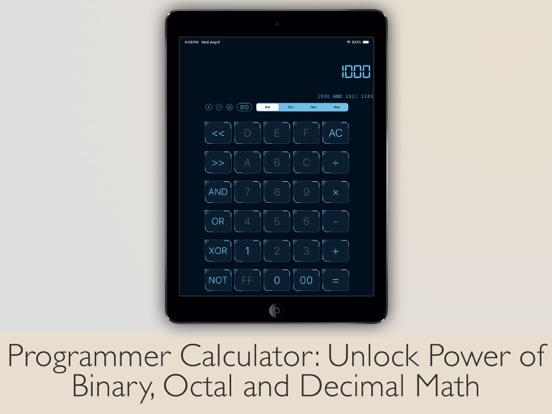
Unlock the power of binary, octal, decimal, and hexadecimal math with Programmer Calculator.
Solve fraction math problem quickly and easily with Fraction Calculator.
Includes international currency conversion and variety of units conversion categories.
Tip calculator to calculate tip percentage for food and drink on the fly.
Save time when use bill splitter, and tip exactly what you mean to, no more, no less.
BASIC/SCIENTIFIC CALCULATOR
• All functions like the original calculator app
• Basic calculation in portrait
• Scientific calculation in landscape
• Manual basic & scientific calculator switching in portrait or landscape orientation
• Access result and do calculation on widget
• Switch between Degrees and Radians calculations
• Make more complex calculations with Memory buttons
• Simply swipe on the digits to delete a single wrong digit
UNIT CONVERTER
• Currency converter with daily updated exchange rates in the universal currency
• Freely convert units from variety of categories
• All catalogs in converter include: Currency, Area, Data, Length, Mass, Velocity, Temperature, Time, Volume, Acceleration, Angle, Current, Energy, Force, Illumination, Inductance, Magnitude, Power, Pressure, Radiation and Torque
FRACTION CALCULATOR
• Built-in fraction calculator to solve fraction math
• Display result in proper fraction, improper fraction or decimal number
PROGRAMMER CALCULATOR
• Multi-base calculations with seamlessly switch between binary, octal, decimal and hexadecimal
• Perform arithmetic and logical operations
• Directly view and manipulate the individual bits of the binary number with built-in Bit Editor
TIP CALCULATOR
• Calculate tip of bill on the fly
• Split the bill to share with others
• Simply swipe to round any number of total, tip, or per person
• Built-in share function to easily share the number with others
SIMPLICITY
• View whole calculation equation in calculator
• Check previous calculation with history
• Copy and paste numbers from or into display
• Support split view multitasking
• Support external hardware keyboard input
INTERFACE
• Get new feel of different looks with multiple themes
• Easy one-hand usage with resizable and draggable interface
• Pinch to scale calculator size
• Quick actions by tap and hold calculator area
• Buttons feedback sound to ensure you touch the buttons correctly
NOTES:
• To add widget in iOS 14 or later, scroll to the bottom of the widget list, tap Edit, tap Customize, add Calculator widget, and tap Done.
Calculator - Pad Edition App Comments & Reviews
Calculator - Pad Edition Positive Reviews
FIVE STARS & YALLAlr so this is a really good app to use because it helps me solve all the hard questions that is stuck in my mind. This app can actually help kids and others educate and get a little bit smarter. I appreciate for the creator to make this app. This app is really smart and really this helps me solve my problems and solve hard questions like 8000 times 2 billion and if kids have these apps, it could really help them because he might even be confused. Some people just use this app like it’s just a garbage app that just gotta tell you all the answers but it’s really really helpful and you can learn education from this app whoever the owner of this app I really appreciate your kindness of making this wonderful education you get five stars. and I added your app to my favorites. Stay safe!.Version: 6.8.4
Great functional calculatorOther calculators I’ve looked at do crazy things like track your location, purchases, or have insane weekly subscriptions like $5 a week for no ads. This calculator charges a reasonable $5 for the full version. As it is the ad is small and unobtrusive. The only thing it’s missing is multi-view support. It functions in multi-view but the format doesn’t change when in multi-view. So it’s just a smaller version of the full screen version with large blank spaces above and below, also the history buttons could be a little bigger, but again functional. It’s still 5 stars for all it has and it’s ease of use..Version: 6.5
It’s goodI like how it is a calculator. But I just wish it didn’t erase the whole number when you make a mistake. Just do one Number by one number. I would also like it to have exponents. I’m not sure if there are exponents on the buttons, because I’m just a fifth grader so I’m not sure but because of that I think you should add some thing that you can recognize as an exponent. Because not all people know these math symbols. I would also like an option where we can do remainders instead of 1 million numbers behind the decimal. I also want to be able to controlThe theme, but I’m sure there’s a button for that but it just didn’t work. I’m tired of seeing black and orange colors whenever I open a Calculator . That’s it. It’s a nice calculator. It’s all the jobs done that I need. But sometimes with the exponent in the remainders it’s difficult..Version: 4.0.2
⭐️review⭐️It’s not a five stars ✨ because I think it should quiz you on math for what level you’re on math as a kid. And adults 👩👨would maybe have a better calculator for work because a lot of adults don’t really have the right tools ⚒️ on the calculator to add a lot numbers and they need a better calculator because it’s hard to do that in a couple of minutes and it would be better if they could do it quicker while in work so they don’t have to do extra work. And it’s annoying that on a phone 📱 it get very small some people might have bad vision or even big hands 🙌 please 🙏 at least make the thing bigger and the rest of the numbers on Scroll. That is my review please consider doing it and maybe i’ll be back with the five stars ✨ good bye 👋.Version: 6.6.1
Best option out there butThere is one thing I would like to see improved though, when “Auto Basic or Scientific UI Switching” is enabled, it will switch to basic when in portrait and scientific when in landscape (which is good), but when using the side over function (which I do quite often for multitasking) it doesn’t seem to realize it’s in portrait mode so it’s really small and difficult to use (I’ve just been manually changing it every time) It’s still definitely the best calculator app for iPadOS And even tho there is ads it’s just one unintrusive banner add at the bottom.Version: 6.6.1
Apple should have made a calculator an iPad native appFirst off it is counter intuitive that Apple did not include a calculator app as part of the baked in software, it almost seems as if Apple just wanted to give developers an opportunity to reinvent the wheel lol. But as far as this app goes it functions as expected the only real caveat is after purchasing an “Ad Free” version the app manages to revert into a unpaid version with ads. You then are offered two options which does not make sense the first is to pay $4.99 to unlock the Ad Free features then below it to Restore Purchase. So it seems this app could use an update so paid users do not experience ads after purchasing the Ad Free version..Version: 6.5
Better than the Apple calculatorI was annoyed that Apple didn't bother to port the iPhone Calculator app too iPad. I mean, how hard could it be? But now that I've found this app I don't care, because it's even better than the original. The basic and scientific calculator modes look and work exactly like Apple's iPhone calculator, unlike the other replacement apps I've tried. (The others all looked or worked differently. There's also additional functionality here that I wasn't expecting: a fraction calculator and a unit converter. I haven't needed them yet, but from just playing with them they look useful..Version: 6.3.2
⭐️Best App!⭐️I Love it so much! It helps me understand my homework and hard math. Now, with this app, I can do math! This is the best app for people who need help. I gave it all stars⭐️ I Love Using The App! 👏 Thanks!👍 Best app!👏 But, sometimes, it can be hard once you start. First, Pick a Number and Pick what to use like plus. If you wanna erase, press C. Here’s an example: 100+3=103. That’s how I started to know how to use it. Then, here’s another example. 4-2=2. And yes, I know, their easy. But, I started with easy and did more. I went from Easy To Medium To Hard. This helps me with the math. Hope you understand how to use it now! Bye👋.Version: 6.6.1
Great for school workThis app is help me with my schoolwork. And this app is amazing I’ve had it for more than a year it’s helped me with my math I’ve understood it even more now even though I have a problem with the understanding my math work this has stopped a lot of my learning so with this calculator I have learned a lot now I download if I were you but there is one problem though there’s a lot you can do without signing in but there is a key so when you tap on it it was so an ad press the ad button then when the ad is over you’ll get a different theme..Version: 6.8.2
My calculatorThis is a good app but sometimes it’s kind of gets stuck so I would give it a five star but honestly it would be more of a like three star if it were free but since it’s not free then I am your name mean is it it’s not free I feel like the first part is free but then the second part you have to buy all different styles if you have to buy all the different styles then what’s the point of even buying it I would rather get a free one and buy this one and then all the other styles aren’t free so I would recommend A different calculator but not this one this one is horrible..Version: 4.0.5
Better than Apple calculator🐱🍎This is a really good calculator it doesn’t even have ads at least for me and a first I really wanted a calculator and I found this one and I got it and if you need a calculator you should get this one. It’s a really good calculator it tells you the equation you made and it record that equation, and of course tells you the answer. this is way better than the Apple calculator that comes with a phone and it’s the best calculator I’ve seen. And I don’t know if the review will pop up but if it does, you can read it 👌 meow🐱.Version: 6.5
Stop adsIt would be 5 stars if there would be no ads and make a quiz so if I would say I am working on + than make a quick quiz and u have 30 hearts and ever time u make a mistake u loses a heart. ever 4 min u get a heart and the max hearts are 30 and make the quiz have 40 questions to do and the more u get right u get money not real money game money. and make a mascot and for some money u get to dress up The character in different clothes make a leader bored And whoever has the most things solved at the end of the month Gets an extra 500 dollars so then it would make the game more popular and people would have fun doing it. and I am 13 years old !! so if there are spelling mistakes my bad.Version: 3.3
Wonderful calculator appI’ve been using this app for over a year now. I enjoy every feature and have lately come to be using the conversion functions quite often. Wonderful! The ads never bothered me but I felt the $5 prince was well worth it. My one request is to have a programmers calculator in addition to the scientific one. That would round out the feature set and, to me anyway, make this the perfect app. Again, kudos on creating what I feel is one of the best calculator apps available for the iPad..Version: 6.6.1
So glad I found thisMy othe calc was showing more and more intrusive ads and only offered a ridiculously expensive subscription option. This had very basic banners at the bottom - no big deal - but when I saw it was a very reasonable one time buy (the price of a latte at Starbucks or maybe even less) I just bought it. It has several skins and looks great. I was never happy that Apple left a calc out of the iPad but I do like that they support their developer community and this is well worth it..Version: 6.5
Better than any otherCompared to any other calculators I think this is the most unique, it’s amazing how big of a difference this is to others, And it’s different in a good way, love all the techniques,this really helps out, when on my apple iPad that I’m reviewing this on, it doesn’t have a calculator but I’m happy I installed THIS calculator to be honest, you might be legit saying it’s just a calculator But nah, this is more than a calculator and top it off with no adds! Lots of apps,calculator,video games have lots of adds popping up lots of different adds I’m not complaining on what the adds are on different apps but I personally think it is worth it! As well as it being free to install this ISNT just a random act of kindness I’m saying it from all my heart as it is true I love the details and to be honest I’ve gotten my attention on the icon this is wonderful Thanks. -haya.Version: 6.5
Calculator is the bestFirst, the calculator is the most best, because what I think of it is that it is really cool to use on homework and really thinking of a response of math and people that are not smart it can be really used for them like me. I’m not that smart, but it is amazing. I have got a lot right with this app and this app is thanking of your homework and math but also this app is also helping you for smart ideas I would recommend this app for all people, including smart and unsmart app is useful. Thanks..Version: 6.6.1
Widget doesn't work: UPDATEDI like the app.. It does what it says mostly.. However, I cannot get the widget to work properly.. I pull it up on the lock screen and as soon as I click on any button it asks me to sign in so it can open the full app, when I just want to do a quick calculation. I also tried using the widget when my iPad when it was already unlocked and it still kicked me into the full app... Why isn't the widget working properly? UPDATE: With the help of the developers I was able to get the widget working. They had a very quick response and their suggestions worked. Love the widget!.Version: 3.3
Decent calculatorIt fills the void that iPad doesn’t have one. It’s a one time payment and no subscription. I doubt iPad will ever include one because technically it’s not possible to create a widget calculator that is workable and at the same time floats over the home screen. If you look at all the widgets on Home Screen, they are just shortcuts that takes you to full screen app. The only workable widget this app can give you is only over Widget Screen, not the Home Screen. It’s an iOS limitation..Version: 6.3.2
NO annoying pop-up ads!Good free calculator with low price to upgrade to better themes, but the free themes are decent. Another good thing about this one and the very reason I uninstalled my old “free” calculator is this one doesn’t have pop-up ads. Only an ad bar at the bottom of the calculator screen. My old calculator suddenly started popping up ads right in the middle of my calculations, so it had to go. I don’t know why my iPad Air didn’t come with a calculator. Shame on Apple. I give Apple a negative rating for that for sure!.Version: 2.7
Very inconvenient but it looks like Apple’s calculatorI gave it a three star rating because it looks really good and nearly exactly like apple’s. I can’t give it those last two stars though because it doesn’t support the one thing that most iPad users use; multitasking. It’s SUPER inconvenient to use the app since I have to be flipping back and forth between apps when making quick calculations. I use my iPad as my main and only computing device when I’m on the go, so it isn’t ideal that I have to take out my phone to use as a calculator while I’m doing work on my iPad screen. Otherwise, what’s all the extra screen real estate for?.Version: 3.0.1
Should’ve been included with iPadIt’s a calculator. How difficult could it have been to develop? I don't mind paying to unlock this calculator. I give it 5 stars, because it works with the keyboard, instead of just on-screen display. The reason that got its 5 stars is that there’s no subscription. One time pay and boom, you've got a calculator on your iPad. I mean, technically, you could have just used the free version with the ads - but it works and it works well, I didn’t mind paying $2.00 for it..Version: 3.3
I’m not sure what I want the best for me and you guys are bothIt very good cause it help me with my math Okay if I get a chance I will let go and see how much it is going for me and you can slap me on my head lol I just want you guys in my heart and I don’t want you in the lord I don’t need you help with my self esteem I need to do it all this way I don’t know how to get golden paint I don’t know how to get golden paint but you need me and you don’t know how to do anything else like it I can kill it I just need.Version: 6.5
Thank youI love this app it tells me all of my calculations, and it makes me smarter in my subjects of math. Whoever tells us these answers is wildly great at math, and I’m very proud. Thank you for all you do, and for helping us, and supporting us through our journey of math, there’s never been a time where I doubted you guys so thank you because I appreciate it and my family appreciate it and the whole world appreciates it because now they can know their calculations so I just wanted to say keep up the great work your work is magnificent.Version: 6.8.2
Great replacement for missing iPad calculatorI have no idea why Apple didn’t include a calculator app for the iPad as a utility program like they do with iPhones, but this calculator is the closest thing I’ve found to the simple calculator I love to use on the iPhone. I’ll probably support it by purchasing the ad-free version at some point. But the ads are so tiny and unobtrusive that they aren’t much of a distraction. Thanks, developers, for filling a need for those of us who compute numbers frequently!.Version: 5.0.1
Easy to use calculator but missing multitaskingThis is a simple to use calculator with big buttons and clean look. There are ads, but they get removed after you pay. No subscription nonsense to deal with. The only problem is that it doesn’t have multitasking. Can’t do split screen and run side by side with another app. Hopefully this will be an upcoming feature. *Edit* Updated Review: Multitasking has been added in an update and is now my main calculator app because of its simple design..Version: 3.1.6
CalculatorThe first time you were able and you had to do something about the situation you can play this game on calculator you can play it on the computer and you can play on the phone and you can play the game on the tablet and then when you’re ready you have a computer so I don’t have a problem playing on it so you have a lot more control on your computer so I don’t have any problems.Version: 6.8.2
🦋✨🦄Review🦋✨🦄 Plz respond!Hello! I’m 9 and I think that this game is great! It tells you what it equals! The answer could be wrong, usually not though. It’s just tells you the answer though. BUT it’s still useful if you don’t know the answer! But there is updates, which idk 🤷♀️ why. But I really like this! Just today I was crying because I couldn’t get the math answer right, so I took this out. And it told me! Great job on this game! Sincerely- Swiftygirl🎤.Version: 6.8.2
Great Calculator except for slide-over modeI really like how this calculator functions and looks, and it has a ton of features. I think the price is more than fair; he could even raise it as long as it is subscription-free! The one issue currently keeping me from buying it is that it seems like it does not display properly in slide-over mode, it gets very small when I try that. Slide-over mode is how I always use a calculator on my iPad, if this gets fixed I would definitely buy it..Version: 6.3.2
Full Version Is Worth It!Let me start by saying “A calculator is a tool not a service!” and these guys seem to get that. So unless you want to deal with popup adds that render the app useless or pay a yearly subscription fee to an app that the developers will more than likely never have to update, then do yourself a favor and pay the one time $1.99 fee for this apps full version and get yourself everything you could possibly be looking for in a calculator app..Version: 3.3.2
Amazing Calculator!This calculator has so many different settings! It has absolutely no ads and no charges! For me and my daughter this is an amazing calculator to do school work! This is such an easy tool to use and it works super quickly! Other online calculators I have used have had ads and not worked, but this one works so much better! If you download this calculator you will be 100% happy you got it!.Version: 6.8.4
SeriouslyI’m sorry for my last review it was harsh it’s a great app you won’t find a better calculator the only thing wrong with it is that the max zoom out is too small and you might get it stuck to tiny if you zoom out to much then hit the lock by mistake it seems like something that would never happen but it’s a tool for school and probably I’m not the only one who fidgets with it.Version: 4.0.5
I am so sorryI’m going back in the morning to do some more work on everything and I will call you after that I will let the girls know and I can let you know what time I’m leaving work and then I’ll be home I love to talk with e to text you when I’m leaving work I love to you both and I’ll talk with you later bye enjoy your time with the kids and have a great night talk to you later bye I love you.Version: 6.5
3/5 star, would be 4/5 or higher if not for repeat soliciting of reviewsGreat application with great functionality. Unfortunately, have to rate at a 3/5 instead of 4/5 or higher due to repeat soliciting of app reviews. Those who also keep getting prompted on reviews for apps whenever resetting your device or obtaining a new device, I would encourage downgrading your reviews as well to show that soliciting constant reviews is a negative impact to customer satisfaction. Not sure which side is setting this prompt, ie. Apple or the app developers/company..Version: 6.8.4
Would be 5-Stars, but is missing an important featureOverall, I really enjoy the app. The calculator is exactly what I expected when I purchased the app, but I wish that accessing the app was more like on my iPhone. I hate searching for the app, when all I need is a simple calculation. I should be able to access this from the top-right control center. I would love to see this feature added in a future update. I went into my settings, control center, but I can not add this app yet..Version: 3.3
Strange UII’m here because pop-up ads drove me away from other app. Odd UI: The 6 small buttons top left really difficult to press with my big fingers (maybe have one large “menu” button and the 6 actions under the menu). The “Deg” is not press-able (have to find “Rad” button far away from it). In manual sizing, then split screen, the calculator is useless because did not shrink to the % of the split window, so had to turn back to auto-size.Version: 6.5
Works exactly as the iPhone Calculator appI hated when I found out that the iPad did not include the Calculator app. This app is amazing. It works exactly as the iPhone app calculator. There is no ads and you can just use it like a normal calculator to do quick math. Everything is free and there is no secret monthly fees you have to pay to use. You should download this app if you want a calculator app that works the same as the iPhone app..Version: 6.5
HelpfulThank u Thank u Thank u so much it helps me so much I can’t even imagine living without you well I can but you’re really helpful so I just wanna say thank you thank you thank you thank you thank you thank you thank you thank you thank you thank you I could say that about a billion more times but I just wanna say thank you and you help me Cheat with my homework and all that stuff thank you so much -Mia.Version: 6.5
Awesome app for iPadI will remove the review I submitted earlier today, as its mentions of Google Ads was previously mentioned in a number of other reviews, and change my stars to 5. By reading other reviews, I’ve discovered the Tap and Hold function to change settings. Plus a couple other user preference setting and widgets calculations .. makes it worth the forever purchase..Version: 6.5
Good but one bugThis is the best iPad calculator out there at the moment. There are no pop up ads or anything. One problem is that there is currently a bug in which if you slide your finger around the screen while being in the app, you can move away from the calculator and just be stuck with a black screen until you restart the app.Version: 5.0.1
Just one thing that could be better about this calculatorLet people like choose their backround instead of just a black one and yeah. This app will get way more views than. Let people like choose a beach backround there should also be a button that says click here to change your backround. So I hope you guys will listen to this advice!.Version: 6.8.4
Best one I tried, only 5 dollars to remove the ads!Of the 3rd party calculators tried this is the one you should use! The interface is clean and simple and best or all and what sold me to permanently use this calculator app you can remove ads for just 5 dollars where as the other one i looked at wanted you to pay a continual subscription to keep the ads off..Version: 6.5
I love this for my and my homeworkI love this app I could cheat it’s like stuff I don’t understand and I could check if you get the right answer and if you have 1,000,000 billions of dollars I will get someone jillion dollars what a great effort I am building a app I can actually teach math and tell you the answers if you get it wrong I just wanted to say keep up the good A effort!!! I believing you!!!.Version: 6.5
Not bad just need to know how to change somethingHi! I don’t like how the calculator is surrounded by a border. I liked it more when it was the other way. Apparently some new update has happened and changes it. Apparently only for iPads because my Moms phone doesn’t do that. Is there a way I can change it? It is probably because I updated it but I don’t like the new update. Can I change it and can you help me? Please text me or email me back. Thanks..Version: 3.2.1
I Highly Recommend this AppThis app is great for getting the answers you need quickly and accurately. It has helped me check my math homework and has helped Mom check my answers. You can choose the setup of all symbols or no symbols — whatever suits you. It works on my 1 Gen iPad, which doesn't hold many apps before crashing! It works any where you go, service or none! I highly recommend this app!.Version: 4.0.2
Imagine paying $5 a week for a calculator app the iPhone gets for freeWhile I’m not saying this is the best calculator app I’ve ever used it functions very well and only costs $5 once. Other apps are looking to charge you $5 a week which to me is absurd. You want a fully functional calculator and want it with no ads for one small fee get this one it just works..Version: 6.5
MathI love the Calculator because the calculator it literally gives you answers if you just type it and it helps with my homework and schoolwork. You can get on any device but maybe not school devices it’s so fun. You can learn different new things. I hope when you guys get the Calculator , you can have just as much fun as I did..Version: 6.8.4
It’s okayThis is an okay calculator to use for some problems but it gets confusing when I’m trying to do more complicated problems. I needed a calculator for school and so I tried this app but I was dissatisfied with this calculator. It is still an okay app and I would rate five stars if you can fix this and somehow make it less confusing, like add a help button for people who are confused or you can’t find a something. But anyway it’s an okay app once you figure out how to use it, so I give 3/5 stars.Version: 3.2.1
HelpIt helps me cheat and win math games.Version: 6.3.2
PogThis tool is the best and incredibly POG.Version: 4.0.5
Good jobThe original calculator is finally back!i have now a big brain..Version: 4.0.5
SoundsI love this app and use it all the time on my iPad but the clicking sound are getting annoying. Wondering if possible to get rid of the clicking sounds when pressing keys. Thank you.Version: 3.0.1
AwesomeIt’s awesome.Version: 6.2
GOODYIt’s very good but it costs money..Version: 6.8.4
LukeGood it’s a very big.Version: 6.6
The bestThe best.Version: 6.3.2
It’s great!It does the calculations just like that, and it doesn’t take its time like most apps do..Version: 6.8.4
Bleh bleh bleh blehI use this 4 studies I would give one bc I’m just like that but I’m actually voting so four.Version: 6.8.4
Was my calculator until i updated to iPadOS 18IPadOS 18 now has calculator and i deleted this app..Version: 6.8.4
4 stars!Works very well, no ads except the little thing in the bottom but overall helps me a lot with my math homework:).Version: 6.8.4
This app is the bestIt is good.Version: 6.8.4
HelpsHelps me so much do stuff I love this!!.Version: 6.8.4
Calculator reviewThis is a great tool for when I do homework.Version: 6.8.4
MathLove calculating #math#use calculator everyday!# - mathematician.Version: 6.8.4
CalculateWhoever made this app just know that you should be king or queen I’m horrible at math this helps a lot You guys ate Thanks.Version: 6.8.4
Thank you.It’s been great to have a calculator app that is usable..Version: 6.8.4
Helps meHelps me cheat in math stuff like homework.Version: 6.8.4
Like it just had to give it 4Loved it.Version: 6.8.4
Super calculatorIs trop cool et aide pour mes math.Version: 6.8.4
Very HelpfulThis calculator is very helpful and includes many features, though I wish for just a little more functions. Other than that great work!!! :).Version: 6.8.4
It’s been a pleasureWell this app is now obsolete with the new iOS update but it helped me out a lot with my classes. It’s only the ads that were a bit annoying..Version: 6.8.4
It was good too many ads thoNow that Apple added a calculator app, this is no longer needed, but it was good when I had it.Version: 6.8.4
Little bit underwhelmingOther than dat good thangz matter.Version: 6.8.4
CalculatorsIs Calculators are real why do we do math.Version: 6.8.4
How I feel about you.I think you are good enough but, there is much room for improvement. No affence..Version: 6.8.4
Easy to useIts my go to math app when I want to do adding machine tasks without having to go through a lot of ads..Version: 6.8.4
It’s alrJust when I turn my iPhone it change the Calculator I just feel like there should be a button.Version: 6.8.4
Good calculatorUse it all the time..Version: 6.8.4
ObsoleteWith iPadOS 18 this app is dead..Version: 6.8.4
GoodHelpful for homework.Version: 6.8.4
👰🏻♀️I just got married.Version: 6.8.4
Fed DJ YycHrr to ry.Version: 6.8.4
Good but lots of adsToo many ads but very good.Version: 6.8.4
100%💯.Version: 6.8.4
Unuthbijuoijbtiuojigtjuoitgujiogoooolllloi demcmiocdfomidcomoioogtubI’m just trying my luck with this and it doesn’t look too.Version: 6.8.4
GOODGood.Version: 6.8.4
OMGThis is such a good app! It fits the screen, has a bunch of other symbols that a regular calculator wouldn’t and its accurate!.Version: 6.8.4
Free International Money Transfer 💸Enjoy high maximum transfers into more than 20 currencies while saving up to 90% over local banks! The cheap, fast way to send money abroad. Free transfer up to 500 USD!Version: 7.1
What do you think Calculator - Pad Edition ios app? Can you share your thoughts and app experiences with other peoples?
Please wait! Facebook comments loading...