皓 李
皓 李QuickPlan Basic - Project Plan Customer Service

- QuickPlan Basic - Project Plan Customer Service
- QuickPlan Basic - Project Plan App Comments & Reviews (2026)
- QuickPlan Basic - Project Plan iPad Images
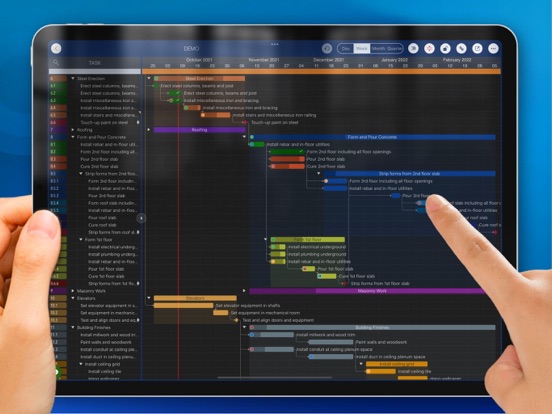
Project planning has never been easier. Project management with natural gestures on the Gantt chart, synchronization and sharing of projects across multiple devices and teams, and support for integration with Microsoft Project Plan.
## PRIVACY FOCUSED
Projects are saved locally on the device or in iCloud Drive, developer team does not have a server to store user-created data.
With NATURAL GESTUREs on a clean and elegant interface, project management is more accessible, faster and more efficient than ever before. Visualize, manage and simplify projects flexibly and efficiently with Gantt charts, outline list and property editor, create tasks, organize your project calendar and resources, track status. It's easier than you think, with a minimum of effort and learning.
QuickPlan app supports exporting projects to image, Excel, PDF, Microsoft Project and WBS files. AND to import projects from Microsoft Project, WBS and Mind-map files.
The app supports synchronization of project plans between the same user's macOS and iOS devices and supports team collaboration via iCloud Drive. And it supports syncing and sharing via OneDrive and Dropbox. QuickPlan also supports duplicating projects by members for better teamwork.
QuickPlan optimizes the best features of Microsoft Project Plan and brings them to iPad - without the complexity - providing users of all experience levels with an INTUITIVE and discoverable project management experience.
## EFFICIENT MAINTENANCE
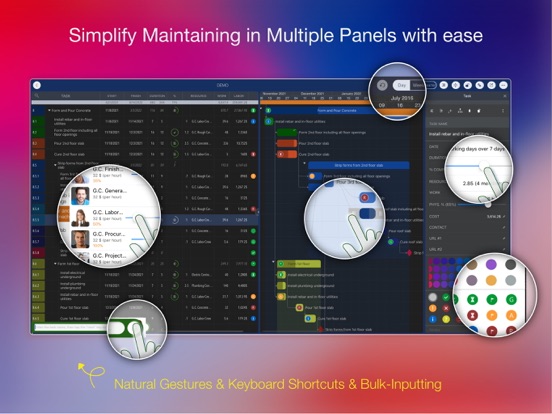
- Gestures for tasks: create, remove, move, indent and outdent, change order.
- Gestures to zoom in and out, collapse and expand.
- Keyboard shortcuts.
- Batch input.
- The most fluid Gantt chart app on a clean interface.
## STRONG PLANNING
- Multiple Projects.
- Supports duplication of the entire project and duplication by specific members.
- Organize tasks into REAL task groups and sub-projects.
- Task color, icon, contact, and required task fields.
- Five levels of outline (plus sub-project, for a total of ten levels of outline).
- Gesture-based management of task links.
- Lock editing, row height.
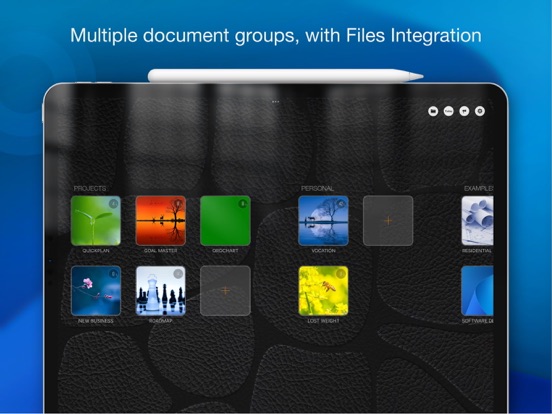
- Integration with the iOS Files app.
- Manual and automatic project backup.
- Project currency, charge rate, project resources, calendar, task date policy.
## TREE and LIST
- Representation as a tree with support for displaying key paths.
- Representation as a list with support for sorting and filtering.
## UI CUSTOMISATION
- Customization of the task column title and visibility.
- Style of the task bar.
## REPORTING
- Export as image, PDF and Microsoft Excel (including three sheets).
- With options to customize the output.
## SYNC
- Sync projects between iOS and Mac devices via iCloud Drive, OneDrive and Dropbox.
## TEAM COLLABORATION
- Sync between team members via iCloud Drive.
## INTEGRATION
- Export and import Microsoft Project XML files.
- Import and export SwiftApp WBS files.
- Import from Microsoft Excel files.
- Import from iThought Map files.
## SHARE
- Supports Airdrop, OneDrive, Dropbox.
## TEAMWORK
- Create a new project by exporting tasks for the selected project members.
## NOTIFICATION
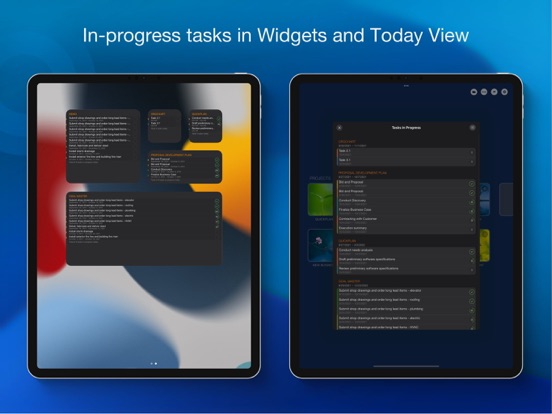
- Widget to track ongoing tasks (iOS 14 or later).
- Today widget and Local Notification.
The best project planning app for iPad.
- Initialize, discuss, present and share your plan.
- Export it to Microsoft Project Plan to work on it PC.
- Strategic Planning.
- Import MS Project XML file and reports, tracking.
- Plan actions in meetings, confirm.
- Guide employees.
QuickPlan Basic - Project Plan App Comments & Reviews
QuickPlan Basic - Project Plan Positive Reviews
Surprisingly simple to sophisticatedThe hallmark of a great app is a simple one that “hides” the distractions of its advanced sophistication. This app is like owning a simple, very useful pickup truck, that by the way is hiding thee top 4x4 suspension and a corvette engine! I can say as a professional program manager that this app has all the functionality that 99% of the users will ever need—with the best user interface of any PM app (I’ve tried them all). An example of what the other 1% may need would be the use of the rare and elusive dependency species called: “Start to Finish”, found in MS Project or Smartsheet. Trust me, you’ll never need this dependency unless you’re launching the space shuttle. I really hope these guys stay viable and in business—they truly get the essence of project management and built this for PMs from the ground up. The most important priority being getting the work done, not working on a project plan. If they don’t stay in business, you have plenty of export options for a reasonable price... but I think we’ll see these guys grow out of control soon!.Version: 9.0
Don't buy anything else for project managementI have never taken the time to stop what I'm doing just to write a review for an app, let alone write the review when the apps constantly ask you for your input. I'll just say this, don't waste your money on any other project management app. This app does everything it says and more. It's the easiest to use, won't play the bait-n-switch non-sense that everyone is starting to do now with 'in-app' purchases. It just works. Watch a few of the onboarding videos and you'll be hooked. It's amazing..Version: 8.1
The Project Management App I’ve Been Looking ForQuickPlan has been a massive help in organizing multiple projects on a daily basis. The UX is smooth, intuitive and simple to edit as deliverables change. Excellent app and the latest update only improves on previous iterations!.Version: 8.6
My favoriteI had the phone version but it was a work phone, work went and changed to a flip phone so I bought an iPad for myself and it was the first app I wanted to get. Enjoy it!.Version: 8.1
Great App - don’t waste you time with othersI don’t generally bother writing a review on apps unless they prove to be a waste of space on my iPad. I am a construction project manager and this app makes updating project schedules a breeze..Version: 8.2
Best app for project planning for desktop & ipadproI’ve tried them all and this one is the easiest to use by far. I’m a remodeling contractor and I use this app to give me a accurate perspective of my ever changing schedules..Version: 8.2
Outstanding Scheduling AppMS Project is too complicated and cumbersome to use. Quick Plan is so much more user friendly and easier. Then export in MS Project, life is good.Version: 13.3
Does what is says it does, well.I needed a project app for my iPad. i've used other software in the past but usually wound up using a spreadsheet. I've only been using this a few days but I love its interface... great app..Version: 5.1.1
Great AppI was looking for an application that let me do planning of mini projects. Am not a project planner, but I needed something to allow me organize steps, activities and processes. This application is very good for that. The fact that I can do this in an Ipad helps me avoid having to pull the laptop out, specially since I am on the road constantly. The app has everything I need. The only 2 drawbacks are that for the price ($10 at the moment of this review) I would have expected the export to pdf and excel to be included. These are optional features that have to be unlocked by paying an extra fee. The only unlocked (free) option for export is jpeg (image), not bad, but not perfect. All in all I like the application and recommend it. It comes with several sample projects to use as guides or templates, and I even emailed the developer for a sample of the proposal template in the demo, and they answered quickly. Mind you importing and exporting of projects also require activation fee of som $2 bucks, but is available. 4 stars out of 5 only because I think the price should include the export options, otherwise it is a very nice app for those of us on the road..Version: 7.0
Free International Money Transfer 💸Enjoy high maximum transfers into more than 20 currencies while saving up to 90% over local banks! The cheap, fast way to send money abroad. Free transfer up to 500 USD!Version: 17.5
What do you think QuickPlan Basic - Project Plan ios app? Can you share your thoughts and app experiences with other peoples?
Please wait! Facebook comments loading...