皓 李
皓 李WBS - Project Work Breakdown Customer Service

- WBS - Project Work Breakdown Customer Service
- WBS - Project Work Breakdown App Comments & Reviews (2026)
- WBS - Project Work Breakdown iPad Images
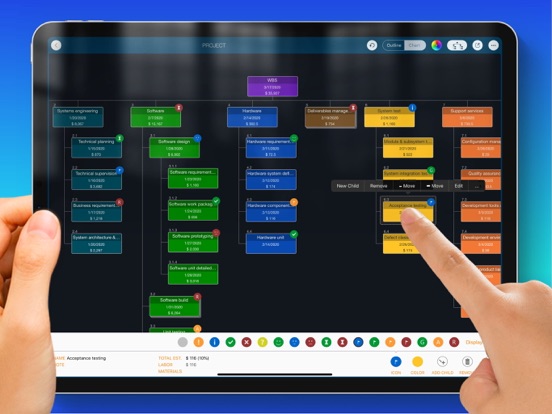
Manage the work breakdown structure (WBS) in the list and tree diagram. Construct the work package tree and update the estimate; import work items from MS Excel and export the work breakdown structure to PDF, Excel, and image files. Also, we can convert a work breakdown structure to a project plan file in the QuickPlan app.
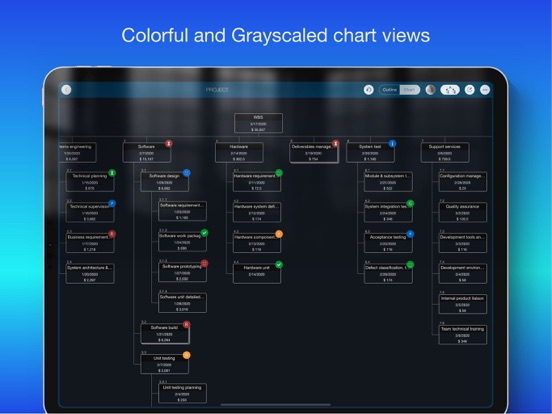
The WBS is a hierarchical and incremental decomposition of the project into phases, deliverables, and work packages. It is a tree structure that shows a breakdown of the effort required to achieve a goal, such as a program, a project, and a contract.
Mobilinked WBS is THE easy-to-use WBS management app for the iPad. Using natural gestures on a clean interface makes WBS management more convenient, faster, and more efficient than ever before. Visualize and simplify the work breakdown structure in the outline and diagram view to break down work elements and determine labor, material, and total costs for each component. The app automatically adds costs up to the element hierarchy, and supports continuous and mass tracking.
The WBS can be exported to image, Excel, and PDF files AND converted to QuickPlan (https://itunes.apple.com/app/id621375878) as a project plan.
The WBS supports mass entry of work items and import of work items from an MS Excel file.
- Feature video - https://youtu.be/FZ7puht7Nao
- Support - at http://wbs.mbl.app
WBS provides a fast, intuitive and discoverable experience for users in a clean and elegant interface
- Work package maintenance - natural gestures, continuous and batch input in outline and diagram views.
- Project costing - support labor and material costs for work packages Communication - export the work breakdown structure as an image/PDF and Excel file.
- Collaboration - Share the work breakdown structure across multiple devices via email, airdrop, and third-party cloud apps.
- Project plan integration - Export to a project plan for QuickPlan.
FEATURES
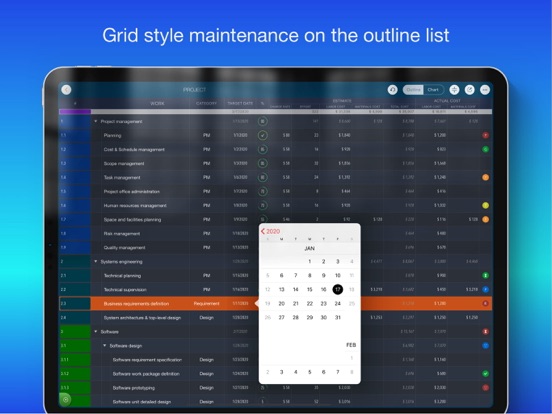
- Manage work items in a text outline view and a graphical tree diagram view.
- Continuous and batch entry of work items.
- Import from MS Excel file
- Three chart layouts, AND Display as color or grayscale style.
- Color and icon
- Supports large projects (smooth interaction for 1000 task packages)
- Natural gestures (swipe left/right to adjust outline levels, tap with two fingers to collapse/expand all groups, hold and move to change order).
- Create project quotes with labor and material costs; labor costs can be entered as expenses.
- Adjust project fee rate, currency, and work package category.
- Collapse/expand specific or all groups; zoom in on a chart view.
- User interface customization options
- Share the work breakdown structure with other devices via email, airdrop, and third-party cloud apps.
- Export the outline with costs to a new project plan to QuickPlan (https://itunes.apple.com/app/id621375878).
- Export the entire work breakdown structure or a selected workgroup to an Excel file.
- Export the entire work breakdown structure or a selected workgroup to a PDF file with export customization options.
- Export the entire work breakdown structure or a selected workgroup to an image file.
- Undo and toast with voice output
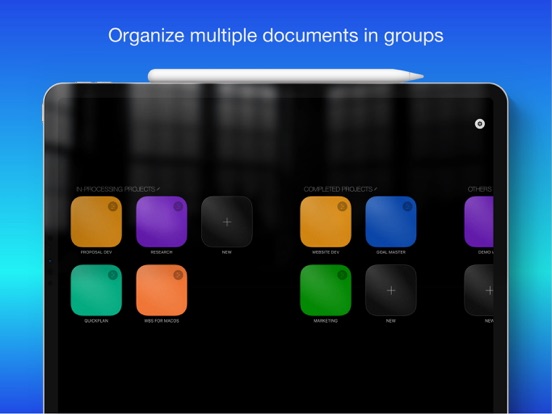
- Duplicate work breakdown structure
Work breakdown structure makes work planning easy and fast, and helps estimate future project schedule by easily viewing work items and costs. The best project management app for your business on iPad.
WBS - Project Work Breakdown App Comments & Reviews
WBS - Project Work Breakdown Positive Reviews
Excellent ProgramThis program is a valuable asset to and Project Management Suite. The program makes creation of a WBS an easy task as it should be..Version: 5.2
Bottom chopped off on iPad Pro 11” widescreenHello Team, I’ve just purchased WBS app for iPad and noticed that the bottom of the screen is chopped off on iPad Pro 11” widescreen format when I select an item. The menu on the bottom is chopped off and I’m not able to fully use the app. Please optimize the app for 11” widescreen format and release an update ASAP. FYI, the new iPad 10.9” is also widescreen and may have similar issue. Also, your other apps may have similar issues with widescreens. 2. It badly needs drag and drop boxes across columns in the layout screen. Currently, it seems deleting and re-adding the boxes is the only way to reorganize. 3. Category is not available for some boxes. Great app, will give 5 stars on resolving these issues..Version: 6.1
Well DoneThis is a great tool. Almost perfect. I’d love keyboard shortcuts, but this tool is great! Keep up the great work developer!.Version: 3.5
Excellent Start!I had been looking for a simple, high-value WBS app for quite some time and finally found this one. It is by the same company that produces QuickPlan Pro and the interface elegance and simplicity have followed through to this product. The export features are well thought out and even exports to the QuickPlan Pro product into a project plan. While it is not perfect (it is a ".0" release after all), it provides everything necessary to quickly and easily produce a WBS and cost out a project. I sent the developers a couple of suggestions and they responded immediately. I have no doubt this product will continue to evolve in a positive direction. The price is right, too! It would be great if they would add more cloud storage options (OneDrive, Box, GoogleDrive), as only Dropbox is currently supported..Version: 1.0
Finally...a great planning app for iPad!Organization is the key to success and so many apps fail to have one integrated approach. This app allows you to completely organize and schedule goals, projects and even mind maps to help you reach your potential. Great app!.Version: 3.1
Powerful and FlexibleA surprisingly powerful tool that supports a robust and dynamic project planning phase. Changes and adjustments are easy to make, budgets are quickly defined, and it has pretty seamless integration with the other apps in the package to create the final plan. Well worth the investment. Paid back the first time..Version: 3.3
WBS simplistic in design, powerful in functionThis WBS app along with its two companion apps are excellent tools for any project manager. The clean interface design, at first glance, almost makes you not realize how efficient the app itself is..Version: 3.0
Excellent work breakdown softwareEasy-to-use intuitive interface that is not cluttered with too many bells and whistles..Version: 3.2
Outstanding appOverall I'm very happy with this app, however I'd like to see more colors for the diagram boxes, that could be with a color picker or more color options. Please improve that and I'll update my review..Version: 3.0
Great app!This is a simple but relevant app that does what it should!.Version: 2.0
What I've been looking forCompatible with desktop applications, e.g. Excel. Let's me organize and structure work efforts easily and quickly..Version: 3.2
CEO at UMPPretty good app for me and telling to my team to try it and see if they also like it, it's something which I do not hesitate to share..Version: 3.2
Um excelente programaÉ um recurso muito bom, apenas deveria ter também em português..Version: 6.5
Great app. Easy and practicalWish I could have discovered this sooner!.Version: 3.6
Cool appAwesome.Version: 3.0
Great app, I love it :)User friendly, it does more then I expect. You can easily see your estimate, total and individual. I had some question and they replied to me right away with answers. For me, much better then any other I seen..Version: 3.0
Free International Money Transfer 💸Enjoy high maximum transfers into more than 20 currencies while saving up to 90% over local banks! The cheap, fast way to send money abroad. Free transfer up to 500 USD!Version: 6.5
What do you think WBS - Project Work Breakdown ios app? Can you share your thoughts and app experiences with other peoples?
Please wait! Facebook comments loading...