Photo Scan App By Photomyne Customer Service

- Photo Scan App by Photomyne Customer Service
- Photo Scan App by Photomyne App Comments & Reviews (2026)
- Photo Scan App by Photomyne iPhone Images
- Photo Scan App by Photomyne iPad Images
Photomyne is the fastest and easiest way to turn photos, slides, negatives and other family keepsakes into a digital library spanning generations and share them with others. Download it today to see the magic of this powerful scanning app, built with cutting edge AI technology.
This free app offers a taste of what Photomyne has to offer. Use it for basic photo scanning to see if it suits your needs (before deciding whether to upgrade to the paid plan).
SIMPLY HOLD & CAPTURE – THE SCANNER WILL DO THE REST
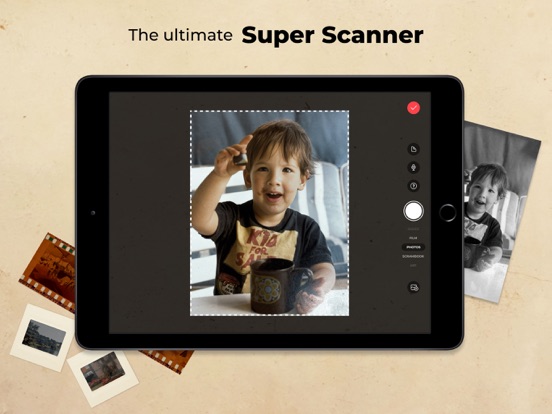
- Scan multiple physical photographs in a single shot
- Scan more than just photos too - film negatives, slides, documents, notes, kids' art, recipes, scrapbooks, and more
- Scan an entire photo album in minutes
- The photo scanner auto-detects picture boundaries, auto-rotates sideways pics, crops, restores colors and saves them into a digital album
EDIT AND CURATE YOUR COLLECTION OF MEMORIES
- Add details to albums and photos (locations, dates, and names)
- Name people in photos
- Scan the back of a photo
- Add audio recording
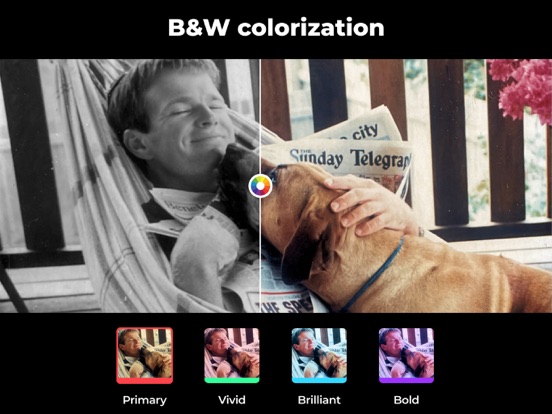
- Apply color filters & colorize B&W photos
- Sharpen blurry faces in photos
GO EVEN FURTHER WITH AI-POWERED MAGIC
In addition to the core features, Photomyne hosts hand-picked external AI tools from other trusted platforms to restore and enhance your memories even more. These optional features include powerful AI enhancements like photo damage repair, subtle motion animations, and more. These aren’t included in the paid plan but are offered at a special price, so you can enjoy even more photo-enhancing magic, all in one place.
USE SCANNED PHOTOS TO MAKE SPECIAL EVENTS TRULY UNFORGETTABLE
- Add a dose of nostalgia to reunions
- Honor memorials with photo memories
- Celebrate anniversaries with old photos
- Add an element of surprise to birthdays
OPTIONAL IN-APP UPGRADE
For unlimited use, consider purchasing an optional paid plan (in-app purchase).
Here are the premium features you get with a paid plan:
- Scan, save & share to the max - Unlimited scanning, sharing, and saving to your device or computer in print quality
- Access anytime, anywhere - Unlimited photo backup, access on other devices, and online
- Unlimited enhancements - Enjoy unrestricted photo design effects and creations such as B&W photo colorization and more
The app offers an optional paid plan via monthly/yearly auto-renewing subscriptions**, as well as a One-Time plan, which is paid for by a single upfront payment. These offer unlimited access to the premium mentioned above.
**Payment will be charged to your App Store account at confirmation of purchase. Your subscription will automatically renew itself unless auto-renewal is turned off at least 24 hours before the end of the current period. Your account will be charged for renewal within 24 hours prior to the end of the current period. You can manage your subscriptions and turn off auto-renewal in the App Store under Account Settings. If offered, if you choose to use our free trial, any unused portion of the free trial period will be forfeited when you purchase a subscription to that publication, where applicable.
Got any questions? Email us to: [email protected]
Privacy Policy: https://photomyne.com/privacy-policy
Terms of Use: https://photomyne.com/terms-of-use
Photo Scan App by Photomyne App Comments & Reviews
Photo Scan App by Photomyne Positive Reviews
Unbelievably greatOh my heck, I never expected an app to be so easy and accurate to use. I can do multiple pictures at a time and they come out individually as if I did each one separately. I can color the black and white an they look just like they were taken in color. It is so easy to send the album up to google photos. Just select the photos you want and click on “send to google photos” and “poof” there they are. I tried a couple of other apps and there is too much you have to do with them, like move a circle to each corner rather than just scan and go with Photomyne. Another thing I love about Photomyne is you can just keep scanning until you are finished with the project and then save them all in its own album with just one click. Also , at this time they are gifting me with a phone holder that I can use for steadier scans. This will assist me in taking better pictures in the future. I scanned over 400 pictures by hand in a little over an hour because of the ability to scan more than one picture at a time. Well, as you can see, I am totally impressed with this app. You won’t be disappointed having to pay for the app, because you will be done scanning those old pictures that you have been putting off so quickly that you will say, ”what? I am done all ready, Sandy, go take some more pictures so that I can scan some more”! Richard Hollister.Version: 29.3
Perfect archive app for Boomer generationPhotomyne is an amazing app that allows you to scan multiple photos per scan saving valuable time. Place 4 or 5 photos together, the scan will recognize, crop and save them for you…oh…and it also includes ai to IMPROVE the quality of your photos! Get out that box of your grandparents turn of the century images and have at it! There are lots of extra goodies included too. An ai feature that allows you to take a portrait and bring it to life. I tried it with a baby picture. It looks like a short vintage video but spooky real. But bottom line, if you have boxes or trunks full of photos that are collecting dust, don’t have friends or family clamoring to inherit them, you can save them digitally while you are downsizing and purging. OH, and another thing. If you are really getting your geek on, there is a NEGATIVES setting. Got old negatives from God knows where? This feature (with a light board and careful framing with your phone) will capture the image and recover something you thought you would have to spend more $$ on at a photo processing store. Can’t wait to see what features they add. There is more, but these are the things I use the most.. Thanks, Photomyne for helping me organize my overwhelming pile of memories..Version: 28.6
Impressed!I cannot say just how much I love this app. It is so easy to create digital images from still photos. My mom passed away unexpectedly several years ago and we hadn’t taken time to go through her pictures until a recent scare with hurricane Helene and the thought of loosing those precious memories in an instant. I got my moms pictures and quickly starting dry them and start the process of sorting them for myself and siblings. I told my husband that I wished I could get them converted to digital copies so that we could all have a copy, but also to preserve them in the event of property loss situation. I then found this app, and downloaded it to try, and was immediately impressed! I scanned pictures for hours and told all my family about it. I purchased the membership to be able to enjoy all the benefits and also took advantage of the prime day sales for accessories. I am excited to get the remainder of my moms, mine and my mother in laws pictures all digital! Thank you thank you! I will tell everyone I know about this wonderful app..Version: 29.5
Love it so farI’m 74 looking to have a knee replacement in January and needed a good none physical activity to keep me occupied . I decided to organize my photos. I just found this app and so far I am impressed. Especially the ability to down load pics from my phone directly to my iPad. Very user friendly. I spent about 30 minutes scanning photos from my childhood album. Within an hour I was able to email a video of 100 photos to all of family. Pretty impressive. The app automatically improves the images and you can still decide on features like sharpening a persons face. My photos are old so they can use all the help they can get. You can name or add a story to a picture. I haven’t figured out how to share or print the added pic stories. But I’m sure it’s there. , My only complaint is the small area the app gives to type in the words. I wish I could expand it to be able to see it better. I work on my IPad Pro. So far I think for the price it’s pretty darn easy and worth the $$ Now 7 months later I don’t know how I lived without. There’s definitely a learning curve. I just wish there was a way to upload photos onto one of the online photo books to print for my family..Version: 29.2
Great app for importing and managing photosI purchased this app because I’m old and have hundreds of old photos I would like to preserve electronically. Pricey, but the more I use the app, the more features I’ve discovered and now feel it’s worth the cost. I also bought a photo tent and camera stabilizing arm, which has greatly improved scanned photos. A towel over the top of the box is necessary to avoid “phone” shadows from overhead light. Features I especially like are multiple albums, ability to transfer photos between albums, to rearrange photos, to produce slide shows with music and share collages, and the excellent sharpening of fuzzy faces. One negative is the company’s data collection, and I may not renew if there isn’t better assurance of privacy protection. Another feature I would like, which may be available but I haven’t figured out, is how to send a collage of pictures with captions for a printable soft-bound paper book of a special event (wedding, memorial, graduation, etc.) that could be provided to guests/friends/relatives..Version: 23.3
Learning curve, support lagHonestly, I did not want to rate the app right now until I have had some chance to use it extensively. But the dialogue box kept popping up so I’ve decided to put up a review even though it’s likely premature. There is a learning curve on Photomyne if you want to create a slideshow. It is not straightforward. I ran into many obstacles. It is not possible to create a slide show on a desktop Mac as far as I can tell. You’ll need to use either an iPhone, or an iPad, which is less convenient in my opinion. Support is available via texting, but the answers, likely due to time change, is not back-and-forth. There’s a several hour lag in responses. The scanning of albums is very straightforward and is really great and the beauty of this app. I decided to sign up for the Life Time unlimited, which, in reality is 10 years not lifetime. They're pricing plans seem to change frequently. Overall, I’m happy but it’s been quite a learning curve. There are multiple steps involved if you want to create a slideshow from photos that have already been uploaded into albums..Version: 29.0
Absolutely wonderful APP!I can’t say enough about how wonderful this app is! I’ve had a photo project that I started two years ago - to make a family photo book for my siblings. I stumbled upon Photomyne and I am absolutely in love with this app! I had been scanning old photos on my printer to my computer to print out and make these books. It was time consuming and I sort of gave up halfway through. After discovering this app I scanned them all in one day! I bought the clicker that goes with it as well as the stand to mount your phone. I could not believe how fast it went! Slide a photo over, click, and slide the next over. It was so exciting! The best part is that it clarifies the images so they are sharper and clearer than the original, especially if it’s an older black and white or fuzzy picture. I truly couldn’t believe it. It also gives the option to turn black and white into color! What could be better. If I could rate it 100 stars, I would! You will not be disappointed if you buy this app..Version: 27.3
Incredible Photo Scanning AppPhotomyne is a super useful solution to scan old photos. We had over 200 family photos dating back to 1938. Some were damaged, faded, curled. Photomyne was able to scan them in, auto-detect the photo portion of the image and save them into an album. I used the convenient voice “Go” command to initiate scans as I held the iPad/iPhone squarely over the image sizing it to maximum for best resolution. The app can actually scan multiple photos at once and separate them all into individual captured photos but I chose one at a time for best results. For some of the black and white photos I used the app’s one-step Colorization feature and the results were truly amazing. Incredible detail shows up in the scanned photos since the app also enhances the image it scans. I used the image titling option to add notes from the back of some of the original photos. I exported all to the iOS Photos app and saved them as JPEG files for backup. App is a little pricy but worth it. Wish there was an option to not include the Photomyne logo on photos I added titles to..Version: 19.3
Best app EVER!!I had a mother that hoarded photographs! I have pictures that date back to the 1800s that I didn’t know what to do with and every time I tried to scan them they looked like crap. This app has been amazing, and then I can easily share them with my family! A feature that I wish this app had was for me to allow contributors. I wish I could allow my nieces or my cousins to be able to make changes, like adding dates to the pictures that I didn’t know and other information. It would also be nice if you could add a feature that would allow families to get together and contribute to one album. My nieces also have old pictures of my grandparents and it would be nice if we could have them all in one place. I just can’t say enough good things about this app though! It sharpens your pictures as it downloads them it can color eyes or black and whites, although sometimes not perfectly, but overall it is just an amazing app and worth every penny they’re asking for!.Version: 24.1
I have no WordsAll these other reviews may seem like they really are just vouching for this app, trying to make it sound great. But I’ll tell you straight up, this is the best thing since sliced bread. I had an old picture on my wall, it happened to be of my grandfather, great grandfather, great great grandfather, and great great great grandfather. So I scanned it (the picture was in B&W of course) and that was cool enough, to see the picture on my wall transform to digital form perfectly cropped, then it said I could colorize the photo. Initially I expected a cheesy idly colored disaster, ruining the beautiful picture as it was. But as I hit the colorize feature, the picture changed, and much for the better. I saw the colors come to life. All original, whether they were the real colors, well, I can’t tell. And that is just how good this app really is. If you have a prized possession of a picture, where there is only 1 print. Please get this, this was really epic. I also want to thank Photomyne for this. I really appreciate it..Version: 22.3
My Photomyne AppI accidentally fell upon this app an early morning on a Sunday because it popped up on my phone. This Photomyne App is the best because i am not tech savy but using my iphone it was so easy and almost like a godsend. It helped me restore a completely damaged picture of my grandmother. Her name was Esperanca De Jesus which means Hope of Jesus and she died at 19 years of age of Tuberculosis when my father was an 11 mth old baby. This was the only black and white severely damaged photocopy of a picture i had of her. This app within seconds restored this picture added color and helped me remember her and honor her as i should. It allowed me to add a beautiful cursive memorial to her by suggesting it. So easy, so fun, so impressive, so important. Thank you Photomyne for helping me restore and preserve my Grandmother’s story, life, and legacy. Even though i never met her she was my first guardian angel around me and my father our entire lives from birth till well you know ….. Love, Love this app.Version: 29.5
Great app.My 71-yr-old hands are a bit shaky, so I bought an adjustable phone holder for stability and clarity. Worked wonders. Since our internet speed is a little slow out here in rural Idaho, give your app time to work and don’t expect instant uploading. I do a batch of about 50 photos, then make sure my phone is plugged in while uploading, then go outside to enjoy country living. After uploads are complete, I sort the uploaded photos on my desktop and share the link with family members. Take the time to make a brief description of the photo. You may know what it is, but after you’re gone no one else may be around to fill in the blanks. I then make family videos out of downloaded images using Camtasia. As for this app, it really beats trying to scan photos on my printer scanner. Not having much luck scanning slides. Need a backlight of some kind. Still, I love all the features. I highly recommend this app..Version: 27.3
Amazing technology!I had thousands of printed photos to convert to digital. Originally, I purchased an automated scanner that fed printed photos into a high speed scanner. That worked great right up to the point that I got to my older photos which were glued to the album and impossible to remove or scan. Then I found this app which scanned an entire page of photos, automatically separated each image, knew which side was up, enhanced the photos, optionally colorized them, and put them right into Google Photos. Easy to download the images if you want to import them into Apple Photos, although that took several steps (but it was simple to do). This app made it possible to digitize entire albums in minutes! Amazing quality even when originals were faded yellow and copying them through the plastic album insert. You just have to position them so there was no glare from the overhead light. Absolutely amazing!.Version: 26.4
All about best photo scanningThis is a best photo scanning app It scans very quick more than that scanned photo colorization in one click nearly perfect color colorization off black and white photo App allows to organize photo in desirable albums There is a cloud storage also many options to share photo Very reliable no crashing app It is worth it to have in your phone Photomyne is the best photo scanning app I found in apps store after trying quite a few Scanning results is picture perfect no color loss Developer also introduced new app which is also very good app to scanning color negative..results is impressive but after few update will become like Photomyne There are also few important tool in Photomyne app like photo print In short I recommend all if you see interest in the app simply just buy it..you will be happy once you learned how to run using all tools Don’t wait buy it👍.Version: 24.2
Photomyne is the BEST APP EVER!!!!It’s exactly what I needed for years. I usually lay photos flat on my dinosaur scanner, go through the whole process of getting it to scan... wait for it wait for it.... oh good, it’s done. THEN get the scan onto Photoshop, & do the cutting, cropping & straightening & then saving each photo as a new JPEG file. 🤦♀️ So time consuming! The first time I tried Photomyne, I was floored at how fast it was. Then I stared in amazement as it went through each of the 9 small, 40 year old photos of baby pictures, & aligned each one, photo retouched it & made it its own file. All within seconds! The photo editing isn’t perfect, but it’s still impressive. This app will save me hours of boring work & let me move onto to the fun part of organizing & Photoshopping. I couldn’t be more more happy with it. Thank you Photomyne!!! (We’re also getting the slide app for my father-in-law who has a gazillion slides.🥰).Version: 19.1
Photomyne’s little iPhone app is the best!!!I was unable to see the “Save Photos” download button on Photomyne’s website. After spending $60 on this app, adding 47 albums and 2500 photos to this app, this was very distressing to me. I loved the promise for saving my albums and photos for 10 years, and the excellent editing options, but was frustrated by not being able to download it. Over the next 5 days, through the weekend, and at off-hours, Lara would email me questions, and try her best to problem solve. Found out that my browser (Chrome) was not compatible with the Photomyne website, and by switching to Safari (on my Mac), I was able to see the button. But more importantly, the iPhone app was more robust in all ways, than the Photomyne website. All good learning, thanks to Lara and Photomyne!!! I am so appreciative for this wonderful app and now I can share my daughter’s childhood as she prepares for her wedding!.Version: 15.7
Works best of any archival photo programI am very impressed. I have a HUGE number of family photos to scan. It has been a very slow process using a flat bed scanner and I have not been able to add any notes. Using Photomyne, I can scan multiple photos at once, add comments and it all saves to the cloud. I can download photos from the album there into my phone so I can move them to an iCloud album. I will eventually download them to my PC so I can burn them to multiple DVDs for family members. I have a tripod that will hold the phone so I can capture the photos at the correct angle. Photomyne is the ideal software for not only scanning a lot of photos, but just the occasional scan. Like you might be working on family tree stuff. It doesn’t have to be a photo, just anything scannable. UPDATE: August 1,2021 Still the best. Have not had any glitches. Using iPhone 6S+.Version: 21.1
These are my photosPhotomyne scans the photos really well. Mine ran a little darker than the original, but that’s fixable and probably due to bad lighting on my end. So the service is amazing until you try to back up your photos. I’m on a quest to get ALL of my photos on one hard drive. From there, I’ll share via USB to family. Photomyne has a SHARE button. This is very easy to use. Select your album or your individual photos and BAM! Sent via email(that’s all I’ve used) very easily. The photos download so that you open them in Photomyne. I don’t want to open them in Photomyne. I want MY pictures downloaded without having to report to the mother ship. So you have to tap on each picture, click on Save Image As and download ONE BY ONE. Photomyne, these photos are mine.I need you to help me get photos from albums and negatives to a digital form. I thank you for your help, but now you have to let go—of MY photos—and let them go easier and faster than one. photo. at a time. 🤦♀️.Version: 22.4
I am loving this app!I just downloaded it. I ran across it when I was planning on posting a picture of my dad on Facebook for Father’s Day. He has been gone since 1978 so all of my pictures of him are very old. I was able to import pictures I had already scanned to my phone a few years ago. I love that because I didn’t have to go find them and rescan them. One thing that really touched me, brought tears to my eyes and caused emotions of joy, sadness and other feelings that I’m not quite sure how to handle, was when I ran the live animation on him. I saw him move, smile, blink his eyes. You can only imagine how that made me feel! I haven’t seen him since I was 13 years old, I will be 60 this year! I highly recommend this app but be cautious if you run the live animation, because it can bring a lot of feelings that you may not be sure of..Version: 29.1
Helped a lot when scanning pages of photosI had put together photo albums from our families photos about 20 years ago. I put multiple photos on one page and had glued them down and placed them within a plastic sleeve. Ugh! To scan all those photos would have been a nightmare. I just pulled each page of photos up out of the plastic and used this app to photograph the entire page. It takes each picture and alters the color and save it as each image rather than the whole page. Super time consuming so far I’ve done the 60’s, 70’s and 80’s, on to the 90’s next. I love having them on my phone too. So after using Photomyne to scan and save to my phone, I open my Google photos and back them up. It’s fantastic! Plus, so old photos I had had the orange and purple tinge to them and this app removes the awkward coloring! Thank you Photomyne!!.Version: 16.1
This was just what I neededI was visiting my family and had boxes of loose photos to go through and wanted to be sure that I could digitize some for my own use.I tried taking a photo of them with my iPhone but that didn’t turn out great, and then I looked into Google drives scanner app and that didn’t work out either. PhotomyneWas at the top of my Google search when I was looking for a better option and it had great reviews so I thought I would give it a try! I’m so glad that I did. I was able to digitize over 500 photos and the app made some of them look even better than the quality of the photo itself!I love the way you can take a photo of an entire page of loose photos and the app is able to identify each individual picture and optimize it as its own photo. Great app 👍.Version: 24.1
Very well thought-out app!Photomyne developers have really knocked it out of the park with the user-selected sharpening levels and accurate colorizing features. I’ve been using the app since about when it came out. It was good then - even better than Google’s version (which takes forever to use and isn’t as good as Photomyne in other ways) but since then they have improved it to a level that even the staunchest photo nerd will like. I scanned a tiny wallet photo I recently found of my father. The paper was old and it had creases across it from being folded - even though it was only 2.5 inches by 1.75 inches. It was taken when my Dad was about twelve years old - 1937. I can now expand the digital Photomyne version and see amazingly clear and sharp details of my Dad’s young face!! Five stars!!!.Version: 27.4
Game ChangerI downloaded the app and tried the trial version first. From the different options available, I manipulated several photos plus some old negatives. I have no reservation to say that I am so impressed. I have been looking for so long until I finally found this app. The scanning is fast, easy and accurate. Ease of use and photo editing capabilities are excellent. I will definitely recommend Photomyne to whoever is looking for a professional and complete photo software application. In addition when I contacted their customer service to inquire about accessories and their occasional promotions I found their customer service so caring and helpful. They answered all questions with patience and in professional manner. What more could you ask for in an app like this. Really a great tool..Version: 27.4
Digitize old photos/improve images/ ShareI ’ve gone from film to digital photography. Our physical Family photo albums can get lost or destroyed. My favorite feature is that with Photomyne I can open an album and photograph a whole page. Photomyne automatically separates the photos and enhances them. Then, there’s a place for comments and, each face can be identified. This allows me to search in all the photos in my scanned collection for those of a particular individual. Since the photos are now digital, you can take them with you on your devices (mine is an iPhone). Where ever you are having to sit, like medical offices or land, sea, or air transportation, it’s easy to view and edit, share or delete photos. It’s not a free app but, in my opinion, well worth the price. I love it!⭐️⭐️⭐️⭐️⭐️.Version: 27.3
Much better photos than my print scanner createsI have personally recommended this app to so many people working on genealogy. It is so easy to use, and the quality of the scans is much better than those I get from my printer/scanner. I have found two challenges using the app. The first is not the fault of the app, it’s that taking photos in ambient light requires finding a place where you can hold your phone over the photos without casting a shadow on them while scanning. Second, while I love that you can scan writing on the back of the photo and attach it to the image, I find it inconvenient to have to always leave the scanning part of the app, find the image in its album, and then scan the back of the image at the same time. I assume it is because the front and back scans are saved to different kinds of file types. I have learned to scan a number of images first, then go to the album and scan all the backs afterwards. You just have to be very careful to scan the back to the correct photo. It would be easier if I had the option to scan the back immediately after the front If you work with scanning photos for family history I really recommend Photomyne!.Version: 26.1
My new scanning serviceI have been scanning photos for decades and also used other services where I mail my photos in bulk to them and they scan and send them back. I thought that was the way to go but just decided to try Photomyne because friends have been raving about them. While skeptical of having to scan myself, I was wrong. I purchased the Photomyne tent, iPhone holder/arm accessory and paid the subscription service fee. Wow is this amazing. So easy, incredibly good quality (actually better than the scanning companies work I was mailing my photos too), and I can scan fast and have my photos digitized immediately. I love the ease of use and everything else. I’m also saving hundreds of dollars. Well done Photomyne. You are my new preferred scanning method..Version: 25.0
Works great for photo albums exceptTakes a a page of photos from an album, separates and enchanted beautifully. Saves tremendous amounts of time. My only issue having used it for days is using the pictures afterwards. All photos are placed into albums online then downloaded if desired onto your computer (for example). This process numbers the photos in each album starting at 1. Therefore the photo numbers are duplicated over and over. Deciding to move a photo to another album after downloading results in the inability to copy. On a Mac you don’t get the option to keep a dup photo number with a suffix. You have to rename the photos before copying. This is extremely time consuming. There are no options for file naming or numbering sequences. Online interface needs improvement.Version: 28.6
Beat App I Have Ever PurchasedI have downloaded so many free apps and purchased many as well. I was hesitant to pay for this app but my father-in-law is finishing a book on his life and needed some old pictures scanned for the publisher. Not only is it easy to scan a page of pictures with an old photo album, but the actual quality of the scan is better than the picture in many cases. We only needed 10 pictures but scanned over 100 in a short amount of time. You can scan the back and front and add text to explain who and what is happening in the pictures. It’s an incredible gift later for the grandkids (and there are many) because the photos can also be shared. The whole family was impressed with this app. Amazing job!!.Version: 23.2
Old photos look amazing!I am the holder of our family photos, but holding the only copy, I wanted to make it more accessible to my family and myself. The auto crop feature works better than any other app I’ve tried using, auto removing the orange fade on photos from the 70’s and 80’s helps me see things I’ve never seen before! I’m tagging our pets, and I wish they auto captured them, as they are part of our family too, but I can manually do it. I only wish I could get it into google photos with details, like I can on my device. And I also wish I could only share certain albums with certain people. Because my family doesn’t need my husband’s family and Vice versa. But it’s totally worth the monthly fee, in my opinion!.Version: 26.3
This App is amazing!I was searching for an app that would make scanning and restoring my old family photos easy. I was using my printer scanning 1 photo at a time, then using a photo editing program that took up to several minutes to use. I have over 1000 old family photos and I knew it would take me months to do them all. I am simply amazed with PHOTOMYNE! I can scan several photos at once and it auto restores each picture and saves them separately as an individual scan. The only bad thing I can say is that I wish there were more free features, however to be honest this is one of those rare times I really don’t mind paying for the premium version! Everyone needs this app especially if you have old photos that are at risk of fading and being lost forever!.Version: 10.1
Disappointed with Storage SystemSo far I have digitized photos, negatives and written materials. When you see the scans, they look great and have the things written on the back of them easily accessible. HOWEVER, if you try yo download them to anything other than google (say, your computer), the photos download in an inoperable zip file. If you download an individual photo (the app puts even 2 photos in a zip file), it will open, but no longer connects to the back of the photo. In other words, Photomyne is trying to trap you into using and paying for the app forever, which will undoubtedly collapse at some point in the future, leavening you with no access to your photos after expending a fair amount of time and energy on the project. Personally, I would be willing to pay a bit more for true and permanent access to my photos..Version: 27.4
Great App!I have been using this app for about 3 weeks now and absolutely love it! This app has taken many of the features of other apps and put them all in one program meaning that I no longer need to switch between programs to use a feature. I have been able to take all of my old photo albums & scan a full page at a time without needing to remove them from the album. Then, each of those photos are separately scanned on the app. The edit features work very well. If I want or need - I can send all of these scanned photos to the Google photo app, I can edit them, share them with others, create albums, and much more. I am very happy with this photo app and have recommended it to many friends..Version: 29.5
Easy peasyI never ever rate an App because, at least in my opinion once I download the App, it did not do what they claimed it could, but this one is different. App does exactly what it claims it can do; it’s pretty easy to use and directions are in layman terms. The first time you play around with this App, it will create an album (which you could always re-name and date). Love that you can line up a bunch of pictures and after it scans, it crops, clears and separates each as a new photo. Also while playing around with App, I found it can work as a camera too and does the same functions as it would with scanned pictures. The ONLY THING TO REMEMBER while you are playing around and testing this App, make sure you tap on the album you want pix to go into FIRST before scanning new pictures, otherwise you’ll have a bunch of new albums for each pix you take/scan & I have not found how to move pix from one album into another but I’m sure I will figure it out eventually. That’s it, very easy and App delivers as promised. If down the line, something changes in a negative way, I will change my recommendation, but for now it’s all good!!.Version: 21.1
Gets the job doneI was able to scan in multiple vintage photos while visiting my in-laws over the holidays. They aren’t perfect, since I was in a hurry, but are close enough. The ability to attach the info that’s often written on the back of a photo is very helpful. My only issue was the reflection of my phone. Under better lighting it would have worked great but I was in a hurry to scan as many as I could. In the past I’ve used flatbed scanners to scan hundreds of photos in a day or so. Usually before a funeral or anniversary. This method is so much easier. As a plus for me, no sore shoulder from the repetitive movevent. I also like that it doesn’t take up room on my hard drive during the process..Version: 28.6
Truly AMAZING!I’ve had this app for less than a week and I’ve scanned in nearly 2,000 pictures, just scanning while I watch TV in the evening. It’s intuitive and EASY! I’m scanning all kinds of pictures, from the 1920’s to current and it handles them all well. It’s amazing how some of the pictures are better AFTER I scan them. I upgraded to the family plan and the siblings are enjoying seeing all the old family photos. I also am VERY pleased with the support. I’ve had a couple questions along the way and they are responsive and helpful. Wish I had done this years ago. I freed up a lot of closet space! There are a couple things I wish it did easier or settings I wish I could adjust, but for the price I have no complaints at all..Version: 19.2
Gets slower with useI was so excited when I first downloaded Photomyne that I went right for a 5 year membership. The “samples” I started with turned out wonderful! A few weeks later I put it to the test with over 400 photos. The first few were fast to crop and the voice feature worked slick. As I added photos, the cropping took longer and the voice feature occasionally worked. The most I added to an album was 150 pictures and it turned into a slow process. The quality was nice, but I ended up buying a light box so I didn’t have to rely on the natural lighting to avoid glares. I’m about 2/3 of the way through the stack and I’m frustrated with how slow it is to crop and the voice feature doesn’t work very often. I found it was faster to hold the button for 3 seconds than say “go” 5 times in a row. I am using and iPhone XR running iOS 14..Version: 19.4
Photomyne is the best photo scanning tool I’ve ever used.This app is great! It is effortless. Place the pictures in a grid in any orientation and scan. The app does the rest. It took me just minutes to get familiar with how it works. It’s so easy! I was going to bite the bullet and pay a service to scan these hundreds of pictures and it was going to be expensive! Not only will I be able to scan my own pictures but I can add information for each picture right with it! I know about 90% of the people in these pictures have a pretty good idea of their time taken but I’m the last person who knows this information. If something happened to me or these pictures before I got this done all of this important family information would be lost!!!!.Version: 16.3
AmazingI was looking for a platform to easily take pictures of hundreds of physical photos. But I didn’t wanna pay a ton, nor did I want to make it a headache. I just uploaded hundreds of photos over the last two hours, made them into slideshows very easily. Shared them to my Google Drive to use as a super simple slideshow. I work in disputing bad reviews, legitimately my job. I don’t review things unless they are phenomenal. This is it! Highly highly recommended. It was free to an extent but then it was a $10 fee to finalize what I was looking for. If and when I have another project like this I will do it again in a heartbeat, personally not going to pay the yearly fee. But anybody trying to do something on the regular, it’s worth it!.Version: 23.2
Very easy to scan photos in bulkIt easily scans many photos concurrently from a single page in album. It restores /revives colors to faded colored photos. It can colorize b&w photos too, though several times it didn’t colorize to color I remember for clothes in photograph. It can improve on sharing - specially for sharing whole album- it still asks to select each photo instead of ‘select all ‘ option if we want to share whole album. At times, it scans and breaks/crops photos based on lines /angular forms of objects in photos . For eg if a door frame is in photo, it will split photo into 2, one with human figure and another on other side of door frame. Logic to crop a picture into 2 needs to be refined..Version: 25.2
Connie GI’ve really enjoyed using this app. My Mom passed away last August and have been going through her photos. Thousands of photos!! I’m saving them here a little a time and sharing them with family - many of whom have never seen the pictures. In fact my cousin had never seen her since divorced parents in a friendly photo before and when I shared it from this app to Facebook she messaged me that she cried when she saw it! I’m also finding family pictures from the Colorado River days and a mutual friend looking at the pictures I posted said he’s so happy to relive those days that brought so much joy in his younger years. So thank you for this wonderful way so save and share photos from the “old days!”.Version: 20.0
Best App for photo captureI just took pics of my wedding album from 1983… almost 40 years ago!! The photos are absolutely AMAZING!!!! This will allow me to share our precious memories with friends and family!! And I just did a collage on Snapfish for a 20 x 24 size canvas print… I look forward to to seeing the canvas in a few weeks!! I also have lots of albums since the birth of my twins who are 30 years old now!! I am on book #3 and it will take a long time to complete, but I love the results of the quality of the 4x6 pics!! The glare is an issue sometimes, but I will continue to work around that (depends on time of day that I am using the app)!! UPDATE: the 20 x 24 canvas was FABULOUS… THANK YOU PHOTOMYNE!!.Version: 23.2
Needs 1 improvement!PLEASE do away with the 3 second pop up that verifies an action just taken in the app. For example, after deleting a scan an oval shaped bubble that says “deleted” will remain on the screen, with ZERO way to dismiss it. The same exact thing occurs every time I finish scanning a photograph. The oval bubble pops up saying “Added to album” and stays there for 3 long seconds. The entire phone screen is incapacitated during those 3 seconds and although it may not seem like a long time, it DEFINITELY adds up quickly when scanning a large number of photographs. It is absolutely maddening to have to constantly wait for the pop up to go away after every single photo is scanned or other action is taken..Version: 25.0
Great appStarted to copy my albums I have no copies of and it’s been great so far. Just remember to turn data off on phone and go to wifi. Pictures are just like originals..Version: 14.2
Great app!Doing all I need it to do!.Version: 8.4
Photomyne pour la familleSuper app ! Vraiment utile !.Version: 10.3
AwesomeThe colouring option is great.Version: 16.3
MeWow, amazing!.Version: 28.4
Great for prints, good for slides, fair for negativesEfficent process for prints; not so much for slides and quality for negatives questionable.Version: 28.5
RSLove this app.Version: 17.0
Amazing results!I was skeptical at first and then tried scanning a couple of old photos I had. Wow, can’t believe the quality and it was so easy to do. I added colour to them and it brought the pictures to life! I am thrilled with this app!.Version: 15.5
PhotosFacile d'utilisation le partage se fait très bien et je peux même conserver sur mon PC j'aime cette application.Version: 8.1
Amazing!It is probably one of the best apps I have ever used!.Version: 29.7
Just downloadedI like it a lot - it sure makes scanning easy, and efficient..Version: 29.7
Bringing life to old photosA very easy to use app with terrific results. Love it. Brings old photos to life..Version: 29.7
GreatJust started using, so far it’s great.Version: 29.7
Fast and easy!I love the app for digitizing old photos. There are lots of features and learning opportunities that I haven’t even used yet!.Version: 29.7
Best re colour of b&w photosI’ve been doing photo negatives from the 1920 my dad look. This program excelled my expectations..Version: 29.7
很棒的一款产品非常好的应用,效果真的很好,功能强大,很旧的照片可以清晰,黑白的照片变成有色彩而且非常逼真,这款软件真是太棒了!.Version: 29.7
The BEST app yet!Tried a few but this one is great, the subscription cost could have a been a little better 😉.Version: 29.7
Great AppGreat app for recording memories ♥️.Version: 29.6
Very useful!Now have mostly learned how to use it , like the product but still learning….Version: 29.6
I’m dropping a star offMy experience with the app on my iPhone has been fabulous but I have also been using the Web app and I was using the extension to work on my journals on my Windows computer now since Apple has come out with Journal, day one has shut down the extension app until they can develop a better web app and locking me into the Apple environment..Version: 29.6
Best find so farLoving it so far!.Version: 29.6
Your App PhotomyneIt is all you say it is! Awesome for me to use. Easy, I’ve done a lot of photos in my 70 plus years and this is the easiest & fastest of anything I have worked with… Thank you very much! Bobbie.Version: 29.6
Great for scanningI signed up for the yearly subscription because I had a lot of photos to scan and I loved that I could keep the photos in their original album and the program would auto crop. This process works well. But now I want to move them into iPhoto or even Amazon photos and there is no option to easily do this. I want all my photos in one place. So moving to another platform is essential. Or alternatively add features to make me want to move all my photos to this platform. I would need to be able to move and organize photos easily. Yes it can be done but very tedious. Also no face recognition to identify the same person in multiple photos..Version: 29.6
A fine scannerWe had dozens of very old photos to scan and preserve for family archive and Photomyne was a great efficient tool in the process via my IPhone..Version: 29.6
Wonderful app!It turns your iPhone into a better photo scanner than you thought possible..Version: 29.6
ExcellentReally like this app, very easy to use was able to scan quite a few pics in a short time..Version: 29.5
LOVE THIS APPI have a lot of old photos from my younger years. This made the pictures better. Very easy to use..Version: 29.5
Love this app.Absolutely the best app out there for photos.Version: 29.5
Such a useful appThis app has been so useful to me…making memory books, slide shows etc. It works so well..Version: 29.5
Finally my life saver thank you.After 53 years as apro international corporate commercial shooter I’ve been dreading digitizing for posterity a lifetime of présidial images. PHOTOMYNE has made it quick easy and fun..Version: 29.5
Great photo programIt’s wonderful to be able to take all my photos from the albums and put them digital..Version: 29.5
Too priceyNot sure how these guys comes with their pricing. App is good but the pricing is terrible. This only makes sense for professionals. As an individual where I want convert my picture some here and there the fee is super expensive. I could easily go to professionals and pay less..Version: 29.5
Free International Money Transfer 💸Enjoy high maximum transfers into more than 20 currencies while saving up to 90% over local banks! The cheap, fast way to send money abroad. Free transfer up to 500 USD!Version: 34.1
What do you think Photo Scan App by Photomyne ios app? Can you share your thoughts and app experiences with other peoples?
Please wait! Facebook comments loading...