Apple
AppleReality Composer Customer Service

- Reality Composer Customer Service
- Reality Composer App Comments & Reviews (2026)
- Reality Composer iPhone Images
- Reality Composer iPad Images
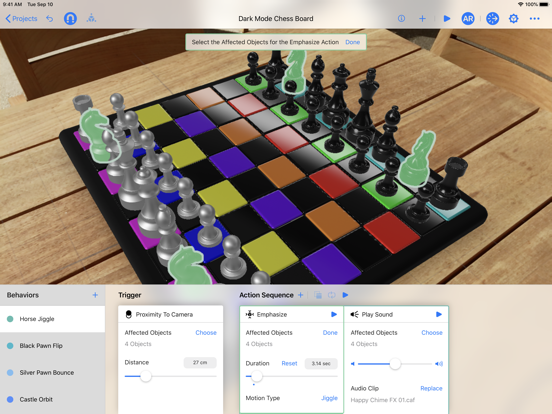
Easily prototype and produce AR experiences directly in AR with no prior 3D experience.
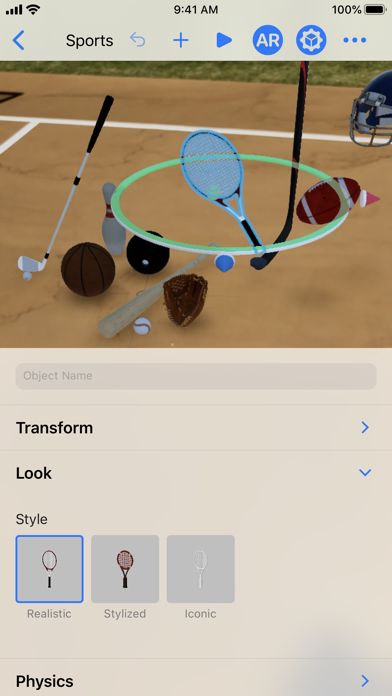
• Drag and drop to place and rotate virtual objects to assemble your scene directly in AR or on the canvas.
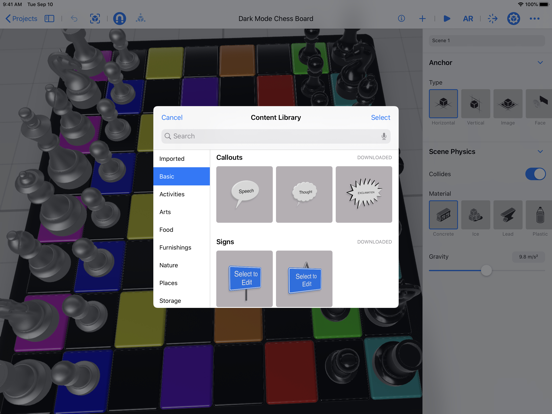
• Build your scene by importing your own .usdz files or take advantage of the ready to use virtual objects in Reality Composer’s built-in AR content library, so you can get up and running quickly.
• Create high-quality 3D models using photogrammetry and a guided capture process leveraging the advanced LiDAR sensors on your iPhone or iPad (iPhone 12 Pro or later and iPad Pro 5th generation or later).
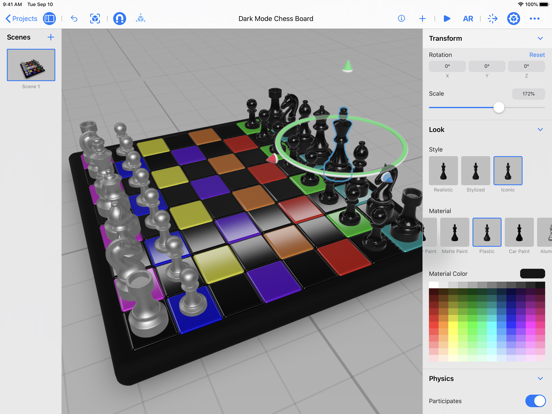
• Customize a virtual object’s size, style, and more.
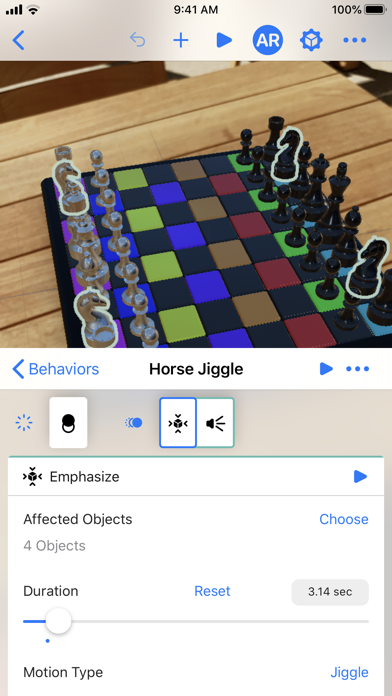
• Add animations that let you move, scale, and add emphasis like a ‘wiggle’ or ‘spin’ to virtual objects, without having any animation experience.
• Add spatial audio, all of which can be set up to happen upon a user tapping on those objects, coming in close proximity with them, or other triggers.
• Easily send your project back and forth between your iOS device and your Mac with the Reality Composer app bundled with Xcode.
• Export your complete scene as a .usdz file to use in AR Quick Look, use in your existing 3D projects, or integrate it into your Xcode project with Reality Composer on Mac.
• Record sensor and camera data in the actual location you are building it for, and then replay it on your iOS device while building your app in Xcode later. This lets you iterate and build out your AR experience using the recorded data without the need to physically move your device or go to another location.
Reality Composer App Comments & Reviews
Reality Composer Positive Reviews
Works good, but wish for background processing.This app works great for making 3D models of things, but I wish it would work in the background, while I’m using other apps. Or even if it just works while I’m scanning other models even..Version: 1.6
Great App!I think that this is a very fun app to tool around with! It is put together well, but I think that 3 things need to be fixed. 1. The menu that is used to change the properties of the object is very big. It would be nice if it could be shrunken down so I can move around to see and manipulate my objects. Also, if my behaviors were included in this menu, it would help a lot. 2. The sensitivity for moving around the objects when not in AR is way to sensitive. It would be a nice improvement to the app if you could change the sensitivity in the apps settings. 3. It would be very cool if the real objects (such as bread or a soccer ball) acted like real objects. Example: If I drop a cube of lead on a loaf of bread, the bread would squish. Overall, great app! If you are reading this as a developer, job well done..Version: 1.4.1
Has potential for future developers looking into ARAs a student who is interested working in the field of AR technology and seeing it capabilities, this app has really good editing tools and UI design for those who are interested in testing AR technology and seeing what it’s capable of doing. The only problem is that whenever I’m trying to save my project to a specific location such as Google Drive, It will keep getting an error and sometimes the project itself would not load properly, causing it to lose progress of my project in the process. Also it would be nice to have the ability to create custom polygons and shapes within the app while in AR mode so I can make detailed 3D models of what I want to create, otherwise, this app is pretty great overall..Version: 1.0
The well-built AR composer for anyone📱Apple’s user-friendly and intuitive interface makes their reality composer really available for anyone. Objects and behaviors work well as their designed to be, making it seem realistic enough for use. The only problem I had with the app was the time it took to open a file or project, sometimes even crashing completely. Despite this, Apple’s integration of AR in this app show just how much progress has been made over the years..Version: 1.0
Please read this reviewHello apple I just would like to recommend that I really enjoy this app so much there are a variety of combinations to choose from however this app can improve so here are my suggestions. I would really suggest if you added people into the app. This would make it much easier for people to interact with realistic 3D human models. This would definitely be a big improvement and I highly recommend this. My second suggestion is that there was a tool that could edit AR in the app. This would be amazing to do in the app as more future developers can learn and create their own AR products. The app so far has been absolutely amazing but there is always room for improvements. Please take my suggestions as a positive review. Thank you developers of Reality Composer Kind regards, Sarah.Version: 1.4
Omg I love animating with itI love animating with this and just using it for fun, I wish that I had an option to allow objects to interact with the environment. For example I place an object and o it the physics on it, I wish I can interact with the table or the floor or anything I scan with the device. Pretty neat app though.Version: 1.6
Very great app.I love that you can resize and make shapes. I also think you can add a draw mode where you can draw things, Also I have an idea for reviews, you could add replying on reviews, you don’t have to, these are just suggestions..Version: 1.5.2
Greetings apple.Hello. I would like to suggest a few things. 1. A goto action, what it would do is go to the specific object’s location or a finger. 2. Variables, without these, nothing is possible. 3. If, without if action it is impossible to make real experiences. 4, random integres, yeah. 5. Move forward. It would move in the direction it’s facing. Please read. Thank you..Version: 1.5.1
Great but not enough customizationIt’s great and all, but we need more materials or colors, maybe even a blending tool where you can blend a color into another color. We also need more basic shapes, and possibly a drawing mode where we draw lines on a single point with your finger and Apple Pencil, and it converts to 3d or something..Version: 1.5.1
Need updatesNowadays 3D is one of the most used things in developing So I think this app need a lot of improvement and features for not only objects but also places and Gaussian splatting and more.Version: 1.6
The best app for prototyping AR experiencesI’ve been using Reality Composer since it was in beta, and it’s blown me away for the couple months I’ve been using it. It’s perfect to use if you’re a developer prototyping AR experiences, or as a fun game for kids to build AR cities. Congrats to the team on the launch!.Version: 1.0
Great but difficult to useIt’s great some controls don’t make sense though. I can’t figure out how to use image though. I want to make it seem like it’s a piece of artwork but I can’t figure out how. It doesn’t show the up. Please fix this. Also controls are a little complicated..Version: 1.5.3
Uh,confusing but 4 outta 5You could check how many people use this app and if it’s low, then you could switch it to an app like blender for free, because blender needs money.Version: 1.6
Can’t get a solid scanApp needs updating, I’m on the most recent version and it’s crashing every time I try to scan something on my desk on the 17 pro max. All the other 3D scanning apps are monthly subscriptions now. Apple, please fix..Version: 1.6
I was a trainer of this ApI was a trainer of this app. I am a blender 3D artist too. This app is cool, though it has some drawbacks(which is fine as it’s running on mobile).Version: 1.6
I love this butI love how this works—it’s exactly how I (as an animator and brand new developer) wish game development tools worked. If there were a way to do either lights, or emissive materials (with post-process bloom), I could complete my entire project in RC. I’ve seen these features in Reality Kit 2, but I don’t know how to integrate them together. Wishlist: - Toggle-able post process effects (bloom specifically) - Lights If there is something I’m missing, I’d be really happy to learn..Version: 1.5.2
It’s really just fine.It’s a decent AR app although I am expecting more from Apple, I am using this app on an iPhone 11 so I would expect the app not to crash when downloading new AR objects. The app isn’t very useful although it’s a good idea from Apple..Version: 1.1
GreatGreat but hard to use.Version: 1.4
Cool but no capturingThe AR and 3D designing is cool, don’t get me wrong, but one of the major features is limited to iPhone pros. You can only scan physical objects using your camera on iPhone pros. I am annoyed that they did not state that in the description but I will keep the app..Version: 1.6
Please fix thisThe control drives me insane when I try to zoom out it sends my miles back or from the app kilometers back I also wish you could use miles and all that..Version: 1.6
Crashes during object captureGood with limitations when it works, but regularly crashes during object capture. Capturing from a lower angle crashes the app often, four times in a row just yesterday..Version: 1.6
AppsSo I download your apps Apple, and I noticed only 3 of your apps are fun! Please add more fun apps. Also about this app, I made something big and heavy and the plane did not bend please fix that. And #2 when I throw a steel block at a wood, plastic, ice, etc, it doesn’t break please fix that too.Version: 1.4.1
GoodI am on an iPad 5th generation, and iPhone 6S. Works great! No gonna lie, I make a dice game! Really good app! Thanks, apple! P.S. how to change my App Store name? I don’t like “oh my god this game on iPad”. P.S.2. When iOS 15 comes out even though it stops supporting devices with A9 chip and lower, keep making it compatible with devices with at least A8. Thanks! Great app 5 stars!!.Version: 1.5.1
Crash’s and doesn’t save on iPad Pro 11I like using this but for my iPad Pro 11 it crash’s in the middle of my project then doesn’t save half of my project that I have to redo so please fix it..Version: 1.4
Great with Apple RealityTried today with the new headset and it works like magic. Bravo Apple!.Version: 1.5.3
So apple wonderfulWas cool before i got iphone13 … now with Occlusion its overwhelmingly great , Pixar, move over!.Version: 1.6
Spanish version?How language localize?.Version: 1.6
Horrible app do not downloadWhy.Version: 1.6
BugWhen loading a large AutoCAD model it’s 1:1 scale outside and accurate However in doors it shrinks the model and still shows 100% in the scale bar. Therefore this could be hit or miss on accuracy if you never tested it at this level of use or expertise in drafting. Apple needs to fix this..Version: 1.5.1
Great app idea! But needs some major bug fixes...Great idea, but I can delete ANYTHING, even behaviors. So basically I can’t make any more mistakes..Version: 1.0
Best app everThis app is super cool and it can be for anyone who likes AR.Version: 1.6
Great AppFor object capturing, this app is the best one..Version: 1.6
GoodNice app to use for AR stuff..Version: 1.5.1
Unable to use 3D model for its intended purposePlease make it so I can convert my 3D models to STL and OBJ.Version: 1.4
Hold upDoes iPhone 15 have LiDar?.Version: 1.6
Amazing 3d scanning BUT!!!!!IPhone 14 and 15 pro maxes get really hot while scanning. iPhone 15 pro max got a temperature warning while scanning. The 14 pro max didn’t get the temperature warning but the phone was just as hot during the scanning phase.Version: 1.6
Very usefulAs an off again and on again developer this is very helpful to be able to things as they are and to be able to manipulate them in real time on my iPad such as preset physiques and materials, just an awesome companion for AR development for iOS.Version: 1.0
Doesn’t let you scan thingsJust a black screen unfortunately.Version: 1.6
Awesome AppAs someone who doesn't have a Mac but wants to learn xcode this is certainly perfect In Grade 6 I amazed my friends with this app.Version: 1.5.2
Free International Money Transfer 💸Enjoy high maximum transfers into more than 20 currencies while saving up to 90% over local banks! The cheap, fast way to send money abroad. Free transfer up to 500 USD!Version: 1.6