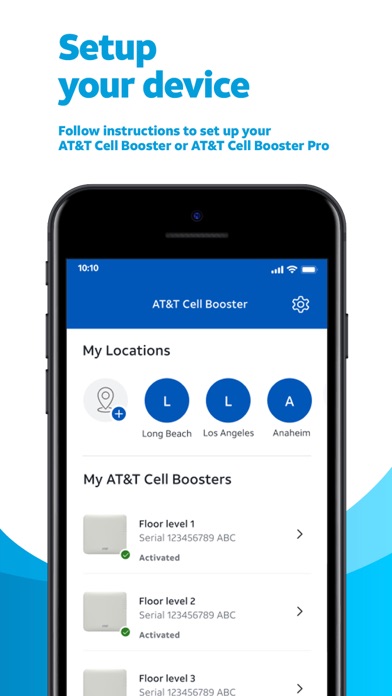
Manage your AT&T Cell Booster and Cell Booster Pro with the AT&T Cell Booster App. Set up, manage, and troubleshoot all in one place.
Sign in with your myAT&T, Premier or FirstNet User ID and password to get started!
• Register your AT&T Cell Booster or AT&T Cell Booster Pro
• Follow instructions to set up your device
• Manage your user and notification settings
• Get real-time status and troubleshooting tips
• For Cell Booster Pro view performance reports
The AT&T Cell Booster app is available to AT&T Mobility customers who have the AT&T Cell Booster or AT&T Cell Booster Pro device.
AT&T Cell Booster Positive Reviews
Don’t believe all the negative reviewsI’m not sure what has triggered so many negative reviews. There are a few things I do agree with but nothing that would make me give a one star rating. Let me explain. First off I do agree that the app has way too many AT&T ads for extra services that you probably don’t want. You open up this app and you go to a couple of pages and it’s sometimes hard to find the parts that you really need. But if you’re diligent and you know what you’re looking for, you’ll be fine. I was able to get my AT&T Cell Booster up and running within 2 hrs with only a three little hitches. First hitch, the documentation is not 100% clear about things like where to place the Cell Booster unit. As it turns out it really needs to be as high up as possible - say 7 to 8 feet mounted on a wall, maybe not a closet. Second hitch, is the GPS module. It really needs to be stuck on a window. Won’t work unless it can talk to a little sky (and you NEED GPS so that 911 services knows where you are). In retrospect, I should have figured that out - but, hey, at least I didn’t freak out when I didn’t find documentation! Lol. Third and final hitch, the documentation in the app says that the registration process takes only a few minutes. It can take up to a few hours for AT&T to detect your Cell Booster and register it. Boom, that’s it. By the way… if you have difficulty reading the instructions from the app, Google “AT&T Cell Booster installation instructions” - easy peasy. Good luck!.HeavypenVersion: 1.21750.4
Real problem with iPhone Speaker use..Within 10 + feet of rebooted unit on 500gb/sec wi-fi and making a speaker phone call, people on the other end of the call complain the connection is poor. Happens every time. When I switch off the iPhone speaker mode to the “normal” ear speaker (not an ear piece) they say the connection is so perfect.
NOTE: This happens across iOs updates, over different iPhone models, over the span of two years, and over years of reboots of the AT&T unit.
Honestly, after a power failure in the house the AT&T unit loses power and does not auto-start. I can use our registered iPhones ( in most areas) just fine without the unit on. If I walk by the unit and notice it is powered down, I will turn it back on. Our phones might auto-pickup a good signal with our wi-fi and use that to successfully manage calls without the AT&T unit.
We need the unit because our residence has stucco on the outside with wire mesh underneath. This creates a faraday cage around our whole house ( except for the roof, doors and windows)..FilmGo2GuyVersion: 1.24214.2(2)
Fast set upNote the QR on the box is different than the one on the booster ( that one is the boosters serial number info ) . I was avoiding setting this up. I downloaded this app and it was annoying to log in . I decided to update my password ( I used the same password ) that worked . Once I logged in the instructions were there and took me step by step through the process of set up. Plenty of time and pics . No disrupted signal . I don’t know how else I will use this app yet but so far my device is verified set up and in the process of being registered..SwmnupsrtmVersion: 1.21750.2
Fine but needs FaceID supportThe Cell Booster was a snap to set up. Yes, I had a problem at first too, but it was because my router needed to have some settings changed to permit the cell booster to get through to the internet. The tech support page on at&t’s website about firewall and router is actually very helpful and tells you precisely what to do. Plus I have gone from 1 bar to full service. Anyway the app is fine insofar as it goes. My biggest complaint about it is that it does not support FaceID and there’s a bug with passwords stored on the iPhone keychain. Seems like a simple fix..Puma PunkuVersion: 1.21750.4
Results very good - it took patienceI went from 1-bar to 4-bars, ground floor condo in Naples FL. Cell signal & WiFi assist had given very poor results. You must have a) GPS signal that pinpoints your location b) port on your router c) ATT login account & patience. The GPS antenna stuck on the window is necessary for setup - and then can be stored. The GPS identified that the device location matched my account location; and then an hour later everything was working very well. The back office work was done with no input from me. I am super happy with it and very pleased that I went to the effort..JerryTheBARIVersion: 1.23136.1(1)
No instructions but online support was wonderfulAs many reviews have stated there are NO instructions included in the package and the cell booster application is absolutely worthless in even indicating whether the device is working properly. But verbal support (by dialing 611) and remote screen sharing is wonderful. What a wonderful and pleasant surprise. Eva spent a half an hour walking me through the setup and she managed to get the booster working.Patient 9999Version: 1.21750.4
Bad serviceAfter 2 and 1/2 hours on the phone with three specialists , I am still trying to get someone to fix my cell booster !! Finally got a hold of a Service specialist that knew how to do his job. He fixed it in about 20 minutes teach people how to do their job. Let the guy that fix this one be the instructor for the rest of them..Att is beyondhelpVersion: 1.25246.1
ATT Mini cell tower boosterI found the device easy to install by following the app instructions on my phone following the booster app installation. I now have 3-4 bars throughout my house where had 1 bar previously and problems with phone calls and text messages.
Time will tell about how well it works for phone calls and texts, but I am very pleased after initial installation and the apparent increase in signal strength.
I had previously tried an outdoor booster style device which required running wires and trying to find mounting locations, wire runs etc. The ATT Cell booster was so much easier and cleaner install with minimal effort!
Thanks ATT!.ForageRiderVersion: 1.25271.1
Not sure why all the bad reviews.I scanned the QR on the card. Followed the steps for signing in, hooked it up in under 5 minutes. ATT did their part and activated it in about 10 minutes. I live high in the mountains and I went from 1 bar to 4. FaceTime now works and I have about 100 ft range from the house..RippleroadVersion: 1.21750.4
FeedbackHave to login every time I open the app and using iCloud Keychain to fill in the username/password does not work correctly as it thinks I typed nothing into the password field (have to put a character in it then delete it to get it to work). Fix this please. Everything else seems to work fine..HawkEye1194Version: 1.21750.4
Easy setupOpen box
Scan QR
Open App
Sign in
Scan device QR
Follow instructions
Connect cables
Register
Wait…~20 min
Received text and email activation complete and active. All Lights on device confirm operation, top 4 solid white, bottom blinking.
App did not automatically refresh, had to close and reopen to show active device.
Detecting optimal GPS signal strength for antenna placement option would have made 5 stars.DrALCVersion: 1.21750.2
Add User listDevice can be used by anyone, not just people registered to the device. Please add user list for just people on the specific account..Jngerson1980Version: 1.21750.2
GreatWas dubious having read so many negative reviews. Virtually no signal at home in western MA. Works incredibly well..BobbubbabsVersion: 1.24214.2(2)
Free International Money Transfer 💸Enjoy high maximum transfers into more than 20 currencies while saving up to 90% over local banks! The cheap, fast way to send money abroad. Free transfer up to 500 USD!AdvertorialVersion: 1.25271.1
AT&T Cell Booster Negative Reviews
WonkySet up was straightforward, but it wouldn’t connect to my phone. Before I called tech center, I did all the usual reboot this and that stuff, to no avail. Talked to tech support. About the only thing I could understand was the 2000 times the “service professional” said “We’re sorry”. They finally told me I had to contact my ISP, because there may be restrictions on my Wi-Fi router. Seems legit, except I have my own router, and there ain’t no restrictions. So I rebooted everything again, and voilà! 4 bars of 4G LTE instead of 1 bar of 5G! Great! Then I left the house for a few hours, and, whah-whah-whah, won’t connect again. My old 3G AT&T Microcell worked flawlessly for a decade, and the app was easy. Walk in the house, it automatically connected. This one, not so much. Every time I open the app, it makes mean completely log in, and the CellBoost Status page just says I have all white lights. I’m going 2-stars instead of 1, because I have this little guy in the back of my brain telling me I did something wrong. Will update if that proves to be the case..Obombs46Version: 1.23136.1(1)
Terrible App and a Terrible DeviceI was very impressed when AT&T first contacted me and offered me a new signal booster to replace a 3G cell signal booster I had purchased years earlier. However, when I opened the new booster’s box to install it there were NO instructions of any kind. I finally found this Cell Booster App and was able to walk through Registering the booster device and “turn it on”. But now, after 24 hours of supposedly working, the booster device’s Power indicator light is blinking (no idea what that means, but it’s probably not good), the Internet indicator light is lit, but none of the other indicator lights (Status, GPS, 4G Lite) are lit. Most importantly, my phone does not suggest the cell booster is doing anything. I’m still connected via WiFi which is how it was connected before the cell booster. And now, after only 24 hours, this worthless AP tells me I haven’t used the App in awhile so it redirected me to the AT&T website where they want to sell me other products or services. And I can’t get back to the Cell Booster App. Bottom line, this is undoubtedly the worst App I ever had on my phone (I’ve already deleted it) and will disconnect the cell booster device later today. Both are worthless..Doug12170Version: 1.21750.4
Glitchy and TemperamentalThis app is glitchy. When it works it works great, then suddenly it stops and you have to spend countless hours trying to get it to work again. I am surprised that a company that prides itself on their experience in telecommunication technology and innovation creates a product as glitchy as this, and makes no reasonable effort to remedy the problem in a reasonable amount of time. Really wish they could remedy this as I have c-phones and the booster through them..BIG ED 1956Version: 1.24214.2(2)
Too little infoThe problem with the app and cell booster is that it provides almost zero information on the setup process. It does not tell you that you will receive an email to confirm you are registered. It does not tell you that it will take another hour or so for the booster to be activated and that you will receive a text to tell you that. Of course if you need a booster and AT&T communicate by text that’s kinda stupid. If you can receive that text, you don’t need the booster. Not clear if you must plug in the gps arial. Just unplugged mine now that I have got the system operating as I do not want an arial chord dragging across the living room towards the closest system. Still seems to be functional. Yes I did talk to AT&T tech service. They were semi helpful and barely spoke English. Lots of indicator lights on the booster but nowhere does it tell you what is a “good” light and what is a problem and what action to take. Disappointed in AT&T..FrederickalbertiiiVersion: 1.21750.2
Total waste of timeSimilar to one of the other posts, I was able to see complete information about status while in the registration process, once registered I see nothing but my address. Wasted 45 minutes with “technical support“ who had no idea what the app was doing, took over my iPhone screen to see what was going on and still totally clueless, suggested I delete and reinstall the app which I did and nothing happened, still see nothing more than the address I entered. This app well it says is recommended for ages 4+, I think that is really the qualifications of the app developers that created this app you’re a bunch of four-year-olds I can’t write a decent app. Because I have crappy AT&T area coverage, I have to use the cell phone booster or Wi-Fi calling. Shame on you, AT&T.CellTex999Version: 1.21750.2
WorthlessWe live in the Sticks, no WFI, one bar of cell service. We get our WIFI via a hot spot. ATT sent me an email offering me a free CELL BOOSTER. I think, Great! It’s about time they do something to improve service out here. It comes, no instructions. You have to download an app. Then enter all you location and contact information and register the device before you even get started. Then it’s just a couple simple steps to set it up, basically just plugging in the antenna, power, and the eathernet cable. What eathernet cable?! I’ve been an ATT customer for almost 30 years, I get their bills, I know they know where we live. Yould THINK they would know there is barely any cell service here and for darn sure no eathernet plug! Waste of my time and their money..Dripping readerVersion: 1.21750.4
Doesn’t allow me to deactivate my device.I accidentally deactivated my cell booster. Now when I sign back in it doesn’t show me as the administrator of this device. There’s no way to reset it or fix it. I have deleted and reinstalled it several times and every time I sign in it doesn’t show the Cell Booster or give me an option to deactivate it. I don’t know what the fix could be was on the phone with AT&T for five hours and got nowhere. I can still add locations. But the old location when I go to delete it just says hmmLooks like there’s a problem. It’s been more than 24 hours and I still get the same error message but it says keep on trying. I don’t know what to do...👎👎💩💩💩👾Version: 1.21750.2
Poor Tech support for new Nokia Femtocell SOHOSeveral hrs spent trying to resolve issue with new Nokia cell booster. It was mailed to us to replace the MicroCell booster. Finally got to technician Nancy who said she updated the server for our SN of the cell booster. Adam a supervisor called to confirm that I had spoken with Nancy and the issue would be resolved in 2-3 hrs. He said he would call back at that time to confirm the issue was resolved. Still waiting for his call. Today I am spending more time trying to get to the right person that has the answers. Another problem is I need the old booster to make a call but I am unable to troubleshoot the new booster unless it is plugged up. I am in a catch 22..12Ky42025Version: 1.21750.2
Deserves every 1-star reviewI ordered the AT&T cell booster despite all the poor reviews because I work from home and can’t live without cell service. In theory this app should make setting up the device easy; in practice I couldn’t ever even get my device registered despite multiple attempts and a solid background in consumer tech. The AT&T support rep said things like, “there are a lot of gray areas with setup,” and also said the tech support team has passed along customer frustration with this app. So here’s an idea, AT&T: If it’s so bad that even your own people know it’s bad, just fix it. It’s crap..ScreenwriteVersion: 1.23136.1(1)
Horrible app, can’t loginThis whole thing is horribly executed, and there are no instructions. Downloaded the app and I can’t login. Changed password and still can’t log into the app. It also keeps looping back to the myatt website to try to entice me to upgrade my phone. What good is the cell booster device if I can’t get into the app to register it. I am a technology professional and this is a very poor rollout to consumers. I would be embarrassed if my team rolled this out. However, this would not have happened under my watch. What happened to user acceptance testing? Horrible, just horrible..DesiD11Version: 1.21750.2
Cell boosterI’ve had these for years with mostly good luck until recently when my internet got knocked out. Once back up the booster wouldn’t reconnect spent 5-6 hours on the phone and by myself trying to get it up and running including deleting from the app and trying to reregister it with zero progress. Just bought a new one and same issues. I think the app is the problem not the booster itself. Currently back on hold with tech support trying to get to bottom of it and no-one there seems to understand these units and how to troubleshoot.Rd968Version: 1.25232.1
Zero info on registrationThis isn’t really an app but more a link to your web browser. You login to your account and it takes you to your account overview page. Were you then have to try to search for the instructions to register your Microsoft booster. This takes you in endless loop of information that really does not help. No instructions included with the device and zero support on their webpage for this device. It’s almost like they don’t want you to use it. This isn’t really an app and it’s quite useless. Just shows you how lazy AT&T really is..MissileChicagoVersion: 1.21750.2
BadWill not even show any status indicators for my device anymore …. Device status just continues to say not available. My 4 g won’t connect with even rebooting uggg.JustpostzVersion: 1.23136.1(1)
Another AT&T FailAfter being transferred 12 times in order to get to the right department I “think” I finally got my questioned answered. I say that because the rep, who was very polite, but I could barely understand told me that all of the various wires must be connected for the device to operate. My router is in an interior room and there is no way I can run enough Ethernet wire to the booster and the GPS wire to an exterior window in order to make this thing operational. Another hour and a half of my life I will never get back..My8999Version: 1.21750.4
No cell booster info.While registering the new cell booster the app showed useful data. Number of lights on, blinking lights, connected , etc. Once it was registered the app dropped all the useful info. Now It only shows my address. That’s it. No useful info on the booster. It’s working- I can see the increased signal strength. But the app is useless. I even deleted and readded it. Nope. No data..Highpox1Version: 1.21750.2
Still a crappy appDidn’t do anything before? New upgrade Doesn’t do anything either New microcell boost device is crappy
Most times I have to turn on/ off airplane mode to sign in. And several times a day/ night , it drops out. Att can’t seem to figure out how to keeep any of their devices or services running.Wb0609Version: 1.21750.3
Wasted timeDownloaded app expecting to be able to continue with the process and instructions for setting up the cell booster. All I get is sales info for upgrading my devices and Valentines Day junk. I know there are steps that need to be followed but I can’t find a path forward. It’s crap!.OrieGoneVersion: 1.21750.2
NightmareTrying to get this thing to work, been at it and hour or so , power light is still blinking but somewhere it tells me the power is not connected, must be a magic power lamp, I give up for today, frustrating program.Xgguu GI I fVersion: 1.21750.2
WorthlessReceived the cell booster unsolicited (and at no charge) from AT&T. Tried to connect. Never did work when connected to router or directly to modem. Total waste of time. Don’t bother. Will continue to have a landline since we are lucky to have 1 bar with AT&T cell. 🤮.GatorfrankVersion: 1.23136.1(1)
Cell boosterThe booster is almost impossible to get to work. Worthless tech help. Turn out you need to have internet provider open certain ports. After hours on phone and attempting 2 try at it, I give up. Switching carriers after 25 years with att..UyttbshdueVersion: 1.21750.2
Total jokeDownloaded, tried to sign in, got a time out. Tried again, spinning circle for way too long. Deleted and reloaded the app and tried again. Spinning circle for 20 1/2 minutes now. I’m quitting, returning the booster, and changing carriers. This is nonsense..Auggie's ManVersion: 1.25246.1
Great to get a cell booster but..We are still periodically getting a no service message on our phones. There’s no indication as to whether or not you are connected to the cell booster. There’s no management options for the cell booster either..Knkelly911Version: 1.21750.2
Useless appJust like the other reviews said, no instructions on this app. Logged onto website but still had to call customer service and jump through hoops to get to a human..DcdpfsVersion: 1.21750.2
Don’t botherThe app is worse than the company. You’re better off trying to register and monitor your boosters via the website, and even then it’s buggy..TheManPAPVersion: 1.25246.1
Password errorsPlease update the database. The app doesn’t even recognize my log in credentials. Changed the password for 5 times already! The app hasn’t been tested before publishing live..Un BakziVersion: 1.21750.2
Don’t waste your moneyWorks great when it works, but constant call failed errors. Missed incoming calls. Intermittent connection. Nothing like the old microcell. This thing is absolute garbage. Use Wi-Fi calling..CrakSVersion: 1.21750.4
Att cell boosterWorked just fine until I had to login again. Wants new setup but will not allow because existing account..66gmcVersion: 1.21750.4
No information if the booster doesn’t workPretty much a how to install app that could have been one sheet of paper. Worthless for troubleshooting. If it doesn’t work call1-800.5pkmh6Version: 1.21750.2
GarbageI couldn’t even get it registered for set up. I spent an hour on the phone with an ATT tech and they couldn’t figure it out either. The app let me in circles..JhrdhjfdfuiVersion: 1.25271.1
ImpossibleThe instructions are useless, and the”antenna “ connection keeps falling out of the device. I’ve gone back to my microcell which’s WORKS..Topanga2000Version: 1.21750.2
Instructions incompleteThis app left me with more questions than answers 😕.Dr. Scott WatsonVersion: 1.25232.1
Unstable applicationCell Booster is amazing, but the app has a lot to be desired. Very unstable, it works when it wants to. Totally undependable..BEDPilotVersion: 1.23136.1(1)
Hate itDoesn’t work so far. App is useless. Box is junk..HeadingToVerizonVersion: 1.21750.2
TerribleTerrible app Instructions do not exist does not work.KenmlaVersion: 1.24214.2(2)
Crap AppApp is horrible and pointless..WoofDog1Version: 1.21750.2
Not a great appI purchased this booster because out here in North Spokane Washington. AT&T sucks.
I followed the directions loaded from the QR code loaded the app and now wants to charge me a $257 that I already paid for this booster
Now I’m on my second day of waiting over two hours for someone to get back to me on hold really really unset really really unprofessional.Not convinced AT&T is any goodVersion: 1.25271.1
Cell Booster - Model #SS2F11Terrible Customer Service Technicians. Nobody knows how to manually register the unit. Can not register device manually. No QR Code available for the unit. A waste of money. I still have no AT&T cell service in my home due to a weak cellular signal in my area. I have to make calls using my home internet line..Family shopperVersion: 1.25246.1
Payoneer 💰Payoneer is an online payment platform that lets you transfer money from any corner of the world! A best and must have payment service for every blogger, traveler, freelancer, affiliate marketer, consultant, virtual assistant, business person, online sellers, and receivers. Earn $25 for free by joining Payoneer. Sign Up Now!AdvertorialVersion: 1.25271.1
 AT&T Services, Inc.