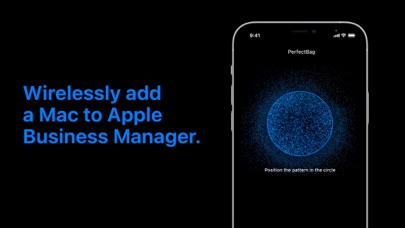
Apple Configurator for iPhone makes it easy to add any iOS device running iOS 16 or later or any Mac with the T2 Security Chip or Apple silicon running macOS Monterey or later to your organization in Apple School Manager, Apple Business Manager, or Apple Business Essentials so that you can take advantage of Automated Device Enrollment.
Once signed into Apple Configurator with your organization Managed Apple ID with the Device Enrollment Manager role, you can provide a network configuration to the device being added by sharing the iPhone’s network configuration or by choosing a configuration profile to install on the device.
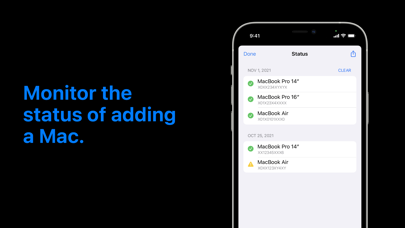
To add a device to your organization, bring the iPhone running Apple Configurator near an iPhone or iPad showing the Wi-Fi pane in Setup Assistant or near a Mac showing the Country or Region pane in Setup Assistant and scan the image or manually enter the six-digit PIN. After the device is added to the organization, it appears in an ‘Added by Apple Configurator’ MDM server placeholder in Apple School Manager, Apple Business Manager, or Apple Business Essentials; the Administrator or Device Enrollment Manager can then assign it to an MDM server for Automated Device Enrollment. The status button in Apple Configurator provides a report of devices which have already been added to your organization.
When a device has been assigned and enrolled in this way, it behaves like any other device enrolled using Automated Device Enrollment, including mandatory supervision and MDM enrollment. The only difference is that the user has a 30-day provisional period to remove the device from the organization, supervision, and MDM.
Apple Configurator Positive Reviews
It really shouldn’t say it works on iPadsIt doesn’t work on iPads and the documentation says so. Stop the iPad downloads, because it isn’t designed for it. iPhone only. Any review that says it doesn’t add iPads it didn’t until iOS 16, so that is normal. Now you can do it after Nov 2022..Chimona ChimeaVersion: 1.1
A little buggy, but it does workWe are a Microsoft shop, but need to deploy iPhones and iPads. Typically our VAR takes care of registering new devices with Apple Business Manager, but we were in an urgent situation where we had to source devices from a different vendor who didn’t have the config set up with our ABM account. We needed to deploy 10 iPads and assign them to ABM, but none of us are Mac users. We did have iPhones though. Apple’s documentation is a little vague and unclear, but it does state that to use the iPhone to register devices with Configurator for iOS, both device are required to be on iOS 16. This means updating the new devices with iTunes if they came out of the box on iOS 15. When you power on the device, go through the prompts until you hit the screen asking you to bring your iPhone close, but hit “Configure manually instead”, and while on the WiFi selection screen, open the Configurator app and bring it close to the new device. The “Add to your organization” prompt should appear and you should be able to scan the image. You must have the correct privileges to be able to add the device to your ABM account. It does work. But it took a while to figure out the quirks of the app..ZjeicmymaogVersion: 1.1
Way easier than using a MacBook for manual enrollment into ASMWe had an ordering issue and some iPads were not added into ASM. This app made is much easier than using a MacBook with Apple Configurator.
The important thing to know with iPad OS is you have to do a fresh reset and stop at the wifi setup step, before you connect to wifi, and then it’ll work..DookiedoughVersion: 1.1
Won’t workAfter logging in, the app only displays a black screen. Tried deleting, reinstalling, and doing a hard reboot, but the issue persists..Fendi0213Version: 1.1
Really easy to useIf you are having issues read the documentation for it on the developer portal.ARealHuman3275Version: 1.1
Much needed tool. Now please support iOS.This was a much needed tool. It works great. Now it needs to be extended to support iPhones and iPads with a similar point cloud system..Eric SummersVersion: 1.0
Apple ConfiguratorIt’s ehh.Sle3pylostVersion: 1.1
It worksDespite all the negative reviews. It’s been flawless for me..HoslerjVersion: 1.1
Every Supportive AppAwesome Tool, And Every High Quality. Great Job Apple.Jefferson L. FrittsVersion: 1.0
SECURITY RISKDon’t install.RaeeaeVersion: 1.1
ReviewReview.Piss pussVersion: 1.0.1
Apple Configurator Utilities ReviewNormal Review. Sign In with my account using my password. Automatically Signs me into its feature. Fix errors and continue without it. Succesfully get me into online connection..Allen EstarisVersion: 1.1
Free International Money Transfer 💸Enjoy high maximum transfers into more than 20 currencies while saving up to 90% over local banks! The cheap, fast way to send money abroad. Free transfer up to 500 USD!AdvertorialVersion: 1.1
Apple Configurator Negative Reviews
S hamefully poor, bad practices of APPLE’sApple’s customers, both current and former alike, have a consistent experience where either through their arrogance and/or unacceptable, complacency or incopencies to provide us [whom we have paid a premium price for supposedly a superior product AND services to and for which they offer and have sold to us. Hopefully, and I mean this from an honest and selfish reason - to have assistance from the maker themselves [APPLE] to those of us who are NOT experts in all of THEIR products, but incorporating their AI services or by hiring [for which the constantly brag of their company’s profits, yet ALWAYS seem to pocket those profit literally paid by the very customer-based community and individuals], training AND customer support staff to honestly do what true leaders and wise business’ executives of legacy businesses have done so since our current human history recorded when one ancient or otherwise modern day person sold a trinque or beast of burden to another!
Truly shameful AND reprehensible ‼️
Horrible & shamefully poor, bad practices of APPLE’s regarding their lazy philosophy towards their paying customer community and individual!.SlingGuruVersion: 1.1
Apple made me spend $3000 for nothingI have been having issues with this app for over a year now and I’ve called Apple over 30 times already. They have MADE me purchase a brand new MacBook along with brand new iPads because their excuse was my equipment was out of date. I cannot run a business like this, I’m still having issues setting up iPads, it takes 3-4 hours just to setup ONE because I have to restore it 10 times until it recognizes my MDM server, then the app crashes on the computer and makes me restart the computer in order for configurator to recognize an iPad is connected. Apple was unprofessional, and ended up giving up trying to help me and told me to figure it out myself. Cannot run a business like this..SYegorVersion: 1.1
Manually connect your devices people!So I don’t have this for it’s intended purpose but it was used in an attempt to transfer over my data when I replaced my iPad a year ago so I got to see it inaction.
Literally. It did not work.
I asked what “that” was (first time seeing it) and the GB employee said “basically I’m trying to have the new iPad confirm that your iPad is an iPad,” and then if failed a second time.
“Well, it’d be like asking a human to confirm that another human is a human; in theory it shouldn’t be an issue, but….” I said. My implication being that programmers biases are written into their scripts; in this case being so cautious that anything “off” would rejected for security reasons.
“Off” examples: lens smudge, light, incorrect angle, screen smudge, brightness, wired device incompatibility, etc
But really, just do it the old fashioned way, with long complicated passwords, and offline back up keys..WoodpegasusVersion: 1.1
Utterly uselessI would give this 0 stars if it were an option. I need to add a single refurbed iPad to a company Apple business account. This app won’t install on any of the company iPhones or iPads. It will install on my personal (non-managed iPhone). However, it won’t let me move the iPad to the business manager. It just sets it up with my personal settings. This is worse than having no app. If there was no app to try doing what this app claims it does, I would have wasted a couple of hours fighting this..Greybeard SysadminVersion: 1.0.1
Worthless. Does not work.As a parent trying to put my child’s phone into supervised mode, this app fails completely.
I eased my sons phone, followed instructions to start the process on the wireless screen.. got the phone to pair, selected his account… Only then configurator froze on “Signing in For..”. I waited an hour. Tried the process start to finish running configurator multiple times on three different devices (an iPhone and the iPads). All failed in the same step..L0janVersion: 1.1
Waste of Time!!This doesn’t work! The entire process for getting Apple devices into an MDM is a joke. My clients made the mistake of buying 20 iPads with a grant and it has been impossible to get these managed. Apple is not designed for business. Period. This will not work. You have to have the app on a Mac book and manually connect the device. They have NO PC version of this. Stupid. I want to chuck these iPads out a window..Mellypepper85Version: 1.1
$162 billion cash on hand……How can a company with $162 billion in cash on hand not invest just a single drop of that ocean of money into this thing. It is absolute hot garbage that never works the same way twice. For those where an iPhone is the only way to enroll devices into Apple Business Manager it is completely unacceptable. I would rather lop off my baby toe than be exposed to this app for one more minute..Just 1 Baby Toe JoeVersion: 1.1
When will iPad version be released?Our use case doesn’t allow iPhones, therefore making this app useless for our users. Would be extremely useful to have an iPad version that allows the prepare and restore functions, as well as the other options available on the MacOS version. Thanks..😂😌😏Version: 1.1
Terrible piece of softwareThis app literally never connects to iPads. It will connect intermittently even after I’ve signed into my admin account. It just never seems to work. When I open the configurator app to scan and connect, it doesn’t work. It is infuriating. It is a complete and total waste of time..Drake365Version: 1.1
HorribleThis app is incredibly frustrating to use. You can’t use a personal iCloud and you can’t use your company iCloud. Seems to defeat the whole point. It feels like I’m running around in circles trying to find an iCloud account that it’s happy with..ChocolatePeanutButterVersion: 1.1
When is the next upgrade?The App is GREAT when it works. But, I’m finding that it’s working less and less. Two years since any upgrade for the app is pretty disappointing.
Thank you.Spelt1231Version: 1.1
PAGING TIM COOKJust as bad as the desktop version. Can't get the Apple Configuration software to recognize Apple iPads from my Apple iPhone to add to the Apple MDM. This has been a problem for YEARS. Just need to bounce the iPads through the Apple jujitsu and manage them with Jamf...
Paging Tim Cook. Paging Tim Cook... cleanup in the deployment isle...
Jobs would be appalled (peace be upon him).PauliPaulPaulVersion: 1.1
App won’t even openUpdated iPad to allow for Configurator installation and it just goes to a white window then closes. This also is only because the app isn’t available on macOS. Grand product..DoeTheDeerVersion: 1.1
I wish I could use this app for home without a school account and business Account!I wish I could use this app for home without a school account and business account?.TylerAustin7Version: 1.0.1
Rarely worksHave to consistently reinstall. Doesn’t ever load or open half. The time doesn’t work. Apple, you’re a multitrillion dollar figure it out!!!!.CowLamboVersion: 1.1
Does not work with iPadsAs the app is incompatible for iPads and only iPhones it seems we would have to purchase iPhones simply for joining MacBooks to ABM..EthanS12345Version: 1.1
Really BadI’ve tried this on 3 different iPads and two different OS versions and got the same result. The app immediately crashes on open. Cannot be used..DvbnmlVersion: 1.1
This app is garbage9 out of 10 times I can never get the device to pair. This app is absolute crap. This process dos not need to be this complicated. Getting a device into ABM should not be this complicated. Stupid..BrandonTravisVersion: 1.0.1
Nope. Still useless.Don’t bother unless you have a Mac that can also run configurator. Otherwise get ready to be disappointed.Lymealope1Version: 1.1
Terms and conditions not metA horrible app that does not recognize that I have already accepted the terms and conditions on the website..Emptystreets130Version: 1.1
Always takes me 10-15 minNever works properly..Marz_AhmdVersion: 1.1
Did Not Work for MeCould not initiate after download. Required Apple Business account login for iPad/iPhone. Would not load devices on MacBook..JunisnitnisVersion: 1.1
Will not work for iPad no matter what updateI downloaded it to get an app and it wouldn’t even let me open it my iPad is also on the new update 16.2.JASONCAREY61Version: 1.1
Confusing and poor executionApple has made something that should be streamlined and simple… very confusing..Bocon43Version: 1.0.1
Doesn’t workIncomplete app made by a once great company being lead by an incompetent man. This app (if you can even call it that) encapsulates everything that Tim Cook’s era of Apple stands for..Gibbato1Version: 1.1
Has not worked for monthsCrashes on startup for all iPads.IPad user273733Version: 1.1
Wow.I didn't wanna involve anything with a MacBook and it just FORCED ME TO. all I wanted to do was make configuration profile but I had to sign I with some controled account not mine..Warioware2Version: 1.1
Why?Why didn't you answer the question from January 17? I have the same question..SKIITTZVersion: 1.0.1
Crashes on launchLatest update causes the iPad app to crash on launch..AndyPancakeVersion: 1.1
ScamUnable to use this app which make it more than a failure. Never install this app!.Jscheiner88Version: 1.1
Can’t join to ABMVery annoying process to join a laptop to ABM
they need to figure out another method cuz this ain’t it . . ..KidNamedJersterVersion: 1.1
Joke on an appDon’t bother with this app, it crashes and won’t work. Useless.NoNameNoCareVersion: 1.1
Fails constantlyComplete garbage app, fails to join half of the time, FIX IT!.SmalonerVersion: 1.1
Fix this.“Unable to sign in” this app is buggy..RadiojwVersion: 1.1
App is horribleDownloaded the app ant opens and then crashes..RljunggrenVersion: 1.1
Help!!Someone did this without my knowledge!! Apple thanks for the privacy!!!!!!.Yolo55666Version: 1.0.1
Immediate crashNewest download crashes immediately on ipadOS 16 on a 12.9 inch 5th gen ipad..TrancefuzionVersion: 1.1
Does nothingIt literally does not work on ios.Cars0419Version: 1.1
UselessHorrible app.JasgvxbdhVersion: 1.1
Useless for iPhonesBut actually works for adding a Mac.ScottyjnVersion: 1.1
This application is not finding anythingThe configurator app is not configured !
Check your app.AkramasaadVersion: 1.1
JAMF ProInconsistent and freezing constantly. Rarely does JAMF import work correctly.Moms breakfastVersion: 1.1
Terms not acceptedStuck at login saying “terms and conditions not accepted”. Can’t login or add any devices even though we have accepted the latest terms when the app prompted us to do so..GmdelisleVersion: 1.1
Doesn't connect to cloudUseless app.XxWiinkVersion: 1.1
The app is not working at allThe app is not working at all for adding devices to apple business manager.MohammedIslamBenayadVersion: 1.1
Payoneer 💰Payoneer is an online payment platform that lets you transfer money from any corner of the world! A best and must have payment service for every blogger, traveler, freelancer, affiliate marketer, consultant, virtual assistant, business person, online sellers, and receivers. Earn $25 for free by joining Payoneer. Sign Up Now!AdvertorialVersion: 1.1
 Apple
Apple