Masayuki Akamatsu
Timetracks - Slit-Scan Camera Customer Service

- Timetracks - Slit-Scan Camera Customer Service
- Timetracks - Slit-Scan Camera App Comments & Reviews (2026)
- Timetracks - Slit-Scan Camera iPhone Images
- Timetracks - Slit-Scan Camera iPad Images
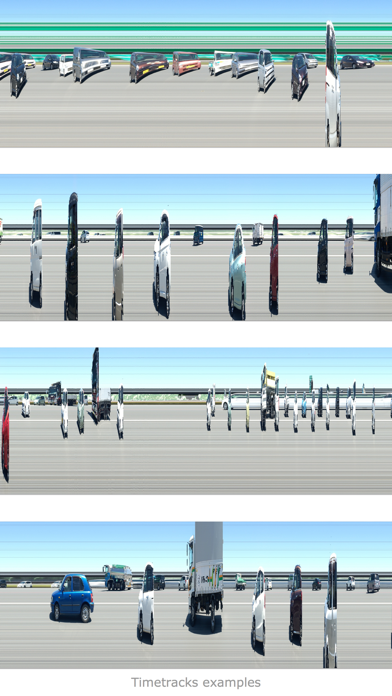
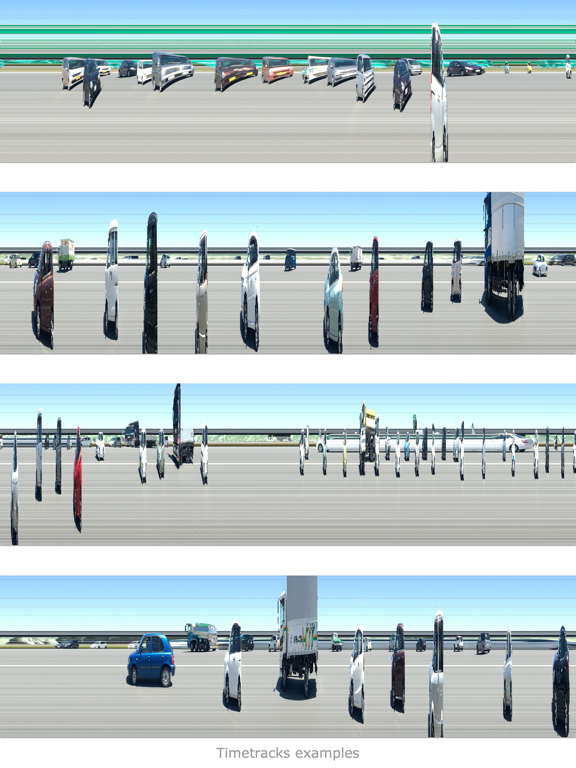
Timetracks is a camera image-capture application which uses a slit-scan technique. Like an image scanner, it generates a unique effect over a certain defined duration - moving objects and changing scenes will produce interesting photographs.
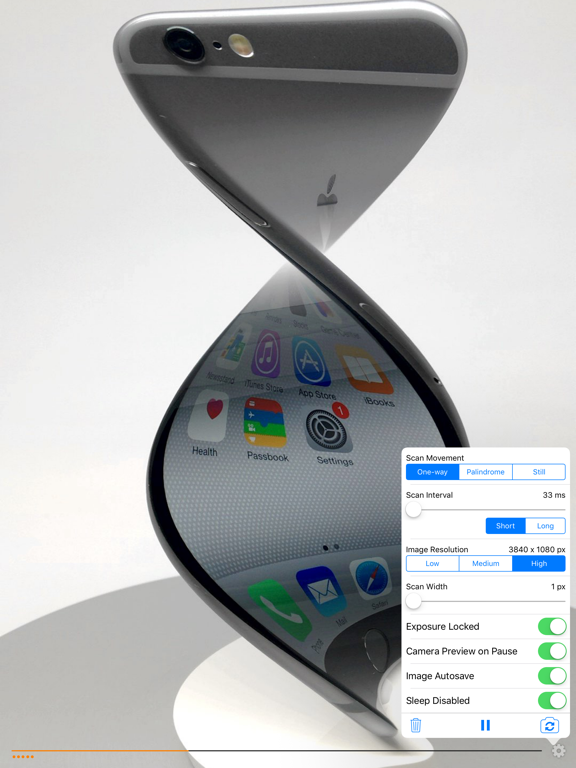
This application includes the following optional settings:
- One-way, Palindrome and Still scan movement
- Scan time interval
- Image resolution
- Scan line width
- Exposure Locked
- Camera Preview on Pause
- Image Autosave
- Disable Sleep
When you activate the “Image Autosave” option, the image will be automatically saved periodically. The activity indicator will be shown while saving.
Timetracks - Slit-Scan Camera App Comments & Reviews
Timetracks - Slit-Scan Camera Positive Reviews
Interesting app; I'd like some changes...Happily, this app no longer crashes immediately on my iPhone 3GS, as of update 1.0.1. That said, I'd still like some changes in this before I'd be likely to use it regularly. Here are some thoughts on 1.0.1: First off, it's a very cool concept. I've been interested in slit-scan photography for a while, and having a way to at least approximate it on the iPhone is a very welcome thing. Next, I find the behavior of this app a little strange in a few ways: it is continually scanning (and, depending on your mode, re-scanning) the range of the sensor (or a single line of it), and (if set to save to camera roll) it saves roughly every 2 and a half full scans (worth), giving you a very tall (or wide, but the UI is always vertical) image, maybe 3:1 aspect ratio (I haven't measured... But the example outputs all appear to be two saved images placed side by side, with that placement done by something other than this app). This is kind of neat to be able to do, but I'd also like to be able to have it do a single scan and then stop, saving the image at that point, and not starting again until I said to. I think that's my biggest request, though. It's definitely interesting, and I expect to play more with it over time. I only wish I had a good way to mount my iPhone on a tripod... Perhaps I'll look for something that will let me do that. Keep up the good work! This app definitely has promise..Version: 0
Great PotentialThere are some amazing artistic images that can be created from otherwise ordinary scenes. The screen shots show some typical scenes with the camera (iPhone) held still. Moving the camera around while the 'scan' is taking place renders the most interesting results. Experiment with textures and patterns up close using different types of movement from slow to moderate speeds. The interface could be a little more intuitive. It takes a bit of head scratching to figure out how the thing works. If you just want to take funny pictures of your friends this app is probably not for you. If you want to create never-before-seen images and don't mind a little experimentation this very cool!.Version: 0
Outstanding Photo AppThis app can create some really interesting effects if you take the time to learn how to use it. Admittedly, this app could definitely use a bit more polish as far as distinguishing the meaning of the icons but once you learn them it's pretty easy to use this app. I'd love to be able to upload my images directly to Flickr, Twitter or Facebook but that is easily done from within those specific apps. This app really does make for some amazingly interesting images that would otherwise be impossible to achieve. Definitely worth a buck even though I got the app for free during the beginning of twenty-ten promotion!.Version: 0
Faster please!I was definitely looking forward to playing with this app, however the fastest scan rate is 0.1s, which is way too slow for most of the things I wanted to look at, like people walking etc. It can't be a hardware thing because the phone can shoot video at 25fps (0.04s). Please allow the fastest speed of pixel grabbing that you can. Also a sideways scan direction would be nice because you get through the whole frame quicker (not so many lines). Could you analyze iphone movies like this so you could shoot action first, then slice later, like Don Whitaker did with Waveslice? Still interesting to play with, but a faster scan rate would be more immediately satisfying..Version: 0
Save needs tweakingI LOVE this app however, one thing is keeping it from getting a full five stars from me, and that's a big thing. There's no save function. There's an option that says "Save to Camera Roll" but you don't have any control over when exactly it does this. Imagine you start an image, get some good effects, then you're interrupted by something else and need to close down the app. There's no way that I've found of saving your image before closing the app. If you want to keep something specifically, without chance of losing it, you have to either do a screen cap, or wait until you see the activity monitor indicate that it's saved. Without saving control of some kind, it's very heartbreaking to gather some neat effects and images, only to lose them because you must close the app quickly. Nevertheless, it is very fun to play with and I hope that the creators will see fit to add this function. I would still say it's worth the price to play with it..Version: 0
Wonderful but no save-when-you-wantBeautiful effects, but it's heartbreaking to see them scroll away without saving. Give me the option to save when I want to and I'll give it six stars..Version: 0
It's official?Every obscure photo technique has an app now. I was particularly tickled to find this one, and superbly written too!.Version: 0
UniqueVery interesting variation on video capture. Fun to use..Version: 0
Free International Money Transfer 💸Enjoy high maximum transfers into more than 20 currencies while saving up to 90% over local banks! The cheap, fast way to send money abroad. Free transfer up to 500 USD!Version: 2.2.0