Eventbrite Organizer App is your go-to app for managing events effortlessly from any iOS device.
With the Eventbrite Organizer App, you can:
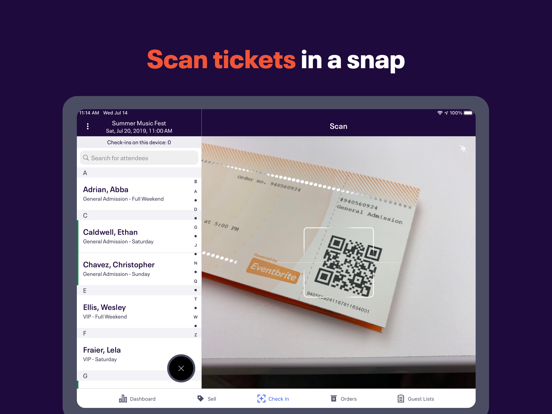
- Track ticket sales in real-time to stay on top of your event’s performance - Check-in attendees seamlessly with fast, reliable ticket scanning from any device - Monitor live attendance to keep your event running smoothly - Easily manage orders with reissues, cancellations, and refunds on the spot - Accept fast, secure on-site payments for tickets and merchandise - Stay coordinated across multiple devices at different entry points with sales and check-in data that instantly syncs in real time
Multilingual? No problem: Eventbrite Organizer App is also available in German, French, Italian, Dutch, Portuguese, Swedish, and Spanish.
Standard credit card processing fee (2.9%) and an Eventbrite Service Fee are charged on all credit card orders sold through the Eventbrite Organizer App.
What is Eventbrite? Eventbrite is the world’s largest self-service ticketing platform and events marketplace with the mission of bringing people together through live experiences.
Eventbrite Organizer App Comments & Reviews
POSITIVE REVIEWS
NEGATIVE REVIEWS
Eventbrite Organizer Positive Reviews
The Perfect Ticket Partner!The Big and Tall Comedy Tour LOVES Eventbrite. We couldn’t do our national tour without them. Love how they integrate with Facebook (perfect)! Love how the app gives you the ability to see how many tickets are sold for each event and you chexk people in using your phone. It’s so easy and takes some of the work load and worry off our shoulders. We HIGHLY recommend them!!.DuncaineVersion: 10.0.0
Great for creating events terrible editing optionsThe app and deals are wonderful.
The annoying part is editing anything.
When you go to your profile on the creator app it only shows statistics of your event. It doesn’t give you the option to add updates. And it doesn’t give you the option to edit your organizer event profile. I went through the research on go to settings then work profile. Work profile isn’t there and if you click on your own it just takes you back to statistics of your events. So the only annoying thing is trying to edit. It’s a scavenger hunt..PirateNinjjaaVersion: 10.5.2
Difficult to track orders & notificationsI’m new to Eventbrite so still learning how to navigate things. First thought is the fees are pretty high! For a $25 class EB charges my customers $5.03 per class. Not sure this will be sustainable for my community. Venmo and PayPal charge less than $2 for that ticket amount.
I have found it cumbersome to track when a student pays. Seems you have to turn notifications on in a setting that is buried somewhere in the account setting. Finally got it figured out on my second attempt but meanwhile hassled my customer since nothing came through on my end to verify the sale. Hmmmm……..Hawaii CallsVersion: 10.1.0
Eventbrite Organizer is really helpful for managing our eventsI really enjoy using Eventbrite Organizer on my mobile device because it helps me easily keep track of how many people I have signed up for our events which helps me manage the event venue, food, presenters, etc. for our non profit organization’s events. Eric Soriano ASPE Chapter 32 Programs Chairman.EzsorianoVersion: 10.0.0
Feature requestThe Eventbrite Organizer works quite well. However, when quickly scrolling through the check in list, the scrolling action can be misinterpreted and delete a paid attendee accidentally. This could be mitigated by having a secondary requester popup to confirm or deny the deletion. This has happened for our organization over a dozen times..SaltCityMikeVersion: 10.3.0
Makes my life easierLove this app, makes managing my ticket orders easier. The fees are a little high on my big ticket events but other than that I am very happy with it. I would recommend to others..ShuttavacVersion: 10.0.0
Easy to use, wish it had editing capabilitiesI’ve used this app for quite a while for numerous events, and have had great success & ease. I’ve been able to have team members log in simultaneously, which has been helpful. The one major part I’m looking for in a Mobile app is to be able to edit details of my event without having to log on from a computer/laptop. I wish this app would have the functionality to do that..Mama-HitaVersion: 9.3.1
Good but…..It gives me false readings on my “circles “ telling me I’ve sold 100% but I haven’t sold any tickets. I’ve taken events down and reentered them and it still happens. I’ve created brand new events instead of using previous information from completed events and it still happens. I refresh the page …and it still happens. It only happens on events where I have not sold any yet..Me and my shadow 375Version: 10.8.0
Editor PageI recently updated to the newest app version and I can’t access the event editor page from my phone. I have to log in through the website to make changes and that’s kindda annoying. Don’t know if that’s a phone app issue but it’d be great if you guys can look on to that. Besides that everything is great. Thanks so much for this service..ATT (All Things Trance)Version: 10.1.0
It’s ok — nice updates but please ad editing functionsIt’s a great app to check in guests and get real time stats, yes. However I can’t make one single edit to an event. Can’t delete, add, or change anything. I have to do that from a browser which is just clumsy and frustrating. This app would be 5 stars and blow the competition out of the water if it had the ability to edit/add/delete events..Miotch!Version: 9.0.1
This is great for viewing the dashboardI love the quick reference ability with this app but there are some more capabilities I wish were available. I’d love to be able to re-schedule repeating events or cancel from my phone. Overall I love how convenient it is though!.Hammer SanVersion: 10.10.0
Easy to check in attendeesI like the way I can easily check in attendees. I find a good way to verify that someone has paid is to search for their last name..Magic, Momo SuperdogVersion: 10.4.0
Not a bad app but if you create an event there’s no way to share itThe user interface leaves much to be desired. You can create events and see analytics but if you want to get a shareable link, you’re out of luck. This is the most basic function of event planning and it’s not even available in the app!.Jeffrey and XiaomingVersion: 10.1.0
Some browser features would be niceIt would great if we could create tracking links and do email blast via the app.KnizzaVersion: 9.7.0
Inaccurate dataAlmost as soon as I create and publish an event the app starts showing a large percentage of tickets sold even before going public, even though the $ amount shows zero..GuitarzzaneVersion: 10.8.0
Contact attendee featuresWonderful and handy app. As an organizer however I would love to see a one touch feature to contact attendees - enable calling & emailing them when respective fields are clicked in orders tab..Punjabi_PuttarVersion: 8.10.3
Minor inconvenienceWould be even better if it didn't change which event you are looking at when you go to another app and come back..King David LaneVersion: 10.2.0
I don’t understand this app!I thought I could use this app to create new events but I’m lost trying to do that. I think this is only for tracking already made ones?? It take a few clicks for me to navigate where I really want..EdititxVersion: 10.8.0
Great trackingLove the way it’s set up to keep track of everything and the check in as well.Brizzy BryanVersion: 10.2.0
Convenient - easy to use - great toolCan’t say enough about the app. Super useful and easy to navigate. Updates are always on point.Billy HustleVersion: 9.9.1
Great App!This app is incredibly easy to use for large events. I used it to scan people in for a show at a university with 500+ attendees. The QR scanning is seamless, and the event names list is very helpful. Highly suggested to use!.SamrashinVersion: 8.6.1
Game ChangerI’m only ever using Eventbrite for any events I have from here on out. It’s so easy to navigate and also building a brand in the event space..KindawallaceVersion: 10.6.0
Great AppIts a great tool for keeping up with my events. It would be great if one could be able to see tracking links insights..Kiki-ExorVersion: 9.7.0
Why remove Guestlists?Eventbrite why have you removed thr ability to add guestlist and guests via the app and online. Guestlists are a crucial part of the evnt business and instead of simplifying the process you have made it more cumbersome. The organizer app needs to be updated.AjayRawVersion: 10.1.0
Eventbrite is 🔥🔥I use eventbrite for all of my events. One stop shop for email marketing, sales tracking and super easy to use!.Bfrsh89Version: 10.10.1
Needs some functions addedOverall easy to use and nice layout.
It needs the following basic functions added:
1- Add push notifications for when tickets are sold. Right now it only gives you push notification for when the first ticket is sold.
2- In the settings, I am unable to turn the auto check in on or off. It is just stuck on ON.
Thank you for making this app and constantly updating it with awesome features..Pishi joonVersion: 9.2.2
ReviewWell put together, straight forward and fairly easy to use. Thanks for your hard work..Hawk757Version: 9.9.1
So easy to useThis is my first time using Eventbrite for an event and it was so easy! I will definitely be using again..Hmkgirl1Version: 10.5.0
Must haveIf you’re running an event without this App, you’re working harder than you need to..Londellw1977Version: 10.1.0
Limited OptionsOther than scanning attendee tickets for an event, I don’t see a use for this program as the options are much more limited than the web-based version..WVUSquirrelVersion: 10.3.0
It’s okay. It could be better.How about a simple share button on each event to share the short link from the app. I have to go to the browser to do that.
You can implement editing details and ticket type as well..LatinDanceFactory.comVersion: 9.5.1
Need 1 improvementThis is a great app, I find it supper handy. One improvement I can suggest is to let the organizer include costumized question in case we need to additional information grom the client..NEGF11Version: 10.1.0
Best appLove this great way to create events in toronto.Cheap Garage Sale DealsVersion: 10.8.0
Latest version is worseIn the latest app update, when you scan a QR code, the name of the person who’s ticket you just scanned doesn’t show up anymore making it harder to greet attendees. I used to be able to scan, see the person’s name who I just scanned and say “hi John! Welcome!” which adds an extra layer of comfort to attendees. Now I have no idea who’s who out of the people whose tickets I scan..Mr Moe88Version: 10.14.0
Too limitedWay too limited as far as options compared to the web version.Ricky RiicksVersion: 10.10.1
Best AppBest app for selling tickets for all types of events 🔥🔥.NyesvuVersion: 10.4.0
Seems very expensive for someone who only presents a few concerts perThis is my first time using Eventbrite… Eventbrite charges a 10.3% service charge on each ticket sold, correct? In the last year I’ve only done 3 events, all in churches, so can I continue paying the approximately 10.3% you add to each ticket sale for future events with no monthly charge?
And if I wanted Eventbrite extra promo/help advertising, how do I choose extras such as sending my poster/info out to a particular demographic in my geographical area??
I think I’d like to do that.
Can you have someone email or text me please?.Ladner lonnieVersion: 10.7.0
RequestFor car events can you add make and model at checkout.MonialaskaVersion: 10.6.1
Not User FriendlyHandy to check people in, but the navigation is seriously lacking. It’s not clear what the app is meant for or the benefits.COCO.XOVersion: 10.5.2
My new addictionI just started but if it goes well this app may become my new addiction for hosting classes and workshops 😏😁.RozzebudVersion: 10.4.0
Editing eventsWhy can’t I edit my events in the app???.Belle 9Version: 10.2.0
Buy multi season ticketsWe need the platform to allow our buyers to buy up to five different concerts while they are in the App. So we need a cart where people can load their ticket purchases before buying. Than you..GreatwalksVersion: 8.7.0
Need major updates on functionalityThe app doesn’t sync properly with modifications made on the backend… we deleted double attendees and they are still showing on the app.
Also, when we sell through the app, it doesn’t show us the mandatory fields and won’t let the “sale” complete but we didn’t realize it was becuase those fields were mandatory (no a message on why it doesn’t do anything)
The app should also allow us to delete attendees ...KristenjuVersion: 9.10.0
Pretty goodI find it really helpful to be able to keep an eye on registrations on my phone when I have multiple events happening. The one feature I would like to see included is being able to see how many tickets by ticket type are available on the phone instead of just the overall number. Are there more VIP tickets left or just general admission. Or if I have the different ticket types set up as separate dates in a series of events then is Monday's event sold out but the rest are full? Or is there space left in all of them. This would allow me to better deploy remaining marketing tactics.
I'd also like to see more functionality around emailing those who have registered and sharing via social media to help with last minute promotions..K8ieTVersion: 3.2.2
It’s great but could be betterI like that I can see ticket sale information. I feel the opportunity for your app to shine would be to add the ability to promote the event by adding the option of email and social media invites. It’s very difficult to use Eventbrite website on a cell phone or tablet..Rayvan1234Version: 8.0.2
Why split the apps?There's no real reason the attendee app and the host app should be separate..ForbizzleVersion: 3.1
Why isn't there........ An app for attendees to load Their tickets? Save paper. Be easier. Makes more sense..ZchamuVersion: 2.75
Free International Money Transfer 💸Enjoy high maximum transfers into more than 20 currencies while saving up to 90% over local banks! The cheap, fast way to send money abroad. Free transfer up to 500 USD!AdvertorialVersion: 10.34.0
Eventbrite Organizer Negative Reviews
Entirely disappointedUnable to host large events due to inability to receive funds. The dashboard is impractical and still leaves me looking all over to find the names of registrants. I cannot find a guest list to make name tags with. I still cannot find information via my app regarding payouts either. They also kept nearly 8%! That’s entirely silly and then want to charge an additional 3% to withdraw funds in able to actually pay for your event BEFORE the day of the event. If their main focus is helping form events and encouraging business growth you would think they would know the importance of how much goes into hosting the events financially and pay out as soon as the funds come in especially with non refundable tickets! Just absolutely disappointed..Moses mojoVersion: 10.6.0
Updates ruining the appSo it would be great if you could fix the update or simply revert it please. No one can look at their dashboard sales anymore as the entire app freezes. Also you now lengthened the process to enter a customers Information by requiring to click the more actions button which people forget sometimes and process tickets with no ones Information causing confusion. Lastly over a year ago you took away the feature that displayed how many tickets were remaining at different price tiers for the same event. Now if there are $15 and $20 tickets it will say 200 available but in reality only 20 are left at $15 and 180 left for $20. This is very annoying and hard to offer tickets accurately. I hope you take all of these complaints into consideration as I am part of a big organization that agrees..Percy KainVersion: 9.2.0
Can’t Even Log InI have created an event for my organization and wanted to download the app so I can check in guests using the iPhone app.
I’m able to download the app, but every time I try to log in it says to check my email address and password for a typo. There’s nothing wrong with the address or password. I’ve tried from different accounts that are on my team, uninstalled and reinstalled the app, and I’ve tried to log in using email, Apple, and Google.
It’s very frustrating to not even be able to log in. Everything else at Eventbrite has been fine, but not being able to directly contact a support team there is so annoying..Can’t Even Log InVersion: 10.1.0
Unresponsive and kept over $4,000I used Eventbrite to manage a paid event on Nov 2. When I tried to withdraw my money, they suspended my account for suspicious activity. I have spoken to their live chat twice, sent multiple emails, and they always have the same response that I need to change my password. As soon as I change my password, they lock the account and start the whole process over. I am considering legal action because it is thousands of dollars that they are keeping, and I need this money in order to pay my event staff. Absolutely horrible company, horrible service. STEER CLEAR!.LllfranciscoVersion: 10.15.0
Good but doesn’t do what i need it to doI like this app because it’s easy for me to go in and see how many people I have coming to an event however, I can’t edit my events or change anything on them or delete anything. I was just sitting in a meeting and tried to be productive and edit an event but I couldn’t. I needed to delete one of my events and couldn’t do that. Really, all this app allows me to do is see how many people are coming to an event. I tried to do it with the regular Eventbrite app and it took me to the organizer. Very frustrating.
It needs work. Because it could be so good!.Jeanne Marie CummingsVersion: 8.10.3
Can’t I just get a link to my event?You would think for an organizer app, it would have a convenient way for you to access & share the link to the event. It’s great for sales on site, but not great for promoting the event for an online audience. I would love more of the functionality of the web organizer page, at the very least an easy way for me to access the links to each of my different events or edit my event. If someone has tips for where I can find that feature, that would be great..LaRosaLocaVersion: 10.10.0
They will scam you in “fees”We sold over 200 tickets for a charity event to friends and family that we know. Eventbrite said that 190 of the tickets were traffic directed from them and their organizers and only a little over 10 tickets from our Facebook page and took over $500 of profit from us in fees because of it. Our Facebook page had over 10K people view it from ads WE PAID FOR. WE LINKED OUR EVENT PAGE TO EVENTBRITE AND DIRECTED THE TRAFFIC THERE OURSELVES. Eventbrite doesn’t answer their contact phone number. As convenient as this app and website seems, they are scamming money from you. Won’t be using this service anymore.Electrohead junkieVersion: 8.9.1
Disappointed & still waiting for payout!A first-time user, I was extremely disappointed in this service. The app is lame & there’s zero support. I found it difficult to share links, was annoyed to pay sales tax on a non-taxable training, and more than a week later, I’m still waiting for my money. I upgraded & paid even more fees, hoping for better options. The float time is absolutely ridiculous to close out these events. Nobody takes this long to transfer funds! I am now late on my mortgage because I’m waiting for these people to pay me what’s left of my money..Mleather2Version: 8.6.1
Eventbrite...Listen to your users and fix this app.Ok here’s the good. It works... mostly. Getting an up to date read on how many tickets are sold is clumsy at best. Refresh page and wait sometimes over 30 seconds for the data to repopulate.
There was a recent change to the GUI that makes assigning a name and email to comped tickets impossible. I think you tried to streamline the process of selling and somehow made it more convoluted. Everything should be done in steps. Step 1. Step 2. Confirm. Not with sub menus and back tracking...
I get this is a box office solution only. So it’s got one job please make it good at it.
Another small gripe is attendees will have a tiny green sliver to indicate they have been checked in. You can barley see it on certain devices. Make it a check mark for dog’s sakes!
I encourage your team to read these reviews careful and fix your app!.Swamplord47Version: 9.1.4
Not super useful on basic tasksThis app doesn’t let you copy phone numbers or email or just use them to message or call your attendees, so what’s the point of displaying them? It also doesn’t let you swipe back to get to your events list so it’s kind of a pain to navigate once you’re in a particular date. swiping back is a pretty basic function in most apps.EphramzzVersion: 10.5.0
Covenant SolesI have been trying to actually publish my event and have been having difficulty. Part of the event is post but I tried to do the free tickets and it would allow it then it looks like it’s charging me. Lastly, the location keeps pin pointing a car wash and not the actual Hilton Garden Inn Peachtree City, GA location. Quite frustrating. I cannot tell if my event is actually being seen/ published! Very disappointing..HelpNeedesVersion: 10.4.0
FrustratingThe app and website are difficult to navigate after setting up an event. Why you do not allow direct access to edit how many tickets are being sold and what style of ticket or being sold is incomprehensible to me. As an event promoter I should have a complete and total access to the events I create in order to manage that event in the way I see fit. Highly frustrating completely unprofessional..AP_MIVersion: 10.1.0
No Phone No Business! EVENTBRITE have my phone but we do not get theirs.EVENTBRITE since the pandemic has hidden underneath a shell zero communication lines except for a chat line. There are complex issues that cannot be addressed in a timely manner because you have to search high and low for a chat line since you cannot call a rep. This ticket service has become useful for events under 200 attendees. No longer a fan of EVENTBRITE. Yet to receive my payment..Very weak organizationVersion: 10.1.0
Needs more featuresUnderwhelmed with the ability to use the app, works great for check-in however if you are the organizer trying to make changes or get notifications there’s almost no options. There should be the ability to get notifications of sales and total amounts as they come in live..Michael ZakVersion: 8.8.1
No accurate And no supportPlanning for graduation weekend. My guests are confused with the way the platform sets up “multiple events”. The app attendees do not align with the same event when reviewed on desktop. I’ll have to upgrade for support to get it resolved. Not happy. I’ve use this for many professional events I hold, never for personal planning. And I never will again..GraceMommyVersion: 10.1.0
Erased / Checked-Out attendeesWe recently had a corporate event that we used Eventbrite for. We decided to use the Organizer app to check in attendees. The app appeared to work at first. To our dismay, after a few minutes it started checking out attendees that we checked in! It completely messed up our tracking and we don’t have an accurate headcount of who attended. We will not be using this terrible app again!.DelroySVersion: 8.10.2
Clunky and not user friendly.This app needs a lot of improvement, and the recent update made things worse. I don’t like that you can’t view all upcoming events at once anymore. The only helpful thing about the app was being able to see all my events at a glance and see which dates were selling out..RicardoPerezVersion: 10.13.0
You can’t edit or launch events on mobile.What is the point of it if you can’t actually manage anything? You can only work with the ticketing side but are unable to edit anything else. This has been a major stress of this platform for many years and I am surprised to see that there have been no improvements. Super disappointed..Gre CatalanaVersion: 8.7.2
1st time userWell, I’m not sure I can say 1st time user. I am unable to even log in on the app. I have used the regular Eventbrite app to purchase tickets for other events. This is my first time using organizer to set an event that I am hosting. I have tried to select the “help” button and there is no response from that either. So, overall, this app is not useful since I can’t even use it..BlamemylipsVersion: 8.6.1
Known issue yet no fix.Eventbrite has had a known issue with logging into the Organizer app from an iOS device and it’s still not fixed. Looks like we’ll be using pen and paper for our guests tomorrow. We will also be using a different service for future ticketed events going forward. Not a professional app..Fly18944Version: 10.1.0
Cannot edit the event on the appI cannot edit anything on the event from the app. I have to access the event on my computer in order to edit it. What’s the point of an app if we can’t have full access to the event..Andre2231Version: 10.4.0
FrustratingThis app is very outdated and needs to be updated ASAP ..Sam20_23Version: 10.3.0
Cannot actual ‘Manage’ events..Cannot manage/edit/create events in this app.. it seems it is purely for tracking money from events...MollyEvelynVersion: 10.3.0
Impossible to manage eventsIt’s impossible to manage your events from this app.Alexandra1223455Version: 10.2.0
Not user-friendlyI realize that once I publish my event, it seems impossible to do edits. I can barely see ticket sales..CooksvilleguyVersion: 10.8.0
Log errorI get log error and as a free costumer I couldn’t find a way to get help or report the issue. So I just can’t use it. The browser version works fine though..--radar--Version: 10.7.0
I really think this app sucksI’m a paid subscriber. This user interface is not friendly. It does not allow me to accomplish what I need for something that should be very simple. I’m always frustrated when I use it..JJJJJJ57jjjjjJJJJJJJJJVersion: 10.5.0
FrustratingI’m producing 4 events and can’t find away to look at the ones that aren’t the more recent.JoTofinoVersion: 10.1.0
App takes u to browser to do thingsNot at all user friendly.BarenirvanaVersion: 10.1.0
Wont load guest listsIs there a fix for this yet it’s been like 6 months.Ohmz1507Version: 10.1.0
Terrible appCharged us +$400 on service fees. Reason we went with them was because they had the guest list app. Turns out that is no longer offered but still shows up on the app. Customer service is terrible. They are basically charging $ on transaction. Their features are terrible. Use other cheaper alternatives. These guys are frauds..PemskiVersion: 10.1.0
Keeps asking me to log in again and againTerrible unusable app. Just keeps showing me the login screen. After I enter the username and password, it takes me back to the login screen. I expect better from an otherwise good event management platform..GoyalnilayVersion: 9.4.2
Can’t sign inSince the last update it no longer allows me to login. Every time I sign it it sends me back to the main login page..Katie S. O'HaraVersion: 9.4.2
Cannot log inSimply does not work. Cannot log in at all..PinkmelVersion: 9.4.2
Log in bugs continueBug fixed and now back. App allows me to log in once and then asks me log in again and snaps back to the main page. I keep having to delete and install on mobile in order to use..KavircVersion: 9.3.3
Cannot login with the good credentialsI am entering same credentials that works on desktop. But it snaps back to the login page without even an error. so I am unable to use the app at all 😔.Sgervais71Version: 9.2.1
Can't see attendee listSince upgrading to V3.2 I cant see names on the check-in screen which makes the app rather useless.
Please fix this and return the app to its former useful self..Pearsg1dVersion: 3.2
CrashesI can’t even get this app to open. It crashes as soon as it opens. Slightly disappointed..XdeenxVersion: 8.5.2
Cannot fathom this is liveIt’s unbelievable they would launch this as non-beta - it’s borderline unusable. Full of bugs, rarely loads past events, confusing as hell.SBuckleVersion: 8.5.2
Not working on iOS12?Entering correct login credentials returns error - cannot login. User error ruled out. Contacted support, waiting for response..AaronrideskiVersion: 8.0.2
Stuck on Organizations ScreenWhy when the app opens is it stuck on a blank screen called Organizations? There is no way of interacting with the app as soon as it opens. The app is currently useless. iPhone 8+ iOS 12 user.PPM_ME_YOUR_BEARVersion: 8.0.2
Crashing?It keeps crashing when I try to open my event..KZeddVersion: 7.0.1
Payoneer 💰Payoneer is an online payment platform that lets you transfer money from any corner of the world! A best and must have payment service for every blogger, traveler, freelancer, affiliate marketer, consultant, virtual assistant, business person, online sellers, and receivers. Earn $25 for free by joining Payoneer. Sign Up Now!AdvertorialVersion: 10.34.0
What do you think Eventbrite Organizer ios app? Can you share your thoughts and app experiences with other peoples?
 Eventbrite