EuroSmartz Ltd
CalPrint For IPhone Customer Service

- CalPrint for iPhone Customer Service
- CalPrint for iPhone App Comments & Reviews (2026)
- CalPrint for iPhone iPhone Images
Print your Calendar and Reminders from your iPhone. You can print your Day, Week, Month and custom list calendar views to ANY printer, not just AirPrint. Email your calendar or reminders as a PDF file to share with others. Print out your monthly calendar and stick it to the fridge or office wall. Print out a shared family reminder shopping list.
Full support for Shortcuts eg. "Print today", "Print tomorrow", "Print this week", "Print this month"
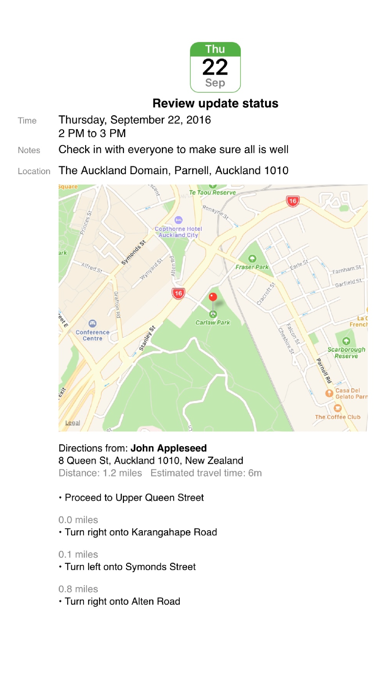
Print maps and driving directions for appointments.
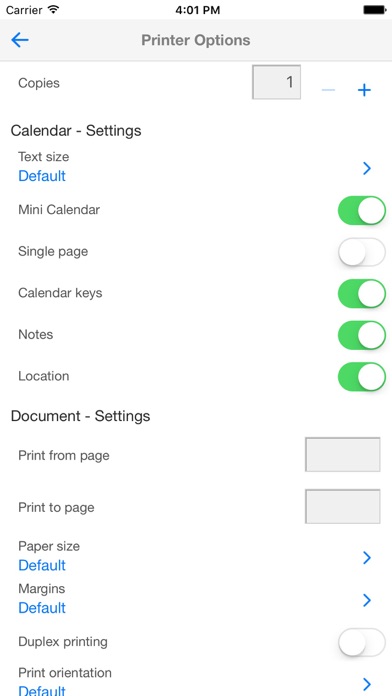
Add, delete and edit your appointments inside CalPrint and print them out straight away. Choose from a range of print options, including layout, mini calendar inserts, text size, single page and more.
Create a list view of upcoming appointments for the next week, month or any date range you choose. Each appointment is itemized and printed in a list.
There is no need to setup calendars as CalPrint uses your existing calendar on your iPhone or iPad. Google Calendar, Exchange and other calendar formats are all supported.
FULL CALENDAR FUNCTIONALITY
• Choose which calendars to display and print
• Email your calendar views as PDF files
• Search for events and print the results
• Easy scroll the week view
• Quickly zoom to a day in month view
• Easily create new appointments
• Print event maps and driving directions
• Print your calendar as a PDF for use in other apps
• Utilizes existing calendars, no new calendar setup needed.
• View and Print by Day/Week/Month and a custom list view
REMINDER FUNCTIONALITY
• Choose which reminder lists to display and print
• Print your shopping list, to do list, or other lists shared with your family
• Filter by scheduled and completed
• Search for text in reminders to filter results
• Email your reminder lists as PDF files
FULLY FUNCTIONAL PRINTING
• Print to ALL printers (Network/WiFi/USB/Bluetooth) via your Mac or PC or direct to most WiFi printers without additional software. Also print to Apple AirPrint printers.
• USB & Bluetooth printers can be used with free print server software (Windows & Mac)
• Print remotely via 3G/4G
• Print using ALL the same document formats to ALL printers used by your Mac/PC
CalPrint for iPhone App Comments & Reviews
CalPrint for iPhone Positive Reviews
Great Customer SupportI purchased this app for an iPhone 11 Pro running IOS 13. It crashed when I attempted a particular function and I sent the information to CalPrint. I was contacted by Melissa in support within a few hours and she said the issue would be fixed in the next update. A few hours later I received a follow-up email from Melissa that the update was now available in the App Store. I downloaded the update and my problem was resolved. I appreciate her proactively alerting me when the update was available. That is a sign of great customer service..Version: 3.6
Crucial for bringing my vision to life despite my challenges.This program is essential for me because I have macular degeneration. It helps me remember important doctor appointments and reminds me to take my medications. I use it to view my appointments on my iPhone calendar. Additionally, the support team has always provided wonderful help and understanding for the many questions I have. It has become a crucial part of my self-care routine. I can't thank the creators enough for making it easier to manage my disability..Version: 4.1
Great app!CalPrint fills a very simple need but does it superbly. I found it hard to believe that Apple's own built-in calendar app for the iPhone does not allow you to print the calendar. CalPrint does the job quickly and easily allowing you to email your calendar as a PDF file to others. To my amazement, when it reached out to CalPrint customer service when it appeared that changes I was making to my Google Calendar were not appearing in the app, they got back to me with an answer — it was my fault — literally within minutes..Version: 3.6.5
This app is AMAZING!I needed an app that can provide a PDF of all my business events within a specific time period. Not only does this CalPrint do that, but it also has the complete day, date and year indicated for each calendar entry retrieved within the specific time period (e.g., 5-Year period for a project). Other apps like “PDF Calendar” only shows the day and date, but not the year; so, if you were to print out calendar entries for a project within a 5-year or 10-year period, you wouldn’t be able to tell what year specific events actually occurred, since “PDF Calendar” only tells you the day and date for each entry retrieved. CalPrint can also feature/print out the notes and location for each calendar entry for those events within the specified time period. This app ROCKS!.Version: 3.9
What I was hoping forI was having issues syncing my Outlook Exchange calendars between my iPhone and PC, with the 2 calendars not matching in the events showing. My iPhone calendar is always the most current version, but I couldn’t convert it to a pdf file. I like to save the latest month of calendar events as a pdf file to archive them. With this app, now I can, quickly and easily! And I can print each day’s events as a separate page in a pdf file that has as many weeks or months as I wish. The format options are great for what I want. I had a question about how to do something that I didn’t see answered in the FAQ. I emailed the app’s support and got a reply with a simple solution in just 15 minutes on a Sunday evening. A great app with great support at a great price. I recommend it!.Version: 3.5.1
Great AppThis is such a great App. It helps keep me organized and on time for appointments. I appreciate the reminders I am able to set, and it is especially helpful that events show up on all of my devices. Another helpful feature is that you can read what your event is, on the calendar, instead of seeing a dot and needing to open up the calendar, as I’ve seen with other Apps. Good design!.Version: 4.1
ExcellentOne of the best purchases I have ever made. Also…if you ever need a backup of your iPhone Calendar, this is another way to do it: use CalPrint to print off the full year from time to time. Yes, there are ways to back up the iPhone Calendar, but sometimes those fail…as did mine. You don’t want to lose all those birthdays and doctor appointments. I highly recommend the CalPrint app..Version: 4.1
Quickly opted to bail.I had what I felt were serious issues in trying to figure out how to use the app. I posted an honest, but quite negative review, and the company got back to me very quickly with advice (Thank you!) I’d asked for a refund, but with the info they gave me I think I can get the hang of it eventually, so I decided to cancel my refund request. To be honest, I’m still a little blown away with crowded app screen, but that may be my 6’3” frame, large fingers, small screen, and somewhat analogue brain..Version: 3.6.3
CalPrint is OutstandingI just purchased and installed CalPrint on my iPhone. It’s an outstanding product that works great. There’s a lot of features that are useful. When I had a couple questions, I sent a query to the developer (there was an easy link on the website) and received back a thorough and helpful response within minutes! Both their product and customer support are amazing..Version: 3.6.2
Time Zone issueOn screen m’y calendar looked beautiful. But once printed I realized the times were all wrong. Then it hit me. The calendar I subscribed to used central time and I’m in eastern. So after about an hour of jumping through hoops I realized how to fix my problem. Don’t bother with the app preferences, change the iPhone prefs to the time zone you want the calendar to PRINT in. What a PITA to figure this out. Not a real user friendly app when it comes to time zone issues and the prefs aren’t easy to understand (we aren’t all coders or time geeks). Otherwise an ok app..Version: 3.6.1
Great service.I wa having a problem getting my printer to print off the app. My printer was connected but when I selected Print nothing happened. I sent in a text stating the problem and immediately got an answer from Melissa. Instead of selecting my printer under select a device I need to select Airdrop printer. It printed off my calendar immediately. Thank you Melissa for prompt and accurate service..Version: 3.5.1
A very helpful appAllows me to keep all my calendars on my phone while also being able to print them out individually. I especially wanted this feature because I keep a bill paying calendar on my phone but like to print it out when doing our family’s finances..Version: 3.9.2
Great App; Great Customer ServiceI’ve been using this app for years and have been very happy with it. A recent update created a problem for me, and when I reported it, I received an immediate reply and in short order, the problem was fixed. I’m still happily using this app and am so pleased with their customer service..Version: 3.8.3
Finally!!Finally found an app to print my iPhone calendar. I’ve been searching for something suitable for a long, long time. My busy life is all scheduled on my iPhone calendar and happy now that I can print it out to post a monthly calendar for me and my family to see the month ahead and plan our days together..Version: 3.5.5
Does what I neededI print 11x17 tabloid size calendars using my iPhone calendar. This is the best printing app I found. It is easy to use. I am using only basic printing but I am sure I does much more than I need for now. I am so glad I found it. It has made my printing so easy..Version: 3.9.1
Unbelievable customer supportThis app does exactly what I need. But what is so amazing is the personal support offered by Melissa. She responds within several hours, and even provided me a custom iOS shortcut to use until the next app update is published to fix a bug. Thank you Melissa!.Version: 4.0.1
Fast and friendly user supportI had an issue with a calendar, and I was able to reach out and get help resolving it. Communications were fast and friendly. I love this app because it prints directly to my Wi-Fi printer without syncing problems..Version: 3.7.4
Best calendar appI absolutely love this app. Especially since I’m a full time worker, mommy of 3 and also a wife. I also am in charge of my parents appointments as well, so this app is amazing to keep things organized. I am able to print out the calendar and add things into my paper daily planner..Version: 3.5.5
Great for organizationIt’s easy for me to put all of my appointments in my phone calendar but I could never figure out how to print it out when I needed a hard copy. This app is so easy to use! I printed all of Santa and Mrs Claus’s schedule out so we could make sure that we didn’t miss anything!.Version: 3.5.1
WOW!!!The most complicated thing of the whole process was trying to remember my iTunes password. Once the password was reset, I downloaded the app. Within minutes my calendar was printed. Thanks for putting the smile on my face..Version: 3.8.3
CalPrint ReviewEverything you need to navigate from your calendar to PDF, print, text or email without any complications you will find with CalPrint. I have been using it for over 15 years and love it :)).Version: 4.1.1
Great Features!We’ve been using this calendar for a few years now, and just love it. It automatically updates on all our devices, so we’re always up-to-date!.Version: 3.8
PatienceI had trouble at first getting this wto work on my iPad Pro but suddenly everything just popped into place!! I have used the old version for a very long time on multiple devices. Would not want to have to ever give it up. Thank you!.Version: 3.6.4
Andrea defines customer serviceI had a weird issue with printing this app and Andrea simply would not give up on me! Quick response initially and several to get me to finally resolve. App is great and when you add outstanding customer service it is the total package.Version: 3.6.2
Ilove CalPrintI have a ton of notes in my calendar and didn't realize that eventually I would not be able to access them. CalPrint has allowed me to access & print anything I need from my calendar from years ago..Version: 3.6.5
Does everything as advertisedTakes a little bit to learn the app, but once you learn it, it’s flawless and it was everything I was looking for exceeded my expectations..Version: 4.0.5
Great app!Great app! I lost the sync between my iCloud calendar and Outlook 365 so I lost the ability to print a monthly calendar for my fridge. This app was the perfect solution! It is easy to use and solved my problem at a low cost!.Version: 4.1
Great support if needed!I have this app on my Ipad and now I got the version for the Iphone. It is very handy for me to have a hard copy of my schedule in addition to the calendar on my phone/Ipad that I can view..Version: 4.1
Love This AppIt makes printing your calendar so easy! You can even turn off which calendars you wish not to print (have have it set as the default). Then all I have to do is open the app and click print. Bam! Done..Version: 3.3
Great toolAre use this a lot to keep track of appointments and I’ll kinds of things so much easier to have a piece of paper, then doing things online sometimes..Version: 3.9.1
Easy to useI’ve been using CalPrint for years to track work and household schedules. I find it easy to use but it offers plenty of extras to get the job done well..Version: 4.0.5
CalPrint is flawlessI have been using this handy app for a while now and it performs flawlessly every time. Never had a glitch. Spits out my calendar in seconds wireless from my office printer..Version: 4.1.1
CalPrint Is A Great Calendar App For iPhoneJust bought CalPrint and have been very pleased with its functionality. Contacted CalPrint Technical Support for help with one minor technical issue, and got quick and excellent support! I am recommending your app to all of my iPhone friends..Version: 3.5.1
CalPrintBest way to print your calendar out there. Been using for a few years now and I have never had a problem with it..Version: 4.1
CalPrintWas looking for a program to print my iPhone calendar and this one works great. I am able to get the different calendars to print in the colors and print on legal paper..Version: 4.0.5
Excellent SolutionSimple and effective way to print calendars from the iPhone. Highly recommended. One improvement would be to compress printing to one page. This capability may exist and I have not yet found it..Version: 3.4.1
Just the App that I was looking for!Perfect calendar app. I can print out our monthly schedule and put them on the fridge so nothing is missed! Can’t live without this app! Great.Version: 4.0.2
Finally, an app that works! Love it.This solves the problem of not being able to print a multi layered calendar stored in iCloud on a Windows 10 computer..Version: 3.8.3
Versatile!Love being able to edit a specific reminder & email or print just that reminder & not have to print the whole schedule!.Version: 3.4.1
Works well! Love this app!It adds much-needed functionality to iPhone Calendar app. Great app! Makes it easy to keep my life organized. It is problem free and very reliable..Version: 4.1
Great for iPhone calendarThis app is great to print calendar out of iPhone it is beyond me why you can’t print a calendar from your phone without an app but until that happens this is a great app to have.Version: 3.5.1
Works well!Intuitive, smart, works well and easily and perfectly print my combined Outlook and Google Calendars from my iPad, or iPhone. So delighted to have found this app!! Kudos!.Version: 3.7.4
Works well. Use app all the time.Glad I found it to use with my iPhone to print out my calendar. One of my more useful apps! Invaluable..Version: 4.1.1
PerfectI’ve been looking for an app like this for a long time. They have thought of everything. Highly recommended..Version: 4.1
Love this app!Saves me so much time. I usually transfer my calendar lists to an excel spreadsheet. Now I just select a format and push a button to print. A dream come true!! Bravo!!.Version: 3.9.1
GreatestThis calendar is unreal. Prints great and easy to use. Looked all over for a calendar like this! I I would like updates. Also, is there a way to make the calandar larger!.Version: 4.0.4
Owner lynnesdoggiegroomroomGreat app for biz & personal Love this app Has made keeping track of my appointments easy and the software has always been compatible with my printers.Version: 4.0.1
Critical app to help me arrive on time for appointmentsI have used this app for years and will continue to do so! Apple’s Calendar functionality is way, way behind industry standard And this app plugs a few key holes!.Version: 3.6.5
Must haveI document everything in my phone and print out a monthly calendar for the family.Version: 3.6.1
Prend seulement une journée de l impression que j ai sélectionnéAvant ça fonctionnait?? Merci.Version: 4.1
A True TimesaverI love having a printed copy of my icalendar on my fridge. This app lets me quickly set up and print. I can choose which calendars I wish to display and it is so easy to read. My copy, paste, resize days are over! Thank you..Version: 4.1
Très utileTrès bien.Version: 4.0.5
Love being able to print remindersI document the progress of my projects in reminders and my husbands health care and I love that you can PDF the reminders and email them to print as a paper copy. Live this app. Printing specific reminders is very very important to me..Version: 3.7.4
Excellent productI enjoy using CalPrint every month..Version: 3.5.4
PrinterThe calendar is okay but it does not have a printer 🖨️ icon. I have to download the app for a printer..Version: 3.6.1
CalprintLoving so helpful to me & my business.Version: 3.3
RatingLook ok for first try.Version: 3.5.1
GreatGreat.Version: 3.4.1
Great FunctionalityThis app is well thought out and has great functionality. Yes it allows you you to print calendars which it does very well, but it shines in allowing you to easily select the information to view and print. 👍🏻👍🏻.Version: 3.2.1
Great appDoes well on what it advertised, great job! The only thing I'd like to address is the design of the logo. It look a bit old-fashioned. Overall, it's a nice app to have..Version: 3.3
Exactly what I was looking for!...wanted my iPhone calendar on paper and voila, there it was. Omg! Super easy to use, and prints right from my phone..Version: 3.2.1
Revised ReviewWhen I first activated the app I experienced some difficulty. This has been satisfactorily resolved. I inappropriately rated it as 2 Stars. Now that I know how to use the app I love it. Far superior to the Apple Calendar. I now give the app 5 stars. I've used the app for quite a period of time now and can honestly say that it is excellent. I recommend it to anyone who needs to keep track of their calendar! I use this app regularly and find it of great assistance to me. It's easier to read than the calendar provided by Apple. When using this application in concert with the Apple calendar the result is very good. I continue to give this application five stars..Version: 3.1.1
So far so goodNot too shabby.Version: 3.1.2
Great appVery easy to use and very clearly laid out. I agree with the previous reviewer-Apple should look at it. It would be hard to go back to Apple's iCal..Version: 2.7.2
Great appExcellent for printing Apple calendars.Version: 2.7.2
Really great appEven with big 6plus screen, nice to have paper backup to plan future events. Big improvement on Apple supplied functions.Version: 2.7.2
Très bon!!!Acceptable mais là version imprimable n'est pas adéquates.Version: 2.7
ICalGreat app!.Version: 2.6.1
GreatLove it works great.Version: 2.4.1
Good appSo far it seems great.Version: 2.4.1
Cal printGreat!.Version: 2.4.1
Cal printGreat...so handy when outside or upstairs from my computer which is downstairs..Version: 2.4
GreatApp performs as advertised. Print layout was good. Very easy to use. Shame apple doesn't allow this in iCal.Version: 2.1.1
Time zone issue between Apple iphone/ipod touch and Ical solvedThis is a Great App and is very helpful. we had some issues in the initial stage but the Customer service was very good and they were able to solve the Issue with the Time not matching with Apple Calendar and Ical. Make sure to check the settings confirm that the Time zone in both the places TIme & Date and also in Mail, Contacts and Calendar are set to the same Time zone..Version: 0
Free International Money Transfer 💸Enjoy high maximum transfers into more than 20 currencies while saving up to 90% over local banks! The cheap, fast way to send money abroad. Free transfer up to 500 USD!Version: 4.1.1