Mocha WOL Customer ServiceMochaSoft

Mocha WOL Customer Service

  1. Mocha WOL Customer Service
  2. Mocha WOL App Comments & Reviews (2026)
  3. Mocha WOL iPhone Images
  4. Mocha WOL iPad Images

Wake-on-LAN for easy wake up calls. Use your iPhone or iPad to power up a sleeping Mac or PC on your network.

FEATURES:

- Easy detection of local computers with Bonjour and NETBIOS lookup.
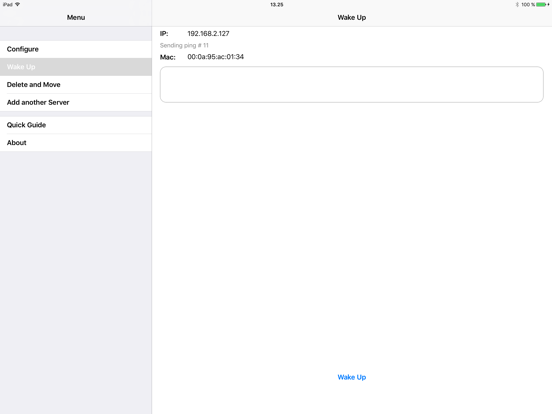
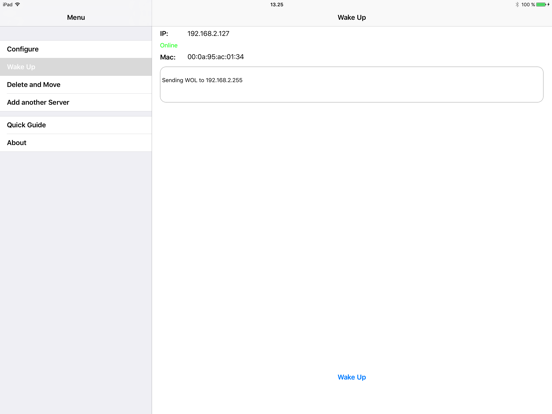
- Can ping your computer to check, when it it is ready.
- Broadcast on a LAN.
- Works from other networks as 3G and WIFI.
- Can keep 30 configurations for computers to WOL.
- Build in help guides.

HOW IT WORKS:

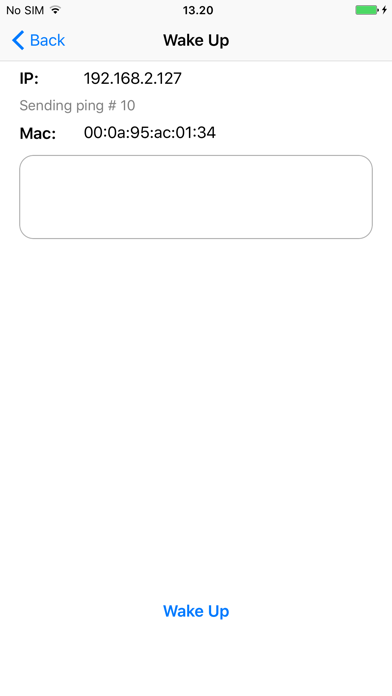
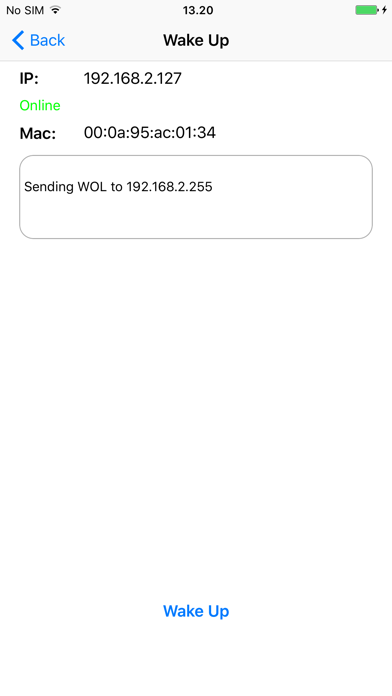
When you select a computer to wake, a special UDP data frame is broadcast on the LAN. When the sleeping computer see the data frame, it will wake up. If the iPhone or iPad is on another network, such as 3G, you must first configure the HOME router to forward the special UDP package.

Mocha WOL App Comments & Reviews

Mocha WOL Positive Reviews

It works.The app works. That’s the most important thing. It DOES work. But the interface is pretty awful. I’ll deal with it, though, because the app does exactly what it needs to do..Version: 2.1

Awesome App Does what it's supposed toJust found this app for Wake on Lan & Wake on Wan as I was looking for a replacement for a 32-bit app I had been using for years. With iOS 11 I can no longer use that app & found Mocha. Thank you Mocha. Seriously. I'd make one suggestion for the app, it'd be nice if we could choose to have the "wake up" screen show up when first opening the app. Other than that, this is great..Version: 2.1

Works as advertisedA spartan app, which works as advertised - I have a couple of computers I want to wake while on my home network, and I can use this app to wake them up. A couple of feature suggestions that could make this app great: * Ability to show status from the main screen * A “force touch” menu to wake a computer..Version: 2.1

Great app for beginnersThis app is great for beginners who are new to waking up their computers via network. Others have complained the interface isn't the best. Though I don't have any issues with the interface. Overall, this is a good app..Version: 2.2

It worksIt pings your target until it wakes up and then let you know that the target computer is online. Using your router software , be sure to assign a constant IP address for the target PC in your intranet..Version: 2.1

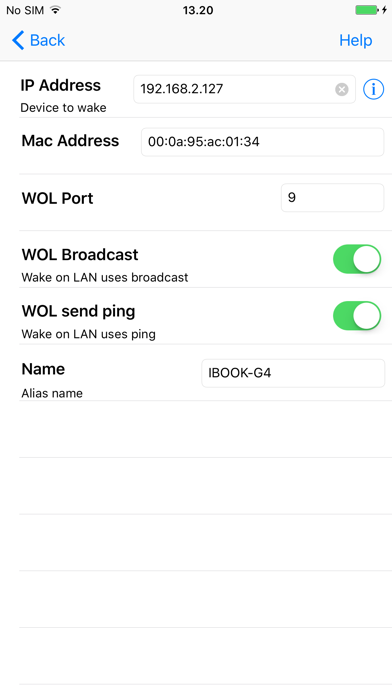
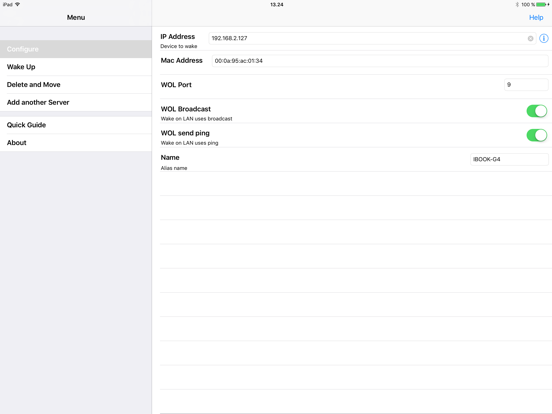
Very simple and straight forwardI have a windows 10 PC. Make sure wake on land is enabled under the Ethernet controller in device manager. Open up a command line and type “ipconfig /all ” without quotes Found IP and MAC address(can be called physical address) Filled out the boxes (IP and MAC) in the Mocha app. Left everything else default Turned off PC. Walked away and pressed “wake up” and it worked. Took less than 5 mins. Good and straight forward app..Version: 2.1

Great app!Does what it’s supposed to! Please have the app do a dns lookup every time when a domain is entered instead of an ip address. I have to create a new connection every time my IP address changes..Version: 2.2

It works superbly!Before Moca WOL, I have tried the other free apps with nice looking interface and 4.5 stars but they don’t work. Moca WOL works right after configuring it with my NAS. No frills! No hassle! Right on!.Version: 2.1

Confused.What if my pc is wireless and encrypted & Do I need to adjust my norton firewall settings??.Version: 2.1

It worksThe UI is a bit kludgy, but it’s a simple task. This app gets the job done. Can’t really ask for more..Version: 2.3

Love itLove the app, trying to figure out if it supports Siri Shortcuts? Got Siri to open the app, but trying to wake pc with one voice command.Version: 2.2

Still be compatible for ios12 and it’s great !Please don’t upgrade your sdk to newer version..Version: 2.3

Works, but not convenientTo wake up already configured host, one has to do several taps. This is inconvenient. It would be better to have configured hosts as icons on the first screen to wake selected immediately..Version: 2.1

Use it everydayIt’s awesome.Version: 2.2

Great but needs a few tweaksThe new UI is much cleaner and this is a great simple app for waking up computers on your network. I think the only problem is it needs to be a little quicker to get to the actual wake up button. The menu item should be above the configure option since you will be waking up more often than configuring and with more room open at the bottom of the screen at the initial menu page, it would be nice to have a larger "wake up" button that wakes up your top IP address. That way a click to open the app and a click of that button could send the packet..Version: 2.0

Excellent, but could still use a tweak or twoGenerally, this is an absolutely excellent app, supporting both Wake on Lan, and Wake on WAN as well. Both work as advertised. Still, if I'm allowed a little constructive criticism on this (again) excellent and versitile app, I would say it could use a little sharpening in the UI. If the primary purpose of this app is to wake a computer up, why am I brought to a selection menu asking what I want to do (Wake, configure, etc) each time I boot it up? Maybe other people have a much deeper tweaking need with their WOL needs, but for me it seems odd to have the app's primary function buried under an extra layer of UI..Version: 1.0

Works well, inefficient usage thoughWorks to boot my PC, which is what matters most. It baffles me though that every time I start the app it brings me to the configure page, as if that is the most common scenario. This requires 4 taps to boot my machine, when ideally it should be one. Great otherwise....Version: 1.1

Great appI haven't done any extensive testing with it, but it was really easy to set up and I was able to wake my sleeping laptop over wifi with no problem. The only think I would add is maybe a quick wake up button on the home screen for a most recent or favorite computer. It's a little annoying to have to click through menus to get to the option. But it's not really a big deal..Version: 1.0

Excellent App!This app works great! I have my router configured to forward the wake on LAN packet from this app, when I am away from home, and it works perfectly! I can also wake up my desktop with in my local network as well. This app is free and is the perfect solution. Why pay for some other app when this is free with no ads and works great?.Version: 1.1

Easy, Quick, Just worksI don't have time to mess with my router settings and this does the trick of waking my Mac (connected to my router by ethernet cable) from my iPhone and iPad so I can access my iTunes Home Sharing from anywhere in my home. I haven't tried waking using 3G yet, but for local stuff, this is great!.Version: 1.1

Worked greatI have a Windows Home Server upstairs that I don't leave turned on all the time, so wanted a program to wake it up from downstairs. Installed this program, entered the MAC address, and it worked perfectly. Thanks for an awesome app, one that's free!.Version: 1.0

WorksSeems to work just fine. There is a basic scanner which can retrieve machine names but not the Mac address. It's just one extra step to enter manually but not a biggie..Version: 1.0

Great!!Very easy to configure and easy to use!! Been trying to use Splashtop WOL, will be using this until they get it together and come out with interactions on how to configure that!!.Version: 1.0

Best free WoL appI tried many of the free WoL apps and this is the best. Easy to save configs, works outside of LAN, resolves host names (for dyndns), allows you to change listening ports, etc. It even pings the target afterwards to make sure it's awake (if your router allows outside ICMP)..Version: 1.0

Actually works!Does what I need it to do... wake up my server whenever I need it. I tried two other WOL apps and they both didn't work. This is the only one that did..Version: 1.1

Works like a charmDelivers on most points. Would be nice if macaddresses could be discovered too. How about auto-wakeup on joining a certain wifi? I call it coming home mode..Version: 1.0

Worked great until 6.1.2This app was working great for me until I updated to 6.1.2 OS. It worked fine with 6.1 on both my iPhone 5 and iPad 3..Version: 1.1

Thank you!Thank you so much for making this client and making it free no less! It works perfectly and looks great too. KUDOS!.Version: 1.0

Great appI liked the app when I got it last year on with the old UI. Love the app now with the new UI. Big thanks to the dev for such a great app and for their continued efforts to keep it modern..Version: 2.0

Easy to useI was looking for an app for My iPad which I could use to Wake Up my PC on my home network. This little app was easy to setup and does the trick!.Version: 1.0

Best wol app in the store!Work great both inside and outside the network. Just need some knowledge to change broadcast address to get it to work outside the home network. Google WW-DDRT.Version: 1.1

Wish all apps worked this well!WOL itself sometimes fails, but I think that is more of a weakness of the protocol. App is excellent..Version: 1.1

Exactly what it's supposed to be:Simple and functional. IP field DOES support URL, does exactly what it says on the tin. Some folks need to get some perspective before panning apps..Version: 1.1

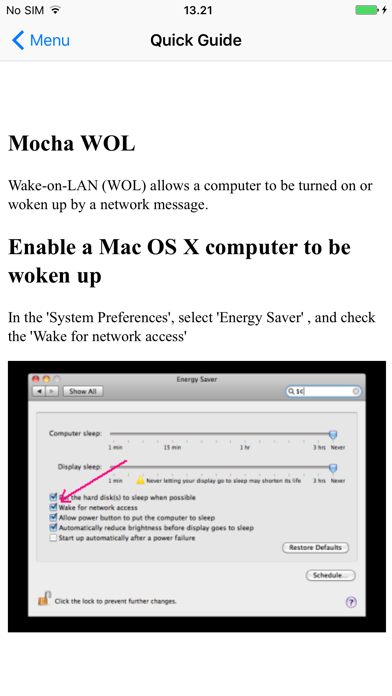
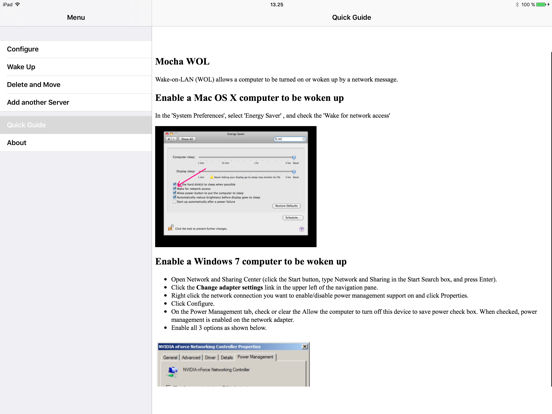
Exactly what I was looking forEasy setup, easy to use. Perfect simple WoL app with great instructions for users that might need a little help..Version: 1.0

Works as advertisedWorked on the first try. Just what I needed since Logmein Ignition doesnt seem to like waking on lan..Version: 1.0

Works as advertisedThanks for the app. Works great. I use this with my sonos system to wake up the library drives..Version: 1.1

WorksWorked right out of the box. Great basic WOL for those days you forgot too..Version: 1.1

Great app!!Does exactly what it says. Occasionally crashes when multitasking but excellent nonetheless.Version: 1.0

Works flawlessly and is freeWhat more do you need from a tool that sends a single packet?.Version: 2.0

OMG AN UPDATE!Rejoice! OP is not dead! 4.5 years later we finally get a better looking UI. Looks great on my 6S+, and still works, too!.Version: 2.0

GreatReally useful and great application and for Free !!! Am using it to wake up my server from both LAN and Internet and it's working great....Version: 1.0

It worksSeems too little functionality for a single app. MochaSoft also offers a VNC app that does the same thing. The VNC app is very cool, but why offer this? Needs to do a bit more..Version: 1.0

Great app :)Have been using this for about a year and it has never failed me. Great app, awesome price :).Version: 1.1

Simple and worksWorked the first try. Very neat. Ping feature is nifty too..Version: 1.1

PerfectDoes exactly what it's meant to, no less no more. And all that for free.Version: 1.1

Simple, easy, worksAll of the above plus I’ve been using it for years and years and never had issues with it.Version: 2.3

It actually worksAnd you can’t take that for granted….Version: 2.2

Great appWorks as expected..Version: 2.2

A lovely little app that does exactly what I wantedA little lazy UI but hey... It does what its supposed to do :) Thank you app developers 😊.Version: 1.1

The best WoL appEasy to setup, allow you to see if a computer is online, easy classic iphone interface..Version: 1.1

Works greatWorks as planned. Can wake up my ubuntu server. No prob. Quick and easy.Version: 1.1

Ça fonctionneJe croyais au départ qu'il ne fonctionnait pas ,mais c'était la configuration de mon bios..Version: 1.1

It just works!Great App! Remotely turn your PC on from anywhere..Version: 1.1

FantasticWorks as it should and easy to setup. Thanks!.Version: 1.1

Awesome!Great app! Works well!.Version: 1.1

Works over 3G!Works as advertised. Forward the udp port to your Mac address and works fine via 3G iPhone4!.Version: 1.0

GoodNice, easy, simple. Suits my purpose. Thanks for being free..Version: 1.0

Works wellSimple and easy, don't see any reason to even consider the other apps which cost money. Thanks for making it free.Version: 1.0

Free International Money Transfer 💸Enjoy high maximum transfers into more than 20 currencies while saving up to 90% over local banks! The cheap, fast way to send money abroad. Free transfer up to 500 USD!AdvertorialVersion: 2.5


What do you think Mocha WOL ios app? Can you share your thoughts and app experiences with other peoples?

Please wait! Facebook comments loading...

Mocha WOL iPhone Images
  • Mocha WOL iPhone image 1
  • Mocha WOL iPhone image 2
  • Mocha WOL iPhone image 3
  • Mocha WOL iPhone image 4
Mocha WOL iPad Images
  • Mocha WOL iPad image 1
  • Mocha WOL iPad image 2
  • Mocha WOL iPad image 3
  • Mocha WOL iPad image 4