TP-LINK tpCamera Positive Reviews
Customer Service is the BEST!I have five NC450 for about six years and recently had weird issues like not able to connect to the live stream remotely. I am very good with electronics and I tried number of things including both basic and advanced levels to resolve but couldn’t. As a final resort, I have reached out to the customer and etc have escalated it to the engineering team. And they were able to resolve the problems with my cameras very quickly and professionally! One of the best customer service experiences that I have ever had! Keep up the good work guys! And make sure to keep more people like them in your team! Thanks again!.Seyfi1234Version: 3.1.20
Easy to UseI have had this camera for well over a year now and it has gotten even better. They have updated the software for the app and it’s amazing. The latest update which is the reason for the review, is you can save favorite angles the camera is pointing. No more manually tilting and paning to get my favorite angles. I just hit that angle and it goes right to it, amazing!.Ppayne365Version: 3.1.1
Good camera when I first bought it but quality of the picture has been declining with each updateMy Nc220 and NC230 were crystal clear when I purchased several months ago but are now highly pixelated pictures with any movement. I bought this so I could watch my 85 year old mother take her medications as she had a big problem with adherence which landed her in the ER and short term care a number of times. Since I simplified her medication regime and started watching her on the “Pill Cam” she has been fully compliant, her blood pressure is totally under control and no more ER visits. While the camera is still useful for monitoring my mom, I would like my clearer picture back. It has gotten so bad that at times she looks like The Thing from the Fantastic Four..CamerojockVersion: 3.1.3
Easy cam managementTplink cam app has turned into a stable and easy to use app. I recommend using it..Baig AdeelVersion: 3.1.6
The camera’s great. App mediocre.The app’s just not particularly user friendly. It works but I find it difficult.
One MAJOR thing is that I can’t figure out is how to upload to iCloud. They push you to use their pay cloud service. I already pay for iCloud and want to use it for storage; NOT theirs.
I bought your camera. It’s mine. You ain’t gonna rope me into buying your cloud storage too!.SixPoints13Version: 3.1.19
App update breaks the camera!Recent update has broken the camera! It shows up as “Live” for a few moments, then says “no updates for 30 days” and won’t show me a live view. Last pic shows a Christmas tree in my house, so it was from back around Christmas. So appears it was the recent update (3.1.4) causing an issue with my NC290 camera..SupamikeVersion: 3.1.4
Works great, ....butI don’t care for the new interface. There are many new buttons and choices, but it seems to just make it more complicated.
I would love to display it on my TV but the larger image appears sideways and the only available control flips it 180 degrees..Sparky six sevenVersion: 3.1.1
This is great!This is use for security it takes a long time to load sometime but it’s fine!.Retrograde 3Version: 3.1.20
Great useThis work very good in my company.Ricky RichterVersion: 3.1.14
EngineerExtremely useful and amazing.Abdel wahabVersion: 3.0.8
Tplink cameraGood.Baby309Version: 3.1.8
Missing some itemsThe app is grate , easy to use , so is the products
How ever missing some stuff
1. More Languages in the app like Arabic ( come on 1 Billion of arabs its a big market )
2. Adding the app to Apple TV
Only then i think it will be perfect.ShumokhVersion: 3.1.8
Noisy cameraCamera is very noisy when looking remotely..AmbermonkeyVersion: 3.1.1
Awesome systemIf you have ever wanted a camera that does everything but you don't want to pay the steep prices or pay for monitored security, go for this company. Their app is intuitive and the camera is awesome and high def. I can even speak into it and have my dog at home hear me. Highly recommend!.SffrVersion: 2.5.9
BugBug no camera.Daniel sabinoVersion: 3.1.6
Works now with updateDownloaded app and set up camera, was working fine. Then opened up camera on computer and could no longer view on phone! Would not show up no matter how many times I reset it or even change all the admin setting and re add it to my cloud account! Working fine now with new update.Sano sVersion: 2.0.6
Fast and easy to install.I would say download the app plug the Internet cord into the device turn on the power turn on the app. Follow instructions in less than five minutes should be up and running..SimdpsVersion: 2.6.2
Export all photosI love the app, it has a nice design and all of that, but it’s missing a feature that I need ASAP. I would love to be able to export all the photos and all the videos all at once. I have over 100 photos, and I obviously can’t go and export every single one of them individually. I need the option to export all of them to the camera roll or to iCloud Drive or something..Denniss h.Version: 2.6.2
Works wellNot sure why all the poor reviews. I think this product and app work great. Clear picture, easy to use and amazing given the price vs other products on the market..FiggymamaVersion: 2.5.9
For some reason always off-lineFor some reason my camera always offline can you please tell me why.Sultan haddadVersion: 3.0.5
Great Camera, Only Negative is That it Can't Move!The app is great regarding control of the camera, the only downside to the n200 camera is that it's stationary (meaning once placed somewhere it can't move left, right, up, or down. But other than that it seems to be great!.Eterno VitaVersion: 2.0.6
Camera NC220Perfect security camera for the price and so easy to setup, bought a trail cam yesterday. Now, planning to buy more TP-link video camera to complete my home security..Jonas Mini iPadVersion: 2.5.7
Works!App is simple and good. Good image quality with remote viewing. I suppose the main credit goes to the TP link cameras - $35 a piece for high quality video is good value !.PtcadocVersion: 1.1.4
Good productIt works very well but you much have a good wifi connection.Man of God kingdomVersion: 2.3.8
Tp camsMy father has Dimentia the camera’s give me peace of mind and the freedom to let him roam the house on his own. Great quality and easy setup!.Gozer4377Version: 3.0.6
ExcellentVery good camera for it's price! No problem with it!.Nonong19Version: 2.3.13
Great Cam!!Love it! Does exactly what it said it does! 😊.SherrieBohachVersion: 2.4.7
NC220 Cameras stopped working with IOS 14.The cameras stopped working with IOS 14. No update is available yet to fix this..PickeringmanVersion: 3.1.8
Great cameraMy camera works as intended, I have no issues using this device. Yes I would recommend this camera. My friend has one as well and has no issues either..Corey1970Version: 3.1.4
Terrible Night vision and sensitive motion sensor.For better night vision, you have to buy a extra infrared lights on amazon. They should add some more on their camera.
The motion detector will detect any change of light. It will send alerts for the slightest beam of light by a car for example. That could be frustrating if you use it as a alarm..AlliyanceVersion: 3.1.1
NiceGood quality. I wish I were able to record!!.JojmtlVersion: 3.1.1
Only works on home WifiRecently the camera does not work unless I am in my home and connected to my home Wi-Fi, cannot access remotely anywhere else. Is this a software bug?.NginonVersion: 3.1.1
Great appWorks fine with no issues a would recommend getting a tp link camera.Aidan156Version: 3.1.1
Settings need tweaking, otherwise ok...The email on setting keeps going off by itself and needs to be re-checked every time the mode is set...would be so much easier if it would just keep its setting!....Armino777Version: 3.0.10
Great cameraI am using these cameras to monitor our house in the past three years and didn’t have any problem
Great product with affordable price
Easy to install and use.KZ old gradVersion: 3.0.8
To caméra for iPadCan’t find the dame app for the iPad . Even though it says it is compatible !.NormBCVersion: 3.0.8
Easy setupI was worried at first that I. Light the wrong camera. It turned out it was exactly what I wanted and was easy to setup I'm going to buy a couple more just cause of the decent price..DangermayVersion: 3.0.5
It's like a tank or timed takes a licking and keeps On my way! TickingThank you james.JohnstreetguertyVersion: 2.4.7
AwesomeLove this app.Keelow -GVersion: 2.4.7
Work WellYes.Inuit32Version: 2.2.8
Wow!Super appli!.DkciisdbciVersion: 2.4.7
NC450Produit excellent.facile d'installation et bonne qualité. jai acheter en premier un d-link bug d'installation et wifi fonctionnait plus a plus de 3m. je recommande tplink..KimbedardVersion: 2.4.7
JWork pretty well.PylandeurVersion: 2.3.8
Great appAwesome.ChililandVersion: 2.3.8
AwesomeClear picture and excellent audio. Can record. Take picture in the cloud with face-to-face output. Setup was fast and easy. I plan to get more for my friends..JibloVersion: 2.1.1
AwesomeAwesome product
Great camera picture
Easy setup
Well worth the money.Troy w 1971Version: 2.1.1
Free International Money Transfer 💸Enjoy high maximum transfers into more than 20 currencies while saving up to 90% over local banks! The cheap, fast way to send money abroad. Free transfer up to 500 USD!AdvertorialVersion: 3.1.22
TP-LINK tpCamera Negative Reviews
Good when it worksGranted living in a 2 story apartment made of concrete will do no favors for WiFi. We have a 5G setup and TP link repeater made for a space 5x of what we have.
All that said the app does what it’s supposed to most of the time. One of my cameras has direct line of sight to the router and it’ll drop signal or the app will just hang several times per week. Not sure if that’s the app or camera firmware but I’d say the whole ecosystem needs some work. Kinda hard to beat for the price point though.
I wouldn’t recommend the app or cameras on WiFi for a business but for a baby cam or home install it’ll work just fine. Good enough reason to tell your wife to stop obsessing over the stupid camera and get some sleep.
June 5th update.
Neither camera will tether to the router. Wired the cam to router, tried WPS, nothing. Setup for the moment is completely useless..AjaccsVersion: 3.1.1
IPad ReviewThis app never gets better. From the initial screen, I see all of my cams. I have 4 TP-Link cams, but I can only view one Live cam at a time. I’d like to see all four Live. The settings are repetitive. And worst of all, I can’t adjust the time interval for email alerts because the app is designed with a scroll bar that cannot be scrolled on an iPad..DanariusVersion: 3.1.3
Worst customer serviceBeen using the nc 250 camera for over 18 months now
It worked perfect at the beginning however lately i can hardly view the camera once a day
I keep getting notifications through the day but its of no use as i cant view the images/video.Eldin123Version: 3.1.4
Latest version keeps crashRecently I updated to version 3.1.8. Then problem comes. It keeps disconnecting whenever I open a camera. I had no issues using the previous version 3.1.6. But now, I can't go back to that older version.Unfortunate user 2019Version: 3.1.8
Glob Forbid There’s An Update!I’ve had this camera for about three years now and every time there’s an update available, the app stops working anywhere from 2-4weeks.
To say this app is unreliable would be an understatement..DauraLeanVersion: 3.1.1
Camera not listedInstalled app and my C220camera not listed when trying to add camera, dissappointed!.TapoDanVersion: 3.1.20
Stopped working with iOS 14I have 4 cameras that are now useless because developer hasn’t updated to ios14. Please fix it!.RigaritaVersion: 3.1.8
Very bad last upgradeVery bad last upgrade.S-K SINGHVersion: 3.1.0
Very buggyVery buggy.MtsfsVersion: 3.0.10
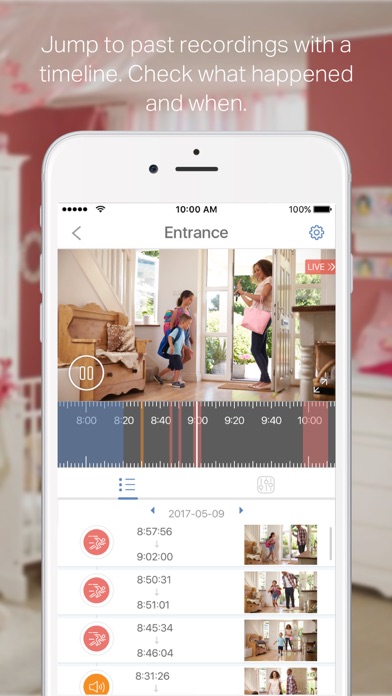
Why screw up a working feature?Checking and viewing recorded data was fast, responsive, intuitive and easy. Amazingly the developers managed to break all of that at once. The timeline that you scroll to and then pinch or stretch and then push play in several times until it finally quits timing out is nether fast, responsive or easy and only has a brief flirtation with intuitive.
June 12.
Nice job with the sudden flurry of fake positive reviews. With the latest patch you now cannot even remotely manage the camera. Why not just roll back to the pre-April app?.Karen4488Version: 2.5.9
To-link cameraThis outfit is a joke. Got a cloud camera with a to-link router and tried to set it up. The instructions are barely literate, to say the least, and woefully skimpy. After I finally got the camera connected to my home wifi, the software said I needed a "firmware" update. Of course, the update failed, and there's nobody to talk to about it. Continual message of "update failed, try again later." But there is no later. This is just a piece of crap outfit. Nobody (at least in the English speaking world) should waste their money on TP-link..AncientMariner1940Version: 2.0.6
Nice when it still workedEver since the last firmware upgrade, most of my cameras show up as offline in the app, but work fine via the website. This latest version of the app fixed this for one out of 4 cameras. Still needs a lot more work before being a useful app.Fl nerdVersion: 2.0.6
Loss of cross regional viewingThe loss of cross regional viewing via mobile phone makes this app redundant. No more checking on webcams at home while on the road. Having to find a computer , log on and use the web based version is a waste of time.
This issue has been going in for months already. Let's get it fixed !.YyzsinVersion: 2.0.9
App still crushingNot sure what you did with the update for this app. January 11, 2017 the app works worst than ever. Cannot access my Camera is without the app crashing. Hope you guys get this right soon otherwise I will be taken down my network and purchasing new cameras. I have over four locations and over 30 cameras altogether..FirehawktoonVersion: 2.4.6
App needs to be updatedApp should be updated, it shows notification of update available but it is not working properly for more than two weeks.AimanaaaaaaVersion: 2.3.8
Decent but not greatI can't set a network that isn't being broadcast; only SSID's that are broadcast. Motion sense was visible once at initial setup but isn't available after that. I bought two; one is still in the box. Thinking on returning it..BackwashbobVersion: 2.5.9
Not ReliableApp keeps loosing sync with the cameras. I'll be viewing the camera and it will just go off line. The only way to view the camera again is to do a power reset on the camera..DewerskiVersion: 2.2.8
CameraThis Item is the worse I never I had before, since the day one I brought it , I can't see anything clear , only mix of color s, I requested help so many times that I give up. DONT BUY THIS CAMERa save your money for a Dlink is cheaper and better products.Julio4135Version: 2.5.7
Great butIt needs to continue recording even when I exit the app or lock my phone, there's no point if it at all if I have to keep the app open at all times, FIX ?!?.DVOHONBEATVersion: 2.5.6
Terrible - time to return this cameraApp is horrible, so is the Website. Very disappointed. You cannot change the Wi-Fi network unless you re-install which is not a quick task. Web support and FAQs are not helpful..Axl HuckleberryVersion: 2.0.11
UpsetI use to be able to view it from another country suddenly now is unable to . Please look into it . Kept saying will update for cross region viewing . It had been a while ,please get it right . Thank you.SuespeedVersion: 2.0.6
Needs an updateIt doesn't let me update the firmware. Keeps failing. Cannot connect away from the house either.
This app needs a major update. I can't even connect anymore. Went from being a 3 star app to a big fat 1!!!.Cpt.Jesse310Version: 2.1.1
Connectivity Issues?I can't get it to operate for more than a few inputs before it locks up or crashes. It also seems like the app isn't complete as it doesn't have very good functionality..MRB1968Version: 2.5.9
UnreliableOnly works about 10 percent of the time. Always gives the same stupid error after 5 minutes of trying to connect, bad network connection.TurboluisVersion: 2.0.9
No useApple’s 16.1.1 update and your app no longer seems to work. Any answers?.ZoupelleVersion: 3.1.15
WorstThis company is stupid. There is no where to call for tech support and their products are cheap. This app won’t sink anything.JaydeCrystalVersion: 3.1.14
App Stopped WorkingNone of my cameras work and my app stopped working. Tried resetting everything, now the app won’t download….MetooreduxVersion: 3.1.14
Just crashes, nothing elseAs soon as I installed the September 28 update, I was unable to access my cameras. All the app does is crash. A shame, previous versions of the software weren’t bad. But this release is terrible..John and JoanVersion: 3.1.12
This app has serious accessibility problemsAre use this app with voice over, it has no end of accessibility problems. there are lots of unlabeled buttons throughout the app, especially in the live view. as far as I can tell, there is no way to access 24 hour recordings from the camera. The camera itself is actually quite nice, it's a shame that it's being spoiled by such a crappy application..Shawnk123Version: 3.1.8
App is terribleKeeps loading/initiating... very annoying as I am using it as a baby monitor..ValAttVersion: 3.1.8
Bug reportDevice list reorder does not work. clicked on the up/down arrows on top left and drag device up or down has no change in camera list order..Flash4t5Version: 3.1.8
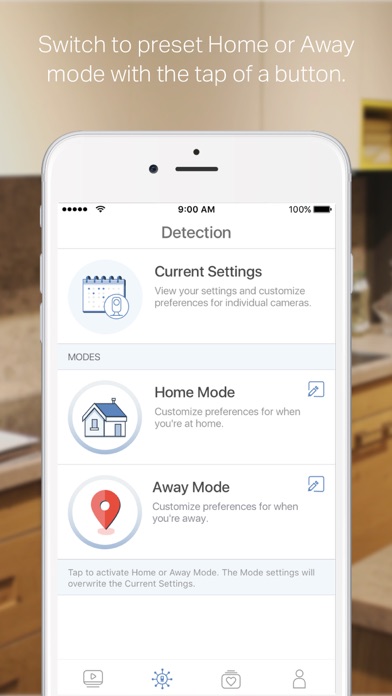
No frills camera and appGot this a few years back and it does the job as advertised. But the lack of integration with any smart home protocols really makes it feels dated. And there’s no way to auto-switch between home and away modes which makes having modes a bit pointless..Skinnypig118Version: 3.1.8
Used to work, now it can’t find my cameraThis app used to be amazing. I don’t know what your updates have done, but now it will never locate my camera. No matter what I do I get “camera cannot be located” and as a result I will never purchase another of your products. FIX. YOUR. APP..Caitlin5150Version: 3.1.8
Newer Version takes 4X the TimeThis new version is seriously flawed compared to earlier versions. I had to reset my cameras and because the new version is lacking clear indications where to input information, it’s taken me 4 times the time to figure out what to press, where to find things and get my cameras up and running again. Very poor job at making this easier..Dogtooth22Version: 3.1.1
Not doing good (SECURITY ISSUE)NEEDS WORK! Cameras goes offline very often at least three times a day requiring a manual power off and on, the one camera can pan down anymore. Bestbuy had pulled the product off the shelf for some reason. Had to buy a d link camera, no motion tracking features. Hoping for the best!
CAMERAS SEEM OR APPEAR TO BE HACKABLE OR CONTROLLED BY A THIRD PARTY. The camera will pan and tilt on its own even with motion tracking OFF! This happens on some occasion which leads me to conclusion. The camera will be directed towards a wall always and not some random spot. Bestbuy has pulled the product off the shelf but no details as to why. The camera will go offline every 20 mins requiring a hard reset to factory settings. Total security is lost when the camera is vulnerable to attack to make it offline or controlled to point at the walls. I’ve moved the camera into a different position physically and by random fluke again the camera was pointed at the same wall on its own not showing the front..BXBOY416Version: 3.1.1
Latest update shows camera offline randomlyMy wife and I both have this app. Up until 2 months ago everything worked perfectly. Now, the app shows the camera offline everyday, but not always for both of us. Most of the time it shows offline for us both, but there have been a few occasions where we’re sitting next to each other the camera is working perfectly for one of us but for the other it’s “offline”.
Prior to the update we both could view and control the camera at the same time from our phones. Now, we’re lucky to be able to use this camera for more than a few minutes a day before it goes offline.
When it’s working, the camera is great. But without a working app to control it, it’s just a paperweight. Will need to look into getting a better app and camera if this isn’t resolved soon.
Update: now it’s not just the app. With the latest firmware update (1.4.0) the camera itself goes offline and has to be unplugged and plugged back in for it to come back online. But within a couple of hours it’s off again. Dropping my review by 1 star..PU DaddyVersion: 3.1.1
Can’t link to existing device after upgraded to 3.1.1Can’t find my device no matter via Ethernet not wifi, even after reset the device.A**pVersion: 3.1.1
App supportGreat when it works... anyone know how to contact the app developers to ask a question? Nothing online and zero support for non-standard questions.....Buzzfeed4everVersion: 3.0.10
App sucksThe camera quality is great and when it works it’s perfect. But the app doesn’t work more than half the time. Always ‘initiating’ or the wheel just spins..Hm328Version: 3.0.10
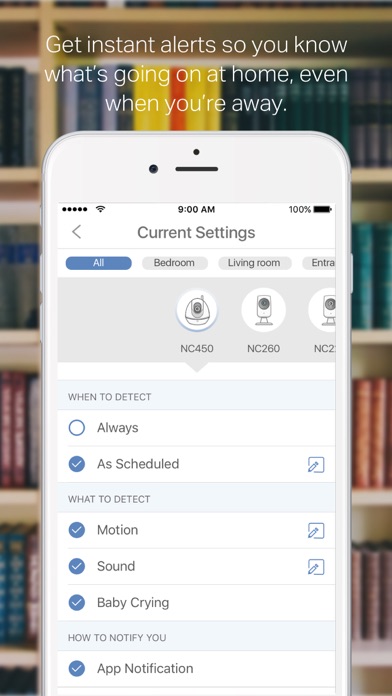
N230Have an excellent signal from my router..... camera does not always pick up detection when I come in. Camera pointed at entrance about 15 to 20 feet from door. Not sure how reliable this is. Settings Time zone etc are correct. Why is it so inconsistent even when it is on ‘live’. Motion and audio both checked. Been using it for a week....unreliable so far..Olympicfan14Version: 3.0.10
Updated review - better now**new update mar 2018** back to being crap again. Usually won’t connect on first, second, third attempt... is my camera defective? I don’t know, but it sucks.
**update** just installed the newest iOS 11.2.6 and the app seems to work consistently now. Will keep using and update this if anything changes.
Usually takes about 10 minutes to connect to either of my cameras. Just loads.... and loads......... and loads.................. and loads,,,,,,,, then quits.
Otherwise picture quality is good, although doesn’t really matter if you can’t connect. Setup was easy but again had to do it a couple times as the app froze during setup on both cameras. Also the mic function is choppy out of the camera speaker.
I was attempting to use this as a baby monitor but may have been to go back to my standard Motorola monitor..Dude-arotamyVersion: 3.1.1
GarbageThis app is garbage. It keeps asking me to update the software and the software update didn't exist. It's a waste of money and a piece of garbage..GllvVersion: 2.3.8
Waste of moneyBoth the camera and the app are a waste of time and money. Set up is incredibly difficult and the app goes into a loop of wanting to update and then being unable to update.
don't waste your time or money..MeinwegVersion: 2.0.11
App re-design is trashThe old app was great, it was functional and well designed. The app re-design update turned a great piece of software into absolute garbage. On the odd chance the app works and connects to the camera, the interface is so goddam clunky - you now have to tap 3 times (on different ui elements btw) to get into a mode where you can see and hear from the camera. The other times you end up looking at a loading spinner. This update is the Windows Vista of camera software..BjedrochaVersion: 3.0.7
New update doesn’t workAfter updating the app to 3.0.6, the video never loads, just a spinning icon. The night/day mode is gone and the camera no longer allows for any adjustment. Clicking the support link on this app page goes to a 404 Not Found and emails to the company go unanswered. Support I can find online says to reboot the camera from the web app, but that is gone too.
This company seems to have gone downhill, released an app before it is ready, crippled the web version and stopped responding to support requests..Nsdtr68Version: 3.0.5
App update sucks!App sooooooo lagy on finding and trying to view recorded video. Takes over 2hrs to load a clip. Scrolling shows motion and something was recorder but to play it waiting n waiting and doesnt even play it in the end. Fix this the camera is great software is garbage..Johnny BozVersion: 2.6.2
You have to SCROLL for HOURS to find any video!The old app they provided you with a list of recorded videos when motion was detected.
Now they give you a time line, if you want to see yesterday’s video, you have to SCROLL left over and over to find “motion”. Forget it if you want to find a video from three days ago, you’ll have to scroll left for like 5 minutes! Beyond stupid!
Bring back the LIST of recorded videos!
Also, no camera presets! My camera from 2006 has presets!
They support FTP photo upload, but you can’t access it from the app, you have to use the Web interface.
The NC-450 is a great camera. This APP is garbage!.YuprulesVersion: 2.6.2
Worst customer serviceTrying to set up new camera NC220 says my app is outdated yet it's the only one to download. Tells you to go to their website, I do then tells you to download most recent version???? Seriously? No one answers the 24/7 global technical help line. I think it's time to package this up and return it to the store. Biggest waste of my time and money!.LacewithoutVersion: 2.6.1
Detecteur de mouvementA mon achat ils ont dis qu'il vont metre a jour le software pour ajouter un détecteur de mouvement depuis aucun update concernant cette fonction qui n'a jamais vue le jour
Je regrette cet achat.AtosPortosAramisVersion: 2.5.9
CrashesIt always crashes when I try to record.AllanBurnsVersion: 2.5.9
Not goodAlways can not connect..超级无敌大奶牛Version: 2.4.7
Fix the Firmware!Constantly disconnecting and offline and saying there's an update when there isn't.RobertLapenzaVersion: 2.3.8
TerribleKeeps saying update firmware, nothing to update.BibleNiopVersion: 2.3.8
Second Camera stopped working on "the cloud"1st cam was good but second was always "offline" (same set up as the first) I would have just exchanged the one but I return them both within 24hours of purchase, this app has the biggest battery drain that I ever seen, enormous! I have had Belkin netcams and Foscams for years with their apps and have no issues with them. They were on sale for under $45 but saw them the same day for $29 somewhere elese.You get what you pay for I guess....SF2222Version: 2.1.1
Payoneer 💰Payoneer is an online payment platform that lets you transfer money from any corner of the world! A best and must have payment service for every blogger, traveler, freelancer, affiliate marketer, consultant, virtual assistant, business person, online sellers, and receivers. Earn $25 for free by joining Payoneer. Sign Up Now!AdvertorialVersion: 3.1.22
 TP-Link Systems Inc.