TP-Link Systems Inc.
TP-Link Deco Customer Service

- TP-Link Deco Customer Service
- TP-Link Deco App Comments & Reviews (2026)
- TP-Link Deco iPhone Images
- TP-Link Deco iPad Images
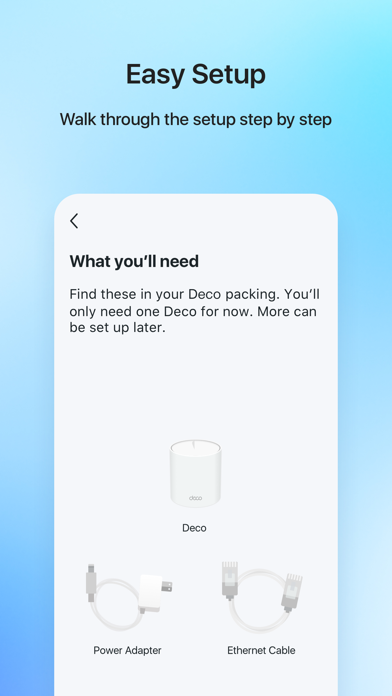
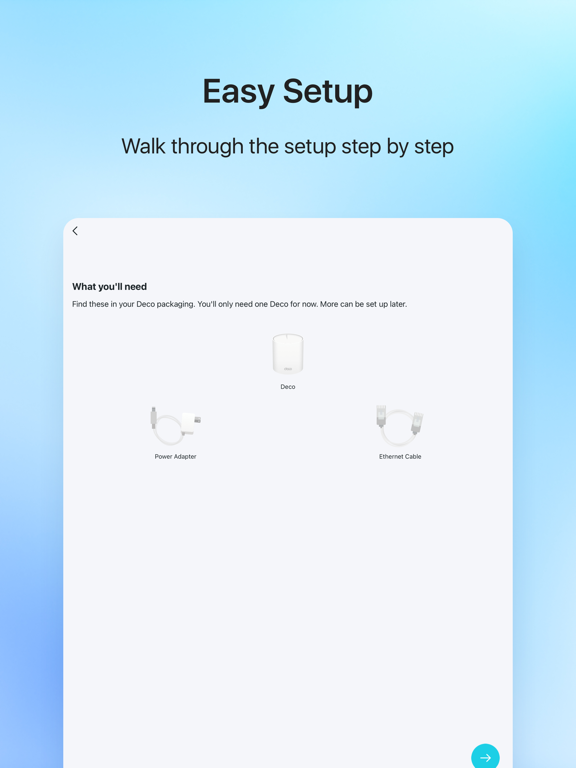
Welcome to the Deco App — the perfect way to set up your mesh WiFi in minutes and control your whole network.
Our simple-to-follow guide walks you through the setup process and even gives you suggestions for whole home coverage.
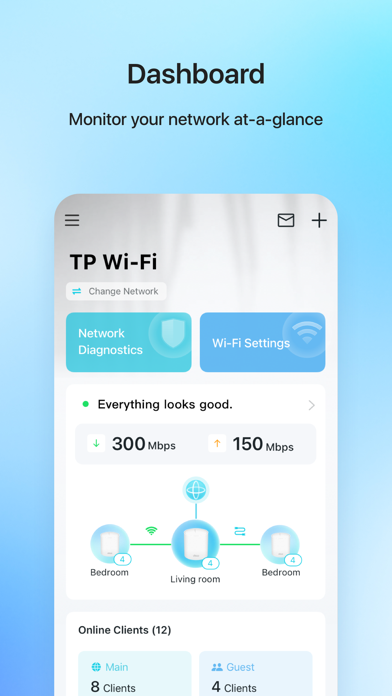
Once connected, you’ll have instant access to check every connected device, manage your kids’ online activity, and control your home network effortlessly. All from the palm of your hand.
- EASY TO SET UP AND MANAGE
• Quickly set up with step-by-step instructions
• Find the best spots to place additional Deco units for maximum coverage
• Control your WiFi network without turning on your computer
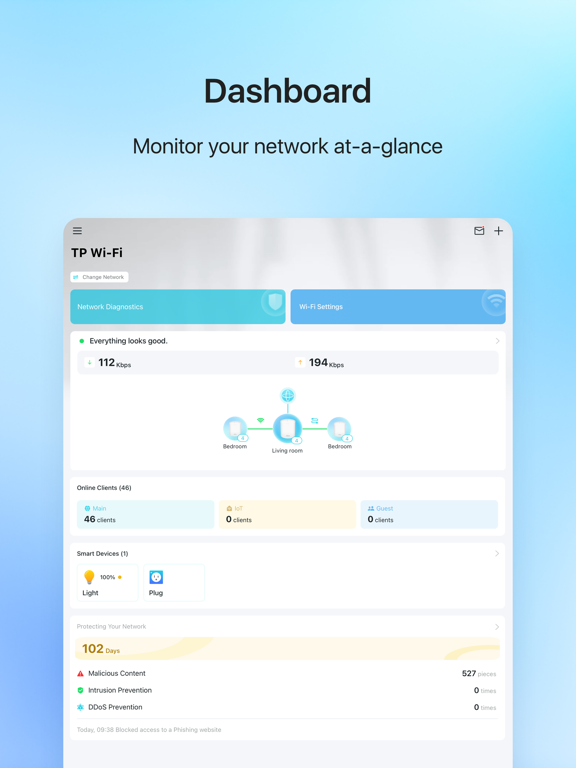
• Check your connection status and network speed at a glance
• Find out who or what is connecting to your network
• Instantly block unwanted devices with a tap
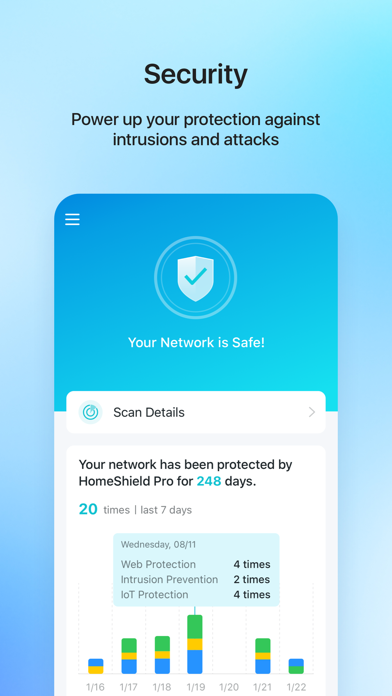
- PROTECT YOUR WIFI
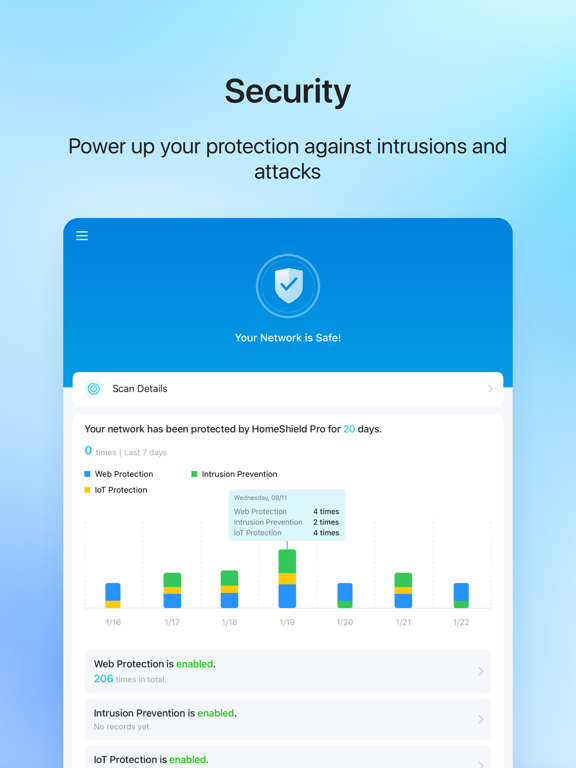
• Detect potential threats and receive warnings before things get serious
• Create a guest network to give friends internet access while shielding your private network
• Block unauthorized access and inappropriate content
• Run network performance tests
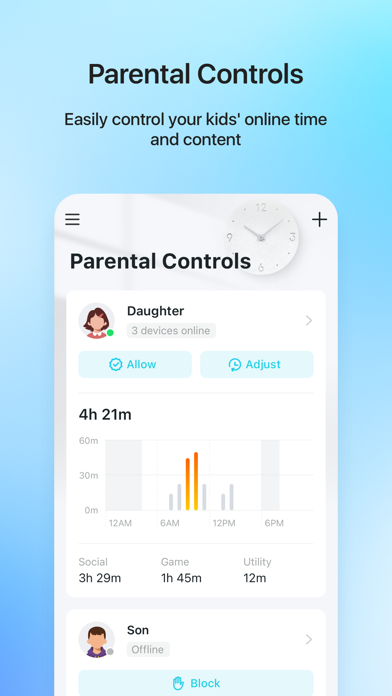
- FIND FAMILY TIME WITH PARENTAL CONTROLS
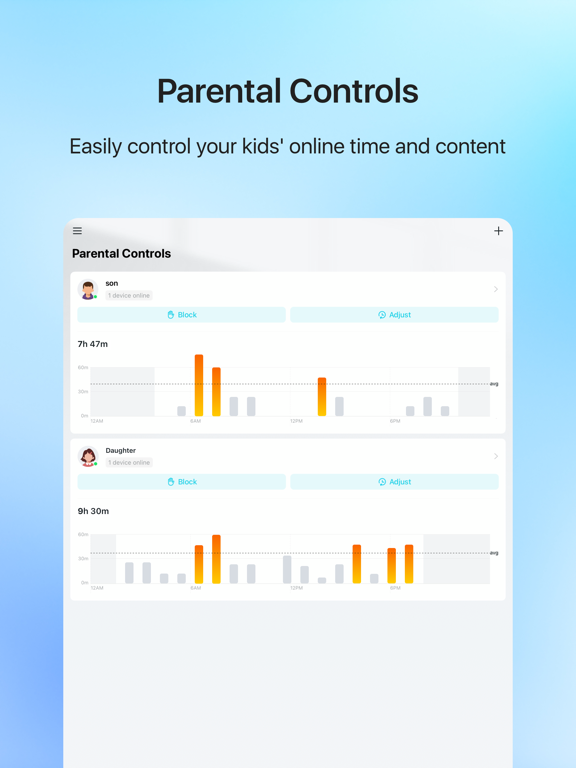
• Set a time restriction and pause the WiFi on kids’ devices
• Control when specific devices have WiFi access
• Make room for more family time with Schedules
- PRIORITIZE YOUR FAVORITE DEVICES
QoS lets you choose which devices always have the fastest connections. Set a schedule to assign device priority for different times of the day.
- KNOW EVERYTHING ABOUT YOUR NETWORK
Detailed reports help you understand your home WiFi and everything connected.
- CREATE YOUR SMART HOME
Connect, control, and check the status of your smart cameras, plugs, and lights – all from the Deco app.
Features available in Deco may vary by model and software version. Stay tuned for updates as we add new features and products to the Deco family!
Privacy Policy: http://www.tp-link.com/en/privacy?app=deco#sec_a\
Term of Use: http://www.tp-link.com/en/privacy?app=deco#sec_b\
HomeShield Subscription Service Agreement: https://www.tp-link.com/homeshield/service-agreement/?app=deco
Auto-Renewal Service Agreement: https://www.tp-link.com/homeshield/auto-renewal-service-agreement/?app=deco
For more information about Deco, visit www.tp-link.com
TP-Link Deco App Comments & Reviews
TP-Link Deco Positive Reviews
Great routers, great software, would love a few more featuresI’m upgrading from a ten year old Apple AirPort Extreme Basestation to the TP-Link Deco M5 kit. Performance is similar since both are WiFi5 (AC) systems. But the mesh lets me put several small routers around the house to have better performance everywhere. And the TP-Link app is so much better than where the Apple Airport app left off a decade ago. Getting a list of all devices, wireless and *wired* — something Apple refused to do — is fantastic. There are straightforward quality of service (QOS) controls. And a bunch of stuff I don’t care about that families will appreciate for controlling access times and device priorities and device owners. I wish for a few more features in the system: * WPA3 (maybe specific to the Deco M5) * Easy, direct control of the individual routers to change relative power or turn off individual WiFI beacons to help improve the network * More info on the “Network Optimization” including some guidance on positioning the beacons for improved performance. But those are higher-end features and this is a really budget-friendly kit, so on the whole, it’s a great system!.Version: 3.9.118
Pretty good but could be betterI like the app but I didn’t like that I had to name almost every one of my devices. My old mesh system app my devices were listed as the name I gave it, this app simply calls all phones “phone” for example, even tablets and other devices were originally listed as “phone”. You have to connect every device one by one or look at the address of each device and name them in the app. Also the parental control info is lacking, it reports “time connected” for each person only. Tablets and phones are connected continuously all day until shut off or you leave the network, so not useful information in my opinion because it doesn't tell me how much time a user is using a device, only the total time of all the devices assigned to them are connected to Wi-Fi. I also want to know how much internet traffic (kb/mb) per hour/day/week/month each device and/or user is using. That way I can tell if there is a device/person that needs to be restricted. Hopefully this information will be added, I see a total is in the monthly report for traffic per user set up in the parental control, but that doesn’t tell the whole story. Some months we get close to xfinity’s max GB (1229) and others not even close, I’d like to know where that data is being used and when. All in all, good app but I think it could be made better especially since I’m paying for it. The Deco 6E system I got is great so far after one week, the speed is awesome and devices switch seamlessly as you move about..Version: 3.5.43
Great app with just a couple of minor accessibility issues.If you are a person who is blind looking at a Deco mesh system, or especially if you are a Tp-Link developer, continue reading. Otherwise, just know that this app is fantastic for managing your devices. If the only reason you wouldn't buy Decos is because you're afraid that it's not going to have a great app, do not let that be a reason not to buy them. It is great other than one consideration, it does not entirely reliably show if devices are connected to the network or not. This is a very small issue though. There are just a few minor accessibility issues that I hope get fixed. First, when scrolling through clients on any list of clients, be that the main list or on any of the nodes, often times the focus of VoiceOver will jump around, and navigation will be slow and inconsistent. Double tapping also doesn't work a lot of the time. This can get annoying, but it can be worked around relatively easily with a bit of patience. For Tp-Link developers, I believe this is caused by the app constantly refreshing itself but not updating the accessibility tree properly or at all. The second issue is that on the reboot screen, the specific buttons to unselect and select specific Decos to be rebooted are neither labeled with the name of the Deco nor properly expose VoiceOver native selected or unselected markers, or even a custom developer selected or unselected marker. However, other than this, there are no issues with accessibility that I have found in the app. The app is great overall..Version: 3.10.417
Good app, but some modifications would make it great!Similar situation with the other reviewer noting how it would be helpful to have the date and time devices connect available. My other suggestion is with parental controls. It would be great to be able to have the list of visited websites sorted by time visited, or have a drop-down and you could select time, date, or alpha by website. The list it generates is good, and they recently made improvements to combine associated sites within one main drop down, but doesn’t give you an accurate depiction of the time sites were visited. Instead, its sorted by number of times visited putting the highest amount at the top. It also would be nice to be able to go back a day, 2days, 2weeks, etc. however long and see more than just a list of the top 10 sites visited. Unless you login on the same day as the sites were visited, you cannot get a full list of all sites, only the top 10. If it’s a memory issue and not having enough storage in the Deco system for all this data maybe a daily email option could be available. I would be fine getting a daily email for all sites visited before their deleted for the next day. Aside from those small details, the app is pretty solid and works reliably well. My setup is perfect for my home. I have three indoor deco units and one outdoor, all connected with ethernet backhaul..Version: 3.7.55
BE85 Great PerformanceI upgraded to a set of three Deco BE85 WiFi 7 Mesh units and I have been quite pleased with the worry free performance, despite living in an older home with thick walls and utilizing wireless backhaul. I was so pleased that I purchased a fourth BE85 about six months ago. The price is excellent compared to similar Wifi 7 Mesh hardware offerings from other vendors. The units work right out of the box with minimum setup effort. I don’t have any dead spots in the home and I have WiFi access outdoors in most of our yard. The security software comes with an annual subscription. The price isn’t bad and I’m glad that I subscribed. There is also a parental controls software offering that’s available by annual subscription, but I didn’t subscribe. The system is designed for the non-technical user, which means that the Deco app doesn’t offer much in the way of settings that can be modified by the user. Overall I am very pleased with the Deco BE85 Mesh WiFi 7 system. This is one purchase that I would definitely recommend to anyone that is interested in a solid WiFi 7 Mesh solution..Version: 3.10.404
5 Stars Isn’t EnoughI have been using the Deco X50 AX3000 Whole Home Mesh WiFi 6 System for a few days now, and I’m very satisfied with it. It has improved my WiFi coverage and speed significantly, and it was very easy to set up and manage. The Deco X50 comes with three units that can cover up to 6,500 square feet of space1. I placed one unit near my modem, and the other two in different rooms. The app guided me through the installation process, and it automatically detected the best locations and channels for the units. The app also lets me monitor the network status, run speed tests, set parental controls, and create guest networks. The WiFi performance is amazing. The Deco X50 supports WiFi 6, which means it can handle more devices and deliver faster speeds than previous WiFi standards2. The creators of this device must have learned how to catch lightning it’s capabilities of over 30 devices connected to the network, including laptops, smartphones, tablets, smart TVs, gaming consoles, and smart home devices, and they all work smoothly. The WiFi signal is strong and consistent throughout the house, and I can seamlessly roam from room to room without any drop or interruption. The speed is fast and reliable, and I can stream 4K videos, play online games, and download large files without any lag or buffering. The design of the units is sleek and compact, and they blend in well with the decor. They also have two Ethernet ports each, which is great for connecting wired devices or creating a wired backhaul. The units are also compatible with other Deco models, so I can easily expand the coverage if I need to. Overall, I’m very happy with the Deco X50 system. It has transformed my WiFi experience and made my home smarter and more connected. I highly recommend it to anyone looking for a simple, affordable, and effective mesh WiFi solution. It deserves 500 stars in my opinion..Version: 3.7.11
Excellent App But Could Be BetterEasy to use app for my Deco mesh system, however, it could be better. These days, unless you’re hiding under a rock, you know that there are people trying to take advantage of others. I happen to live in a neighborhood where it’s common…neighbors, or their guests, can’t afford their own internet so they try to piggyback on mine, causing me to pay more for the service. My complaint with the app is that it doesn’t indicate the date someone has connected. I do get a notification, but I don’t often see them timely as I don’t carry my phone with me constantly. Having the date someone connects helps to identify which connected device I should block. If I had three Unknown devices, maybe all three should be blocked, but maybe it’s the last one listed. I do give out my password as I live rurally and cell service can be ridiculously poor, but having a better idea of whom I might want to block would help. At the very least, the connected devices should be able to be sorted by date connected. For me it’s the downside of an otherwise excellent, easy to use, app..Version: 3.7.39
GREAT, affordable mesh systemI am adept at setting up all sorts of networks (Linux is my preferred operating system). I did not have to rely on any skills, simply plug in, follow the instructions and everything works seamlessly. A few weeks ago the living room speeds were unusually low. I opened the app, it told me that one of the cables was failing (the Ethernet backhaul speed was slower than the provider supplied, it was detected), I changed out the cable and the speed shot back up to what it should be. I also live in two states, commuting every few weeks from one place to the next. I can access my network remotely and even set up guest networks remotely (my neighbor had internet issues, called me and I was 300 miles away, I didn’t want to give him my WiFi password so I set up a guest network and gave him access until his internet was fixed!). All in all, a great system (all versions). One last thing, don’t overdo it, a small system goes a long way (larger might actually cause interference)..Version: 3.8.129
Huge Improvement in rural areaI switched to Rise Broadband after a reference for a contractor who was able to install a antenna at her place enabling broadband signal reception when she’d always been told it was not available in our area. We live in a semi-rural location with tall trees blocking signal, if the standard height poll is used. I had DSL from AT&T, absolutely the only other option besides using a satellite signal company. They are all WAY over priced, as is AT&T’s internet everywhere, or something like that. TP-Link equipment with antenna placement vs. AT&T DSL was like switching from Dial-Up internet service to DSL when it was first available! The TP-Link App’s Trouble Shooting area is a great help for those time when Wi-Fi signal is lost. It is limited to equipment malfunctions, you have to connect a lap-tap or desktop PC directly to the router for help with no signal or you have to contact your provider, no direct way to report or see signal outages in my area. Calling in for assistance is a nightmare now days with most companies giving their reps limited information to go off on to be able to help..Version: 3.8.24
Awesome App & SetupDeco X15 mesh Wi-Fi system. Super easy setup even for a relative e-gizmo neophyte like me. It allowed me to set up one deco unit at a time so I could see what the coverage was throughout the house before I added the 2nd and 3rd units. To add another unit, simply plug in the power supply and watch the app. It’ll find the added unit and tell you if the unit needs a firmware update. In this system, each deco unit can serve as a router, not just a satellite. So if you have multiple modems from your cable/broadband provider in different parts of the house, you can use any one of the deco’s as a router. The app also shows you the status of each unit and how they’re performing. There’s also an “Auto” select feature in which the system selects the best deco unit depending on what you’re doing and where you are in the house. All in all, very pleased with the ease of setup and the information available in the app. It exceeded my expectations for sure..Version: 3.8.76
Great except for missing featuresMy 3-piece Deco X60 mesh network works well in most ways, but is missing some key features. The most critical one is the ability to manually select what channel to use. The automatically selected channel mine picked is very crowded. This is such a standard feature I took it for granted I would have it before I bought it. I would have picked another product if I realized. Less critically, but also a feature that would come in handy for me is to be able to force a selected device to connect to a specified frequency. I have a mixture of devices that use 2.4 or 5GHz frequencies. Mostly it’s fine to let the device choose. I have one device, though, (a VR headset) that works much better on 5GHz but left to connect on its own, often chooses the less optimal frequency, especially if it’s handed off from one router to another in the mesh. If I just disable the 2.4 band, that would disrupt a bunch of other devices. I also don’t want to dedicate the guest network, which is used for actual guests, to just the VR. A toggle in the device details to disable one of the frequencies for only that device would be great..Version: 2.3.12
Super Simple, but has all the bells and whistles if neededHands down the best router I’ve ever had. I have a 3 story 3,400 sf. home. It covers my whole house. Zero dead spots, full bars at all times. Dual band simultaneously, so my PlayStation, iPhone and laptop connect on 5 GHz band, while some other use the 2.4Ghz band. The firmware update was dang near automatic. This thing literally holds your hand through the full setup. 99% of people will hit next, next, next, and so on until it’s setup. It asks one question that could throw you bout how you connect to your ISP, but for most people it is by dynamic address which it defaults to for you. Lastly, without geeking out, you can do IP reservations and a tons of other advanced cool stuff. And this was with the whole home mesh network Deco M3. Buy it!! You will not be disappointed - unless you’re the type of person who has to customize everything to death for absolutely no reason other than it makes you feel superior, lol..Version: 1.10.9
Nice App, but needs a few tweaksThis app is pretty good as far as Wi-Fi management apps go. I wish it didn’t show nodes as disconnected frequently when they aren’t, and I would like to see them give a little more explanation of the performance hit of the security features. For instance, I have 1gbit fiber internet. With the IPS off, I can achieve that speed in a test in a wired computer. If I turn on IPS, I can barely crack 100mbit. This, of course, is not the fault of the app, it’s just that doing that inspection takes processing power that my Deco doesn’t have to spare. But the app never warns you of this, so people out there may think their Wi-Fi is slow or the internet is slow since the app bugs you to turn these features on. It could be hurting a customers opinion of the product and the company since there’s no expectations set with regards to the performance hit. Overall it’s a good app, well laid out, but it could explain things a little clearer to level set exactly what’s going on..Version: 3.4.21
Easiest WiFi I've ever dealt withWhile its the most unconventional WiFi hardware I've ever used its been amazingly easy to use and its the first stuff to ever properly cover my parents entire house basement to second floor. Device hand off between nodes is smooth and almost entirely hiccup free while live streaming! A feat i could only dream of on the old setup. I run an ethernet back bone for the thing, so in network traffics amazingly fast. Though my parents paltry 32mbps download speed is less than desired, QoS on these actually works well and everyone get a slice when needed instead of whoever's downloading a game. The app for managements surprisingly robust enough for whats needed to satisfy myself, but simple enough I'm not scared of letting my mom have access to it. I think this is the first WiFi hardware in my parents place i can confidently say is invisible, it "just works". Which is incredibly comforting as i cant be their IT gal all the time anymore..Version: 1.7.11
Great performance and feature setI have a complex house that has interior insulation curved walls and it’s hard for wireless devices to penetrate through the walls and four floors,. I love it that this deco device supports, backhaul, cabling, automatic weekly reboot, wireless optimization, and each device can either be the primary device or an extension of the network and every device has 4 RJ 45 ports for wired devices. Also, this product has a USB port where I can create a small wireless network accessible storage drive hanging off this network for things like my scan to network based printer . Not many brands support these features. Great job. For the most part set up is easy, but given that I had to rerun cat Tate cabling through my house it took me a little longer than I expected to get everything fully operational. Keep up the great work and continuously provide firmware updates..Version: 3.9.115
Suitable Network for my home needsUpgraded this system countless time over the last 10 years or so. I love the push upgrades and the addition of Deco’s security subscription further protects my system. I had a close neighbor who accidentally had their internet cable severed by some tree planting. She works at home and the repair work from her cable company was 3 days. I was able to create a guest network for her in a matter of a few minutes and have her up and running in 10 minutes thanks to a great app. My house is fully automated with wall plugs, wall switches and portable outlet plugs. I use EVE climate sensors and a network connected watering system including an outdoor weather station. In totals I have 55 devices connected to my network in a two story house not to mention 7 Apple HomePods, 2 AppleTV and two internet TVs. I run two XE75 Pros, one XE75 and one X50-Outdoor. I absolutely luv Deco..Version: 3.9.115
Game changerI added three Deco mesh systems to my home and business. This cured several problems. Easily being able to implement device priority, reset, test, update, easily from the well designed app, and curing dropouts in our parking lot. My auto repair business has gone completely cloud based and everything from wrote up to inspections, to accounting is in the cloud. I am working and managing my business remotely more and more and I have the ability to log into my work or home networks easily from anywhere. Not being a tech guy, The Deco app has made simple what before meant I had to stop everything, drive to work, manually log in and diagnose network issues. Routers and networks have problems. It’s the nature of things, Deco has experienced far fewer problems and more uptime than anything we’ve used in the past 20 years. Highly recommended..Version: 3.7.39
Sleek and simpleI have to use Deco app to selective block devices. It works. I have focused on security, due to my work and also protecting children. I make use of guest wifi to protect the internal network. I rename the devices to track who and what device it is. This is easy. I stop at 4 stars because it is a bit difficult to separate or sort by inactive, blocked, active, internal wifi, guest wifi, and newly registered devices. With device proliferation and the convenient ability to share passwords with friends, I need to add devices with some frequency. Usually more than one at once. It’s difficult on a phone to scroll through 30 entries to find the be one. Moreover, the app is slow to include newly added devices, even when forcing a refresh / reload. This makes the process harder. I would expect it to show in my app immediately as they have network access. Anything less is a security vulnerability..Version: 3.8.129
By far the best router brand and app!I bought my TP-Link Deco W2400 Mesh Router (2-Pack) from Walmart for a good deal, like $79. I just had my internet turned on at our new house today and setting this router system up was so dang easy. It’s the easiest, simplest router app out there! I had an ASUS router before upgrading to the TP-Link ones and their app was trash. Every other router app I’ve used has been trash. Only one that’s even remotely comparable to this one is the Linksys one and even it is not as smooth running. TP-Link you definitely need to continue to stay on top of the competitors and stay ahead! All I had to do was press 2 buttons in the app and create my name and WiFi password and I was done. The whole setup took less than 5 minutes. I got the 1 Gigabyte Internet speed with Mediacom and these routers are super duper fast! I’m only getting 50MB/s right now cause I need to upgrade my ASUS modem to a higher capacity. But still even at 50MB/s it’s fast as h$ll! Thanks TP-Link for making an awesome & seamless app and an even awesomer product! This is the first TP-Link product I’ve ever owned. This review was not a paid review or anything like that. I’m a real person, living in the U.S., that’s HIGHLY satisfied with my purchase and will forever get TP-Link over any other brand. I hope this helps someone else. I’ll update my review if anything changes or when I get a new modem..Version: 1.10.9
Great routerIt’s only the third one I’ve ever owned. The first was one where you had to go to a website to set anything, and while not difficult, also wasn’t the easiest. The second was an Apple Airport, and that worked fine, but got old. Started looking into this because I felt it was time to change and upgrade, and this worked the best hands down. I didn’t realize how old my Apple one was, and with the Deco it was like night and day. Able to get online from my driveway, whereas before it felt like I could only use the internet inside my house (and even some areas it would be a weak signal). Having the mesh network is definitely great, as long as all the devices themselves get a good signal from the main router, you’ll never be without internet. And the app… easy to use and figure out. Hands down it truly felt like it was plug and play..Version: 2.14.24
Easy to setup router and additional decoI had saw the router mine which is the X60 model at Home Depot for about $150. Went back about a week later and bought it. The app easy and straight forward to setup. If you have an existing account with TP-Link with another product use that instead of creating a new one, just a tech tip. Installed the app on my iPhone go the prompts and the first deco was setup less than 5 minutes! Once you have the first deco setup, just plug in the second one and it should communicate without the app automatically. No more drops and perfect for my Blue ADT wireless cameras. App you can see all your devices connected or about to connect. Updates to the firmware appeared automatically for both decos. Let it update and your done! Out of all the routers I’ve setup over the years, this app and deco units superseded my expectations. Highly recommend..Version: 2.11.3
App and Deco Mesh Devices easy to useI like the Deco mesh and the app. I’ve set it up now in three homes and it’s been seemless. I’ve been able to even set up some advanced settings needed for network devices. I had one problem with the QoS setting. (Quality of Service). Be aware that QoS setting is meant to manage traffic when you have multiple devices trying to hog your bandwidth. It asks you to put in the maximum speed. I put in my services max speed at the time. This will limit the speed on any device to that speed. My internet provider subsequently upped my speed and I only realized later I needed to adjust the QoS settings after troubleshooting why I wasn’t getting the full new speed. My advice is don’t use QoS unless you are managing a large network and one device is using too much of your bandwidth and you want to restrict it..Version: 3.7.7
Works Great had for couple monthsTp-link. Works really well I’d say. Friends online recommended after I had trouble with Wifi with multiple people on it (roommates) I got a cheap 40$ tp link with two towers at target and it’s a simple setup. Plug into your modem set it up then plug other by ur computer and out Ethernet. Haven’t had trouble at all till today, just had to restart them. Do the modem one first.. went through an out of headache connecting to two decos Wifi trying to setup and pressing don’t use Wifi (which canceled the whole deco connection process) so don’t do that. Anyways besides that it works great and looks stylish. I’d recommend if you have multiple people on a Wifi network and are on outskirts of house. If you have bad wifi connection but pay for good wifi I’d recommend this too. Thanks tp-link I can play lag free and not be frustrated knowing I have good wifi around the house.. happy gaming.Version: 3.8.139
GreatThe TP-Link Deco is one of the best in-home WiFi solution I’ve used so far. It comes packed with features, from hardware to software and plays nice with third party software, apps and tools. Even though I have setup several different WiFi solutions in my home over the years, this one felt overwhelming with all the different opens to choose from for setting up your home network. So I opted for the guided setup, which was a great experience , that had me up and running quickly. I have a two-story home with about 4,000sq ft of living space and the coverage I have with the Deco is amazing. In my opinion I feel both beginners and experienced users will be happy with the features the TP-Link Deco Whole Home WiFi system offers along with the many options to customize it for what you need. ✌🏻. Hope this review helps..Version: 3.10.62
Decos are great!We live in an area with zero cell service, so having a dependable Wi-Fi system is absolutely essential for us—and the Deco Home System delivers. With just two units, we’re able to cover nearly half an acre with strong, consistent signal. The broadcast range is impressive, easily reaching across our property with no major drops or dead zones. Setup was simple, and once it was running, we noticed an immediate improvement in connection quality for all our devices. Whether we’re inside the house or out in the yard, the signal holds up. It’s honestly become the backbone of our daily communication, streaming, and smart home devices. If you’re in a rural or remote area and need something that performs reliably where others fail, I highly recommend the Deco system. It’s kept us connected when nothing else could..Version: 3.9.65
Excellent productEverything is managed through your phone app. All features are listed and organized on the app. App is very intuitive. Update of firmware is smooth and labor free. You get notifications on your app and update, reboot is automatically done through the phone app. You also use your phone app to monitor home network remotely while you are away from home. My child who play Minecraft & Roblox used to complain about internet when using google high intelligence home router. Now with deco, every endpoint gets it own isolated bandwidth so there’s no more or less. You also see what devices are connected to your home network so you can block unauthorized access. You can also set guest network so you never had to share personal password that you used for everything!.Version: 3.8.10
Decent, but Somewhat FlakyI'll admit my home's layout is not ideal. The WAN drop from my ISP is on the ground level, and the house (interior townhouse unit) goes up for two more levels. I'd appreciate it, then, if the Deco app reflected the sometimes-spotty state of the mesh, and offered even the most basic feedback on how to make things easier for the network. Instead, the app offers either that "everything looks good," even when things are clearly not good from a network performance standpoint, or it offers that pretty much every Deco is offline, even when all the units have green status lights. When it works, it all works well. Thankfully it works most of the time. When it doesn't work, however, the app is of no help whatsoever. I don't think I'm moving anytime soon, so I'll probably give Ubiquiti's mesh solutions a look at some point. Deco's is OK, but it demands more attention than I'd like, and the app is pretty much useless for troubleshooting..Version: 3.8.10
Good but basic features either missing or locked behind expensive subscriptionI am happy about my WiFi mesh network. I won’t even mention the model because this review is for the app alone. I find the app somewhat confusing. It has good features and some powerful customization. I run a PiHole so being able to set a custom DNS server is necessary and that does work to some extent. I switched from google WiFi, and that app had better features and no subscription to pay for any of it. With the google WiFi I could trivially test my ISP internet speed. In order to diagnose speed problems, running speed tests from individual devices over WiFi is pointless. There is no way with this app to test the actual internet speed on the line connected directly to the ISP. That’s a major pain. With this app I get slower upload speeds than download, but how can I tell if it’s the WiFi mesh network or the ISP?? I can’t. Another thing that’s trivial with the google WiFi app is real-time stats and stats over time. For example I like to see how much data my Apple TV has pulled in the last month, or how much it’s pulled in the last minute. You can do that with Deco, but you need to pay. That’s right, basic info is locked behind a subscription. Everything is a subscription these days. I hate it. I won’t pay for basic things. If it was a one time fee I’d consider it, but this is simply a hostage situation. Basic features you want are locked away and you have to pay, and keep paying for the rest of the entire life to access them. There are no ongoing costs to the company to provide these features. It’s just a cash grab for them..Version: 3.2.6
Network Update Long Overdue!I finally replaced my old, but reliable WiFi network in my home to address dead spots and lack of reach farther away from my router. The TP-Link Deco BE63 3-node mesh system wa just the ticket! Installation couldn’t be simpler or straightforward. I was able to upgrade the entire network in my 3600 sqft home in less than an hour (included cleanup, documenting old settings, etc). This also included updating the firmware and going through the network optimizations and other tweaking. All of which was made easier with TP-Link’s highly intuitive mobile app. Time will tell whether the BE-63 system will last as long as my previous network (8 years). This experience has been nothing but encouraging and would not hesitate to recommend this system to others!.Version: 3.10.12
Highly ConfigurableI had other long-term well known competing products and all they did is convert to services that were "dumbed down" as if all users didn't care to challenge their home network security settings and simply be okay paying for monthly network security subscriptions - not knowing they were not getting any value for their money. I was skeptical of an App only configuaration, but TP-Link is like no other indeed. I have been extremely impressed with their organized and well thought out in depth deep dive into one being able to adjust internal settings and security notifications have been dead on when any new clients join my expansive home network. Their sub pricing is good value too. Highly impressed with strong signal coverage of this mesh system. Good work you guys!.Version: 3.8.69
I generally like the network management BUT…The management application is a bit cumbersome and the parental controls are limited. If you want to make sure you’ve got your kid’s devices locked in you have to turn off the NIC randomization that Apple does to maintain privacy. I haven’t found a way to require a specific password per device (where DHCP only gives out an IP when properly logged in with identified NIC). The fact that the WiFi password is so easily shared it totally allows kids to share the WiFi with anyone of their friends. Also… all anyone needs to do is connect over Enet… there is NO protection… the router gladly hands out an IP to whoever plugs in. I have had to assign IP’s to all devices and then change the range of IPs that DHCP can serve. Then, I have to go in and modify that every time a neighbor comes over and wants to connect. Needs improvement. ALSO… and this is a big one. It appears that every time there is a software update to the router, that I have to log back in and turn on the PRO services again. Is my PRO service just NOT working until I discover the update? I really like a lot of the features and would give a 5 star BUT I really HATE the problems that I mentioned above which to me deserve a 1 or 2 star…. So, I split the difference at 3 star. I hope they can get their act together and fix some of these glaring problems..Version: 3.7.39
Very pleased has free Parental ControlsI bought this after I returned a netgear mesh system that was incredibly unreliable and flaky. I am use to setting up things manually as I come from an IT background so I was making the setup difficult because I did not grasp how easy they had made it with using your phone to set it up. Normally you go to the IP address of the router and put in your ISP and DHCP settings and then any other configs you want with port forwarding or DNS server assignments for Family Friendly Internet. With this you just download the app and follow the instructions. Once setup you can make any config changes you need from the app no matter where you are. I have mixed feelings about how secure that is but I have not found any info regarding TP Link being a malicious brand. The coverage is quite impressive even for a single unit. The 3 pack does a 3/4 acre property that includes outside and garage areas very well. Now my favorite part: On all other name brand routers you have to pay for any kind of screen time controls or Internet usage limitations for your kids. Which if you don’t do this then shame on you. However, those of us parents who understand the need and benefits of the internet as well as the dangers and social damage it can cause, we like to control the usage to an extent. This has what you must pay for with most other brands built in for free. I have automated shutoff times for individual devices for my kids so the VR time is limited, PC time is limited and Cell phone time is limited, all independently and automatic. And can be easily overridden if they need or have earned a little extra time. I highly recommend this setup. Especially for large homes or properties with kids..Version: 3.7.7
Mom of 4 pre-teen/teens Best thing EVERSeriously I would have been switched to this router if I would’ve known how awesome this is! It’s literally my favorite thing in my house right next to my ring cameras and door bell! You can control every device on the wifi from anywhere! And you can change the password right on the app ❤️no more calling the internet company!!!!! You can put all the kid’s devices on the kids profile with an automatic shut off time and have them set to different times for different days. You can set your tv/devices to high priority so if the kids have a million things on your stuff will still work. I love it 10/10 recommend. I’m not paid for this review I just have had no wifi control over my kids and now I really do! Thanks for the great design.Version: 3.7.11
Wish I Would Have Purchased SoonerI had an old mesh system in my house that worked well but my speeds were nowhere near where they should have been. I purchased this unit and actually held off for a few weeks because I was worried of all the extra work of connecting and then reconnecting all my devices. I shouldn’t have waited. This system connected to my router seamlessly and over the next couple of days I connected everything to the system. I even had a Cannon printer that I could not connect to my old mesh system that connected to this one in seconds. The only mistake I made was I named this mesh system the same as my old one and that caused me extra work in a few places but nothing terrible. I wish I would have purchased this months ago..Version: 3.7.39
So far so goodJust got the equipment yesterday and set it up today the setup was a little bit clunky, but in the end great and working fine. During the setup it asked to take a picture of the Barcode on the bottom of the unit but had to unplug power to get a good picture then had to wait for it to boot back up. Did not say anything or I missed it, naming device one and two So one device says the name I wanted the other one didn’t. of course I never read the manual. It was too small. Also did not realize when you set up one you’re setting up both until it was done that actually was pretty cool. I’m sure I will be getting a couple more in the future. It will go much smoother next time. Definitely recommend this product..Version: 3.7.55
Mesh Network Works Well but Parental Controls are TerribleWe have a 3,000 sqft house with the router and 3 additional access points. We get a pretty good signal everywhere but it’s not as good as you’d think since we have more access points than should be required for this size house. But, for the most part I’m happy with the system. But, do not pay for the parental controls. They are horrible. My kids will have their computers closed on the dining room table all day and when they open it to start homework, it shows that they used up all their time for the day on that device. Also, when you block a device for the day, it doesn’t automatically reset that device the next day. You have to manually go back in and allow the device or it stays blocked until you change it. I’ve used lots of parental control apps and this is one of the worst I’ve tried..Version: 3.5.43
Really good. Wish it had a few featuresThe router is great and the app is easy to use and I can find everything pretty quickly and easily. I just wish it had a couple features that it doesn’t have. This would be my pretty short but valuable wish list 1- save port forwarding rules and turn them on or off without deleting them. If I want to disable one temporarily, it’s a pain to have to delete it an recreate the whole rule again. 2- some of my devices are recognized as a new device each time they connect, even though the MAC address is the same. Pointless to rename and pick a picture/device type of it changes each time. Also, it clutters the devices view. Duplicates not being created would be great. 3- address reservation is a little weird. It doesn’t apply to the device right away, you can’t set one that is currently in use by another device (which makes sense, but is a problem because…), and you can’t change that conflicting device easily to free the address. It also doesn’t work well with port forwarding since port forwarding kind of overrules it. It’s just a little finicky. Those are really my only complaints. They’re overall pretty minor, but I don’t think they’d be terribly difficult to fix either..Version: 2.10.4
Love it.Super easy to use. Love the parent control.Version: 2.1.2
Good ProductEasy install..Version: 3.10.417
Great product and supportHave been using the product AC-1200 and the app flawlessly. It is informative and has worked from the day uploaded without issues. Thank you..Version: 3.10.417
Mesh NetworkEasy set up with StarLink basic kit.Version: 3.10.417
AwesomeBest router from the world.Version: 3.10.417
ดีดีเยียม.Version: 3.10.417
Easy InstallationAwesome.Version: 3.10.417
Working wellSet up was not bad and system is working like I expected.Version: 3.10.417
Works perfectlySimple to set up and use.Version: 3.10.417
Two seamless yearsGreat so far, after two years. Let’s see how long they support their product..Version: 3.10.417
Works amazing!Tried other mesh systems. This is the only one that did what was needed & has been solid..Version: 3.10.417
SundayI called on a Sunday for tech help and they were so responsive! Really appreciated their help.Version: 3.10.417
Great unitLove it!.Version: 3.10.417
Improved functionalityThe traffic usage feature has been helpful to point out leaking devices in the network..Version: 3.10.417
Surprisingly EasyIf a neophyte like me can install this, anyone can. I just followed the app instructions. Marvellous!.Version: 3.10.417
Great AppI’ve always liked TP-LINK. Unfortunately they are also pushing subscription services like everyone else. Regardless, they have great software and products..Version: 3.10.417
Its goodBig deal.Version: 3.10.417
Ca cocheFacile d’utilisation et configuration.Version: 3.10.417
Great AppGreat app, wish it had a bit more freedom like a web browser, but for day to day use and monitoring kids usage it is very good. It would be nice to see firmware updates happen at a similar time as the firmware is updated on the website..Version: 3.10.417
Good connectionEasy to set up.Version: 3.10.417
MissZombieTrès bonne application.Version: 3.10.417
OwnerSeamless and Robust.Version: 3.10.417
ExcellentEverything is perfect.Version: 3.10.417
Deco is goodI have 7 Deco units in my network.Version: 3.10.417
Love DevicesEasy to manage/setup and performance is very good!! Highly recommend..Version: 3.10.384
GreatestBest wifi router.Version: 3.10.417
Easy set upI love the deco line. Anyone can do it. Plug and play basically.Version: 3.10.384
Painted!Whole house is painted in wifi - as promised 💪.Version: 3.10.404
WatunWatun.Version: 3.10.404
TP-LinkAn amazing innovator with technology, I’ve been using their products for almost 15 years and now with WIFI 6E and 7 now on the path, it has make it easier, faster and reliable for internet connection. TP-Link is well recognize wold wide and most for being a Canadian Company.. Oh 🇨🇦!.Version: 3.10.404
The productVery easy to use if everything is OK.Version: 3.10.384
In progressIn progress.Version: 3.10.404
Advance appWell designed app for the deco mesh routers. Many great feature to enhance connectivity..Version: 3.10.404
HappyEasy set up !.Version: 3.10.404
Perfect servicesPerfect services.Version: 3.10.404
Very stable network with the X50 ProVery stable network with the X50 Pro.Version: 3.10.404
La simplicité ...La configuration des appareils Déco est tellement facile, intuitive et efficace. Je penserais que c'est un produit Apple tellement c'est simple..Version: 3.10.174
Great MeshHave the mesh system covering my 18 acre acreage wifi from the gate to the garden no issue!.Version: 3.10.384
Printer problemsMy printer originally connected fine but then somehow it started working intermittently and then stopped connecting completely. It to me hours to get it working again. Very frustrating but I got it..Version: 3.10.258
Well done TPVery good performance.Version: 3.10.258
App quits while adding a VPN serverApp crashes and phone goes back to Home Screen when clicking the add server button inside VPN server, need this fixed asap. Everything else works perfectly..Version: 3.10.377
Optimisation réseauNetwork optimization should be a gradual task within the reboot planning. I shouldn't be forced to optimize my network regularly; it's a recurring task that should be scheduled..Version: 3.10.376
Réseau decoSérieusement rien à dire, facile de configurer et fonctionne bien!.Version: 3.10.174
Works as it shouldReliable and constantly communicating.Version: 3.10.174
InstallationTrès facilement.Version: 3.10.258
Free International Money Transfer 💸Enjoy high maximum transfers into more than 20 currencies while saving up to 90% over local banks! The cheap, fast way to send money abroad. Free transfer up to 500 USD!Version: 3.10.417