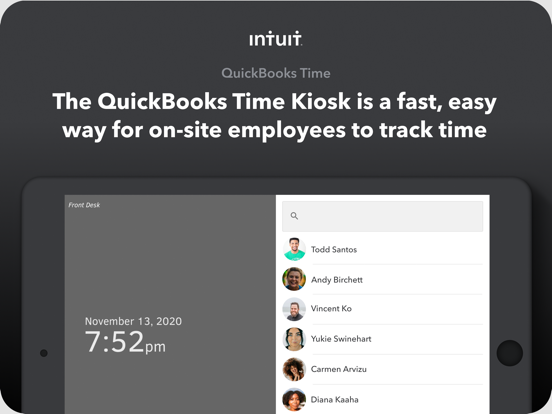
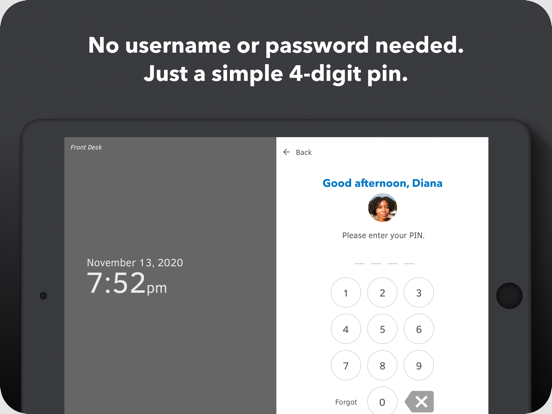
The QuickBooks Time Kiosk (formerly TSheets Time Clock Kiosk) is a simple digital time tracking tool that operates like a traditional wall-mounted punch clock—without the expensive hardware! Simply run this app on any internet-enabled device or tablet and link it to your existing QuickBooks Time account. Now your employees can easily and quickly clock in and out from one location with a simple 4-digit PIN.
QuickBooks Time is a cloud-based employee scheduling and time tracking tool. Whether you have employees in the office, on the go, or out in the field, QuickBooks Time has a time tracking solution for you. The QuickBooks Time mobile app allows employees to accurately log their hours even while on the go, from the devices they’ve already got in their pockets. The QuickBooks Time web dashboard can be used on any desktop or laptop for office environments. And the Time Kiosk allows employees to track time from one central location.
Accurate, electronic time data replaces paper timesheets and makes payroll and invoicing faster and less costly. QuickBooks’ in-app scheduling functionality makes it faster and easier than ever to build and share schedules with employees, assign jobs and shifts, and keep your workforce in-the-know and running like a well-oiled machine.
GAME CHANGERS • Photo capture feature allows admins to recognize who is clocking in and out • QuickBooks, Xero, Square, and Gusto integrations (and more!) to simplify your back office • In-app scheduling lets employees easily clock in and out of assigned jobs or shifts • Push, text & email alerts that are triggered if employees don’t clock in as scheduled, or approach overtime limits • Save 2-8% on gross payroll costs & eliminate hours of manual data entry
ALSO INCLUDED • Seamless integration with QuickBooks Online & QuickBooks for PC (Pro, Premier, & Enterprise) • Integrations with popular payroll, accounting, invoicing software • Powerful, real-time reports in multiple formats (PDF, CSV, online, HTML) • Safe data storage and detailed time log to protect you from FLSA lawsuits and audits • Configurations for DCAA/DOL compliance • Developer open API
SUPPORT, CUSTOMER RATED QuickBooks Time offers free unlimited phone, email, and chat support to all of our customers. Have a question? We’re always happy to help!
Phone: 888.836.2720
THERE'S MORE TO LOVE...
TRACK TIME • Track employee hours accurately with a real-time virtual time clock • Photo capture feature allows admins to recognize who is clocking in and out • Easily switch between job codes, pause tracking, or take a break • Employees clock into new shifts and jobs right from the schedule • Track time against multi-level job codes, projects, locations, clients, and more • See where your mobile employees are located on one map view, with GPS tracking
SCHEDULE • Schedule by job or by shift • Easily create or modify a schedule with drag-and-drop shifts • Sync your schedule with Apple iCal, Microsoft Outlook or Google Calendar • Easily notify employees through push or text when a new schedule is published or if a shift changed • Get notifications if employees don’t clock in to a job or shift as scheduled
MANAGE TIME • Employees can effortlessly submit time for approval right from the Kiosk • Edit, delete, or approve timesheets with a click • Set overtime alerts to notify employees and managers as limits approach • See who’s working and where, even on the go, from one dashboard • Track vacation, sick or holiday accruals for employees
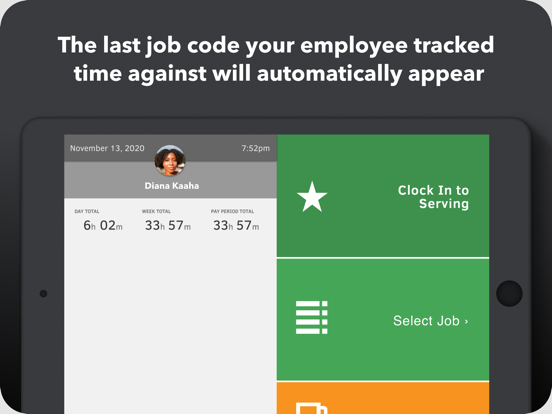
REPORT TIME • See day and week totals at a glance • Easily access a breakdown of employee hours by job, customer, or location • View timer history with map • Keep a black-box history of all edits and deletions, in case of an audit
PLUS, using the web dashboard, managers can: • Manage PTO, leave & holiday time • Schedule overtime alerts • Set up custom approvals
QuickBooks Time Kiosk App Comments & Reviews
POSITIVE REVIEWS
NEGATIVE REVIEWS
QuickBooks Time Kiosk Positive Reviews
Quickbooks IntegrationOur employees work on multiple projects and service items in one day, every day, making payroll data entry a nightmare when there is overtime and double time. Typically, each employee has 2 to 10 line items per weekly time card. By using QuickBooks and T sheets I save three hours a week in data entry and the headache of accuracy for our construction company of 30 employees.
I hesitated on the implementation of T-sheets because I thought it was going to be difficult. However, they have an amazing customer service team (domestic, open 20 hours a day/7 days a week!), specifically Cody who walked me through the flawless employee, customer, service item upload to TSheets from QB. No data entry required! No ‘accounting software installation’ drama! Cody walked me through each of our specific operational concerns with ease because t sheets had a stock solution for each of our intricate needs. Our foremen love that they no longer have to hand write timecards and our employees value being able to see their hours at a glance from anywhere. We use the preference for each Employee to be required to select a customer and service item When clocking in. This gives them greater investment in their performance and production..Fincon ConcreteVersion: 1.4.4
Great people, easy paperless transitionAmazing customer service - Jarett couldn’t have been more helpful. This is above my pay grade and he was able to make me see it made sense, change things on the spot as we needed them and all while being courteous and genuine! I am excited about using the product for my employees, makign the switch from paper to fully integrated Tsheets and Quickbooks..JW OfficeVersion: 1.4.4
Usually good, prone to issuesReally simple and straightforward, love that it integrates so well with QuickBooks.
It can be buggy, for example currently it won’t display employees’ total hours for the day or week, always shows 0. Waiting for an update to fix this. 🤞🏻
We’ve always wished it would show more timesheet detail in the submit screen, so employees could see the shift detail rather than just a daily total..Yonkersbonkers9Version: 2.3.0
Awesome JobDecker did a fantastic job helping us set up our TSheets Kiosk. Tracking time with the iPad for employees will significantly increase payroll processing efficiencies. We are also excited to utilize the "track by job" functionality to improve visibility on project costs and increase profitability. Thanks Decker for helping us implement this solution!.MLuccoVersion: 1.4.4
Free International Money Transfer 💸Enjoy high maximum transfers into more than 20 currencies while saving up to 90% over local banks! The cheap, fast way to send money abroad. Free transfer up to 500 USD!AdvertorialVersion: 2.9.3
QuickBooks Time Kiosk Negative Reviews
Constantly prompted “Allow to access camera”Every time someone clock in, app is prompting them to “Allow to access camera”. There is no settings or anything to permanently allow access to camera, so employees would not have to click allow every time..Milan SVK 12345Version: 2.7.0
Customer support is nonexistentGood luck getting someone on the phone or via chat. Not even some call center in India or something. Nope, you just have to wait for over an hour or not get support at all. Meanwhile their automated system says they thrive to answer within 90 seconds! What a joke!
The system needs a lot of improvements all around. Before, I could email their tech support @ prosupport but the last time I sent an email on October 6th, I got a reply saying that they don’t monitor that account and to resort to the chat option on the website. Way to go back in service rather than helping your customers!
If you’re a prospective customer though, they’ll be in touch until you sign up. Typical sales tactic.
Sadly, we tried about 4 other systems before deciding to go with them and this was the best one of those options, which says a lot about the others. We pay over $6,000 annually for service too!
Needless to say, if a better system comes along, we’ll be making the switch..GT GlobeVersion: 1.7.1
The worst app I have the misfortune of using every dayIf I could give this app 0 stars I would.
It crashes on a daily basis, and I have to close the app and reopen it. Now it says my device is not connected to the internet, which is not the case. I have had nothing but trouble with this app since my company started using it, and I am actually going to go over to staples and buy an analog time clock, because I know that I can’t possibly spend more time manually summing time cards every week than I spend screwing around with this app..-n-r-1-5Version: 2.1.1
Vice PresidentApp has been broken for months yet I'm still getting billed by quick books time. App worked great when it was run by tsheets but after they were bought by quick books the support and quality have become the worst I've ever experienced. Would recommend using anything other than this app to track employee time..Miked38782187Version: 2.1.1
Good when it’s workingGood app when it’s working but unfortunately it crashes once a week. It is really annoying and haven’t seen updates for months now. Would be nice to have this app stable running, we spent way more on that for the apple iPads and the software itself to be worried about that.
We have set up this in few locations and makes us drive every time it decides to stop working,spending hours in traffic.
Last error code was: 503 service unavailable (no server is Available to handle this request).ATI SolutionsVersion: 2.1.1
November update broke the appWe use TSheets Kiosk on iPads across our entire company (9 locations). The November update of this app caused it to stop working on all 25 kiosks. We’ve had no timesheets company-wide for 3 business days now. We reported it twice. The first time they told us to reinstall the app on each device, which was a huge waste of time. Still no fix. PLEASE FIX THE BROKEN UPDATE ASAP..Best Co.Version: 1.6.2
Broken App Broken Customer support!White screen since April 29, 2021! Tried all the tricks to fix on our end and still a white screen! It has now been a whole week and Customer support has no solution! Starting to wonder if Intuit employees even use their own products!.🤔7448Version: 2.1.1
Very GlitchyIf notes are set to required, it won’t switch until a note is entered and “save note” button pressed. However the note doesn’t save and it requires you to enter it again. Also populating projects hangs the app..DaveTrishVersion: 2.9.3
Ask photo permission every timeIt is asking for permission to take photos at each login even though permission has already been granted in app settings. So my employees can just not give it permission. Useless.Dan989412Version: 2.8.0
Making me sign inAfter an employee clocks in it doesn’t go back to the Home Screen but goes to a sign in screen which it never did before.EfffqbVersion: 2.8.0
Can’t take photosWhen I log in to clock in, the system can’t take a photo of me. The app isn’t accessing the camera and the permission to enable it isn’t anywhere..HewwjfhfbrhVersion: 2.7.0
Doesn’t work on iPadAfter the first clock in, every subsequent clock in times out. We have to use the website version of the kiosk. Customer service seems disinterested in fixing the issue..SeantdphVersion: 1.4.4
App was great now it doesn't workStopped working on iPad after update. PLEASE FIX APP!!! Support is non existent and doesn't really help. If I can give 0 stars I would..Super eightVersion: 2.1.1
BuggyApp freezes sometimes. Screen gets crazy and sometimes stop responding.EdgardaraicaVersion: 1.7.1
No SupportNovember update happened and app no longer working. Lack of support and resolution affecting our business. No sense of urgency demonstrated..Wonder when this will workVersion: 1.6.2
Won’t openThis latest update won’t even open. Says Kiosk not installed.LBDyckVersion: 1.4.4
Was good, now won't openFor the last couple of weeks we have been using the kiosk and it worked great but since Thursday afternoon (4/29/21) it has refused to open just showing a white screen even after deleting and redownloading the app multiple times. I would love to update this review with a better score if This could get fixed. We need reliability for our team to get to their jobs more than we need a lot of the features available. We want to stick to quickbooks but can't even find any support for help resolving this problem..ZimichanVersion: 2.1.1
IPad loses AuthorizationThis app need fixing...currently unusable and is actually taking more work and time to use than before. Continually says that the iPad is not authorized and when putting in a new code from the “setup kiosk” option in TSheets it doesn’t recognize it. Always have to uninstall, then reinstall app, then setup again in TSheets, only to have it work for one cycle before employees takes breaks. After clocking out of the break and back into the shift the app goes blank and needs to be authorized again which means going back through the process above with the same poor results.
At this point there is no reason to use this app or TSheets. Time tracking made simple is in fact a catastrophic and stressful fail.
If this is due to user error or if there is a fix please make it known..MikeyTom...Version: 1.5.1
Continuously deletes the verification codeI am having to continuously to enter a new verification code which is not very productive for our staff as they can not clock in.
Please fix and I will give a better rating.Schocked824Version: 1.4.4
Don't work on iPad 9.3 versionDon't work on iPad 9.3 version :( It's about 3 weeks I can't use it. Very disappointed!.GolychVersion: 2.1.1
Payoneer 💰Payoneer is an online payment platform that lets you transfer money from any corner of the world! A best and must have payment service for every blogger, traveler, freelancer, affiliate marketer, consultant, virtual assistant, business person, online sellers, and receivers. Earn $25 for free by joining Payoneer. Sign Up Now!AdvertorialVersion: 2.9.3
 Intuit Inc.