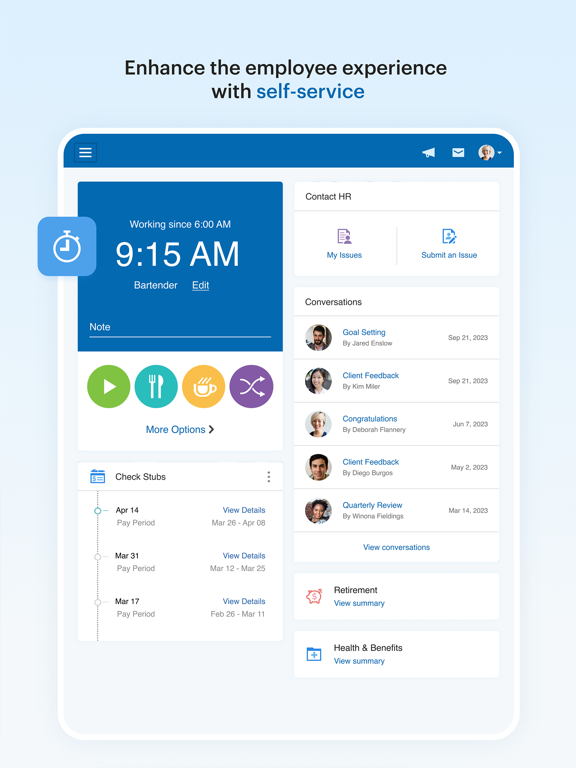
The Paychex Flex app can be used by previously registered Paychex Flex (paychexflex.com) users.
Paychex Flex keeps employers and employees connected to the most vital payroll and benefits features.
Available features will vary and are dependent upon your company's plan options.
EMPLOYERS
Touch ID and Face ID authentication
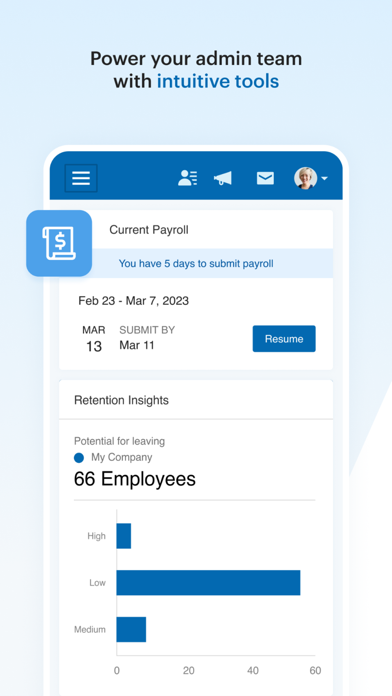
Submit payroll
- Enter, review, and submit on the go.
- Resume payrolls started on your tablet or desktop.
Access vital information
- All reports, including payroll reports and cash requirements.
- Employee check stubs and tax documents.
- Employee profiles, compensation, taxes, deductions, and time-off balances.
- Retirement plan balances, participation rates, and employee eligibility.
- Health and benefits carrier information and member guides.
- Health and benefits employee enrollment and election information.
EMPLOYEES
Touch ID and Face ID authentication
Access vital information
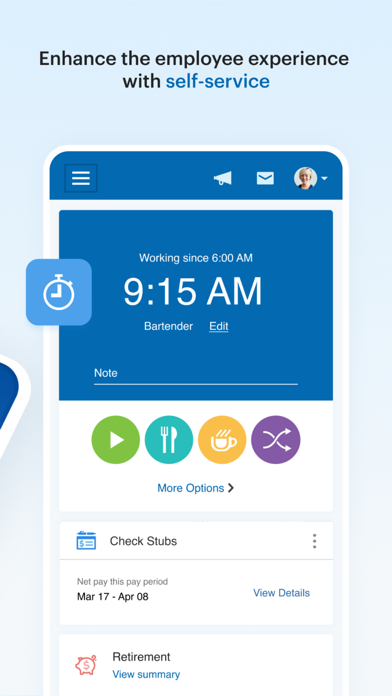
- Check stubs and W2s.
- Retirement balances, contributions, returns, and loans.
- Update retirement contributions and investments.
- Profile, compensation, taxes, deductions, and time-off balances.
- Health, dental, and life insurance benefit details, deductions, and contact information.
- FSA contributions, balances, claim, and reimbursement activity.
Paychex Flex Positive Reviews
Good appIt would be nice if UI was a little easier to navigate. Maybe a one press instead of multiple. Like instead of the three bars, one press to view your hours for a pay period or your paycheck as you build hours. Important things like your paycheck. I also don’t like when I view my hours for my shift, I work graveyard, I have to press the back arrow on the pay period date to make the app change the date from when the pay period starts to when it ends. It has a weird date thing where it’s between that to the current shift you’re working, when it should just show your company’s pay period start and end date for that pay period. Mine is the first of the month to the 15th for a paycheck on the 25th. Then from the 16th to the last day of the month for a paycheck on the 10th. If I work on the 8th, it’ll show the 3rd to the 8th. Why not just show the first to the 8th? Up to the day I’m on the clock? Instead of making me change the date? It should already know?.Jason LurfVersion: 7.2
Disappointing Experience When Switching CompaniesI rarely leave reviews, but I feel like people need to know what happens when you’re not using Paychex Flex under ideal conditions.
I recently started with a new company that uses this same app I had with a previous employer. The transition? Absolutely awful. The integration from my old account to the new one was a mess. I’m now locked out with zero access and no way to reach support, there’s no real-time help, no chat, and no one to call.
Resetting the password took six tries. Even after following every step exactly, the app just refused to cooperate. It’s clunky, outdated, and frustrating, especially compared to other payroll apps I’ve used, which are much smoother.
I get why the app has a 4.8 rating, if you’re with one employer and nothing changes, it works fine. But if you’re changing jobs or need any flexibility, good luck. This experience has made me seriously question how this is still considered a top-tier app. It’s not ready for real-world problems.
Apple should take a closer look at this. Honestly, if I could, I’d be exploring legal options,this level of user lockout and no support access isn’t acceptable..Riskfour$Version: 7.63.1
Needs workButtons missing, important ones like clock in, on the laptop, it doubles the hours when you have work entered then enter On-site pay. Since they removed the Classic version, the app has not worked. I contacted their help desk, their only response was for me to contact out HR. I complied and now she’s having issues getting through. I can’t clock in or use the app for the phone, I can see what hours I worked 2 weeks ago till Tuesday and can’t enter any more hours in. Lap top version is overly complicated and you spend several screen punches and 30 mins. Just to enter time for one day work times. The developers need to speak to those who actually have to use this app. We will be dropping this service since the Paychex rep told us “ it’s just the way it is now” unprofessional and ridged. Sad state of affairs. Don’t bother calling, using the help button on the app or emailing this company. They won’t return any correspondence..HueyUH1NVersion: 7.14
AmazingI couldn’t tell you how many times I’ve needed paycheck stubs and had it become a headache....not to mention, I never wanted to switch to direct deposit (bc I like being able to see exactly how each check is broken down) and as result I had check stubs all over my car and in my house yet could never find the most recent 4 or whatever it was that I needed. (Enter headache) This app has made this small but sometimes important part of life so easy. Not only is it so easy to navigate, it’s easier than I ever would have imagined to view, email, print, etc PDF’s of any or all stubs dating back to the beginning of your employment. It also makes it super easy to see your direct deposit info 1-2 days before “pay day.” I wouldn’t delete this app for anything..GreySteele1122Version: 5.6
Absolutely FantasticThis is hands down one of the most well designed apps I’ve used. My employer uses Paychex for their payroll management and this app takes Paychex ESS to the next level. Check your retirement plan details and change contribution amount, view your pay rate, hours, pay stubs, view and change your direct deposit account, and a bunch of other whatchamajigs. And what really makes it awesome is just how clean and intuitive the app itself is. I don’t write a lot of reviews but I’m genuinely impressed with the quality of this app and the Paychex platform, so they deserve my humble opinion and they’re gonna get it..SwaftBelicVersion: 7.0
Worst app for this services, 2 minutes to loadI’ve been using this app since my company moved to it back in October 22’, I cannot tell you how many times I’ve been late or had to rush to use desktop because it never loads. Cellular or wifi, it always does it. I update it and open it right away, sometimes it takes 2 whole minutes for the clock in icons to appear. It is easy to use when it decides to work but besides that, it’s not a reliable app at all.
Their desktop version is good, I can’t say nothing bad about it..ChivamaneVersion: 7.36
⭐️⭐️⭐️⭐️⭐️Paychex has been absolutely outstanding for our business. Their payroll and HR services are incredibly reliable, easy to use, and have saved us countless hours each month. Whenever we’ve had a question, their support team has been knowledgeable, responsive, and genuinely helpful. The platform is intuitive, the reporting is excellent, and everything runs smoothly and on time.
I highly recommend Paychex to any business looking for dependable payroll and HR solutions — they’ve truly made our operations more efficient and stress-free..PLMvVersion: 7.67
Retail clerk, cashier & stocker.User friendly APP but I think the option that displays the day & time & the hours we had accumulated of the pay period/check in PDF format should be available for employees to see without request from the administrator. Employees need to see if any discrepancies or variances need be addressed from missed clock punches or oversights. This is personal record & having this option allows for review as a bank statement, credit card statement or receipt would for any financial transactions or exchanges where money is involved. This is a business industry standard to see what is being charged, debited or in this case, credited by payroll as a paper-trail of any edits to show good accountability and proper bookkeeping practices that can be in question if a employee has to refer to at later date.
This needs not to be just a option or preference but rather a accessible personal record that provides ‘archived information’ not ‘by-request information.’
Thank you for providing the option for review of this APP Sincerely,
-David J Baker-.Mr. aynonomousVersion: 6.2
Pretty good. Could be improvedThe paycheck aspect of this app is very good. Easy to view all the details I need, easy to update direct deposit amounts as well as adjusting my 401(k) contributions.
Now, as for viewing said 401(k) investments, it leaves much to be desired. Some charts would be helpful. There’s no clear way to see the cost basis of your investments, even in quarterly statements. And syncing with aggregate budgeting apps such as Quicken Simplifi is not possible. Would love to see these features expanded to make the experience of tracking investments more thorough and appealing. If I’m going to have a large percentage of my portfolio with this company, I expect better service and more modern features..Tpe.wagVersion: 7.72
Love this app!!I love Paychex Flex and especially the app! I've never seen an app for work that was this easy and user friendly. I work remotely and I use this app alot if I'm not at my desk and it is a dream. I have had to run payroll before while sitting in my car and trying to beat the clock to have it submitted in time for my staff to be paid on time. It was amazing!! I am able to easily submit every single piece of information for payroll and submit it with no issues. I frequently run reports and email to people or load on Dropbox. It's amazing!! Thank you for making my job easier!.LL Ward13Version: 6.12.1
Update made this app uselessI used to love this app but... You guys updated your app, it prompted me to get the new one, so I tried, but my phone isn’t compatible with it. The apple store app says I can operate the older version of the paychex app, but when I try to open the older version of Paychex, it just prompts me to upgrade to the new version. So basically I’m in a cycle that I can’t get out of, due to your app “updates”. This is very inconvenient and you have made this app useless. I can’t see my paystubs or tax information. 😑.Poured_designs_studioVersion: 7.6
Needs improvementsThis app maybe good for employers. However for the employee this app needs many things improved on and I am very thankful I only have to use it for a few more weeks before I leave my current employer who uses this app. I have advised other business owners I know not to use this app due to its issues for the employee.
App takes forever to open, even doing 2 factor and saying to remember the device about every other or every 3rd time you have to enter 2 factor again. Took a while to learn some of the functions of the app.
Have used Homebase and Paycom would recommend both of those before this app..1Spsrtan17Version: 7.57
Awesome for employers & employeesThis app offers employers the ability to allow employees 24/7 access to their payroll information. Employees can update their personal information, view their check stubs, and if integrated with Time and Attendance...view & approve their time cards and process time off. One stop shop for employees. One central location for all payroll related items for employers. The fact everything is web based means no more coming into work on your day off to do things you can now do from anywhere. The app does look just a little different on different platforms, but overall works just the same..Me 2 & againVersion: 6.4
Like Nike, Just Do It! Get it you won’t Regret it.Best work app when it comes to checking your Hours and it’s good to know how much you’ve made and Compare it with every other Check I get so I can see if Hard work actually pays off or not.. PayChex is the app actually it’s a Must Have for Those who are Employed and compensated legitimately. so if your reading this to see if you should get it, Get it now. Don’t waste anymore time with wondering if you should, you should. I Did and I Did it on my other Phones As well..T.HeartistVersion: 7.29
ReviewGreat.Joesll2643Version: 7.5
Free International Money Transfer 💸Enjoy high maximum transfers into more than 20 currencies while saving up to 90% over local banks! The cheap, fast way to send money abroad. Free transfer up to 500 USD!AdvertorialVersion: 7.73
Paychex Flex Negative Reviews
Not reliable!I was at a company that helped me get set up with Paychex flex since that was the accounting system they were using. The app did work OK, and I was able to get on and see my paychecks, however, the company switched payroll services after I had been there for almost one year. When I changed trucking companies about three months later, probably 3 to 6 months after that, I tried contacting Paychex flex to get my final paychecks. However, since the company did not use them anymore, I could not login and the agents could not help me. Therefore, I am unable to properly do my taxes because I can’t get my final statements… So frustrating! Even when using their login assistant and speaking several times to live agents, none of them have been able to help me get logged in. I can still log into the app, but since the company stopped using their service, apparently all that data is just lost forever in cyberspace? it’s hard to believe that in the 2020s, that these accounting companies have such poor management practices that they can’t even back up and save their databases in case people want them a year or two later. Digital storage is so cheap! In the future, when I change companies again, one of the things in prospective new trucking companies is, I will make sure they don’t use Paychex flex or I’m just not interested in working for them… Or, maybe I just have to screenshot my paycheck stubs like we are still in the 1990s..UmkmowmVersion: 7.69
Incapable of doing its only jobThere is no way this app has 5 star ratings from real people. I have problems with it every single day and I know it isn’t just me from reading these reviews and talking to others at work. When I open the app, there is about a 50% chance that the app will even load to get into the clock in screen, and if it does load, there is a 50% (probably less) chance that the clock in actually works. Usually it just greys out like it’s about to clock me in and just doesn’t. So, I have to reset my phone over and over (because if it greys out and the clock in doesn’t actually work and you reset the app to try again, the app won’t load) until it luckily decides to finally work. Usually when I’m at work I just give up and use our walk up computer to clock in/out (which begs the question, why does it load up flawlessly on the company computer but can’t on the phone?). However, when I’m working from home I have to sit for 20-30 minutes resetting my phone repeatedly in hopes that one of those times the app will both load up and clock me in. I gave up after over 20 minutes today and had to email our office lady to clock me in and adjust my time. It’s ridiculous how much time gets wasted by this garbage app that can’t even perform its only task..Call of dutyFOLIFEVersion: 7.54
Constantly Logs False ErrorsUpdate; Still no update on this constant glitch. My clock ins/outs are constantly stopped and duplicated. There's constant errors and my manager constantly has to delete the duplicate ins/outs that usually aren't reflected on my time card until that day has already passed. In other words, to me and my manager it looks fine and then suddenly that same time punch will have errors. It's a weird glitch and it's been constant for a year. (And no it's not user error I've taken great precautions to mitigate this by making sure I'm always updating the app -and my phone ios, and making sure I have strong wifi, and making sure I'm not double tapping, and making sure I wait for the punch to reflect correctly before closing the app). And yet!!!!
Original note;
There's a bug with clocking in. I reached out to support to report a bug but they are very unhelpful. I constantly have to fix clock-ins or outs that weren't there, or it duplicates them, and every time I fix one it duplicates itself and creates an endless loop. It's awful and the only way to remedy it is to have my manager manually delete the duplicates and manually adjust my clock. The app is also so slow on startup..MadiStarlightVersion: 7.68
Positive reviews have to be botsI have used paychex flex for work for over 3 years, and it is without qualification the worst application that sees heavy usage in a modern workplace. The UI for every piece of its engagement platform actually seem to be intentionally designed to be counterintuitive at every possible level. For instance, tapping my pay is not how you get to paycheck history, for that you need to go to the dashboard. Time and attendance? No pto tab there. All of this fails to communicate just how glitchy flex is. Every single week the app breaks. We actually have taken to calling it “getting paychexed” as a shorthand, it is just that common. As I write this, attempting to open the app results in it telling me I am using an outdated version and that it should be updated, with a button that takes me to the app store, where it confirms the app has already been updated. The app is so poorly designed that I can only assume that any positive review has been paid for, generated via AI, or as a consequence of the extraordinary luck of using the app once without immediately encountering a glitch..Luke ReadyVersion: 7.50
Terrible AppMy company is making us employees use this terrible app for some reason, we had the original clock in/out system on the wall that worked perfectly fine. I tried logging into this app and it would just stay on the loading screen even with full bars signal and full bars on Wi-Fi. It won’t login me in so I can clock in. I’ve turned my phone off and back on multiple times and the same thing keeps happening, stuck on the loading screen. This has been an ongoing problem for the past 3 consecutive days so my manager recommended that I delete the app off my phone and re download. So I deleted it and now when I try to download it again. It’s stuck on the loading screen and won’t even download back onto my phone. I tried everything, Wi-Fi ,no Wi-Fi, turned phone off and back on, still stuck on the loading screen. Now I’m at the point where I can’t clock in for work or see my paystub or my schedule. Terrible app in my opinion. They need to fix it immediately. 0 out of 5 stars, but I can’t put 0 as a rating..HonestSteve1Version: 7.38
Worst business app everI never actually write reviews for anything, but I despise this app enough that I have to write this as a sort of catharsis.
To begin, the UI interface is messy, the menu is not intuitive, and when my company ID changed, there was no clear way to make the new company ID the default one on my Home Screen, which is annoying.
There is frequently input lag when I clock in or clock out, and it is a burden to log in and out of the app every single time I open it after an hour or so has passed. This burden is even more cumbersome when coupled with the fact that I work with my hands, and the “Touch ID” option to log in works very infrequently because my fingerprints are eroded from labor. Which is more of a personal complaint, but it leads to more issues that I’m about to divulge.
The password requirements are not standardized with other systems that I’ve encountered; only a few special characters are allowed. You can’t use “#, %, *,” or other common special characters, but you still HAVE TO USE one of the few “approved” special characters, along with other specific other requirements that do little to actually improve password security.
This brings me to my last criticism: after only a few attempts are made to log in, first with Touch ID, and then with trying to type my password, I am locked out of my account, and the process to unlock it is long and tedious— ESPECIALLY given the fact that the only reason I ever use this app is to clock in or clock out, so it affects my time on the clock..Toby456728Version: 7.23
Worst AppI cant express how much I hate this app. It never wants to connect, I dont know how many times Ive had to uninstall and then reinstall this app just so I can sign in; which I have to do for any and all timeclock changes. Clock in? Sign in. Taking a Break? Sign in. Coming back from break? Sign in. Going to Lunch? Sign in. Coming back from lunch? Sign in. Another break? Sign in. Coming back from break? Sign in. Clocking out? Sign in. Is that tedious? Absolutely, but for some reason this app needs more security than a banking app. It takes so long to log into the stupid thing that Ill often miss my clock out time, and suddenly Im over time, so I have to go back and fix in after the fact. Not to mention it will on occassion just NOT log my timeclock change, or worse duplicate an entry, and then flag it like It was my fault. This app is THE worst thing ive ever been forced to use at my job and I am counting down the days until we either shift back to quickbooks, or they hire a better UI designer, because it is THAT awful..RagtagVenomVersion: 7.45
Need support, Good LuckI reached out to Paychex about getting my W2 for a business I worked for that closed their doors. I got a notification from Paychex saying my W2 was ready but when I click their link it says there’s “Nothing to see here” I chat in asking for help and am disconnected twice before even getting to reveal my issue, the 3rd rep says they CANNOT provide my W2 to me, as they have a contract with my previous employer promising them that that Paychex will not provide any of my own documents to me. This alone is false, as I fully had access to paystubs and the personal information Paychex had on me until the business was closed. I asked them how to contact the employer, and they said they do not retain any phone number, and they could give me an email for the employer. they then told me to check one other spot on the website to see if I could pull the tax info. When I couldn’t they refused to give me the Email and just disconnect. Their chat just kicks the can down the road..Venicio L.Version: 7.69
THIS. APP. SSUUUUUUUCKSSSI would give less than one star if I could. My company has been using this for a few years now and it seems like as more time goes on the worse this app gets. First the app wasn’t bad, maybe mediocre? Now it’s constantly glitching and freezing on me upon initial login. It can sometimes take 5 minutes for the app to even log you in and even then after that it’ll be frozen and won’t let me clock in or out so I’ll have to close it out wait another five minutes to try and log in for the same thing to happen. After a certain point it’s easier for me to just have the admin clock me in, which is about 50% of my clock in/outs in a week. The app allows you to request time off, which is nice, but the amount of time off available that is displayed is wildly inaccurate. So with that being said you have to keep track of how much PTO you have left, not a big problem, but it’s just another thing about it that could REALLY use some improvement..JoelDizzleMaNizzleVersion: 7.48.1
Constantly hangs on login on iPhone 14This app has consistently fails to login and just stays in a hung state after you get pasted login but before it loads the dashboard. You will sit there for hours and have to reset your phone to get in. I just decided to delete the app and reload it on my phone and it hangs during the download. I’ve reset the phone via power cycle, and tried. Nothing works. I have over 128GB on my phone so it is not a memory issue. It works on my iPad so it is. Or a wifi or connection issue. The app has a bug which hangs and my guess is it sees my IP address and uses that somehow. I don’t always logout after checking in I just close the app. That should not crash the app and make it sit in an endless loop of connecting and downloading the dashboard. This is beyond frustrating as a both an employee and employer! Can’t do payroll if the dashboard never loads after login is successful!.Busdriver49Version: 7.46
The Worst App Ever- A NightmareThis app is an absolute nightmare. First off it’s slow and cumbersome. Second, at least twice a week they’re having some issue so I can’t sign in so I can’t clock out when my shift is over, which means I need to contact my boss w the time and follow up on payday to sure my hours have been updated so I get paid, and sometimes my boss has issues so I’m now waiting weeks to get paid for my shift, all because this stupid app is absolute garbage. I’d advise anyone who’s thinking of signing up to go somewhere else because it’s going to end up being a lot more work than it helps. It’s horrid all the way around what an absolute nightmare I’m sitting at work at the end of the day for an hour trying to sign in just so I can finally clock out and go home. Every single week there are problems making life a lot harder than it needs to be. Paychex is a pathetic nightmare.Aunch3Version: 7.67
UnprofessionalThe app isn’t just unprofessional it’s unusable I’ve been unable to clock in began meal or clock out stays stuck on load screen I can’t even injoy my lunch because on the off chance the stars align and I some how get to the dashboard of the app it task 15-30 minutes to do that no exaggeration my self and numerous other employees have the same issues I am glad my PM and superintendent use the app so they are more understanding I hope by writing this review it will be a warning to a small business or some contractor to invest into something else because this app isn’t worth the 4.8 stars it’s trying to pass on it really should not exist the developer needs to take it down and start from scratch IF I worked the same why this app works I would be fired also this isn’t my first review of this app posted one about a month ago never showed up so this maybe all for nothing.Yamaha23xVersion: 7.44
Always a PTO errorWhile most of its functions are nice, on the employee end, when you check your PTO accrual history, it’s almost like it forgets math. For example, I’ll have 8 hours taken each day while I’m on vacation. Everything is all fine and dandy for the first few days. Then all of a sudden I’ll go from have 60 hours to -2 hours. The deduction will math is all wrong down to the minute. Even when I go to the balances, it’s completely wrong! It’ll say I used way less hours than I accrued, but still show a negative balance. Luckily when I’ve spoken to management, this error doesn’t show on their end and if they re-save, it goes back to normal on my end. But then a few days pass, and it’s magically in the negative again on my end. This is something Paychex needs to fix. I shouldn’t have to keep contacting my boss in a panic on whether or not I’ll get my PTO while on vacation..WaffleNekoVersion: 7.33
Slow, unreliable, day to day hassleThis app is abysmal. Since my job starting using Paychex about 6 months ago, we’ve had nothing but issues, complaints and messed up pay checks. Every single day I try to login to clock in for work, the app doesn’t load. It’ll some times be hours later before I can punch in. I have to have my boss adjust my times DAILY because of how inefficient the app is. It’s not the location, I’ve tried punching it at home, at work, and on the way to work and no matter where I am, the app never loads. It’s an unnecessary headache everyday making sure my hours are actually correct. I have to use a different app to make sure my hours are correct and then have my boss adjust the hours accordingly in Paychex. A postcard sent across the Atlantic on the Nina, Pinta or Santa Maria would arrive quicker in Europe than the Paychex app will take to load.Salty_Jiggs69Version: 7.50
Never loads promptlyI have constant issues getting the app to actually open when I need it to. Tried with wifi, without, turned phone off and back on completely, deleted and redownloaded the app. Never loads promptly and it’s an inconvenience to myself and my boss who is always fixing my clockings. I have deleted the app to redownload in hopes that this would help. I now cannot download the app, it gets stuck about 3/4’s of the way when downloading and now I cannot clock out from the first part of my shift and click back in for the second part this evening. Upon reading reviews several people are having the same issue. This is something that needs to be fixed, I have had this issue pretty much the entire year and a half I have worked for the company I currently work for..HanSoloHannahSoloVersion: 7.39
Plagued with issues2 Stars for ~usually~ making it easy to clock in and out. Other than that, the login load times are more often than not very long. With wifi or full LTE coverage it can easily take upwards of 5+ minutes. I have been stuck on the loading screen for an hour and 20 minutes before, and only after that amount of time did it finally time out. When clocking in and then closing the app and coming back to clock out later, the time often is not up to date and the home screen shows as if Im already clocked out.
After clocking in our out, I often have to close the app and open it back up to make sure it took my clocking. Sometimes, it appears as it did not take it and then I press it again and suddenly there are 2 punches for the same thing.
Once in the app, navigating through the tabs can also be a pain as the screen can take quite while to populate.
It seems these issues became more prevalent once paychex time was merged with flex.
Love the idea of the app, but still has many bug fixes to be worked out..HottubdudeVersion: 7.46
UselessThis app is by far the worst app, probably on the entire app store, for loading. Face ID instantly works but makes you wait an eternity to load. I’ve had multiple instances where it will not load in for 30+ minutes. Once you get in, you think “okay sweet I can navigate to everything I need”. Wrong. Now it will make you wait another 10 minutes to load the dashboard and if you swap to time and attendance, get ready to wait another 10 minutes. If you’re a business wanting to run payroll with this app, please pass and save yourself the headache. It’s not just me either with these loading issues, my whole crew has the same issues. App will make you update every week, yet it never gets fixed. I’d rate this -2 stars if i could..Bmw667Version: 7.46
Recent update broke running payroll.I generally run payroll and get the reports to our owner who then approves payroll and I will then finish the process of submitting it to Paychex. Many times, I get a text on the weekend or in the evening letting me know I can submit payroll. It used to be, I could log into the app and just submit payroll in the last step. Now, I log in and the app behaves as though I am accessing it through a mobile browser. I get notified that not all features are available in the "mobile browser" and for full functionality, I should download the app. I am in the app. Until this feature is once again fixed, the app is worthless for my purposes. I'd give it 5 stars otherwise. Will update my review and stars when it's fixed..LiliannathVersion: 5.1
Poor functionalityThis app barely functions on iPhone. Even after signing up on an iPad it still won’t work on iPhone. For the biggest paycheck processor it’s an extremely poor app. The layout is clunky and disorganized. The search feature is almost useless so they might as well take it out. If I didn’t have to use this app for work it wouldn’t be worth keeping.
I wrote this review years ago. They have not fixed it. Login is slow and clumsy. Even now it just won’t load properly or quickly. Sometimes I get random text messages from the app saying my paycheck stub is available from a month ago. Maybe if they spent a little more on the app and less worrying about share holders everyone including share holders would be happier..Journeyman24Version: 7.44
Bad time keepingThis is an inaccurate time keeping website for any company and the developers need to reinvent how it tracks time. If an employee is not watching their time on here then you are getting ripped off from your paycheck and the company you are working for is gaining money while you work for free. If you clock in 7 minutes past the hour then this website charges you 15 minutes past the hour. It does not keep an accurate time of your clock in and clock out time. Time worked is time paid and this website DOES NOT log it correctly. If I could give this app zero stars to reflect the company website I would do it. The developers of this website should be reported to the United States Department of Labor along with the Fair Labor Standards Act. DO NOT GET THIS Website OR USE THE PAYCHEX app..Phantom2222Version: 5.6
YikesWhen this app works, it is absolutely wonderful. sadly, that rarely ever happens. it takes at least 10 mins for the app to open to the main screen so that i can clock in for work. then clocking in takes another 2 minutes. and god forbid i ever want to look at who’s scheduled with me.. that takes forever to load as well. ive tried deleting and redownloading and it is ALSO taking absolutely forever to do just that! not to mention the constant maintenance being done on the app. it’ll also tell me that my paycheck is ready to view so i try ti go view it, and it’s nowhere to be found. this app constantly has issues and i hate that i have to use it for work..UhimsavVersion: 7.38
GarbageMy company switched from Paycom to Paychex a few months ago. Paychex must be quite cheaper because this app is almost useless.
Good luck trying to even login. I’d say 75% of the time the app won’t even get past the login screen. I have to wait until later to write in my hours most of the time. Sometimes you’ll be able to clock in, then later the app won’t load for you to clock out.
If you’re lucky and get past the first screen, half the time your clock in button won’t appear. The screen will be blank white with a buffering logo. The app always runs slow, clicking on another tab is taking a risk of the app crashing on you.
The last company had a “Pay To Date” feature, which would show you all of your hours and how much money you’ve made so far in the pay period. Paychex doesn’t have that option unfortunately.
Overall a major downgrade from what we were using last time. I hardly write reviews, but after today when the app once again wouldn’t login, I couldn’t take it anymore lol. The fact that this app has 5 stars is an abomination..Bob123453Version: 7.46
SLOW even on the FASTEST phone in the worldThis is a cool app with lots of features. But it is SLOW. I’m not sure what kind of data processing it uses, but every time our employees launch the app it seems to load all widgets from scratch. It is faster for our employees to just pull up the website, which renders this app useless.
Querying the database to see which ‘widgets’ to load shouldn’t take that long- each user’s phone should have all widgets preloaded THEN check with the database. Seriously, feels clunky. The lag is so noticeable that it’s hard to tell when you’ve punched or not and we frequently get double punch errors because users have no way of knowing that their punch is ‘processing.’.Apple Music ModeratorVersion: 6.15
Horrible AppWish I could give zero stars. The app seems to be awfully buggy. It will work fine for a week or so and then just won’t load or takes forever to load/open. So I will delete and redownload the app and then it will work again. Been doing this for a few months now and nothing seems to change, I have automatic updates turned on so I am not sure if this is the issue or what but the app is extremely frustrating when it doesn’t load allowing me to clock in and then I have to waste more of my and my employers time and money every time I have to wait and then every time I have to then go back in the app later on to adjust my time and attendance. Do not recommend..TwoodburtVersion: 7.62
Terrible, top to bottomI use this app as an employee to clock in and out, and as an administrator who checks the time cards of our field and shop carpenters. This app is nothing but a headache on its best days, and useless every other day.
It’s a first world problem, I know, but it takes forever, meaning at least 1-2 minutes on some days, for the app to load. Whether it is accepting your password, clicking between screens, or logging clicks, it is sooooo slow.
I just tried to submit time off requests and it keeps hinting me the “oops, something went wrong message”.
From an administrative side, the built-in reports are utterly useless. I cannot simply ask it how many hours a certain carpenter worked at a certain job. It has no idea. I have looked at every built-in report and none of them offer information that my construction company needs. And our sales rep, when I ask him for solutions, just sends me screen shots of the steps I need to take to find what I need.
I cannot wait until we can jump ship and find a better product..MarisaDBVersion: 7.66
This app wastes more time than it saves.I can not say ANYTHING good about this app. I’d say it was a brick, but bricks are useful. This app might make things easier for people in the office working in payroll, but it is at the expense of the end user out in the field. Constant login and freezing issues. And the UI is so counterintuitive, it might as well be in a foreign language. The only training I’ve been able to find for this worthless app, is a PDF with some pictures and writing so small, it’s barely legible on a phone screen. You know what doesn’t crash or have log in issues? PAPER TIME CARDS!!!
If I could take stars away from this app I would. There is absolutely no reason this steaming pile should be at 4.8 stars..Janxy81Version: 7.49
GlitchyWhen I went to set up my account, they asked me to select four security questions. I tried to select the questions that were relevant to me, but neither the website nor the app would let me select different questions. It was literally stuck/glitched on certain questions; and no matter how many times I tried to select a different option, it wouldn’t change to the option I was tapping on. So I had to literally write down every security question and write in a random password answer to it in order to actually be able to use this site. I can’t rely on my memory to easily answer these questions now because these questions have no relevance whatsoever..Some1had2sayitVersion: 7.33
Mobile interface is trashI have NEVER written a review for an app before, I simply dont feel the need 90% of the time...alas, I am required to use this app for work.
The mobile interface is so broken, it fails to allow me to log in 9 out of 10 times I try. 7 of 10 times that it does let me login, it fails to load any of the pages I typically need to interact with. To the point where it has consistently been a better use of my time to launch a mobile hotspot, find my laptop, boot it up, and log out using the online portal. By the time I do all of that, the mobile app is still frozen or failing to load even just the dashboard.
Please fix your mobile app, paychex. Its absolute trash..SkraabadoodledooVersion: 7.49
UnusableMy company switched over to this system a while ago. The online page works alright but this app is actually useless. I have, on more than one occasion, spent 20-30 minutes just trying to get it to log me in. The amount of time I get a “we seem to be having trouble right now” type of error message is innumerable. My position in the company has me on the go a lot and I don’t really have any other option other than to use this stupid app. If you get it works fine enough although the UI is clunky, needing to click 100 different buttons just to take a lunch, break, transfer, clock in, clock out, is crazy. Over all not a fan of the app and I am stuck using it..Xmen admirerVersion: 7.41
UnusableMy workplace used this app for about a year before switching over to something else. In the time we used it every single employee in my department had issues with it. It would clock us in or out for literally no reason at all, unapprove hours that were already approved, keep us clocked out for our lunches when we already clocked back in, as well as a myriad of other problems. It got to a point where most of our staff gave up on using it and just recorded their hours on paper and sent their hours to our supervisor at the end of every pay period to enter it manually. Not sure how it almost has 5 stars, it was completely useless for me and my coworkers..EternalhoneymoonVersion: 7.58
Doesn't load most the time and no notif systemFirst off, this app has a terrible load up rate. 6/10 times opening trying to clock in/out/meal, the app refuses to load. This app has has caused such an issue, my manager has made a sheet for people to write missed time punches so he can fix the time clock.
The second lesser issue; This is honestly the first and only clock in app I've experienced that has no sort of notification system, which is really weird and kind of off putting, as the notifications from previous apps were very useful and accommodating for my ADHD and irregular schedules (also how do so many people not know how to make cohesive stable schedules?)..ThereIsNoFreedomVersion: 7.39
GarnishmentIf you’re an employee whose company uses Paychex, be aware—they are all about serving the employer, not the employees. If you run into issues, like I did with wage garnishment, don’t expect any help from them. They over-garnished my wages—taking out more than they were legally allowed—and then held the extra money for weeks before even beginning to process a refund.
Worse, they absolutely refuse to speak with employees directly. You’re left in the dark, having to go through your employer for every question or concern, even when Paychex is the one responsible for the mistake.
Their mobile app is another nightmare. It’s clunky, slow, and difficult to use. Good luck trying to find clear breakdowns of your pay or garnishment information. The app feels outdated and designed more for show than function.
In short, Paychex prioritizes employers over employees, offers poor transparency, and provides a terrible user experience. I wouldn’t recommend this company to anyone who values fair treatment and timely payroll accuracy..Antdaddy17Version: 7.60
Too many bugsThis application is constantly down for maintenance or plagued by some other issue. I have deleted and redownloaded the application many time, I have used this app for over a year and have had constant issues. Trying to have my employer change because none of us like this, when you try to talk to support you just sit there waiting for an agent for hours on end. There is not ETA for when the next agent will be available and I honestly don’t think they even have any agents that work there. If your an employer looking to get this save the headache and don’t, if you an employee I’m sorry and hopefully the employer swaps to another system soon.DevilLobsta97Version: 7.50
Honestly annoying customer support is really badIt literally won’t let me create an account and there is no customer service or anything listed you have to GOOGLE IT and the number i called didn’t even have a person and didn’t help me at all. how am i supposed to get paid????? at least have ACTUAL customer support, not a robot giving you a list of more links to go to. and it’s really annoying how if anything happens on my phone if i slide down my notifications or check something for a second it kicks me out and clears all my information and i have to restart the app and enter it all over again. it’s been like well over 10 times..MOOMOO & BEAN TAKE THE WORLD!Version: 7.38
Absolutely horrendousWorst punch in app I've ever had to use. I've had problems non stop ranging from not even being open the app to being shown a successful punch in/out just to open the app later or the next day and see if didn't go through. Have had to contact customer support multiple times and so has the he manager at but he company I work for. Has been nothing but a headache everyday and have resigned to emailing time punches because the app inconsistent. It companies didn't force their employees to use this because of the competitive pricing then this app would not have a single user. All 18 guys at the company I work for have a similar feelings..Remissdust12534Version: 7.67
Log on lackingConstant issues logging in. At first use it constantly made you verify identity. Now a couple months in, it will not connect to server, have to log in, time out, log in again. Then when you finally can log in ten or fifteen minutes later the dashboard show up blank screen with no clock in or out option, so swipe out, try to log on again rinse repeat. It’s great when it works, but every day I need 3 to 5 attempts to actually log in to clock in or out. I’ve updated the app, removed and reinstalled updated iPhone still the same issue. We have 15 employees and we all experience the same issue with this app..Stove moverVersion: 7.42
AwfulOne of the worst apps I’ve ever used. Takes forever to load to the main screen. Most of the time you can’t even get in it because it refuses to load. I’ve thought maybe it was just my connection sometimes but it isn’t… considering all of my co-workers have the same exact issue..Nrapasi88Version: 7.51
Payoneer 💰Payoneer is an online payment platform that lets you transfer money from any corner of the world! A best and must have payment service for every blogger, traveler, freelancer, affiliate marketer, consultant, virtual assistant, business person, online sellers, and receivers. Earn $25 for free by joining Payoneer. Sign Up Now!AdvertorialVersion: 7.73
 Paychex, Inc