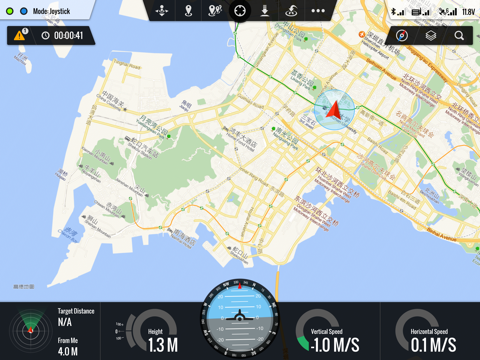
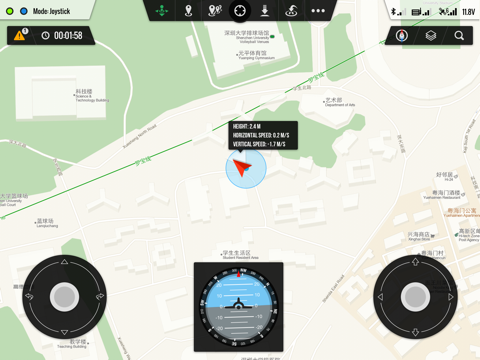
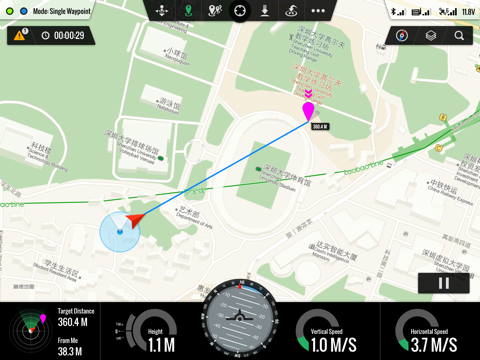
The Ground Control Station software is specially designed for BVR flight. With the DJI hardware, you just need an iPad, then you can make the aircraft carry out the flight course preset on the ground control station software. With the click & go flight and joystick control on touch screen functionality you can enjoy the pleasure of using the iPad to control the aircraft. The software now only supports Bluetooth 4.0 iPad devices (such as: the new iPad, the iPad mini and the iPad 4).
Features:
※ Single Waypoint, Multi Waypoints, Joystick Control
※ Custom Joystick Supported
※ Save & Upload Flight Course Supported
※ Chinese and English Supported
※ Voice Reminder
※ Using Bluetooth 4.0 Low Power Consumption Technology
※ WooKong-M Supported
※ Naza-M Supported
※ A2 Supported
※ Phantom 2 Supported
Ground Station Positive Reviews
Almost there but...This is a great app for use with the Phantom 2 as long as you have the data link.
That being said, it needs these improvements in my opinion to make this a 5 star rating:
- altitude is based on where the copter takes off from (not true altitude). There should be an additional display for true altitude and altitude from takeoff
- when creating way points, you can only pinch-zoom in to a certain level BUT not close enough to provide the level of detail to make a great flight plan. You need to make it so you can zoom in further!
- add the ability to design your flight plan online (where you can zoom in further) and upload it to your Ground Station App. Way point planning takes time. And it would be nice to be able to save your previous work somehow..QBizzyVersion: 1.4.58
This is not for the phantom.....I noticed people complaining about this not working on Phantoms, unless you are running an original phantom with a naza v2 installed along with the 2.4 dji link ( which is a separate piece of hardware for older systems) or the A2 flight control system it won't do anything. This app works perfectly for the product it is design d to support. It's functionality is limited as compar d to the dji go app, which is designed for the newer dji products. It's sad that people can't even research the gear they want to put overhead..Straight aheadVersion: 1.4.63
Aerial photographerWhat a great app. It does what it says
I tested the waypoints and works great
Even better than PC ground station.
wish It could get even better features
but all good I never had any Issues with
It and using this on the DJI S1000 Plus
and works perfect!. you pilots needs
To stop complaining, whining about
how it should work and it really does.
personally, I love this App so, forget
the other ppl who doesn't..MacBookPro225Version: 1.4.63
This is tha OLD GroundStation appFor those with newer DJI multirotors, running on the newer iOS devices, the DJI Ground Station Pro app is the one you need!.CosmiccathVersion: 1.4.63
Good AppI got this app because I could not use PC version reliably. It continually would loose connection with the aircraft and I would not have a status as to its whereabouts. This app has worked flawlessly with my Phantom 2 and I never loose the connection. My only complaint is the Apple maps are very outdated. I do the mission planning on the PC version first then go to the IPad and do it there. that way I am aware of any new structures that may be catastrophic to the flight..Drones be UsVersion: 1.4.59
Great start, needs some cleanupThe graphical interface is nicely polished, sort of surprising after using the PC ground station. Alas, a handful of bugs and UX issues make me nervous to fly with it.
In the hour or so I used it, it crashed twice (the app, not my copter .. simulator mode thank geezus) and suffered from a random bluetooth connection forcing me to relaunch the app.
Failsafe behavior could be clearer, especially if the app has a habit of crashing.
Joystick mode should show the useful flight gauges (altitude, heading, etc). Also, you're unable to zoom/move the map in this mode. Instead, pinching the map will reposition and control the joysticks per your touch. Glad I wasn't in the air to figure that out.
Nice looking app with a plenty of promise… please keep at it!.0x0100Version: 1.3.56
Great app but missing one implant featureI have been flying phantoms for a while and taking lots of photos and videos so when I saw this app it would let me easily fly to locations w/o having to pilot and I could control the camera. What I think is really needed to make this a smash app for dji would be look at points, these points could be added between waypoints for the phantom to target..Gateway69Version: 1.4.58
Phantom 2 Vision plusVery disappointed. Downloaded the app and really enjoyed setting up missions while I waited on my Vision plus to ship just to find out it won't work on it. :-( Would have ordered lot less expensive Phantom 2 and used camera and gimbal off of my Phantom 1.1.1 The whole point of ordering the Vision plus was to have the best possible setup for this app..Jruss1966Version: 1.4.58
Ios9 not compatibleAs others have reported, DO NOT UPGRADE to iOS9… Ground Station is not compatible. I use this for work (commercial use of drones with autonomous flight)… before upgrading, and now I’m screwed. The ios9 Beta has been out for quite some time. Why didn’t DJI figure this out??? PLEASE, DJI… fix this!!!!! Fantastic 5 STAR app, but if it doesn’t work, what good is it?.Commercial Drone AutonomousVersion: 1.4.62
Maps out of date by 5+yrsThis app works pretty well. The only issue I have is that the maps are out of date by 5+ years. This makes is extremely difficult to mission plan in new areas. Please update your maps or use an open source provider..DJI FLYERVersion: 1.4.59
Great app....whenGreat app when it works. Don't understand why it doesn't use the built in wifi of dji vision. Bluetooth doesn't cut it! Hope the next update solves the stability issues also. Otherwise the concept is great and can't wait to be able to fully take advantage of it..HeliBOBterVersion: 1.3.56
Do not update if you plan to fly.Does not work on IOS 9. Tried deleting and reinstalling, but nothing works. Please update ground station to make it compatible with iOS 9.TheOrginal IshmaelVersion: 1.4.62
Not For Vision or Vision+ or P3, Phantom2 ONLYWorks well for P2 Zenmuse. It is not designed for any other version of Phantom so no P3, Vision or Vision+.
This requires you to buy and install the kit/components for the P2 to function. It is not a highly polished app but it gets the job done. That wing said I hope they are working to update it..Hard_CiderVersion: 1.4.62
Update your mapsGood app. 3* only because of the outdated maps. Come on and read these reviews and get the maps updated please..Insp507Version: 1.4.59
Ok, not very intuitive.Lots of room for improvement.
iPhone version, point of interest - so the unit autonomously stays pointed at a target....Eddie Hazel11Version: 1.4.58
DJI Phantom 2 VisionCool app but...Get on it! Where is the release for this quad! Hurry it up please!.Scottygz28Version: 1.3.56
Great app By DJIGreat app so far
I use it with phantom 2 H3-2D zenmuse …...AljufainVersion: 1.4.58
DJI GSVery good app working impressively. Outstanding!.TiPuceLaPuceVersion: 1.4.63
Superb App 5 star but no search function not working in mini IpadI love this app far better then Pc GS far more intuitive,user friendly.Could use a few more features but Im sure its just a matter of time from DJI.The only problem Im having and this could be isolated to a small group of us is no working search feature.Its apparent from online reviews others having same problem.So 4 very shiny stars.Yee Haa!DJI!.Valter PereiraVersion: 1.4.59
Free International Money Transfer 💸Enjoy high maximum transfers into more than 20 currencies while saving up to 90% over local banks! The cheap, fast way to send money abroad. Free transfer up to 500 USD!AdvertorialVersion: 1.4.63
Ground Station Negative Reviews
App will now open on my iPad, but won’t connectI guess it’s better since it won’t crash now, but I still can’t connect to my phantom. I bought my phantom 2 weeks after updating my iPhone and iPad, so I haven’t been able to use it even once. In months. Very disappointing. Can’t say I’d recommend a DJI product to anyone at this point..SdefrieseVersion: 1.4.63
Won't ConnectStill won't connect with my P2. Is there another update coming DJI?.Moots daddyVersion: 1.4.63
Special thanksDJI i wanna say a special thanks for the update
Your the best
Your the first at the world
Good luck.MDCCLXXVIXVersion: 1.4.63
When Phantom 3 support?We need Phantom 3 Advance or Pro support.JcalvacheVersion: 1.4.63
Dji've noticed with the DJI app Groundstation could no longer works since they updated to 9.1 OSI
I found if you disable your Bluetooth on your iPad that works fine but it cannot find aircraft because it is disabled so it's something to do with the Bluetooth enabling part of the app that is malfunctioning maybe DJI could look at this app and fix it if you run the app it will run but then you will have to hit retry and it will do the same thing but if you hit cancel app will open with the Bluetooth disabled lotta people paid a lot of money for this 2.4 autopilot system that does not work maybe we should be asking for our money back if they can't keep up on their software applications get a bunch of people together I see lawsuit.DronecoVersion: 1.4.62
Very Disappointed vision 2+ OwnerI purchased dji vision 2 + after researching what apps would be available to utilize with it. I personally believe marketing is false advertising, yes it has ground control function built into dji app, but does not work with this ipad ground station app, or the pc version, which have considerably more functionality than what was delivered for the iPhone. The iPad and pc version, has a larger screen, and is better suited to autonomous flight. Since ground control is already built into the hone apps, this surely couldn't require much work to allow it to function with the new phantom..Rmay18591Version: 1.4.59
Works as intended..maps way out of dateApplication works well. The reason for only two stars is because the maps are EXTREMELY out of date. This is very disappointing as it is hard to plan an autonomous flight with maps that aren't current. Please, please, please update the maps..please listen to your customer!.Stalkerface322Version: 1.4.62
Not compatible with Phantom 2 Vision+The app refuses to connect to my brand new Phantom 2 Vision+ 3.0 drone. DJI has known about this problem for months but have still not updated the app. This is their only app designed for iPad and the route flying features in their iPhone only Vision App are not as good as Ground Station. If you need waypoint flying, consider buying a drone from another vendor until DJI updates this app..GrangerFXVersion: 1.4.59
No iOS 9 supportApp does not work with ios9 products and the Bluetooth data link. I have tried this with new mini iPad 4 and iPad 2. Dji still hasn't fixed the issue. On iOS 8 it works great however documentation is poor and you are on your own to figure it out..RunnergirljenVersion: 1.4.62
Why is it not ipad2 friendly:(I just don't understands why are one and every other drone on the market is compatible with the iPad 2 and dji has not included this in the compatible list. I love my phantom2 and have 100s of hours flight time would love to take it to the next level with GS dji please make GS compatible with either ipad2 or my galaxy tab 8.EstoucheVersion: 1.4.58
Phantom 2 vision? WHEN!I keep reading and hearing that you will release this to ALL your CUSTOMERS that have bought the PHANTOM 2 VISION. Some say that it will be the 1st of the year! The last I looked, the 1st quarter of 2014 is about to be history. Can you please inform all of us that are patiently waiting when you plan to (if at all) give us 'P2V' users access!
Thank you.MinorthVersion: 1.3.56
No longer works with iOS9The app no longer works with iOS9. DJI just don't care when you call their support, what's new about that! This is a key component of the platform. This is the last DJI product I buy. There customer support is the worst. Wish there was a zero star rating you could give..Mark WebberVersion: 1.4.62
Looks cool but quits as soon as I open it upI had high expectations for this app but I was disappointed when the app would just quit as soon as I opened it. I hope this is a problem in between ios9 and the app that can be fixed easily and quickly!.MomMonicaVersion: 1.4.62
Doesn't work since iOS9...ugh!It worked great until I upgraded to iOS9, now it just quits immediately after opening....what a miss on DJI's part, disappointed! ...how much longer are we going to have to wait?.Happy58452Version: 1.4.62
Causes major problemsAfter install, kept asking to be authorized for this computer, but once you authorized it says you don’t need to authorize because it is already authorized, then it turns around and asks you to authorize. The merry-go-round never changes. Repeat..BereanoneVersion: 1.3.56
This app doesn’t work on iOS9 sell all you DJI equipmentThis app and all DJI hardware related to their iPhone apps stopped working when iOS9 came out, not only has DJI not updated their software they haven’t even bothered to answer any of the thousands of customers affected by this FOR TWO MONTHS..PacoSaisoVersion: 1.4.62
Ios9 doesn't workBefore the update the app worked perfectly but now it crashes on opening the app...this is very disappointing as I use this for work and my own passion projects. I believe this needs to be fixed ASAP!.BigCheesusVersion: 1.4.62
Connection weakConstantly drops Bluetooth connection within 2-5ft of adapter. This makes the app unreliable and unusable.
Fix these bugs and I will gladly rate 4-5 stars. Feet option would be nice also....Oo7aboveVersion: 1.3.56
IOS 9 isn't compatibleThis looks like a great app, but it crashes on the splash page every time. I would love the give this a different rating once they update it to be compatible with iOS 9.JamescarneydevVersion: 1.4.62
MeasurementI would like to see feet instead of meters.PhotoevoVersion: 1.3.56
This is not compatible with Phantom 2 vision plusLike other review said this app do not work with the new Phantom 2 vision plus. I am extreamely dislike it. I count not find the Iphone app for GS too. Fault advertising!.Research Center PointVersion: 1.4.59
App not working!Very frustrating, just finished building a complete multirotor package for a University and at the request of the professor they wanted the ability to set waypoints.
Well the App is not working with iOS9.1, PLEASE GET THE APP UPDATED!!!!!.Hsalinas2018Version: 1.4.62
OCT 31 , still does not work!Looks like they forget about us, HELLO The CUSTOMER HERE!
Just bought it , but looks like the problem with the app takes a lot of time to fix.
I can still return it , HELLOO!.Le kockVersion: 1.4.62
Another Flop for DJI - Doesn't work with Phantom2 Vision+Another disappointment from the guys at DJI. Nope this does not work with the Phantom 2 Vision + nor will they likely address it anytime soon. So don't hold your breath. Honestly Don't bother..CrazyHorseStudiosVersion: 1.4.59
Doesn't work with new Phantom Vision 2+I just bought the latest Phantom Vision 2+ drone only to find the iPad GS isn't compatible with DJI's latest product. Disappointed.ChuckypodVersion: 1.4.59
Useless With iOS 9DJI hasn't bothered to keep up with iOS and now their customers (us) are left high and dry with expensive hardware and useless apps. Thanks for nothing, DJI..VisualFluxVersion: 1.4.62
Does not work with new Phantom 2 Vision+ 3.0This app does not work with my brand new Phantom 2 vision+ v3.0 as advertised on the box and on their website (at the time of purchase). NOT happy!.Cody6382Version: 1.4.59
Crashes IOS 9 Does not work!!!!!!!!! CrashesDo not use this app! It crashes with IOS 9 what happened with DJI and quality control?
I will not buy another DJI product unless they fix. THESE APPS!
Ground Station for iPad.
Vision for phantom vision plus v 3
WKM assistant
Naza m assistant
BASICALLY ALL OF DJI's APPS ARE INOPERATIVE WITH IOS 9.02.
And they don't seem to care when you call for help!.Poolpr0055500Version: 1.4.62
Awesome app but not compatible with ipad 2This app looks awesome but it's just not compatible with the Ipad 2. I would give it 5 stars if it was compatible..Unknown person136Version: 1.4.58
Worthless with iOS 9!App doesn't work at all with iOS 9! Please update immediately!.Got PoofVersion: 1.4.62
IOS 9 not supportedIOS 9 not supported. Will not connect. Also, how about the ability to do POI?.EL8RG8RVersion: 1.4.62
Buggy, Fix them DJIHad some very spurious results using this app. DJI need to fix the bugs then it would be a great app..Jez-RRRVersion: 1.3.56
Need to updateWow unbelievable how this is still an issue about as unprofessional as it gets ... How long will this go unaddressed ???? DJI hello you there????.Malipu2Version: 1.4.62
IOS 9.3.2Does not work with ios9.3.2, no update since last year. DJI bringing number of new apps now and then but why not support the connection problem with GS
which is the basic function. One app cannot dictate people's interest to update the iPad os!.SHRAKALVersion: 1.4.63
Can’t connect to droneI can’t find any instructions or support to help troubleshoot this problem..KmatichukVersion: 1.4.63
Doesn't work with DJI Phantom 2 vision+Can't connect with my drone.Jonas292002Version: 1.4.59
Payoneer 💰Payoneer is an online payment platform that lets you transfer money from any corner of the world! A best and must have payment service for every blogger, traveler, freelancer, affiliate marketer, consultant, virtual assistant, business person, online sellers, and receivers. Earn $25 for free by joining Payoneer. Sign Up Now!AdvertorialVersion: 1.4.63
 DJI
DJI